reset DODGE GRAND CARAVAN 2009 5.G Owner's Manual
[x] Cancel search | Manufacturer: DODGE, Model Year: 2009, Model line: GRAND CARAVAN, Model: DODGE GRAND CARAVAN 2009 5.GPages: 535, PDF Size: 18.61 MB
Page 267 of 535
Headlamp Off DelayWhen this feature is selected, the driver can choose to
have the headlights remain on for 0, 30, 60, or 90 seconds
when exiting the vehicle. To make your selection, press
and release the RESET button until 0, 30, 60, or 90
appears.
Easy Exit Seat
This feature provides automatic driver seat positioning to
enhance driver mobility when entering and exiting the
vehicle. To make your selection, press and release the
RESET button until YES (Y) or NO (N) appears.
NOTE:
The seat will return to the memorized seat
location (if Recall Memory with Remote Key Unlock is set
to ON) when the RKE transmitter is used to unlock the
door. Refer to “Easy Entry/Exit Seat” under “Driver
Memory Seat” in Section 3 of this manual for more
information.
Tilt MIRR. In Reverse
When this feature is selected and the vehicle is placed in
a reverse gear, the side mirrors tilt downward to allow
the driver to see into the previous blind spot and avoid
objects in close proximity to the rear of the vehicle.
Key-Off Power Delay
When this feature is selected, the power window
switches, radio, hands-free system (if equipped), DVD
video system (if equipped), power sunroof (if equipped),
and power outlets will remain active for up to 10 minutes
after the ignition switch is turned OFF. Opening a vehicle
door will cancel this feature. To make your selection,
press and release the RESET button until Off, 45 sec.,
5 min., or 10 min. appears.
ILLUMIN. Approach
When this feature is selected, the headlights will activate
and remain on for up to 90 seconds when the doors are
UNDERSTANDING YOUR INSTRUMENT PANEL 265 4
Page 268 of 535
unlocked with the RKE transmitter. To make your selec-
tion, press and release the RESET button until “OFF,”
“30 sec.,” “60 sec.,” or “90 sec.” appears.
Blind Spot Alert
There are 3 selections when operating Blind Spot Alert.
By pressing and releasing the RESET button once, the
Blind Spot Alert feature can be activated in “Blind Spot
Alert Lights” mode. When this mode is selected the Blind
Spot Monitor (BSM) system is activated and will only
show a visual alert in the outside mirrors. By pressing
and releasing the RESET button a second time “Blind
Spot Alert Lights/CHM” mode is activated. In this mode
the Blind Spot Monitor (BSM) will show a visual alert in
the outside mirrors as well as an audible alert when the
turn signal is on. When “Blind Spot Alert Off” is selected
the Blind Spot Monitor (BSM) system is deactivated.
NOTE:If your vehicle has experienced any damage in
the area where the sensor is located, even if the fascia is not damaged, the sensor may have become misaligned.
Take your vehicle to an authorized dealer to verify sensor
alignment. Having a sensor that is misaligned will result
in the BSM not operating to specification.Park ASST. System
When enable is selected, the Rear Park Assist System is
activated. When disable is selected the system is deacti-
vated and the instrument cluster will display the
9PARK
ASSIST DISABLED9 message. To make your selection,
press and release the RESET button until ENABLE or
DISABLE appears.
Display Units of Measure In
The EVIC, odometer, and navigation system (if
equipped) can be changed between English and Metric
units of measure. To make your selection, press and
release the RESET button until ENGLISH or METRIC
appears.
266 UNDERSTANDING YOUR INSTRUMENT PANEL
Page 269 of 535
Door AlertWhen this feature is selected the signal lamps activate
when power or manual sliding doors are in operation,
signaling other drivers that someone may be exiting or
entering the vehicle.
Sound Horn with Remote Key Lock
When ON is selected, a short horn sound will occur when
the RKE transmitter LOCK button is pressed. This feature
may be selected with or without the Flash Lights with
Remote Key Lock feature. To make your selection, press
and release the RESET button until ON or OFF appears.
Turn Headlights On with Remote Key Unlock
When this feature is selected, the headlights will activate,
and remain on for up to 90 seconds, when the doors are
unlocked with the RKE transmitter. To make your selec-
tion, press and release the RESET button until OFF,
30 sec., 60 sec., or 90 sec. appears.
Automatic High Beams — If Equipped
When this feature is selected, the high beam headlights
will deactivate automatically under certain conditions. To
make your selection, press and release the RESET button
until “ON” or “OFF” appears. Refer to “SmartBeams” in
Section 3.
Rain Sensing Intermittent Wipers — If Equipped
When ON is selected, the system will automatically
activate the windshield wipers if it senses moisture on
the windshield. To make your selection, press and release
the RESET button until “ON” or “OFF” appears. When
OFF is selected, the system reverts to the standard
intermittent wiper operation.
UNDERSTANDING YOUR INSTRUMENT PANEL 267
4
Page 275 of 535
SET/RND Button — To Set the Pushbutton
MemoryWhen you are receiving a station that you wish to
commit to pushbutton memory, press the SET/RND
button. The symbol SET 1 will now show in the display
window. Select the button (1 to 6) you wish to lock onto
this station and press and release that button. If a button
is not selected within five seconds after pressing the
SET/RND button, the station will continue to play but
will not be stored into pushbutton memory.
You may add a second station to each pushbutton by
repeating the above procedure with this exception: Press
the SET/RND button twice and SET 2 will show in the
display window. Each button can be set for SET 1 and
SET 2 in both AM and FM. This allows a total of 12 AM
and 12 FM stations to be stored into pushbutton memory.
The stations stored in SET 2 memory can be selected by
pressing the pushbutton twice.
Every time a preset button is used, a corresponding
button number will display.Buttons 1 - 6
These buttons tune the radio to the stations that you
commit to pushbutton memory (12 AM and 12 FM
stations).
DISC Button
Pressing the DISC button will allow you to switch from
AM/FM modes to Disc modes.
Operation Instructions — CD MODE For CD And
MP3 Audio Play
NOTE:
The ignition switch must be in the ON or ACC
position to operate the radio.
This radio is capable of playing compact discs (CD),
recordable compact discs (CD-R), rewritable compact
discs (CD-RW), compact discs with MP3 tracks and
multisession compact discs with CD and MP3 tracks.
UNDERSTANDING YOUR INSTRUMENT PANEL 273 4
Page 285 of 535
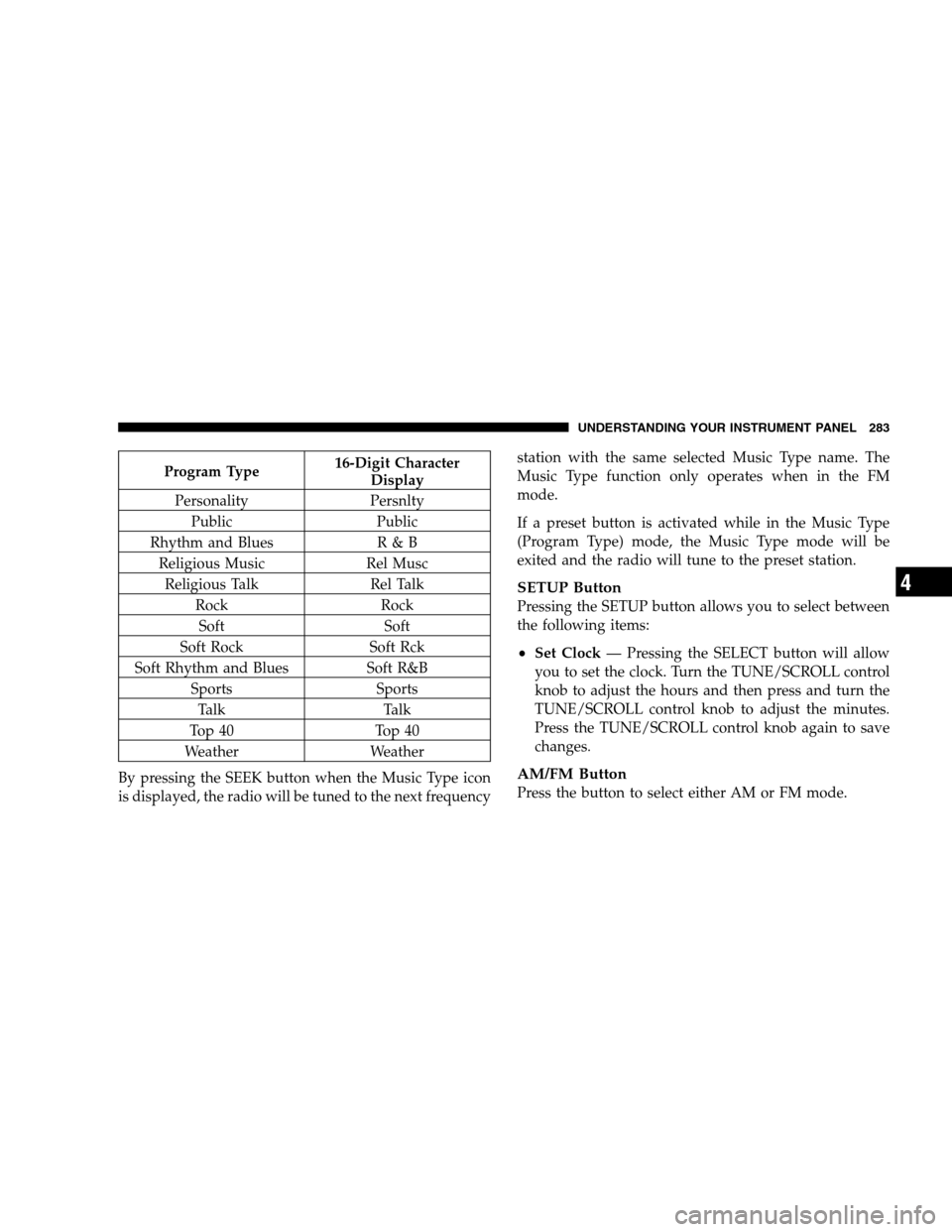
Program Type16-Digit Character
Display
Personality Persnlty Public Public
Rhythm and Blues R & B
Religious Music Rel Musc
Religious Talk Rel Talk
Rock Rock
Soft Soft
Soft Rock Soft Rck
Soft Rhythm and Blues Soft R&B
Sports Sports
Talk Talk
Top 40 Top 40
Weather Weather
By pressing the SEEK button when the Music Type icon
is displayed, the radio will be tuned to the next frequency station with the same selected Music Type name. The
Music Type function only operates when in the FM
mode.
If a preset button is activated while in the Music Type
(Program Type) mode, the Music Type mode will be
exited and the radio will tune to the preset station.
SETUP Button
Pressing the SETUP button allows you to select between
the following items:
Set Clock
— Pressing the SELECT button will allow
you to set the clock. Turn the TUNE/SCROLL control
knob to adjust the hours and then press and turn the
TUNE/SCROLL control knob to adjust the minutes.
Press the TUNE/SCROLL control knob again to save
changes.
AM/FM Button
Press the button to select either AM or FM mode.
UNDERSTANDING YOUR INSTRUMENT PANEL 283 4
Page 286 of 535
SET/RND Button — To Set the Pushbutton
MemoryWhen you are receiving a station that you wish to
commit to pushbutton memory, press the SET/RND
button. The symbol SET 1 will now show in the display
window. Select the button (1 to 6) you wish to lock onto
this station and press and release that button. If a button
is not selected within five seconds after pressing the
SET/RND button, the station will continue to play but
will not be stored into pushbutton memory.
You may add a second station to each pushbutton by
repeating the above procedure with this exception: Press
the SET/RND button twice and SET 2 will show in the
display window. Each button can be set for SET 1 and
SET 2 in both AM and FM. This allows a total of 12 AM
and 12 FM stations to be stored into pushbutton memory.
The stations stored in SET 2 memory can be selected by
pressing the pushbutton twice.
Every time a preset button is used, a corresponding
button number will display.Buttons 1 - 6
These buttons tune the radio to the stations that you
commit to pushbutton memory (12 AM and 12 FM
stations).
DISC/AUX Button
Pressing the DISC/AUX button will allow you to switch
from AM/FM modes to DISC/AUX mode.
Operation Instructions — CD MODE for CD and
MP3 Audio Play
NOTE:
The ignition switch must be in the ON or ACC
position to operate the radio.
This radio is capable of playing compact discs (CD),
recordable compact discs (CD-R), rewritable compact
discs (CD-RW), compact discs with MP3 tracks and
multisession compact discs with CD and MP3 tracks.
284 UNDERSTANDING YOUR INSTRUMENT PANEL
Page 296 of 535
Shuffle OFF modes for the iPodt. If theRNDicon is
showing on the radio display, then the shuffle mode is
ON.
List Or Browse Mode
During Play mode, pressing any of the buttons described
below, takes you to List mode. List mode enables you to
scroll through the list of menus and tracks on the iPodt.
TUNE control knob: The TUNEcontrol knob functions
in a similar manner as the scroll wheel on the iPodt.
Turning it clockwise (forward) and counterclock-
wise (backward) scrolls through the lists, displaying
the track detail on the radio display. Once you have
the track to be played highlighted on the radio
display, press the TUNEcontrol knob to select and
start playing the track. Turning the TUNEcontrol
knob fast will scroll through the list faster. During
fast scroll, you may notice a slight delay in updating
the information on the radio display.
During all List modes, the iPodt displays all lists in
“wrap-around” mode. So if the track is at the
bottom of the list, just turn the wheel backwards
(counter-clockwise) to get to the track faster.
In List mode, the radio PRESETButtons are used as
shortcuts to the following lists on the iPodt.
Preset 1 – Playlists
Preset 2 – Artists
Preset 3 – Albums
Preset 4 – Genres
Preset 5 - Audiobooks
Preset 6 – Podcasts
Pressing a PRESET button will display the current
list on the top line and the first item in that list on
the second line.
294 UNDERSTANDING YOUR INSTRUMENT PANEL
Page 297 of 535
To Exit List mode without selecting a track, press the
same PRESET button again to go back to Play
mode.
LIST button: The LISTbutton will display the top
level menu of the iPodt. Turn the TUNEcontrol knob
to list the top-menu item you wish to select and press
the TUNE control knob. This will display the next
sub-menu list item on the iPodt then you can follow
the same steps to go to the desired track in that list.
Not all iPodt sub-menu levels are available on this
system.
MUSIC TYPE button: TheMUSIC TYPE button is
another shortcut button to the genre listing on your
iPodt. CAUTION!
Leaving the iPodt (or any supported device) any-
where in the vehicle in extreme heat or cold can
alter the operation or damage the device. Follow
the device manufacturer ’s guidelines.
Placing items on the iPodt, or connections to the
iPodt in the vehicle, can cause damage to the
device and/or to the connectors. WARNING!
Do not plug in or remove the iPodt
while driving.
Failure to follow this warning could result in an
accident.
UNDERSTANDING YOUR INSTRUMENT PANEL 295 4
Page 301 of 535
RW/FFPressing the RW (Rewind) or FF (Fast Forward) buttons
causes the tuner to search for the next channel in the
direction of the arrows.
TUNE Control (Rotary)
Turn the rotary TUNE/SCROLL control knob clockwise
to increase or counterclockwise to decrease the channel.
MUSIC TYPE Button — Except REU Radio
Pressing this button once will turn on the Music Type
mode for five seconds. Pressing the MUSIC TYPE button
or turning the TUNE/SCROLL control knob within five
seconds will allow the program format type to be se-
lected.
Toggle the MUSIC TYPE button again to select the music
type.
By pressing the SEEK button when the Music Type
function is active, the radio will be tuned to the next
channel with the same selected Music Type name.
If a preset button is activated while in the Music Type
(Program Type) mode, the Music Type mode will be
exited and the radio will tune to the preset channel.
MUSIC TYPE Button — REU Radio
Pressing this button provides a Music Type list from
which you can make a selection. Once a selection is
made, you can seek up or down or scan the channels and
the radio will tune to the next station matching the
selected format. There is no time-out for this screen.
Pressing the MUSIC TYPE button again will close the
Music Type screen. Once closed, seek up, seek down, and
scan will no longer be based on your selection.
UNDERSTANDING YOUR INSTRUMENT PANEL 299 4
Page 302 of 535
SETUP ButtonPressing the SETUP button allows you to select the
following items:
Display Sirius ID number — Press the AUDIO/
SELECT button to display the Sirius ID number. This
number is used to activate, deactivate, or change the
Sirius subscription.
SET Button – To Set the Pushbutton Memory
When you are receiving a channel that you wish to
commit to pushbutton memory, press the SET button.
The symbol SET 1 will now show in the display window.
Select the button (1-6) you wish to lock onto this channel
and press and release that button. If a button is not
selected within five seconds after pressing the SET but-
ton, the channel will continue to play but will not be
stored into pushbutton memory.
You may add a second channel to each pushbutton by
repeating the above procedure with this exception: Press
the SET button twice and SET 2 will show in the display
window. Each button can be set for SET 1 and SET 2. This
allows a total of 12 Satellite channels to be stored into
pushbutton memory. The channels stored in SET 2
memory can be selected by pressing the pushbutton
twice.
Every time a preset button is used, a corresponding
button number will display.
Buttons 1 - 6
These buttons tune the radio to the channels that you
commit to pushbutton memory (12 Satellite stations).
Operating Instructions — uconnectT
phone (If
Equipped)
Refer to “uconnectt phone” in Section 3.
300 UNDERSTANDING YOUR INSTRUMENT PANEL