light DODGE GRAND CARAVAN 2009 5.G Workshop Manual
[x] Cancel search | Manufacturer: DODGE, Model Year: 2009, Model line: GRAND CARAVAN, Model: DODGE GRAND CARAVAN 2009 5.GPages: 535, PDF Size: 18.61 MB
Page 200 of 535
4. Enable or disable the rear camera feature by selecting
9enable rear camera in reverse9soft key.
5. Press the “save” soft key.
6. When the vehicle is shifted into REVERSE, an image of
the rear of the vehicle will appear with a caution note to
9check entire surroundings9 displayed across the top of
the screen. After five seconds this note will disappear.
7. When the vehicle is shifted out of REVERSE, the rear
camera mode is exited and the navigation or audio screen
appears again.
Turning the Rear Camera On or Off — Without
Navigation Radio
1. Press the 9menu9hard key.
2. Select 9system setup9 soft key.
3. Enable or disable the rear camera feature by selecting
9enable rear camera in reverse9 soft key.4. When the vehicle is shifted into REVERSE, an image of
the rear of the vehicle will appear with a caution note to
9check entire surroundings9
displayed across the top of
the screen. After five seconds this note will disappear.
5.
When the vehicle is shifted out of REVERSE, the rear
camera mode is exited and the audio screen appears again.
OVERHEAD CONSOLES
Front Overhead Console
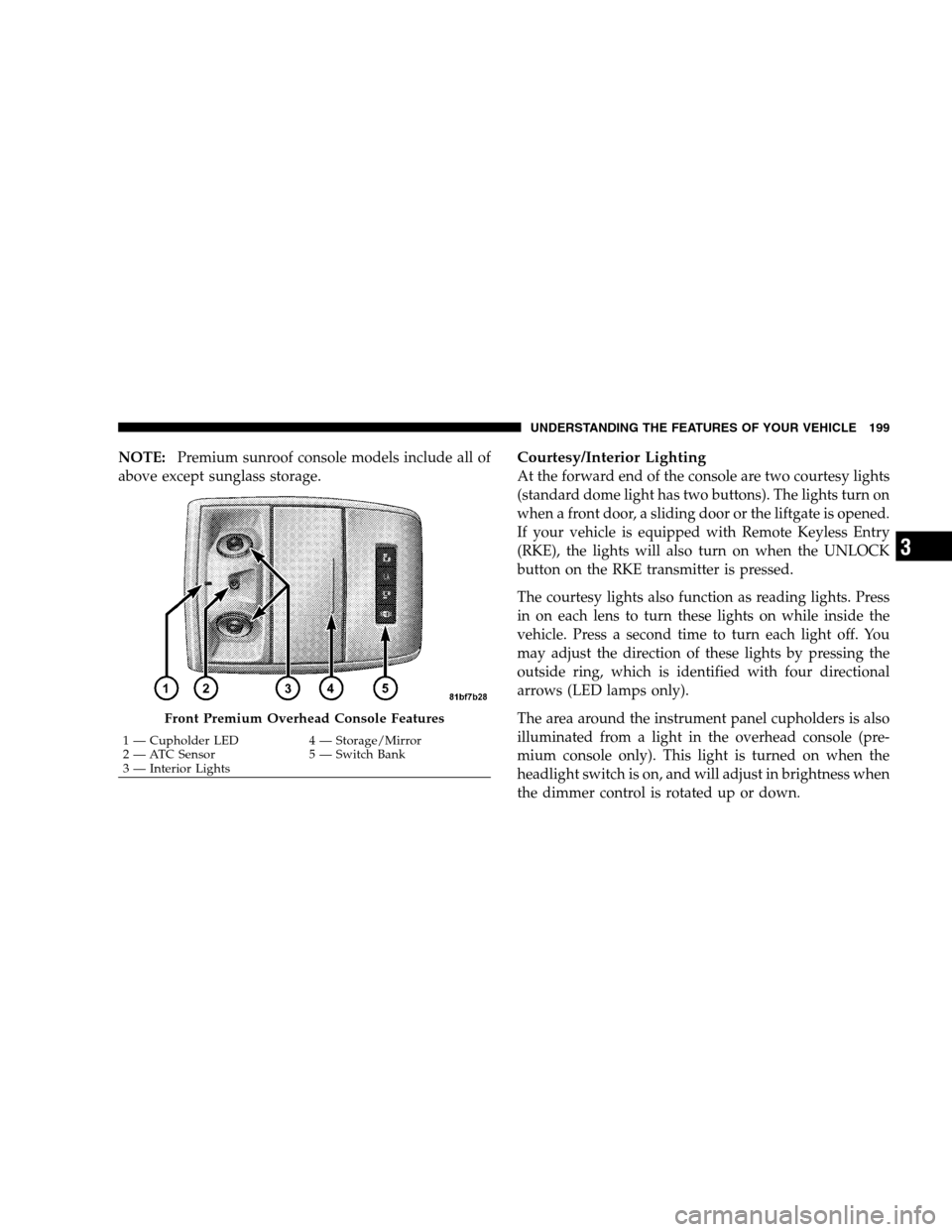
Two versions of the overhead console are available. The
base front overhead console model featured fixed incan-
descent courtesy/reading lights, flip-down sunglass stor-
age and conversation mirror. The premium front over-
head console model features a LED focused light that
illuminates the instrument panel cupholders, Infrared
Automatic Temperature Control Sensor (ATC equipped
only), two swiveling LED lights, flip-down sunglass
storage, conversation mirror, optional power sliding door
switches and an optional power liftgate switch.
198 UNDERSTANDING THE FEATURES OF YOUR VEHICLE
Page 201 of 535
NOTE:Premium sunroof console models include all of
above except sunglass storage.Courtesy/Interior Lighting
At the forward end of the console are two courtesy lights
(standard dome light has two buttons). The lights turn on
when a front door, a sliding door or the liftgate is opened.
If your vehicle is equipped with Remote Keyless Entry
(RKE), the lights will also turn on when the UNLOCK
button on the RKE transmitter is pressed.
The courtesy lights also function as reading lights. Press
in on each lens to turn these lights on while inside the
vehicle. Press a second time to turn each light off. You
may adjust the direction of these lights by pressing the
outside ring, which is identified with four directional
arrows (LED lamps only).
The area around the instrument panel cupholders is also
illuminated from a light in the overhead console (pre-
mium console only). This light is turned on when the
headlight switch is on, and will adjust in brightness when
the dimmer control is rotated up or down. Front Premium Overhead Console Features
1 — Cupholder LED
4 — Storage/Mirror
2 —
ATC Sensor 5 — Switch Bank
3 — Interior Lights UNDERSTANDING THE FEATURES OF YOUR VEHICLE 199 3
Page 202 of 535
Sunglass Storage (non-sunroof only)At the rear of the front overhead console, a compartment
is provided for the storage of two pairs of sunglasses.
From the closed position, press the door over-travel latch
to open the compartment. The door will slowly rotate to
the full open position. From this position, the door can be
fully closed or, by rotating upward about 3/4 of the way
and releasing, positioned for conversation mirror use.
From the
9conversation mirror9 position, the door can
only be closed. To return to the full open position, the
door must first be closed and then opened by pressing
the over-travel latch again to release.
NOTE: The front overhead console supplied with fac-
tory sunroof, incorporates a sunroof switch.
Rear Overhead Consoles — If Equipped
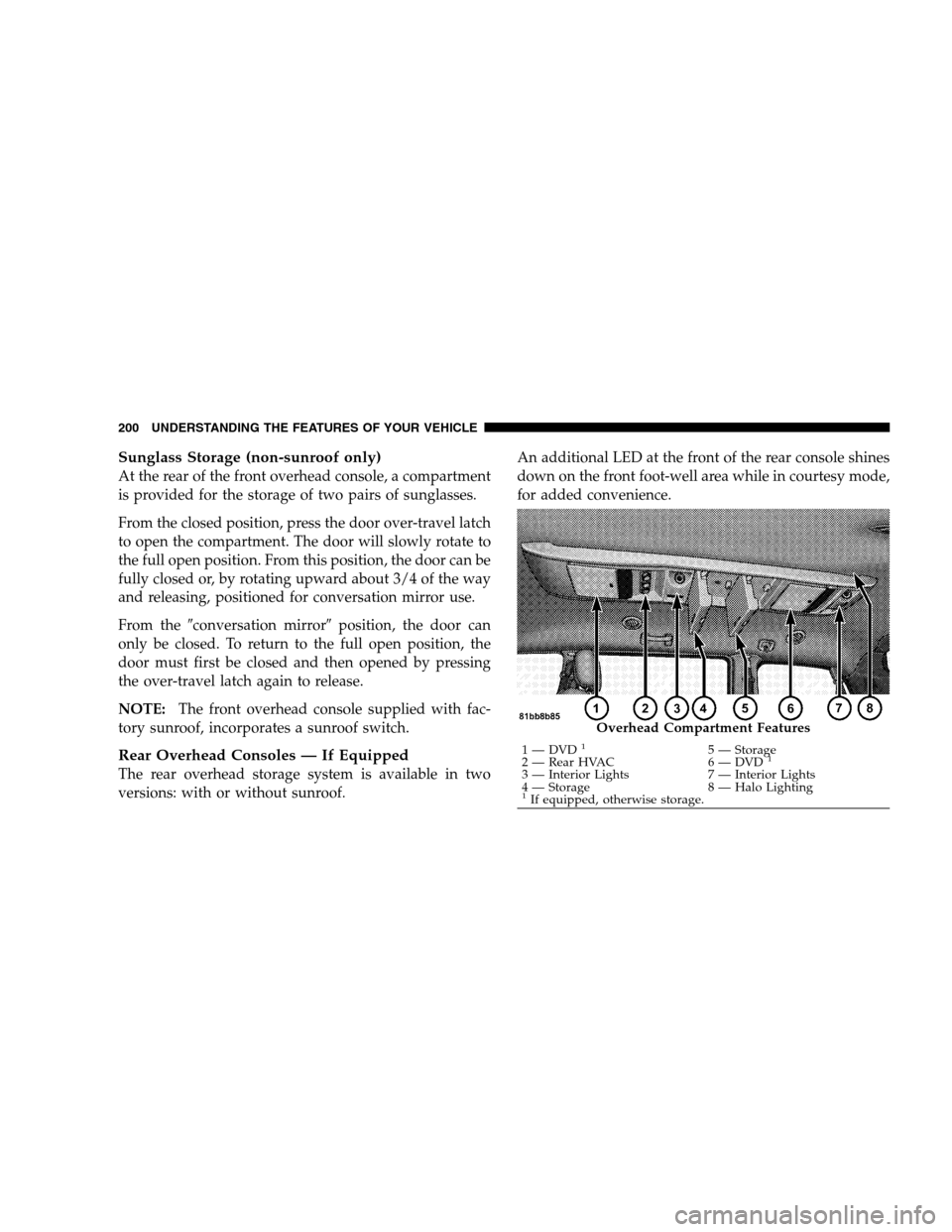
The rear overhead storage system is available in two
versions: with or without sunroof. An additional LED at the front of the rear console shines
down on the front foot-well area while in courtesy mode,
for added convenience. Overhead Compartment Features
1 — DVD
15 — Storage
2 — Rear HVAC 6 — DVD1
3 — Interior Lights7 — Interior Lights
4 — Storage 8 — Halo Lighting
1If equipped, otherwise storage.
200 UNDERSTANDING THE FEATURES OF YOUR VEHICLE
Page 203 of 535
Rear Courtesy/Reading Lights — If EquippedThe overhead console has two sets of courtesy lights. The
lights turn on when a front door, a sliding door or the
liftgate is opened. If your vehicle is equipped with
Remote Keyless Entry (RKE), the lights will also turn on
when the UNLOCK button on the RKE transmitter is
pressed.
The courtesy lights also function as reading lights. Press
in on each lens to turn these lights on while inside the
vehicle. Press the lens a second time to turn each light off.
You may adjust the direction of these lights by pressing
the outside ring, which is identified with four directional
arrows.
Rear Console Halo Lighting
The rear overhead console has recessed halo lighting
around the perimeter of the console base. This feature
provides additional lighting options while traveling and
is controlled by the headlight switch. Refer to ”Halo
Lights — If Equipped” under “Lights” in Section 3.
GARAGE DOOR OPENER — IF EQUIPPED
HomeLinkt
replaces up to three remote controls (hand-
held transmitters) that operate devices such as garage
door openers, motorized gates, lighting, or home security
systems. The HomeLinkt unit operates off your vehicle’s
battery.
UNDERSTANDING THE FEATURES OF YOUR VEHICLE 201 3
Page 205 of 535
Programming HomelinkT
Before Y
ou Begin
If you have not trained any of the HomeLinkt buttons,
erase all channels before you begin training.
To do this, press and hold the two outside buttons for up
to 20 seconds until the red indicator flashes.
It is recommended that a new battery be placed in the
hand-held transmitter of the device being programmed
to HomeLinkt for more efficient training and accurate
transmission of the radio-frequency signal.
Your vehicle should be parked outside of the garage
when programming.
Begin Programming
1. Turn the ignition switch to the ON/RUN position.
2. Hold the battery side of the hand-held transmitter
away from the HomeLinkt button you wish to program. Place the hand-held transmitter 1 to 3 in (3 to 8 cm) away
from the HomeLinkt
button you wish to program while
keeping the indicator light in view.
3. Simultaneously press and hold both the chosen
HomeLinkt button and the hand-held transmitter button
until the HomeLinkt indicator changes from a slow to a
rapidly blinking light, then release both the HomeLinkt
and hand-held transmitter buttons.
Watch for the HomeLinkt indicator to change flash rates.
When it changes, it is programmed. It may take up to
30 seconds, or longer in rare cases. The garage door may
open and close while you train.
NOTE:
Some gate operators and garage door openers may
require you to replace Step 3 with procedures noted in
the “Gate Operator/Canadian Programming” section.
UNDERSTANDING THE FEATURES OF YOUR VEHICLE 203 3
Page 206 of 535
After training a HomeLinkt
channel, if the garage
door does not operate with HomeLinkt and the ga-
rage door opener was manufactured after 1995, the
garage door opener may have a rolling code. If so,
proceed to Step 5 “Programming A Rolling Code
System.”
4. Press and hold the just-trained HomeLinkt button
and observe the indicator light.
If the indicator light stays on constantly, programming is
complete and the garage door (or device) should activate
when the HomeLinkt button is pressed.
If the indicator light blinks rapidly for two seconds and
then turns to a constant light, proceed to Step 5 “Pro-
gramming A Rolling Code System.”
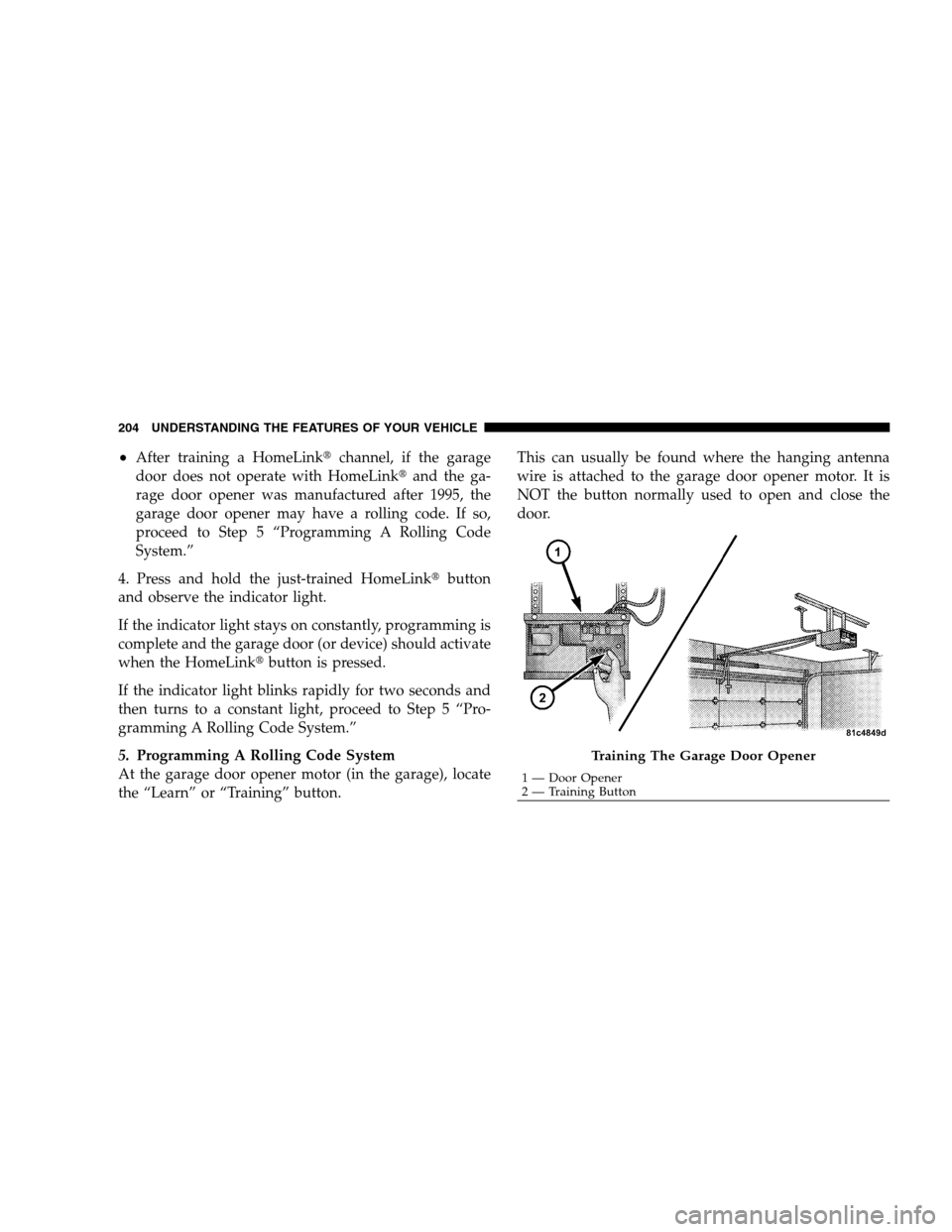
5. Programming A Rolling Code System
At the garage door opener motor (in the garage), locate
the “Learn” or “Training” button. This can usually be found where the hanging antenna
wire is attached to the garage door opener motor. It is
NOT the button normally used to open and close the
door. Training The Garage Door Opener
1 — Door Opener
2 —
Training Button
204 UNDERSTANDING THE FEATURES OF YOUR VEHICLE
Page 207 of 535
6. Firmly press and release the “Learn” or “Training”
button. The name and color of the button may vary by
manufacturer.
NOTE:There are 30 seconds in which to initiate the next
step after the “Learn” button has been pressed.
7. Return to the vehicle and press the programmed
HomeLinkt button twice (holding the button for two
seconds each time). If the device is plugged in and
activates, programming is complete.
If the device does not activate, press the button a third
time (for two seconds) to complete the training.
If you have any problems, or require assistance, please
call toll-free 1–800–355–3515 or, on the Internet at
www.HomeLink.com for information or assistance.
To program the remaining two HomeLinkt buttons,
repeat each step for each remaining button. DO NOT
erase the channels.Using HomeLinkt
To operate, simply press and release the programmed
HomeLinkt button. Activation will now occur for the
trained device (i.e., garage door opener, gate operator,
security system, entry door lock, home/office lighting,
etc. The hand-held transmitter of the device may also be
used at any time.
Reprogramming a Single Homelinkt Button
To reprogram a channel that has been previously trained,
follow these steps:
1. Turn the ignition switch to the ON/RUN position.
2. Press and hold the desired HomeLinkt button until
the indicator light begins to flash after 20 seconds. Do not
release the button.
3. Without releasing the button, proceed with Program-
ming Homelinkt Step 2 and follow all remaining steps.
UNDERSTANDING THE FEATURES OF YOUR VEHICLE 205 3
Page 208 of 535
Gate Operator/Canadian ProgrammingCanadian radio frequency laws require transmitter sig-
nals to time-out (or quit) after several seconds of trans-
mission – which may not be long enough for HomeLinkt
to pick up the signal during programming. Similar to this
Canadian law, some U.S. gate operators are designed to
time-out in the same manner.
It may be helpful to unplug the device during the cycling
process to prevent possible overheating of the garage
door or gate motor.
If you are having difficulties programming a garage door
opener or a gate operator, replace “Programming
HomeLinkt” Step 3, with the following:
3. Continue to press and hold the HomeLinkt
button
while you press and release - every two seconds
(“cycle”) your hand-held transmitter until HomeLinkt has successfully accepted the frequency signal. The
indicator light will flash slowly and then rapidly when
fully trained.
If you unplugged the device for training, plug it back in
at this time.
Then proceed with Step 4 under “Programming
HomeLinkt,” earlier in this section.
Security
It is advised to erase all channels before you sell or turn
in your vehicle.
To do this, press and hold the two outside buttons for
20 seconds until the red indicator flashes. Note that all
channels will be erased. Individual channels cannot be
erased.
The HomeLinkt
Universal Transceiver is disabled when
the Vehicle Security Alarm is active.
206 UNDERSTANDING THE FEATURES OF YOUR VEHICLE
Page 212 of 535
Auto-Express with Anti-Pinch ProtectionDuring express closing, anytime an obstacle that restricts
glass movement is detected, the motor will stop and
reverse travel to avoid pinching the object.
Auto Express will stop and reverse travel up to three
times in succession. After the third time, Auto Express
will enter a manual operation mode. This allows the
operator to manually control the power switch, in order
to close or open the sunroof in case of a malfunction.
Wind Buffeting
Wind buffeting can be described as the perception of
pressure on the ears or a helicopter-type sound in the
ears. Your vehicle may exhibit wind buffeting with the
windows down, or the sunroof (if equipped) in certain
open or partially open positions. This is a normal occur-
rence and can be minimized. If the buffeting occurs with
the rear windows open, open the front and rear windows
together to minimize the buffeting. If the buffeting occurs
with the sunroof open, adjust the sunroof opening to
minimize the buffeting or open any window.
Sunroof Maintenance
Use only a non-abrasive cleaner and a soft cloth to clean
the glass panel.
ELECTRICAL POWER OUTLETS — IF EQUIPPED
Two 12-Volt power outlets are located on the lower
instrument panel, next to the open storage bin. The upper
power outlet is controlled by the ignition switch and the
lower power outlet is connected directly to the battery.
The upper power outlet will also operate a conventional
cigar lighter unit (if equipped with an optional Smoker’s
Package). To ensure proper operation, a MOPARt
cigar
knob and element must be used.
210 UNDERSTANDING THE FEATURES OF YOUR VEHICLE
Page 214 of 535
WARNING! (Continued)
Close the lid when not in use and while driving
the vehicle.
If this outlet is mishandled, it may cause an
electric shock and failure. CAUTION!
Many accessories that can be plugged in draw
power from the vehicle’s battery, even when not in
use (i.e., cellular phones, etc.). Eventually, if
plugged in long enough, the vehicle’s battery will
discharge sufficiently to degrade battery life
and/or prevent the engine from starting.
(Continued) CAUTION! (Continued)
Accessories that draw higher power (i.e., coolers,
vacuum cleaners, lights, etc.), will degrade the
battery even more quickly. Only use these inter-
mittently and with greater caution.
After the use of high power draw accessories, or
long periods of the vehicle not being started (with
accessories still plugged in), the vehicle must be
driven a sufficient length of time to allow the
alternator to recharge the vehicle’s battery.
Power outlets are designed for accessory plugs
only. Do not hang any type of accessory or acces-
sory bracket from the plug. Improper use of the
power outlet can cause damage.
212 UNDERSTANDING THE FEATURES OF YOUR VEHICLE