USB DODGE GRAND CARAVAN 2020 User Guide
[x] Cancel search | Manufacturer: DODGE, Model Year: 2020, Model line: GRAND CARAVAN, Model: DODGE GRAND CARAVAN 2020Pages: 380, PDF Size: 14.92 MB
Page 304 of 380
302MULTIMEDIA
Playing Audio Files From The Audio Device
You can play songs directly from the external
USB device.
Press the Tracks button to display a list view.
Press the button with the desired list item to
select and play the item.
Press the Info button to display the
track information, press the button a
second time to close the display.
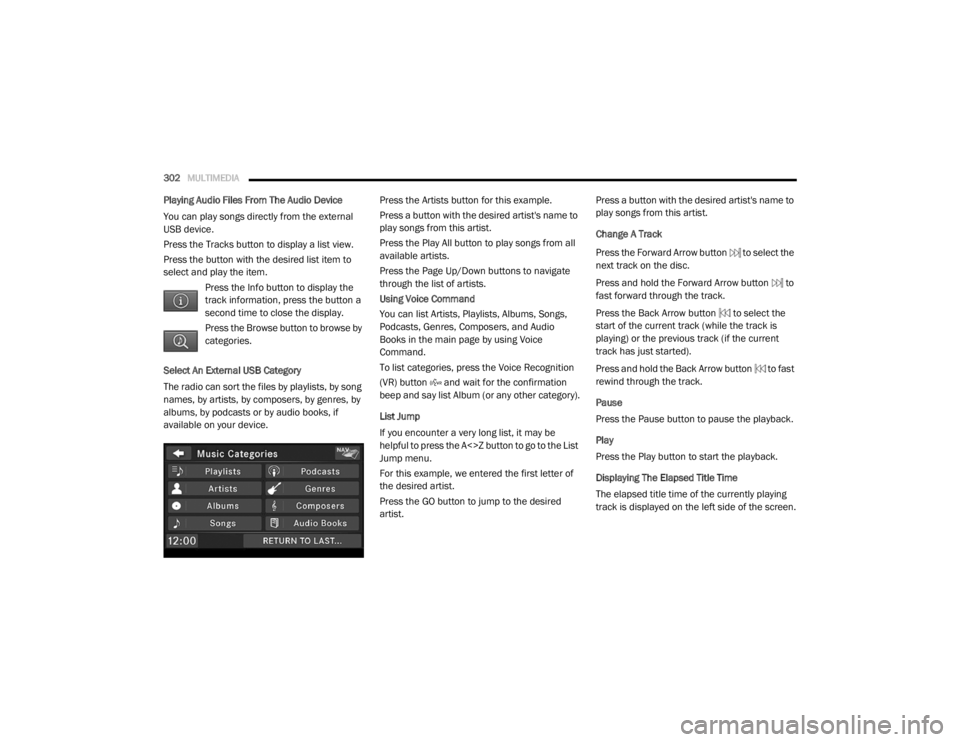
Press the Browse button to browse by
categories.
Select An External USB Category
The radio can sort the files by playlists, by song
names, by artists, by composers, by genres, by
albums, by podcasts or by audio books, if
available on your device. Press the Artists button for this example.
Press a button with the desired artist's name to
play songs from this artist.
Press the Play All button to play songs from all
available artists.
Press the Page Up/Down buttons to navigate
through the list of artists.
Using Voice Command
You can list Artists, Playlists, Albums, Songs,
Podcasts, Genres, Composers, and Audio
Books in the main page by using Voice
Command.
To list categories, press the Voice Recognition
(VR) button and wait for the confirmation
beep and say list Album (or any other category).
List Jump
If you encounter a very long list, it may be
helpful to press the A<>Z button to go to the List
Jump menu.
For this example, we entered the first letter of
the desired artist.
Press the GO button to jump to the desired
artist.Press a button with the desired artist's name to
play songs from this artist.
Change A Track
Press the Forward Arrow button to select the
next track on the disc.
Press and hold the Forward Arrow button to
fast forward through the track.
Press the Back Arrow button to select the
start of the current track (while the track is
playing) or the previous track (if the current
track has just started).
Press and hold the Back Arrow button to fast
rewind through the track.
Pause
Press the Pause button to pause the playback.
Play
Press the Play button to start the playback.
Displaying The Elapsed Title Time
The elapsed title time of the currently playing
track is displayed on the left side of the screen.
20_RT_OM_EN_USC_t.book Page 302
Page 331 of 380
MULTIMEDIA329
Language Settings
From the main menu press Settings >
Language .
Voice Personality — sets the language for
voice prompts.
Keyboard — sets the language for your
keyboard.
Keyboard Layout — sets the keyboard layout.
Restoring The Original Language Settings
From the main menu press Settings >
Language > > Restore.
Restoring All Original Settings
From the main menu, press Settings > >
Restore > Yes .
Appendix
About GPS Satellite Signals
The navigation system must acquire satellite
signals in order to navigate.
When the navigation system has acquired
satellite signals, the signal strength bars on the
main menu are full . When it loses satellite
signals, the bars are clear . For more information about GPS, go to
www.garmin.com/aboutGPS
.
Updating The Software
To update the navigation system software, you
must have a USB mass storage device and an
Internet connection.
1. Go to
auto-update.garmin.com
.
2. Find your model and select Software
Updates > Download .
3. Read and accept the terms of the Software License Agreement.
4. Follow the instructions on the Web site to complete the installation of the software
update.
Updating The Map Data
To update the navigation system map, you must
have a USB mass storage device and an
Internet connection, or visit your local dealer for
assistance. A map update can be purchased
once a year.
1. Go to
auto-update.garmin.com
.
2. Select your vehicle from the drop-down lists. 3. Select
Order Map Updates for your unit.
4. Follow the Web site instructions to update your map.
CAUTION
Garmin and FCA US LLC are not responsible for
the accuracy of, or the consequences of using,
a safety camera database.
Safety camera information is available in some
locations. Go to http://www.garmin.com for
availability. For these locations, the navigation
system includes the locations of hundreds of
safety cameras. Your navigation system alerts
you when you are approaching a safety camera
and can warn you if you are driving too fast. The
data is updated at least weekly, so you always
have access to the most up-to-date information.
You can purchase a new region or extend an
existing subscription at any time. Each region
that you purchase has an expiration date.9
20_RT_OM_EN_USC_t.book Page 329
Page 332 of 380
330MULTIMEDIA
Custom POIs (Points of Interest)
NOTE:
Custom POI files must be named “poi.gpi”. and
located on the USB storage device in a folder
named “POI” within a folder named “Garmin”
(Garmin/POI/).
You can manually load custom Points Of
Interest (POI) databases, available from various
companies on the Internet. Some custom POI
databases contain alert information for points
such as safety cameras and school zones. The
navigation system can notify you when you
approach one of these points. You are
responsible for ensuring that your use of safety
camera information is lawful in your area.
CAUTION
Garmin and FCA US LLC are not responsible for
the consequences of using custom POI
databases, or for the accuracy of custom POI
databases. After downloading your POI database, use the
Garmin POI Loader to install the POIs onto a
USB mass storage device. Use the USB mass
storage device to load the POIs. The POI Loader
is available at
garmin.com/products/poiloader.
Refer to the POI Loader Help file for more
information; click Help to open the Help file. The
file name can only be POI.gpi. No other file
name or extension should be used.
NOTE:
Each time you load custom POIs to the
navigation system, any other custom POIs
already saved in the system will be overwritten.
Finding Custom POIs
You can view a list of the custom POIs loaded in
your navigation system.
Press Where To? > Extras > Custom POIs .
Deleting Custom POIs
1. Press
Tools > My Data > Delete Custom
POI(s)
.
2. Press Yes to confirm. NOTE:
All custom POIs will be deleted from your
navigation system.
Saving Trip Logs
Trip logs are recorded while you navigate a
route.
SiriusXM® Travel Link (Radio 430 NAV Only)
Now, in addition to delivering over 130
channels of the best sports, entertainment, talk
and 100% commercial-free music, SiriusXM®
now offers premium infotainment services that
work in conjunction with compatible navigation
systems.
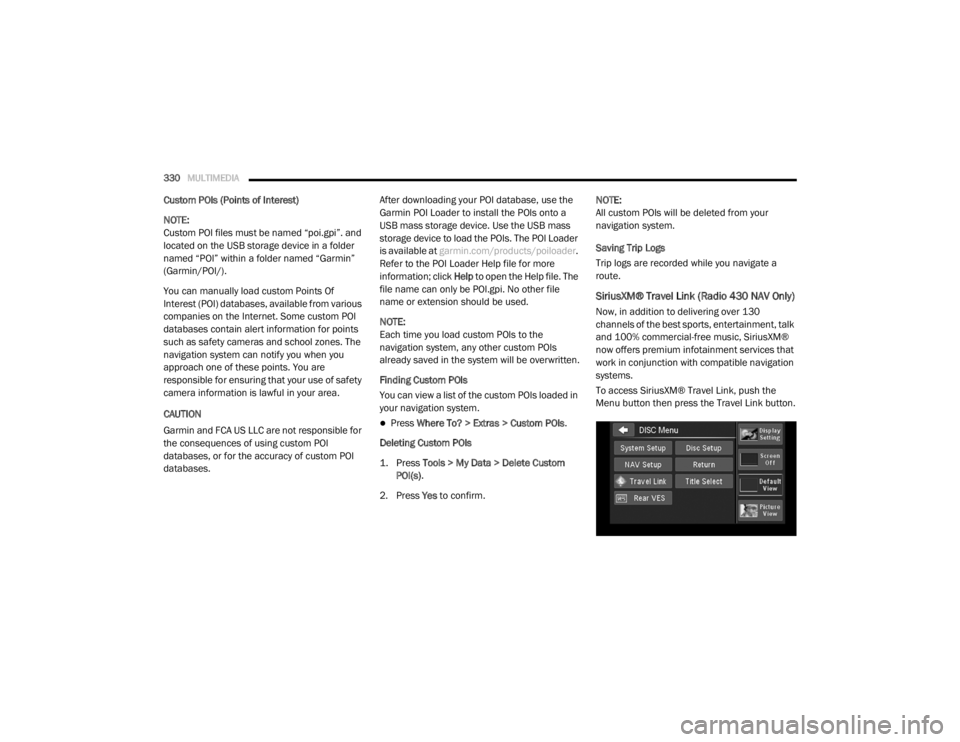
To access SiriusXM® Travel Link, push the
Menu button then press the Travel Link button.
20_RT_OM_EN_USC_t.book Page 330
Page 342 of 380
340MULTIMEDIA
STEERING WHEEL AUDIO CONTROLS — IF
EQUIPPED
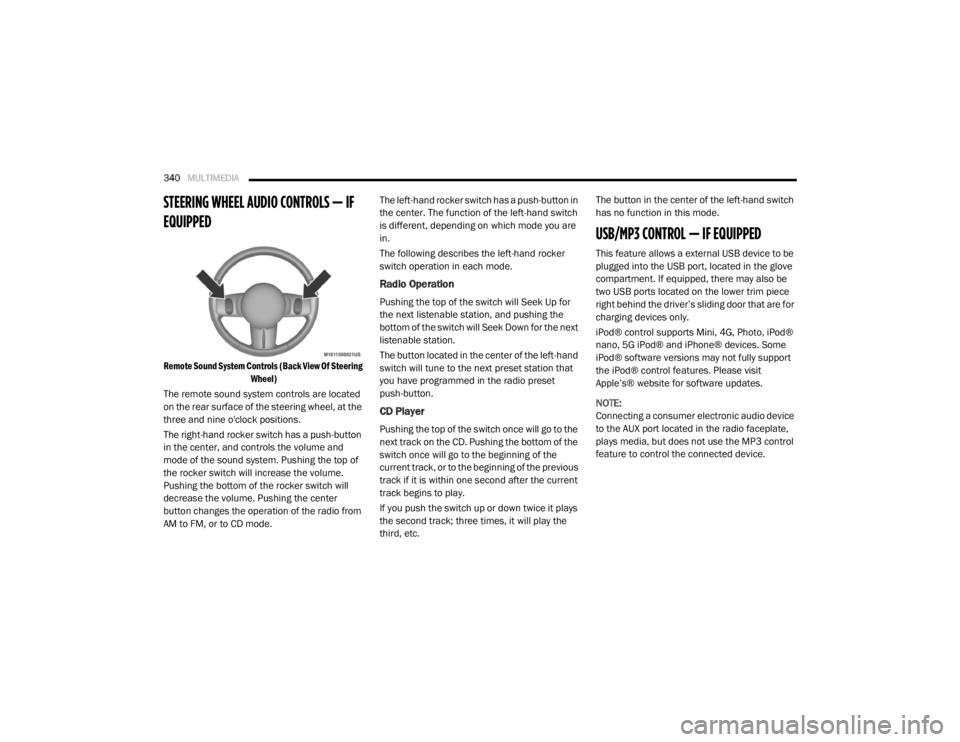
Remote Sound System Controls (Back View Of Steering
Wheel)
The remote sound system controls are located
on the rear surface of the steering wheel, at the
three and nine o'clock positions.
The right-hand rocker switch has a push-button
in the center, and controls the volume and
mode of the sound system. Pushing the top of
the rocker switch will increase the volume.
Pushing the bottom of the rocker switch will
decrease the volume. Pushing the center
button changes the operation of the radio from
AM to FM, or to CD mode. The left-hand rocker switch has a push-button in
the center. The function of the left-hand switch
is different, depending on which mode you are
in.
The following describes the left-hand rocker
switch operation in each mode.
Radio Operation
Pushing the top of the switch will Seek Up for
the next listenable station, and pushing the
bottom of the switch will Seek Down for the next
listenable station.
The button located in the center of the left-hand
switch will tune to the next preset station that
you have programmed in the radio preset
push-button.
CD Player
Pushing the top of the switch once will go to the
next track on the CD. Pushing the bottom of the
switch once will go to the beginning of the
current track, or to the beginning of the previous
track if it is within one second after the current
track begins to play.
If you push the switch up or down twice it plays
the second track; three times, it will play the
third, etc.The button in the center of the left-hand switch
has no function in this mode.
USB/MP3 CONTROL — IF EQUIPPED
This feature allows a external USB device to be
plugged into the USB port, located in the glove
compartment. If equipped, there may also be
two USB ports located on the lower trim piece
right behind the driver’s sliding door that are for
charging devices only.
iPod® control supports Mini, 4G, Photo, iPod®
nano, 5G iPod® and iPhone® devices. Some
iPod® software versions may not fully support
the iPod® control features. Please visit
Apple’s® website for software updates.
NOTE:
Connecting a consumer electronic audio device
to the AUX port located in the radio faceplate,
plays media, but does not use the MP3 control
feature to control the connected device.
20_RT_OM_EN_USC_t.book Page 340
Page 343 of 380
MULTIMEDIA341
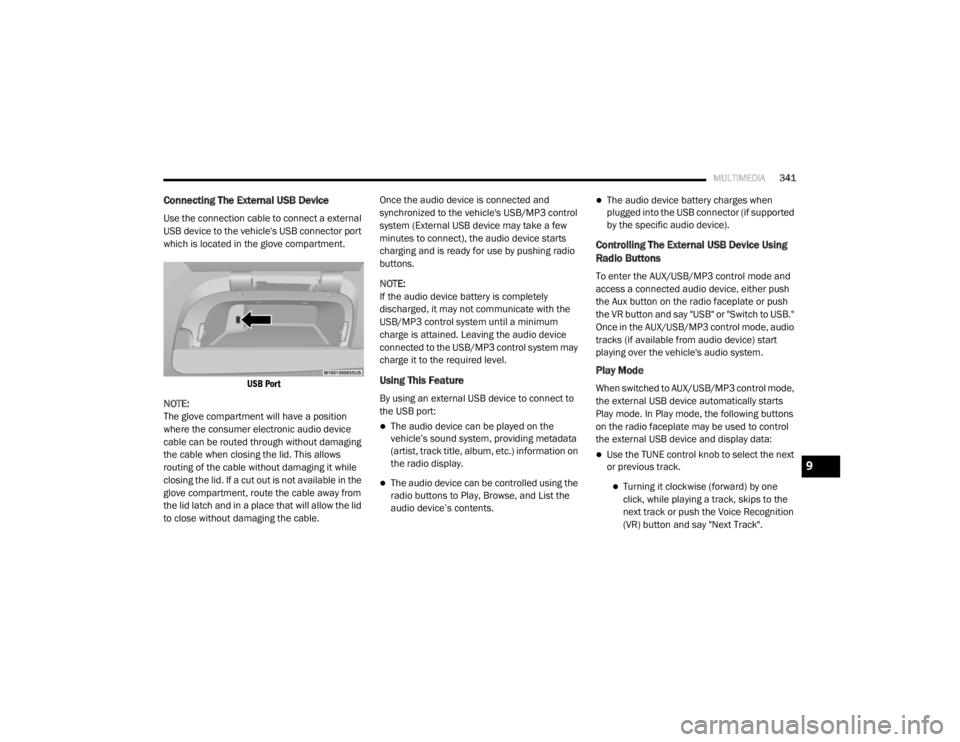
Connecting The External USB Device
Use the connection cable to connect a external
USB device to the vehicle's USB connector port
which is located in the glove compartment.
USB Port
NOTE:
The glove compartment will have a position
where the consumer electronic audio device
cable can be routed through without damaging
the cable when closing the lid. This allows
routing of the cable without damaging it while
closing the lid. If a cut out is not available in the
glove compartment, route the cable away from
the lid latch and in a place that will allow the lid
to close without damaging the cable. Once the audio device is connected and
synchronized to the vehicle's USB/MP3 control
system (External USB device may take a few
minutes to connect), the audio device starts
charging and is ready for use by pushing radio
buttons.
NOTE:
If the audio device battery is completely
discharged, it may not communicate with the
USB/MP3 control system until a minimum
charge is attained. Leaving the audio device
connected to the USB/MP3 control system may
charge it to the required level.
Using This Feature
By using an external USB device to connect to
the USB port:
The audio device can be played on the
vehicle’s sound system, providing metadata
(artist, track title, album, etc.) information on
the radio display.
The audio device can be controlled using the
radio buttons to Play, Browse, and List the
audio device’s contents.
The audio device battery charges when
plugged into the USB connector (if supported
by the specific audio device).
Controlling The External USB Device Using
Radio Buttons
To enter the AUX/USB/MP3 control mode and
access a connected audio device, either push
the Aux button on the radio faceplate or push
the VR button and say "USB" or "Switch to USB."
Once in the AUX/USB/MP3 control mode, audio
tracks (if available from audio device) start
playing over the vehicle's audio system.
Play Mode
When switched to AUX/USB/MP3 control mode,
the external USB device automatically starts
Play mode. In Play mode, the following buttons
on the radio faceplate may be used to control
the external USB device and display data:
Use the TUNE control knob to select the next
or previous track.
Turning it clockwise (forward) by one
click, while playing a track, skips to the
next track or push the Voice Recognition
(VR) button and say "Next Track".
9
20_RT_OM_EN_USC_t.book Page 341
Page 344 of 380
342MULTIMEDIA
Turning it counterclockwise (backward)
by one click will jump to the previous
track in the list or push the VR button and
say "Previous Track".
Jump backward in the current track by
pushing and holding the << RW button.
Holding the << RW button long enough will
jump to the beginning of the current track.
Jump forward in the current track by pushing
and holding the FF >> button.
A single push backward << RW or forward FF
>> will jump backward or forward respec -
tively, for five seconds.
Use the << SEEK and SEEK >> buttons to
jump to the previous or next track. Pushing
the SEEK >> button during play mode will
jump to the next track in the list, or push the
VR button and say "Next or Previous Track."
While a track is playing, push the INFO button
to see the associated metadata (artist, track
title, album, etc.) for that track. Pushing the
INFO button again jumps to the next screen
of data for that track. Once all screens have
been viewed, the last INFO button push will
go back to the play mode screen on the radio.
Pushing the Repeat button will change the
audio device mode to repeat the current
playing track or push the VR button and say
"Repeat On" or "Repeat Off".
Push the Scan button to use AUX/USB/MP3
device scan mode, which will play the first 10
seconds of each track in the current list and
then forward to the next song. To stop Scan
mode and start playing the desired track,
when it is playing the track, push the Scan
button again. During Scan mode, pushing the
<< SEEK and SEEK >> buttons will select the
previous and next tracks.
RND button: Pushing this button toggles
between Shuffle ON and Shuffle OFF modes
for the external USB device, or push the VR
button and say "Shuffle On" or "Shuffle Off." If
the RND icon is showing on the radio display,
then the shuffle mode is On.
List Or Browse Mode
During Play mode, pushing any of the buttons
described below will bring up List mode. List
mode enables scrolling through the list of
menus and tracks on the audio device. Tune control knob: The Tune control knob
functions in a similar manner as the scroll
wheel on the audio device or external USB
device.
Turning it clockwise (forward) and counter-
clockwise (backward) scrolls through the
lists, displaying the track detail on the radio
display. Once the track to be played is high-
lighted on the radio display, push the Tune
control knob to select and start playing the
track. Turning the TUNE control knob fast will
scroll through the list faster. During fast
scroll, a slight delay in updating the informa
-
tion on the radio display may be noticeable.
In List mode, the radio Preset buttons are used
as shortcuts to the following lists on the
external USB device:
Preset 1 – Playlists
Preset 2 – Artists
Preset 3 – Albums
Preset 4 – Genres
Preset 5 – Audiobooks
Preset 6 – Podcasts
20_RT_OM_EN_USC_t.book Page 342
Page 345 of 380
MULTIMEDIA343
Pushing a PRESET button will display the
current list on the top line and the first item in
that list on the second line.
To exit List mode without selecting a track, push
the same Preset button again to go back to
Play mode.
List button: The List button will display the top
level menu of the external USB device.
Turn the Tune control knob to list the
top-menu item to be selected and push the
Tune control knob. This will display the next
sub-menu list item on the audio device, then
follow the same steps to go to the desired
track in that list. Not all external USB device
sub-menu levels are available on this system.
Music Type button: The Music Type button is
another shortcut button to the genre listing on
your audio device.
Bluetooth® Streaming Audio (BTSA)
Music can be streamed from your cellular
phone to the Uconnect phone system.
Refer to the Uconnect Owner’s Manual
Supplement for further information on
Bluetooth® connectivity.
Controlling BTSA Using Radio Buttons
To enter BTSA mode, push either AUX button on
the radio or push the VR button and say
“Bluetooth® Streaming Audio”.
Play Mode
When switched to BTSA mode, some audio
devices can start playing music over the
vehicle’s audio system, but some devices
require the music to be initiated on the device
first. Then, it will get streamed to the Uconnect
phone system. Seven devices can be paired to
the Uconnect phone system, but just one can be
selected and played.
Selecting A Different Audio Device
1. Push the Phone button to begin.
2. After the "Ready" prompt and following the beep, say "Setup", then say "Select Audio
Devices".
3. Say the name of the audio device or ask the Uconnect phone system to list the audio
devices.
Next Track
Use the Seek Up button, or push the VR
button on the radio and say “Next Track,” to
jump to the next music track on your cellular
phone.
WARNING!
Do not plug in or remove the iPod® or
external USB device while driving. Failure to
follow this warning could result in an
accident.
CAUTION!
Leaving the iPod® or external USB device
(or any supported device) anywhere in the
vehicle in extreme heat or cold can alter the
operation or damage the device. Follow the
device manufacturer’s guidelines.
Placing items on the iPod® or external USB
device, or connections to the iPod® or
external USB device in the vehicle, can
cause damage to the device and/or to the
connectors.
9
20_RT_OM_EN_USC_t.book Page 343
Page 346 of 380
344MULTIMEDIA
Previous Track
Use the Seek Down button, or push the VR
button on the radio and say “Previous Track,” to
jump to the previous music track on your
cellular phone.
Browse
Browsing is not available on a Bluetooth®
Streaming Audio (BTSA) device. Only the current
song that is playing will display info.
UCONNECT MULTIMEDIA — VIDEO
ENTERTAINMENT SYSTEM (VES) — IF
EQUIPPED
Your rear seat Video Entertainment System
(VES) is designed to give your family years of
enjoyment. You can play your favorite CDs or
DVDs, listen to audio over the wireless
headphones, or plug and play a variety of
standard video games or audio devices. Please
review this Owner's Manual to become familiar
with its features and operation. NOTE:
The screen is located in the 2nd row overhead
console.
Getting Started
Screen located in the overhead console
:
Unfold the overhead LCD screen(s) by
pushing the button on the overhead console
behind the screen(s).
Cycle the ignition to the ON/RUN or ACC
position.
Turn on the Player by pushing the Power
button, located on the far left, or by pushing
the button on the Remote Control.
When the video screen is open and a DVD is
inserted into the VES player, the screen turns
on automatically, the headphone transmit -
ters turn on and playback begins.
The system can be controlled by the front
seat occupants using either the touchscreen
radio, the DVD, or by the rear seat occupants
using the remote control.
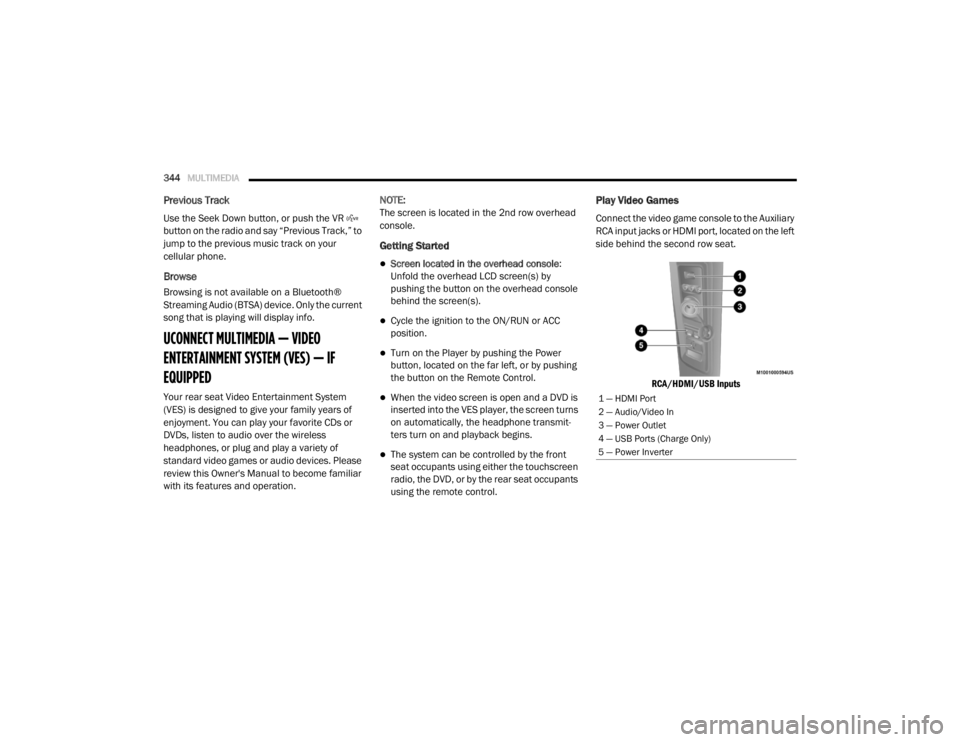
Play Video Games
Connect the video game console to the Auxiliary
RCA input jacks or HDMI port, located on the left
side behind the second row seat.
RCA/HDMI/USB Inputs
1 — HDMI Port
2 — Audio/Video In
3 — Power Outlet
4 — USB Ports (Charge Only)
5 — Power Inverter
20_RT_OM_EN_USC_t.book Page 344
Page 362 of 380
360MULTIMEDIA
NOTE:
This equipment has been tested and found to
comply with the limits for a Class B digital
device, pursuant to Part 15 of the FCC Rules.
These limits are designed to provide reason -
able protection against harmful interference
in a residential installation. This equipment
generates, uses and can radiate radio
frequency energy and, if not installed and
used in accordance with the instructions,
may cause harmful interference to radio
communications. However, there is no guar -
antee that interference will not occur in a
particular installation.
If this equipment does cause harmful inter -
ference to radio or television reception,
which can be determined by turning the
equipment off and on, the user is encour -
aged to try to correct the interference by one
or more of the following measures:
a. Increase the separation between the equipment and receiver.
b. Consult an authorized dealer or an expe -
rienced radio technician for help.
VOICE RECOGNITION QUICK TIPS— IF
EQUIPPED
Voice Command System Operation
The Uconnect Voice Command
system allows you to control your AM,
FM radio, disk player, USB mass
storage class device, Apple® family of
devices, Bluetooth® Streaming Audio Device,
satellite radio, and a memo recorder.
NOTE:
Take care to speak into the Voice Interface
System as calmly and normally as possible. The
ability of the Voice Interface System to
recognize user voice commands may be
negatively affected by rapid speaking or a
raised voice level. When you push the Voice Recognition
button, you will hear a beep. The beep is your
signal to give a command.
NOTE:
If you do not say a command within a few
seconds, the system will present you with a list
of options.
If you would like to interrupt the system while it
lists options, push the Voice Recognition
button, listen for the beep, and say your
command.
Pushing the Voice Recognition button while
the system is speaking is known as “barging in”.
The system will be interrupted, and after the
beep, you can add or change commands. This
will become helpful once you start to learn the
options.
NOTE:
At any time, you can say the words “Cancel,”
“Help” or “Main Menu.”
These commands are universal and can be
used from any menu. All other commands can
be used depending upon the active application.
When using this system, you should speak
clearly and at a normal speaking volume.
WARNING!
Any voice commanded system should be
used only in safe driving conditions following
all applicable laws. Your attention should be
focused on safely operating the vehicle.
Failure to do so may result in a collision
causing serious injury or death.
20_RT_OM_EN_USC_t.book Page 360
Page 363 of 380
MULTIMEDIA361
The system will best recognize your speech if
the windows are closed, and the heater/air
conditioning blower is set to low.
At any point, if the system does not recognize
one of your commands, you will be prompted to
repeat it.
To hear the first available Menu, push the Voice
Recognition button and say “Help” or
“Main Menu”.
Commands
The Voice Command system understands two
types of commands, Universal commands, and
Local commands. Universal commands are
available at all times. Local commands are
available if the supported radio mode is active.
Changing The Volume
1. Start a dialogue by pushing the Voice
Recognition button.
2. Say a command (e.g., “Help”). 3. Use the ON/OFF VOLUME rotary knob to
adjust the volume to a comfortable level
while the Voice Recognition system is
speaking. Please note the volume setting
for Voice Recognition is different than the
audio system.
Main Menu
Start a dialogue by pushing the Voice
Recognition button. You may say “Main
Menu” to switch to the main menu.
In this mode, you can say the following
commands:
“Radio AM” (to switch to the radio AM mode)
“Radio FM” (to switch to radio FM mode)
“Sat” (to switch to Satellite radio mode)
“Disc” (to switch to the disc mode)
“USB” (to switch to USB mode)
“Bluetooth® Streaming” (to switch to
Bluetooth® Streaming mode)
“Memo” (to switch to the memo recorder)
“System Setup” (to switch to system setup)
Radio AM
To switch to the AM band, say “AM” or “Radio
AM”. In this mode, you may say the following
commands:
“Frequency #” (to change the frequency)
“Next Station” (to select the next station)
“Previous Station” (to select the previous
station)
“Radio Menu” (to switch to the radio menu)
“Main Menu” (to switch to the main menu)
Radio FM
To switch to the FM band, say “FM” or “Radio
FM”. In this mode, you may say the following
commands:
“Frequency #” (to change the frequency)
“Next Station” (to select the next station)
9
20_RT_OM_EN_USC_t.book Page 361