USB DODGE GRAND CARAVAN 2020 Owners Manual
[x] Cancel search | Manufacturer: DODGE, Model Year: 2020, Model line: GRAND CARAVAN, Model: DODGE GRAND CARAVAN 2020Pages: 380, PDF Size: 14.92 MB
Page 8 of 380

6
USB/MP3 CONTROL — IF EQUIPPED .............. 340 Connecting The External USB Device .......341
Using This Feature ..................................... 341Controlling The External USB Device
Using Radio Buttons ..................................341 Play Mode...................................................341
List Or Browse Mode .................................342
Bluetooth® Streaming Audio (BTSA) .......343
UCONNECT MULTIMEDIA — VIDEO
ENTERTAINMENT SYSTEM (VES)
— IF EQUIPPED ................................................... 344
Getting Started........................................... 344
Play Video Games ......................................344
Play A DVD Using The Touchscreen
Radio...........................................................346 Play A DVD Using The VES Player
— If Equipped .............................................347 VES Remote Control — If Equipped ..........348
Remote Control Storage ............................349
Locking The Remote Control .....................349 Replacing The Remote Control
Batteries ..................................................... 349 Headphones Operation ............................. 350Controls ...................................................... 350
Replacing The Headphone Batteries ....... 350
Accessibility — If Equipped ........................ 350
Stereo Headphone Lifetime Limited
Warranty ..................................................... 351 System Information ................................... 351
RADIO OPERATION AND MOBILE PHONES .... 359
Regulatory And Safety Information........... 359
VOICE RECOGNITION QUICK TIPS
— IF EQUIPPED .................................................. 360
Voice Command System Operation ......... 360
Commands ................................................ 361
Voice Training ........................................... 363
CUSTOMER ASSISTANCE
SUGGESTIONS FOR OBTAINING SERVICE
FOR YOUR VEHICLE .......................................... 364Prepare For The Appointment .................. 364Prepare A List............................................. 364
Be Reasonable With Requests ................. 364
IF YOU NEED ASSISTANCE .............................. 364
FCA US LLC Customer Center ................... 365
FCA Canada Inc. Customer Center ........... 365
In Mexico Contact ...................................... 365
Puerto Rico And U.S. Virgin Islands .......... 365Customer Assistance For The Hearing
Or Speech Impaired (TDD/TTY) ................ 365 Service Contract ....................................... 365
WARRANTY INFORMATION .............................. 366
MOPAR PARTS................................................... 366
REPORTING SAFETY DEFECTS ........................ 366
In The 50 United States And
Washington, D.C. ....................................... 366 In Canada ................................................... 366
PUBLICATION ORDER FORMS ........................ 367
20_RT_OM_EN_USC_t.book Page 6
Page 277 of 380
275MULTIMEDIA
CYBERSECURITY
Your vehicle may be a connected vehicle and
may be equipped with both wired and wireless
networks. These networks allow your vehicle to
send and receive information. This information
allows systems and features in your vehicle to
function properly.
Your vehicle may be equipped with certain
security features to reduce the risk of
unauthorized and unlawful access to vehicle
systems and wireless communications. Vehicle
software technology continues to evolve over
time and FCA US LLC, working with its suppliers,
evaluates and takes appropriate steps as
needed. Similar to a computer or other devices,
your vehicle may require software updates to
improve the usability and performance of your
systems or to reduce the potential risk of
unauthorized and unlawful access to your
vehicle systems.
The risk of unauthorized and unlawful access to
your vehicle systems may still exist, even if the
most recent version of vehicle software (such as
Uconnect software) is installed.
NOTE:FCA or your dealer may contact you directly
regarding software updates.
To help further improve vehicle security and
minimize the potential risk of a security
breach, vehicle owners should:
Routinely check
www.driveu-
connect.com/support/
software-update.html (US Residents) or
www.driveuconnect.ca (Canadian
Residents) to learn about available
Uconnect software updates.
Only connect and use trusted media
devices (e.g. personal mobile phones,
USBs, CDs).
Privacy of any wireless and wired communi -
cations cannot be assured. Third parties may
unlawfully intercept information and private
communications without your consent. For
further information, refer to “Onboard
Diagnostic System (OBD II) Cybersecurity” in
“Getting To Know Your Instrument Panel”.
WARNING!
It is not possible to know or to predict all of
the possible outcomes if your vehicle’s
systems are breached. It may be possible
that vehicle systems, including safety
related systems, could be impaired or a
loss of vehicle control could occur that may
result in an accident involving serious injury
or death.
ONLY insert media (e.g., USB, SD card, or
CD) into your vehicle if it came from a
trusted source. Media of unknown origin
could possibly contain malicious software,
and if installed in your vehicle, it may
increase the possibility for vehicle systems
to be breached.
As always, if you experience unusual
vehicle behavior, take your vehicle to your
nearest authorized dealer immediately.9
20_RT_OM_EN_USC_t.book Page 275
Page 279 of 380
MULTIMEDIA277
Care And Maintenance
Touchscreen
Do not press the touchscreen with any hard
or sharp objects (pen, USB stick, jewelry,
etc.), which could scratch the touchscreen
surface!
Do not spray any liquid or caustic chemicals
directly on the screen! Use a clean and dry
microfiber lens cleaning cloth in order to
clean the touchscreen.
If necessary, use a lint-free cloth dampened
with a cleaning solution, such as isopropyl
alcohol or an isopropyl alcohol and water
solution ratio of 50:50. Be sure to follow the
solvent manufacturer's precautions and
directions.
RADIO 430/430 NAV
General Handling
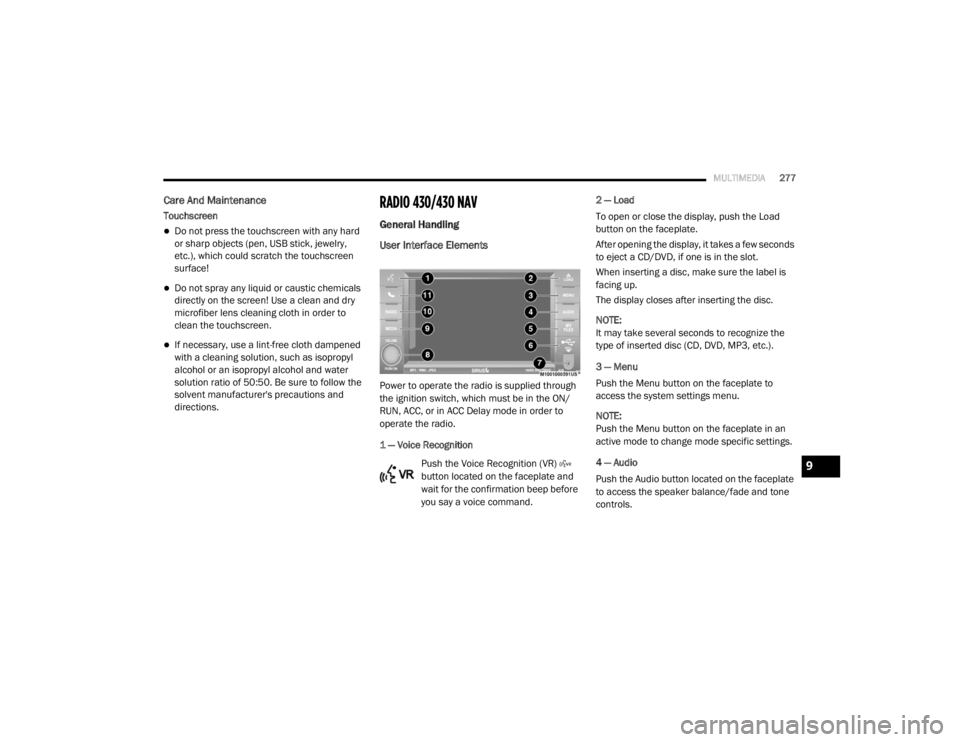
User Interface Elements
Power to operate the radio is supplied through
the ignition switch, which must be in the ON/
RUN, ACC, or in ACC Delay mode in order to
operate the radio.
1 — Voice Recognition
Push the Voice Recognition (VR)
button located on the faceplate and
wait for the confirmation beep before
you say a voice command. 2 — Load
To open or close the display, push the Load
button on the faceplate.
After opening the display, it takes a few seconds
to eject a CD/DVD, if one is in the slot.
When inserting a disc, make sure the label is
facing up.
The display closes after inserting the disc.
NOTE:
It may take several seconds to recognize the
type of inserted disc (CD, DVD, MP3, etc.).
3 — Menu
Push the Menu button on the faceplate to
access the system settings menu.
NOTE:
Push the Menu button on the faceplate in an
active mode to change mode specific settings.
4 — Audio
Push the Audio button located on the faceplate
to access the speaker balance/fade and tone
controls.
9
20_RT_OM_EN_USC_t.book Page 277
Page 280 of 380
278MULTIMEDIA
5 — My Files
Push the My Files button on the faceplate to
manage your music and picture files on the
internal storage drive.
6 — USB Connector
Connect a supported device into the USB
Connector to play music and to copy music and
picture files to the internal hard disk drive.
NOTE:
Refer to “USB Connector” in the “Remote
Devices” section of this chapter for further
information.
7 — AUX Input (Audio Jack)
Connect an external audio device into the AUX
Input (e.g., MP3 player, video game) to play the
device audio through the car audio system.
8 — On/Off Volume
It is also possible to set the unit in standby
mode while driving by pushing the On/Off
Volume rotary knob. NOTE:
If the ignition is switched OFF with the radio in
standby mode, the radio memorizes the
standby state when the ignition is switched to
ON/RUN again. Push the On/Off Volume rotary
knob to switch the radio On. The radio software
is always working when the ignition is switched
to ON/RUN, even if the radio is in standby
mode. It is still possible to eject the CD and to
display the time if the unit is switched Off.
9 — Media
Push the Media button located on the faceplate
to change to a Media mode or to toggle between
Media modes:
HDD (Hard Disk Drive)
CD/DVD
AUX
NOTE:
If you are viewing the NAV screen (Radio
430 Nav only), pushing the Media button will
return you to the Media mode screen. 10 — Radio
Push the Radio button located on the faceplate
to change to a Radio mode or to toggle between
Radio modes:
AM
FM
SAT (If Equipped)
NOTE:
If you are viewing the NAV screen (Radio
430 Nav only), pushing the Radio button will
return you to the Radio mode screen.
11 — Uconnect Phone Push the Uconnect Phone button
located on the faceplate to either
activate the Uconnect system or to
cancel an active phone call.
Audio Settings
Volume
Use the ON/OFF VOLUME rotary knob to adjust
the volume of the currently playing audio
source. While you adjust the volume, the name
of the audio source and a volume indicator is
displayed in the lower left corner of the display.
20_RT_OM_EN_USC_t.book Page 278
Page 294 of 380
292MULTIMEDIA
After a short pause, the copy process begins
and the audio resumes playback from the start
of the track. The copy process continues in the
background while the audio plays. The progress
is shown in the display. Even if you change to
another mode (radio, AUX, etc.) or turn the radio
Off (ignition ON/RUN), the copy process will
continue in the background.
It is also possible to listen to radio modes during
this process. Copying time is greater than 4x the
normal playback rate.
NOTE:
When copying CD-Audio to HDD, audio files are
converted from CD-Audio to AAC. If available,
the artist name, album name, cover art, track
names and genres are stored with the tracks on
the HDD. DVD-Audio cannot be copied to the
HDD. If the CD-Audio disc is not recognized by
the Gracenote® Music Recognition Service, you
can rip the CD-Audio disc on your
internet-equipped computer first, then copy the
resulting compressed audio files to a USB
memory stick. Then insert the USB memory
stick in the radio and copy the audio files to the
HDD mode. Copy WMA/MP3 Files To Hard-Drive
MP3 and WMA formatted compressed audio
files from a disc or via USB (e.g., USB stick) can
be copied to the Hard Disc Drive.
It is recommended to sort music files into
folders.
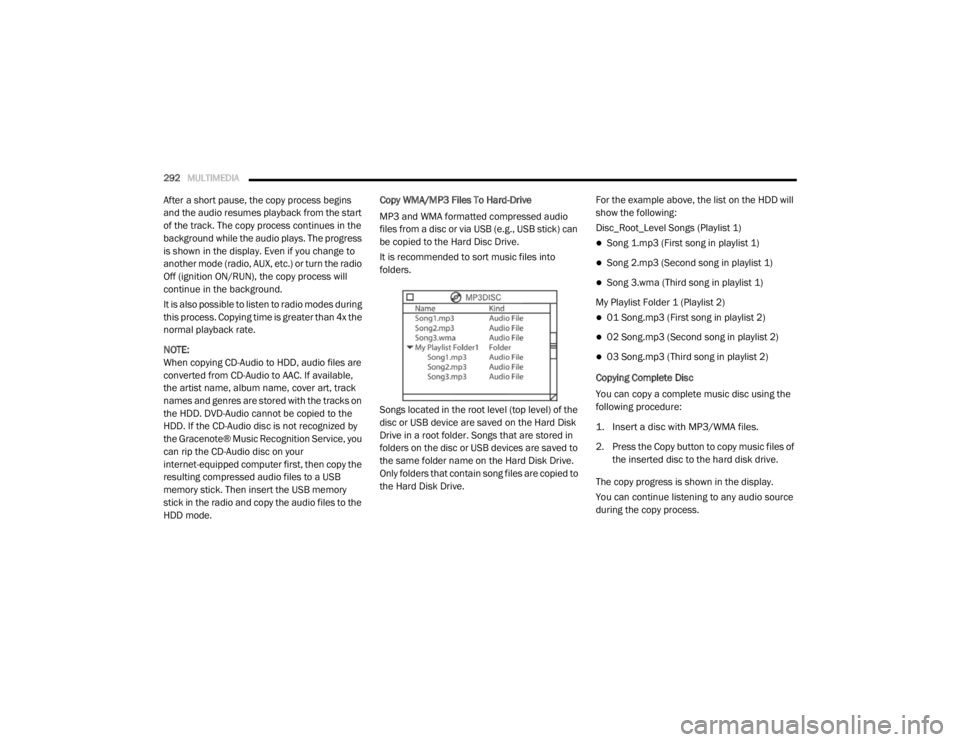
Songs located in the root level (top level) of the
disc or USB device are saved on the Hard Disk
Drive in a root folder. Songs that are stored in
folders on the disc or USB devices are saved to
the same folder name on the Hard Disk Drive.
Only folders that contain song files are copied to
the Hard Disk Drive.
For the example above, the list on the HDD will
show the following:
Disc_Root_Level Songs (Playlist 1)
Song 1.mp3 (First song in playlist 1)
Song 2.mp3 (Second song in playlist 1)
Song 3.wma (Third song in playlist 1)
My Playlist Folder 1 (Playlist 2)
01 Song.mp3 (First song in playlist 2)
02 Song.mp3 (Second song in playlist 2)
03 Song.mp3 (Third song in playlist 2)
Copying Complete Disc
You can copy a complete music disc using the
following procedure:
1. Insert a disc with MP3/WMA files.
2. Press the Copy button to copy music files of the inserted disc to the hard disk drive.
The copy progress is shown in the display.
You can continue listening to any audio source
during the copy process.
20_RT_OM_EN_USC_t.book Page 292
Page 295 of 380
MULTIMEDIA293
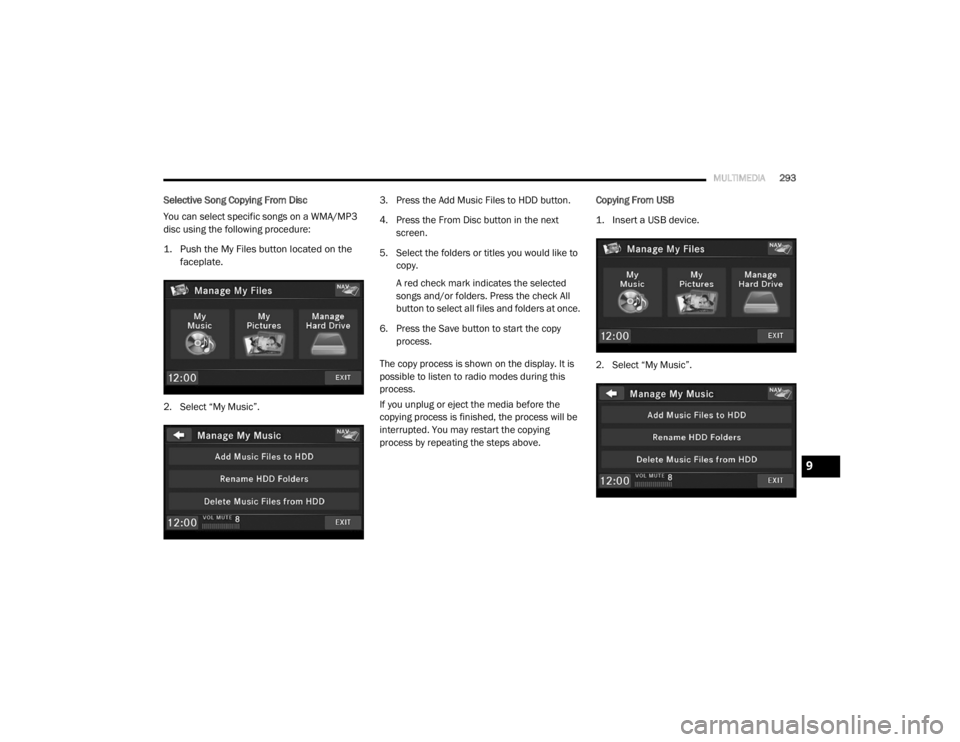
Selective Song Copying From Disc
You can select specific songs on a WMA/MP3
disc using the following procedure:
1. Push the My Files button located on the
faceplate.
2. Select “My Music”. 3. Press the Add Music Files to HDD button.
4. Press the From Disc button in the next
screen.
5. Select the folders or titles you would like to copy.
A red check mark indicates the selected
songs and/or folders. Press the check All
button to select all files and folders at once.
6. Press the Save button to start the copy process.
The copy process is shown on the display. It is
possible to listen to radio modes during this
process.
If you unplug or eject the media before the
copying process is finished, the process will be
interrupted. You may restart the copying
process by repeating the steps above. Copying From USB
1. Insert a USB device.
2. Select “My Music”.
9
20_RT_OM_EN_USC_t.book Page 293
Page 296 of 380
294MULTIMEDIA
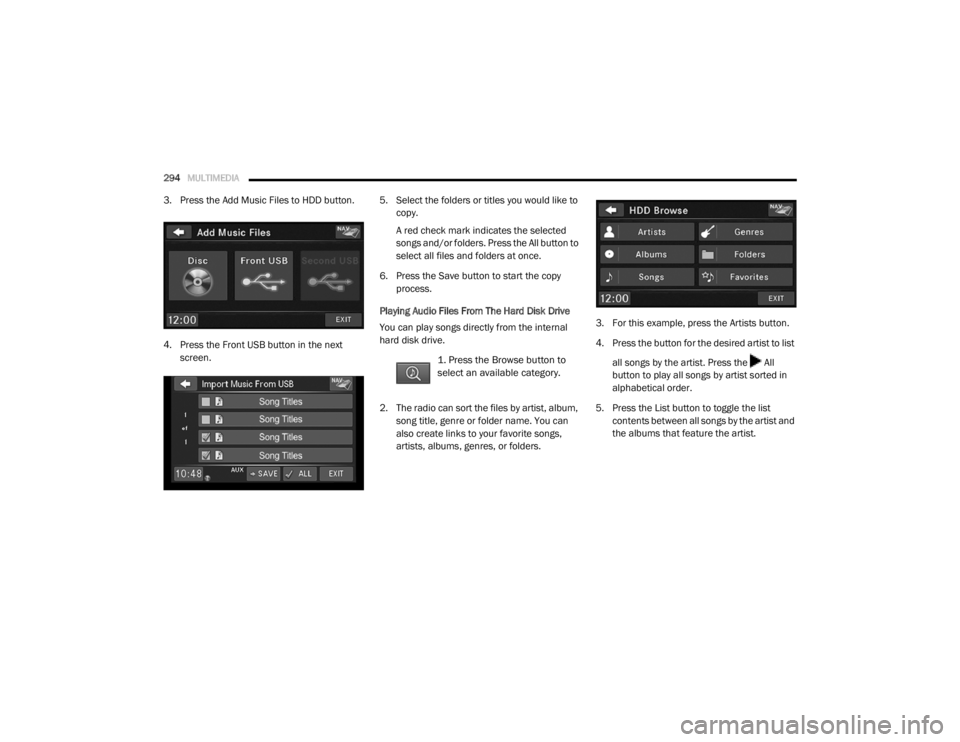
3. Press the Add Music Files to HDD button.
4. Press the Front USB button in the next
screen. 5. Select the folders or titles you would like to
copy.
A red check mark indicates the selected
songs and/or folders. Press the All button to
select all files and folders at once.
6. Press the Save button to start the copy process.
Playing Audio Files From The Hard Disk Drive
You can play songs directly from the internal
hard disk drive.
1. Press the Browse button to
select an available category.
2. The radio can sort the files by artist, album, song title, genre or folder name. You can
also create links to your favorite songs,
artists, albums, genres, or folders. 3. For this example, press the Artists button.
4. Press the button for the desired artist to list
all songs by the artist. Press the All
button to play all songs by artist sorted in
alphabetical order.
5. Press the List button to toggle the list contents between all songs by the artist and
the albums that feature the artist.
20_RT_OM_EN_USC_t.book Page 294
Page 300 of 380
298MULTIMEDIA
Importing Pictures
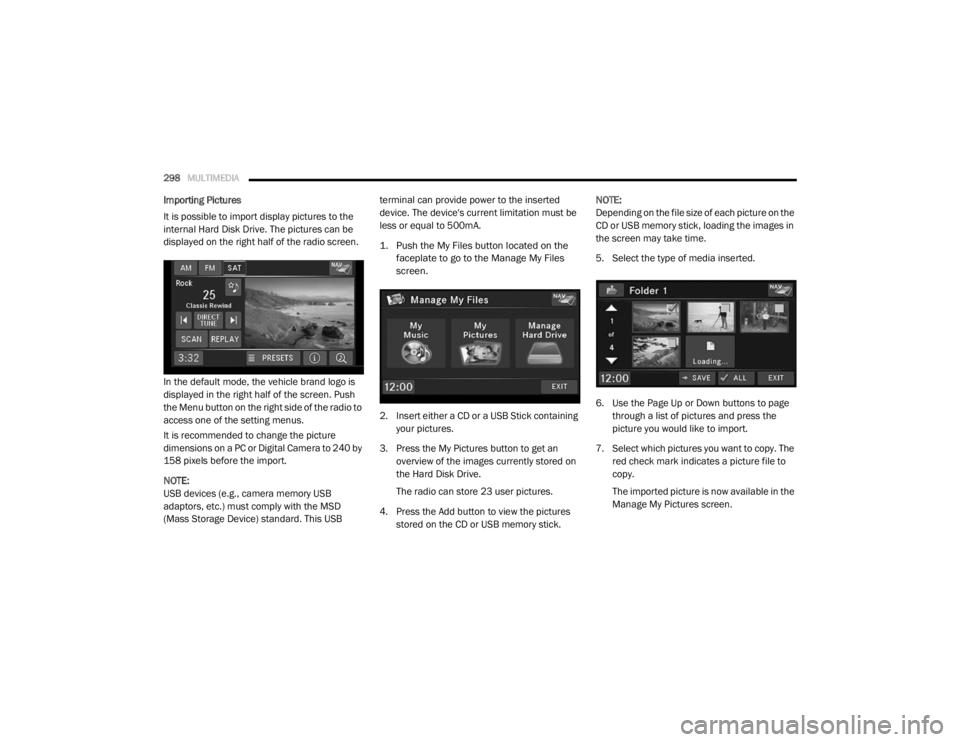
It is possible to import display pictures to the
internal Hard Disk Drive. The pictures can be
displayed on the right half of the radio screen.
In the default mode, the vehicle brand logo is
displayed in the right half of the screen. Push
the Menu button on the right side of the radio to
access one of the setting menus.
It is recommended to change the picture
dimensions on a PC or Digital Camera to 240 by
158 pixels before the import.
NOTE:
USB devices (e.g., camera memory USB
adaptors, etc.) must comply with the MSD
(Mass Storage Device) standard. This USB terminal can provide power to the inserted
device. The device's current limitation must be
less or equal to 500mA.
1. Push the My Files button located on the
faceplate to go to the Manage My Files
screen.
2. Insert either a CD or a USB Stick containing your pictures.
3. Press the My Pictures button to get an overview of the images currently stored on
the Hard Disk Drive.
The radio can store 23 user pictures.
4. Press the Add button to view the pictures stored on the CD or USB memory stick. NOTE:
Depending on the file size of each picture on the
CD or USB memory stick, loading the images in
the screen may take time.
5. Select the type of media inserted.
6. Use the Page Up or Down buttons to page
through a list of pictures and press the
picture you would like to import.
7. Select which pictures you want to copy. The red check mark indicates a picture file to
copy.
The imported picture is now available in the
Manage My Pictures screen.
20_RT_OM_EN_USC_t.book Page 298
Page 301 of 380
MULTIMEDIA299
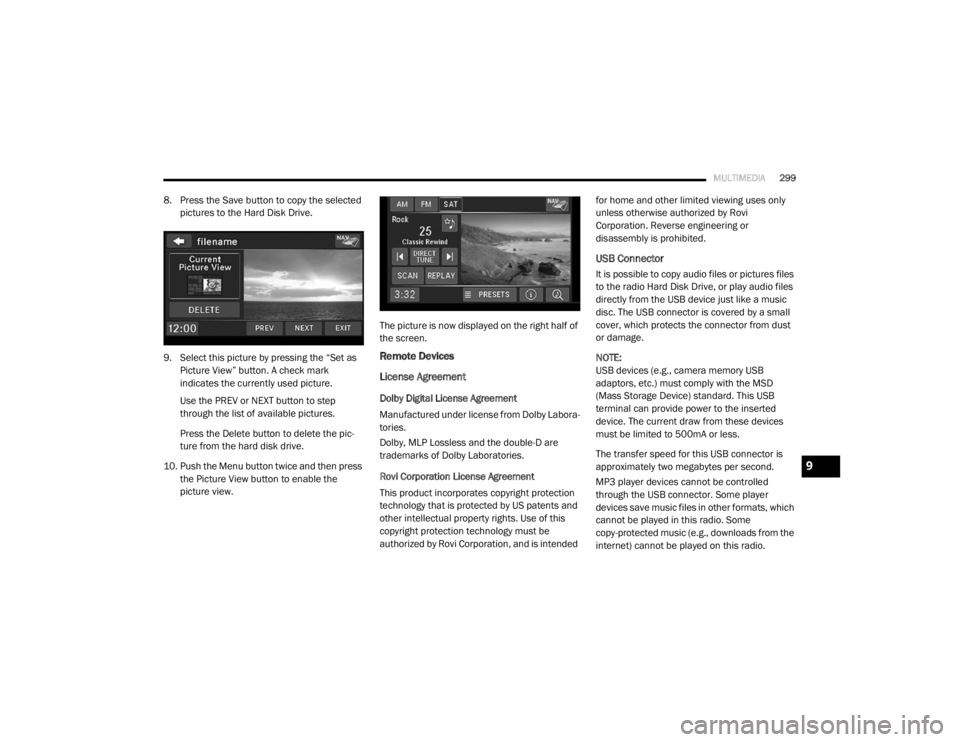
8. Press the Save button to copy the selected
pictures to the Hard Disk Drive.
9. Select this picture by pressing the “Set as Picture View” button. A check mark
indicates the currently used picture.
Use the PREV or NEXT button to step
through the list of available pictures.
Press the Delete button to delete the pic -
ture from the hard disk drive.
10. Push the Menu button twice and then press the Picture View button to enable the
picture view. The picture is now displayed on the right half of
the screen.
Remote Devices
License Agreement
Dolby Digital License Agreement
Manufactured under license from Dolby Labora-
tories.
Dolby, MLP Lossless and the double-D are
trademarks of Dolby Laboratories.
Rovi Corporation License Agreement
This product incorporates copyright protection
technology that is protected by US patents and
other intellectual property rights. Use of this
copyright protection technology must be
authorized by Rovi Corporation, and is intended for home and other limited viewing uses only
unless otherwise authorized by Rovi
Corporation. Reverse engineering or
disassembly is prohibited.
USB Connector
It is possible to copy audio files or pictures files
to the radio Hard Disk Drive, or play audio files
directly from the USB device just like a music
disc. The USB connector is covered by a small
cover, which protects the connector from dust
or damage.
NOTE:
USB devices (e.g., camera memory USB
adaptors, etc.) must comply with the MSD
(Mass Storage Device) standard. This USB
terminal can provide power to the inserted
device. The current draw from these devices
must be limited to 500mA or less.
The transfer speed for this USB connector is
approximately two megabytes per second.
MP3 player devices cannot be controlled
through the USB connector. Some player
devices save music files in other formats, which
cannot be played in this radio. Some
copy-protected music (e.g., downloads from the
internet) cannot be played on this radio.
9
20_RT_OM_EN_USC_t.book Page 299
Page 303 of 380
MULTIMEDIA301
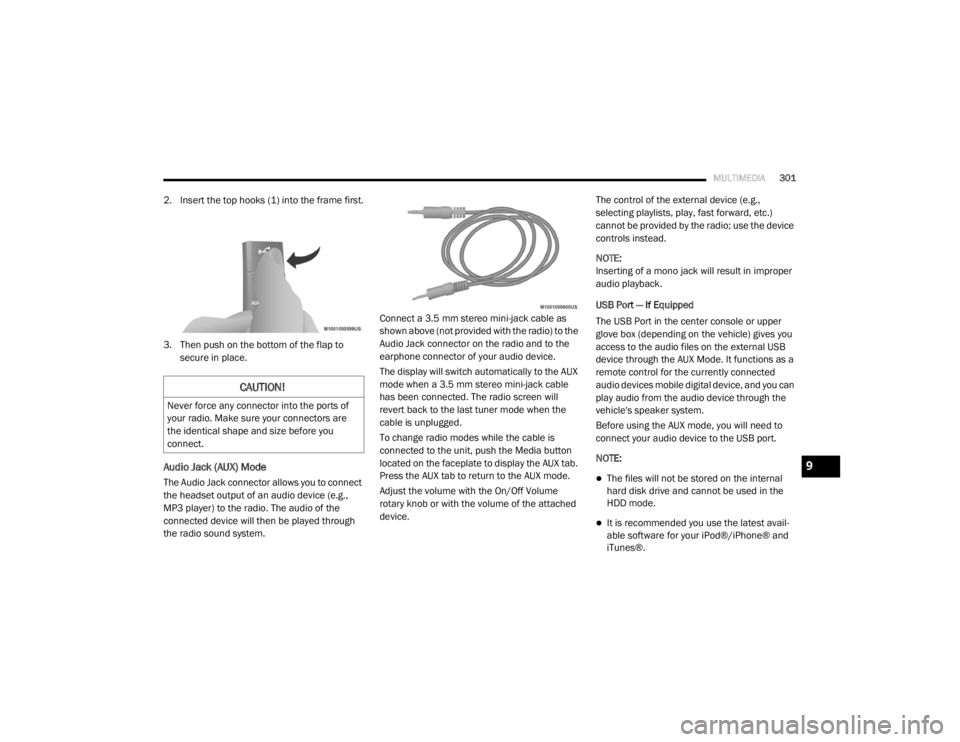
2. Insert the top hooks (1) into the frame first.
3. Then push on the bottom of the flap to
secure in place.
Audio Jack (AUX) Mode
The Audio Jack connector allows you to connect
the headset output of an audio device (e.g.,
MP3 player) to the radio. The audio of the
connected device will then be played through
the radio sound system. Connect a 3.5 mm stereo mini-jack cable as
shown above (not provided with the radio) to the
Audio Jack connector on the radio and to the
earphone connector of your audio device.
The display will switch automatically to the AUX
mode when a 3.5 mm stereo mini-jack cable
has been connected. The radio screen will
revert back to the last tuner mode when the
cable is unplugged.
To change radio modes while the cable is
connected to the unit, push the Media button
located on the faceplate to display the AUX tab.
Press the AUX tab to return to the AUX mode.
Adjust the volume with the On/Off Volume
rotary knob or with the volume of the attached
device.The control of the external device (e.g.,
selecting playlists, play, fast forward, etc.)
cannot be provided by the radio; use the device
controls instead.
NOTE:
Inserting of a mono jack will result in improper
audio playback.
USB Port — If Equipped
The USB Port in the center console or upper
glove box (depending on the vehicle) gives you
access to the audio files on the external USB
device through the AUX Mode. It functions as a
remote control for the currently connected
audio devices mobile digital device, and you can
play audio from the audio device through the
vehicle's speaker system.
Before using the AUX mode, you will need to
connect your audio device to the USB port.
NOTE:The files will not be stored on the internal
hard disk drive and cannot be used in the
HDD mode.
It is recommended you use the latest avail
-
able software for your iPod®/iPhone® and
iTunes®.
CAUTION!
Never force any connector into the ports of
your radio. Make sure your connectors are
the identical shape and size before you
connect.
9
20_RT_OM_EN_USC_t.book Page 301