ECO mode DODGE GRAND CARAVAN 2020 Manual PDF
[x] Cancel search | Manufacturer: DODGE, Model Year: 2020, Model line: GRAND CARAVAN, Model: DODGE GRAND CARAVAN 2020Pages: 380, PDF Size: 14.92 MB
Page 350 of 380
348MULTIMEDIA
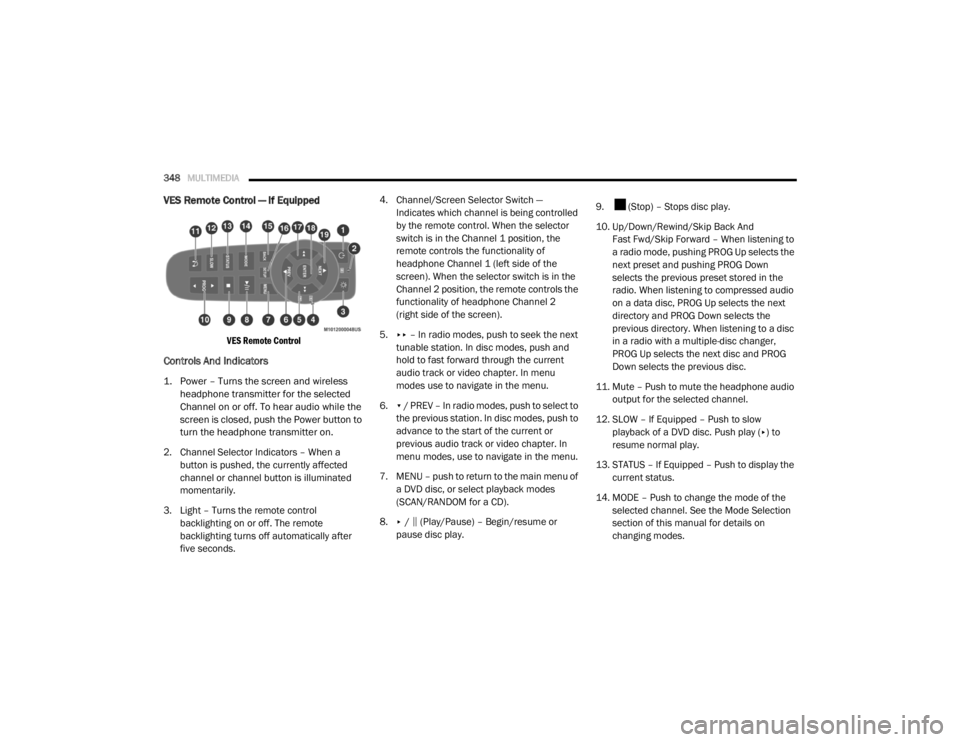
VES Remote Control — If Equipped
VES Remote Control
Controls And Indicators
1. Power – Turns the screen and wireless
headphone transmitter for the selected
Channel on or off. To hear audio while the
screen is closed, push the Power button to
turn the headphone transmitter on.
2. Channel Selector Indicators – When a button is pushed, the currently affected
channel or channel button is illuminated
momentarily.
3. Light – Turns the remote control backlighting on or off. The remote
backlighting turns off automatically after
five seconds. 4. Channel/Screen Selector Switch —
Indicates which channel is being controlled
by the remote control. When the selector
switch is in the Channel 1 position, the
remote controls the functionality of
headphone Channel 1 (left side of the
screen). When the selector switch is in the
Channel 2 position, the remote controls the
functionality of headphone Channel 2
(right side of the screen).
5. ▸▸ – In radio modes, push to seek the next
tunable station. In disc modes, push and
hold to fast forward through the current
audio track or video chapter. In menu
modes use to navigate in the menu.
6. ▾ / PREV – In radio modes, push to select to
the previous station. In disc modes, push to
advance to the start of the current or
previous audio track or video chapter. In
menu modes, use to navigate in the menu.
7. MENU – push to return to the main menu of a DVD disc, or select playback modes
(SCAN/RANDOM for a CD).
8. ▸ / ‖ (Play/Pause) – Begin/resume or
pause disc play. 9. (Stop) – Stops disc play.
10. Up/Down/Rewind/Skip Back And
Fast Fwd/Skip Forward – When listening to
a radio mode, pushing PROG Up selects the
next preset and pushing PROG Down
selects the previous preset stored in the
radio. When listening to compressed audio
on a data disc, PROG Up selects the next
directory and PROG Down selects the
previous directory. When listening to a disc
in a radio with a multiple-disc changer,
PROG Up selects the next disc and PROG
Down selects the previous disc.
11. Mute – Push to mute the headphone audio output for the selected channel.
12. SLOW – If Equipped – Push to slow playback of a DVD disc. Push play ( ▸) to
resume normal play.
13. STATUS – If Equipped – Push to display the current status.
14. MODE – Push to change the mode of the selected channel. See the Mode Selection
section of this manual for details on
changing modes.
20_RT_OM_EN_USC_t.book Page 348
Page 355 of 380

MULTIMEDIA353
Disc Formats
The DVD player is capable of playing the
following types of discs:
DVD-Video discs (MPEG-2 video compres -
sion) (see notes about DVD Region Codes)
DVD-Audio discs (2 channel audio output
only)
Audio Compact Discs (CDs)
CD Data discs with MP3 and WMA
compressed audio format files
Video CDs (MPEG-1 video compression)
DVD Region Codes
The DVD player and many DVD Discs are coded
by geographic region. These region codes must
match in order for the disc to play. If the region
code for the DVD does not match the region
code for the player, the disc will stop playing
and a warning will be displayed.
DVD Audio Support
When a DVD-Audio disc is inserted in the DVD
player, the DVD-Audio title on the disc is played
by default (most DVD-Audio discs also have a
Video title, but the Video title is ignored). All
multi-channel program material is automatically mixed down to two channels, which may result
in a lowered apparent volume level. If you
increase the volume level to account for this
change in level, remember to lower the volume
before changing the disc or to another mode.
Recorded Discs
The DVD player will play CD-R and CD-RW discs
recorded in CD-Audio or Video-CD format, or as
a CD-ROM containing MP3, WMA. The player will
also play DVD-Video content recorded to a
DVD-R or DVD-RW disc. DVD-ROM discs (either
pressed or recorded) are not supported.
If you record a disc using a personal computer,
there may be cases where the DVD player may
not be able to play some or the entire disc, even
if it is recorded in a compatible format and is
playable on other players. To help avoid
playback problems, use the following guidelines
when recording discs.
Open sessions are ignored. Only sessions
that are closed are playable.
For multi-session CDs that contain only
multiple CD-Audio sessions, the player will
renumber the tracks so each track number is
unique.
For CD Data (or CD-ROM) discs, always use
the ISO-9660 (Level 1 or Level 2), Joliet, or
Romeo format. Other formats (such as HFS,
or others) are not supported.
The player recognizes a maximum of
512 files and 99 folders per CD-R and
CD-RW disc.
Mixed media recordable DVD formats will
only play the Video_TS portion of the disc.
If you are still having trouble writing a disc that
is playable in the DVD player, check with the
disc recording software publisher for more
information about burning playable discs.
The recommended method for labeling
recordable discs (CD-R, CD-RW, and DVD-R) is
with a permanent marker. Do not use adhesive
labels as they may separate from the disc,
become stuck, and cause permanent damage
to the DVD player.
9
20_RT_OM_EN_USC_t.book Page 353
Page 363 of 380
MULTIMEDIA361
The system will best recognize your speech if
the windows are closed, and the heater/air
conditioning blower is set to low.
At any point, if the system does not recognize
one of your commands, you will be prompted to
repeat it.
To hear the first available Menu, push the Voice
Recognition button and say “Help” or
“Main Menu”.
Commands
The Voice Command system understands two
types of commands, Universal commands, and
Local commands. Universal commands are
available at all times. Local commands are
available if the supported radio mode is active.
Changing The Volume
1. Start a dialogue by pushing the Voice
Recognition button.
2. Say a command (e.g., “Help”). 3. Use the ON/OFF VOLUME rotary knob to
adjust the volume to a comfortable level
while the Voice Recognition system is
speaking. Please note the volume setting
for Voice Recognition is different than the
audio system.
Main Menu
Start a dialogue by pushing the Voice
Recognition button. You may say “Main
Menu” to switch to the main menu.
In this mode, you can say the following
commands:
“Radio AM” (to switch to the radio AM mode)
“Radio FM” (to switch to radio FM mode)
“Sat” (to switch to Satellite radio mode)
“Disc” (to switch to the disc mode)
“USB” (to switch to USB mode)
“Bluetooth® Streaming” (to switch to
Bluetooth® Streaming mode)
“Memo” (to switch to the memo recorder)
“System Setup” (to switch to system setup)
Radio AM
To switch to the AM band, say “AM” or “Radio
AM”. In this mode, you may say the following
commands:
“Frequency #” (to change the frequency)
“Next Station” (to select the next station)
“Previous Station” (to select the previous
station)
“Radio Menu” (to switch to the radio menu)
“Main Menu” (to switch to the main menu)
Radio FM
To switch to the FM band, say “FM” or “Radio
FM”. In this mode, you may say the following
commands:
“Frequency #” (to change the frequency)
“Next Station” (to select the next station)
9
20_RT_OM_EN_USC_t.book Page 361
Page 364 of 380

362MULTIMEDIA
“Previous Station” (to select the previous
station)
“Menu Radio” (to switch to the radio menu)
“Main Menu” (to switch to the main menu)
Satellite Radio
To switch to satellite radio mode, say “Sat” or
“Satellite Radio.” In this mode, you may say the
following commands:
“Channel Number” (to change the channel by
its spoken number)
“Next Channel” (to select the next channel)
“Previous Channel” (to select the previous
channel)
“List Channel” (to hear a list of available
channels)
“Select Name” (to say the name of a channel)
“Menu Radio” (to switch to the radio menu)
“Main Menu” (to switch to the main menu)
Disc Mode
To switch to the disc mode, say “Disc”. In this
mode, you may say the following commands:
“Track” (#) (to change the track)
“Next Track” (to play the next track)
“Previous Track” (to play the previous track)
“Main Menu” (to switch to the main menu)
USB Mode
To switch to USB mode, say “USB”. In this mode,
you may say the following commands:
“Next Track” (to play the next track)
“Previous Track” (to play the previous track)
“Play” (to play an Artist Name, Playlist Name,
Album Name, Track Name, etc.)
Bluetooth® Streaming (BT) Mode
To switch to Bluetooth® Streaming (BT) mode,
say “Bluetooth® Streaming”. In this mode, you
may say the following commands:
“Play” (to play the current track)
“Pause” (to pause the current track)
“Next Track” (to play the next track)
“Previous Track” (to play the previous track)
Memo Mode
To switch to the voice recorder mode, say
“Memo”. In this mode, you may say the
following commands:
“New Memo” (to record a new memo) —
During the recording, you may push the Voice
Command button to stop recording. You
proceed by saying one of the following
commands:
“Save” (to save the memo)
“Continue” (to continue recording)
“Delete” (to delete the recording)
20_RT_OM_EN_USC_t.book Page 362
Page 365 of 380
MULTIMEDIA363
“Play Memos” (to play previously recorded
memos) — During the playback you may push
the Voice Command button to stop
playing memos. You proceed by saying one of
the following commands:
“Repeat” (to repeat a memo)
“Next” (to play the next memo)
“Previous” (to play the previous memo)
“Delete” (to delete a memo)
“Delete All” (to delete all memos)
Setup
To switch to system setup, you may say one of
the following:
“Change to setup”
“Switch to system setup”
“Main menu setup”
“Switch to setup” In this mode, you may say the following
commands:
“Language English”
“Language French”
“Language Spanish”
“Tutorial”
“Voice Training”
NOTE:
Keep in mind that you have to push the Voice
Command button first and wait for the beep
before speaking the “Barge In” commands.
Voice Training
For users experiencing difficulty with the system
recognizing their voice commands or numbers
the Uconnect Voice “Voice Training” feature
may be used.
1. Push the Voice Recognition button, say “System Setup” and once you are in that
menu then say “Voice Training”. This will
train your own voice to the system and will
improve recognition.
2. Repeat the words and phrases when prompted by Uconnect Voice. For best
results, the “Voice Training” session should
be completed when the vehicle is parked,
engine running, all windows closed, and the
blower fan switched off. This procedure may
be repeated with a new user. The system
will adapt to the last trained voice only.
9
20_RT_OM_EN_USC_t.book Page 363
Page 372 of 380

370
Dimmer Switch Headlight
.............................................. 37, 38DipsticksAutomatic Transmission............................ 244Oil (Engine)................................................ 232Power Steering.......................................... 173Disabled Vehicle Towing................................ 224DisposalAntifreeze (Engine Coolant)....................... 242Door Ajar................................................... 95, 96Door Ajar Light.......................................... 95, 96Door LocksAutomatic.................................................... 17Doors............................................................... 16Driver’s Seat Back Tilt..................................... 20DrivingThrough Flowing, Rising, Or Shallow
Standing Water
......................................... 192DVD Player (Video Entertainment System).... 344
E
Economy (Fuel) Mode.................................... 167Electric Brake Control System....................... 104Anti-Lock Brake System............................. 103Traction Control System............................ 109Electric Remote Mirrors................................... 36Electrical Power Outlets................................... 75Electronic Speed Control (Cruise Control)...... 173
Electronic Stability Control (ESC).................. 105Electronic Throttle Control Warning Light......... 95Emergency, In Case OfFreeing Vehicle When Stuck..................... 223Hazard Warning Flasher........................... 194Jacking................................... 202, 206, 244Jump Starting........................................... 219Emission Control System Maintenance........ 102Engine........................................................... 231Air Cleaner................................................ 235Block Heater............................................. 163Break-In Recommendations..................... 163Checking Oil Level.................................... 232Compartment........................................... 231Compartment Identification...................... 231Coolant (Antifreeze).................................. 272Cooling..................................................... 239Exhaust Gas Caution....................... 159, 270Fails To Start............................................ 163Flooded, Starting...................................... 163Oil........................................... 233, 271, 272Oil Filler Cap............................................. 231Oil Filter.................................................... 234Oil Selection.................................... 233, 271Oil Synthetic............................................. 234Overheating.............................................. 221Starting..................................................... 162
Engine Oil Viscosity....................................... 234Engine Oil Viscosity Chart.............................. 234Enhanced Accident Response
Feature................................................ 138, 225Ethanol.......................................................... 268Exhaust Gas Cautions.......................... 159, 270Exhaust System................................... 159, 238Exterior Lighting...............................................37Exterior Lights............................... 37, 161, 194
F
FiltersAir Cleaner
................................................ 235Air Conditioning................................. 58, 235Engine Oil........................................ 234, 272Engine Oil Disposal................................... 234FlashersHazard Warning........................................ 194Turn Signals............37, 100, 161, 196, 197Flash-To-Pass............................................ 37, 38Flooded Engine Starting................................ 163Floor Console...................................................69Fluid Capacities............................................ 271Fluid Leaks.................................................... 161Fluid Level ChecksAutomatic Transmission........................... 244Brake........................................................ 243Power Steering......................................... 173
20_RT_OM_EN_USC_t.book Page 370
Page 373 of 380

371
Fluid, Brake
................................................... 274Fluids And Lubricants.................................... 272Fog Lights........................................ 37, 39, 196Fog Lights, Service......................................... 196Fold In Floor (Stow ‘n Go) Seating.................... 21Fold-Flat Seats................................................. 20Freeing A Stuck Vehicle................................. 223Fuel............................................................... 267Adding....................................................... 181Additives................................................... 268Clean Air.................................................... 268Economy Mode.......................................... 167Ethanol...................................................... 268Gasoline.................................................... 267Materials Added........................................ 268Methanol................................................... 268Octane Rating................................. 267, 272Specifications............................................ 272Tank Capacity............................................ 271Fueling........................................................... 181Fuses................................................... 197, 198
G
Garage Door Opener (HomeLink).................... 63Gasoline, (Fuel)............................................. 267Gasoline, Clean Air........................................ 268Gasoline, Reformulated................................. 268Gear Ranges.................................................. 168
Gear Selector Override................................. 222Glass Cleaning.............................................. 265Gross Axle Weight Rating.............................. 183Gross Vehicle Weight Rating......................... 183GVWR............................................................ 182
H
Hands-Free Phone Uconnect
.................................................. 304HazardDriving Through Flowing, Rising,
Or Shallow Standing Water
....................... 192Hazard Warning Flashers.............................. 194Head Restraints............................................... 30Headlights....................................................... 37Automatic.................................................... 38Bulb Replacement.................................... 196Cleaning................................................... 263High Beam/Low Beam Select Switch... 37, 38Lights On Reminder.............................. 37, 39Passing................................................. 37, 38Replacing................................................. 196Switch.......................................................... 37Time Delay............................................ 37, 38Heated Mirrors.......................................... 34, 37Heater, Engine Block.................................... 163
High Beam/Low Beam Select
(Dimmer) Switch..............................................38Hill Start Assist.............................................. 108HitchesTrailer Towing........................................... 184HomeLink (Garage Door Opener).....................63Hood Prop........................................................61Hood Release...................................................61Hook, Coat.......................................................73
I
Ignition.............................................................11Switch..........................................................11Inside Rearview Mirror.....................................35Instrument Cluster...........................................82Descriptions....................................... 84, 100Display.........................................................85Display Controls...........................................85Menu Items.................................................87Instrument Panel Lens Cleaning................... 265Integrated Power Module (Fuses)................. 198Interior And Instrument Lights.........................39Interior Appearance Care.............................. 264Interior Lights...................................................39Intermittent Wipers (Delay Wipers)..................42InverterPower...........................................................77iPod/USB/MP3 Control................................. 340Bluetooth Streaming Audio.............. 343, 362
11
20_RT_OM_EN_USC_t.book Page 371