tow DODGE GRAND CARAVAN 2020 Manual PDF
[x] Cancel search | Manufacturer: DODGE, Model Year: 2020, Model line: GRAND CARAVAN, Model: DODGE GRAND CARAVAN 2020Pages: 380, PDF Size: 14.92 MB
Page 256 of 380
254SERVICING AND MAINTENANCE
Radial Ply Tires
Tire Repair
If your tire becomes damaged, it may be
repaired if it meets the following criteria:
The tire has not been driven on when flat.
The damage is only on the tread section of
your tire (sidewall damage is not repairable).
The puncture is no greater than a ¼ of an
inch (6 mm).
Consult an authorized tire dealer for tire repairs
and additional information. Damaged Run Flat tires, or Run Flat tires that
have experienced a loss of pressure should be
replaced immediately with another Run Flat tire
of identical size and service description (Load
Index and Speed Symbol). Replace the tire
pressure sensor as well as it is not designed to
be reused.
Run Flat Tires — If Equipped
Run Flat tires allow you the capability to drive
50 miles (80 km) at 50 mph (80 km/h) after a
rapid loss of inflation pressure. This rapid loss
of inflation is referred to as the Run Flat mode.
A Run Flat mode occurs when the tire inflation
pressure is of/or below 14 psi (96 kPa). Once a
Run Flat tire reaches the run flat mode it has
limited driving capabilities and needs to be
replaced immediately. A Run Flat tire is not
repairable. When a run flat tire is changed after
driving with underinflated tire condition, please
replace the TPM sensor as it is not designed to
be reused when driven under run flat mode
14 psi (96 kPa) condition.
NOTE:
TPM Sensor must be replaced after driving the
vehicle on a flat tire condition.It is not recommended driving a vehicle loaded
at full capacity or to tow a trailer while a tire is in
the run flat mode.
See the tire pressure monitoring section for
more information.
Tire Spinning
When stuck in mud, sand, snow, or ice
conditions, do not spin your vehicle's wheels
above 30 mph (48 km/h) or for longer than
30 seconds continuously without stopping.
Refer to “Freeing A Stuck Vehicle” in “In Case Of
Emergency” for further information.
WARNING!
Combining radial ply tires with other types of
tires on your vehicle will cause your vehicle to
handle poorly. The instability could cause a
collision. Always use radial ply tires in sets of
four. Never combine them with other types of
tires.
WARNING!
Fast spinning tires can be dangerous. Forces
generated by excessive wheel speeds may
cause tire damage or failure. A tire could
explode and injure someone. Do not spin your
vehicle's wheels faster than 30 mph
(48 km/h) for more than 30 seconds
continuously when you are stuck, and do not
let anyone near a spinning wheel, no matter
what the speed.
20_RT_OM_EN_USC_t.book Page 254
Page 259 of 380

SERVICING AND MAINTENANCE257
Snow Tires
Some areas of the country require the use of
snow tires during the Winter. Snow tires can be
identified by a “mountain/snowflake” symbol
on the tire sidewall.
If you need snow tires, select tires
equivalent in size and type to the
original equipment tires. Use snow
tires only in sets of four; failure to do
so may adversely affect the safety and handling
of your vehicle.
Snow tires generally have lower speed ratings
than what was originally equipped with your
vehicle and should not be operated at
sustained speeds over 75 mph (120 km/h). For
speeds above 75 mph (120 km/h) refer to
original equipment or an authorized tire dealer
for recommended safe operating speeds,
loading and cold tire inflation pressures.
While studded tires improve performance on
ice, skid and traction capability on wet or dry
surfaces may be poorer than that of
non-studded tires. Some states prohibit
studded tires; therefore, local laws should be
checked before using these tire types.
Spare Tires — If Equipped
NOTE:
For vehicles equipped with Tire Service Kit
instead of a spare tire, please refer to
“Tire Service Kit” in “In Case Of Emergency” for
further information.
Refer to the “Towing Requirements - Tires” in
“Starting And Operating” for restrictions when
towing with a spare tire designated for
temporary emergency use.
Spare Tire Matching Original Equipped Tire
And Wheel — If Equipped
Your vehicle may be equipped with a spare tire
and wheel equivalent in look and function to the
original equipment tire and wheel found on the
front or rear axle of your vehicle. This spare tire
may be used in the tire rotation for your vehicle. If your vehicle has this option, refer to an
authorized tire dealer for the recommended tire
rotation pattern.
Compact Spare Tire — If Equipped
The compact spare is for temporary emergency
use only. You can identify if your vehicle is
equipped with a compact spare by looking at
the spare tire description on the Tire and
Loading Information Placard located on the
driver’s side door opening or on the sidewall of
the tire. Compact spare tire descriptions begin
with the letter “T” or “S” preceding the size
designation. Example: T145/80D18 103M.
T, S = Temporary Spare Tire
Since this tire has limited tread life, the original
equipment tire should be repaired (or replaced)
and reinstalled on your vehicle at the first
opportunity.
Do not install a wheel cover or attempt to mount
a conventional tire on the compact spare wheel,
since the wheel is designed specifically for the
compact spare tire. Do not install more than
one compact spare tire and wheel on the
vehicle at any given time.
CAUTION!
Because of the reduced ground clearance, do
not take your vehicle through an automatic
car wash with a compact or limited use
temporary spare installed. Damage to the
vehicle may result.
7
20_RT_OM_EN_USC_t.book Page 257
Page 267 of 380

SERVICING AND MAINTENANCE265
Cleaning Plastic Instrument Cluster Lenses
The lenses in front of the instruments in this
vehicle are molded in clear plastic. When
cleaning the lenses, care must be taken to
avoid scratching the plastic.
1. Clean with a wet soft cloth. A mild soap
solution may be used, but do not use high
alcohol content or abrasive cleaners. If
soap is used, wipe clean with a clean damp
cloth.
2. Dry with a soft cloth.
Glass Surfaces
All glass surfaces should be cleaned on a
regular basis with Mopar Glass Cleaner, or any
commercial household-type glass cleaner.
Never use an abrasive type cleaner. Use caution
when cleaning the inside rear window equipped
with electric defrosters or windows equipped
with radio antennas. Do not use scrapers or
other sharp instruments that may scratch the
elements.
When cleaning the rear view mirror, spray
cleaner on the towel or cloth that you are using.
Do not spray cleaner directly on the mirror.
Cleaning The Instrument Panel Cupholders
Removal
Pull the flexible liner from the cupholder drawer
starting at one edge to ease removal.
Cleaning
The liner is top shelf dishwasher safe, or you
may follow the cleaning procedure below.
Soak the liner in a mixture of medium hot tap
water and one teaspoon of mild liquid dish
soap. Let soak for approximately 30 minutes.
After 30 minutes, pull the liner from the water
and dip it back into the water about six times.
This will loosen any remaining debris. Rinse the
liner thoroughly under warm running water.
Shake the excess water from the liner and dry
the outer surfaces with a clean soft cloth.
Installation
Place the liner into the cupholder drawer and
push the liner into place so that the retention
tabs seat into the corresponding openings in
the drawer.
7
20_RT_OM_EN_USC_t.book Page 265
Page 306 of 380
304MULTIMEDIA
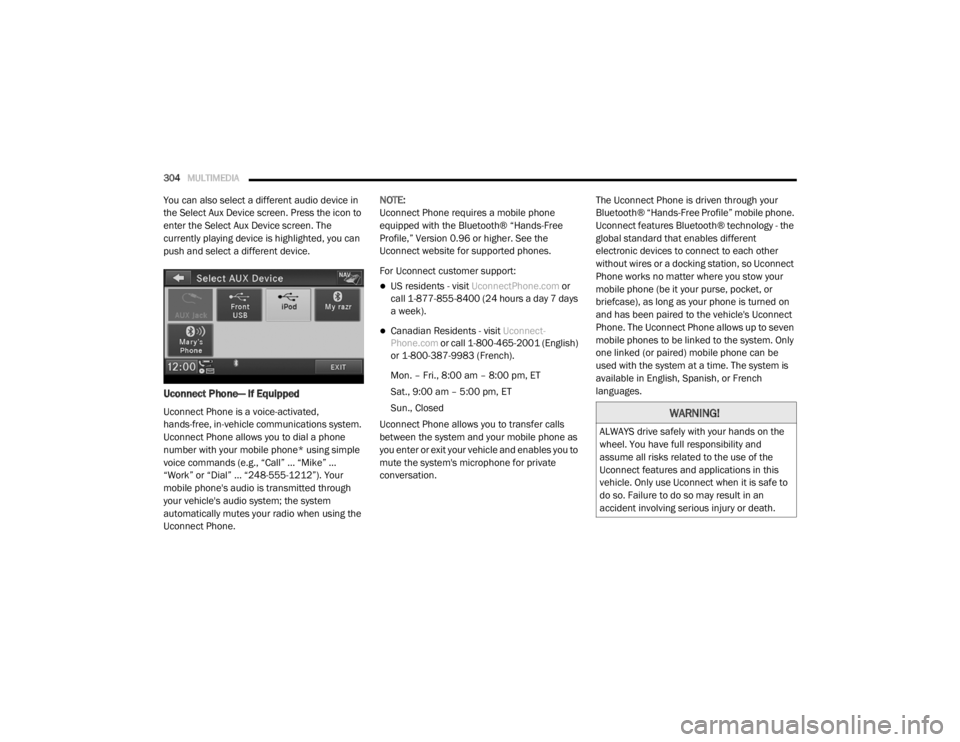
You can also select a different audio device in
the Select Aux Device screen. Press the icon to
enter the Select Aux Device screen. The
currently playing device is highlighted, you can
push and select a different device.
Uconnect Phone— If Equipped
Uconnect Phone is a voice-activated,
hands-free, in-vehicle communications system.
Uconnect Phone allows you to dial a phone
number with your mobile phone* using simple
voice commands (e.g., “Call” … “Mike” …
“Work” or “Dial” … “248-555-1212”). Your
mobile phone's audio is transmitted through
your vehicle's audio system; the system
automatically mutes your radio when using the
Uconnect Phone. NOTE:
Uconnect Phone requires a mobile phone
equipped with the Bluetooth® “Hands-Free
Profile,” Version 0.96 or higher. See the
Uconnect website for supported phones.
For Uconnect customer support:
US residents - visit
UconnectPhone.com or
call 1-877-855-8400 (24 hours a day 7 days
a week).
Canadian Residents - visit Uconnect-
Phone.com or call 1-800-465-2001 (English)
or 1-800-387-9983 (French).
Mon. – Fri., 8:00 am – 8:00 pm, ET
Sat., 9:00 am – 5:00 pm, ET
Sun., Closed
Uconnect Phone allows you to transfer calls
between the system and your mobile phone as
you enter or exit your vehicle and enables you to
mute the system's microphone for private
conversation. The Uconnect Phone is driven through your
Bluetooth® “Hands-Free Profile” mobile phone.
Uconnect features Bluetooth® technology - the
global standard that enables different
electronic devices to connect to each other
without wires or a docking station, so Uconnect
Phone works no matter where you stow your
mobile phone (be it your purse, pocket, or
briefcase), as long as your phone is turned on
and has been paired to the vehicle's Uconnect
Phone. The Uconnect Phone allows up to seven
mobile phones to be linked to the system. Only
one linked (or paired) mobile phone can be
used with the system at a time. The system is
available in English, Spanish, or French
languages.
WARNING!
ALWAYS drive safely with your hands on the
wheel. You have full responsibility and
assume all risks related to the use of the
Uconnect features and applications in this
vehicle. Only use Uconnect when it is safe to
do so. Failure to do so may result in an
accident involving serious injury or death.
20_RT_OM_EN_USC_t.book Page 304
Page 314 of 380
312MULTIMEDIA
NOTE:
The emergency number dialed is based on
the country where the vehicle is purchased
(911 for the US and Canada and 060 for
Mexico). The number dialed may not be appli -
cable with the available mobile service and
area.
If supported, this number may be program -
mable on some systems. To do this, push the
Phone button and say “Setup,” followed
by “Emergency.”
The Uconnect Phone does slightly lower your
chances of successfully making a phone call. Roadside Assistance/Towing Assistance
If you need roadside assistance:
Push the Phone button to begin.
After the “Ready” prompt and the following
beep, say “Towing Assistance”.
NOTE:
You should program the desired Towing
Assistance phone number using the Voice
Command system. To do this, push the Phone
button and say “Setup,” followed by “Towing
Assistance.” When prompted say
1-800-521-2779 for U.S., 1-800-363-4869 for
Canada, 55-14-3454 for Mexico City and
1-800-712-3040 for outside Mexico City in
Mexico.
Paging
To learn how to page, refer to “Working With
Automated Systems.” Paging works properly
except for pagers of certain companies, which
time out a little too soon to work properly with
the Uconnect Phone.
Voice Mail Calling
To learn how to access your voice mail, refer to
“Working With Automated Systems.” Working With Automated Systems
This method is used in instances where one
generally has to press numbers on the mobile
phone keypad while navigating through an
automated telephone system.
You can use your Uconnect Phone to access a
voice mail system or an automated service,
such as a paging service or automated
customer service line. Some services require
immediate response selection. In some
instances, that may be too quick for use of the
Uconnect Phone.
When calling a number with your Uconnect
Phone that normally requires you to enter in a
touch-tone sequence on your mobile phone
keypad, you can push the Voice Recognition
button and say the sequence you wish to
enter, followed by the word “Send.” For
example, if required to enter your PIN followed
with a pound, (3 7 4 6 #), you can push the
Voice Recognition button and say, “3 7 4 6 #
Send.” Saying a number, or sequence of
numbers, followed by “Send,” is also to be used
for navigating through an automated customer
service center menu structure, and to leave a
number on a pager.
WARNING!
To use your Uconnect Phone System in an
emergency, your mobile phone must be:
Turned on.
Paired to the Uconnect System.
Have network coverage.
20_RT_OM_EN_USC_t.book Page 312
Page 351 of 380
MULTIMEDIA349
15. SETUP – When in a video mode, push the
SETUP button to access the display settings
(see the display settings section) to access
the DVD setup menu, select the menu
button on the radio. When a disc is loaded
in the DVD player (if equipped) and the VES
mode is selected and the disc is stopped,
push the SETUP button to access the DVD
Setup menu.
16. BACK – When navigating in menu mode, push to return to the previous screen. When
navigating a DVD’s disc menu, the
operation depends on the disc’s contents.
17. ◂◂ – In radio modes, push to seek to the
previous tunable station. In disc modes,
push and hold to fast rewind through the
current audio track or video chapter. In
menu modes, use to navigate in the menu.
18. ENTER/OK – Push to select the highlighted option in a menu.
19. ▴ / NEXT – In radio modes, push to select to
the next station. In disc modes, push to
advance to the next audio track or video
chapter. In menu modes, use to navigate in
the menu.Remote Control Storage
The video screen comes with a built-in storage
compartment for the remote control which is
accessible when the screen is opened. To
remove the remote, use your index finger to pull
and rotate the remote towards you. Do not try to
pull the remote straight down as it will be very
difficult to remove. To return the remote back
into its storage area, insert one long edge of the
remote into the two retaining clips first, and
then rotate the remote back up into the other
two retaining clips until it snaps back into
position.
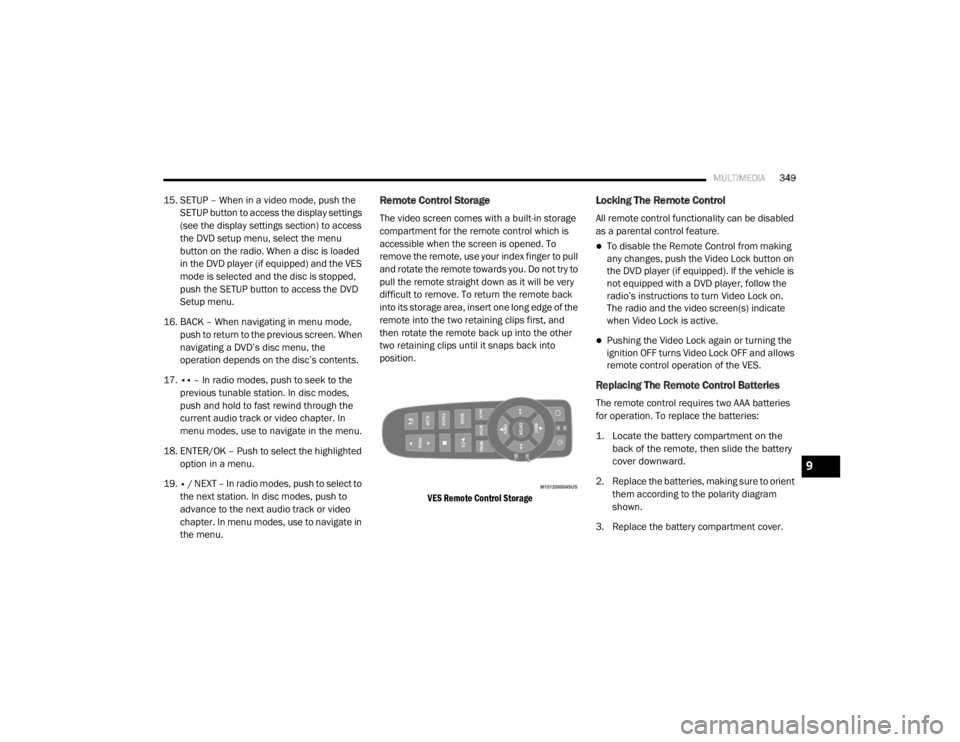
VES Remote Control Storage
Locking The Remote Control
All remote control functionality can be disabled
as a parental control feature.
To disable the Remote Control from making
any changes, push the Video Lock button on
the DVD player (if equipped). If the vehicle is
not equipped with a DVD player, follow the
radio’s instructions to turn Video Lock on.
The radio and the video screen(s) indicate
when Video Lock is active.
Pushing the Video Lock again or turning the
ignition OFF turns Video Lock OFF and allows
remote control operation of the VES.
Replacing The Remote Control Batteries
The remote control requires two AAA batteries
for operation. To replace the batteries:
1. Locate the battery compartment on the back of the remote, then slide the battery
cover downward.
2. Replace the batteries, making sure to orient them according to the polarity diagram
shown.
3. Replace the battery compartment cover.
9
20_RT_OM_EN_USC_t.book Page 349
Page 370 of 380

368
INDEX
A
About Your Brakes......................................... 266Adding Engine Coolant (Antifreeze)............... 240Adding Fuel.................................................... 181Adding Washing Fluid.................................... 232Additives, Fuel............................................... 268AdjustDown........................................................... 28Forward....................................................... 28Rearward..................................................... 28Up................................................................ 28Air Bag........................................................... 132Air Bag Operation...................................... 133Air Bag Warning Light................................ 131Driver Knee Air Bag................................... 134Enhanced Accident Response......... 138, 225Event Data Recorder (EDR)....................... 225If Deployment Occurs................................ 138Knee Impact Bolsters................................ 134Maintaining Your Air Bag System.............. 139Maintenance............................................. 139Side Air Bags............................................. 134Transporting Pets...................................... 159Air Bag Light..................................94, 131, 160Air Cleaner, Engine
(Engine Air Cleaner Filter).............................. 235
Air Conditioner Maintenance........................ 235Air Conditioner Refrigerant........................... 235Air Conditioner System................................. 235Air Conditioning................................................ 56Automatic Rear............................................ 51Rear............................................................. 45Air Conditioning Filter..............................58, 235Air Conditioning, Operating Tips....................... 57Air Filter........................................................ 235Air PressureTires......................................................... 253AlarmArm The System.......................................... 15Disarm The System..................................... 15Security Alarm............................................. 97Alterations/ModificationsVehicle........................................................... 8Antifreeze (Engine Coolant)................. 240, 271Disposal................................................... 242Anti-Lock Brake System (ABS)...................... 103Anti-Lock Warning Light................................... 97Ashtray............................................................. 78Assist, Hill Start............................................. 108Assistance Towing........................................ 312Automatic Dimming Mirror............................... 34Automatic Door Locks............................... 17, 18
Automatic Headlights.......................................38Automatic Transmission....................... 165, 244Adding Fluid..................................... 244, 274Fluid And Filter Change............................. 244Fluid Change............................................. 244Fluid Level Check............................. 243, 244Fluid Type........................................ 243, 274Gear Ranges............................................. 168Special Additives...................................... 244Torque Converter...................................... 172Axle Fluid....................................................... 274Axle Lubrication............................................ 274
B
Battery................................................... 95, 232Charging System Light.................................95Jump Starting........................................... 219Keyless Key Fob Replacement....................10Battery Saver Feature......................................39Belts, Seat.................................................... 160Body Mechanism Lubrication........................ 237B-Pillar Location............................................ 249Brake Assist System..................................... 104Brake Control System, Electronic.................. 104Brake Fluid.................................................... 274
20_RT_OM_EN_USC_t.book Page 368
Page 371 of 380

369
Brake System
...................................... 242, 266Anti-Lock (ABS).......................................... 266Fluid Check..................................... 243, 274Parking...................................................... 164Warning Light.............................................. 94Brake/Transmission Interlock....................... 166Bulb Replacement......................................... 194Bulbs, Light.......................................... 161, 194
C
Calibration Compass
..................................................... 89Camera, Rear................................................ 179Capacities, Fluid............................................ 271Caps, FillerOil (Engine)................................................ 231Power Steering.......................................... 173Radiator (Coolant Pressure)...................... 241Car Washes................................................... 263Carbon Monoxide Warning.................. 159, 270CargoVehicle Loading........................................... 63Cargo Area Cover............................................. 63Cargo Compartment........................................ 63Luggage Carrier........................................... 79Cellular Phone..................................... 304, 359Center High Mounted Stop Light...................197Certification Label......................................... 182Chains, Tire.................................................... 260Change Oil Indicator........................................ 87
Changing A Flat Tire............................. 202, 244Chart, Tire Sizing........................................... 246Check Engine Light
(Malfunction Indicator Light)......................... 102Checking Your Vehicle For Safety................. 159Checks, Safety.............................................. 159Child Restraint.............................................. 141Child RestraintsBooster Seats........................................... 144Child Seat Installation..................... 153, 155How To Stow An unused ALR Seat Belt.... 152Infant And Child Restraints....................... 142Locating The LATCH Anchorages.............. 149Lower Anchors And Tethers For Children.. 146Older Children And Child Restraints......... 143Seating Positions...................................... 145Using The Top Tether Anchorage.............. 157Clean Air Gasoline......................................... 268CleaningWheels..................................................... 259Climate Control................................................ 42Automatic.................................................... 48Manual........................................................ 42Coat Hook........................................................ 73Cold Weather Operation............................... 163Compact Spare Tire...................................... 257Compass.......................................................... 88Calibration................................................... 89Variance...................................................... 89Computer, Trip/Travel............................... 87, 93
Console............................................................69Floor............................................................69Console, Overhead...........................................71Contract, Service........................................... 365Cooling Pressure Cap (Radiator Cap)............ 241Cooling System............................................. 239Adding Coolant (Antifreeze)...................... 240Cooling Capacity....................................... 271Disposal Of Used Coolant......................... 242Drain, Flush, And Refill............................. 240Inspection................................................. 240Points To Remember................................ 242Pressure Cap............................................ 241Radiator Cap............................................. 241Selection Of Coolant
(Antifreeze).............................240, 271, 272Corrosion Protection..................................... 262Cruise Light................................................... 100Cupholders............................................. 73, 265Customer Assistance.................................... 364Cybersecurity................................................ 275
D
Daytime Brightness, Interior Lights..................41Daytime Running Lights............................37, 38Dealer Service............................................... 233Defroster, Windshield................................... 160Delay (Intermittent) Wipers..............................42Diagnostic System, Onboard......................... 101
11
20_RT_OM_EN_USC_t.book Page 369
Page 372 of 380

370
Dimmer Switch Headlight
.............................................. 37, 38DipsticksAutomatic Transmission............................ 244Oil (Engine)................................................ 232Power Steering.......................................... 173Disabled Vehicle Towing................................ 224DisposalAntifreeze (Engine Coolant)....................... 242Door Ajar................................................... 95, 96Door Ajar Light.......................................... 95, 96Door LocksAutomatic.................................................... 17Doors............................................................... 16Driver’s Seat Back Tilt..................................... 20DrivingThrough Flowing, Rising, Or Shallow
Standing Water
......................................... 192DVD Player (Video Entertainment System).... 344
E
Economy (Fuel) Mode.................................... 167Electric Brake Control System....................... 104Anti-Lock Brake System............................. 103Traction Control System............................ 109Electric Remote Mirrors................................... 36Electrical Power Outlets................................... 75Electronic Speed Control (Cruise Control)...... 173
Electronic Stability Control (ESC).................. 105Electronic Throttle Control Warning Light......... 95Emergency, In Case OfFreeing Vehicle When Stuck..................... 223Hazard Warning Flasher........................... 194Jacking................................... 202, 206, 244Jump Starting........................................... 219Emission Control System Maintenance........ 102Engine........................................................... 231Air Cleaner................................................ 235Block Heater............................................. 163Break-In Recommendations..................... 163Checking Oil Level.................................... 232Compartment........................................... 231Compartment Identification...................... 231Coolant (Antifreeze).................................. 272Cooling..................................................... 239Exhaust Gas Caution....................... 159, 270Fails To Start............................................ 163Flooded, Starting...................................... 163Oil........................................... 233, 271, 272Oil Filler Cap............................................. 231Oil Filter.................................................... 234Oil Selection.................................... 233, 271Oil Synthetic............................................. 234Overheating.............................................. 221Starting..................................................... 162
Engine Oil Viscosity....................................... 234Engine Oil Viscosity Chart.............................. 234Enhanced Accident Response
Feature................................................ 138, 225Ethanol.......................................................... 268Exhaust Gas Cautions.......................... 159, 270Exhaust System................................... 159, 238Exterior Lighting...............................................37Exterior Lights............................... 37, 161, 194
F
FiltersAir Cleaner
................................................ 235Air Conditioning................................. 58, 235Engine Oil........................................ 234, 272Engine Oil Disposal................................... 234FlashersHazard Warning........................................ 194Turn Signals............37, 100, 161, 196, 197Flash-To-Pass............................................ 37, 38Flooded Engine Starting................................ 163Floor Console...................................................69Fluid Capacities............................................ 271Fluid Leaks.................................................... 161Fluid Level ChecksAutomatic Transmission........................... 244Brake........................................................ 243Power Steering......................................... 173
20_RT_OM_EN_USC_t.book Page 370
Page 373 of 380

371
Fluid, Brake
................................................... 274Fluids And Lubricants.................................... 272Fog Lights........................................ 37, 39, 196Fog Lights, Service......................................... 196Fold In Floor (Stow ‘n Go) Seating.................... 21Fold-Flat Seats................................................. 20Freeing A Stuck Vehicle................................. 223Fuel............................................................... 267Adding....................................................... 181Additives................................................... 268Clean Air.................................................... 268Economy Mode.......................................... 167Ethanol...................................................... 268Gasoline.................................................... 267Materials Added........................................ 268Methanol................................................... 268Octane Rating................................. 267, 272Specifications............................................ 272Tank Capacity............................................ 271Fueling........................................................... 181Fuses................................................... 197, 198
G
Garage Door Opener (HomeLink).................... 63Gasoline, (Fuel)............................................. 267Gasoline, Clean Air........................................ 268Gasoline, Reformulated................................. 268Gear Ranges.................................................. 168
Gear Selector Override................................. 222Glass Cleaning.............................................. 265Gross Axle Weight Rating.............................. 183Gross Vehicle Weight Rating......................... 183GVWR............................................................ 182
H
Hands-Free Phone Uconnect
.................................................. 304HazardDriving Through Flowing, Rising,
Or Shallow Standing Water
....................... 192Hazard Warning Flashers.............................. 194Head Restraints............................................... 30Headlights....................................................... 37Automatic.................................................... 38Bulb Replacement.................................... 196Cleaning................................................... 263High Beam/Low Beam Select Switch... 37, 38Lights On Reminder.............................. 37, 39Passing................................................. 37, 38Replacing................................................. 196Switch.......................................................... 37Time Delay............................................ 37, 38Heated Mirrors.......................................... 34, 37Heater, Engine Block.................................... 163
High Beam/Low Beam Select
(Dimmer) Switch..............................................38Hill Start Assist.............................................. 108HitchesTrailer Towing........................................... 184HomeLink (Garage Door Opener).....................63Hood Prop........................................................61Hood Release...................................................61Hook, Coat.......................................................73
I
Ignition.............................................................11Switch..........................................................11Inside Rearview Mirror.....................................35Instrument Cluster...........................................82Descriptions....................................... 84, 100Display.........................................................85Display Controls...........................................85Menu Items.................................................87Instrument Panel Lens Cleaning................... 265Integrated Power Module (Fuses)................. 198Interior And Instrument Lights.........................39Interior Appearance Care.............................. 264Interior Lights...................................................39Intermittent Wipers (Delay Wipers)..................42InverterPower...........................................................77iPod/USB/MP3 Control................................. 340Bluetooth Streaming Audio.............. 343, 362
11
20_RT_OM_EN_USC_t.book Page 371