interior lights DODGE GRAND CARAVAN 2020 Owners Manual
[x] Cancel search | Manufacturer: DODGE, Model Year: 2020, Model line: GRAND CARAVAN, Model: DODGE GRAND CARAVAN 2020Pages: 380, PDF Size: 14.92 MB
Page 4 of 380

2
INTRODUCTION
HOW TO USE THIS MANUAL .................................. 8
Essential Information .................................... 8
Symbols .......................................................... 8
WARNINGS AND CAUTIONS ................................. 8
VEHICLE MODIFICATIONS/ALTERATIONS ........... 8
GETTING TO KNOW YOUR VEHICLE
KEYS ........................................................................ 9
Key Fobs ......................................................... 9
IGNITION SWITCH .................................................11
Wireless Ignition Node (WIN) ...................... 11
REMOTE START — IF EQUIPPED .........................12
How To Use Remote Start ........................... 12
Remote Start Abort Messages .................... 12
To Enter Remote Start Mode ...................... 12
To Exit Remote Start Mode Without
Driving The Vehicle ..................................... 13 To Exit Remote Start Mode And Drive The
Vehicle .......................................................... 13 General Information .................................... 13
SENTRY KEY ..........................................................13
Key Programming ....................................... 14
Replacement Keys....................................... 14
General Information .................................... 14
VEHICLE SECURITY ALARM — IF EQUIPPED .....15
Rearming Of The System............................. 15
To Arm The System ..................................... 15
To Disarm The System ................................ 15
Tamper Alert................................................. 16 DOORS .................................................................. 16
Manual Door Locks...................................... 16
Power Door Locks — If Equipped ............... 17
Power Sliding Side Door — If Equipped ...... 18
Child Locks ................................................... 19
SEATS .................................................................... 20
Manual Adjustment (Front Seats) — If
Equipped ...................................................... 20 Manual Adjustment (Rear Seats) ............... 21
Power Seats — If Equipped ......................... 27
Heated Seats — If Equipped ....................... 28
Plastic Grocery Bag Retainer Hooks........... 30
HEAD RESTRAINTS .............................................. 30
Supplemental Active Head Restraints
— Front Seats ............................................... 30 Head Restraints — Second Row Quad
Seats............................................................. 31 Head Restraints — Second Row Bench ...... 32
Head Restraints — Third Row...................... 32
STEERING WHEEL ............................................... 33
Tilt/Telescoping Steering Column .............. 33
Heated Steering Wheel — If Equipped ....... 34
MIRRORS .............................................................. 34
Automatic Dimming Mirror
— If Equipped .............................................. 34 Automatic Dimming Mirror With Rear
View Camera Display — If Equipped ........... 35 Outside Mirrors ........................................... 35
Interior Observation Mirror.......................... 36
Power Mirrors — If Equipped ...................... 36
Outside Mirrors Folding Feature ................. 36 Heated Mirrors — If Equipped ..................... 37
Illuminated Vanity Mirrors
— If Equipped .............................................. 37
EXTERIOR LIGHTS ...............................................37
Headlight Switch.......................................... 37
Multifunction Lever .................................... 37
Daytime Running Lights (DRLs)
— If Equipped ............................................... 38 High/Low Beam Switch .............................. 38
Flash-To-Pass ............................................... 38
Automatic Headlights ................................. 38
Headlights On With Wipers
— If Equipped ............................................... 38 Headlight Delay — If Equipped.................... 38
Lights-On Reminder ..................................... 39
Front Fog Lights — If Equipped .................. 39
Turn Signals ................................................. 39
Lane Change Assist ..................................... 39
Battery Protection ....................................... 39
INTERIOR LIGHTS ................................................39
Courtesy/Interior Lighting ........................... 39
WINDSHIELD WIPER AND WASHERS ...............41
Windshield Wiper Operation ....................... 41
Rear Wiper And Washer .............................. 42
CLIMATE CONTROLS ...........................................42
Manual Climate Control Overview .............. 42
Automatic Climate Control Overview .......... 48
Climate Control Functions........................... 56
Automatic Temperature Control (ATC)
— If Equipped ............................................... 56 Operating Tips ............................................. 57
20_RT_OM_EN_USC_t.book Page 2
Page 18 of 380
16GETTING TO KNOW YOUR VEHICLE
(Continued)
NOTE:
The driver's door key cylinder and the liftgate
button on the key fob cannot arm or disarm
the vehicle security alarm.
The vehicle security alarm remains armed
during power liftgate entry. Pushing the lift-
gate button will not disarm the vehicle secu -
rity alarm. If someone enters the vehicle
through the liftgate and opens any door, the
alarm will sound.
When the vehicle security alarm is armed,
the interior power door lock switches will not
unlock the doors.
The vehicle security alarm is designed to protect
your vehicle. However, you can create
conditions where the system will give you a false
alarm. If one of the previously described arming
sequences has occurred, the vehicle security
alarm will arm regardless of whether you are in
the vehicle or not. If you remain in the vehicle
and open a door, the alarm will sound. If this
occurs, disarm the vehicle security alarm. If the vehicle security alarm is armed and the
battery becomes disconnected, the vehicle
security alarm will remain armed when the
battery is reconnected; the exterior lights will
flash, and the horn will sound. If this occurs,
disarm the vehicle security alarm.
Tamper Alert
If something has triggered the vehicle security
alarm in your absence, the horn will sound three
times and the exterior lights will blink three
times when you disarm the vehicle security
alarm. Check the vehicle for tampering.
DOORS
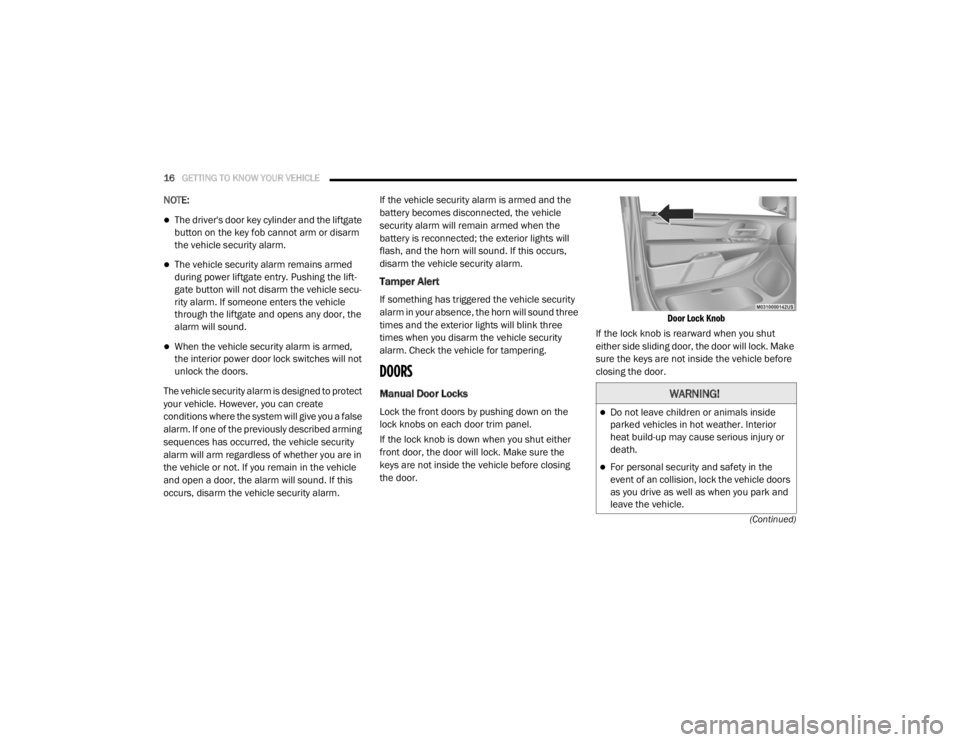
Manual Door Locks
Lock the front doors by pushing down on the
lock knobs on each door trim panel.
If the lock knob is down when you shut either
front door, the door will lock. Make sure the
keys are not inside the vehicle before closing
the door.
Door Lock Knob
If the lock knob is rearward when you shut
either side sliding door, the door will lock. Make
sure the keys are not inside the vehicle before
closing the door.
WARNING!
Do not leave children or animals inside
parked vehicles in hot weather. Interior
heat build-up may cause serious injury or
death.
For personal security and safety in the
event of an collision, lock the vehicle doors
as you drive as well as when you park and
leave the vehicle.
20_RT_OM_EN_USC_t.book Page 16
Page 39 of 380
GETTING TO KNOW YOUR VEHICLE37
Heated Mirrors — If Equipped
These mirrors are heated to melt frost
or ice. This feature will be activated
whenever you turn on the rear window
defroster (if equipped). Refer to “Climate
Controls” in this chapter for further information.
Illuminated Vanity Mirrors — If Equipped
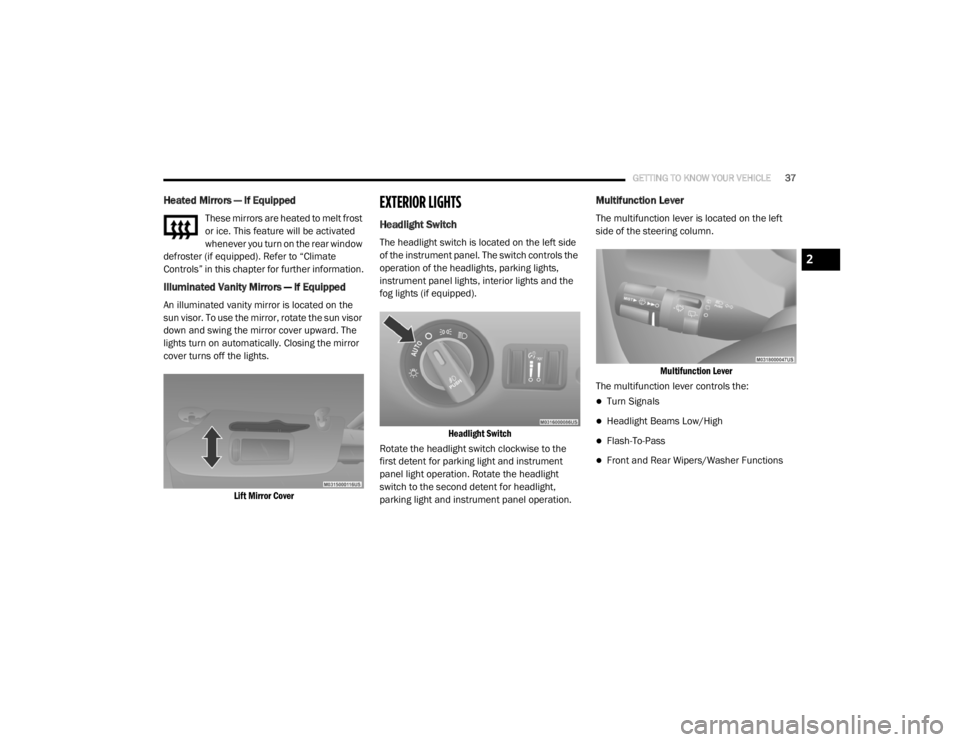
An illuminated vanity mirror is located on the
sun visor. To use the mirror, rotate the sun visor
down and swing the mirror cover upward. The
lights turn on automatically. Closing the mirror
cover turns off the lights.
Lift Mirror Cover
EXTERIOR LIGHTS
Headlight Switch
The headlight switch is located on the left side
of the instrument panel. The switch controls the
operation of the headlights, parking lights,
instrument panel lights, interior lights and the
fog lights (if equipped).
Headlight Switch
Rotate the headlight switch clockwise to the
first detent for parking light and instrument
panel light operation. Rotate the headlight
switch to the second detent for headlight,
parking light and instrument panel operation.
Multifunction Lever
The multifunction lever is located on the left
side of the steering column.
Multifunction Lever
The multifunction lever controls the:
Turn Signals
Headlight Beams Low/High
Flash-To-Pass
Front and Rear Wipers/Washer Functions
2
20_RT_OM_EN_USC_t.book Page 37
Page 41 of 380

GETTING TO KNOW YOUR VEHICLE39
When exiting the vehicle the driver can choose
to have the headlights remain on for 30, 60 or
90 seconds or not remain on. To change the
timer setting, see an authorized dealer.
The headlight delay time is programmable on
vehicles equipped with an instrument cluster
display. Refer to “Instrument Cluster Display” in
“Getting To Know Your Instrument Panel” for
further information.
If the headlights are turned off before the
ignition, they will turn off in the normal manner.
NOTE:
The headlights must be turned off within 45
seconds of placing the ignition in the OFF
position to activate this feature.
Lights-On Reminder
If the headlights or the parking lights are left on,
or if the dimmer control is in the extreme top
position after the ignition has been placed in
the OFF position, a chime will sound when the
driver's door is opened.
Front Fog Lights — If Equipped
To activate the front fog lights, turn on the
parking lights or the low beam headlights and
push in the headlight switch control knob. Pushing the headlight switch control knob a
second time will turn the front fog lights off.
Turn Signals
Move the multifunction lever up or down and
the arrows on each side of the instrument
cluster display will flash to show proper
operation of the front and rear turn signal lights.
NOTE:
If either light remains on and does not flash, or
there is a very fast flash rate, check for a
defective outside light bulb. If an indicator fails
to light when the lever is moved, it would
suggest that the indicator bulb is defective.
Turn Signal Warning
If the vehicle electronics sense that the vehicle
has traveled at over 18 mph (29 km/h) for
about 1 mile (1.6 km) with the turn signals on, a
chime will sound to alert the driver.
Lane Change Assist
Tap the lever up or down once, without moving
beyond the detent, and the turn signal (right or
left) will flash three times then automatically
turn off.
Battery Protection
This feature provides battery protection to avoid
wearing down the battery if the headlights or
parking lights are left on for extended periods of
time when the ignition is in the OFF position.
After eight minutes of the ignition being placed
in the OFF position, and the headlight switch in
any position other than OFF or AUTO, the lights
will turn off automatically until the next cycle of
the ignition or headlight switch.
The battery protection feature will be disabled if
the ignition is placed in any position other than
OFF during the eight minute delay.
INTERIOR LIGHTS
Courtesy/Interior Lighting
At the forward end of the overhead console are
two courtesy lights (standard dome light has
two buttons). These interior lights are turned on
when a door or the liftgate is opened, the
remote keyless entry key fob is activated, or
when the dimmer control is moved to the
extreme top.
2
20_RT_OM_EN_USC_t.book Page 39
Page 42 of 380

40GETTING TO KNOW YOUR VEHICLE
The interior lights will automatically turn off in
approximately 10 minutes for the first
activation and 90 seconds every activation
thereafter until the engine is started, if one of
the following occur:
A door, sliding door or the liftgate is left open.
Any overhead reading light is left on.
NOTE:
The ignition must be placed in the OFF position
for this feature to operate.
The courtesy lights also function as reading
lights. Push in on each lens to turn these lights
on while inside the vehicle. Push a second time
to turn each light off. You may adjust the
direction of these lights by pushing the outside
ring, which is identified with four directional
arrows (LED lamps only).
Rear Courtesy/Reading Lights — If Equipped
The overhead console has two sets of courtesy
lights. The lights turn on when a front door, a
sliding door or the liftgate is opened. If your
vehicle is equipped with Remote Keyless Entry,
the lights will also turn on when the unlock
button on the key fob is pushed.
The courtesy lights also function as reading
lights. Push in on each lens to turn these lights
on while inside the vehicle. Push the lens a
second time to turn each light off. You may
adjust the direction of these lights by pushing
the outside ring, which is identified with four
directional arrows.
Reading Lights
Rear Console Halo Lighting
Halo lights are strategically placed soft lighting
that help to illuminate specific areas to aid the
occupants in locating specific features while
driving at night.
The rear overhead console has recessed halo
lighting around the perimeter of the console
base. This feature provides additional lighting
options while traveling and is controlled by the
ambient light dimmer control of the headlight
switch.
Ambient Light Dimmer Control
20_RT_OM_EN_USC_t.book Page 40
Page 43 of 380

GETTING TO KNOW YOUR VEHICLE41
Dimmer Controls
The dimmer switch is located next to the
headlight switch.
Instrument Panel Dimmer Control
With the parking lights or headlights on, rotating
the left dimmer control upward will increase the
brightness of the instrument panel lights.
Rotating the left dimmer control completely
upward to the second detent (extreme top
position) will turn on the interior lights. The
interior lights will remain on when the dimmer
control is in this position.
Rotating the left dimmer control to the off
position (extreme bottom) will turn the interior
lights off, and will remain off when the doors or
liftgate are opened.
Parade Mode (Daytime Brightness Feature)
Rotate the dimmer control upward to the first
detent. This feature brightens all text displays
such as the odometer, instrument cluster
display, and radio when the parking lights or
headlights are on.
WINDSHIELD WIPER AND WASHERS
The wipers and washers are operated by a
switch within the multifunction lever. Rotate the
end of the multifunction lever to select the
desired wiper speed.
Washer And Wiper Controls
NOTE:
Always remove any buildup of snow that
prevents the windshield wiper blades from
returning to the off position. If the windshield
wiper switch is turned off and the blades cannot
return to the off position, damage to the wiper
motor may occur.
Windshield Wiper Operation
Rotate the end of the lever upward, to the first
detent past the intermittent settings for
low-speed wiper operation. Rotate the end of
the lever upward to the second detent past the
intermittent settings for high-speed wiper
operation.
WARNING!
Sudden loss of visibility through the
windshield could lead to a collision. You might
not see other vehicles or other obstacles. To
avoid sudden icing of the windshield during
freezing weather, warm the windshield with
the defroster before and during windshield
washer use.
2
20_RT_OM_EN_USC_t.book Page 41
Page 72 of 380
70GETTING TO KNOW YOUR VEHICLE
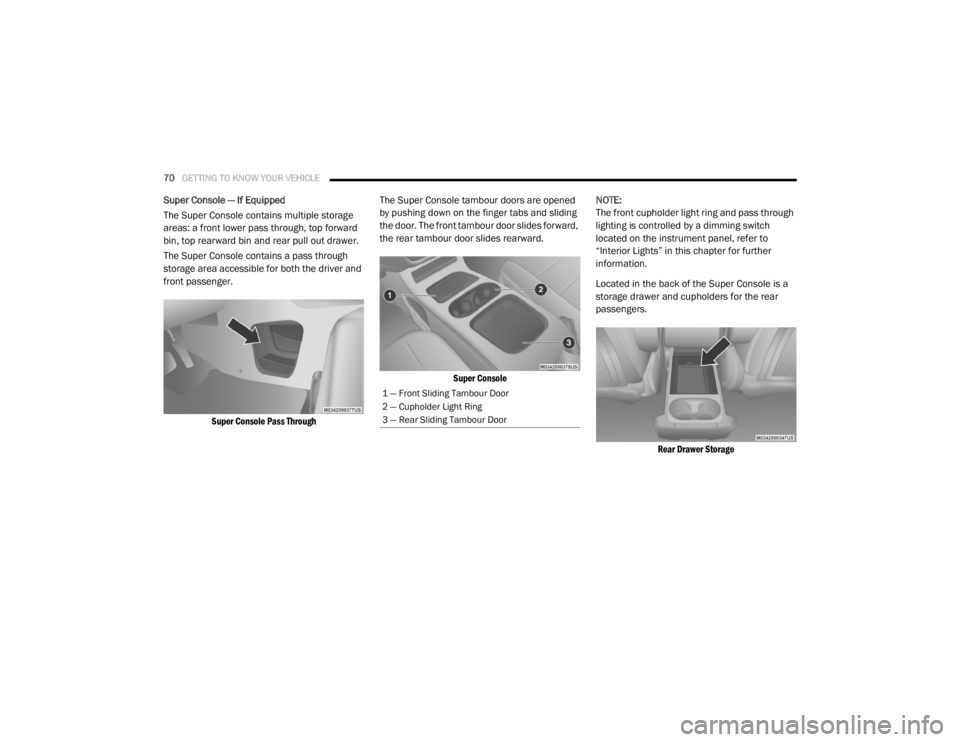
Super Console — If Equipped
The Super Console contains multiple storage
areas: a front lower pass through, top forward
bin, top rearward bin and rear pull out drawer.
The Super Console contains a pass through
storage area accessible for both the driver and
front passenger.
Super Console Pass Through
The Super Console tambour doors are opened
by pushing down on the finger tabs and sliding
the door. The front tambour door slides forward,
the rear tambour door slides rearward.
Super Console
NOTE:
The front cupholder light ring and pass through
lighting is controlled by a dimming switch
located on the instrument panel, refer to
“Interior Lights” in this chapter for further
information.
Located in the back of the Super Console is a
storage drawer and cupholders for the rear
passengers.
Rear Drawer Storage
1 — Front Sliding Tambour Door
2 — Cupholder Light Ring
3 — Rear Sliding Tambour Door
20_RT_OM_EN_USC_t.book Page 70
Page 73 of 380
GETTING TO KNOW YOUR VEHICLE71
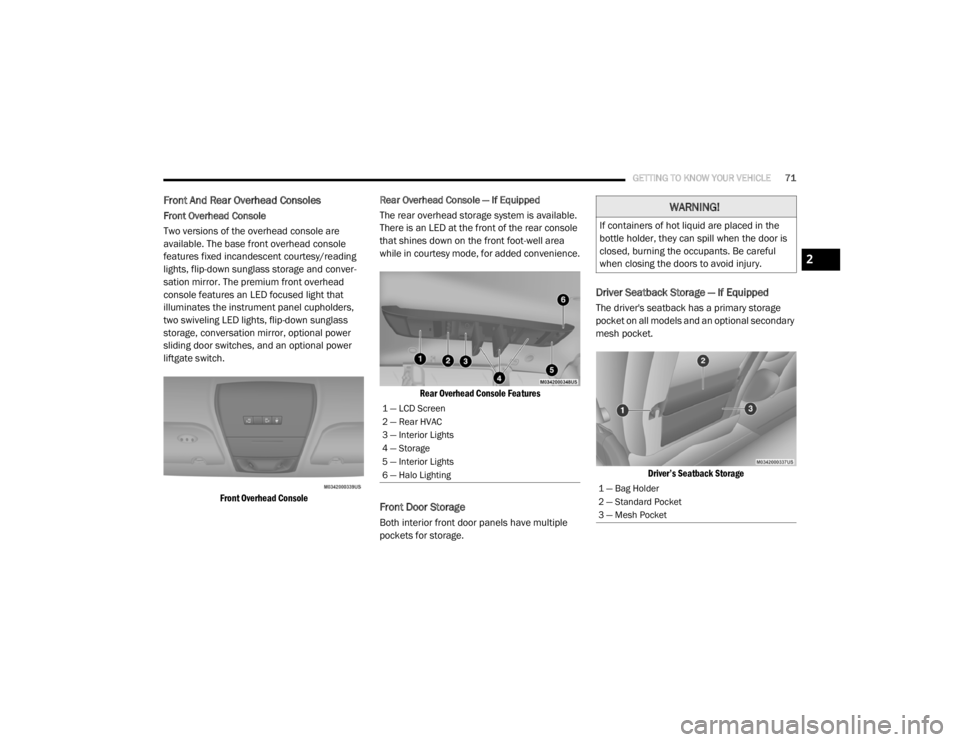
Front And Rear Overhead Consoles
Front Overhead Console
Two versions of the overhead console are
available. The base front overhead console
features fixed incandescent courtesy/reading
lights, flip-down sunglass storage and conver -
sation mirror. The premium front overhead
console features an LED focused light that
illuminates the instrument panel cupholders,
two swiveling LED lights, flip-down sunglass
storage, conversation mirror, optional power
sliding door switches, and an optional power
liftgate switch.
Front Overhead Console
Rear Overhead Console — If Equipped
The rear overhead storage system is available.
There is an LED at the front of the rear console
that shines down on the front foot-well area
while in courtesy mode, for added convenience.
Rear Overhead Console Features
Front Door Storage
Both interior front door panels have multiple
pockets for storage.
Driver Seatback Storage — If Equipped
The driver's seatback has a primary storage
pocket on all models and an optional secondary
mesh pocket.
Driver’s Seatback Storage
1 — LCD Screen
2 — Rear HVAC
3 — Interior Lights
4 — Storage
5 — Interior Lights
6 — Halo Lighting
WARNING!
If containers of hot liquid are placed in the
bottle holder, they can spill when the door is
closed, burning the occupants. Be careful
when closing the doors to avoid injury.
1 — Bag Holder
2 — Standard Pocket
3 — Mesh Pocket
2
20_RT_OM_EN_USC_t.book Page 71
Page 94 of 380

92GETTING TO KNOW YOUR INSTRUMENT PANEL
Headlamp Off Delay
When this feature is selected, the driver can
choose to have the headlights remain on for
0, 30, 60, or 90 seconds when exiting the
vehicle. To make your selection, scroll up or
down until the preferred setting is highlighted,
then push and release the right arrow button
until a check-mark appears next to the setting,
showing that the setting has been selected.
Headlamps With Wipers
(Available With Auto Headlights Only)
When ON is selected, and the headlight switch
is in the AUTO position, the headlights will turn
on approximately 10 seconds after the wipers
are turned on. The headlights will also turn off
when the wipers are turned off if they were
turned on by this feature. To make your
selection, push and release the right arrow
button until a check-mark appears next to the
setting, showing that the setting has been
selected.
NOTE:
Turning the headlights on during the daytime
causes the instrument panel lights to dim. To
increase the brightness, refer to “Interior
Lights” in “Getting To Know Your Vehicle.” Intermittent Wiper Options — If Equipped
When ON is selected, the system will automat
-
ically activate the windshield wipers if it senses
moisture on the windshield. To make your
selection, push and release the right arrow
button until a check-mark appears next to the
feature showing the system has been activated
or the check-mark is removed showing the
system has been deactivated. When the system
is deactivated, the system reverts to the
standard intermittent wiper operation.
Key-Off Power Delay
When this feature is selected, the power
window switches, radio, Uconnect phone
(if equipped), DVD video system (if equipped),
power sunroof (if equipped), and power outlets
will remain active for up to 10 minutes after the
ignition switch is turned OFF. Opening either
front vehicle door will cancel this feature. To
make your selection, scroll up or down until the
preferred setting is highlighted, then push and
release the right arrow button until a
check-mark appears next to the setting,
showing that the setting has been selected. Illuminated Approach
When this feature is selected, the headlights
will activate and remain on for up to 90 seconds
when the doors are unlocked with the key fob.
To make your selection, scroll
up or down until
the preferred setting is highlighted, then push
and release the right arrow button until a
check-mark appears next to the setting,
showing that the setting has been selected.
Hill Start Assist (HSA) — If Equipped
When on is selected, the HSA system is active.
Refer to “Electronic Brake Control System” in
“Safety” for system function and operating
information. To make your selection, push and
release the right arrow button until “ON” or
“OFF” appears.
Flashers With Sliding Door
When this feature is selected, the signal lamps
activate when power or manual sliding doors
are in operation, signaling other drivers that
someone may be exiting or entering the vehicle.
To make your selection, push and release the
right arrow button until a check-mark appears
next to the feature showing the system has
been activated or the check-mark is removed,
showing the system has been deactivated.
20_RT_OM_EN_USC_t.book Page 92
Page 140 of 380

138SAFETY
If A Deployment Occurs
The front air bags are designed to deflate
immediately after deployment.
NOTE:
Front and/or side air bags will not deploy in all
collisions. This does not mean something is
wrong with the air bag system.
If you do have a collision which deploys the air
bags, any or all of the following may occur:
The air bag material may sometimes cause
abrasions and/or skin reddening to the occu -
pants as the air bags deploy and unfold. The
abrasions are similar to friction rope burns or
those you might get sliding along a carpet or
gymnasium floor. They are not caused by
contact with chemicals. They are not perma -
nent and normally heal quickly. However, if
you haven’t healed significantly within a few
days, or if you have any blistering, see your
doctor immediately.
As the air bags deflate, you may see some
smoke-like particles. The particles are a
normal by-product of the process that gener -
ates the non-toxic gas used for air bag infla -
tion. These airborne particles may irritate the
skin, eyes, nose, or throat. If you have skin or
eye irritation, rinse the area with cool water.
For nose or throat irritation, move to fresh air.
If the irritation continues, see your doctor. If
these particles settle on your clothing, follow
the garment manufacturer’s instructions for
cleaning.
Do not drive your vehicle after the air bags have
deployed. If you are involved in another
collision, the air bags will not be in place to
protect you. NOTE:
Air bag covers may not be obvious in the inte
-
rior trim, but they will open during air bag
deployment.
After any collision, the vehicle should be
taken to an authorized dealer immediately.
Enhanced Accident Response System
In the event of an impact, if the communication
network remains intact, and the power remains
intact, depending on the nature of the event,
the ORC will determine whether to have the
Enhanced Accident Response System perform
the following functions:
Cut off fuel to the engine (if equipped)
Cut off battery power to the electric motor (if
equipped)
Flash hazard lights as long as the battery has
power
Turn on the interior lights, which remain on
as long as the battery has power or for
15 minutes from the intervention of the
Enhanced Accident Response System
Unlock the power door locks
WARNING!
Deployed air bags and seat belt
pretensioners cannot protect you in another
collision. Have the air bags, seat belt
pretensioners, and the seat belt retractor
assemblies replaced by an authorized dealer
immediately. Also, have the Occupant
Restraint Controller System serviced as well.
20_RT_OM_EN_USC_t.book Page 138