stop start DODGE HORNET 2023 Owners Manual
[x] Cancel search | Manufacturer: DODGE, Model Year: 2023, Model line: HORNET, Model: DODGE HORNET 2023Pages: 288, PDF Size: 14.2 MB
Page 6 of 288
4
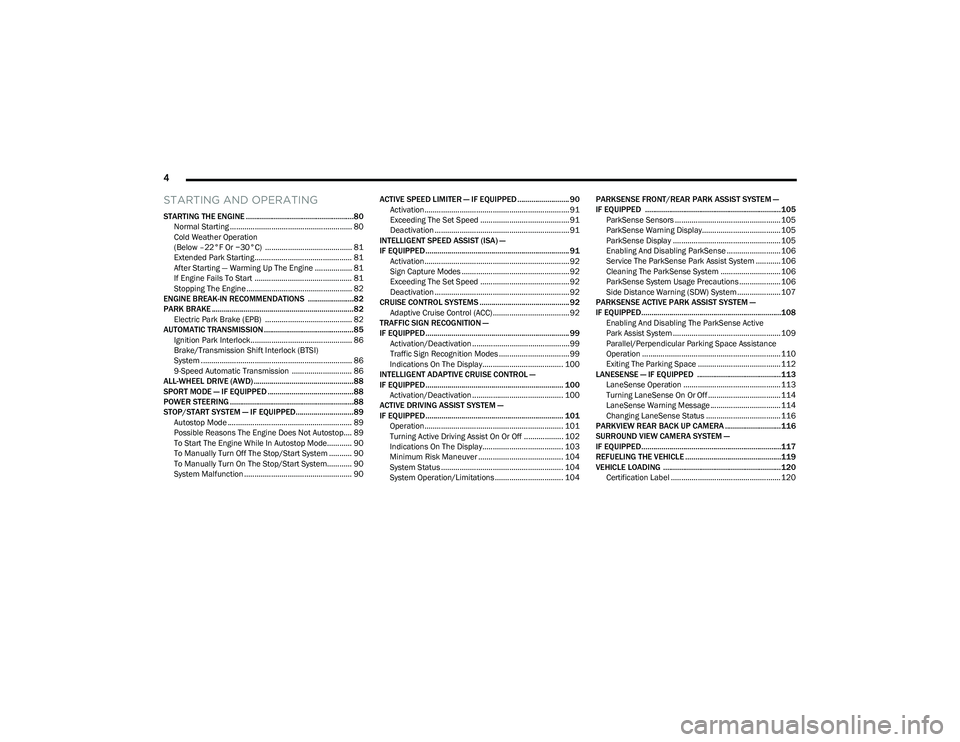
STARTING AND OPERATING
STARTING THE ENGINE ......................................................80
Normal Starting ........................................................... 80
Cold Weather Operation
(Below –22°F Or −30°C) .......................................... 81
Extended Park Starting............................................... 81
After Starting — Warming Up The Engine .................. 81
If Engine Fails To Start ............................................... 81
Stopping The Engine ................................................... 82
ENGINE BREAK-IN RECOMMENDATIONS .......................82
PARK BRAKE ....................................................................... 82 Electric Park Brake (EPB) .......................................... 82
AUTOMATIC TRANSMISSION .............................................85 Ignition Park Interlock................................................. 86
Brake/Transmission Shift Interlock (BTSI)
System ......................................................................... 86
9-Speed Automatic Transmission ............................. 86
ALL-WHEEL DRIVE (AWD) ..................................................88
SPORT MODE — IF EQUIPPED ...........................................88
POWER STEERING ..............................................................88
STOP/START SYSTEM — IF EQUIPPED.............................89 Autostop Mode ............................................................ 89
Possible Reasons The Engine Does Not Autostop.... 89
To Start The Engine While In Autostop Mode............ 90
To Manually Turn Off The Stop/Start System ........... 90
To Manually Turn On The Stop/Start System............ 90
System Malfunction .................................................... 90 ACTIVE SPEED LIMITER — IF EQUIPPED .......................... 90
Activation...................................................................... 91
Exceeding The Set Speed ........................................... 91
Deactivation ................................................................. 91
INTELLIGENT SPEED ASSIST (ISA) —
IF EQUIPPED ........................................................................ 91 Activation...................................................................... 92
Sign Capture Modes .................................................... 92
Exceeding The Set Speed ........................................... 92
Deactivation ................................................................. 92
CRUISE CONTROL SYSTEMS ............................................. 92 Adaptive Cruise Control (ACC)..................................... 92
TRAFFIC SIGN RECOGNITION —
IF EQUIPPED ........................................................................ 99 Activation/Deactivation ............................................... 99
Traffic Sign Recognition Modes .................................. 99
Indications On The Display....................................... 100
INTELLIGENT ADAPTIVE CRUISE CONTROL —
IF EQUIPPED ..................................................................... 100 Activation/Deactivation ............................................ 100
ACTIVE DRIVING ASSIST SYSTEM —
IF EQUIPPED ..................................................................... 101 Operation................................................................... 101
Turning Active Driving Assist On Or Off ................... 102
Indications On The Display....................................... 103
Minimum Risk Maneuver ......................................... 104
System Status ........................................................... 104
System Operation/Limitations................................. 104 PARKSENSE FRONT/REAR PARK ASSIST SYSTEM —
IF EQUIPPED ....................................................................105
ParkSense Sensors ................................................... 105
ParkSense Warning Display...................................... 105ParkSense Display .................................................... 105
Enabling And Disabling ParkSense .......................... 106
Service The ParkSense Park Assist System ............ 106
Cleaning The ParkSense System ............................. 106
ParkSense System Usage Precautions .................... 106
Side Distance Warning (SDW) System..................... 107
PARKSENSE ACTIVE PARK ASSIST SYSTEM —
IF EQUIPPED......................................................................108 Enabling And Disabling The ParkSense Active
Park Assist System .................................................... 109
Parallel/Perpendicular Parking Space Assistance
Operation ................................................................... 110Exiting The Parking Space ........................................ 112
LANESENSE — IF EQUIPPED .......................................... 113 LaneSense Operation ............................................... 113Turning LaneSense On Or Off ................................... 114
LaneSense Warning Message .................................. 114
Changing LaneSense Status .................................... 116
PARKVIEW REAR BACK UP CAMERA ............................ 116
SURROUND VIEW CAMERA SYSTEM —
IF EQUIPPED......................................................................117
REFUELING THE VEHICLE ................................................119
VEHICLE LOADING ...........................................................120 Certification Label ..................................................... 120
23_GG_OM_EN_USC_t.book Page 4
Page 13 of 288
11
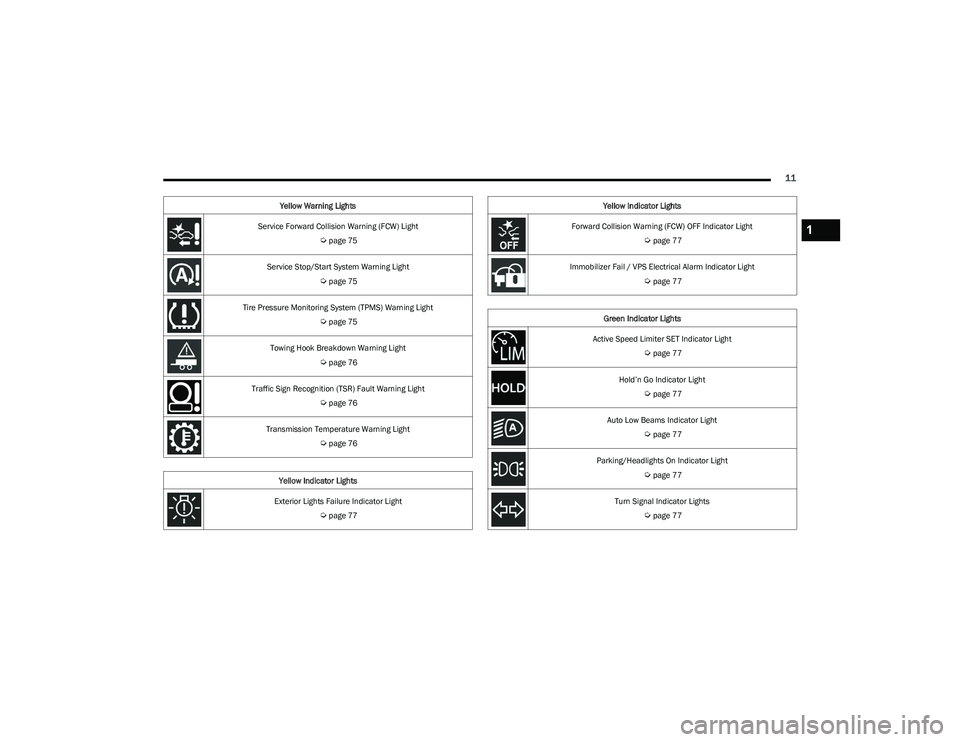
Service Forward Collision Warning (FCW) Light
Úpage 75
Service Stop/Start System Warning Light
Úpage 75
Tire Pressure Monitoring System (TPMS) Warning Light
Úpage 75
Towing Hook Breakdown Warning Light
Úpage 76
Traffic Sign Recognition (TSR) Fault Warning Light
Úpage 76
Transmission Temperature Warning Light
Úpage 76
Yellow Indicator Lights
Exterior Lights Failure Indicator Light
Úpage 77
Yellow Warning Lights
Forward Collision Warning (FCW) OFF Indicator Light
Úpage 77
Immobilizer Fail / VPS Electrical Alarm Indicator Light
Úpage 77
Green Indicator Lights
Active Speed Limiter SET Indicator Light
Úpage 77
Hold’n Go Indicator Light
Úpage 77
Auto Low Beams Indicator Light
Úpage 77
Parking/Headlights On Indicator Light
Úpage 77
Turn Signal Indicator Lights
Úpage 77
Yellow Indicator Lights
1
23_GG_OM_EN_USC_t.book Page 11
Page 14 of 288
12
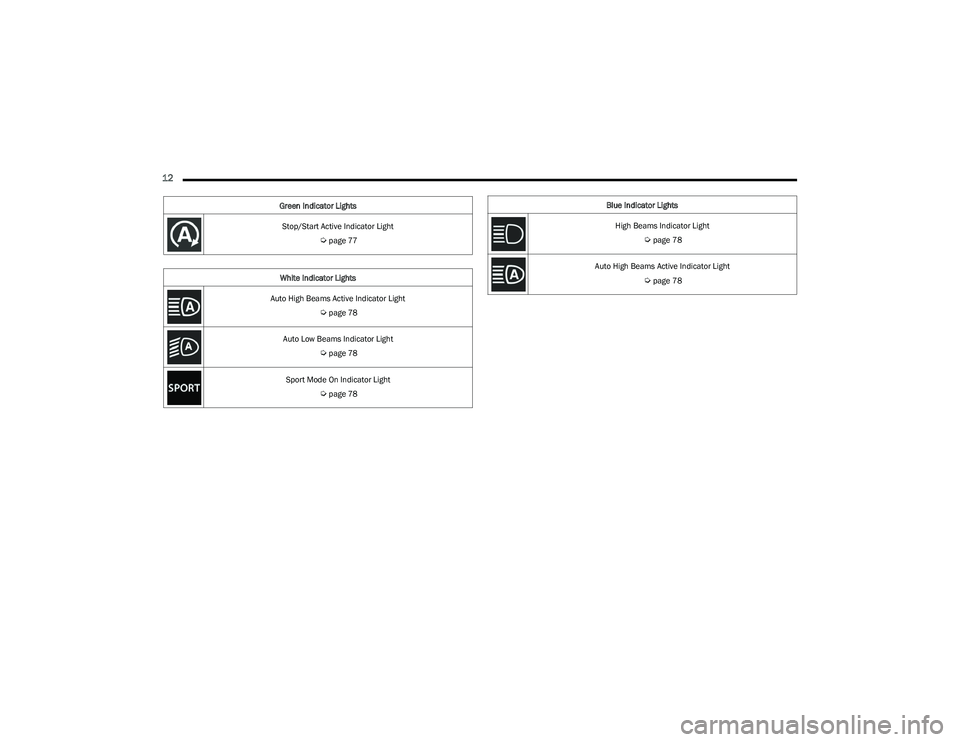
Stop/Start Active Indicator Light
Úpage 77
White Indicator Lights
Auto High Beams Active Indicator Light
Úpage 78
Auto Low Beams Indicator Light
Úpage 78
Sport Mode On Indicator Light
Úpage 78
Green Indicator Lights
Blue Indicator Lights
High Beams Indicator Light
Úpage 78
Auto High Beams Active Indicator Light
Úpage 78
23_GG_OM_EN_USC_t.book Page 12
Page 17 of 288
GETTING TO KNOW YOUR VEHICLE15
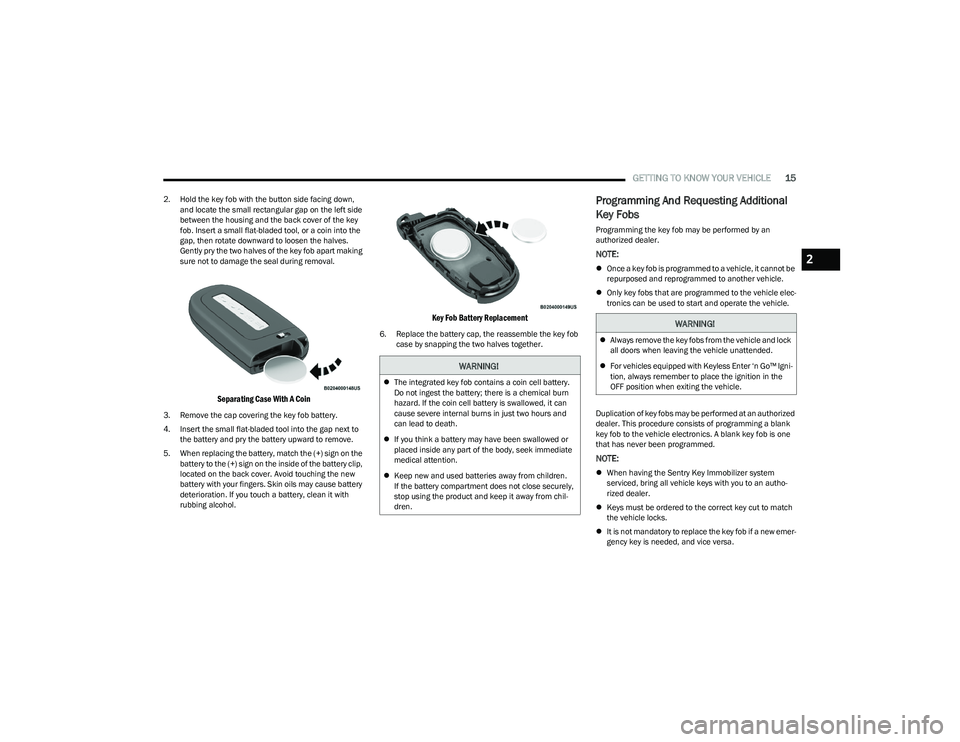
2. Hold the key fob with the button side facing down,
and locate the small rectangular gap on the left side
between the housing and the back cover of the key
fob. Insert a small flat-bladed tool, or a coin into the
gap, then rotate downward to loosen the halves.
Gently pry the two halves of the key fob apart making
sure not to damage the seal during removal.
Separating Case With A Coin
3. Remove the cap covering the key fob battery.
4. Insert the small flat-bladed tool into the gap next to the battery and pry the battery upward to remove.
5. When replacing the battery, match the (+) sign on the battery to the (+) sign on the inside of the battery clip,
located on the back cover. Avoid touching the new
battery with your fingers. Skin oils may cause battery
deterioration. If you touch a battery, clean it with
rubbing alcohol.
Key Fob Battery Replacement
6. Replace the battery cap, the reassemble the key fob case by snapping the two halves together.
Programming And Requesting Additional
Key Fobs
Programming the key fob may be performed by an
authorized dealer.
NOTE:
Once a key fob is programmed to a vehicle, it cannot be
repurposed and reprogrammed to another vehicle.
Only key fobs that are programmed to the vehicle elec -
tronics can be used to start and operate the vehicle.
Duplication of key fobs may be performed at an authorized
dealer. This procedure consists of programming a blank
key fob to the vehicle electronics. A blank key fob is one
that has never been programmed.
NOTE:
When having the Sentry Key Immobilizer system
serviced, bring all vehicle keys with you to an autho -
rized dealer.
Keys must be ordered to the correct key cut to match
the vehicle locks.
It is not mandatory to replace the key fob if a new emer -
gency key is needed, and vice versa.
WARNING!
The integrated key fob contains a coin cell battery.
Do not ingest the battery; there is a chemical burn
hazard. If the coin cell battery is swallowed, it can
cause severe internal burns in just two hours and
can lead to death.
If you think a battery may have been swallowed or
placed inside any part of the body, seek immediate
medical attention.
Keep new and used batteries away from children.
If the battery compartment does not close securely,
stop using the product and keep it away from chil -
dren.
WARNING!
Always remove the key fobs from the vehicle and lock
all doors when leaving the vehicle unattended.
For vehicles equipped with Keyless Enter ‘n Go™ Igni -
tion, always remember to place the ignition in the
OFF position when exiting the vehicle.
2
23_GG_OM_EN_USC_t.book Page 15
Page 18 of 288
16GETTING TO KNOW YOUR VEHICLE
SENTRY KEY
The Sentry Key Immobilizer system prevents unauthorized
vehicle operation by disabling the engine. The system
does not need to be armed or activated. Operation is
automatic, regardless of whether the vehicle is locked or
unlocked.
The system uses a key fob, keyless push button ignition
and a Radio Frequency (RF) receiver to prevent
unauthorized vehicle operation. Therefore, only key fobs
that are programmed to the vehicle can be used to start
and operate the vehicle. The system cannot reprogram a
key fob obtained from another vehicle.
After placing the ignition in the ON/RUN position, the
Vehicle Security Light will turn on for three seconds for a
bulb check. If the light remains on after the bulb check, it
indicates that there is a problem with the electronics. In
addition, if the light begins to flash after the bulb check, it
indicates that someone attempted to start the engine with
an invalid key fob. In the event that a valid key fob is used
to start the engine but there is an issue with the vehicle
electronics, the engine will start and shut off after two
seconds.
If the Vehicle Security Light turns on during normal vehicle
operation (vehicle running for longer than 10 seconds), it
indicates that there is a fault in the electronics. Should
this occur, have the vehicle serviced as soon as possible
by an authorized dealer. All of the key fobs provided with your new vehicle have
been programmed to the vehicle electronics
Úpage 275.
NOTE:A key fob that has not been programmed is also
considered an invalid key.
IGNITION SWITCH
KEYLESS ENTER ‘N GO™ IGNITION
This feature allows the driver to operate the ignition with
the push of a button as long as the key fob is in the
passenger compartment.
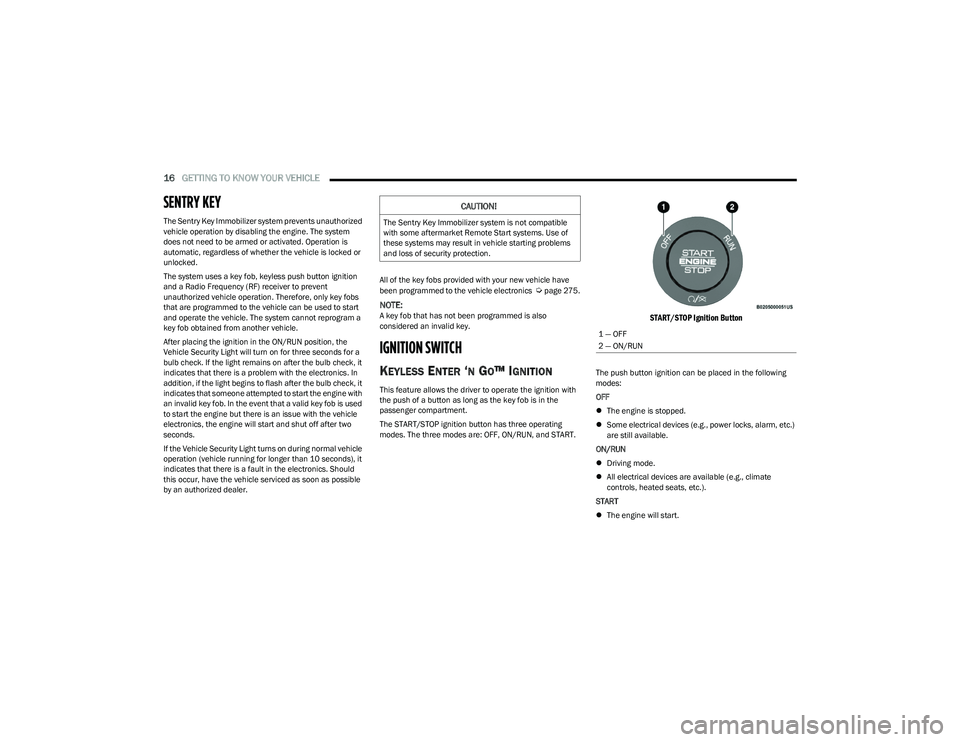
The START/STOP ignition button has three operating
modes. The three modes are: OFF, ON/RUN, and START.
START/STOP Ignition Button
The push button ignition can be placed in the following
modes:
OFF
The engine is stopped.
Some electrical devices (e.g., power locks, alarm, etc.)
are still available.
ON/RUN
Driving mode.
All electrical devices are available (e.g., climate
controls, heated seats, etc.).
START
The engine will start.
CAUTION!
The Sentry Key Immobilizer system is not compatible
with some aftermarket Remote Start systems. Use of
these systems may result in vehicle starting problems
and loss of security protection.
1 — OFF
2 — ON/RUN
23_GG_OM_EN_USC_t.book Page 16
Page 19 of 288
GETTING TO KNOW YOUR VEHICLE17
Starting The Engine With A Depleted Key Fob Battery
If the ignition state/mode does not change with the push
of a button, the key fob may have a low or depleted
battery. In this situation, a backup method can be used to
operate the ignition switch:
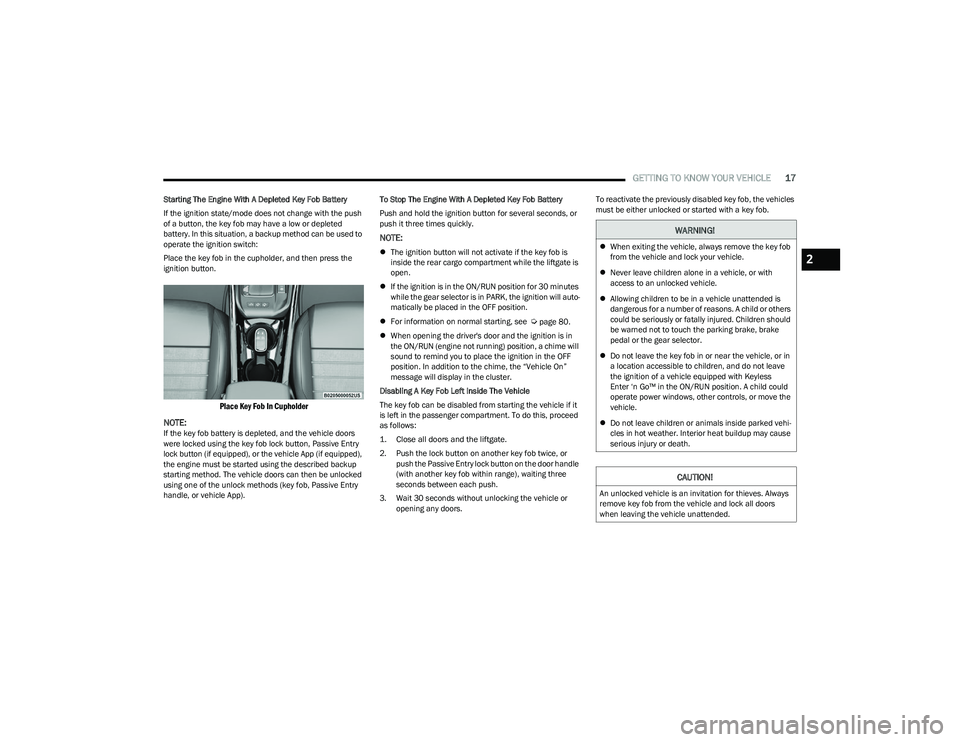
Place the key fob in the cupholder, and then press the
ignition button.
Place Key Fob In Cupholder
NOTE:
If the key fob battery is depleted, and the vehicle doors
were locked using the key fob lock button, Passive Entry
lock button (if equipped), or the vehicle App (if equipped),
the engine must be started using the described backup
starting method. The vehicle doors can then be unlocked
using one of the unlock methods (key fob, Passive Entry
handle, or vehicle App). To Stop The Engine With A Depleted Key Fob Battery
Push and hold the ignition button for several seconds, or
push it three times quickly.
NOTE:
The ignition button will not activate if the key fob is
inside the rear cargo compartment while the liftgate is
open.
If the ignition is in the ON/RUN position for 30 minutes
while the gear selector is in PARK, the ignition will auto -
matically be placed in the OFF position.
For information on normal starting, see
Úpage 80.
When opening the driver's door and the ignition is in
the ON/RUN (engine not running) position, a chime will
sound to remind you to place the ignition in the OFF
position. In addition to the chime, the “Vehicle On”
message will display in the cluster.
Disabling A Key Fob Left Inside The Vehicle
The key fob can be disabled from starting the vehicle if it
is left in the passenger compartment. To do this, proceed
as follows:
1. Close all doors and the liftgate.
2. Push the lock button on another key fob twice, or push the Passive Entry lock button on the door handle
(with another key fob within range), waiting three
seconds between each push.
3. Wait 30 seconds without unlocking the vehicle or opening any doors. To reactivate the previously disabled key fob, the vehicles
must be either unlocked or started with a key fob.
WARNING!
When exiting the vehicle, always remove the key fob
from the vehicle and lock your vehicle.
Never leave children alone in a vehicle, or with
access to an unlocked vehicle.
Allowing children to be in a vehicle unattended is
dangerous for a number of reasons. A child or others
could be seriously or fatally injured. Children should
be warned not to touch the parking brake, brake
pedal or the gear selector.
Do not leave the key fob in or near the vehicle, or in
a location accessible to children, and do not leave
the ignition of a vehicle equipped with Keyless
Enter ‘n Go™ in the ON/RUN position. A child could
operate power windows, other controls, or move the
vehicle.
Do not leave children or animals inside parked vehi -
cles in hot weather. Interior heat buildup may cause
serious injury or death.
CAUTION!
An unlocked vehicle is an invitation for thieves. Always
remove key fob from the vehicle and lock all doors
when leaving the vehicle unattended.
2
23_GG_OM_EN_USC_t.book Page 17
Page 21 of 288
GETTING TO KNOW YOUR VEHICLE19
TO EXIT REMOTE START MODE
To drive the vehicle after starting the Remote Start
system, push and release the START/STOP ignition button
prior to the end of the 15 minute cycle.
The Remote Start system will turn the engine off if the
Remote Start button on the key fob is pushed again, or if
the engine is allowed to run for the entire 15 minute cycle.
Once the ignition is placed in the ON/RUN position, the
climate controls will resume previously set operations
(temperature, blower control, etc.).
NOTE:
For vehicles not equipped with the Keyless
Enter ‘n Go™ — Passive Entry feature, the ignition
switch must be in the ON/RUN position in order to drive
the vehicle.
For vehicles equipped with the Keyless Enter ‘n Go™ —
Passive Entry feature, the message “Remote Start
Active — Push Start Button” will show in the instrument
cluster display until you push the START/STOP ignition
button.
To avoid unintentional shutdowns, the system will
disable for two seconds after receiving a valid
Remote Start request.
REMOTE START FRONT DEFROST
A
CTIVATION — IF EQUIPPED
When Remote Start is active, and the outside ambient
temperature is 40°F (4.5°C) or below, the system will
automatically activate front defrost for 15 minutes or less.
The timing is dependent on the ambient temperature.
Once the timer expires, the system will automatically
adjust the settings depending on ambient conditions. See
“Remote Start Comfort Systems — If Equipped” in the next
section for detailed operation.
REMOTE START COMFORT SYSTEMS —
I
F EQUIPPED
When Remote Start is activated, the front and rear defrost
will automatically turn on in cold weather. The heated
steering wheel and driver heated seat feature will turn on
if programmed in the Comfort menu screen within
Uconnect Settings
Úpage 130. In warm weather, the
driver vented seat feature will automatically turn on when
Remote Start is activated, if programmed in the Comfort
menu screen. The vehicle will adjust the climate control
settings depending on the outside ambient temperature.
Automatic Temperature Control (ATC) — If Equipped
The climate controls will automatically adjust to the
optimal temperature and mode settings depending on the
outside ambient temperature. This will occur until the
ignition is placed in the ON/RUN position where the
climate controls will resume their previous settings. Manual Temperature Control (MTC) — If Equipped
In ambient temperatures of 40°F (4.5°C) or below, the
climate settings will default to maximum heat, with
fresh air entering the cabin. If the front defrost timer
expires, the vehicle will enter Mix mode.
In ambient temperatures from 40°F (4.5°C) to 78°F
(26°C), the climate settings will be based on the last
settings selected by the driver.
In ambient temperatures of 78°F (26°C) or above, the
climate settings will default to MAX A/C, Bi-Level mode,
with Recirculation on.
For more information on ATC, MTC, and climate control
settings, see
Úpage 46.
NOTE:These features will stay on through the duration of Remote
Start, or until the ignition is placed in the ON/RUN
position. The climate control settings will change, and exit
the automatic defaults, if manually adjusted by the driver
while the vehicle is in Remote Start mode. This includes
turning the climate controls off using the OFF button.
REMOTE START WINDSHIELD WIPER
D
E-ICER ACTIVATION — IF EQUIPPED
When Remote Start is active and the outside ambient
temperature is less than 33°F (0.6°C), the Windshield
Wiper De-Icer will activate. Exiting Remote Start will
resume its previous operation. If the Windshield Wiper
De-Icer was active, the timer and operation will continue.
2
23_GG_OM_EN_USC_t.book Page 19
Page 29 of 288
GETTING TO KNOW YOUR VEHICLE27
For information on use with the Remote Start system, see Úpage 19.
DRIVER MEMORY SETTINGS — IF EQUIPPED
This feature allows the driver to save up to two different
memory profiles for easy recall through a memory switch.
Each memory profile saves desired position settings for
the following features:
Driver seat position
A set of desired radio station presets
Memory Switches
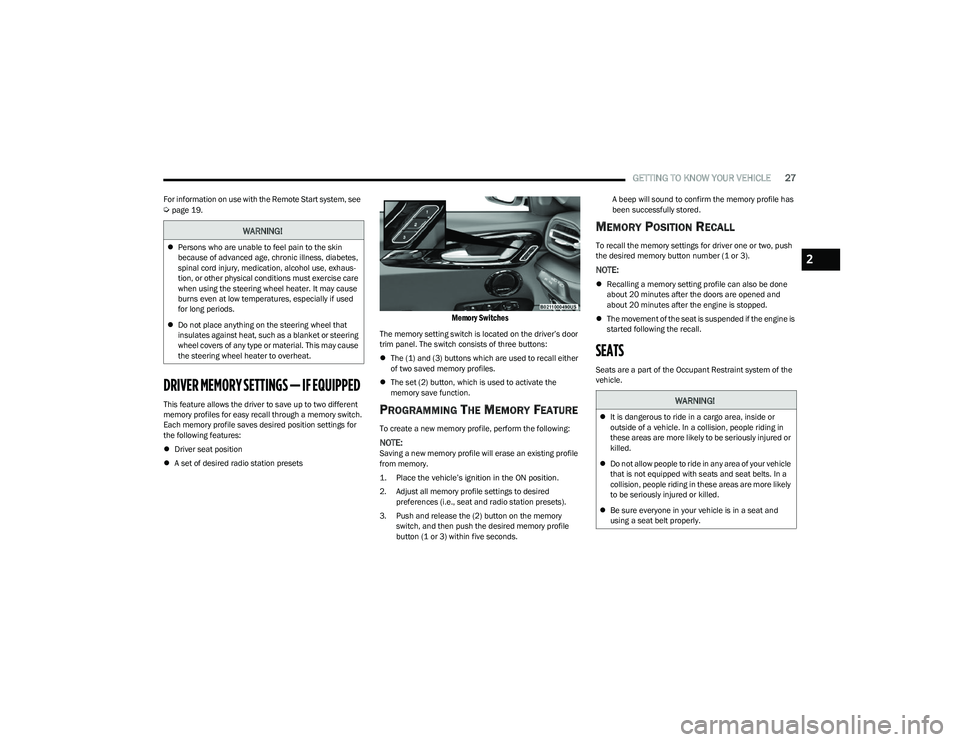
The memory setting switch is located on the driver’s door
trim panel. The switch consists of three buttons:
The (1) and (3) buttons which are used to recall either
of two saved memory profiles.
The set (2) button, which is used to activate the
memory save function.
PROGRAMMING THE MEMORY FEATURE
To create a new memory profile, perform the following:
NOTE:Saving a new memory profile will erase an existing profile
from memory.
1. Place the vehicle’s ignition in the ON position.
2. Adjust all memory profile settings to desired
preferences (i.e., seat and radio station presets).
3. Push and release the (2) button on the memory switch, and then push the desired memory profile
button (1 or 3) within five seconds. A beep will sound to confirm the memory profile has
been successfully stored.
MEMORY POSITION RECALL
To recall the memory settings for driver one or two, push
the desired memory button number (1 or 3).
NOTE:
Recalling a memory setting profile can also be done
about 20 minutes after the doors are opened and
about 20 minutes after the engine is stopped.
The movement of the seat is suspended if the engine is
started following the recall.
SEATS
Seats are a part of the Occupant Restraint system of the
vehicle.
WARNING!
Persons who are unable to feel pain to the skin
because of advanced age, chronic illness, diabetes,
spinal cord injury, medication, alcohol use, exhaus -
tion, or other physical conditions must exercise care
when using the steering wheel heater. It may cause
burns even at low temperatures, especially if used
for long periods.
Do not place anything on the steering wheel that
insulates against heat, such as a blanket or steering
wheel covers of any type or material. This may cause
the steering wheel heater to overheat.
WARNING!
It is dangerous to ride in a cargo area, inside or
outside of a vehicle. In a collision, people riding in
these areas are more likely to be seriously injured or
killed.
Do not allow people to ride in any area of your vehicle
that is not equipped with seats and seat belts. In a
collision, people riding in these areas are more likely
to be seriously injured or killed.
Be sure everyone in your vehicle is in a seat and
using a seat belt properly.
2
23_GG_OM_EN_USC_t.book Page 27
Page 35 of 288
GETTING TO KNOW YOUR VEHICLE33
UCONNECT VOICE RECOGNITION QUICK
TIPS — IF EQUIPPED
INTRODUCING VOICE RECOGNITION
Start using Uconnect Voice Recognition with these helpful
quick tips. It provides the key Voice Commands and tips
you need to know to control your vehicle’s Voice
Recognition (VR) system.
BASIC VOICE COMMANDS
The following Voice Commands can be given at any point
while using your Uconnect system.
Push the Voice Recognition (VR) button. You can also say
the Wake Up word “Hey, Dodge” or “Hey, Uconnect”.
After the beep, say:
“Cancel ” to stop a current voice session.
“Help ” to hear a list of suggested Voice Commands.
“Repeat ” to listen to the system prompts again.
Notice the visual cues that inform you of your Voice
Recognition system’s status.
GET STARTED
The VR button is used to activate/deactivate your Voice
Recognition system. You can also use the system’s “Wake
Up” word to activate voice recognition. The Wake Up word
can be set through the Uconnect Settings
Úpage 130.
Helpful hints for using Voice Recognition:
Reduce background noise. Wind noise and passenger
conversations are examples of noise that may impact
recognition.
Speak clearly at a normal pace and volume while facing
straight ahead.
Each time you give a Voice Command, first push the
VR button or say the Wake Up word, wait until after the
beep, then say your Voice Command.
You can interrupt the help message or system prompts
by pushing the VR button and saying a Voice Command
from the current category.
You can also interrupt the help message or system
prompts by speaking. This feature is called “barge-in”
and can be set through the Uconnect Settings
Úpage 130.
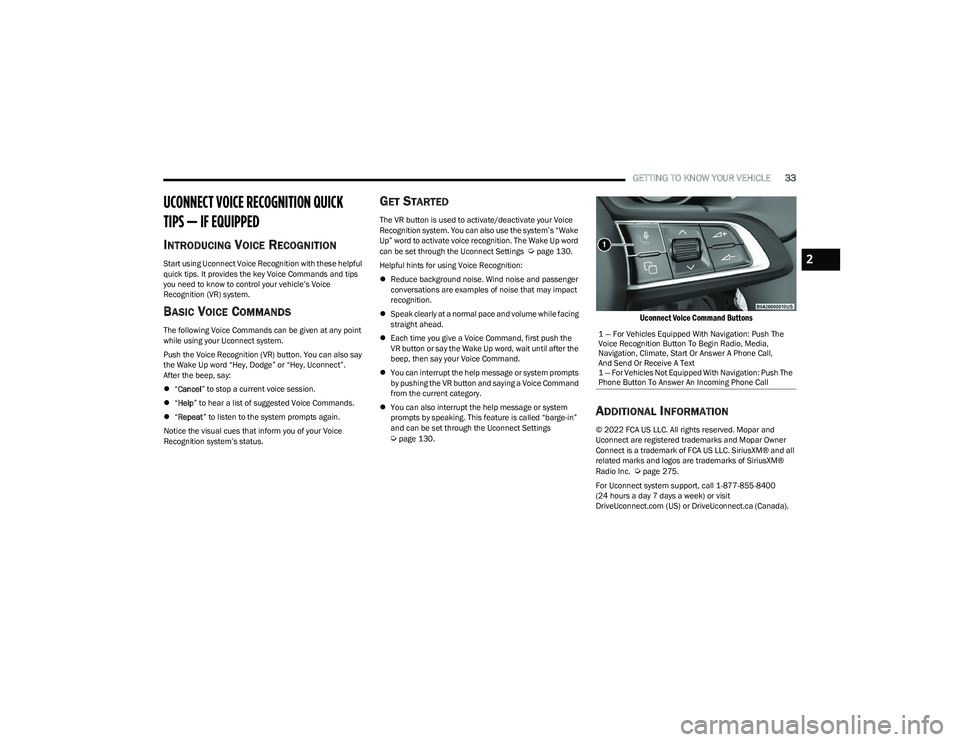
Uconnect Voice Command Buttons
ADDITIONAL INFORMATION
© 2022 FCA US LLC. All rights reserved. Mopar and
Uconnect are registered trademarks and Mopar Owner
Connect is a trademark of FCA US LLC. SiriusXM® and all
related marks and logos are trademarks of SiriusXM®
Radio Inc.
Úpage 275.
For Uconnect system support, call 1-877-855-8400
(24 hours a day 7 days a week) or visit
DriveUconnect.com (US) or DriveUconnect.ca (Canada). 1 — For Vehicles Equipped With Navigation: Push The
Voice Recognition Button To Begin Radio, Media,
Navigation, Climate, Start Or Answer A Phone Call,
And Send Or Receive A Text
1 — For Vehicles Not Equipped With Navigation: Push The
Phone Button To Answer An Incoming Phone Call
2
23_GG_OM_EN_USC_t.book Page 33
Page 45 of 288
GETTING TO KNOW YOUR VEHICLE43
Overhead Light Timing
On certain models, to assist getting in and out of the
vehicle at night or in poorly-lit areas, two timed modes
have been provided.
Timing While Getting Into The Vehicle
The overhead lights turn on according to the following
modes:
Will illuminate for approximately three minutes when
the doors are unlocked.
Will illuminate for approximately three minutes when
one of the doors is opened.
Will illuminate for approximately 27 seconds when
each individual door is closed and switch off simultane -
ously when the doors are locked.
Timing is interrupted when the ignition is placed in the
ON/RUN position.
Three Modes Are Available For Turning Off Overhead
Lighting:
When all doors are closed after entering the vehicle,
the three-minute timer will stop and a seconds timer
will start for the interior lights. This timing will stop
when the ignition is placed in the ON/RUN position.
When doors are locked (either with key fob or with the
emergency key inserted in driver side door), the over -
head light turns off.
The interior lights will turn off after 15 minutes to
preserve the battery. Timing While Getting Out Of The Vehicle
After placing the ignition in the OFF position, the overhead
lights will turn on as follows:
For a few seconds after the engine stops.
For approximately three minutes when one of the doors
is opened.
For several seconds when the last door is closed.
The timing stops automatically when the doors are locked.
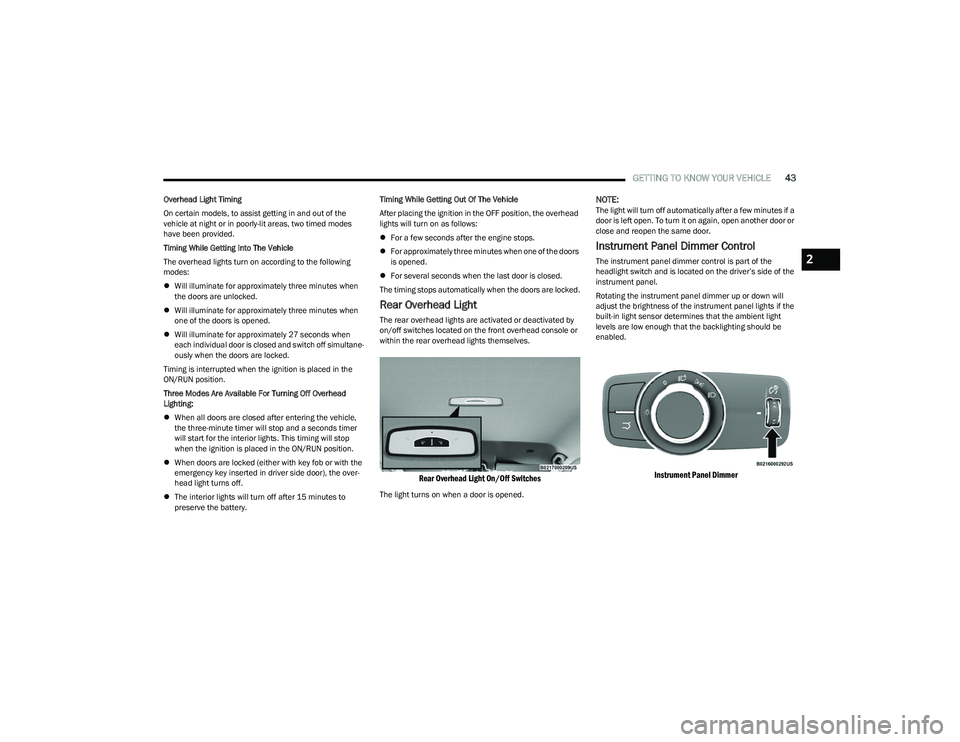
Rear Overhead Light
The rear overhead lights are activated or deactivated by
on/off switches located on the front overhead console or
within the rear overhead lights themselves.
Rear Overhead Light On/Off Switches
The light turns on when a door is opened.
NOTE:The light will turn off automatically after a few minutes if a
door is left open. To turn it on again, open another door or
close and reopen the same door.
Instrument Panel Dimmer Control
The instrument panel dimmer control is part of the
headlight switch and is located on the driver’s side of the
instrument panel.
Rotating the instrument panel dimmer up or down will
adjust the brightness of the instrument panel lights if the
built-in light sensor determines that the ambient light
levels are low enough that the backlighting should be
enabled.
Instrument Panel Dimmer
2
23_GG_OM_EN_USC_t.book Page 43