lock DODGE JOURNEY 2011 1.G Manual PDF
[x] Cancel search | Manufacturer: DODGE, Model Year: 2011, Model line: JOURNEY, Model: DODGE JOURNEY 2011 1.GPages: 557
Page 288 of 557
your selection, touch the Headlights With Wipers soft-
key and select ON or OFF. Then touch the arrow back
soft-key.
•Auto High Beams
Touch the Auto High Beams soft-key to change this
display. When this feature is selected, the high beam
headlights will deactivate automatically under certain
conditions. To make your selection, touch the Auto High
Beams soft-key and select ON or OFF. Then touch the
arrow back soft-key. Refer to “Lights/SmartBeam™ — If
Equipped” in “Understanding The Features Of Your
Vehicle” for further information.
•Daytime Running Lights
Touch the Daytime Running Lights soft-key to change
this display. When this feature is selected, the headlights
will turn on whenever the engine is running. To make your selection, touch the Daytime Running Lights soft-
key and select ON or OFF. Then touch the arrow back
soft-key.
•Steering Directed Lights
Touch the Steering Directed Lights soft-key to change this
display. When this feature is selected, the headlights turn
relative to a change in direction of the steering wheel. To
make your selection, touch the Steering Directed Lights
soft-key and select ON or OFF. Then touch the arrow
back soft-key.
•Flash Headlights With Lock
Touch the Flash Headlights With Lock soft-key to change
this display. When this feature is selected, the headlights
will flash when the doors are locked or unlocked with the
Remote Keyless Entry (RKE) transmitter. This feature
may be selected with or without the sound horn on lock
286 UNDERSTANDING YOUR INSTRUMENT PANEL
Page 289 of 557
feature selected. To make your selection, touch the Flash
Headlights With Lock soft-key and select ON or OFF.
Then touch the arrow back soft-key.
Doors & Locks
•
Auto Unlock On Exit
Touch the Auto Unlock On Exit soft-key to change this
display. When this feature is selected, all doors will
unlock when the vehicle is stopped and the transmission
is in the PARK or NEUTRAL position and the driver’s
door is opened. To make your selection, touch the Auto
Unlock On Exit soft-key and select ON or OFF. Then
touch the arrow back soft-key.
•Flash Lights With Lock
Touch the Flash Lights With Lock soft-key to change this
display. When this feature is selected, the front and rear
turn signals will flash when the doors are locked or unlocked with the Remote Keyless Entry (RKE) transmit-
ter. To make your selection, touch the Flash Lights With
Lock soft-key and select ON or OFF. Then touch the
arrow back soft-key.
•Sound Horn With Remote Start
Touch the Sound Horn With Remote Start soft-key to
change this display. When this feature is selected, the
horn will sound when the remote start is activated. To
make your selection, touch the Sound Horn With Remote
Start soft-key and select ON or OFF. Then touch the
arrow back soft-key.
•Sounds Horn With Lock
Touch the Sounds Horn With Lock soft-key to change this
display. When this feature is selected, the horn will chirp
when the doors are locked or unlocked with the Remote
Keyless Entry (RKE) transmitter. To make your selection,
touch the Sounds Horn With Lock soft-key and select ON
or OFF. Then touch the arrow back soft-key.
4
UNDERSTANDING YOUR INSTRUMENT PANEL 287
Page 290 of 557
•Remote Door Unlock Order
Touch the Remote Door Unlock Order soft-key to change
this display. When Unlock Driver Door Only On 1st Press
is selected, only the driver’s door will unlock on the first
press of the Remote Keyless Entry (RKE) transmitter
UNLOCK button. When Unlock Driver Door Only On 1st
Press is selected, you must press the RKE transmitter
UNLOCK button twice to unlock the passenger’s doors.
When Unlock All Doors On 1st Press is selected, all of the
doors will unlock on the first press of the RKE transmitter
UNLOCK button.
NOTE: If the vehicle is equipped with Keyless Enter-
N-Go (Passive Entry) and the EVIC is programmed to
Unlock All Doors On 1st Press, all doors will unlock no
matter which Passive Entry equipped door handle is
grasped. If Unlock Driver Door Only On 1st Press is
programmed, only the driver ’s door will unlock when
the driver ’s door is grasped. With Passive Entry, if
Unlock Driver Door Only On 1st Press is programmed, touching the handle more than once will only result in
the driver ’s door opening. If Unlock Driver Door Only
On 1st Press is selected, once the driver door is opened,
the interior door lock/unlock switch can be used to
unlock all the doors (or use the RKE transmitter).
•Memory Linked to FOB
Touch the Memory Linked to FOB soft-key to change this
display. This feature provides automatic driver seat po-
sitioning to enhance driver mobility when entering and
exiting the vehicle, driver 1 and driver 2 last mode,
settings and presets. To make your selection, touch the
Memory Linked to FOB soft-key and select ON or OFF.
Then touch the arrow back soft-key.
NOTE: The seat will return to the memorized seat
location (if Recall Memory with Remote Key Unlock is set
to ON) when the RKE transmitter is used to unlock the
door. Refer to “Driver Memory Seat” in “Understanding
The Features Of Your Vehicle” for further information.
288 UNDERSTANDING YOUR INSTRUMENT PANEL
Page 291 of 557
•Passive Entry (Keyless Enter-N-Go)
Touch the Passive Entry soft-key to change this display.
This feature allows you to lock and unlock the vehicle’s
door(s) without having to press the RKE transmitter lock
or unlock buttons. To make your selection, touch the
Passive Entry soft-key and select ON or OFF. Then touch
the arrow back soft-key. Refer to “Keyless Enter-N-Go” in
“Things To Know Before Starting Your Vehicle”.
Heated Seats
•
Auto Heated Seats
Touch the Auto Heated Seats soft-key to change this
display. When this feature is selected, the driver’s heated
seat will automatically turn on when temperatures are
below 40° F (4.4° C). To make your selection, touch the
Auto Heated Seats soft-key and select ON or OFF. Then
touch the arrow back soft-key.
Engine Off Options
•
Headlight Off Delay
Touch the Headlight Off Delay soft-key to change this
display. When this feature is selected, the driver can
choose to have the headlights remain on for 0, 30, 60, or
90 seconds when exiting the vehicle. To change the
Headlight Off Delay status, touch the 0, 30, 60 or 90
soft-key. Then touch the arrow back soft-key.
•Engine Off Power Delay
Touch the Engine Off Power Delay soft-key to change this
display. When this feature is selected, the power window
switches, radio, Uconnect™ phone system (if equipped),
DVD video system (if equipped), power sunroof (if
equipped), and power outlets will remain active for up to
10 minutes after the ignition is cycled to OFF. Opening
either front door will cancel this feature. To change the
4
UNDERSTANDING YOUR INSTRUMENT PANEL 289
Page 295 of 557
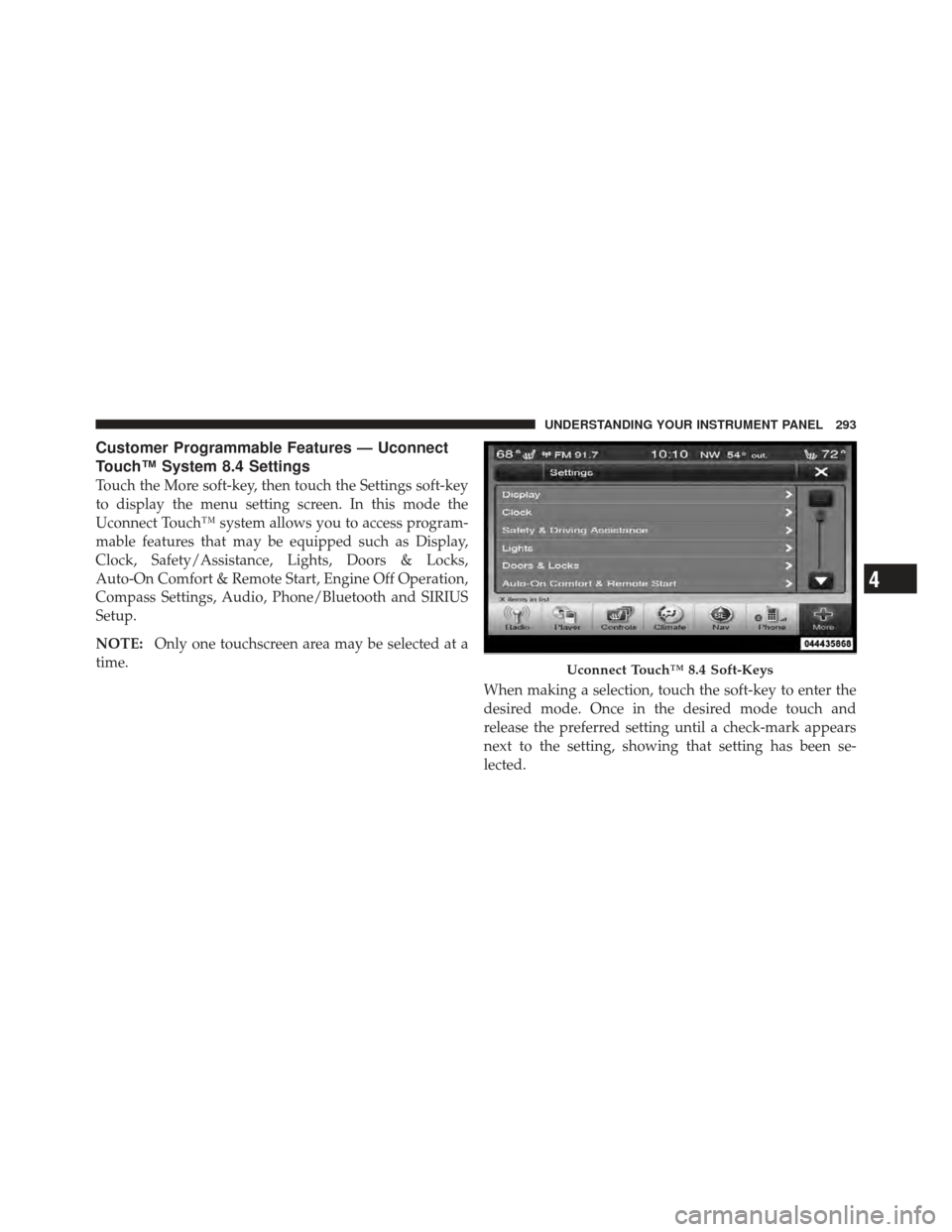
Customer Programmable Features — Uconnect
Touch™ System 8.4 Settings
Touch the More soft-key, then touch the Settings soft-key
to display the menu setting screen. In this mode the
Uconnect Touch™ system allows you to access program-
mable features that may be equipped such as Display,
Clock, Safety/Assistance, Lights, Doors & Locks,
Auto-On Comfort & Remote Start, Engine Off Operation,
Compass Settings, Audio, Phone/Bluetooth and SIRIUS
Setup.
NOTE:Only one touchscreen area may be selected at a
time.
When making a selection, touch the soft-key to enter the
desired mode. Once in the desired mode touch and
release the preferred setting until a check-mark appears
next to the setting, showing that setting has been se-
lected.
Uconnect Touch™ 8.4 Soft-Keys
4
UNDERSTANDING YOUR INSTRUMENT PANEL 293
Page 298 of 557
Clock
After pressing the Clock soft-key the following settings
will be available.
•Sync Time With GPS
When in this display, you may automatically have the
radio set the time. To change the Sync Time setting touch
the Sync with GPS Time soft-key until a check-mark
appears next to the setting, showing that setting has been
selected. Touch the back arrow soft-key to return to the
previous menu.
•Set Time Hours
When in this display, you may adjust the hours. The Sync
with GPS Time soft-key must be unchecked. To make
your selection touch the + or - soft-keys to adjust the
hours up or down. Touch the back arrow soft-key to
return to the previous menu or touch the X soft-key to
close out of the settings screen.
•Set Time Minutes
When in this display, you may adjust the minutes. The
Sync with GPS Time soft-key must be unchecked. To
make your selection touch the + or - soft-keys to adjust
the minutes up or down. Touch the back arrow soft-key
to return to the previous menu or touch the X soft-key to
close out of the settings screen.
•Time Format
When in this display, you may select the time format
display setting. Touch the Time Format soft-key until a
check-mark appears next to the 12hrs or 24hrs setting,
showing that setting has been selected. Touch the back
arrow soft-key to return to the previous menu.
•Show Time In Status Bar
When in this display, you may turn on or shut off the
digital clock in the status bar. To change the Show Time
Status setting touch the Show Time in Status Bar soft-key
296 UNDERSTANDING YOUR INSTRUMENT PANEL
Page 301 of 557
•Rain Sensing Auto Wipers
When this feature is selected, the system will automati-
cally activate the windshield wipers if it senses moisture
on the windshield. To make your selection, touch the
Rain Sensing soft-key, until a check-mark appears next to
setting, showing that setting has been selected. Touch the
back arrow soft-key to return to the previous menu.
•Hill Start Assist — If Equipped
When this feature is selected, the Hill Start Assist (HSA)
system is active. Refer to “Electronic Brake Control
System” in “Starting And Operating” for system function
and operating information. To make your selection, touch
the Hill Start Assist soft-key, until a check-mark appears
next to setting, showing that setting has been selected.
Touch the back arrow soft-key to return to the previous
menu.
Lights
After pressing the Lights soft-key the following settings
will be available.
•Headlight Off Delay
When this feature is selected, the driver can choose to
have the headlights remain on for 0, 30, 60, or 90 seconds
when exiting the vehicle. To change the Headlight Off
Delay status touch the 0, 30, 60 or 90 soft-key. Then touch
the arrow back soft-key.
•Headlight Illumination On Approach
When this feature is selected, the headlights will activate
and remain on for 0, 30, 60, or 90 seconds when the doors
are unlocked with the Remote Keyless Entry (RKE)
transmitter. To change the Illuminated Approach status,
touch the + or - soft-key to select your desired time
interval. Touch the back arrow soft-key to return to the
previous menu.
4
UNDERSTANDING YOUR INSTRUMENT PANEL 299
Page 302 of 557
•Headlights With Wipers — If Equipped
When this feature is selected, and the headlight switch is
in the AUTO position, the headlights will turn on ap-
proximately 10 seconds after the wipers are turned on.
The headlights will also turn off when the wipers are
turned off if they were turned on by this feature. To make
your selection, touch the Headlights With Wipers soft-
key, until a check-mark appears next to setting, showing
that setting has been selected. Touch the back arrow
soft-key to return to the previous menu.
•Auto Dim High Beams — If Equipped
When this feature is selected, the high beam headlights
will deactivate automatically under certain conditions. To
make your selection, touch the Auto High Beams soft-
key, until a check-mark appears next to setting, showing
that setting has been selected. Touch the back arrow
soft-key to return to the previous menu. Refer to “Lights/
SmartBeam™ — If Equipped” in “Understanding The
Features Of Your Vehicle” for further information.
•Daytime Running Lights
When this feature is selected, the headlights will turn on
whenever the engine is running. To make your selection,
touch the Daytime Running Lights soft-key, until a
check-mark appears next to setting, showing that setting
has been selected. Touch the back arrow soft-key to
return to the previous menu.
•Steering Directed Lights
When this feature is selected, the headlights turn relative
to a change in direction of the steering wheel. To make
your selection, touch the Steering Directed Lights soft-
key, until a check-mark appears next to setting, showing
that setting has been selected. Touch the back arrow
soft-key to return to the previous menu.
•Flash Headlights With Lock
When this feature is selected, the headlights will flash
when the doors are locked or unlocked with the Remote
Keyless Entry (RKE) transmitter. This feature may be
300 UNDERSTANDING YOUR INSTRUMENT PANEL
Page 303 of 557
selected with or without the sound horn on lock feature
selected. To make your selection, touch the Flash Head-
lights with Lock soft-key, until a check-mark appears
next to setting, showing that setting has been selected.
Touch the back arrow soft-key to return to the previous
menu.
Doors & Locks
After pressing the Doors & Locks soft-key the following
settings will be available.
•Auto Unlock On Exit
When this feature is selected, all doors will unlock when
the vehicle is stopped and the transmission is in the
PARK or NEUTRAL position and the driver’s door is
opened. To make your selection, touch the Auto Unlock
On Exit soft-key, until a check-mark appears next to
setting, showing that setting has been selected. Touch the
back arrow soft-key to return to the previous menu.
•Flash Headlight With Lock
When this feature is selected, the headlights will flash
when the doors are locked or unlocked with the Remote
Keyless Entry (RKE) transmitter. To make your selection,
touch the Flash Lights With Lock soft-key, until a check-
mark appears next to setting, showing that setting has
been selected. Touch the back arrow soft-key to return to
the previous menu.
•Sound Horn With Lock
When this feature is selected, the horn will sound when
the remote start is activated. To make your selection,
touch the Sound Horn With Lock soft-key, until a check-
mark appears next to setting, showing that setting has
been selected. Touch the back arrow soft-key to return to
the previous menu.
•Sound Horn With Remote Start
When this feature is selected, the horn will sound when
the remote start is activated. To make your selection,
4
UNDERSTANDING YOUR INSTRUMENT PANEL 301
Page 304 of 557
touch the Sound Horn With Remote Start soft-key, until a
check-mark appears next to setting, showing that setting
has been selected. Touch the back arrow soft-key to
return to the previous menu.
•1st Press Of Key Fob Unlocks
When Unlock Driver Door Only On 1st Press is selected,
only the driver’s door will unlock on the first press of the
Remote Keyless Entry (RKE) transmitter UNLOCK but-
ton. When Driver Door 1st Press is selected, you must
press the RKE transmitter UNLOCK button twice to
unlock the passenger’s doors. When Unlock All Doors
On 1st Press is selected, all of the doors will unlock on the
first press of the RKE transmitter UNLOCK button.
NOTE: If the vehicle is programmed to Unlock All
Doors 1st Press, all doors will unlock no matter which
Passive Entry equipped door handle is grasped. If Driver
Door 1st Press is programmed, only the driver ’s door will
unlock when the driver ’s door is grasped. With Passive Entry, if Driver Door 1st Press is programmed touching
the handle more than once will only result in the driver ’s
door opening. If driver door first is selected, once the
driver door is opened, the interior door lock/unlock
switch can be used to unlock all doors (or use RKE
transmitter).
•Passive Entry
This feature allows you to lock and unlock the vehicle’s
door(s) without having to press the Remote Keyless
Entry (RKE) transmitter lock or unlock buttons. To make
your selection, touch the Passive Entry soft-key, until a
check-mark appears next to setting, showing that setting
has been selected. Touch the back arrow soft-key to
return to the previous menu. Refer to “Keyless Enter-N-
Go” in “Things To Know Before Starting Your Vehicle”.
Auto-On Comfort & Remote Start
After pressing the Auto-On Comfort & Remote Start
soft-key the following settings will be available.
302 UNDERSTANDING YOUR INSTRUMENT PANEL