audio DODGE JOURNEY 2016 1.G User Guide
[x] Cancel search | Manufacturer: DODGE, Model Year: 2016, Model line: JOURNEY, Model: DODGE JOURNEY 2016 1.GPages: 664
Page 151 of 664
•Setting Favorite Contact Phone numbers so they are
easily accessible on the Main Phone screen.
• Viewing and Calling contacts from Recent Call logs.
• Reviewing your recent Incoming SMS.
• Sending a text message via the touchscreen.
• Listen to Music on your Bluetooth Device via the
touchscreen.
• Pairing up to 10 phones/audio devices for easy access
to connect to them quickly. NOTE:
Your phone must be capable of SMS messaging
via Bluetooth for messaging features to work properly.
Your mobile phone’s audio is transmitted through your
vehicles audio system; the system will automatically
mute your radio when using the Uconnect Phone. For
Uconnect customer support, visit the following website:
• U.S. residents - visit UconnectPhone.com or call 1-877-
855-8400.
• Canadian residents - visit UconnectPhone.com or call
1-800-465-2001 (English) or 1-800-387-9983 (French).
Uconnect Phone allows you to transfer calls between the
system and your mobile phone as you enter or exit your
vehicle and enables you to mute the system’s microphone
for private conversation.
3
UNDERSTANDING THE FEATURES OF YOUR VEHICLE 149
Page 152 of 664
WARNING!
Any voice commanded system should be used only
in safe driving conditions following all applicable
laws, including laws regarding phone use. Your at-
tention should be focused on safely operating the
vehicle. Failure to do so may result in an accident
causing serious injury or death.
The Uconnect Phone is driven through your Bluetooth
“Hands-Free Profile” mobile phone. Uconnect features
Bluetooth technology - the global standard that enables
different electronic devices to connect to each other
without wires or a docking station, so Uconnect Phone
works no matter where you stow your mobile phone (be
it your purse, pocket, or briefcase), as long as your phone
is turned on and has been paired to the vehicle’s
Uconnect Phone. The Uconnect Phone allows up to ten mobile phones or
audio devices to be linked to the system. Only one linked
(or paired) mobile phone and one audio device can be
used with the system at a time. The system is available in
English, Spanish, or French languages.
Uconnect Phone Button
The Uconnect Phone
button is used to
enter the phone mode and make calls, show
recent incoming and outgoing calls, view
phonebook along with other features. When
you push the button you will hear a BEEP. The beep is
your signal to give a command.
Uconnect Voice Command Button
The Uconnect Voice Command
button is
only used for “barge in” and when you are
already in a call and you want to send Tones
or make another call.
150 UNDERSTANDING THE FEATURES OF YOUR VEHICLE
Page 153 of 664
The Voice Commandbutton is also used to access
the Voice Commands for the Uconnect Voice Com-
mand features if your vehicle is equipped. Please see
the Uconnect Voice Command section for direction on
how to use the Voice Command
button.
The Uconnect Phone is fully integrated with the vehicles
audio system. The volume of the Uconnect Phone can be
adjusted either from the radio volume control knob or
from the steering wheel radio control (right switch), if so
equipped.
Operation
Voice commands can be used to operate the Uconnect
Phone and to navigate through the Uconnect Phone
menu structure. Voice commands are required after most
Uconnect Phone prompts. There are two general methods
for how Voice Command works:
1. Say compound commands like “Call John Smith mo- bile.” 2. Say the individual commands and allow the system to
guide you to complete the task.
You will be prompted for a specific command and then
guided through the available options.
• Prior to giving a voice command, one must wait for the
beep, which follows the “Listen” prompt or another
prompt.
• For certain operations, compound commands can be
used. For example, instead of saying “Call” and then
“John Smith” and then “mobile”, the following com-
pound command can be said: “Call John Smith mo-
bile.”
• For each feature explanation in this section, only the
compound command form of the voice command is
given. You can also break the commands into parts and
say each part of the command when you are asked for
it. For example, you can use the compound command
3
UNDERSTANDING THE FEATURES OF YOUR VEHICLE 151
Page 158 of 664
NOTE:For phones which are not made a favorite, the
phone priority is determined by the order in which it was
paired. The latest phone paired will have the higher
priority.
You can also use the following VR commands to bring up
the Paired Phone screen from any screen on the radio:
• “Show Paired Phones”
• “Connect My Phone”
Pair A Bluetooth Streaming Audio Device
1. Press the “Player” button on the touchscreen to begin.
2. Change the Source to Bluetooth.
3. Press the “Bluetooth” button on the touchscreen to
display the Paired Audio Devices screen.
4. Press the “Add Device” button on the touchscreen. NOTE:
If there is no device currently connected with the
system, a pop-up will appear.
5. Search for available devices on your Bluetooth enabled audio device. When prompted on the device, enter the
PIN shown on the Uconnect screen.
6. Uconnect Phone will display an in process screen while the system is connecting.
7. When the pairing process has successfully completed, the system will prompt you to choose whether or not
this is your favorite device. Selecting “Yes” will make
this device the highest priority. This device will take
precedence over other paired devices within range.
NOTE: For devices which are not made a favorite, the
device priority is determined by the order in which it was
paired. The latest device paired will have the higher
priority.
156 UNDERSTANDING THE FEATURES OF YOUR VEHICLE
Page 159 of 664
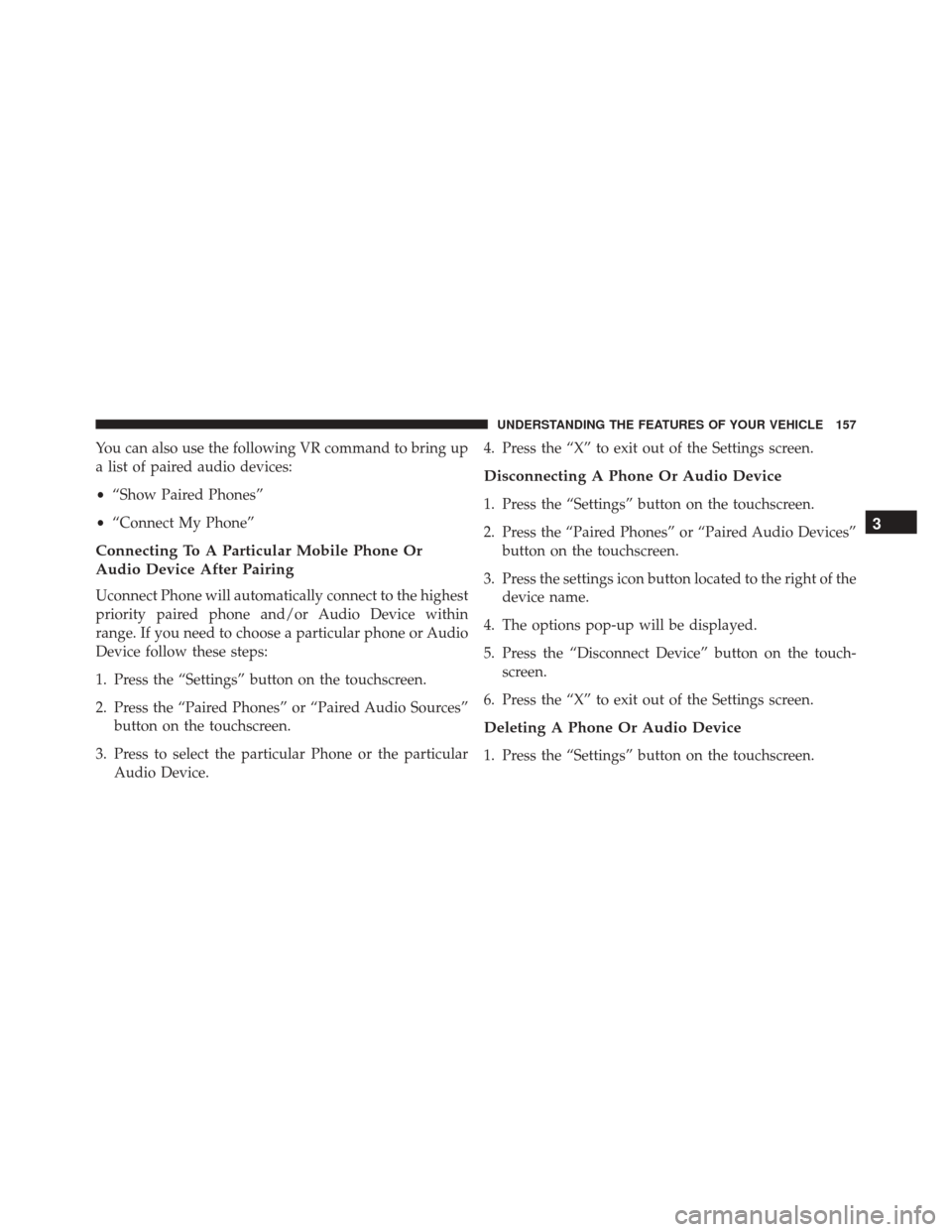
You can also use the following VR command to bring up
a list of paired audio devices:
•“Show Paired Phones”
• “Connect My Phone”
Connecting To A Particular Mobile Phone Or
Audio Device After Pairing
Uconnect Phone will automatically connect to the highest
priority paired phone and/or Audio Device within
range. If you need to choose a particular phone or Audio
Device follow these steps:
1. Press the “Settings” button on the touchscreen.
2. Press the “Paired Phones” or “Paired Audio Sources”
button on the touchscreen.
3. Press to select the particular Phone or the particular Audio Device. 4. Press the “X” to exit out of the Settings screen.
Disconnecting A Phone Or Audio Device
1. Press the “Settings” button on the touchscreen.
2. Press the “Paired Phones” or “Paired Audio Devices”
button on the touchscreen.
3. Press the settings icon button located to the right of the device name.
4. The options pop-up will be displayed.
5. Press the “Disconnect Device” button on the touch- screen.
6. Press the “X” to exit out of the Settings screen.
Deleting A Phone Or Audio Device
1. Press the “Settings” button on the touchscreen.
3
UNDERSTANDING THE FEATURES OF YOUR VEHICLE 157
Page 160 of 664
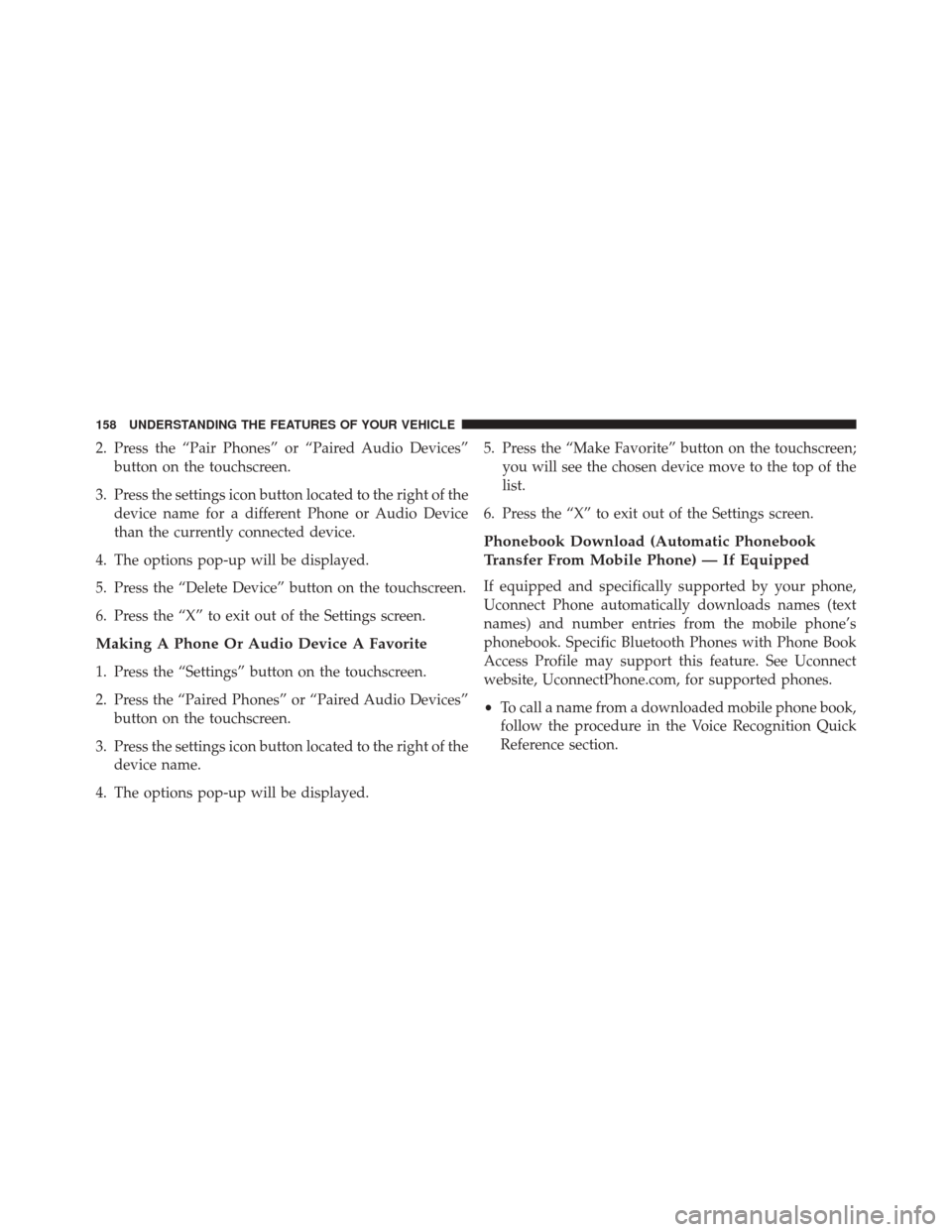
2. Press the “Pair Phones” or “Paired Audio Devices”button on the touchscreen.
3. Press the settings icon button located to the right of the device name for a different Phone or Audio Device
than the currently connected device.
4. The options pop-up will be displayed.
5. Press the “Delete Device” button on the touchscreen.
6. Press the “X” to exit out of the Settings screen.
Making A Phone Or Audio Device A Favorite
1. Press the “Settings” button on the touchscreen.
2. Press the “Paired Phones” or “Paired Audio Devices” button on the touchscreen.
3. Press the settings icon button located to the right of the device name.
4. The options pop-up will be displayed. 5. Press the “Make Favorite” button on the touchscreen;
you will see the chosen device move to the top of the
list.
6. Press the “X” to exit out of the Settings screen.
Phonebook Download (Automatic Phonebook
Transfer From Mobile Phone) — If Equipped
If equipped and specifically supported by your phone,
Uconnect Phone automatically downloads names (text
names) and number entries from the mobile phone’s
phonebook. Specific Bluetooth Phones with Phone Book
Access Profile may support this feature. See Uconnect
website, UconnectPhone.com, for supported phones.
• To call a name from a downloaded mobile phone book,
follow the procedure in the Voice Recognition Quick
Reference section.
158 UNDERSTANDING THE FEATURES OF YOUR VEHICLE
Page 167 of 664
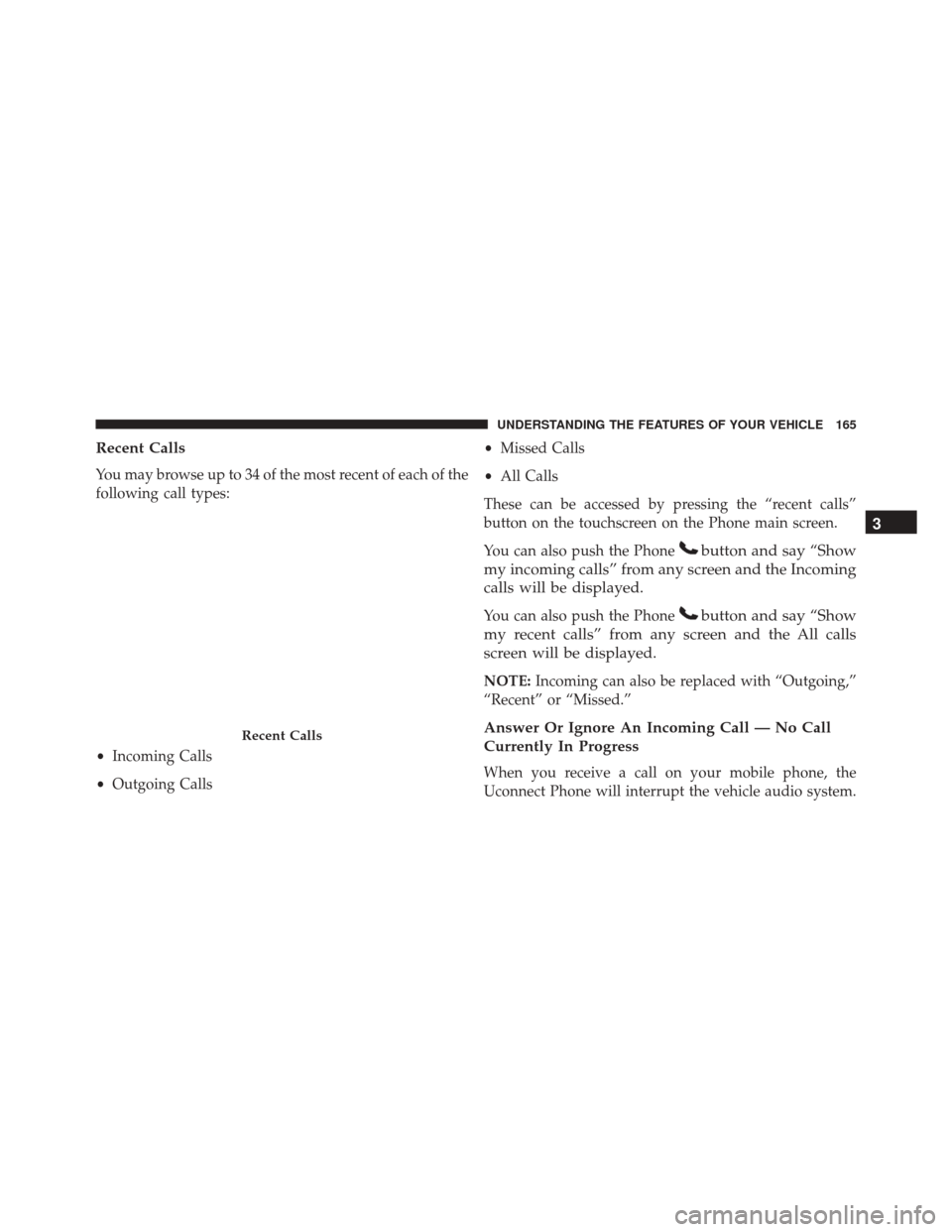
Recent Calls
You may browse up to 34 of the most recent of each of the
following call types:
•Incoming Calls
• Outgoing Calls •
Missed Calls
• All Calls
These can be accessed by pressing the “recent calls”
button on the touchscreen on the Phone main screen.
You can also push the Phone
button and say “Show
my incoming calls” from any screen and the Incoming
calls will be displayed.
You can also push the Phonebutton and say “Show
my recent calls” from any screen and the All calls
screen will be displayed.
NOTE: Incoming can also be replaced with “Outgoing,”
“Recent” or “Missed.”
Answer Or Ignore An Incoming Call — No Call
Currently In Progress
When you receive a call on your mobile phone, the
Uconnect Phone will interrupt the vehicle audio system.
Recent Calls
3
UNDERSTANDING THE FEATURES OF YOUR VEHICLE 165
Page 169 of 664
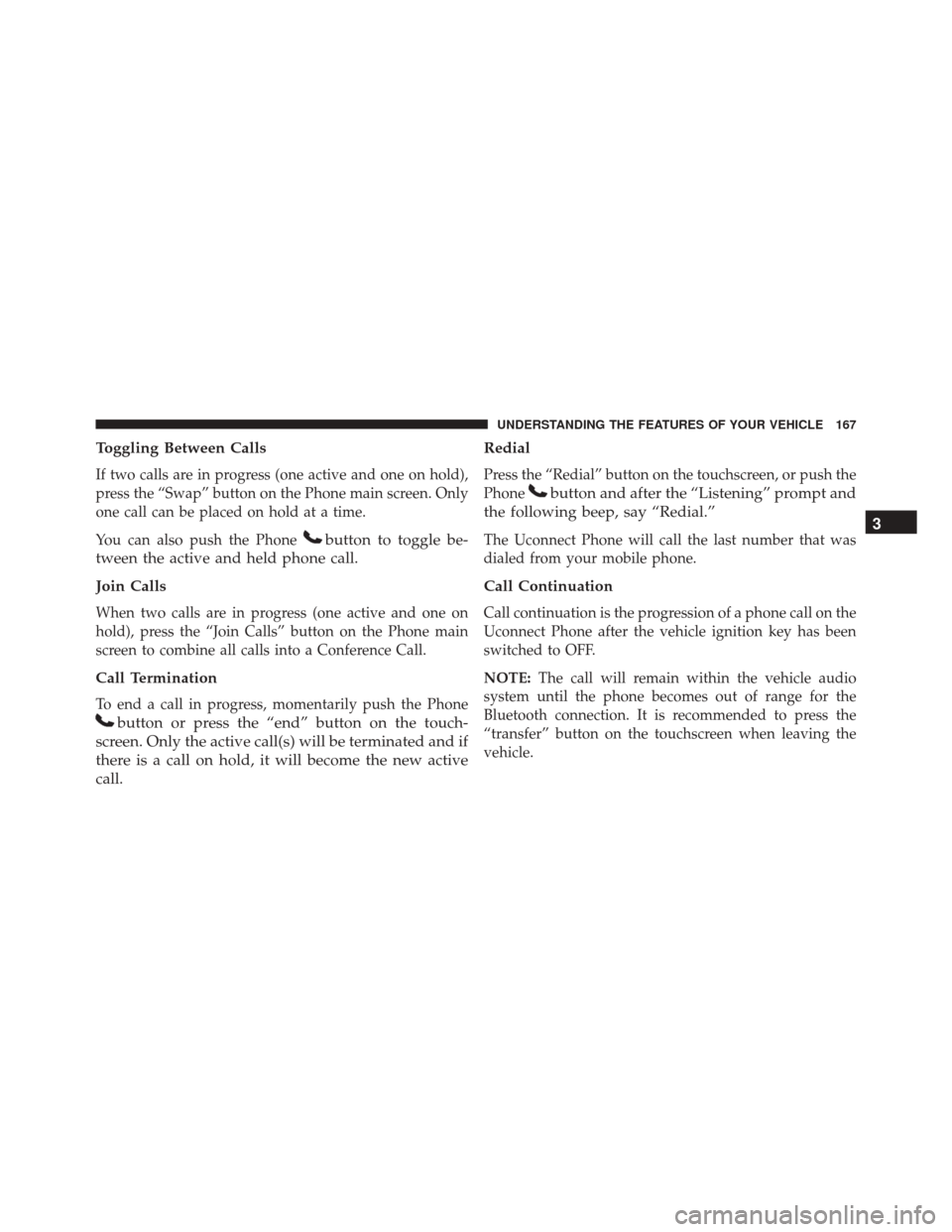
Toggling Between Calls
If two calls are in progress (one active and one on hold),
press the “Swap” button on the Phone main screen. Only
one call can be placed on hold at a time.
You can also push the Phone
button to toggle be-
tween the active and held phone call.
Join Calls
When two calls are in progress (one active and one on
hold), press the “Join Calls” button on the Phone main
screen to combine all calls into a Conference Call.
Call Termination
To end a call in progress, momentarily push the Phone
button or press the “end” button on the touch-
screen. Only the active call(s) will be terminated and if
there is a call on hold, it will become the new active
call. Redial
Press the “Redial” button on the touchscreen, or push the
Phone
button and after the “Listening” prompt and
the following beep, say “Redial.”
The Uconnect Phone will call the last number that was
dialed from your mobile phone.
Call Continuation
Call continuation is the progression of a phone call on the
Uconnect Phone after the vehicle ignition key has been
switched to OFF.
NOTE: The call will remain within the vehicle audio
system until the phone becomes out of range for the
Bluetooth connection. It is recommended to press the
“transfer” button on the touchscreen when leaving the
vehicle.
3
UNDERSTANDING THE FEATURES OF YOUR VEHICLE 167
Page 174 of 664
Phone And Network Status Indicators
Uconnect Phone will provide notification to inform you
of your phone and network status when you are attempt-
ing to make a phone call using Uconnect Phone. The
status is given for network signal strength and phone
battery strength.
Dialing Using The Mobile Phone Keypad
You can dial a phone number with your mobile phone
keypad and still use the Uconnect Phone (while dialing
via the mobile phone keypad, the user must exercise
caution and take precautionary safety measures). By
dialing a number with your connected Bluetooth mobile
phone, the audio will be played through your vehicle’s
audio system. The Uconnect Phone will work the same as
if you dial the number using voice a command.NOTE:
Certain brands of mobile phones do not send the
dial ring to the Uconnect Phone to play it on the vehicle
audio system, so you will not hear it. Under this situa-
tion, after successfully dialing a number the user may feel
that the call did not go through even though the call is in
progress. Once your call is answered, you will hear the
audio.Mute/Un-Mute (Mute ON/OFF)
When you mute the Uconnect Phone, you will still be
able to hear the conversation coming from the other
party, but the other party will not be able to hear you. To
mute the Uconnect Phone simply press the “Mute”
button on the Phone main screen.
172 UNDERSTANDING THE FEATURES OF YOUR VEHICLE
Page 176 of 664
Performance is maximized under:
•Low-To-Medium Blower Setting
• Low-To-Medium Vehicle Speed
• Low Road Noise
• Smooth Road Surface
• Fully Closed Windows
• Dry Weather Condition
WARNING!
ALWAYS drive safely with your hands on the wheel.
You have full responsibility and assume all risks
related to the use of the Uconnect features and
applications in this vehicle. Only use Uconnect when
it is safe to do so. Failure to do so may result in an
accident involving serious injury or death. Even though the system is designed for many languages
and accents, the system may not always work for some.
NOTE:
It is recommended that you do not store names in
your favorites phonebook while the vehicle is in motion.
Phonebook (Mobile and Favorites) name recognition rate
is optimized when the entries are not similar. You can say
“O” (letter “O”) for “0” (zero).
Even though international dialing for most number com-
binations is supported, some shortcut dialing number
combinations may not be supported.Far End Audio Performance
Audio quality is maximized under:
• Low-To-Medium Blower Setting
• Low-To-Medium Vehicle Speed
• Low Road Noise
174 UNDERSTANDING THE FEATURES OF YOUR VEHICLE