light DODGE JOURNEY 2020 Owners Manual
[x] Cancel search | Manufacturer: DODGE, Model Year: 2020, Model line: JOURNEY, Model: DODGE JOURNEY 2020Pages: 396, PDF Size: 25.53 MB
Page 326 of 396
324 MULTIMEDIA
Fast Seek Up
Press and hold the Seek Up button and the
Bluetooth® device will begin to fast forward
th
rough the current track until the button is
released.
Fast Seek Down
Press and hold the Seek Down button and
the Bluetooth® device will begin to rewind
t h
rough the current track until the button is
released.
Source
Press the Source button on the touchscreen to
s e
lect the desired audio source, Disc/USB/SD
Card/AUX/ or Bluetooth®. This screen will time
out after a few seconds and return to the main
radio screen if no selection is made.
Repeat
Press the Repeat button to toggle the repeat
f u
nctionality. The Repeat button is highlighted
when active. The Radio will continue to play the
current track, repeatedly, as long as the repeat
is active. Info
Press the Info button to display the current
t
r
ack information. Press the Info button a
second time to cancel this feature.
Audio
Refer to “Audio” in “Radio Mode” for further
i n
formation on adjusting the audio settings.
UCONNECT PHONE
Uconnect Phone is a voice-activated,
hands-free, in-vehicle communications system.
Uconnect Phone allows you to dial a phone
number with your mobile phone.
Uconnect Phone supports the following
fe
atures:
Voice Activated Features:
Hands-Free dialing via Voice (“Call John
Smith Mobile” or, “Dial 248 555 1212”).
Hands-Free text-to-speech listening of your
incoming SMS messages.
Hands-Free text messaging (“Send a
message to John Smith Mobile”).
Redialing last dialed numbers (“Redial”).
Calling Back the last incoming call number
(“Call Back”).
Viewing Call logs on screen (“Show Incoming
Calls,” “Show Outgoing Calls,” “Show Missed
Calls,” “Show Recent Calls”).
Searching Contacts phone number (“Search
for John Smith Mobile”).
Screen Activated Features
Dialing via Keypad using touchscreen.
Viewing and Calling contacts from Phone -
books displayed on the touchscreen.
Setting Favorite Contact Phone numbers so
they are easily accessible on the Main Phone
screen.
Viewing and Calling contacts from Recent
Call logs.
Reviewing your recent Incoming SMS.
Sending a text message via the touchscreen.
Page 336 of 396
334 MULTIMEDIA
Place/Retrieve A Call From Hold
During an active call, press the Hold button on
th
e Phone main screen.
Toggling Between Calls
If two calls are in progress (one active and one
o n
hold), press the Swap button on the Phone
main screen. Only one call can be placed on
hold at a time.
You can also push the Phone button to
toggle between the active and held phone call.
Join Calls
When two calls are in progress (one active and
on
e on hold), press the Join Calls button on the
Phone main screen to combine all calls into a
Conference Call.
Call Termination
To end an in-progress call, momentarily push
t h
e Phone button or press the End button on
the touchscreen. Only the active call(s) will be
t e
rminated and if there is a call on hold, it will
become the new active call. Redial
Press the Redial button on the touchscreen, or
p
u
sh the VR button and after the “Listening”
prompt and the following beep, say “Redial.”
The Uconnect Phone will call the last number
t h
at was dialed from your mobile phone.
Call Continuation
Call continuation is the progression of a phone
c a
ll on the Uconnect Phone after the vehicle
ignition has been switched to Off.
NOTE:
The call will remain within the vehicle audio
sy
stem until the phone becomes out of range
for the Bluetooth® connection. It is recom -
mended to press the Transfer button on the
t o
uchscreen when leaving the vehicle.
Uconnect Phone Features
Emergency Assistance
If you are in an emergency and the mobile
ph
one is reachable:
Pick up the phone and manually dial the
emergency number for your area. If the phone is not reachable and the Uconnect
P
h
one is operational, you may reach the
emergency number as follows:
1. P ush the Phone
button to begin.
2. A fter the “Listening” prompt and the
f
ollowing beep, say “Dial Emergency” and
the Uconnect Phone will instruct the paired
mobile phone to call the emergency
number. This feature is supported in the US,
Canada, and Mexico.
NOTE:
The Emergency call may also be initiated by
using the touchscreen.
The emergency number dialed is based on the
country where the vehicle is purchased (911
for the US and Canada and 060 for Mexico).
The number dialed may not be applicable with
the available mobile service and area.
The Uconnect Phone does slightly lower your
chances of successfully making a phone call
as to that for the mobile phone directly.
Page 368 of 396
366 MULTIMEDIA
When connecting an external source to the AUX
input, be sure to follow the standard color
coding for the VES jacks:
NOTE:
Certain high-end video games consoles will
ex
ceed the power limit of the vehicle's power
inverter. Refer to the Power Inverter section
within “Internal Equipment” in “Getting To Know
Your Vehicle”.
Ensure the remote control channel selector
s w
itch and headphone switch (IR channel) are
the same number.
Using The Remote Control
1. Push the MODE button on the Remote Control.
2. W hile looking at the video screen, highlight
V
ES AUX 2, by either pushing Up/Down/
Left/Right buttons or by repeatedly pushing
the MODE button, then push ENTER on the
Remote Control.
Using The Touchscreen Radio Controls
1. Press the MORE button on the touchscreen.
2. P ress the Rear Entertainment button on the
t
ouchscreen to display the Rear
Entertainment Controls.
3. I f the Rear Entertainment is turned off,
p
ress the Power button on the touchscreen.
4. P ress the 1 or 2 button on the touchscreen
f
or the channel desired and press the
Source button on the touchscreen to select
the desired mode.
LISTEN TO AN AUDIO SOURCE ON
C
HANNEL 2 WHILE A VIDEO IS PLAYING
O
N CHANNEL 1
Ensure the Remote Control and Headphone
switch is on Channel 2.
Using The Remote Control
1. Push the MODE button on the Remote
Control and the Mode Select Screen will
display, unless a video is playing, then only
a small banner will appear on the bottom
of the screen.
2. W
hile looking at the video screen, either
p
ress Up/Down/Left/Right on the Remote
Control to highlight the desired audio
source or repeatedly push the MODE button
on the remote until the desired audio
source appears on the screen.
Using The Touchscreen Radio Controls
1. Press the MORE button on the touchscreen.
2. P ress the Rear Entertainment button on
t
he touchscreen to display the Rear
E n
tertainment Controls.
3. I f the Rear Entertainment is turned off,
p
ress the Power button on the touchscreen.
4. P ress the 1 or 2 button on the touchscreen
f
or the channel desired and press the
Source button on the touchscreen to select
the desired mode.
Page 369 of 396
MULTIMEDIA 367
PLAY A DVD USING THE TOUCHSCREEN
R
ADIO
Insert the DVD with the label facing up.
The radio automatically selects the appropriate
m o
de after the disc is recognized and displays
the menu screen or starts playing the first track.
Using The Remote Control
1. Push the MODE button on the Remote Control.
2. W hile looking at the Video Screen, highlight
D
ISC by either pushing Up/Down/Left/Right
buttons or by repeatedly pushing the MODE
button, then push ENTER.
NOTE:
The VES system will retain the last setting
when turned off.
Viewing a DVD on the Touchscreen radio
screen is not available in some regions or
locations, the vehicle must be stopped, and
the gear selector must be in the PARK posi -
tion. Refer to local and state laws.
Using The Touchscreen Radio Controls
1. Press the MORE button on the
touchscreen.
2. P ress the Rear Entertainment button on the
t
ouchscreen to display the Rear
Entertainment Controls.
3. I f the Rear Entertainment is turned off,
p
ress the Power button on the touchscreen.
4. P ress the 1 or 2 button on the touchscreen
f
or the channel desired and press the
Source button on the touchscreen to select
the desired mode.
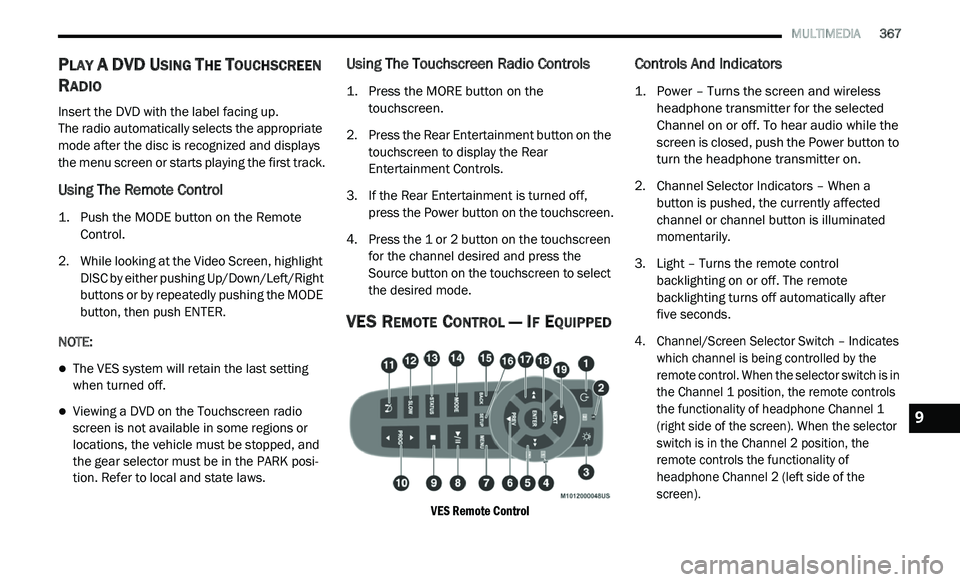
VES REMOTE CONTROL — IF EQUIPPED
VES Remote Control
Controls And Indicators
1. Power – Turns the screen and wireless headphone transmitter for the selected
Channel on or off. To hear audio while the
screen is closed, push the Power button to
turn the headphone transmitter on.
2. C hannel Selector Indicators – When a
b
utton is pushed, the currently affected
channel or channel button is illuminated
momentarily.
3. Light – Turns the remote control b
acklighting on or off. The remote
backlighting turns off automatically after
five seconds.
4. Channel/Screen Selector Switch – Indicates w
hich channel is being controlled by the
remote control. When the selector switch is in
the Channel 1 position, the remote controls
the functionality of headphone Channel 1
(right side of the screen). When the selector
switch is in the Channel 2 position, the
remote controls the functionality of
headphone Channel 2 (left side of the
screen).
9
Page 370 of 396
368 MULTIMEDIA
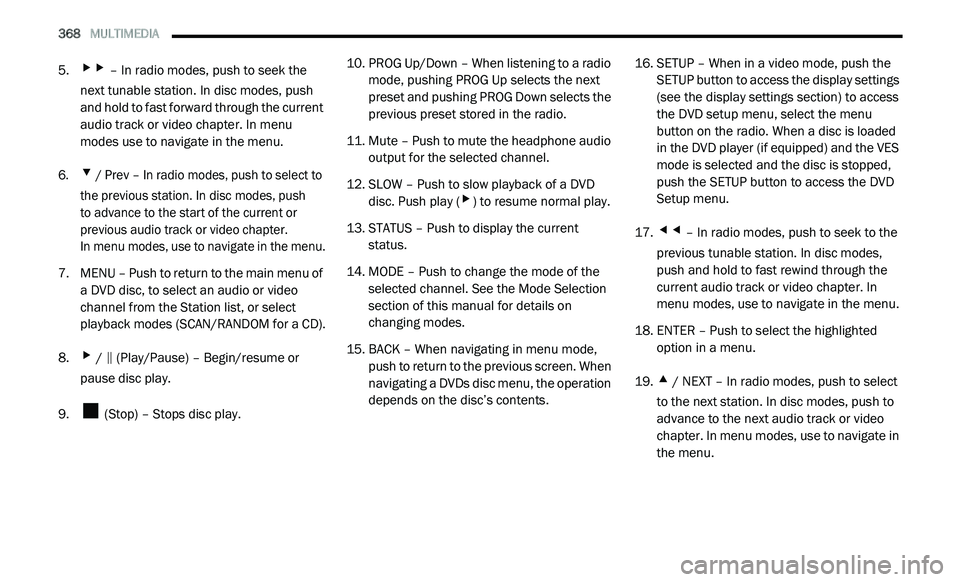
5.▸▸ – In radio modes, push to seek the
next tunable station. In disc modes, push
and hold to fast forward through the current
audio track or video chapter. In menu
modes use to navigate in the menu.
6.
▾ / Prev – In radio modes, push to select to
the previous station. In disc modes, push
to advance to the start of the current or
p r
evious audio track or video chapter.
In menu modes, use to navigate in the menu.
7. M ENU – Push to return to the main menu of
a
DVD disc, to select an audio or video
channel from the Station list, or select
playback modes (SCAN/RANDOM for a CD).
8.
▸ / ‖ (Play/Pause) – Begin/resume or
pause disc play.
9. (Stop) – Stops disc play. 10. P
ROG Up/Down – When listening to a radio
m
ode, pushing PROG Up selects the next
preset and pushing PROG Down selects the
previous preset stored in the radio.
11. Mute – Push to mute the headphone audio o
utput for the selected channel.
12. S LOW – Push to slow playback of a DVD
d
isc. Push play (
▸) to resume normal play.
13. S TATUS – Push to display the current
s
tatus.
14. M ODE – Push to change the mode of the
s
elected channel. See the Mode Selection
section of this manual for details on
changing modes.
15. BACK – When navigating in menu mode, p
ush to return to the previous screen. When
navigating a DVDs disc menu, the operation
depends on the disc’s contents. 16. S
ETUP – When in a video mode, push the
S
ETUP button to access the display settings
(see the display settings section) to access
the DVD setup menu, select the menu
button on the radio. When a disc is loaded
in the DVD player (if equipped) and the VES
mode is selected and the disc is stopped,
push the SETUP button to access the DVD
Setup menu.
17.
◂◂ – In radio modes, push to seek to the
previous tunable station. In disc modes,
push and hold to fast rewind through the
current audio track or video chapter. In
menu modes, use to navigate in the menu.
18. E NTER – Push to select the highlighted
o
ption in a menu.
19.
▴ / NEXT – In radio modes, push to select
to the next station. In disc modes, push to
advance to the next audio track or video
chapter. In menu modes, use to navigate in
the menu.
Page 375 of 396
MULTIMEDIA 373
3. Channel 2 Audio Only/Mute — Audio: Only in
a single screen system: The Audio Only icon
is displayed on Channel 2 when Channel 1
is in a video mode. Mute: when the Mute
icon is displayed, the audio for Channel 2
has been muted using the remote control’s
MUTE button.
4. C hannel 2 Mode — Displays the current
s
ource for Channel 2.
5. R emote Locked Out — When the icon is
d
isplayed, the remote control functions are
disabled.
6. C lock — Displays the time.
7
. C hannel 1 Shared Status — When the icon is
d
isplayed, the audio for Channel 1 is also
shared with the radio and playing through
the cabin speakers.
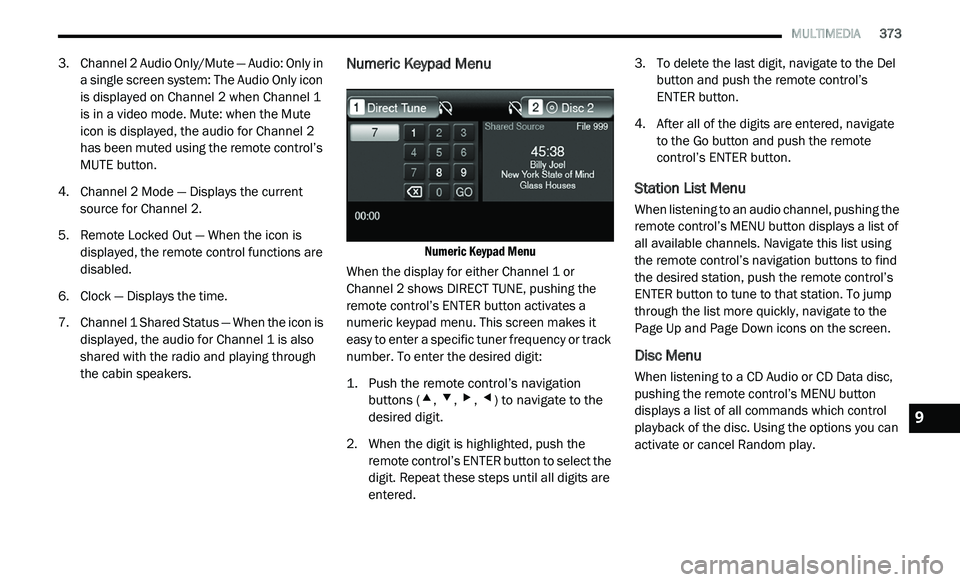
Numeric Keypad Menu
Numeric Keypad Menu
When the display for either Channel 1 or
C h
annel 2 shows DIRECT TUNE, pushing the
remote control’s ENTER button activates a
numeric keypad menu. This screen makes it
easy to enter a specific tuner frequency or track
number. To enter the desired digit:
1. P ush the remote control’s navigation
b
uttons (
▴, ▾, ▸, ◂) to navigate to the
desired digit.
2. W hen the digit is highlighted, push the
r
emote control’s ENTER button to select the
digit. Repeat these steps until all digits are
entered. 3. T
o delete the last digit, navigate to the Del
b
utton and push the remote control’s
ENTER button.
4. A fter all of the digits are entered, navigate
t
o the Go button and push the remote
control’s ENTER button.
Station List Menu
When listening to an audio channel, pushing the
remote control’s MENU button displays a list of
all available channels. Navigate this list using
the remote control’s navigation buttons to find
the desired station, push the remote control’s
ENTER button to tune to that station. To jump
through the list more quickly, navigate to the
Page Up and Page Down icons on the screen.
Disc Menu
When listening to a CD Audio or CD Data disc,
pushing the remote control’s MENU button
displays a list of all commands which control
playback of the disc. Using the options you can
activate or cancel Random play.
9
Page 384 of 396
382 CUSTOMER ASSISTANCE
We appreciate that you have made a major
investment when you purchased the vehicle.
An authorized dealer has also made a major
i n
vestment in facilities, tools, and training to
assure that you are absolutely delighted with
the ownership experience. You will be pleased
with their sincere efforts to resolve any warranty
issues or related concerns.
WARRANTY INFORMATION
See the Warranty Information for the terms and
provisions of FCA US LLC warranties applicable
to this vehicle and market. Refer to
www.mopar.com/om for further information.
MOPAR PARTS
Mopar original equipment parts & accessories
and factory filled fluids are available from an
authorized dealer. They are recommended for
your vehicle to keep it operating at its best and
maintain its original condition.
REPORTING SAFETY DEFECTS
IN THE 50 UNITED STATES AND
W
ASHINGTON, D.C.
If you believe that your vehicle has a
defect that could cause a crash or cause
injury or death, you should immediately
inform the National Highway Traffic
Safety Administration (NHTSA) in
addition to notifying FCA US LLC. If NHTSA receives similar complaints, it
m
a
y open an investigation, and if it finds
that a safety defect exists in a group of
vehicles, it may order a recall and
remedy campaign. However, NHTSA
cannot become involved in individual
problems between you, an authorized
dealer or FCA US LLC.
To contact NHTSA, you may call the
Ve
hicle Safety Hotline toll free at
1-888-327-4236 (TTY: 1-800-424-9153);
or go to
http://www.safercar.gov
; or write to:
Administrator, NHTSA, 1200 New Jersey
Av
enue, SE., West Building, Washington,
D.C. 20590. You can also obtain other
information about motor vehicle safety
from
http://www.safercar.gov
.
WARNING!
Engine exhaust (internal combustion engines
only), some of its constituents, and certain
vehicle components contain, or emit,
chemicals known to the State of California to
cause cancer and birth defects, or other
reproductive harm. In addition, certain fluids
contained in vehicles and certain products of
component wear contain, or emit, chemicals
known to the State of California to cause
cancer and birth defects, or other
reproductive harm.
Page 386 of 396
384
INDEX
A
About Your Brakes...............................160, 256Adding Engine Coolant (Antifreeze)...............229Adding Fuel....................................................176Adding Washing Fluid....................................221Additives, Fuel...............................................258Adjust
Down...........................................................30Forward.......................................................30Rearward.....................................................30Up................................................................30Air Bag...........................................................131Air Bag Operation......................................133Air Bag Warning Light................................131Driver Knee Air Bag...................................133Enhanced Accident Response.........137, 215Event Data Recorder (EDR).......................215If Deployment Occurs................................136Knee Impact Bolsters................................133Maintaining Your Air Bag System..............138Maintenance.............................................138Side Air Bags.............................................134Transporting Pets......................................154Air Bag Light...............................100, 131, 155Air Cleaner, Engine (Engine Air Cleaner
Filter).............................................................224
Air Conditioner Maintenance........................224Air Conditioner Refrigerant..................224, 225Air Conditioner System.................................224Air Conditioning................................................70Rear.............................................................53Air Conditioning Filter.......................................72Air Conditioning, Operating Tips.......................71Air Filter........................................................224Air Pressure Tires.........................................................243AlarmPanic...........................................................11Security Alarm....................................18, 101Alterations/ModificationsVehicle...........................................................8Antifreeze (Engine Coolant).................229, 261Disposal...................................................230Anti-Lock Brake System (ABS)......................109Anti-Lock Warning Light................................105Assist, Hill Start.............................................114Auto Down Power Windows.............................73Automatic Climate Controls.............................58Automatic Dimming Mirror...............................37Automatic Door Locks......................................20Automatic Headlights.......................................41
Automatic Temperature Control (ATC).......58, 70Automatic Transmission.......................161, 234Adding Fluid............................233, 234, 264Fluid And Filter Change.............................234Fluid Change.............................................234Fluid Level Check......................................233Fluid Type.................................................264Special Additives......................................233Autostick.......................................................166Auxiliary Electrical Outlet (Power Outlet)..........87
B
Back-Up Lights..............................................192Battery.................................................102, 221Charging System Light..............................102Keyless Key Fob Replacement....................11Location....................................................221Belts, Seat....................................................155BluetoothPhone..................296, 297, 327, 328, 336Body Mechanism Lubrication........................226B-Pillar Location............................................239Brake Assist System.....................................110Brake Control System, Electronic..................110Brake Fluid....................................................264
Page 387 of 396
385
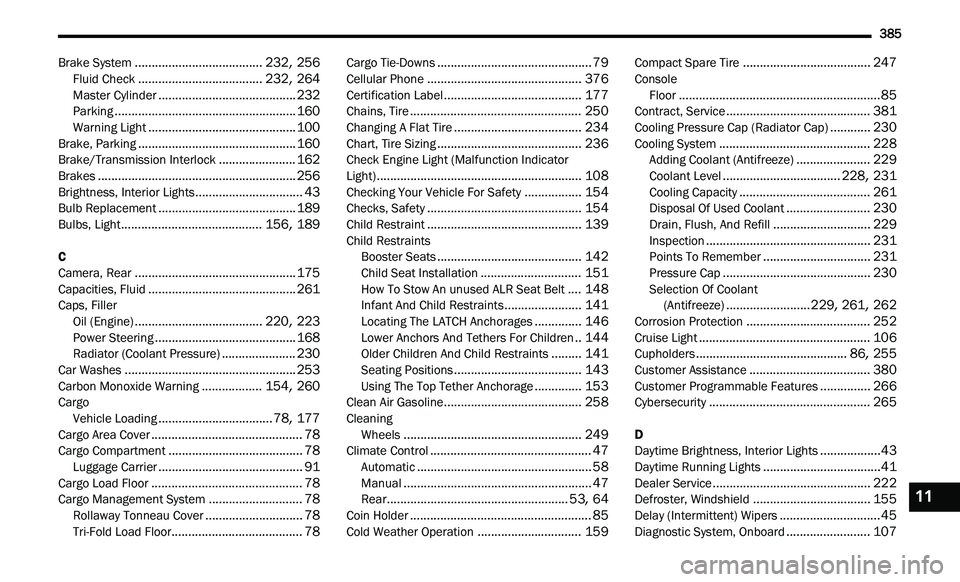
Brake System......................................232, 256Fluid Check.....................................232, 264Master Cylinder.........................................232Parking......................................................160Warning Light............................................100Brake, Parking...............................................160Brake/Transmission Interlock.......................162Brakes...........................................................256Brightness, Interior Lights................................43Bulb Replacement.........................................189Bulbs, Light..........................................156, 189
C
Camera, Rear................................................175Capacities, Fluid............................................261Caps, FillerOil (Engine)......................................220, 223Power Steering..........................................168Radiator (Coolant Pressure)......................230Car Washes...................................................253Carbon Monoxide Warning..................154, 260CargoVehicle Loading..................................78, 177Cargo Area Cover.............................................78Cargo Compartment........................................78Luggage Carrier...........................................91Cargo Load Floor.............................................78Cargo Management System............................78Rollaway Tonneau Cover.............................78
Tri-Fold Load Floor.......................................78
Cargo Tie-Downs..............................................79Cellular Phone..............................................376Certification Label.........................................177Chains, Tire...................................................250Changing A Flat Tire......................................234Chart, Tire Sizing...........................................236Check Engine Light (Malfunction Indicator
Light).............................................................108Checking Your Vehicle For Safety.................154Checks, Safety..............................................154Child Restraint..............................................139Child Restraints Booster Seats...........................................142Child Seat Installation..............................151How To Stow An unused ALR Seat Belt....148Infant And Child Restraints.......................141Locating The LATCH Anchorages..............146Lower Anchors And Tethers For Children..144Older Children And Child Restraints.........141Seating Positions......................................143Using The Top Tether Anchorage..............153Clean Air Gasoline.........................................258CleaningWheels.....................................................249Climate Control................................................47Automatic....................................................58Manual........................................................47Rear......................................................53, 64Coin Holder......................................................85
Cold Weather Operation...............................159
Compact Spare Tire......................................247ConsoleFloor............................................................85Contract, Service...........................................381Cooling Pressure Cap (Radiator Cap)............230Cooling System.............................................228Adding Coolant (Antifreeze)......................229Coolant Level...................................228, 231Cooling Capacity.......................................261Disposal Of Used Coolant.........................230Drain, Flush, And Refill.............................229Inspection.................................................231Points To Remember................................231Pressure Cap............................................230Selection Of Coolant
(Antifreeze).........................229, 261, 262Corrosion Protection.....................................252Cruise Light...................................................106Cupholders.............................................86, 255Customer Assistance....................................380Customer Programmable Features...............266Cybersecurity................................................265
D
Daytime Brightness, Interior Lights..................43Daytime Running Lights...................................41Dealer Service...............................................222Defroster, Windshield...................................155Delay (Intermittent) Wipers..............................45
Diagnostic System, Onboard.........................107
11
Page 388 of 396
386
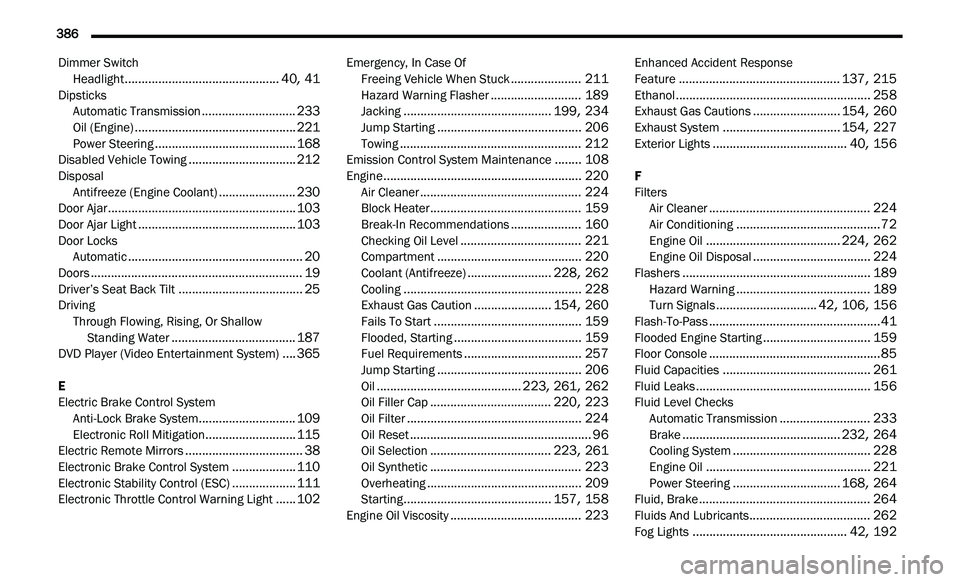
Dimmer Switch
Headlight..............................................40, 41DipsticksAutomatic Transmission............................233Oil (Engine)................................................221Power Steering..........................................168Disabled Vehicle Towing................................212DisposalAntifreeze (Engine Coolant).......................230Door Ajar........................................................103Door Ajar Light...............................................103Door LocksAutomatic....................................................20Doors...............................................................19Driver’s Seat Back Tilt.....................................25DrivingThrough Flowing, Rising, Or Shallow
Standing Water
.....................................187DVD Player (Video Entertainment System)....365
E
Electric Brake Control System Anti-Lock Brake System
.............................109Electronic Roll Mitigation...........................115Electric Remote Mirrors...................................38Electronic Brake Control System...................110Electronic Stability Control (ESC)...................111Electronic Throttle Control Warning Light......102
Emergency, In Case OfFreeing Vehicle When Stuck.....................211Hazard Warning Flasher...........................189Jacking............................................199, 234Jump Starting...........................................206Towing......................................................212Emission Control System Maintenance........108Engine...........................................................220Air Cleaner................................................224Block Heater.............................................159Break-In Recommendations.....................160Checking Oil Level....................................221Compartment...........................................220Coolant (Antifreeze).........................228, 262Cooling.....................................................228Exhaust Gas Caution.......................154, 260Fails To Start............................................159Flooded, Starting......................................159Fuel Requirements...................................257Jump Starting...........................................206Oil...........................................223, 261, 262Oil Filler Cap....................................220, 223Oil Filter....................................................224Oil Reset......................................................96Oil Selection....................................223, 261Oil Synthetic.............................................223Overheating..............................................209Starting............................................157, 158Engine Oil Viscosity.......................................223
Enhanced Accident Response
Feature................................................137, 215Ethanol..........................................................258Exhaust Gas Cautions..........................154, 260Exhaust System...................................154, 227Exterior Lights........................................40, 156
F
Filters Air Cleaner
................................................224Air Conditioning...........................................72Engine Oil........................................224, 262Engine Oil Disposal...................................224Flashers........................................................189Hazard Warning........................................189Turn Signals..............................42, 106, 156Flash-To-Pass...................................................41Flooded Engine Starting................................159Floor Console...................................................85Fluid Capacities............................................261Fluid Leaks....................................................156Fluid Level ChecksAutomatic Transmission...........................233Brake...............................................232, 264Cooling System.........................................228Engine Oil.................................................221Power Steering................................168, 264Fluid, Brake...................................................264Fluids And Lubricants....................................262
Fog Lights..............................................42, 192