door lock DODGE JOURNEY 2020 User Guide
[x] Cancel search | Manufacturer: DODGE, Model Year: 2020, Model line: JOURNEY, Model: DODGE JOURNEY 2020Pages: 396, PDF Size: 25.53 MB
Page 22 of 396
20 GETTING TO KNOW YOUR VEHICLE
POWER DOOR LOCKS
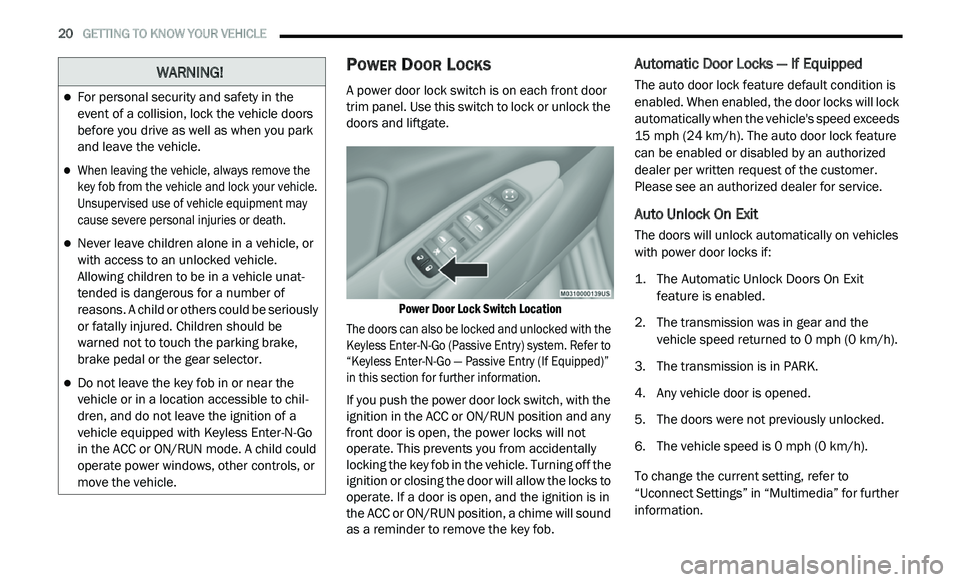
A power door lock switch is on each front door
trim panel. Use this switch to lock or unlock the
doors and liftgate.
Power Door Lock Switch Location
The doors can also be locked and unlocked with the
K e
yless Enter-N-Go (Passive Entry) system. Refer to
“Keyless Enter-N-Go — Passive Entry (If Equipped)”
in this section for further information.
If you push the power door lock switch, with the
i g
nition in the ACC or ON/RUN position and any
front door is open, the power locks will not
operate. This prevents you from accidentally
locking the key fob in the vehicle. Turning off the
ignition or closing the door will allow the locks to
operate. If a door is open, and the ignition is in
the ACC or ON/RUN position, a chime will sound
as a reminder to remove the key fob.
Automatic Door Locks — If Equipped
The auto door lock feature default condition is
enabled. When enabled, the door locks will lock
automatically when the vehicle's speed exceeds
15 mph (24 km/h). The auto door lock feature
c a
n be enabled or disabled by an authorized
dealer per written request of the customer.
Please see an authorized dealer for service.
Auto Unlock On Exit
The doors will unlock automatically on vehicles
with power door locks if:
1. T he Automatic Unlock Doors On Exit
f
eature is enabled.
2. T he transmission was in gear and the
v
ehicle speed returned to 0 mph (0 km/h).
3. T he transmission is in PARK.
4
. A ny vehicle door is opened.
5
. T he doors were not previously unlocked.
6
. T he vehicle speed is 0
mph (0 km/h).
To change the current setting, refer to
“ U
connect Settings” in “Multimedia” for further
information.
WARNING!
For personal security and safety in the
event of a collision, lock the vehicle doors
before you drive as well as when you park
and leave the vehicle.
When leaving the vehicle, always remove the
key fob from the vehicle and lock your vehicle.
Unsupervised use of vehicle equipment may
cause severe personal injuries or death.
Never leave children alone in a vehicle, or
with access to an unlocked vehicle.
Allowing children to be in a vehicle unat -
tended is dangerous for a number of
r e
asons. A child or others could be seriously
or fatally injured. Children should be
warned not to touch the parking brake,
brake pedal or the gear selector.
Do not leave the key fob in or near the
vehicle or in a location accessible to chil -
dren, and do not leave the ignition of a
v e
hicle equipped with Keyless Enter-N-Go
in the ACC or ON/RUN mode. A child could
operate power windows, other controls, or
move the vehicle.
Page 23 of 396
GETTING TO KNOW YOUR VEHICLE 21
NOTE:
Use the Automatic Unlock Doors On Exit feature
i n
accordance with local laws.
KEYLESS ENTER-N-GO — PASSIVE
E
NTRY (IF EQUIPPED)
The Passive Entry system is an enhancement to
the vehicle’s Remote Keyless Entry (RKE)
system and a feature of Keyless Enter-N-Go.
This feature allows you to lock and unlock the
vehicle’s door(s) without having to push the key
fob lock or unlock buttons.
NOTE:
Passive Entry may be programmed on/off;
refer to “Uconnect Settings” in “Multimedia”
for further information.
If wearing gloves on your hands, or if it has
been raining/snowing on the Passive Entry
door handle, the unlock sensitivity can be
affected, resulting in a slower response time.
If the vehicle is unlocked by Passive Entry
and no door is opened within 60 seconds, the
vehicle will re-lock and if equipped will arm
the security alarm.
The key fob may not be detected by the
vehicle Passive Entry system if it is located
next to a mobile phone, laptop, or other elec -
tronic device; these devices may interfere
w i
th the key fob’s wireless signal and prevent
the Passive Entry system from locking/
unlocking the vehicle.
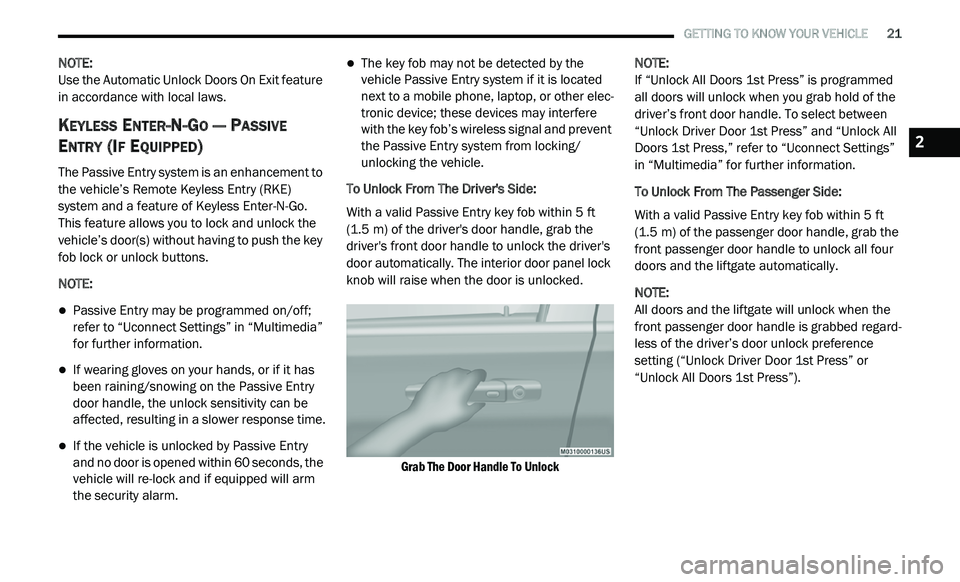
To Unlock From The Driver's Side:
With a valid Passive Entry key fob within 5 ft
( 1
.5 m) of the driver's door handle, grab the
d r
iver's front door handle to unlock the driver's
door automatically. The interior door panel lock
knob will raise when the door is unlocked.
Grab The Door Handle To Unlock
NOTE:
If “Unlock All Doors 1st Press” is programmed
a l
l doors will unlock when you grab hold of the
driver’s front door handle. To select between
“Unlock Driver Door 1st Press” and “Unlock All
Doors 1st Press,” refer to “Uconnect Settings”
in “Multimedia” for further information.
To Unlock From The Passenger Side:
With a valid Passive Entry key fob within 5 ft
( 1
.5 m) of the passenger door handle, grab the
f r
ont passenger door handle to unlock all four
doors and the liftgate automatically.
NOTE:
All doors and the liftgate will unlock when the
fr
ont passenger door handle is grabbed regard -
less of the driver’s door unlock preference
s e
tting (“Unlock Driver Door 1st Press” or
“Unlock All Doors 1st Press”).
2
Page 24 of 396
22 GETTING TO KNOW YOUR VEHICLE
Preventing Inadvertent Locking Of Passive Entry
Key Fob In Vehicle:
To minimize the possibility of unintentionally
lo
cking a Passive Entry key fob inside your
vehicle, the Passive Entry system is equipped
with an automatic door unlock feature which
will function if the ignition is OFF.
If one of the vehicle doors is open and the
ve
hicle is locked with a door panel switch, key
fob button or door handle button, once all open
doors have been closed the vehicle checks the
inside and outside of the vehicle for any valid
Passive Entry key fobs. If one of the vehicle's
Passive Entry key fobs is detected inside the
vehicle, and no other valid Passive Entry key
fobs are detected outside the vehicle, the
Passive Entry system automatically unlocks all
vehicle doors and chirps the horn three times
(on the third attempt, ALL doors will lock and the
Passive Entry key fob can be locked in the
vehicle).
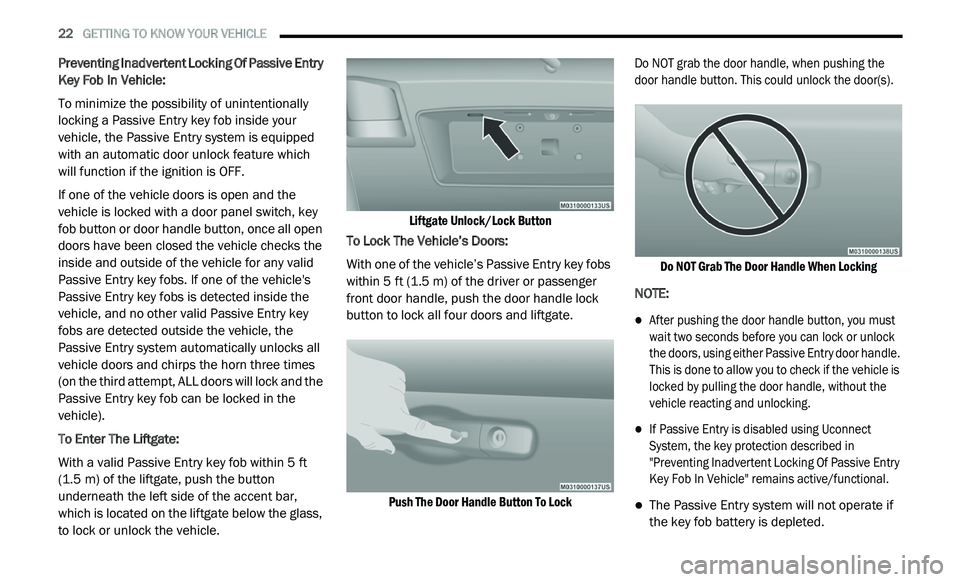
To Enter The Liftgate:
With a valid Passive Entry key fob within 5 ft
( 1
.5 m) of the liftgate, push the button
u n
derneath the left side of the accent bar,
which is located on the liftgate below the glass,
to lock or unlock the vehicle.
Liftgate Unlock/Lock Button
To Lock The Vehicle’s Doors:
With one of the vehicle’s Passive Entry key fobs
w i
thin 5 ft (1.5 m) of the driver or passenger
f r
ont door handle, push the door handle lock
button to lock all four doors and liftgate.
Push The Door Handle Button To Lock
Do NOT grab the door handle, when pushing the
d
o
or handle button. This could unlock the door(s).
Do NOT Grab The Door Handle When Locking
NOTE:
After pushing the door handle button, you must
wait two seconds before you can lock or unlock
the doors, using either Passive Entry door handle.
This is done to allow you to check if the vehicle is
locked by pulling the door handle, without the
vehicle reacting and unlocking.
If Passive Entry is disabled using Uconnect
System, the key protection described in
"Preventing Inadvertent Locking Of Passive Entry
Key Fob In Vehicle" remains active/functional.
The Passive Entry system will not operate if
the key fob battery is depleted.
Page 25 of 396
GETTING TO KNOW YOUR VEHICLE 23
The vehicle doors can also be locked by using
the key fob lock button or the lock button
located on the vehicle’s interior door panel.
General Information
The following regulatory statement applies to all
Radio Frequency (RF) devices equipped in this
vehicle:
This device complies with Part 15 of the FCC
Ru
les and with Innovation, Science and
Economic Development Canada license-exempt
RSS standard(s). Operation is subject to the
following two conditions:
1. T his device may not cause harmful
i
nterference, and
2. T his device must accept any interference
r
eceived, including interference that may
cause undesired operation. Le présent appareil est conforme aux CNR
d
`
Innovation, Science and Economic
Development applicables aux appareils radio
exempts de licence. L'exploitation est autorisée
aux deux conditions suivantes:
1. l 'appareil ne doit pas produire de
b
rouillage, et
2. l 'utilisateur de l'appareil doit accepter tout
b
rouillage radioélectrique subi, même si le
brouillage est susceptible d'en compro -
mettre le fonctionnement.
La operación de este equipo está sujeta a las
s i
guientes dos condiciones:
1. e s posible que este equipo o dispositivo no
c
ause interferencia perjudicial y
2. e ste equipo o dispositivo debe aceptar
c
ualquier interferencia, incluyendo la que
pueda causar su operación no deseada.
NOTE:
Changes or modifications not expressly
a p
proved by the party responsible for compli -
ance could void the user’s authority to operate
t h
e equipment.
CHILD-PROTECTION DOOR LOCK
S
YSTEM — REAR DOORS
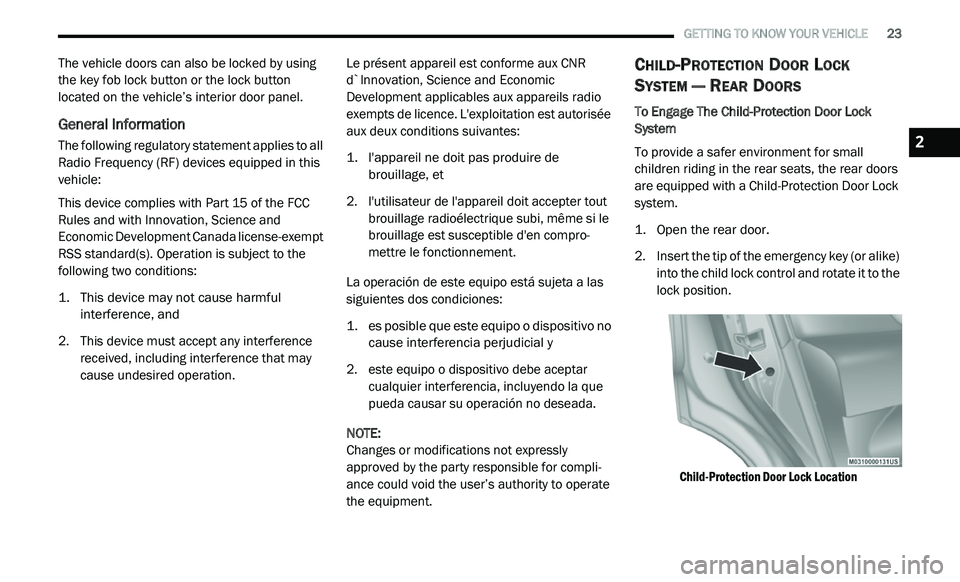
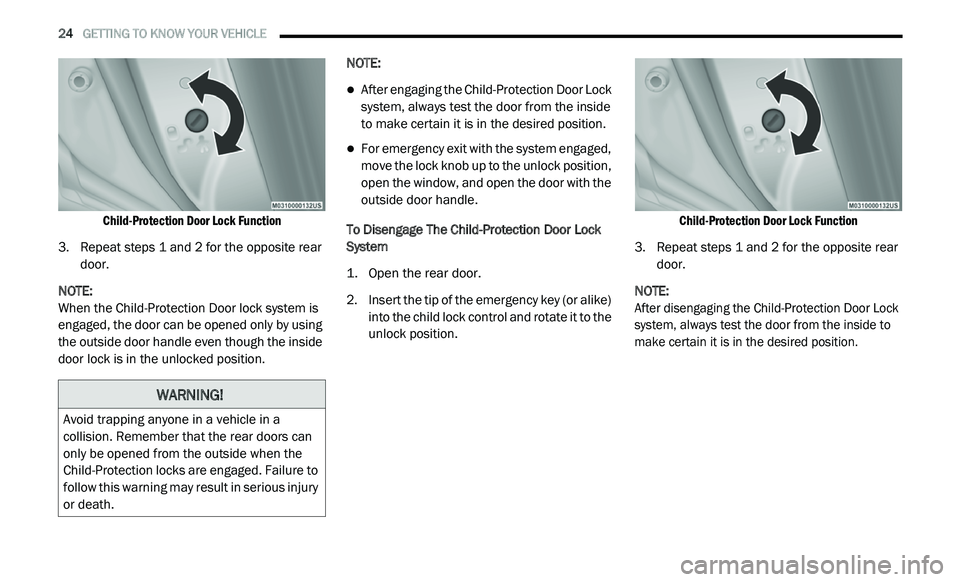
To Engage The Child-Protection Door Lock
System
To provide a safer environment for small
c h
ildren riding in the rear seats, the rear doors
are equipped with a Child-Protection Door Lock
system.
1. Open the rear door.
2
. I nsert the tip of the emergency key (or alike)
i
nto the child lock control and rotate it to the
lock position.
Child-Protection Door Lock Location
2
Page 26 of 396
24 GETTING TO KNOW YOUR VEHICLE
Child-Protection Door Lock Function
3. R epeat steps 1 and 2 for the opposite rear
d
oor.
NOTE:
When the Child-Protection Door lock system is
e n
gaged, the door can be opened only by using
the outside door handle even though the inside
door lock is in the unlocked position. NOTE:
After engaging the Child-Protection Door Lock
system, always test the door from the inside
to make certain it is in the desired position.
For emergency exit with the system engaged,
move the lock knob up to the unlock position,
open the window, and open the door with the
outside door handle.
To Disengage The Child-Protection Door Lock
S y
stem
1. O pen the rear door.
2
. I nsert the tip of the emergency key (or alike)
i
nto the child lock control and rotate it to the
unlock position.
Child-Protection Door Lock Function
3. R epeat steps 1 and 2 for the opposite rear
d
oor.
NOTE:
After disengaging the Child-Protection Door Lock
s y
stem, always test the door from the inside to
make certain it is in the desired position.
WARNING!
Avoid trapping anyone in a vehicle in a
collision. Remember that the rear doors can
only be opened from the outside when the
Child-Protection locks are engaged. Failure to
follow this warning may result in serious injury
or death.
Page 30 of 396
28 GETTING TO KNOW YOUR VEHICLE
Stadium Tip 'n Slide (Easy Entry/Exit Seat) —
Seven Passenger Models
This feature allows passengers to easily enter or
exit the third-row passenger seats from either
side of the vehicle.
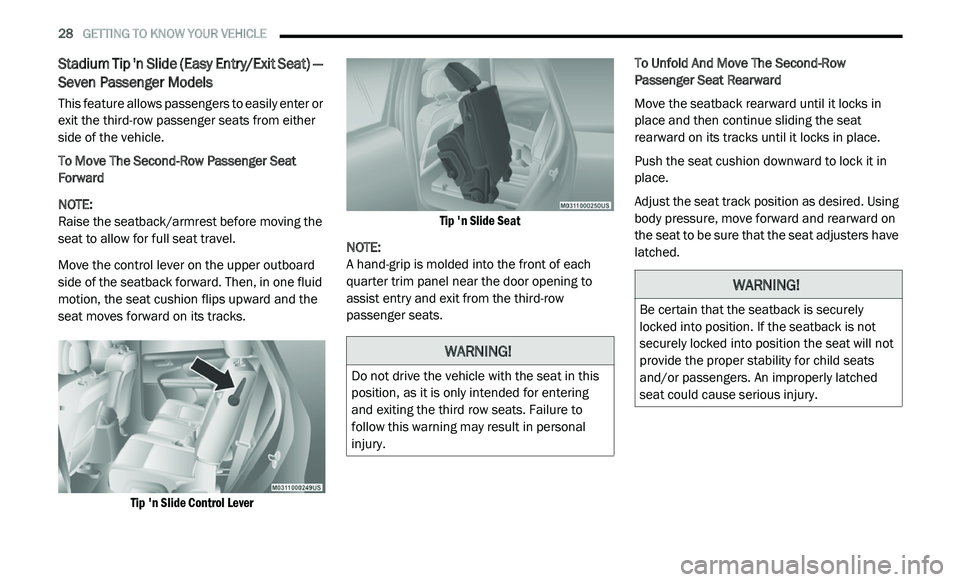
To Move The Second-Row Passenger Seat
Fo
rward
NOTE:
Raise the seatback/armrest before moving the
s e
at to allow for full seat travel.
Move the control lever on the upper outboard
s i
de of the seatback forward. Then, in one fluid
motion, the seat cushion flips upward and the
seat moves forward on its tracks.
Tip 'n Slide Control Lever Tip 'n Slide Seat
NOTE:
A hand-grip is molded into the front of each
q u
arter trim panel near the door opening to
assist entry and exit from the third-row
passenger seats. To Unfold And Move The Second-Row
P
a
ssenger Seat Rearward
Move the seatback rearward until it locks in
p l
ace and then continue sliding the seat
rearward on its tracks until it locks in place.
Push the seat cushion downward to lock it in
p l
ace.
Adjust the seat track position as desired. Using
b o
dy pressure, move forward and rearward on
the seat to be sure that the seat adjusters have
latched.
WARNING!
Do not drive the vehicle with the seat in this
position, as it is only intended for entering
and exiting the third row seats. Failure to
follow this warning may result in personal
injury.
WARNING!
Be certain that the seatback is securely
locked into position. If the seatback is not
securely locked into position the seat will not
provide the proper stability for child seats
and/or passengers. An improperly latched
seat could cause serious injury.
Page 45 of 396
GETTING TO KNOW YOUR VEHICLE 43
INTERIOR LIGHTS
COURTESY/INTERIOR LIGHTING
The interior lights come on when a door is
opened.
To protect the battery, the interior lights will turn
of
f automatically 10 minutes after the ignition is
p l
aced in the OFF position. This will occur if the
interior lights were switched on manually or are
on because a door is open. The battery
protection also includes the glove compartment
light. To restore interior light operation after
automatic battery protection is enabled (lights
off), either place the ignition in the ON/RUN
position or cycle the light switch.
Courtesy Lights
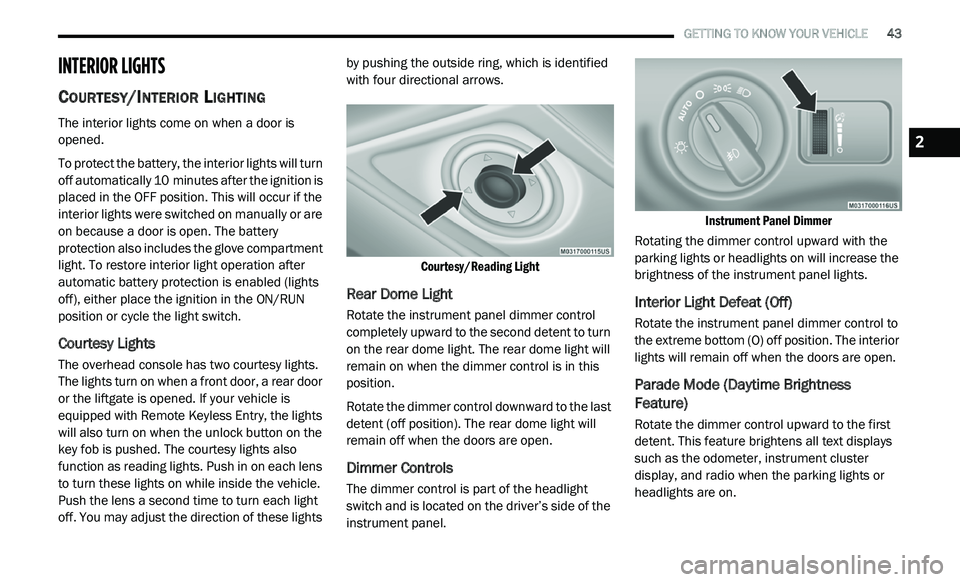
The overhead console has two courtesy lights.
The lights turn on when a front door, a rear door
or the liftgate is opened. If your vehicle is
equipped with Remote Keyless Entry, the lights
will also turn on when the unlock button on the
key fob is pushed. The courtesy lights also
function as reading lights. Push in on each lens
to turn these lights on while inside the vehicle.
Push the lens a second time to turn each light
off. You may adjust the direction of these lights by pushing the outside ring, which is identified
with four directional arrows.
Courtesy/Reading Light
Rear Dome Light
Rotate the instrument panel dimmer control
completely upward to the second detent to turn
on the rear dome light. The rear dome light will
remain on when the dimmer control is in this
position.
Rotate the dimmer control downward to the last
de
tent (off position). The rear dome light will
remain off when the doors are open.
Dimmer Controls
The dimmer control is part of the headlight
switch and is located on the driver’s side of the
instrument panel.
Instrument Panel Dimmer
Rotating the dimmer control upward with the
p a
rking lights or headlights on will increase the
brightness of the instrument panel lights.
Interior Light Defeat (Off)
Rotate the instrument panel dimmer control to
the extreme bottom (O) off position. The interior
lights will remain off when the doors are open.
Parade Mode (Daytime Brightness
Feature)
Rotate the dimmer control upward to the first
detent. This feature brightens all text displays
such as the odometer, instrument cluster
display, and radio when the parking lights or
headlights are on.
2
Page 76 of 396
74 GETTING TO KNOW YOUR VEHICLE
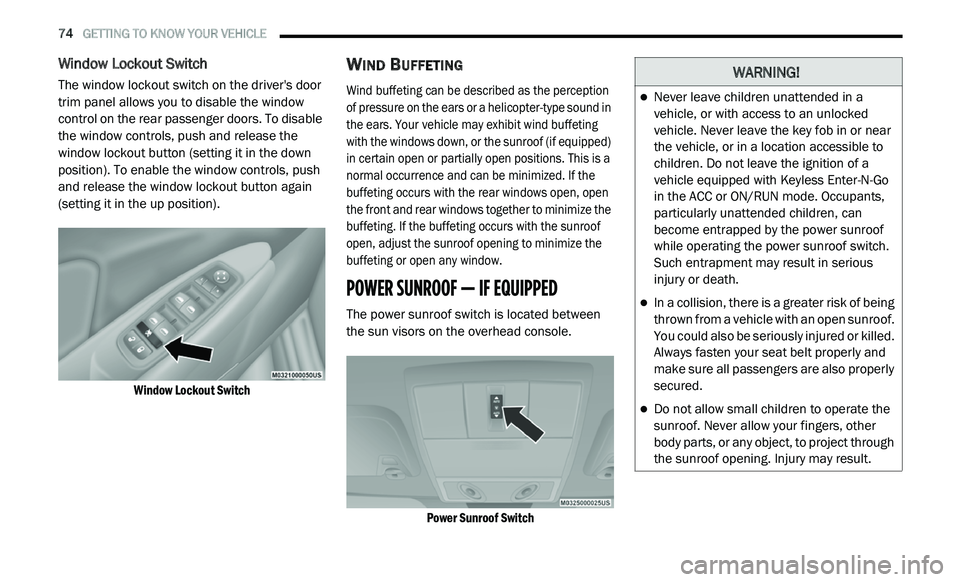
Window Lockout Switch
The window lockout switch on the driver's door
trim panel allows you to disable the window
control on the rear passenger doors. To disable
the window controls, push and release the
window lockout button (setting it in the down
position). To enable the window controls, push
and release the window lockout button again
(setting it in the up position).
Window Lockout Switch
WIND BUFFETING
Wind buffeting can be described as the perception
of pressure on the ears or a helicopter-type sound in
the ears. Your vehicle may exhibit wind buffeting
with the windows down, or the sunroof (if equipped)
in certain open or partially open positions. This is a
normal occurrence and can be minimized. If the
buffeting occurs with the rear windows open, open
the front and rear windows together to minimize the
buffeting. If the buffeting occurs with the sunroof
open, adjust the sunroof opening to minimize the
buffeting or open any window.
POWER SUNROOF — IF EQUIPPED
The power sunroof switch is located between
the sun visors on the overhead console.
Power Sunroof Switch
WARNING!
Never leave children unattended in a
vehicle, or with access to an unlocked
vehicle. Never leave the key fob in or near
the vehicle, or in a location accessible to
children. Do not leave the ignition of a
vehicle equipped with Keyless Enter-N-Go
in the ACC or ON/RUN mode. Occupants,
particularly unattended children, can
become entrapped by the power sunroof
while operating the power sunroof switch.
Such entrapment may result in serious
injury or death.
In a collision, there is a greater risk of being
thrown from a vehicle with an open sunroof.
You could also be seriously injured or killed.
Always fasten your seat belt properly and
make sure all passengers are also properly
secured.
Do not allow small children to operate the
sunroof. Never allow your fingers, other
body parts, or any object, to project through
the sunroof opening. Injury may result.
Page 78 of 396
76 GETTING TO KNOW YOUR VEHICLE
IGNITION OFF OPERATION
The power sunroof switch will remain active for
up to approximately ten minutes after the
ignition is placed in the OFF position. Opening
either front door will cancel this feature.
NOTE:
Ignition Off time is programmable through the
U c
onnect System. Refer to “Uconnect Settings/
Customer Programmable Features” in “Multi -
media” for further information.
HOOD
OPENING
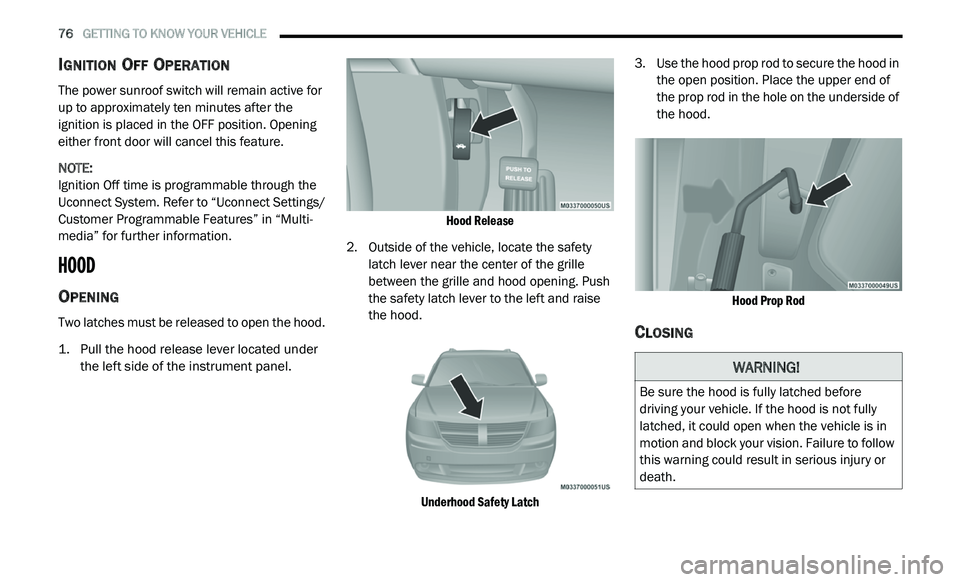
Two latches must be released to open the hood.
1. P ull the hood release lever located under
t
he left side of the instrument panel.
Hood Release
2. Outside of the vehicle, locate the safety l
atch lever near the center of the grille
between the grille and hood opening. Push
the safety latch lever to the left and raise
the hood.
Underhood Safety Latch
3. U
se the hood prop rod to secure the hood in
t
he open position. Place the upper end of
the prop rod in the hole on the underside of
the hood.
Hood Prop Rod
CLOSING
WARNING!
Be sure the hood is fully latched before
driving your vehicle. If the hood is not fully
latched, it could open when the vehicle is in
motion and block your vision. Failure to follow
this warning could result in serious injury or
death.
Page 79 of 396
GETTING TO KNOW YOUR VEHICLE 77
LIFTGATE
OPENING
The liftgate can be unlocked or locked pushing
the unlock or lock button on the Remote
Keyless Entry key fob, the Keyless Enter-N-Go
(Passive Entry) lock/unlock button underneath
the left side of the accent bar, which is located
on the liftgate below the glass, or by activating
the power door lock switch located on either
front door trim panel. Refer to “Keyless Enter-N-Go — Passive Entry” in
“
D
oors” in this chapter for further information
on Keyless Enter-N-Go (Passive Entry).
NOTE:
The liftgate cannot be unlocked or locked with
th
e manual door locks on the door trim panels
or the door lock cylinder on the driver's door.
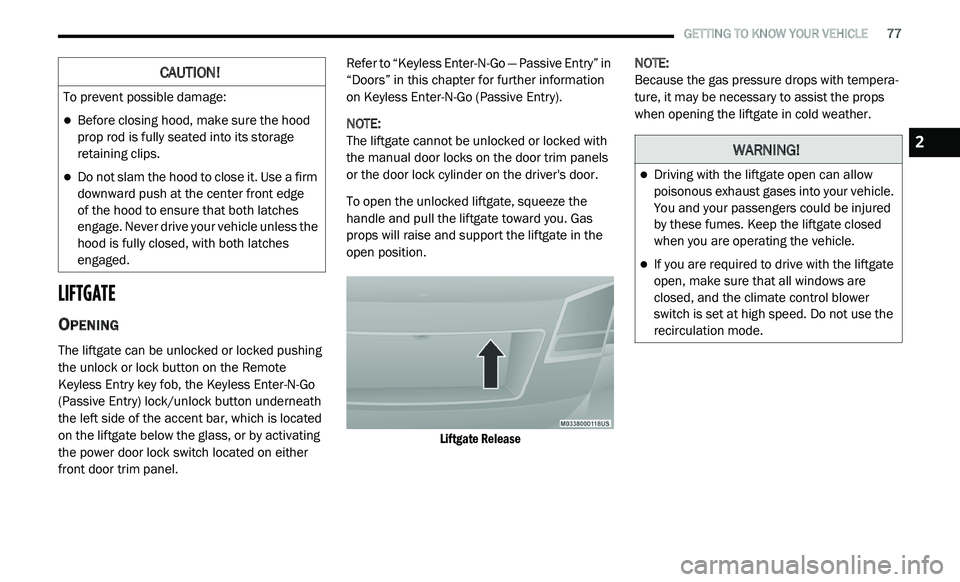
To open the unlocked liftgate, squeeze the
h a
ndle and pull the liftgate toward you. Gas
props will raise and support the liftgate in the
open position.
Liftgate Release
NOTE:
Because the gas pressure drops with tempera -
ture, it may be necessary to assist the props
w h
en opening the liftgate in cold weather.
CAUTION!
To prevent possible damage:
Before closing hood, make sure the hood
prop rod is fully seated into its storage
retaining clips.
Do not slam the hood to close it. Use a firm
downward push at the center front edge
of the hood to ensure that both latches
e n
gage. Never drive your vehicle unless the
hood is fully closed, with both latches
engaged.
WARNING!
Driving with the liftgate open can allow
poisonous exhaust gases into your vehicle.
You and your passengers could be injured
by these fumes. Keep the liftgate closed
when you are operating the vehicle.
If you are required to drive with the liftgate
open, make sure that all windows are
closed, and the climate control blower
switch is set at high speed. Do not use the
recirculation mode.
2