instrument cluster DODGE JOURNEY 2020 User Guide
[x] Cancel search | Manufacturer: DODGE, Model Year: 2020, Model line: JOURNEY, Model: DODGE JOURNEY 2020Pages: 396, PDF Size: 25.53 MB
Page 100 of 396
98 GETTING TO KNOW YOUR INSTRUMENT PANEL
The Trip Functions mode displays the following
information:
Trip A
Shows the total distance traveled for Trip A
since the last reset.
Shows the elapsed time traveled for Trip A
since the last reset.
Trip B
Shows the total distance traveled for Trip B
since the last reset.
Shows the elapsed time traveled for Trip B
since the last reset.
Elapsed Time
Shows the total elapsed time of travel since the
l a
st reset. Elapsed time will increment when the
ignition is in the ON/RUN position.
To Reset The Display
Reset will only occur while a resettable function
i s
being displayed. Push and release the right
arrow button once to clear the resettable
function.
Tire Pressure
Push and release the up or down arrow button
until “Tire PSI:” displays highlighted in the
instrument cluster display. Push and release
the right arrow button to view a graphic of the
vehicle with a tire pressure value at each corner
of the graphic.
Vehicle Info (Customer Information
Features)
Push and release the up or down arrow button
until “Vehicle Info” displays in the instrument
cluster display and push the right arrow button.
Push the up or down arrow button to scroll
through the available information displays.
Coolant Temperature
Displays the actual coolant temperature.
Oil Temperature
Displays the actual oil temperature.
Oil Pressure - If Equipped
Displays the actual oil pressure.
Transmission Temperature
Displays the actual transmission temperature.
Engine Hours
Displays the number of hours of engine operation.
Messages
Push and release the up or down arrow button
until “Messages: XX” displays highlighted in the
instrument cluster display. If there is more than
one message, pushing the right arrow button
will display a stored warning message. Push
and release the up or down arrow button if there
is more than one message to cycle through the
remaining stored messages. If there are no
messages, pushing the right arrow button will
not change the display.
Turn Menu OFF
Select from the Main Menu using the up or
down arrow button. Pushing the right arrow
button clears the menu display. Pushing any
one of the four Display control buttons will bring
the menu back.
Page 101 of 396
GETTING TO KNOW YOUR INSTRUMENT PANEL 99
BATTERY SAVER ON/BATTERY SAVER
M
ODE MESSAGE — ELECTRICAL LOAD
R
EDUCTION ACTIONS — IF EQUIPPED
This vehicle is equipped with an Intelligent
Battery Sensor (IBS) to perform additional
monitoring of the electrical system and status
of the vehicle battery.
In cases when the IBS detects charging system
f a
ilure, or the vehicle battery conditions are
deteriorating, electrical load reduction actions
will take place to extend the driving time and
distance of the vehicle. This is done by reducing
power to or turning off non-essential electrical
loads.
Load reduction is only active when the engine is
r u
nning. It will display a message if there is a
risk of battery depletion to the point where the
vehicle may stall due to lack of electrical supply,
or will not restart after the current drive cycle.
When load reduction is activated, the message
“B
attery Saver On” or “Battery Saver Mode” will
appear in the instrument cluster.
These messages indicate the vehicle battery
h a
s a low state of charge and continues to lose
electrical charge at a rate that the charging
system cannot sustain. NOTE:
The charging system is independent from
load reduction. The charging system
performs a diagnostic on the charging
system continuously.
If the Battery Charge Warning Light is on it
may indicate a problem with the charging
system. Refer to “Battery Charge Warning
Light” in “Getting To Know Your Instrument
Panel” for further information.
The electrical loads that may be switched off
(if equipped), and vehicle functions which can
b e
affected by load reduction:
Heated Seat/Vented Seats/Heated Wheel
Rear Defroster And Heated Mirrors
HVAC System
115 Volts AC Power Inverter System
Audio and Telematics System
Loss of the battery charge may indicate one or
m o
re of the following conditions:
The charging system cannot deliver enough
electrical power to the vehicle system
because the electrical loads are larger than the capability of charging system. The
charging system is still functioning properly.
Excess vehicle electrical loads are turned on
(e.g. HVAC on max settings, exterior and inte
-
rior lights, overloaded power outlets +12 Volts,
1 1
5 Volts AC, USB ports) during certain driving
conditions (city driving, towing, frequent stop -
ping, etc.).
Installed options (additional lights, upfitter
electrical accessories, audio systems, alarms
and similar devices.
Unusual driving cycles (short trips separated
by long parking periods).
The vehicle was parked for an extended
period of time (weeks, months).
The battery was recently replaced and was
not charged completely.
The battery was discharged by an electrical
load left on when the vehicle was parked.
The battery was used for an extended period
with the engine not running to supply radio,
lights, chargers, +12 Volts portable appli -
ances like vacuum cleaners, game consoles
a n
d similar devices.
3
Page 106 of 396
104 GETTING TO KNOW YOUR INSTRUMENT PANEL
Electronic Stability Control (ESC) Active
Warning Light — If Equipped
This warning light will indicate when the
Electronic Stability Control system is
Ac
tive. The “ESC Indicator Light” in the
instrument cluster will come on when the
ignition is placed in the ON/RUN or ACC/ON/RUN
position, and when ESC is activated. It should go out
with the engine running. If the “ESC Indicator Light”
comes on continuously with the engine running, a
malfunction has been detected in the ESC system. If
this warning light remains on after several ignition
cycles, and the vehicle has been driven several
miles (kilometers) at speeds greater than 30 mph
( 4
8 km/h), see an authorized dealer as soon as
p o
ssible to have the problem diagnosed and
corrected.
The “ESC OFF Indicator Light” and the “ESC
Indicator Light” come on momentarily each
time the ignition is placed in the ON/RUN or
ACC/ON/RUN position.
The ESC system will make buzzing or clicking
sounds when it is active. This is normal; the
sounds will stop when ESC becomes inactive.
This light will come on when the vehicle is in
an ESC event.
Electronic Stability Control (ESC) OFF
Warning Light — If Equipped
This warning light indicates the
Electronic Stability Control (ESC) is
o f
f.
Each time the ignition is turned to ON/RUN or
A C
C/ON/RUN, the ESC system will be on, even
if it was turned off previously.
Tire Pressure Monitoring System (TPMS)
Warning Light
The warning light switches on and a
message is displayed to indicate that
t h
e tire pressure is lower than the
recommended value and/or that slow
pressure loss is occurring. In these cases, optimal tire duration and fuel consumption may
not be guaranteed.
Should one or more tires be in the condition
m
e
ntioned above, the display will show the
indications corresponding to each tire.
Each tire, including the spare (if provided),
sh
ould be checked monthly when cold and
inflated to the inflation pressure recommended
by the vehicle manufacturer on the vehicle
placard or tire inflation pressure label. If your
vehicle has tires of a different size than the size
indicated on the vehicle placard or tire inflation
pressure label, you should determine the
proper tire inflation pressure for those tires.
CAUTION!
Prolonged driving with the Malfunction
Indicator Light (MIL) on could cause damage
to the vehicle control system. It also could
affect fuel economy and driveability. If the
MIL is flashing, severe catalytic converter
damage and power loss will soon occur.
Immediate service is required.
CAUTION!
Do not continue driving with one or more flat
tires as handling may be compromised. Stop
the vehicle, avoiding sharp braking and
steering. If a tire puncture occurs, repair
immediately using the dedicated tire repair
kit and contact an authorized dealer as soon
as possible.
Page 113 of 396
SAFETY 111
If the “Brake System Warning Light” remains on
or comes on while driving, it indicates that the
brake system is not functioning properly and
that immediate service is required. If the “Brake
System Warning Light” does not come on when
the ignition is placed in the ON/RUN mode,
have the light repaired as soon as possible.
Electronic Brake Force Distribution (EBD)
The Electronic Brake Force Distribution (EBD)
function manages the distribution of the braking
torque between the front and rear axles by
limiting braking pressure to the rear axle. This is
done to prevent overslip of the rear wheels to
avoid vehicle instability, and to prevent the rear
axle from entering the Anti-Lock Brake System
(ABS) before the front axle.
Electronic Roll Mitigation (ERM)
The Electronic Roll Mitigation (ERM) system
anticipates the potential for wheel lift by
monitoring the driver’s steering wheel input and
the speed of the vehicle. When ERM determines
that the rate of change of the steering wheel
angle and vehicle’s speed are sufficient to
potentially cause wheel lift, it then applies the
appropriate brake and may also reduce engine
power to lessen the chance that wheel lift will
occur. ERM can only reduce the chance of wheel lift occurring during severe or evasive driving
maneuvers; it cannot prevent wheel lift due to
other factors, such as road conditions, leaving
the roadway, or striking objects or other vehicles.
Electronic Stability Control (ESC)
The Electronic Stability Control (ESC) system
enhances directional control and stability of the
vehicle under various driving conditions. ESC
corrects for oversteering or understeering of the
vehicle by applying the brake of the appropriate
wheel(s) to assist in counteracting the oversteer
or understeer condition. Engine power may also
be reduced to help the vehicle maintain the
desired path.
ESC uses sensors in the vehicle to determine
t
h
e vehicle path intended by the driver and
compares it to the actual path of the vehicle.
When the actual path does not match the
intended path, ESC applies the brake of the
appropriate wheel to assist in counteracting the
oversteer or understeer condition.
Oversteer — when the vehicle is turning more
than appropriate for the steering wheel position.
Understeer — when the vehicle is turning less
than appropriate for the steering wheel position.
The ESC Activation/Malfunction Indicator Light
l o
cated in the instrument cluster will start to flash
as soon as the ESC system becomes active.
The ESC Activation/Malfunction Indicator Light
a l
so flashes when the TCS is active. If the ESC
Activation/Malfunction Indicator Light begins to
flash during acceleration, ease up on the
accelerator and apply as little throttle as
possible. Be sure to adapt your speed and driving
to the prevailing road conditions.
WARNING!
Many factors, such as vehicle loading, road
conditions and driving conditions, influence
the chance that wheel lift or rollover may occur.
ERM cannot prevent all wheel lift or roll overs,
especially those that involve leaving the
roadway or striking objects or other vehicles.
The capabilities of an ERM-equipped vehicle
must never be exploited in a reckless or
dangerous manner which could jeopardize the
user's safety or the safety of others.
4
Page 115 of 396
SAFETY 113
ESC Activation/Malfunction Indicator Light
And ESC OFF Indicator Light
The ESC Activation/Malfunction
Indicator Light in the instrument
cl
uster will come on when the ignition
is placed in the ON mode. It should
go out with the engine running. If the ESC
A c
tivation/Malfunction Indicator Light comes
on continuously with the engine running, a
m a
lfunction has been detected in the ESC
system. If this light remains on after several
ignition cycles, and the vehicle has been driven
several miles (kilometers) at speeds greater than
30 mph (48 km/h), see an authorized dealer as
s o
on as possible to have the problem diagnosed
and corrected.
The ESC Activation/Malfunction Indicator Light
( l
ocated in the instrument cluster) starts to flash
as soon as the tires lose traction and the ESC
system becomes active. The ESC Activation/
Malfunction Indicator Light also flashes when
TCS is active. If the ESC Activation/Malfunction
Indicator Light begins to flash during
acceleration, ease up on the accelerator and
apply as little throttle as possible. Be sure to
adapt your speed and driving to the prevailing
road conditions.
NOTE:
The ESC Activation/Malfunction Indicator
Light and the ESC OFF Indicator Light come
on momentarily each time the ignition is
placed in the ON mode.
Each time the ignition is placed in the ON
mode, the ESC system will be on even if it was
turned off previously.
The ESC system will make buzzing or clicking
sounds when it is active. This is normal; the
sounds will stop when ESC becomes inactive
following the maneuver that caused the ESC
activation.
The ESC OFF Indicator Light indicates
the customer has elected to have the
El
ectronic Stability Control (ESC) in a
reduced mode.
WARNING!
When in “Partial Off” mode, the TCS func -
tionality of ESC (except for the limited slip
f e
ature described in the TCS section) has
been disabled and the ESC OFF Indicator
Light will be illuminated. When in “Partial
Off” mode, the engine power reduction
feature of TCS is disabled, and the
enhanced vehicle stability offered by the
ESC system is reduced.
Trailer Sway Control (TSC) is disabled when
the ESC system is in the “Partial Off” mode.
WARNING!
The Electronic Stability Control (ESC) cannot
prevent the natural laws of physics from
acting on the vehicle, nor can it increase
the traction afforded by prevailing road
c o
nditions. ESC cannot prevent all accidents,
including those resulting from excessive
speed in turns, driving on very slippery
surfaces, or hydroplaning. ESC also cannot
prevent collisions.
4
Page 117 of 396
SAFETY 115
Disabling And Enabling HSA
This feature can be turned on or turned off. To
change the current setting, proceed as follows:
If disabling HSA using your instrument cluster
display, refer to “Instrument Cluster Display”
in “Getting To Know Your Instrument Panel”
for further information.
If disabling HSA using Uconnect Settings,
refer to “Uconnect Settings” in “Multimedia”
for further information.
For vehicles not equipped with an instrument
c lu
ster display, perform the following steps:
1. C enter the steering wheel (front wheels
p
ointing straight forward).
2. S hift the transmission into PARK.
3
. A pply the parking brake.
4
. S tart the engine.
5
. R otate the steering wheel slightly more than
o
ne-half turn to the left.
6. P ush the “ESC OFF” button located in the
l
ower switch bank below the climate control
four times within 20 seconds. The “ESC OFF
Indicator Light” should turn on and turn off
two times. 7. R
otate the steering wheel back to center
a
nd then an additional slightly more than
one-half turn to the right.
8. P lace the ignition in the OFF mode and then
b
ack to ON. If the sequence was completed
properly, the “ESC OFF Indicator Light” will blink
several times to confirm HSA is disabled.
9. Repeat these steps if you want to return this f
eature to its previous setting.
Traction Control System (TCS)
The Traction Control System (TCS) monitors the
amount of wheel spin of each of the driven
wheels. If wheel spin is detected, the TCS may
apply brake pressure to the spinning wheel(s)
and/or reduce engine power to provide
enhanced acceleration and stability. A feature
of the TCS, Brake Limited Differential (BLD),
functions similarly to a limited slip differential
and controls the wheel spin across a driven
axle. If one wheel on a driven axle is spinning
faster than the other, the system will apply the
brake of the spinning wheel. This will allow more
engine power to be applied to the wheel that is
not spinning. BLD may remain enabled even if
TCS and Electronic Stability Control (ESC) are in
reduced modes.
Trailer Sway Control (TSC)
TSC uses sensors in the vehicle to recognize an
excessively swaying trailer and will take the
appropriate actions to attempt to stop the sway.
TSC will become active automatically once an
excessively swaying trailer is recognized.
Note that TSC cannot stop all trailers from
s w
aying. Always use caution when towing a
trailer and follow the trailer tongue weight
r e
commendations. Refer to “Trailer Towing” in
“Starting And Operating” for further information.
When TSC is functioning, the ESC Activation/
M a
lfunction Indicator Light will flash, the engine
power may be reduced and you may feel the
brakes being applied to individual wheels to
attempt to stop the trailer from swaying. TSC is
disabled when the ESC system is in the “Partial
Off” mode.
WARNING!
If TSC activates while driving, slow the vehicle
down, stop at the nearest safe location, and
adjust the trailer load to eliminate trailer sway.
4
Page 119 of 396
SAFETY 117
NOTE:
The TPMS is not intended to replace normal
tire care and maintenance, or to provide
warning of a tire failure or condition.
The TPMS should not be used as a tire pres -
sure gauge while adjusting your tire pressure.
Driving on a significantly under-inflated tire
causes the tire to overheat and can lead to
tire failure. Under-inflation also reduces fuel
efficiency and tire tread life, and may affect
the vehicle’s handling and stopping ability.
The TPMS is not a substitute for proper tire
maintenance, and it is the driver’s responsi -
bility to maintain correct tire pressure using
a n
accurate tire pressure gauge, even if
under-inflation has not reached the level to
trigger illumination of the Tire Pressure Moni -
toring System Warning Light.
Seasonal temperature changes will affect
tire pressure, and the TPMS will monitor the
actual tire pressure in the tire.
Premium System
The Tire Pressure Monitoring System (TPMS)
uses wireless technology with wheel rim
mounted electronic sensors to monitor tire
pressure levels. Sensors, mounted to each
wheel as part of the valve stem, transmit tire
pressure readings to the receiver module.
NOTE:
It is particularly important for you to check the
t i
re pressure in all of the tires on your vehicle
monthly and to maintain the proper pressure.
The TPMS consists of the following
c o
mponents:
Receiver module
Four Tire Pressure Monitoring sensors
Various Tire Pressure Monitoring System
messages, which display in the instrument
cluster
Tire Pressure Monitoring System Warning
Light
CAUTION!
The TPMS has been optimized for the orig -
inal equipment tires and wheels. TPMS
p r
essures and warnings have been estab -
lished for the tire size equipped on your
v e
hicle. Undesirable system operation or
sensor damage may result when using
replacement equipment that is not of the
same size, type, and/or style. The TPM
sensor is not designed for use on after -
market wheels and may contribute to a
p o
or overall system performance or sensor
damage. Customers are encouraged to use
OEM wheels to assure proper TPM feature
operation.
Using aftermarket tire sealants may cause
the Tire Pressure Monitoring System
(TPMS) sensor to become inoperable.
After using an aftermarket tire sealant it is
r e
commended that you take your vehicle to
an authorized dealership to have your
sensor function checked.
After inspecting or adjusting the tire pres -
sure, always reinstall the valve stem cap.
T h
is will prevent moisture and dirt from
entering the valve stem, which could
damage the TPM sensor.
4
Page 120 of 396
118 SAFETY
Tire Pressure Monitoring Low Pressure
Warnings
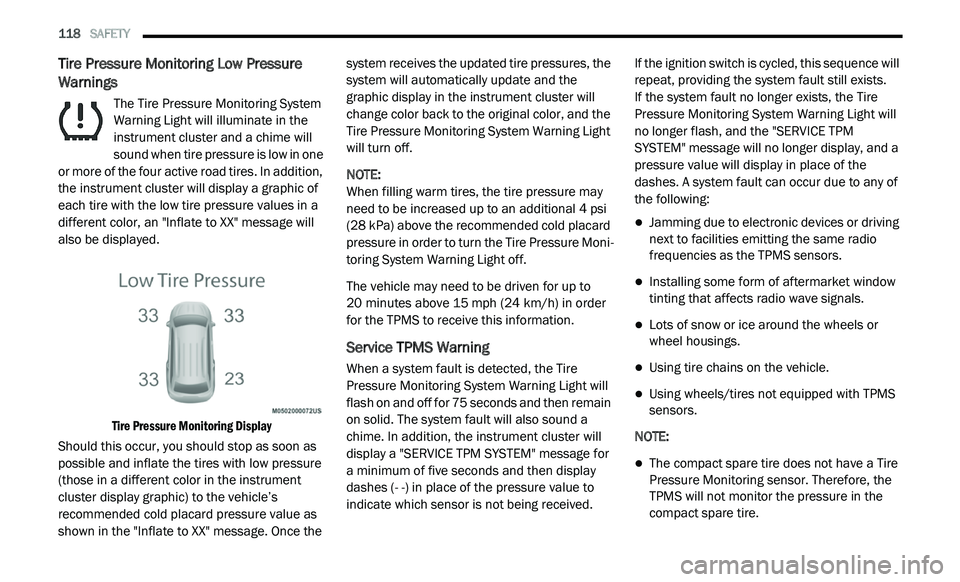
The Tire Pressure Monitoring System
Warning Light will illuminate in the
in
strument cluster and a chime will
sound when tire pressure is low in one
or more of the four active road tires. In addition,
the instrument cluster will display a graphic of
each tire with the low tire pressure values in a
different color, an "Inflate to XX" message will
also be displayed.
Tire Pressure Monitoring Display
Should this occur, you should stop as soon as
p o
ssible and inflate the tires with low pressure
(those in a different color in the instrument
cluster display graphic) to the vehicle’s
recommended cold placard pressure value as
shown in the "Inflate to XX" message. Once the system receives the updated tire pressures, the
system will automatically update and the
graphic display in the instrument cluster will
change color back to the original color, and the
Tire Pressure Monitoring System Warning Light
will turn off.
NOTE:
When filling warm tires, the tire pressure may
n e
ed to be increased up to an additional 4 psi
(28 kPa) above the recommended cold placard
pressure in order to turn the Tire Pressure Moni -
toring System Warning Light off.
The vehicle may need to be driven for up to
2 0
minutes above 15 mph (24 km/h) in order
f o
r the TPMS to receive this information.
Service TPMS Warning
When a system fault is detected, the Tire
Pressure Monitoring System Warning Light will
flash on and off for 75 seconds and then remain
on solid. The system fault will also sound a
chime. In addition, the instrument cluster will
display a "SERVICE TPM SYSTEM" message for
a minimum of five seconds and then display
dashes (- -) in place of the pressure value to
indicate which sensor is not being received. If the ignition switch is cycled, this sequence will
r
e
peat, providing the system fault still exists.
If the system fault no longer exists, the Tire
P r
essure Monitoring System Warning Light will
no longer flash, and the "SERVICE TPM
SYSTEM" message will no longer display, and a
pressure value will display in place of the
dashes. A system fault can occur due to any of
the following:
Jamming due to electronic devices or driving
next to facilities emitting the same radio
frequencies as the TPMS sensors.
Installing some form of aftermarket window
tinting that affects radio wave signals.
Lots of snow or ice around the wheels or
wheel housings.
Using tire chains on the vehicle.
Using wheels/tires not equipped with TPMS
sensors.
NOTE:
The compact spare tire does not have a Tire
Pressure Monitoring sensor. Therefore, the
TPMS will not monitor the pressure in the
compact spare tire.
Page 121 of 396
SAFETY 119
If you install the compact spare tire in place
of a road tire that has a pressure below the
low-pressure warning limit, upon the next
ignition switch cycle, the Tire Pressure Moni -
toring System Warning Light will remain on
a n
d a chime will sound. In addition, the
graphic in the instrument cluster will still
display a pressure value in a different color
and an "Inflate to XX" message.
After driving the vehicle for up to 20 minutes
ab
ove 15 mph (24 km/h), the Tire Pressure
M o
nitoring System Warning Light will flash on
and off for 75 seconds and then remain on
solid. In addition, the instrument cluster will
display a "SERVICE TPM SYSTEM" message
for a minimum of five seconds and then
display dashes (- -) in place of the pressure
value.
For each subsequent ignition switch cycle, a
chime will sound, the Tire Pressure Moni -
toring System Warning Light will flash on and
o f
f for 75 seconds and then remain on solid,
and the instrument cluster will display a
"SERVICE TPM SYSTEM" message for a
minimum of five seconds and then display
dashes (- -) in place of the pressure value.
Once you repair or replace the original road
tire and reinstall it on the vehicle in place of
the compact spare, the TPMS will update
automatically. In addition, the Tire Pressure
Monitoring System Warning Light will turn off
and the graphic in the instrument cluster will
display a new pressure value instead of
dashes (- -), as long as no tire pressure is
below the low-pressure warning limit in any of
the four active road tires. The vehicle may
need to be driven for up to 20 minutes above
1 5
mph (24 km/h) in order for the TPMS to
r e
ceive this information.
TPMS Deactivation — If Equipped
The Tire Pressure Monitoring System (TPMS)
can be deactivated if replacing all four wheel
and tire assemblies (road tires) with wheel and
tire assemblies that do not have TPMS sensors,
such as when installing winter wheel and tire
assemblies on your vehicle.
To deactivate the TPMS, first replace all four
w h
eel and tire assemblies (road tires) with tires
not equipped with Tire Pressure Monitoring
(TPM) sensors. Then, drive the vehicle for
20 minutes above 15 mph (24 km/h). The
T P
MS will chime, the TPMS Warning Light will flash on and off for 75 seconds and then remain
on. The instrument cluster will display the
“Service Tire Pressure System” message and
then display dashes (--) in place of the pressure
values.
Beginning with the next ignition cycle, the TPMS
wi
ll no longer chime or display the “Service Tire
Pressure System” message in the instrument
cluster but dashes (--) will remain in place of the
pressure values.
To reactivate the TPMS, replace all four wheel
an
d tire assemblies (road tires) with tires
equipped with TPM sensors. Then, drive the
vehicle for up to 20 minutes above 15 mph
( 2
4 km/h). The TPMS will chime, the TPMS
W a
rning Light will flash on and off for 75 seconds
and then turn off. The instrument cluster will
display the “Service Tire Pressure System”
message and then display pressure values in
place of the dashes. On the next ignition cycle the
"Service Tire Pressure System" message will no
longer be displayed as long as no system fault
exists.
4
Page 160 of 396
158 STARTING AND OPERATING
NORMAL STARTING
To Turn On The Engine Using The ENGINE
START/STOP Button
1. T he transmission must be in PARK.
2
. P ress and hold the brake pedal while pushing
t
he ENGINE START/STOP button once.
3. T he system takes over and attempts to start
t
he vehicle. If the vehicle fails to start, the
starter will disengage automatically after
10 seconds.
4. If you wish to stop the cranking of the e
ngine prior to the engine starting, push the
ENGINE START/STOP button again.
NOTE:
Normal starting of either a cold or a warm
e n
gine is obtained without pumping or pressing
the accelerator pedal.
To Turn Off The Engine Using ENGINE
START/STOP Button
1. P lace the gear selector in PARK, then push
a
nd release the ENGINE START/STOP
button.
2. T he ignition will return to the OFF mode. 3
. I
f the gear selector is not in PARK, the
E
NGINE START/STOP button must be held
for two seconds or three short pushes in a
row with the vehicle speed above 5 mph
( 8
km/h) before the engine will shut off.
The ignition will remain in the ACC mode
u n
til the gear selector is in PARK and the
button is pushed twice to the OFF mode.
If the gear selector is not in PARK and the
E N
GINE START/STOP button is pushed
once, the instrument cluster will display a
“Vehicle Not In Park” message and the
engine will remain running. Never leave a
vehicle out of the PARK position, or it
could roll.
NOTE:
If the gear selector is in NEUTRAL, push and
r e
lease the ENGINE START/STOP button with
the vehicle speed below 5 mph (8 km/h) before
t h
e engine will shut off, and the ignition will
remain in the ACC position. The system will
automatically time out and the ignition will cycle
to the OFF mode after 30 minutes of inactivity if
t h
e ignition is left in the ACC or RUN (engine not
running) mode and the transmission is in PARK. ENGINE START/STOP Button Functions — With
D
r
iver’s Foot OFF The Brake Pedal (In PARK Or
NEUTRAL Position)
The ENGINE START/STOP button operates
s i
milar to an ignition switch. It has three modes:
OFF, ACC, and RUN. To change the ignition
modes without starting the vehicle and use the
accessories, follow these directions:
1. S tart with the ignition in the OFF mode.
2
. P ush the ENGINE START/STOP button once
t
o place the ignition to the ACC mode.
3. P ush the ENGINE START/STOP button a
s
econd time to place the ignition to the RUN
mode.
4. P ush the ENGINE START/STOP button a
t
hird time to return the ignition to the OFF
mode.
KEYLESS ENTER-N-GO — IGNITION
This feature allows the driver to operate the
ignition switch with the push of a button, as long
as the Remote Start/Keyless Enter-N-Go key
fob is in the passenger compartment.