instrument cluster DODGE JOURNEY 2020 Owner's Manual
[x] Cancel search | Manufacturer: DODGE, Model Year: 2020, Model line: JOURNEY, Model: DODGE JOURNEY 2020Pages: 396, PDF Size: 25.53 MB
Page 162 of 396
160 STARTING AND OPERATING
ENGINE BREAK-IN RECOMMENDATIONS
A long break-in period is not required for the
engine and drivetrain (transmission and axle) in
your vehicle.
Drive moderately during the first 300 miles
( 5
00 km). After the initial 60 miles (100 km),
s p
eeds up to 50 or 55 mph (80 or 90 km/h) are
d e
sirable.
While cruising, brief full-throttle acceleration
w i
thin the limits of local traffic laws contributes
to a good break-in. Wide-open throttle
acceleration in low gear can be detrimental and
should be avoided.
The engine oil installed in the engine at the
fa
ctory is a high-quality energy conserving
type lubricant. Oil changes should be consistent
w i
th anticipated climate conditions under which
vehicle operations will occur. For the
recommended viscosity and quality grades,
refer to “Fluids And Lubricants” in “Technical
Specifications”. NOTE:
A new engine may consume some oil during its
fi
rst few thousand miles (kilometers) of opera -
tion. This should be considered a normal part of
t h
e break-in and not interpreted as a problem.
Please check your oil level with the engine oil
indicator often during the break in period. Add
oil as required.
PARKING BRAKE
Before exiting the vehicle, make sure that the
parking brake is fully applied. Also, be certain to
leave the transmission in PARK.
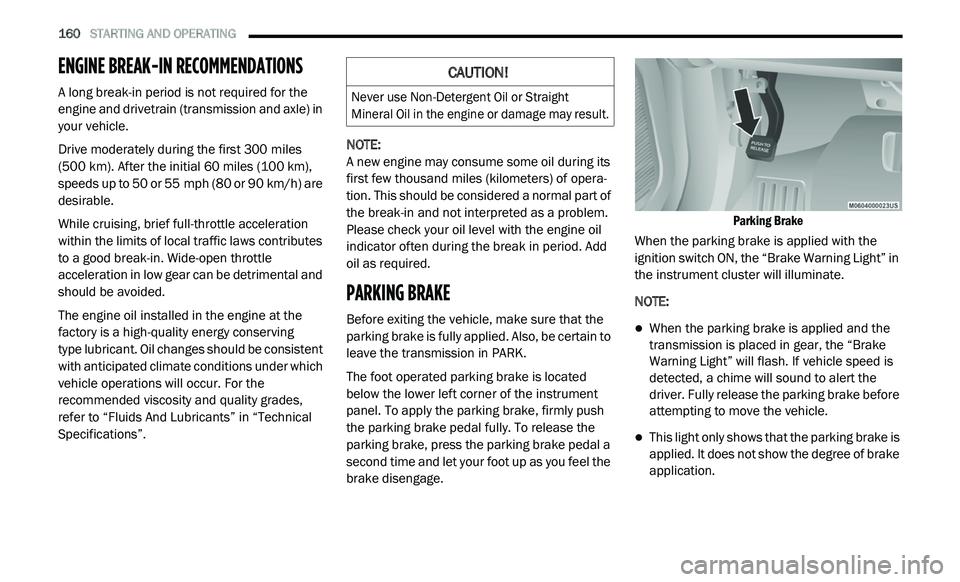
The foot operated parking brake is located
b e
low the lower left corner of the instrument
panel. To apply the parking brake, firmly push
the parking brake pedal fully. To release the
parking brake, press the parking brake pedal a
second time and let your foot up as you feel the
brake disengage.
Parking Brake
When the parking brake is applied with the
i g
nition switch ON, the “Brake Warning Light” in
the instrument cluster will illuminate.
NOTE:
When the parking brake is applied and the
transmission is placed in gear, the “Brake
Warning Light” will flash. If vehicle speed is
detected, a chime will sound to alert the
driver. Fully release the parking brake before
attempting to move the vehicle.
This light only shows that the parking brake is
applied. It does not show the degree of brake
application.
CAUTION!
Never use Non-Detergent Oil or Straight
Mineral Oil in the engine or damage may result.
Page 165 of 396
STARTING AND OPERATING 163
FOUR-SPEED AUTOMATIC
T
RANSMISSION
The transmission gear position display (located in
the instrument cluster) indicates the
transmission gear range. You must press the
brake pedal to move the gear selector out of
PARK (refer to “Brake/Transmission Shift
Interlock System” in this section). To drive, move
the gear selector from PARK or NEUTRAL to the
DRIVE position.
The electronically-controlled transmission
p r
ovides a precise shift schedule. The
transmission electronics are self-calibrating;
therefore, the first few shifts on a new vehicle
may be somewhat abrupt. This is a normal
condition, and precision shifts will develop within
a few hundred miles (kilometers).
Only shift from DRIVE to PARK or REVERSE when
t h
e accelerator pedal is released and the vehicle
is stopped. Be sure to keep your foot on the brake
pedal when shifting between these gears.
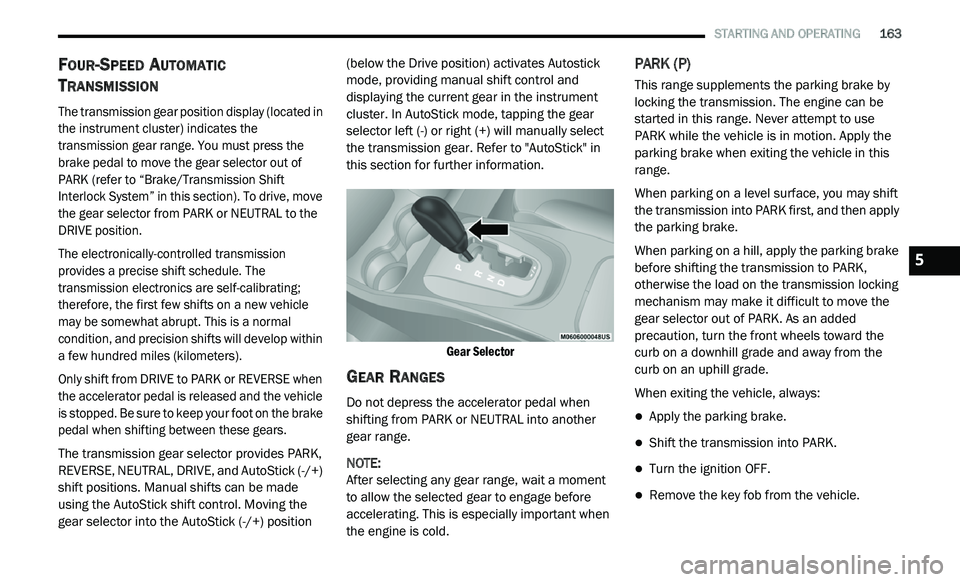
The transmission gear selector provides PARK,
R E
VERSE, NEUTRAL, DRIVE, and AutoStick (-/+)
shift positions. Manual shifts can be made
using the AutoStick shift control. Moving the
gear selector into the AutoStick (-/+) position (below the Drive position) activates Autostick
mode, providing manual shift control and
displaying the current gear in the instrument
cluster. In AutoStick mode, tapping the gear
selector left (-) or right (+) will manually select
the transmission gear. Refer to "AutoStick" in
this section for further information.
Gear Selector
GEAR RANGES
Do not depress the accelerator pedal when
shifting from PARK or NEUTRAL into another
gear range.
NOTE:
After selecting any gear range, wait a moment
to
allow the selected gear to engage before
accelerating. This is especially important when
the engine is cold.
PARK (P)
This range supplements the parking brake by
locking the transmission. The engine can be
started in this range. Never attempt to use
PARK while the vehicle is in motion. Apply the
parking brake when exiting the vehicle in this
range.
When parking on a level surface, you may shift
t h
e transmission into PARK first, and then apply
the parking brake.
When parking on a hill, apply the parking brake
b e
fore shifting the transmission to PARK,
otherwise the load on the transmission locking
mechanism may make it difficult to move the
gear selector out of PARK. As an added
precaution, turn the front wheels toward the
curb on a downhill grade and away from the
curb on an uphill grade.
When exiting the vehicle, always:
Apply the parking brake.
Shift the transmission into PARK.
Turn the ignition OFF.
Remove the key fob from the vehicle.
5
Page 168 of 396
![DODGE JOURNEY 2020 Owners Manual
166 STARTING AND OPERATING
(-16°F [-27°C] or below), operation may briefly
be limited to only second gear. Normal
operation will resume once the transmission
temperature has risen to a su](/img/12/40495/w960_40495-167.png "DODGE JOURNEY 2020 Owners Manual
166 STARTING AND OPERATING
(-16°F [-27°C] or below), operation may briefly
be limited to only second gear. Normal
operation will resume once the transmission
temperature has risen to a su")
166 STARTING AND OPERATING
(-16°F [-27°C] or below), operation may briefly
be limited to only second gear. Normal
operation will resume once the transmission
temperature has risen to a suitable level.
AutoStick
AutoStick is a driver-interactive transmission
feature providing manual shift control, giving
you more control of the vehicle. AutoStick allows
y o
u to maximize engine braking, eliminate
undesirable upshifts and downshifts, and
improve overall vehicle performance. This system
can also provide you with more control during
passing, city driving, cold slippery conditions,
mountain driving, trailer towing, and many other
situations.
Operation
When the gear selector is in the AutoStick
p o
sition (below the DRIVE position), it can be
moved from side to side. This allows the driver
to manually select the transmission gear being
used. Moving the gear selector to the left (-)
triggers a downshift and to the right (+) an
upshift. The current gear will be displayed in the
instrument cluster. In AutoStick mode, the transmission will shift up
o
r
down when the driver moves the gear
selector to the right (+) or left (-), unless an
engine lugging or overspeed condition would
result. It will remain in the selected gear until
another upshift or downshift is chosen, except
as described below.
The transmission will automatically upshift
when necessary to prevent engine
over-speed.
The transmission will automatically down -
shift as the vehicle slows (to prevent engine
l u
gging) and will display the current gear.
The transmission will automatically downshift
to first gear when coming to a stop. After a
stop, the driver should manually upshift (+) the
transmission as the vehicle is accelerated.
You can start out, from a stop, in any gear
except top gear. Tapping (+) (at a stop) will
allow starting in SECOND gear. Starting out in
SECOND gear can be helpful in snowy or icy
conditions.
If a requested downshift would cause the
engine to over-speed, that shift will not occur.
Avoid using speed control when AutoStick is
engaged.
Transmission shifting will be more noticeable
when AutoStick is enabled.
The system may revert to automatic shift
mode if a fault or overheat condition is
detected.
To disengage AutoStick mode, return the gear
s e
lector to the DRIVE position. You can shift in or
out of the AutoStick position at any time without
taking your foot off the accelerator pedal.
WARNING!
Do not downshift for additional engine braking
on a slippery surface. The drive wheels could
lose their grip and the vehicle could skid,
causing a collision or personal injury.
Page 171 of 396
STARTING AND OPERATING 169
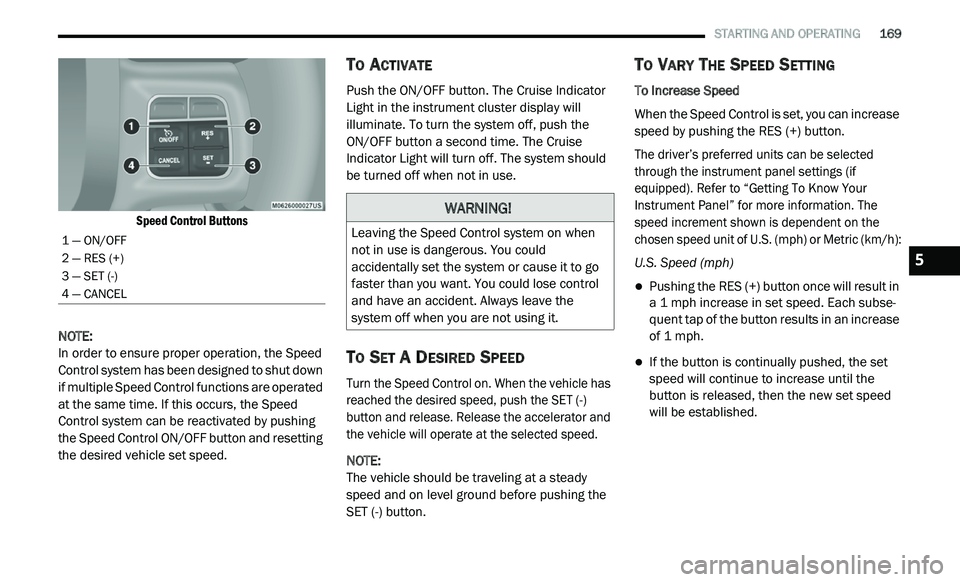
Speed Control Buttons
NOTE:
In order to ensure proper operation, the Speed
Co
ntrol system has been designed to shut down
if multiple Speed Control functions are operated
at the same time. If this occurs, the Speed
Control system can be reactivated by pushing
the Speed Control ON/OFF button and resetting
the desired vehicle set speed.
TO ACTIVATE
Push the ON/OFF button. The Cruise Indicator
Light in the instrument cluster display will
illuminate. To turn the system off, push the
ON/OFF button a second time. The Cruise
I n
dicator Light will turn off. The system should
be turned off when not in use.
TO SET A DESIRED SPEED
Turn the Speed Control on. When the vehicle has
reached the desired speed, push the SET (-)
button and release. Release the accelerator and
the vehicle will operate at the selected speed.
NOTE:
The vehicle should be traveling at a steady
s p
eed and on level ground before pushing the
SET (-) button.
TO VARY THE SPEED SETTING
To Increase Speed
When the Speed Control is set, you can increase
s p
eed by pushing the RES (+) button.
The driver’s preferred units can be selected
t h
rough the instrument panel settings (if
equipped). Refer to “Getting To Know Your
Instrument Panel” for more information. The
speed increment shown is dependent on the
chosen speed unit of U.S. (mph) or Metric (km/h):
U.S. Speed (mph)
Pushing the RES (+) button once will result in
a 1 mph increase in set speed. Each subse -
quent tap of the button results in an increase
o f
1 mph.
If the button is continually pushed, the set
speed will continue to increase until the
button is released, then the new set speed
will be established.
1 — ON/OFF
2 — RES (+)
3 — SET (-)
4 — CANCEL
WARNING!
Leaving the Speed Control system on when
not in use is dangerous. You could
accidentally set the system or cause it to go
faster than you want. You could lose control
and have an accident. Always leave the
system off when you are not using it.
5
Page 174 of 396
172 STARTING AND OPERATING
PARKSENSE DISPLAY
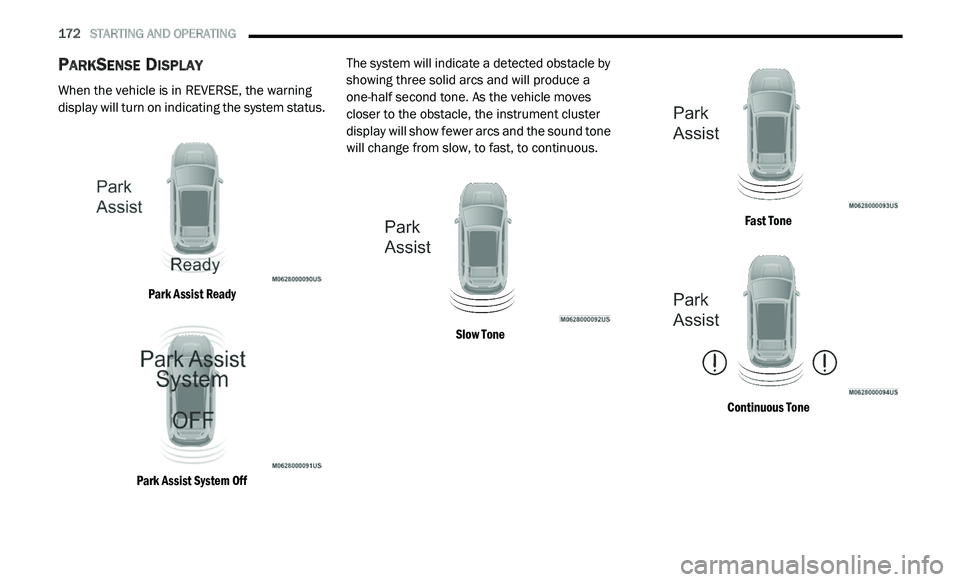
When the vehicle is in REVERSE, the warning
display will turn on indicating the system status.
Park Assist Ready
Park Assist System Off
The system will indicate a detected obstacle by
sh
owing three solid arcs and will produce a
one-half second tone. As the vehicle moves
closer to the obstacle, the instrument cluster
display will show fewer arcs and the sound tone
will change from slow, to fast, to continuous.
Slow Tone Fast Tone
Continuous Tone
Page 175 of 396
STARTING AND OPERATING 173
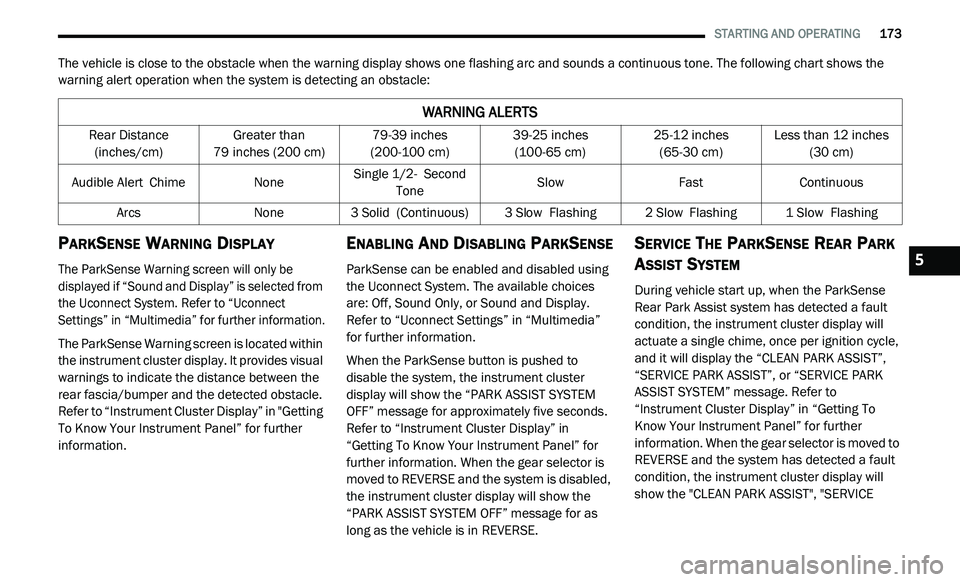
The vehicle is close to the obstacle when the warning display shows one flashing arc and sounds a continuous tone. The following chart shows the
warning alert operation when the system is detecting an obstacle:
PARKSENSE WARNING DISPLAY
The ParkSense Warning screen will only be
displayed if “Sound and Display” is selected from
the Uconnect System. Refer to “Uconnect
Settings” in “Multimedia” for further information.
The ParkSense Warning screen is located within
th
e instrument cluster display. It provides visual
warnings to indicate the distance between the
rear fascia/bumper and the detected obstacle.
Refer to “Instrument Cluster Display” in "Getting
To Know Your Instrument Panel” for further
information.
ENABLING AND DISABLING PARKSENSE
ParkSense can be enabled and disabled using
the Uconnect System. The available choices
are: Off, Sound Only, or Sound and Display.
Refer to “Uconnect Settings” in “Multimedia”
for further information.
When the ParkSense button is pushed to
di
sable the system, the instrument cluster
display will show the “PARK ASSIST SYSTEM
OFF” message for approximately five seconds.
Refer to “Instrument Cluster Display” in
“Getting To Know Your Instrument Panel” for
further information. When the gear selector is
moved to REVERSE and the system is disabled,
the instrument cluster display will show the
“PARK ASSIST SYSTEM OFF” message for as
long as the vehicle is in REVERSE.
SERVICE THE PARKSENSE REAR PARK
A
SSIST SYSTEM
During vehicle start up, when the ParkSense
Rear Park Assist system has detected a fault
condition, the instrument cluster display will
actuate a single chime, once per ignition cycle,
and it will display the “CLEAN PARK ASSIST”,
“SERVICE PARK ASSIST”, or “SERVICE PARK
ASSIST SYSTEM” message. Refer to
“Instrument Cluster Display” in “Getting To
Know Your Instrument Panel” for further
information. When the gear selector is moved to
REVERSE and the system has detected a fault
condition, the instrument cluster display will
show the "CLEAN PARK ASSIST", "SERVICE
WARNING ALERTS
Rear Distance
(inches/cm) Greater than
79
inches (200 cm) 79-39
inches
(2
00-100 cm) 39-25
inches
(1
00-65 cm) 25-12
inches
(6
5-30 cm) Less than 12
inches
(3
0 cm)
Audible Alert C
hime None Single 1/2-
S econd
Tone Slow
FastContinuous
Arcs None3 Solid (Continuous) 3
Slow Flashing2 Slow Flashing1 Slow Flashing
5
Page 176 of 396
174 STARTING AND OPERATING
(Continued)
PARK ASSIST", OR "SERVICE PARK ASSIST
SYSTEM" messages for as long as the vehicle is
in REVERSE. Under this condition, ParkSense
will not operate.
If “CLEAN PARK ASSIST” appears in the
in
strument cluster display, make sure the outer
surface and the underside of the rear fascia/
bumper are clean and clear of snow, ice, mud,
dirt or other obstruction. Then, cycle the
ignition. If the message continues to appear,
see an authorized dealer.
If “SERVICE PARK ASSIST” or “SERVICE PARK
A S
SIST SYSTEM” appears in the instrument
cluster display, see an authorized dealer.
CLEANING THE PARKSENSE SYSTEM
Clean the ParkSense sensors with water, car
wash soap and a soft cloth. Do not use rough or
hard cloths. Do not scratch or poke the sensors.
Otherwise, you could damage the sensors.
PARKSENSE SYSTEM USAGE
P
RECAUTIONS
NOTE:
Ensure that the rear bumper is free of snow, ice,
mud, dirt and debris to keep the ParkSense
system operating properly.
Jackhammers, large trucks, and other vibrations
could affect the performance of ParkSense.
When you turn ParkSense off, the instrument
cluster display will read “PARK ASSIST
SYSTEM OFF.” Furthermore, once you turn
ParkSense off, it remains off until you turn it
on again, even if you cycle the ignition key.
When you move the gear selector to the
REVERSE position and ParkSense is turned
off, the instrument cluster display will show
the “PARK ASSIST SYSTEM OFF” message for
as long as the vehicle is in REVERSE.
Clean the ParkSense sensors regularly,
taking care not to scratch or damage them.
The sensors must not be covered with ice,
snow, slush, mud, dirt or debris. Failure to do
so can result in the system not working prop -erly. The ParkSense system might not detect
a
n
obstacle behind the fascia/bumper, or it
could provide a false indication that an
obstacle is behind the fascia/bumper.
Ensure the ParkSense system is off if objects
such as bicycle carriers, trailer hitches, etc.,
are placed within 12 inches (30 cm) from the
r e
ar fascia/bumper. Failure to do so can
result in the system misinterpreting a close
object as a sensor problem, causing the
“SERVICE PARK ASSIST SYSTEM” message
to appear in the instrument cluster display.
WARNING!
Drivers must be careful when backing up
even when using ParkSense. Always check
carefully behind your vehicle, look behind
you, and be sure to check for pedestrians,
animals, other vehicles, obstructions, and
blind spots before backing up. You are
responsible for safety and must continue to
pay attention to your surroundings. Failure to
do so can result in serious injury or death.
Page 179 of 396
STARTING AND OPERATING 177
(Continued)
NOTE:
Tighten the gas cap until you hear a “clicking”
s o
und. This is an indication that the gas cap is
tightened properly. The MIL in the instrument
cluster may turn on if the gas cap is not secured
properly. Make sure that the gas cap is tight -
ened each time the vehicle is refueled.
LOOSE FUEL FILLER CAP MESSAGE
If the vehicle diagnostic system determines that
the fuel filler cap is loose, improperly installed,
or damaged, a ”gASCAP” message will display in
the odometer or a “Check Gascap” message will
display in the instrument cluster. If this occurs,
tighten the fuel filler cap properly and press the
Trip Odometer button to turn off the message. If
the problem continues, the message will appear
the next time the vehicle is started.
A loose, improperly installed, or damaged fuel
f i
ller cap may also turn on the MIL.
VEHICLE LOADING
The load carrying capacity of your vehicle is
shown on the “Vehicle Certification Label”. This
information should be used for passenger and
luggage loading as indicated.
Do not exceed the specified Gross Vehicle
W e
ight Rating (GVWR) or the Gross Axle Weight
Rating (GAWR).
VEHICLE CERTIFICATION LABEL
Your vehicle has a Vehicle Certification Label
affixed to the drivers side B-pillar or the rear of
the driver’s door.
The label contains the following information:
Name of manufacturer
Month and year of manufacture
Gross Vehicle Weight Rating (GVWR)
Gross Axle Weight Rating (GAWR) front
Gross Axle Weight Rating (GAWR) rear
Vehicle Identification Number (VIN)
Type of vehicle
Month, Day, and Hour of manufacture (MDH)
WARNING!
Never have any smoking materials lit in or
near the vehicle when the gas cap is
removed or the tank is being filled.
Never add fuel to the vehicle when the
engine is running.
A fire may result if gasoline is pumped into
a portable container that is inside of a
vehicle. You could be burned. Always place
gas containers on the ground while filling.
Failure to follow this warning may result in
serious injury or death.
CAUTION!
Damage to the fuel system or emissions
control system could result from using an
improper fuel tank filler tube cap.
A poorly fitting fuel filler cap could let impu -
rities into the fuel system.
A poorly fitting fuel filler cap may cause the
“Malfunction Indicator Light (MIL)” to turn on.
To avoid fuel spillage and overfilling, do not
“top off” the fuel tank after filling. When the
fuel nozzle “clicks” or shuts off, the fuel
tank is full.
CAUTION! (Continued)
5
Page 218 of 396
216
SERVICING AND MAINTENANCE
SCHEDULED SERVICING
Your vehicle is equipped with an automatic
oil change indicator system. The oil change
i n
dicator system will remind you that it is time to
take your vehicle in for scheduled maintenance.
Based on engine operation conditions, the
oil change indicator message will illuminate.
This means that service is required for your
v e
hicle. Operating conditions such as frequent
short-trips, trailer tow, extremely hot or cold
ambient temperatures, and E-85 fuel usage will
influence when the “Change Oil” or “Oil Change
Required” message is displayed. Severe
operating conditions can cause the change oil
message to illuminate as early as 3,500 miles
(5,600 km) since last reset. Have your vehicle
s e
rviced as soon as possible, within the next
500 miles (805 km).
An authorized dealer will reset the oil change
i
n
dicator message after completing the
scheduled oil change. If a scheduled oil change
is performed by someone other than an
authorized dealer, the message can be reset
by referring to the steps described under
“ I
nstrument Cluster Display” in “Getting To
Know Your Instrument Panel” for further
information.
NOTE:
Under no circumstances should oil change
i n
tervals exceed 10,000 miles (16,000 km),
1 2
months or 350 hours of engine run time,
w h
ichever comes first. The 350 hours of engine
run or idle time is generally only a concern for
fleet customers.
Severe Duty All Models
Change engine oil at 4,000 miles (6,500 km) or
3 5
0 hours of engine run time if the vehicle is
operated in a dusty and off road environment or
is operated predominately at idle or only very
low engine RPM. This type of vehicle use is
considered Severe Duty. Once A Month Or Before A Long Trip:
Check engine oil level.
Check windshield washer fluid level.
Check tire pressure and look for unusual
wear or damage. Rotate tires at the first sign
of irregular wear, even if it occurs before the
oil indicator system turns on.
Check the fluid levels of the coolant reservoir,
brake master cylinder, power steering, and
transmission (4-speed only) and fill as
needed.
Check function of all interior and exterior
lights.
Page 223 of 396
SERVICING AND MAINTENANCE 221
CHECKING OIL LEVEL
To ensure proper engine lubrication, the engine
oil must be maintained at the correct level.
Check the oil level at regular intervals, such as
every fuel stop. The best time to check the
engine oil level is about five minutes after a fully
warmed engine is shut off. Checking engine oil
level when the engine is cold will give you an
incorrect reading.
Checking the oil while the vehicle is on level
gr
ound and only when the engine is hot, will
improve the accuracy of the oil level readings.
Maintain the oil level between the range
markings on the dipstick. Either the range
markings consist of a crosshatch zone marked
SAFE or a crosshatch zone marked with MIN at
the low end of the range and MAX at the high
end of the range. Adding 1 Quart (1 Liter) of oil
when the reading is at the low end of the range
marking will raise the oil level to the high end of
the range marking.
ADDING WASHER FLUID
The windshield washer and the rear window
washer share the same fluid reservoir. The fluid
reservoir is located in the engine compartment.
Be sure to check the fluid level in the reservoir
at regular intervals. Fill the reservoir with
windshield washer solvent (not radiator
antifreeze) and operate the system for a few
seconds to flush out the residual water.
When refilling the washer fluid reservoir, apply
s o
me washer fluid to a cloth or towel and wipe
the wiper blades clean. This will help blade
performance.
To prevent freeze-up of your windshield washer
s y
stem in cold weather, select a solution or
mixture that meets or exceeds the temperature
range of your climate. This rating information
can be found on most washer fluid containers. The fluid reservoir will hold nearly 1 Gallon
(4 Liters) of washer fluid when the message
“ Lo
WASH” appears in the instrument cluster.
MAINTENANCE-FREE BATTERY
Your vehicle is equipped with a maintenance-free
battery. You will never have to add water, nor is
periodic maintenance required.
NOTE:
The battery is stored in a compartment that is
lo
cated behind the left front fender and is
accessible through the wheel well. The wheel
and tire assembly do not need to be removed to
access the compartment. Remote battery termi -
nals are located in the engine compartment for
j u
mp starting. Refer to “Jump Starting Proce -
dure” in “In Case Of Emergency” for further
i n
formation.
CAUTION!
Do not overfill the engine with oil. Overfilling
the engine with oil will cause oil aeration,
which can lead to loss of oil pressure and an
increase in oil temperature. This loss of oil
pressure and increased oil temperature could
damage your engine.
WARNING!
Commercially available windshield washer
solvents are flammable. They could ignite and
burn you. Care must be exercised when filling
or working around the washer solution.
7