oil DODGE JOURNEY 2020 Owner's Manual
[x] Cancel search | Manufacturer: DODGE, Model Year: 2020, Model line: JOURNEY, Model: DODGE JOURNEY 2020Pages: 396, PDF Size: 25.53 MB
Page 228 of 396
226 SERVICING AND MAINTENANCE
Some conditions can be caused by a faulty
component such as a belt pulley. Belt pulleys
should be carefully inspected for damage and
proper alignment.
Belt replacement on some models requires the
us
e of special tools, we recommend having your
vehicle serviced at an authorized dealer.
BODY LUBRICATION
Locks and all body pivot points, including such
items as seat tracks, door hinge pivot points
and rollers, liftgate, tailgate, decklid, sliding
doors and hood hinges, should be lubricated
periodically with a lithium based grease, such
as Mopar Spray White Lube to ensure quiet,
easy operation and to protect against rust and
wear. Prior to the application of any lubricant,
the parts concerned should be wiped clean to
remove dust and grit; after lubricating, excess
oil and grease should be removed. Particular
attention should also be given to hood latching
components to ensure proper function. When
performing other underhood services, the hood
latch, release mechanism and safety catch
should be cleaned and lubricated.
The external lock cylinders should be lubricated
t w
ice a year, preferably in the Autumn and Spring. Apply a small amount of a high quality
lubricant, such as Mopar Lock Cylinder
Lubricant directly into the lock cylinder.
WINDSHIELD WIPER BLADES
Clean the rubber edges of the wiper blades and
the windshield periodically with a sponge or soft
cloth and a mild nonabrasive cleaner. This will
remove accumulations of salt or road film.
Operation of the wipers on dry glass for long
p
e
riods may cause deterioration of the wiper
blades. Always use washer fluid when using
the wipers to remove salt or dirt from a dry
w i
ndshield.
Avoid using the wiper blades to remove frost or
i c
e from the windshield. Keep the blade rubber
out of contact with petroleum products such as
engine oil, gasoline, etc.
NOTE:
Life expectancy of wiper blades varies
d e
pending on geographical area and frequency
of use. Poor performance of blades may be
present with chattering, marks, water lines or
wet spots. If any of these conditions are
present, clean the wiper blades or replace as
necessary.
Rear Wiper Blade Removal/Installation
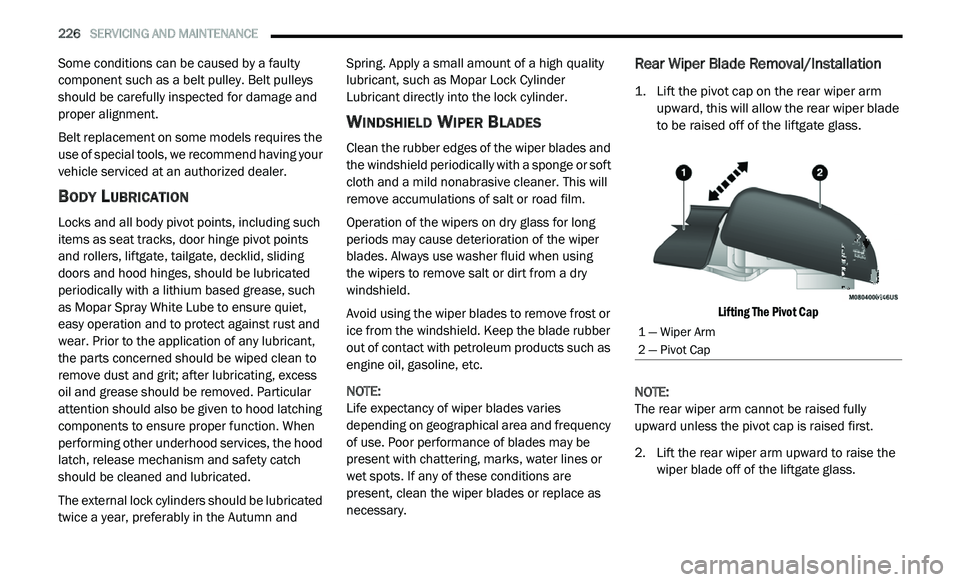
1. Lift the pivot cap on the rear wiper arm upward, this will allow the rear wiper blade
to be raised off of the liftgate glass.
Lifting The Pivot Cap
NOTE:
The rear wiper arm cannot be raised fully
u p
ward unless the pivot cap is raised first.
2. Li ft the rear wiper arm upward to raise the
w
iper blade off of the liftgate glass.
1 — Wiper Arm
2 — Pivot Cap
Page 229 of 396
SERVICING AND MAINTENANCE 227
(Continued)
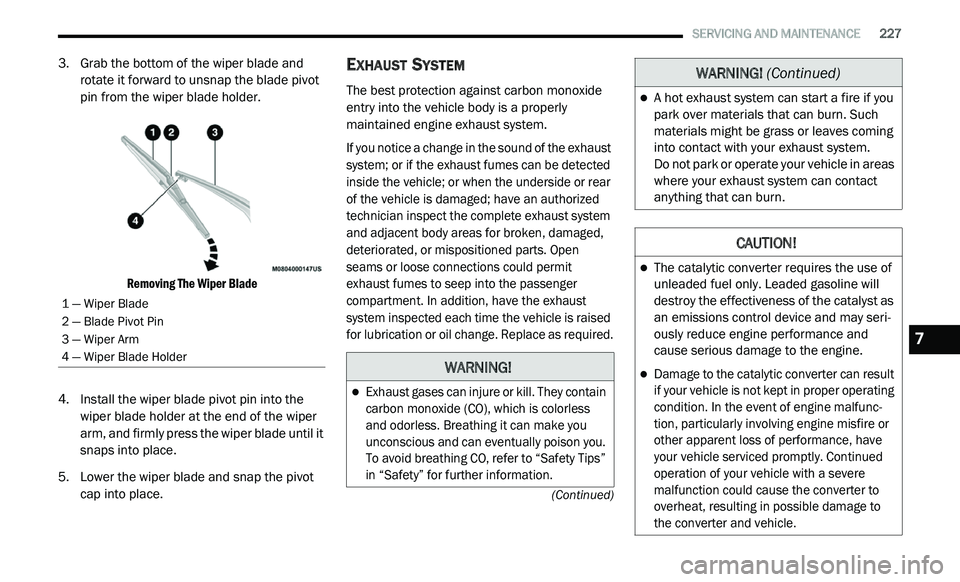
3. Grab the bottom of the wiper blade and rotate it forward to unsnap the blade pivot
pin from the wiper blade holder.
Removing The Wiper Blade
4. I nstall the wiper blade pivot pin into the
w
iper blade holder at the end of the wiper
arm, and firmly press the wiper blade until it
snaps into place.
5. Lower the wiper blade and snap the pivot c
ap into place.
EXHAUST SYSTEM
The best protection against carbon monoxide
entry into the vehicle body is a properly
maintained engine exhaust system.
If you notice a change in the sound of the exhaust
sy
stem; or if the exhaust fumes can be detected
inside the vehicle; or when the underside or rear
of the vehicle is damaged; have an authorized
technician inspect the complete exhaust system
and adjacent body areas for broken, damaged,
deteriorated, or mispositioned parts. Open
seams or loose connections could permit
exhaust fumes to seep into the passenger
compartment. In addition, have the exhaust
system inspected each time the vehicle is raised
for lubrication or oil change. Replace as required.
1 — Wiper Blade
2 — Blade Pivot Pin
3 — Wiper Arm
4 — Wiper Blade Holder
WARNING!
Exhaust gases can injure or kill. They contain
carbon monoxide (CO), which is colorless
and odorless. Breathing it can make you
unconscious and can eventually poison you.
To avoid breathing CO, refer to “Safety Tips”
in “Safety” for further information.
A hot exhaust system can start a fire if you
park over materials that can burn. Such
materials might be grass or leaves coming
into contact with your exhaust system.
Do not park or operate your vehicle in areas
w h
ere your exhaust system can contact
anything that can burn.
CAUTION!
The catalytic converter requires the use of
unleaded fuel only. Leaded gasoline will
destroy the effectiveness of the catalyst as
an emissions control device and may seri -
ously reduce engine performance and
c a
use serious damage to the engine.
Damage to the catalytic converter can result
if your vehicle is not kept in proper operating
condition. In the event of engine malfunc -
tion, particularly involving engine misfire or
o t
her apparent loss of performance, have
your vehicle serviced promptly. Continued
operation of your vehicle with a severe
malfunction could cause the converter to
overheat, resulting in possible damage to
the converter and vehicle.
WARNING! (Continued)
7
Page 234 of 396

232 SERVICING AND MAINTENANCE
(Continued)
BRAKE SYSTEM
In order to ensure brake system performance, all
brake system components should be inspected
periodically. Refer to the “Maintenance Plan” in
“Servicing and Maintenance” for the proper
maintenance intervals.
Master Cylinder — Brake Fluid Level Check
Check the fluid level in the master cylinder
immediately if the “Brake Warning Light”
indicates system failure.
Check the fluid level in the master cylinder
wh
en performing underhood services.
Clean the top of the master cylinder area before
r e
moving the cap. If necessary, add fluid to
bring the fluid level up to the requirements
described on the brake fluid reservoir. Overfilling of fluid is not recommended because
i
t
may cause leaking in the system.
Fluid level can be expected to fall as the brake
p a
ds wear. Brake fluid level should be checked
when pads are replaced. However, low fluid
level may be caused by a leak and a checkup
may be needed.
Use only manufacturer's recommended brake
fl
uid. Refer to “Fluids And Lubricants” in
“Technical Specifications” for further
information.WARNING!
Riding the brakes can lead to brake failure
and possibly a collision. Driving with your foot
resting or riding on the brake pedal can result
in abnormally high brake temperatures,
excessive lining wear, and possible brake
damage. You would not have your full braking
capacity in an emergency.
WARNING!
Use only manufacturer's recommended
brake fluid. Refer to “Fluids And Lubricants”
in “Technical Specifications” for further infor-
mation. Using the wrong type of brake fluid
c a
n severely damage your brake system
and/or impair its performance. The proper
type of brake fluid for your vehicle is also
identified on the original factory installed
hydraulic master cylinder reservoir.
To avoid contamination from foreign matter
or moisture, use only new brake fluid or
fluid that has been in a tightly closed
container. Keep the master cylinder reser -
voir cap secured at all times. Brake fluid in
a
open container absorbs moisture from
the air resulting in a lower boiling point.
This may cause it to boil unexpectedly
d u
ring hard or prolonged braking, resulting
in sudden brake failure. This could result in
a collision.
Overfilling the brake fluid reservoir can
result in spilling brake fluid on hot engine
parts, causing the brake fluid to catch fire.
Brake fluid can also damage painted and
vinyl surfaces, care should be taken to
avoid its contact with these surfaces.
Do not allow petroleum based fluid to
contaminate the brake fluid. Brake seal
components could be damaged, causing
partial or complete brake failure. This could
result in a collision.
WARNING! (Continued)
Page 236 of 396
234 SERVICING AND MAINTENANCE
7. Wipe the dipstick clean and reinsert it until
seated. Then, remove the dipstick and note
the fluid level on both sides. The fluid level
reading is only valid if there is a solid coating
of oil on both sides of the dipstick. Note that
the holes in the dipstick will be full of fluid if
the actual level is at or above the hole.
If the fluid is hot, the fluid level should be
in the crosshatched area marked “HOT”
(between the upper two holes in the
dipstick).
If the fluid is cold, the fluid level should
be between the lower two holes in the
area marked “COLD”.
If the fluid level is low, add fluid through the
d i
pstick tube to bring it to the proper level. Do
not overfill. After adding any quantity of oil
through the dipstick tube, wait at least two
minutes for the oil to fully drain into the trans -
mission before rechecking the fluid level.
NOTE:
If it is necessary to check the transmission
b e
low the operating temperature, the fluid level
should be between the two COLD (lower) holes
on the dipstick with the fluid at approximately
80°F (27°C). If the fluid level is correctly estab -lished at 80°F (27°C), it should be between the
HO
T (upper) reference holes when the transmis -
sion reaches 180°F (82°C). Remember it is
b e
st to check the level at the normal operating
temperature.
8. C heck for leaks. Release the parking brake.
Fluid And Filter Changes
Refer to the “Maintenance Plan” in “Servicing
and Maintenance” for the proper maintenance
intervals.
In addition, change the fluid and filter if the fluid
be
comes contaminated (with water, etc.), or if
the transmission is disassembled for any
reason.
RAISING THE VEHICLE
In the case where it is necessary to raise the
vehicle, go to an authorized dealer or service
station.
TIRES
TIRE SAFETY INFORMATION
Tire safety information will cover aspects of the
following information: Tire Markings, Tire
Identification Numbers, Tire Terminology and
Definitions, Tire Pressures, and Tire Loading.
CAUTION!
Using a transmission fluid other than the
manufacturer’s recommended fluid may
cause deterioration in transmission shift
quality and/or torque converter shudder,
and will require more frequent fluid and
filter changes. Refer to “Fluids And Lubri -
cants” in “Technical Specifications” for
f l
uid specifications.
Dirt and water in the transmission can
cause serious damage. To prevent dirt and
water from entering the transmission after
checking or replenishing fluid, make sure
that the dipstick cap is re-seated properly.
Page 247 of 396
SERVICING AND MAINTENANCE 245
Tread Wear Indicators
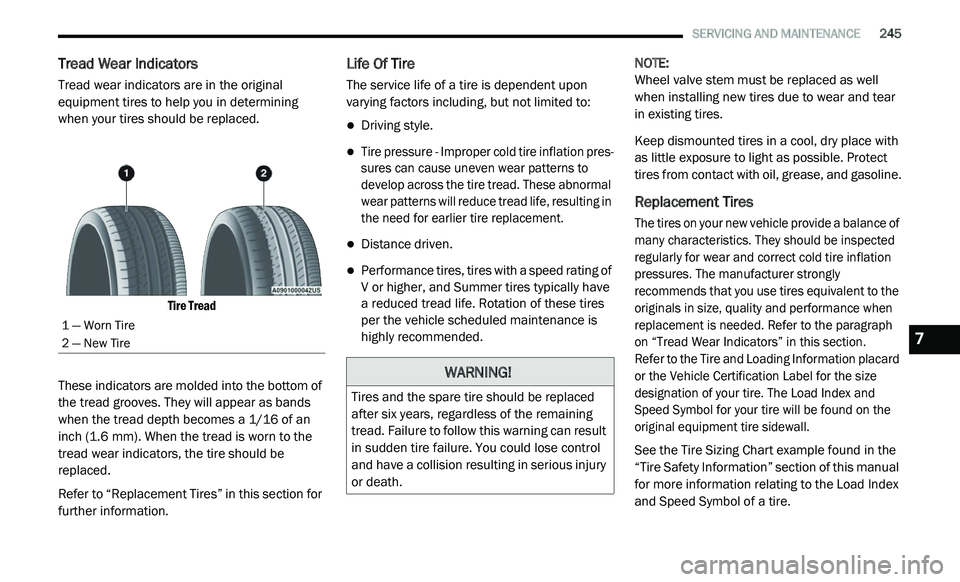
Tread wear indicators are in the original
equipment tires to help you in determining
when your tires should be replaced.
Tire Tread
These indicators are molded into the bottom of
th
e tread grooves. They will appear as bands
when the tread depth becomes a 1/16 of an
inch (1.6 mm). When the tread is worn to the
t r
ead wear indicators, the tire should be
replaced.
Refer to “Replacement Tires” in this section for
f u
rther information.
Life Of Tire
The service life of a tire is dependent upon
varying factors including, but not limited to:
Driving style.
Tire pressure - Improper cold tire inflation pres -
sures can cause uneven wear patterns to
d e
velop across the tire tread. These abnormal
wear patterns will reduce tread life, resulting in
the need for earlier tire replacement.
Distance driven.
Performance tires, tires with a speed rating of
V or higher, and Summer tires typically have
a reduced tread life. Rotation of these tires
per the vehicle scheduled maintenance is
highly recommended. NOTE:
Wheel valve stem must be replaced as well
w h
en installing new tires due to wear and tear
in existing tires.
Keep dismounted tires in a cool, dry place with
a s
little exposure to light as possible. Protect
tires from contact with oil, grease, and gasoline.
Replacement Tires
The tires on your new vehicle provide a balance of
many characteristics. They should be inspected
regularly for wear and correct cold tire inflation
pressures. The manufacturer strongly
recommends that you use tires equivalent to the
originals in size, quality and performance when
replacement is needed. Refer to the paragraph
on “Tread Wear Indicators” in this section.
Refer to the Tire and Loading Information placard
o r
the Vehicle Certification Label for the size
designation of your tire. The Load Index and
Speed Symbol for your tire will be found on the
original equipment tire sidewall.
See the Tire Sizing Chart example found in the
“T
ire Safety Information” section of this manual
for more information relating to the Load Index
and Speed Symbol of a tire.
1 — Worn Tire
2 — New Tire
WARNING!
Tires and the spare tire should be replaced
after six years, regardless of the remaining
tread. Failure to follow this warning can result
in sudden tire failure. You could lose control
and have a collision resulting in serious injury
or death.
7
Page 257 of 396
SERVICING AND MAINTENANCE 255
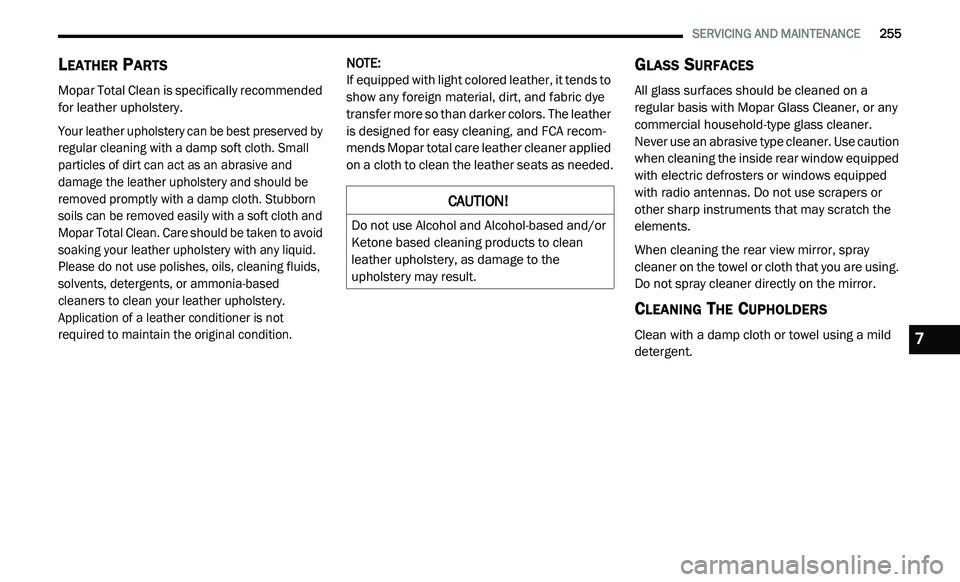
LEATHER PARTS
Mopar Total Clean is specifically recommended
for leather upholstery.
Your leather upholstery can be best preserved by
re
gular cleaning with a damp soft cloth. Small
particles of dirt can act as an abrasive and
damage the leather upholstery and should be
removed promptly with a damp cloth. Stubborn
soils can be removed easily with a soft cloth and
Mopar Total Clean. Care should be taken to avoid
soaking your leather upholstery with any liquid.
Please do not use polishes, oils, cleaning fluids,
solvents, detergents, or ammonia-based
cleaners to clean your leather upholstery.
Application of a leather conditioner is not
required to maintain the original condition.
NOTE:
If equipped with light colored leather, it tends to
s h
ow any foreign material, dirt, and fabric dye
transfer more so than darker colors. The leather
is designed for easy cleaning, and FCA recom -
mends Mopar total care leather cleaner applied
o n
a cloth to clean the leather seats as needed.
GLASS SURFACES
All glass surfaces should be cleaned on a
regular basis with Mopar Glass Cleaner, or any
commercial household-type glass cleaner.
Never use an abrasive type cleaner. Use caution
when cleaning the inside rear window equipped
with electric defrosters or windows equipped
with radio antennas. Do not use scrapers or
other sharp instruments that may scratch the
elements.
When cleaning the rear view mirror, spray
cle
aner on the towel or cloth that you are using.
Do not spray cleaner directly on the mirror.
CLEANING THE CUPHOLDERS
Clean with a damp cloth or towel using a mild
detergent.
CAUTION!
Do not use Alcohol and Alcohol-based and/or
Ketone based cleaning products to clean
leather upholstery, as damage to the
upholstery may result.
7
Page 259 of 396
TECHNICAL SPECIFICATIONS 257
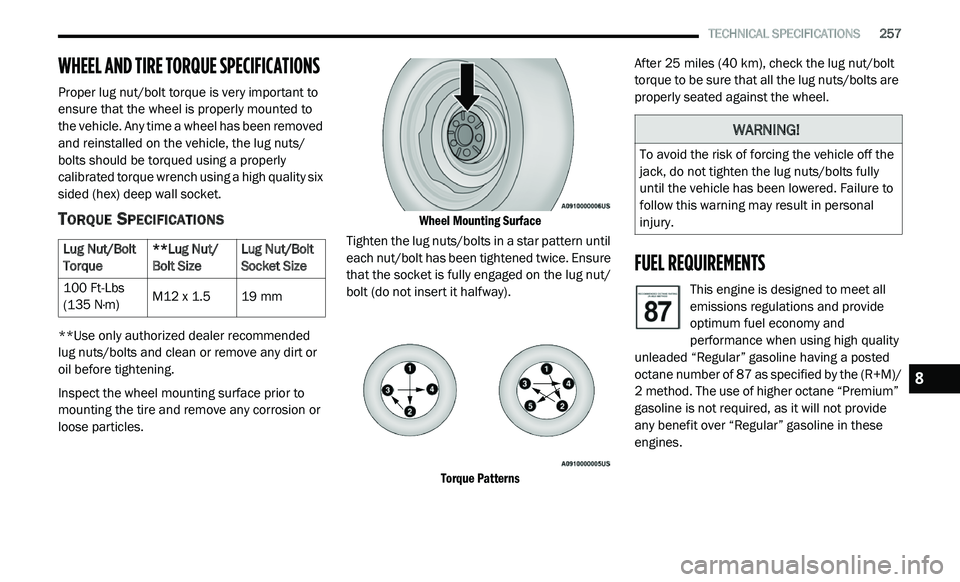
WHEEL AND TIRE TORQUE SPECIFICATIONS
Proper lug nut/bolt torque is very important to
ensure that the wheel is properly mounted to
the vehicle. Any time a wheel has been removed
and reinstalled on the vehicle, the lug nuts/
bolts should be torqued using a properly
calibrated torque wrench using a high quality six
sided (hex) deep wall socket.
TORQUE SPECIFICATIONS
**Use only authorized dealer recommended
lug nuts/bolts and clean or remove any dirt or
oil before tightening.
Inspect the wheel mounting surface prior to
mo
unting the tire and remove any corrosion or
loose particles.
Wheel Mounting Surface
Tighten the lug nuts/bolts in a star pattern until
ea
ch nut/bolt has been tightened twice. Ensure
that the socket is fully engaged on the lug nut/
bolt (do not insert it halfway).
Torque Patterns
After 25
miles (40 km), check the lug nut/bolt
t o
rque to be sure that all the lug nuts/bolts are
properly seated against the wheel.
FUEL REQUIREMENTS
This engine is designed to meet all
emissions regulations and provide
o p
timum fuel economy and
performance when using high quality
unleaded “Regular” gasoline having a posted
octane number of 87 as specified by the (R+M)/
2 method. The use of higher octane “Premium”
g a
soline is not required, as it will not provide
any benefit over “Regular” gasoline in these
engines.
Lug Nut/Bolt
T
o
rque **Lug Nut/
Bo
lt Size Lug Nut/Bolt
So
cket Size
100 Ft-Lbs
( 1
35 N·m) M12 x 1.5
19 mm
WARNING!
To avoid the risk of forcing the vehicle off the
jack, do not tighten the lug nuts/bolts fully
until the vehicle has been lowered. Failure to
follow this warning may result in personal
injury.
8
Page 263 of 396
TECHNICAL SPECIFICATIONS 261
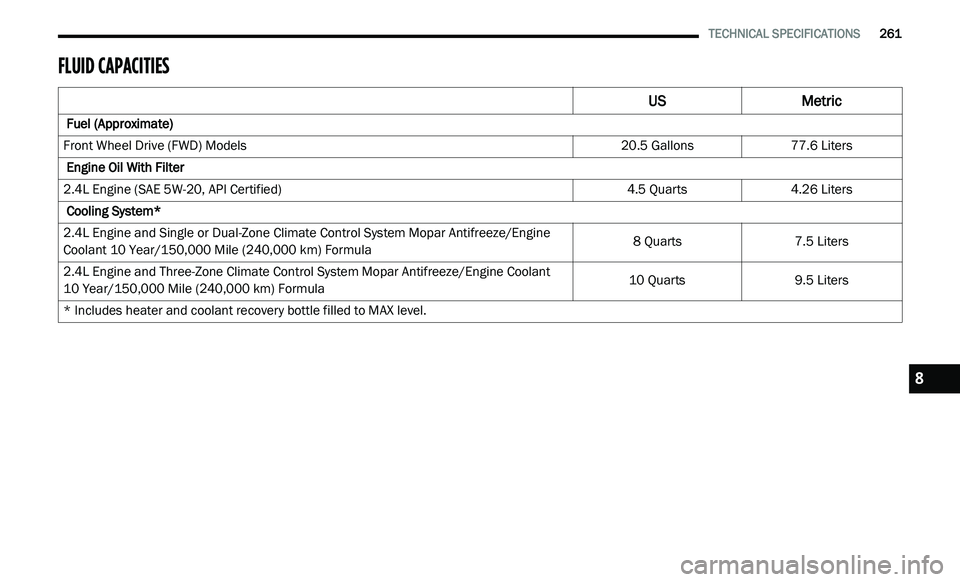
FLUID CAPACITIES
US Metric
Fuel (Approximate)
Front Wheel Drive (FWD) Models 20.5 Gallons77.6 Liters
Engine Oil With Filter
2.4L Engine (SAE 5W-20, API Certified) 4.5 Quarts4.26 Liters
Cooling System*
2.4L Engine and Single or Dual-Zone Climate Control System Mopar Antifreeze/Engine
C o
olant 10 Year/150,000 Mile (240,000 km) Formula 8 Quarts
7.5 Liters
2.4L Engine and Three-Zone Climate Control System Mopar Antifreeze/Engine Coolant
10 Year/150,000 Mile (240,000 km) Formula 10 Quarts
9.5 Liters
* Includes heater and coolant recovery bottle filled to MAX level.
8
Page 264 of 396
262 TECHNICAL SPECIFICATIONS
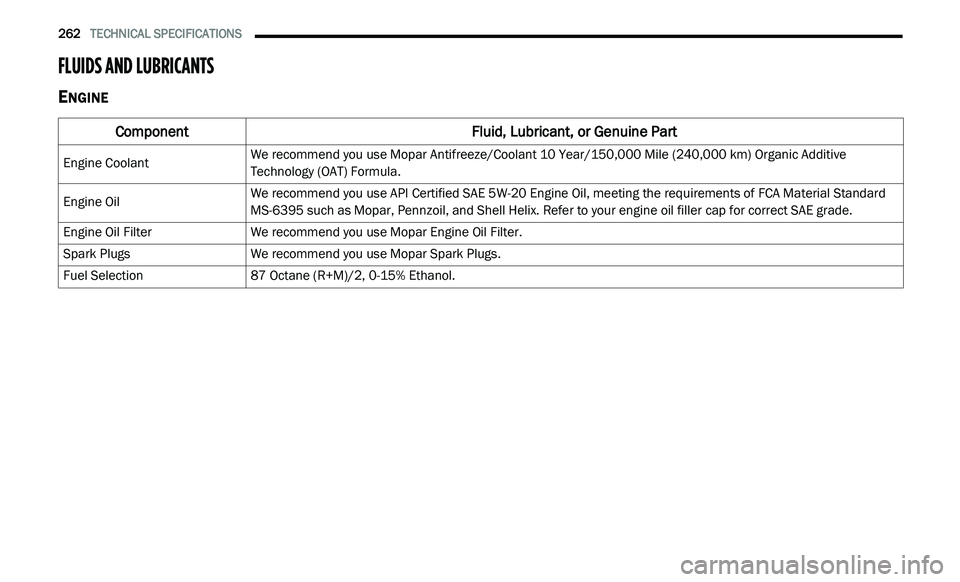
FLUIDS AND LUBRICANTS
ENGINE
Component Fluid, Lubricant, or Genuine Part
Engine CoolantWe recommend you use Mopar Antifreeze/Coolant 10 Year/150,000 Mile (240,000
km) Organic Additive
T e
chnology (OAT) Formula.
Engine Oil We recommend you use API Certified SAE 5W-20 Engine Oil, meeting the requirements of FCA Material Standard
M
S
-6395 such as Mopar, Pennzoil, and Shell Helix. Refer to your engine oil filler cap for correct SAE grade.
Engine Oil Filter We recommend you use Mopar Engine Oil Filter.
Spark Plugs We recommend you use Mopar Spark Plugs.
Fuel Selection 87 Octane (R+M)/2, 0-15% Ethanol.
Page 356 of 396
354 MULTIMEDIA
Custom Points of Interest (POIs)
NOTE:
Custom POI files must be named “poi.gpi”. and
l o
cated on the USB storage device in a folder
named “POI” within a folder named “Garmin®”
(Garmin®/POI/).
You can manually load custom POI databases,
av
ailable from various companies on the
Internet. Some custom POI databases contain
alert information for points such as safety
cameras and school zones. The navigation
system can notify you when you approach one
of these points. You are responsible for
ensuring that your use of safety camera
information is lawful in your area. NOTE:
Each time you load custom POIs to the naviga -
tion system, any other custom POIs already
s a
ved in the system will be overwritten.
Finding Custom POIs
You can view a list of the custom POIs loaded in
y o
ur navigation system.
Press Where To? > Extras > Custom POIs .Deleting Custom POIs
1. P
ress
T
ools > My Data > Delete Custom
POI(s)
.
2. P ress Yes
to confirm.
NOTE:
All custom POIs will be deleted from your navi -
gation system.
Saving Trip Logs
Trip logs are recorded while you navigate a
r o
ute.
SiriusXM® Travel Link (US Market Only)
Now, in addition to delivering over 130 channels
of the best sports, entertainment, talk and
commercial-free music, SiriusXM® now offers
premium infotainment services that work in
conjunction with compatible navigation systems.
To access SiriusXM® Travel Link, press the
ME
NU button then press the Travel Link button.
CAUTION!
Garmin® and FCA US LLC are not responsible
for the consequences of using custom POI
databases, or for the accuracy of custom POI
databases.
After downloading your POI database, use the
Ga
rmin® POI Loader to install the POIs onto a
USB mass storage device. Use the USB mass
storage device to load the POIs. The POI
Loader is available at
garmin.com/products/
poiloader
. Refer to the POI Loader Help file for
more information; click H
e
lp to open the Help
file. The file name can only be POI.gpi. No other
file name or extension should be used.