tow DODGE JOURNEY 2020 Owner's Manual
[x] Cancel search | Manufacturer: DODGE, Model Year: 2020, Model line: JOURNEY, Model: DODGE JOURNEY 2020Pages: 396, PDF Size: 25.53 MB
Page 127 of 396
SAFETY 125
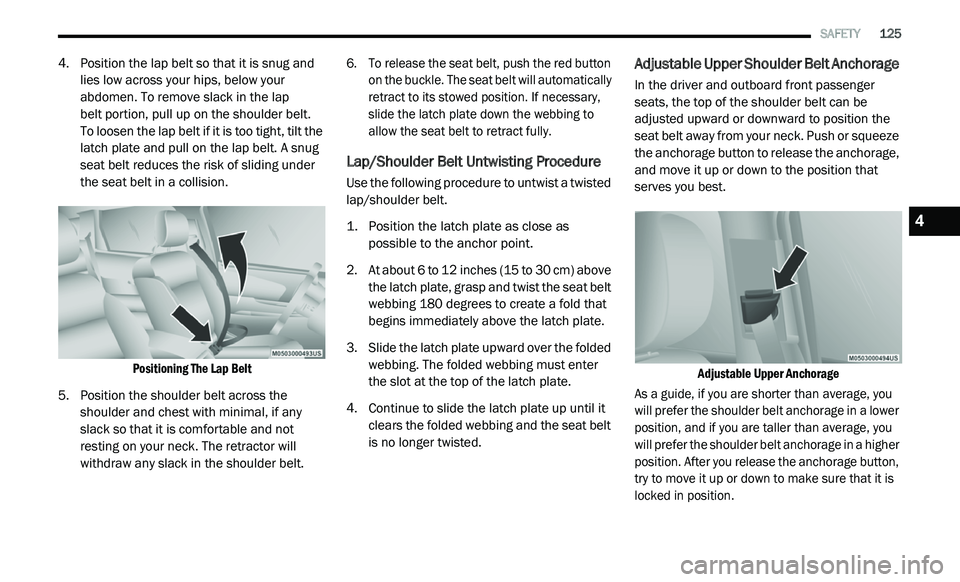
4. Position the lap belt so that it is snug and
lies low across your hips, below your
abdomen. To remove slack in the lap
belt portion, pull up on the shoulder belt.
To loosen the lap belt if it is too tight, tilt the
l a
tch plate and pull on the lap belt. A snug
seat belt reduces the risk of sliding under
the seat belt in a collision.
Positioning The Lap Belt
5. P osition the shoulder belt across the
s
houlder and chest with minimal, if any
slack so that it is comfortable and not
resting on your neck. The retractor will
withdraw any slack in the shoulder belt.
6. T
o release the seat belt, push the red button
o
n the buckle. The seat belt will automatically
retract to its stowed position. If necessary,
slide the latch plate down the webbing to
allow the seat belt to retract fully.
Lap/Shoulder Belt Untwisting Procedure
Use the following procedure to untwist a twisted
lap/shoulder belt.
1. P osition the latch plate as close as
p
ossible to the anchor point.
2. A t about 6 to 12
inches (15 to 30 cm) above
th
e latch plate, grasp and twist the seat belt
webbing 180 degrees to create a fold that
begins immediately above the latch plate.
3. Slide the latch plate upward over the folded w
ebbing. The folded webbing must enter
the slot at the top of the latch plate.
4. C ontinue to slide the latch plate up until it
c
lears the folded webbing and the seat belt
is no longer twisted.
Adjustable Upper Shoulder Belt Anchorage
In the driver and outboard front passenger
seats, the top of the shoulder belt can be
adjusted upward or downward to position the
seat belt away from your neck. Push or squeeze
the anchorage button to release the anchorage,
and move it up or down to the position that
serves you best.
Adjustable Upper Anchorage
As a guide, if you are shorter than average, you
w i
ll prefer the shoulder belt anchorage in a lower
position, and if you are taller than average, you
will prefer the shoulder belt anchorage in a higher
position. After you release the anchorage button,
try to move it up or down to make sure that it is
locked in position.
4
Page 149 of 396
SAFETY 147
(Continued)
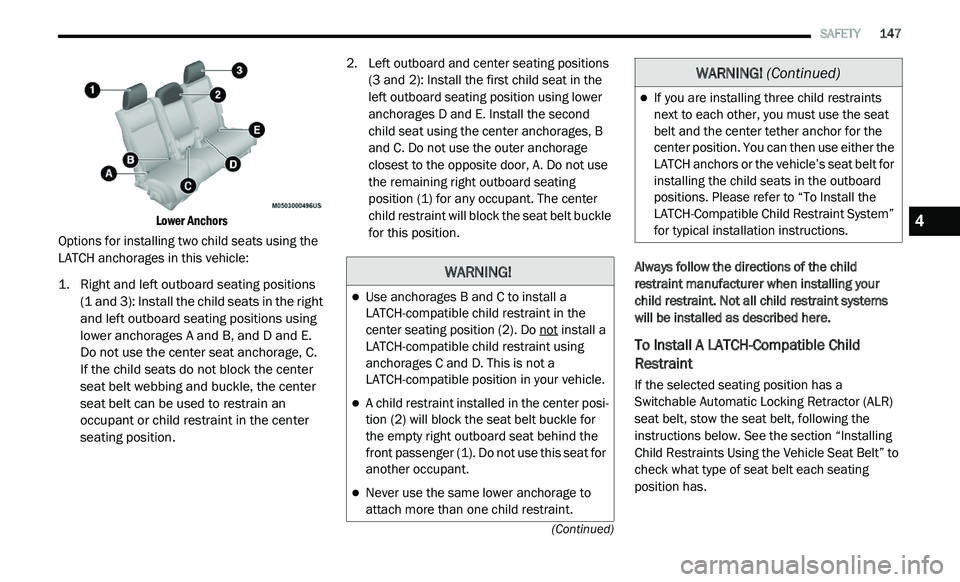
Lower Anchors
Options for installing two child seats using the
LA T
CH anchorages in this vehicle:
1. R ight and left outboard seating positions
(
1 and 3): Install the child seats in the right
and left outboard seating positions using
lower anchorages A and B, and D and E.
Do not use the center seat anchorage, C.
If the child seats do not block the center
s e
at belt webbing and buckle, the center
seat belt can be used to restrain an
occupant or child restraint in the center
seating position.
2. Le
ft outboard and center seating positions
(
3 and 2): Install the first child seat in the
left outboard seating position using lower
anchorages D and E. Install the second
child seat using the center anchorages, B
and C. Do not use the outer anchorage
closest to the opposite door, A. Do not use
the remaining right outboard seating
position (1) for any occupant. The center
child restraint will block the seat belt buckle
for this position.
Always follow the directions of the child
re
straint manufacturer when installing your
child restraint. Not all child restraint systems
will be installed as described here.
To Install A LATCH-Compatible Child
Restraint
If the selected seating position has a
Switchable Automatic Locking Retractor (ALR)
seat belt, stow the seat belt, following the
instructions below. See the section “Installing
Child Restraints Using the Vehicle Seat Belt” to
check what type of seat belt each seating
position has.
WARNING!
Use anchorages B and C to install a
LATCH-compatible child restraint in the
center seating position (2). Do not
install a
LATCH-compatible child restraint using
anchorages C and D. This is not a
LATCH-compatible position in your vehicle.
A child restraint installed in the center posi -
tion (2) will block the seat belt buckle for
t h
e empty right outboard seat behind the
front passenger (1). Do not use this seat for
another occupant.
Never use the same lower anchorage to
attach more than one child restraint.
If you are installing three child restraints
next to each other, you must use the seat
belt and the center tether anchor for the
center position. You can then use either the
LATCH anchors or the vehicle’s seat belt for
installing the child seats in the outboard
positions. Please refer to “To Install the
LATCH-Compatible Child Restraint System”
for typical installation instructions.
WARNING! (Continued)
4
Page 150 of 396
148 SAFETY
1. Loosen the adjusters on the lower straps
and on the tether strap of the child seat so
that you can more easily attach the hooks
or connectors to the vehicle anchorages.
2. Place the child seat between the lower a
nchorages for that seating position. If the
second row seat can be reclined, you may
recline the seat and/or raise the head
restraint (if adjustable) to get a better fit.
If the rear seat can be moved forward and
r e
arward in the vehicle, you may wish to
move it to its rear-most position to make
room for the child seat. You may also move
the front seat forward to allow more room
for the child seat.
3. A ttach the lower hooks or connectors of the
c
hild restraint to the lower anchorages in
the selected seating position.
4. I f the child restraint has a tether strap,
c
onnect it to the top tether anchorage.
See the section “Installing Child Restraints
U s
ing the Top Tether Anchorage” for
directions to attach a tether anchor. 5. T
ighten all of the straps as you push the
c
hild restraint rearward and downward
into the seat. Remove slack in the straps
a c
cording to the child restraint
manufacturer’s instructions.
6. T est that the child restraint is installed
t
ightly by pulling back and forth on the child
seat at the belt path. It should not move
more than 1 inch (25.4 mm) in any
d i
rection.
How To Stow An Unused Switchable-ALR
(ALR) Seat Belt:
When using the LATCH attaching system to
install a child restraint, stow all ALR seat belts
that are not being used by other occupants or
being used to secure child restraints. An unused
belt could injure a child if they play with it and
accidentally lock the seat belt retractor. Before
installing a child restraint using the LATCH
system, buckle the seat belt behind the child
restraint and out of the child’s reach. If the
buckled seat belt interferes with the child restraint installation, instead of buckling it
behind the child restraint, route the seat belt
through the child restraint belt path and then
buckle it. Do not lock the seat belt. Remind all
children in the vehicle that the seat belts are not
toys and that they should not play with them.
WARNING!
Improper installation of a child restraint to
the LATCH anchorages can lead to failure of
the restraint. The child could be badly
injured or killed. Follow the child restraint
manufacturer’s directions exactly when
installing an infant or child restraint.
Child restraint anchorages are designed to
withstand only those loads imposed by
correctly-fitted child restraints. Under no
circumstances are they to be used for adult
seat belts, harnesses, or for attaching other
items or equipment to the vehicle.
Page 158 of 396
156 SAFETY
(Continued)
PERIODIC SAFETY CHECKS YOU SHOULD
M
AKE OUTSIDE THE VEHICLE
Tires
Examine tires for excessive tread wear and
uneven wear patterns. Check for stones, nails,
glass, or other objects lodged in the tread or
sidewall. Inspect the tread for cuts and cracks.
Inspect sidewalls for cuts, cracks, and bulges.
Check the wheel nuts for tightness. Check the
tires (including spare) for proper cold inflation
pressure.
Lights
Have someone observe the operation of brake
lights and exterior lights while you work the
controls. Check turn signal and high beam
indicator lights on the instrument panel.
Door Latches
Check for proper closing, latching, and locking.
Fluid Leaks
Check area under the vehicle after overnight
parking for fuel, coolant, oil, or other fluid leaks.
Also, if gasoline fumes are detected or if fuel, or
brake fluid leaks are suspected, the cause
should be located and corrected immediately.
ONLY use the driver’s side floor mat on the
driver’s side floor area. To check for inter -
ference, with the vehicle properly parked
w i
th the engine off, fully depress the accel -
erator, the brake, and the clutch pedal
(if present) to check for interference. If your
f l
oor mat interferes with the operation of
any pedal, or is not secure to the floor,
remove the floor mat from the vehicle and
place the floor mat in your trunk.
ONLY use the passenger’s side floor mat on
the passenger’s side floor area.
ALWAYS make sure objects cannot fall or
slide into the driver’s side floor area when
the vehicle is moving. Objects can become
trapped under accelerator, brake, or clutch
pedals and could cause a loss of vehicle
control.
WARNING! (Continued)
NEVER place any objects under the floor
mat (e.g., towels, keys, etc.). These objects
could change the position of the floor mat
and may cause interference with the accel -
erator, brake, or clutch pedals.
If the vehicle carpet has been removed and
re-installed, always properly attach carpet
to the floor and check the floor mat
fasteners are secure to the vehicle carpet.
Fully depress each pedal to check for inter -
ference with the accelerator, brake, or
c lu
tch pedals then re-install the floor mats.
It is recommended to only use mild soap
and water to clean your floor mats. After
cleaning, always check your floor mat has
been properly installed and is secured to
your vehicle using the floor mat fasteners
by lightly pulling mat.
WARNING! (Continued)
Page 161 of 396
STARTING AND OPERATING 159
(Continued)
COLD WEATHER OPERATION
(B
ELOW –22°F OR −30°C)
To ensure reliable starting at these
temperatures, use of an externally powered
electric engine block heater (available from an
authorized dealer) is recommended.
IF ENGINE FAILS TO START
If the engine fails to start after you have
followed the "Normal Starting" or "Cold Weather
Operation" procedure it may be flooded. Push
the accelerator pedal all the way to the floor and
hold it there. Crank the engine for no more than
15 seconds. This should clear any excess fuel in
case the engine is flooded. Leave the ignition
key in the RUN position, release the accelerator
pedal and repeat the “Normal Starting”
procedure.
AFTER STARTING
The idle speed is controlled automatically, and
it will decrease as the engine warms up.
ENGINE BLOCK HEATER — IF EQUIPPED
The engine block heater warms the engine, and
permits quicker starts in cold weather. Connect
the cord to a standard 110-115 Volt AC
electrical outlet with a grounded, three-wire
extension cord.
The engine block heater must be plugged in at
le
ast one hour to have an adequate effect on
the engine.
The engine block heater cord is bundled under
t h
e hood between the headlight assembly and
the Totally Integrated Power Module (Fuse Box)
on the driver's side of the vehicle.
WARNING!
Never pour fuel or other flammable liquid
into the throttle body air inlet opening in an
attempt to start the vehicle. This could
result in flash fire causing serious personal
injury.
Do not attempt to push or tow your vehicle
to get it started. Vehicles equipped with an
automatic transmission cannot be started
this way. Unburned fuel could enter the
catalytic converter and once the engine has
started, ignite and damage the converter
and vehicle.
If the vehicle has a discharged battery,
booster cables may be used to obtain a
start from a booster battery or the battery in
another vehicle. This type of start can be
dangerous if done improperly. Refer to
“Jump Starting Procedure” in “In Case Of
Emergency” for further information.
CAUTION!
To prevent damage to the starter, do not
continuously crank the engine for more than
25 seconds at a time. Wait 60 seconds
before trying again.
WARNING! (Continued)
WARNING!
Remember to disconnect the engine block
heater cord before driving. Damage to the
110-115 Volt electrical cord could cause
electrocution.
5
Page 163 of 396
STARTING AND OPERATING 161
(Continued)
(Continued)
When parking on a hill, it is important to turn the
front wheels toward the curb on a downhill
grade and away from the curb on an uphill
grade. For vehicles equipped with an automatic
transmission, apply the parking brake before
placing the gear selector in PARK, otherwise the
load on the transmission locking mechanism
may make it difficult to move the gear selector
out of PARK. The parking brake should always
be applied whenever the driver is not in the
vehicle.
AUTOMATIC TRANSMISSION
WARNING!
Never use the PARK position as a substi
-
tute for the parking brake. Always apply the
p a
rking brake fully when parked to guard
against vehicle movement and possible
injury or damage.
Never leave children alone in a vehicle, or
with access to an unlocked vehicle. Leaving
unattended children in a vehicle is
dangerous for a number of reasons. A child
or others could be seriously or fatally
injured. Children should be warned not to
touch the parking brake, brake pedal or the
gear selector. Do not leave the key fob in or
near the vehicle, or in a location accessible
to children, and do not leave the ignition of
a vehicle equipped with Keyless Enter-N-Go
in the ACC or ON/RUN mode. A child could
operate power windows, other controls, or
move the vehicle.
Be sure the parking brake is fully disen -
gaged before driving; failure to do so can
l e
ad to brake failure and a collision.
Always fully apply the parking brake when
leaving your vehicle or it may roll and cause
damage or injury. Also, be certain to leave
the transmission in PARK. Failure to do so
may cause the vehicle to roll and cause
damage or injury.
WARNING! (Continued)CAUTION!
If the “Brake Warning Light” remains on with
the parking brake released, a brake system
malfunction is indicated. Have the brake
system serviced by an authorized dealer
immediately.
WARNING!
It is dangerous to shift out of PARK or
NEUTRAL if the engine speed is higher than
idle speed. If your foot is not firmly pressing
the brake pedal, the vehicle could accel -
erate quickly forward or in reverse. You
c o
uld lose control of the vehicle and hit
someone or something. Only shift into gear
when the engine is idling normally and your
foot is firmly pressing the brake pedal.
5
Page 165 of 396
STARTING AND OPERATING 163
FOUR-SPEED AUTOMATIC
T
RANSMISSION
The transmission gear position display (located in
the instrument cluster) indicates the
transmission gear range. You must press the
brake pedal to move the gear selector out of
PARK (refer to “Brake/Transmission Shift
Interlock System” in this section). To drive, move
the gear selector from PARK or NEUTRAL to the
DRIVE position.
The electronically-controlled transmission
p r
ovides a precise shift schedule. The
transmission electronics are self-calibrating;
therefore, the first few shifts on a new vehicle
may be somewhat abrupt. This is a normal
condition, and precision shifts will develop within
a few hundred miles (kilometers).
Only shift from DRIVE to PARK or REVERSE when
t h
e accelerator pedal is released and the vehicle
is stopped. Be sure to keep your foot on the brake
pedal when shifting between these gears.
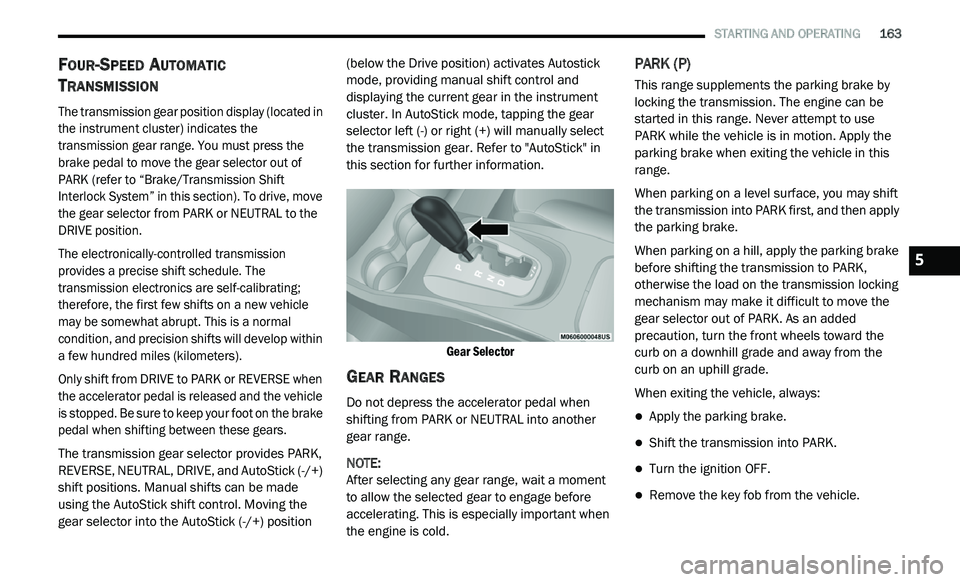
The transmission gear selector provides PARK,
R E
VERSE, NEUTRAL, DRIVE, and AutoStick (-/+)
shift positions. Manual shifts can be made
using the AutoStick shift control. Moving the
gear selector into the AutoStick (-/+) position (below the Drive position) activates Autostick
mode, providing manual shift control and
displaying the current gear in the instrument
cluster. In AutoStick mode, tapping the gear
selector left (-) or right (+) will manually select
the transmission gear. Refer to "AutoStick" in
this section for further information.
Gear Selector
GEAR RANGES
Do not depress the accelerator pedal when
shifting from PARK or NEUTRAL into another
gear range.
NOTE:
After selecting any gear range, wait a moment
to
allow the selected gear to engage before
accelerating. This is especially important when
the engine is cold.
PARK (P)
This range supplements the parking brake by
locking the transmission. The engine can be
started in this range. Never attempt to use
PARK while the vehicle is in motion. Apply the
parking brake when exiting the vehicle in this
range.
When parking on a level surface, you may shift
t h
e transmission into PARK first, and then apply
the parking brake.
When parking on a hill, apply the parking brake
b e
fore shifting the transmission to PARK,
otherwise the load on the transmission locking
mechanism may make it difficult to move the
gear selector out of PARK. As an added
precaution, turn the front wheels toward the
curb on a downhill grade and away from the
curb on an uphill grade.
When exiting the vehicle, always:
Apply the parking brake.
Shift the transmission into PARK.
Turn the ignition OFF.
Remove the key fob from the vehicle.
5
Page 167 of 396
STARTING AND OPERATING 165
The following indicators should be used to
ensure that you have properly engaged the
transmission into the PARK position:
When shifting into PARK, firmly move the
gear selector all the way forward and to the
left until it stops and is fully seated.
Look at the transmission gear position
display and verify that it indicates the PARK
position.
With brake pedal released, verify that the
gear selector will not move out of PARK.
REVERSE (R)
This range is for moving the vehicle backward.
Shift into REVERSE only after the vehicle has
come to a complete stop.
NEUTRAL (N)
Use this range when the vehicle is standing for
prolonged periods with the engine running. The
engine may be started in this range. Apply the
parking brake and shift the transmission into
PARK if you must exit the vehicle.DRIVE (D)
This range should be used for most city and
highway driving. It provides the smoothest
upshifts and downshifts, and the best fuel
economy. The transmission automatically
upshifts through all forward gears. The DRIVE
position provides optimum driving characteristics
under all normal operating conditions.
When frequent transmission shifting occurs
(
s
uch as when operating the vehicle under
heavy loading conditions, in hilly terrain,
traveling into strong head winds, or while towing
a heavy trailer), use the AutoStick shift control
(refer to “AutoStick” in this section for further
information) to select a lower gear. Under these
conditions, using a lower gear will improve
performance and extend transmission life by
reducing excessive shifting and heat buildup.
If the transmission temperature exceeds
n o
rmal operating limits, the powertrain
controller will modify the transmission shift
schedule and expand the range of torque
converter clutch engagement. This is done
to prevent transmission damage due to
o v
erheating.
During cold temperatures, transmission
o p
eration may be modified depending on
engine and transmission temperature as well
as vehicle speed. This feature improves warm
up time of the engine and transmission to
achieve maximum efficiency. Engagement of
the torque converter clutch is inhibited until the
transmission fluid is warm (refer to the “Note”
under “Torque Converter Clutch” in this
section). During extremely cold temperatures
WARNING!
Do not coast in NEUTRAL and never turn off the
ignition to coast down a hill. These are unsafe
practices that limit your response to changing
traffic or road conditions. You might lose
control of the vehicle and have a collision.
CAUTION!
Towing the vehicle, coasting, or driving for any
other reason with the transmission in NEUTRAL
can cause severe transmission damage.
Refer to “Recreational Towing” in “Starting
An
d Operating” and “Towing A Disabled
Vehicle” in “In Case Of Emergency” for further
information.
5
Page 168 of 396
![DODGE JOURNEY 2020 Owners Manual
166 STARTING AND OPERATING
(-16°F [-27°C] or below), operation may briefly
be limited to only second gear. Normal
operation will resume once the transmission
temperature has risen to a su](/img/12/40495/w960_40495-167.png "DODGE JOURNEY 2020 Owners Manual
166 STARTING AND OPERATING
(-16°F [-27°C] or below), operation may briefly
be limited to only second gear. Normal
operation will resume once the transmission
temperature has risen to a su")
166 STARTING AND OPERATING
(-16°F [-27°C] or below), operation may briefly
be limited to only second gear. Normal
operation will resume once the transmission
temperature has risen to a suitable level.
AutoStick
AutoStick is a driver-interactive transmission
feature providing manual shift control, giving
you more control of the vehicle. AutoStick allows
y o
u to maximize engine braking, eliminate
undesirable upshifts and downshifts, and
improve overall vehicle performance. This system
can also provide you with more control during
passing, city driving, cold slippery conditions,
mountain driving, trailer towing, and many other
situations.
Operation
When the gear selector is in the AutoStick
p o
sition (below the DRIVE position), it can be
moved from side to side. This allows the driver
to manually select the transmission gear being
used. Moving the gear selector to the left (-)
triggers a downshift and to the right (+) an
upshift. The current gear will be displayed in the
instrument cluster. In AutoStick mode, the transmission will shift up
o
r
down when the driver moves the gear
selector to the right (+) or left (-), unless an
engine lugging or overspeed condition would
result. It will remain in the selected gear until
another upshift or downshift is chosen, except
as described below.
The transmission will automatically upshift
when necessary to prevent engine
over-speed.
The transmission will automatically down -
shift as the vehicle slows (to prevent engine
l u
gging) and will display the current gear.
The transmission will automatically downshift
to first gear when coming to a stop. After a
stop, the driver should manually upshift (+) the
transmission as the vehicle is accelerated.
You can start out, from a stop, in any gear
except top gear. Tapping (+) (at a stop) will
allow starting in SECOND gear. Starting out in
SECOND gear can be helpful in snowy or icy
conditions.
If a requested downshift would cause the
engine to over-speed, that shift will not occur.
Avoid using speed control when AutoStick is
engaged.
Transmission shifting will be more noticeable
when AutoStick is enabled.
The system may revert to automatic shift
mode if a fault or overheat condition is
detected.
To disengage AutoStick mode, return the gear
s e
lector to the DRIVE position. You can shift in or
out of the AutoStick position at any time without
taking your foot off the accelerator pedal.
WARNING!
Do not downshift for additional engine braking
on a slippery surface. The drive wheels could
lose their grip and the vehicle could skid,
causing a collision or personal injury.
Page 177 of 396
STARTING AND OPERATING 175
(Continued)
PARKVIEW REAR BACK UP CAMERA
Your vehicle is equipped with the ParkView Rear
Back Up Camera that allows you to see an
on-screen image of the rear surroundings of
your vehicle whenever the gear selector is put
into REVERSE. The image will be displayed in
the touchscreen display along with a caution
note to “Check Entire Surroundings” across the
top of the screen. After five seconds this note
will disappear. The ParkView camera is located
on the rear of the vehicle above the rear license
plate.
When the vehicle is shifted out of REVERSE, the
r e
ar camera mode is exited and the last
selected touchscreen appears again.
The camera image is also available in the
r e
arview mirror if the touchscreen display is
unavailable. If your vehicle is equipped with the Camera
D
e
lay feature and it is turned on, the rear
camera image will be displayed for up to
10 seconds when the vehicle is shifted out of
R E
VERSE unless the forward vehicle speed
exceeds 8 mph (13 km/h), the transmission is
s h
ifted into PARK, the “X” button on the camera
display screen is pressed, or the vehicle's
ignition is placed in the OFF position.
Static grid lines will illustrate the width of the
v e
hicle. These lines will show separate zones
that will help indicate the distance to the rear of
the vehicle.
NOTE:
The ParkView Rear Back Up Camera has
p r
ogrammable modes of operation that may be
selected through the Uconnect system. Refer to
“Uconnect Settings” in “Multimedia” for further
information.
Different colored zones indicate the distance to
t h
e rear of the vehicle.
Before using ParkSense, it is strongly
recommended that the ball mount and
hitch ball assembly is disconnected from
the vehicle when the vehicle is not used for
towing. Failure to do so can result in injury
or damage to vehicles or obstacles
because the hitch ball will be much closer
to the obstacle than the rear fascia when
the loudspeaker sounds the continuous
tone. Also, the sensors could detect the ball
mount and hitch ball assembly, depending
on its size and shape, giving a false indica -
tion that an obstacle is behind the vehicle.
CAUTION!
ParkSense is only a parking aid and it is
unable to recognize every obstacle,
including small obstacles. Parking curbs
might be temporarily detected or not
detected at all. Obstacles located above or
below the sensors will not be detected
when they are in close proximity.
WARNING! (Continued)
The vehicle must be driven slowly when
using ParkSense in order to be able to stop
in time when an obstacle is detected. It is
recommended that the driver looks over
his/her shoulder when using ParkSense.
CAUTION! (Continued)
5