tow DODGE JOURNEY 2020 Repair Manual
[x] Cancel search | Manufacturer: DODGE, Model Year: 2020, Model line: JOURNEY, Model: DODGE JOURNEY 2020Pages: 396, PDF Size: 25.53 MB
Page 297 of 396
MULTIMEDIA 295
The Uconnect Phone is driven through your
Bluetooth® “Hands-Free Profile” mobile phone.
Uconnect features Bluetooth® technology — the
global standard that enables different
electronic devices to connect to each other
without wires or a docking station, so Uconnect
Phone works no matter where you stow your
mobile phone (be it your purse, pocket, or
briefcase), as long as your phone is turned on
and has been paired to the vehicle's Uconnect
Phone. The Uconnect Phone allows up to
10
mobile phones or audio devices to be linked
t o
the system. Only one linked (or paired) mobile
phone and one audio device can be used with
the system at a time. The system is available in
English, Spanish, or French languages. Uconnect Phone Button
The Uconnect Phone Button is
used to enter the phone mode and
ma
ke calls, show recent, incoming,
outgoing calls, view phonebook etc.,
When you press the button you will hear a BEEP.
The beep is your signal to give a command.
Uconnect Voice Command Button
The Uconnect Voice Command Button
is only used for “barge in” and when you
a r
e already in a call and you want to send
Tones or make another call.
The Uconnect Phone is fully integrated with the
v e
hicle's audio system. The volume of the
Uconnect Phone can be adjusted either from
the radio volume control knob or from the
steering wheel radio control (right switch), if so
equipped.
Operation
Voice commands can be used to operate the
Uconnect Phone and to navigate through the
Uconnect Phone menu structure. Voice
commands are required after most Uconnect
Phone prompts. There are two general methods
for how Voice Command works:
1. S ay compound commands like “Call John
S
mith mobile.”
2. S ay the individual commands and allow the
s
ystem to guide you to complete the task.
You will be prompted for a specific command
a n
d then guided through the available options.
Prior to giving a voice command, one must
wait for the beep, which follows the “Listen”
prompt or another prompt.
For certain operations, compound
commands can be used. For example,
instead of saying “Call” and then “John
Smith” and then “mobile,” the following
compound command can be said: “Call John
Smith mobile.”
WARNING!
Any voice commanded system should be
used only in safe driving conditions following
all applicable laws, including laws regarding
phone use. Your attention should be focused
on safely operating the vehicle. Failure to do
so may result in a collision causing serious
injury or death.
9
Page 301 of 396
MULTIMEDIA 299
A maximum of 2,000 entries per phone will
be downloaded and updated every time a
phone is connected to the Uconnect Phone.
Depending on the maximum number of entries
downloaded, there may be a short delay
before the latest downloaded names can be
used. Until then, if available, the previously
downloaded phonebook is available for use.
Only the phonebook of the currently
connected mobile phone is accessible.
This downloaded phonebook cannot be
edited or deleted on the Uconnect Phone.
These can only be edited on the mobile
phone. The changes are transferred and
updated to Uconnect Phone on the next
phone connection.
Emergency And Towing Assistance
The 911/Help numbers can only be altered.
Th
ese can not be deleted or the names can not
be changed. To change the 911/Help number, follow these
s
t
eps:
1. P ress the Phonebook button on the
t
ouchscreen from the Phone main screen.
2. P ress the 911/Help button on the
t
ouchscreen. Press the appropriate listing
to alter, Emergency for example.
3. O nce Emergency is pressed, the Edit button
o
n the touchscreen appears. Press the Edit
button on the touchscreen and you will be
given the choice to Edit Number or Reset to
Default.
4. F ollow the on-screen prompts to complete
t
he task.
Phone Call Features
The following features can be accessed through
the Uconnect Phone if the feature(s) are
available on your mobile service plan.
For example, if your mobile service plan
p r
ovides three-way calling, this feature can
be accessed through the Uconnect Phone.
C h
eck with your mobile service provider for the
features that you have. Ways To Initiate A Phone Call
Listed below are all the ways you can initiate a
p
h
one call with Uconnect Phone.
Redial
Dial by pressing in the number
Voice Commands (Dial by Saying a Number,
Call by Saying a Phonebook Name, Redial, or
Call Back)
Mobile Phonebook
Recent Call Log
NOTE:
All of the above operations except Redial can be
do
ne with one call or less active.
Dial By Saying A Number
1. P ush the Phone
button to begin.
2. A fter the “Listening” prompt and the
f
ollowing beep, say “Dial 248-555-1212.”
3. T he Uconnect Phone will dial
2
48-555-1212.
9
Page 304 of 396
302 MULTIMEDIA
Uconnect Phone Features
Emergency Assistance
If you are in an emergency and the mobile
ph
one is reachable:
Pick up the phone and manually dial the
emergency number for your area.
If the phone is not reachable and the Uconnect
P h
one is operational, you may reach the
emergency number as follows:
Push the Phone button to begin.
After the “Listening” prompt and the
following beep, say “Emergency” and the
Uconnect Phone will instruct the paired
mobile phone to call the emergency number.
This feature is supported in the US, Canada,
and Mexico.
NOTE:
The emergency number dialed is based on
the country where the vehicle is purchased
(911 for the US and Canada and 060 for
Mexico). The number dialed may not be appli -
cable with the available mobile service and
a r
ea.
The Uconnect Phone slightly lowers your
chances of successfully making a phone call
to the mobile phone directly.
Roadside Assistance/Towing Assistance
If you need roadside/towing assistance:
Push the Phone button to begin.
After the “Listening” prompt and the
following beep, say “Roadside Assistance” or
say “Towing Assistance.”
NOTE:
The roadside/towing assistance number dialed
i s
based on the country where the vehicle is
purchased (1-800-521-2779 for U.S.,
1-800-363-4869 for Canada, 55-14-3454 for
Mexico City and 1-800-712-3040 for outside
Mexico City in Mexico). Please refer to the FCA
US LLC 24-Hour “Roadside Assistance” coverage details in the Warranty Information
Booklet and on the 24-Hour Roadside Assis
-
tance Card.
Voice Mail Calling
To learn how to access your voice mail, refer to
“ W
orking with Automated Systems.”
Working With Automated Systems
This method is used in instances where one
g e
nerally has to push numbers on the mobile
phone keypad while navigating through an
automated telephone system.
You can use your Uconnect Phone to access a
v o
ice mail system or an automated service, such
as a paging service or automated customer
service line. Some services require immediate
response selection. In some instances, that may
be too quick for use of the Uconnect Phone.
When calling a number with your Uconnect
P h
one that normally requires you to enter in a
touch-tone sequence on your mobile phone
keypad, you can utilize the touchscreen or push
the Voice Command button and say the word
“Send” then the sequence you wish to enter.
F o
r example, if required to enter your PIN
followed with a pound, (3 7 4 6 #), you can push
WARNING!
Your phone must be turned on and connected
to the Uconnect Phone to allow use of this
vehicle feature in emergency situations, when
the mobile phone has network coverage and
stays connected
to the Uconnect Phone.
Page 327 of 396
MULTIMEDIA 325
Listening to Music on your Bluetooth®
Device via the touchscreen.
Pairing up to 10 phones/audio devices for
easy access to connect to them quickly.
NOTE:
Your phone must be capable of SMS messaging
v i
a Bluetooth® for messaging features to work
properly. Your mobile phone’s audio is trans -
mitted through your vehicles audio system; the
s y
stem will automatically mute your radio when
using the Uconnect Phone. For Uconnect
customer support, visit the following website:
US residents — visit UconnectPhone.com or
call 1-877-855-8400.
Canadian residents — visit Uconnect-
Phone.com or call 1-800-465-2001 (English)
or 1-800-387-9983 (French).
Uconnect Phone allows you to transfer calls
b e
tween the system and your mobile phone as
you enter or exit your vehicle and enables you to
mute the system's microphone for private
conversation. The Uconnect Phone is driven through your
B
l
uetooth® “Hands-Free Profile” mobile phone.
Uconnect features Bluetooth® technology — the
global standard that enables different
electronic devices to connect to each other
without wires or a docking station, so Uconnect
Phone works no matter where you stow your
mobile phone (be it your purse, pocket, or
briefcase), as long as your phone is turned on
and has been paired to the vehicle's Uconnect
Phone.
The Uconnect Phone allows up to 10 mobile
p h
ones or audio devices to be linked to the
system. Only one linked (or paired) mobile
phone and one audio device can be used with
the system at a time. The system is available in
English, Spanish, or French languages. Uconnect Phone Button
The Uconnect Phone button
is used to enter
the phone mode and make calls, show recent
i n
coming and outgoing calls, view phonebook
along with other features. When you push the
button you will hear a BEEP. The beep is your
signal to give a command.
Uconnect Voice Command Button
The Voice Recognition button is only used for
“barge in” and when you are already in a call and
y o
u want to send Tones or make another call.
The Voice Recognition button is also used to
access the Voice Commands for the Uconnect
V o
ice Command features if your vehicle is
equipped. Please see the Uconnect Voice
Command section for direction on how to use
the Voice Command button.
The Uconnect Phone is fully integrated with the
ve
hicle’s audio system. The volume of the
Uconnect Phone can be adjusted either from the
radio volume control knob or from the steering
wheel radio control (right switch), if so equipped.
WARNING!
Any voice commanded system should be
used only in safe driving conditions following
all applicable laws, including laws regarding
phone use. Your attention should be focused
on safely operating the vehicle. Failure to do
so may result in an accident causing serious
injury or death.
9
Page 333 of 396
MULTIMEDIA 331
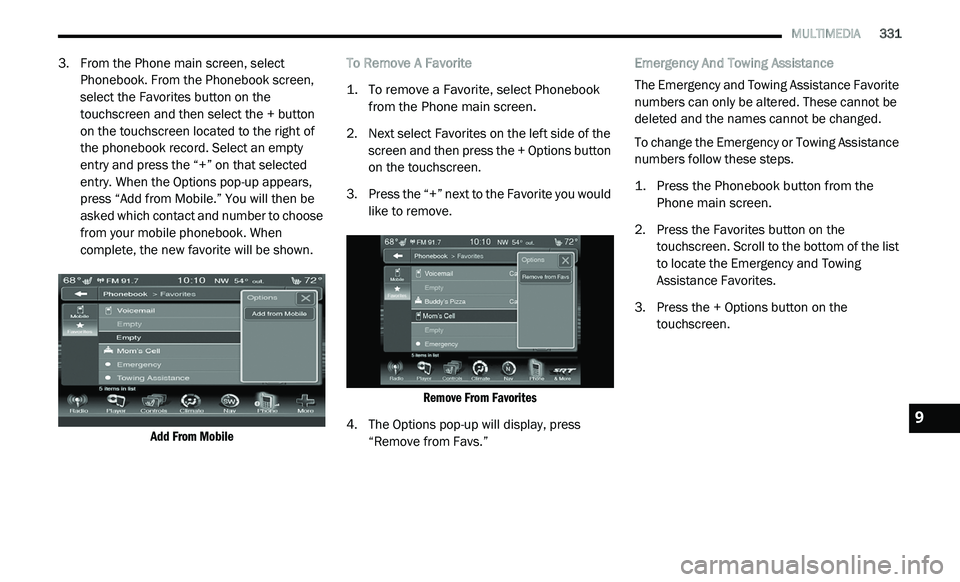
3. From the Phone main screen, select
Phonebook. From the Phonebook screen,
select the Favorites button on the
touchscreen and then select the + button
on the touchscreen located to the right of
the phonebook record. Select an empty
entry and press the “+” on that selected
entry. When the Options pop-up appears,
press “Add from Mobile.” You will then be
asked which contact and number to choose
from your mobile phonebook. When
complete, the new favorite will be shown.
Add From Mobile
To Remove A Favorite
1. T
o remove a Favorite, select Phonebook
f
rom the Phone main screen.
2. N ext select Favorites on the left side of the
s
creen and then press the + Options button
on the touchscreen.
3. P ress the “+” next to the Favorite you would
l
ike to remove.
Remove From Favorites
4. T he Options pop-up will display, press
“
Remove from Favs.” Emergency And Towing Assistance
The Emergency and Towing Assistance Favorite
n
u
mbers can only be altered. These cannot be
deleted and the names cannot be changed.
To change the Emergency or Towing Assistance
n u
mbers follow these steps.
1. P ress the Phonebook button from the
P
hone main screen.
2. P ress the Favorites button on the
t
ouchscreen. Scroll to the bottom of the list
to locate the Emergency and Towing
Assistance Favorites.
3. Press the + Options button on the t
ouchscreen.
9
Page 337 of 396
MULTIMEDIA 335
Roadside Assistance/Towing Assistance
If you need roadside/towing assistance:
1. Push the Phone
button to begin.
2. A fter the “Listening” prompt and the
f
ollowing beep, say “Roadside Assistance”
or say “Towing Assistance.”
NOTE:
The roadside/towing assistance number dialed
i s
based on the country where the vehicle is
purchased (1-800-521-2779 for the U.S.,
1-800-363-4869 for Canada, 55-14-3454 for
Mexico City, and 1-800-712-3040 for outside
Mexico City in Mexico). Please refer to the FCA
US LLC 24-Hour “Roadside Assistance”
coverage details in the Warranty Information
Booklet. Working With Automated Systems
This method is used in instances where one
g
e
nerally has to push numbers on the mobile
phone keypad while navigating through an
automated telephone system.
You can use your Uconnect Phone to access a
v o
ice mail system or an automated service,
such as a paging service or automated
customer service line. Some services require
immediate response selection. In some
instances, that may be too quick for use of the
Uconnect Phone.
When calling a number with your Uconnect
P h
one that normally requires you to enter in a
touch-tone sequence on your mobile phone
keypad, you can utilize the touchscreen or push
the Voice Command button and say the word
“Send” then the sequence you wish to enter.
F o
r example, if required to enter your PIN
followed with a pound, (3 7 4 6 #), you can push
the Voice Command button and say, “Send
3 7 4 6 #.” Saying “Send” followed by a number,
o r
sequence of numbers, is also to be used for
navigating through an automated customer
service center menu structure, and to leave a
number on a pager.
You can also send stored mobile phonebook
e
n
tries as tones for fast and easy access to voice
mail and pager entries. For example, if you
previously created a Phonebook entry with First
and/or Last Name as “Voicemail Password”, then
if you push the Voice Command button and
say “Send Voicemail Password” the Uconnect
P h
one will then send the corresponding phone
number associated with the phonebook entry, as
tones over the phone.
NOTE:
The first number encountered for that
contact will be sent. All other numbers
entered for that contact will be ignored.
You may not hear all of the tones due to
mobile phone network configurations.
This is normal.
Some paging and voice mail systems have
system time-out settings that are too short
and may not allow the use of this feature.
Pauses, wait or other characters that are
supported by some phones are not
supported over Bluetooth®. These additional
symbols will be ignored in the dialing a
numbered sequence.
WARNING!
Your phone must be turned on and connected
to the Uconnect Phone to allow use of this
vehicle feature in emergency situations, when
the mobile phone has network coverage and
stays connected to the Uconnect Phone.
9
Page 371 of 396
MULTIMEDIA 369
REMOTE CONTROL STORAGE
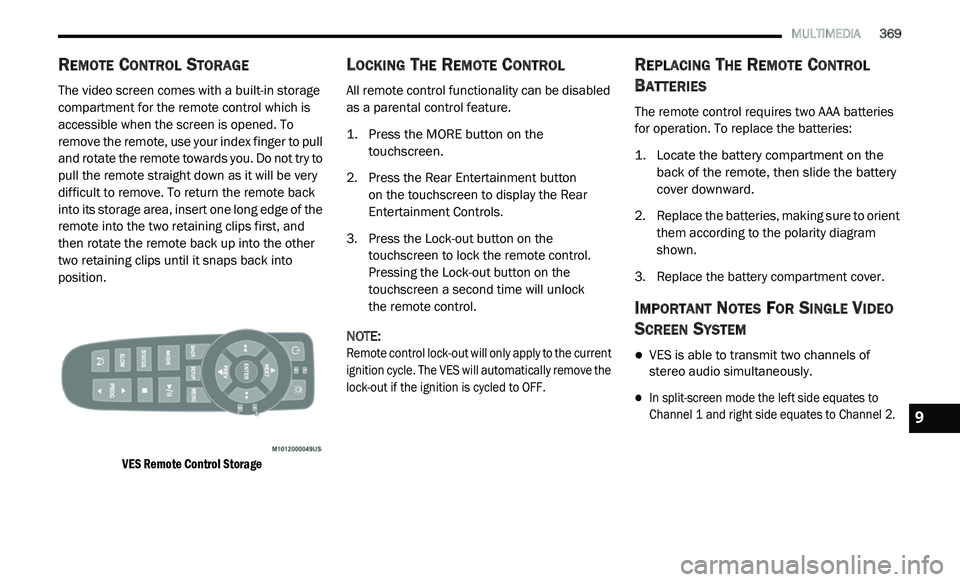
The video screen comes with a built-in storage
compartment for the remote control which is
accessible when the screen is opened. To
remove the remote, use your index finger to pull
and rotate the remote towards you. Do not try to
pull the remote straight down as it will be very
difficult to remove. To return the remote back
into its storage area, insert one long edge of the
remote into the two retaining clips first, and
then rotate the remote back up into the other
two retaining clips until it snaps back into
position.
VES Remote Control Storage
LOCKING THE REMOTE CONTROL
All remote control functionality can be disabled
as a parental control feature.
1. Press the MORE button on the
t
ouchscreen.
2. P ress the Rear Entertainment button
o
n the touchscreen to display the Rear
E n
tertainment Controls.
3. P ress the Lock-out button on the
t
ouchscreen to lock the remote control.
Pressing the Lock-out button on the
touchscreen a second time will unlock
the remote control.
NOTE:
Remote control lock-out will only apply to the current
i g
nition cycle. The VES will automatically remove the
lock-out if the ignition is cycled to OFF.
REPLACING THE REMOTE CONTROL
B
ATTERIES
The remote control requires two AAA batteries
for operation. To replace the batteries:
1. L ocate the battery compartment on the
b
ack of the remote, then slide the battery
cover downward.
2. R eplace the batteries, making sure to orient
t
hem according to the polarity diagram
shown.
3. R eplace the battery compartment cover.
IMPORTANT NOTES FOR SINGLE VIDEO
S
CREEN SYSTEM
VES is able to transmit two channels of
stereo audio simultaneously.
In split-screen mode the left side equates to
Channel 1 and right side equates to Channel 2.
9
Page 387 of 396
385
Brake System......................................232, 256Fluid Check.....................................232, 264Master Cylinder.........................................232Parking......................................................160Warning Light............................................100Brake, Parking...............................................160Brake/Transmission Interlock.......................162Brakes...........................................................256Brightness, Interior Lights................................43Bulb Replacement.........................................189Bulbs, Light..........................................156, 189
C
Camera, Rear................................................175Capacities, Fluid............................................261Caps, FillerOil (Engine)......................................220, 223Power Steering..........................................168Radiator (Coolant Pressure)......................230Car Washes...................................................253Carbon Monoxide Warning..................154, 260CargoVehicle Loading..................................78, 177Cargo Area Cover.............................................78Cargo Compartment........................................78Luggage Carrier...........................................91Cargo Load Floor.............................................78Cargo Management System............................78Rollaway Tonneau Cover.............................78
Tri-Fold Load Floor.......................................78
Cargo Tie-Downs..............................................79Cellular Phone..............................................376Certification Label.........................................177Chains, Tire...................................................250Changing A Flat Tire......................................234Chart, Tire Sizing...........................................236Check Engine Light (Malfunction Indicator
Light).............................................................108Checking Your Vehicle For Safety.................154Checks, Safety..............................................154Child Restraint..............................................139Child Restraints Booster Seats...........................................142Child Seat Installation..............................151How To Stow An unused ALR Seat Belt....148Infant And Child Restraints.......................141Locating The LATCH Anchorages..............146Lower Anchors And Tethers For Children..144Older Children And Child Restraints.........141Seating Positions......................................143Using The Top Tether Anchorage..............153Clean Air Gasoline.........................................258CleaningWheels.....................................................249Climate Control................................................47Automatic....................................................58Manual........................................................47Rear......................................................53, 64Coin Holder......................................................85
Cold Weather Operation...............................159
Compact Spare Tire......................................247ConsoleFloor............................................................85Contract, Service...........................................381Cooling Pressure Cap (Radiator Cap)............230Cooling System.............................................228Adding Coolant (Antifreeze)......................229Coolant Level...................................228, 231Cooling Capacity.......................................261Disposal Of Used Coolant.........................230Drain, Flush, And Refill.............................229Inspection.................................................231Points To Remember................................231Pressure Cap............................................230Selection Of Coolant
(Antifreeze).........................229, 261, 262Corrosion Protection.....................................252Cruise Light...................................................106Cupholders.............................................86, 255Customer Assistance....................................380Customer Programmable Features...............266Cybersecurity................................................265
D
Daytime Brightness, Interior Lights..................43Daytime Running Lights...................................41Dealer Service...............................................222Defroster, Windshield...................................155Delay (Intermittent) Wipers..............................45
Diagnostic System, Onboard.........................107
11
Page 388 of 396
386
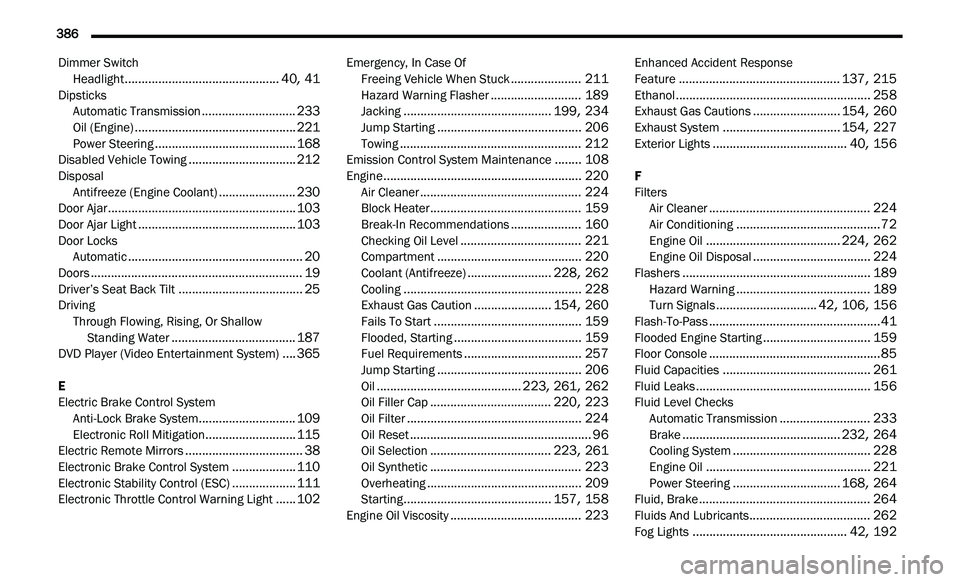
Dimmer Switch
Headlight..............................................40, 41DipsticksAutomatic Transmission............................233Oil (Engine)................................................221Power Steering..........................................168Disabled Vehicle Towing................................212DisposalAntifreeze (Engine Coolant).......................230Door Ajar........................................................103Door Ajar Light...............................................103Door LocksAutomatic....................................................20Doors...............................................................19Driver’s Seat Back Tilt.....................................25DrivingThrough Flowing, Rising, Or Shallow
Standing Water
.....................................187DVD Player (Video Entertainment System)....365
E
Electric Brake Control System Anti-Lock Brake System
.............................109Electronic Roll Mitigation...........................115Electric Remote Mirrors...................................38Electronic Brake Control System...................110Electronic Stability Control (ESC)...................111Electronic Throttle Control Warning Light......102
Emergency, In Case OfFreeing Vehicle When Stuck.....................211Hazard Warning Flasher...........................189Jacking............................................199, 234Jump Starting...........................................206Towing......................................................212Emission Control System Maintenance........108Engine...........................................................220Air Cleaner................................................224Block Heater.............................................159Break-In Recommendations.....................160Checking Oil Level....................................221Compartment...........................................220Coolant (Antifreeze).........................228, 262Cooling.....................................................228Exhaust Gas Caution.......................154, 260Fails To Start............................................159Flooded, Starting......................................159Fuel Requirements...................................257Jump Starting...........................................206Oil...........................................223, 261, 262Oil Filler Cap....................................220, 223Oil Filter....................................................224Oil Reset......................................................96Oil Selection....................................223, 261Oil Synthetic.............................................223Overheating..............................................209Starting............................................157, 158Engine Oil Viscosity.......................................223
Enhanced Accident Response
Feature................................................137, 215Ethanol..........................................................258Exhaust Gas Cautions..........................154, 260Exhaust System...................................154, 227Exterior Lights........................................40, 156
F
Filters Air Cleaner
................................................224Air Conditioning...........................................72Engine Oil........................................224, 262Engine Oil Disposal...................................224Flashers........................................................189Hazard Warning........................................189Turn Signals..............................42, 106, 156Flash-To-Pass...................................................41Flooded Engine Starting................................159Floor Console...................................................85Fluid Capacities............................................261Fluid Leaks....................................................156Fluid Level ChecksAutomatic Transmission...........................233Brake...............................................232, 264Cooling System.........................................228Engine Oil.................................................221Power Steering................................168, 264Fluid, Brake...................................................264Fluids And Lubricants....................................262
Fog Lights..............................................42, 192
Page 389 of 396
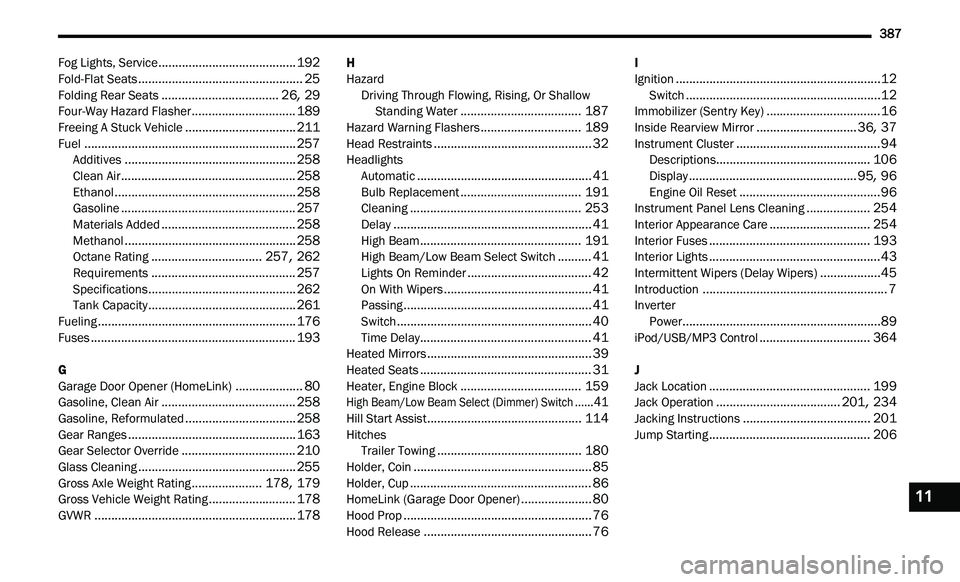
387
Fog Lights, Service.........................................192Fold-Flat Seats.................................................25Folding Rear Seats...................................26, 29Four-Way Hazard Flasher...............................189Freeing A Stuck Vehicle.................................211Fuel...............................................................257Additives...................................................258Clean Air....................................................258Ethanol......................................................258Gasoline....................................................257Materials Added........................................258Methanol...................................................258Octane Rating.................................257, 262Requirements...........................................257Specifications............................................262Tank Capacity............................................261Fueling...........................................................176Fuses.............................................................193
G
Garage Door Opener (HomeLink)....................80Gasoline, Clean Air........................................258Gasoline, Reformulated.................................258Gear Ranges..................................................163Gear Selector Override..................................210Glass Cleaning...............................................255Gross Axle Weight Rating.....................178, 179Gross Vehicle Weight Rating..........................178GVWR............................................................178
H
HazardDriving Through Flowing, Rising, Or Shallow St
anding Water....................................187Hazard Warning Flashers..............................189Head Restraints...............................................32HeadlightsAutomatic....................................................41Bulb Replacement....................................191Cleaning...................................................253Delay...........................................................41High Beam................................................191High Beam/Low Beam Select Switch..........41Lights On Reminder.....................................42On With Wipers............................................41Passing........................................................41Switch..........................................................40Time Delay...................................................41Heated Mirrors.................................................39Heated Seats...................................................31Heater, Engine Block....................................159
High Beam/Low Beam Select (Dimmer) Switch......41
Hill Start Assist..............................................114HitchesTrailer Towing...........................................180Holder, Coin.....................................................85Holder, Cup......................................................86HomeLink (Garage Door Opener).....................80Hood Prop........................................................76
Hood Release..................................................76
I
Ignition.............................................................12Switch..........................................................12Immobilizer (Sentry Key)..................................16Inside Rearview Mirror..............................36, 37Instrument Cluster...........................................94Descriptions..............................................106Display..................................................95, 96Engine Oil Reset..........................................96Instrument Panel Lens Cleaning...................254Interior Appearance Care..............................254Interior Fuses................................................193Interior Lights...................................................43Intermittent Wipers (Delay Wipers)..................45Introduction.......................................................7InverterPower...........................................................89iPod/USB/MP3 Control.................................364
J
Jack Location................................................199Jack Operation.....................................201, 234Jacking Instructions......................................201Jump Starting................................................206
11