audio DODGE JOURNEY 2020 Service Manual
[x] Cancel search | Manufacturer: DODGE, Model Year: 2020, Model line: JOURNEY, Model: DODGE JOURNEY 2020Pages: 396, PDF Size: 25.53 MB
Page 338 of 396
336 MULTIMEDIA
Barge In — Overriding Prompts
The Voice Recognition button can be used
when you wish to skip part of a prompt and
i s
sue your voice command immediately.
For example, if a prompt is asking “There are
t w
o numbers with the name John. Say the full
name” you could push the Voice Recognition
button and say, “John Smith” to select that
option without having to listen to the rest of the
v o
ice prompt.
Voice Response Length
It is possible for you to choose between Brief
a n
d Detailed Voice Response Length.
1. P ress the Settings button on the
t
ouchscreen.
2. P ress the Voice button on the touchscreen,
t
hen scroll down to Voice Response Length.
3. S elect either “Brief” or “Detailed” by
p
ressing the box next to the selection.
A check mark will appear to indicate your
s e
lection. Phone And Network Status Indicators
Uconnect Phone will provide notification to
i
n
form you of your phone and network status
when you are attempting to make a phone call
using Uconnect Phone. The status is given for
network signal strength and phone battery
strength.
Dialing Using The Mobile Phone Keypad
You can dial a phone number with your mobile
p h
one keypad and still use the Uconnect Phone
(while dialing via the mobile phone keypad,
the user must exercise caution and take
p r
ecautionary safety measures). By dialing a
number with your connected Bluetooth® mobile
phone, the audio will be played through your
vehicle's audio system. The Uconnect Phone will
work the same as if you dial the number using a
voice command.
NOTE:
Certain brands of mobile phones do not send the
d i
al ring to the Uconnect Phone to play it on the
vehicle audio system, so you will not hear it.
Under this situation, after successfully dialing a
number the user may feel that the call did not go
through even though the call is in progress. Once
your call is answered, you will hear the audio.
Mute/Un-Mute (Mute ON/OFF)
When you mute the Uconnect Phone, you will
s
t
ill be able to hear the conversation coming
from the other party, but the other party will not
be able to hear you. To mute the Uconnect
Phone simply, press the Mute button on the
Phone main screen.
Advanced Phone Connectivity
Transfer Call To And From Mobile Phone
The Uconnect Phone allows ongoing calls to be
t r
ansferred from your mobile phone to the
Uconnect Phone without terminating the call.
To transfer an ongoing call from your connected
m o
bile phone to the Uconnect Phone or vice
versa, press the Transfer button on the Phone
main screen.
Connect Or Disconnect Link Between The
U c
onnect Phone And Mobile Phone
If you would like to connect or disconnect the
B l
uetooth® connection between a Uconnect
Phone paired mobile phone and the Uconnect
system, follow the instructions described in your
mobile phone User's Manual.
Page 339 of 396
MULTIMEDIA 337
Things You Should Know About Your
Uconnect Phone
Voice Command
For the best performance:
Adjust the rearview mirror to provide at least
½-inch (1 cm) gap between the overhead
console (if equipped) and the mirror.
Always wait for the beep before speaking.
Speak normally, without pausing, just as you
would speak to a person sitting a few feet/
meters away from you.
Ensure that no one other than you is
speaking during a voice command period.
Performance is maximized under:
Low-To-Medium Blower Setting
Low-To-Medium Vehicle Speed
Low Road Noise
Smooth Road Surface
Fully Closed Windows
Dry Weather Condition Even though the system is designed for many
l
a
nguages and accents, the system may not
always work for some.
NOTE:
It is recommended that you do not store names
in
your favorites phonebook while the vehicle is
in motion.
Phonebook (Mobile and Favorites) name
r e
cognition rate is optimized when the entries
are not similar. You can say “O” (letter “O”) for
“0” (zero). Even though international dialing for most
nu
mber combinations is supported, some
shortcut dialing number combinations may not
be supported.
Far End Audio Performance
Audio quality is maximized under:
Low-To-Medium Blower Setting
Low-To-Medium Vehicle Speed
Low Road Noise
Smooth Road Surface
Fully Closed Windows
Dry Weather Conditions
Operation From The Driver's Seat
Performance such as audio clarity, echo, and
l o
udness to a large degree relies on the phone
and network, and not the Uconnect Phone.
Echo at the far end can sometimes be reduced
b y
lowering the in-vehicle audio volume.
In a convertible vehicle, system performance
m a
y be compromised with the convertible top
down.
WARNING!
ALWAYS drive safely with your hands on the
steering wheel. You have full responsibility
and assume all risks related to the use of the
Uconnect features and applications in this
vehicle. Only use Uconnect when it is safe to
do so. Failure to do so may result in an acci -
dent involving serious injury or death.
ALWAYS follow the law! Failure to follow
traffic laws may result in serious injury or
death.
9
Page 357 of 396
MULTIMEDIA 355
SiriusXM® Travel Link brings a wealth of useful
information into your vehicle and right to your
fingertips:
Fuel Prices
Check detailed price information for fuel
stations near your current location.
Sort the list of closest fuel stations by price,
distance or alphabetically.
Route to selected fuel station.
Store a favorite fuel station for quick access
to pricing.
Movie Listings
Check which movies are playing at theaters
near your current location.
Sort the list of theaters by distance or alpha -
betically.
Show movie titles, start times, ratings, run
length, and summaries.
Store a favorite theater for quick access to
schedules. Ski Info
View ski and snowboarding conditions at ski
resorts.
Store a favorite location for quick access to
snow conditions.
Sports Scores
View scores and upcoming events for all
major sports.
Store your favorite teams for quick access to
the scores and schedules.
NOTE:
SiriusXM® Travel Link data services subscrip -
tion is separate from your SiriusXM® Satellite
R a
dio (audio) subscription.
SiriusXM® services require subscriptions, sold
s e
parately after the 12-month trial included
with the new vehicle purchase. If you decide to
continue your service at the end of your trial
subscription, the plan you choose will automatically renew and bill at then-current
rates until you call SiriusXM at 866-635-2349
to cancel.
See SiriusXM® Customer Agreement for
c
o
mplete terms for U.S. residents at
www.siriusxm.com , and Canadian residents at
www.siriusxm.ca . All fees and programming
subject to change. Our satellite service is
a v
ailable only to those at least 18 and older in
the 48 contiguous USA and D.C. Our Sirius
satellite service is also available in PR (with
coverage limitations). Our Internet radio service
is available throughout our satellite service area
and in AK and HI. © 2020 Sirius XM Radio Inc.
Sirius, XM and all related marks and logos are
trademarks of SiriusXM® Radio Inc.
Weather
View detailed current conditions at your
current location.
Check extended 12-hour and 5-day fore -
casts.
Store a favorite location for quick access to
weather conditions and forecasts.
CAUTION!
Neither SiriusXM nor FCA US LLC is
responsible for any errors in accuracies in the
SiriusXM data services or its use in vehicles.
9
Page 358 of 396
356 MULTIMEDIA
End-User License Agreement
Software License Agreement
BY USING THE NAVIGATION SYSTEM, YOU
AG
REE TO BE BOUND BY THE TERMS AND
CONDITIONS OF THE FOLLOWING SOFTWARE
LICENSE AGREEMENT. PLEASE READ THIS
AGREEMENT CAREFULLY.
Garmin® Ltd. and its subsidiaries (“Garmin®”)
gr
ant you a limited license to use the software
embedded in this device (the “Software”) in
binary executable form in the normal operation
of the product. Title, ownership rights, and
intellectual property rights in and to the
Software remain in Garmin® and/or its
third-party providers.
You acknowledge that the Software is the
p r
operty of Garmin® and/or its third-party
providers and is protected under the United
States of America copyright laws and
international copyright treaties. You further
acknowledge that the structure, organization,
and code of the Software, for which source code
is not provided, are valuable trade secrets of
Garmin® and/or its third-party providers and that
the Software in source code form remains a
valuable trade secret of Garmin® and/or its
third-party providers. You agree not to decompile, disassemble, modify, reverse assemble, reverse
engineer, or reduce to human readable form the
Software or any part thereof or create any
derivative works based on the Software. You
agree not to export or re-export the Software to
any country in violation of the export control laws
of the United States of America or the export
control laws of any other applicable country.
The Garmin® device you have purchased
(
“
Device”), or the download that you are making
(the “Download”), may contain an application,
content, or both. If a Device, the software
embedded in it (the “Software”), or if a Download,
the application, including its embedded software
(collectively, the “Application”) is owned by
Garmin® Ltd. or its subsidiaries (collectively,
“Garmin®”). The map data that may be
embedded in your Device, the Application or
downloaded separately (the “Map Data”) is either
owned by Garmin®, or by HERE North America
LLC and/or its affiliates (“HERE”) or another third
party and is licensed to Garmin®. Garmin® also
owns, or licenses from third party providers,
information, traffic data, text, images, graphics,
photographs, audio, video, images and other
applications and data that may be embedded
in the Device or Application, or downloaded
s e
parately (“Other Content”). The Map Data and Other Content are collectively the “Content”. The
Software, Application and Content (collectively,
the “Garmin® Products”) are protected under
copyright laws and international copyright
treaties. The Garmin® Products are licensed, not
sold. The structure, organization and code of the
Software and Application are valuable trade
secrets of Garmin® and/or its third-party
providers. The Garmin® Products are each
provided under this License Agreement and are
subject to the following terms and conditions
which are agreed to by End User (“you” or “your”),
on the one hand, and Garmin® and its licensors
and affiliated companies of Garmin® and its
licensor, on the other hand. Garmin’s® licensors,
including the licensors, service providers,
channel partners, suppliers and affiliated
companies of Garmin® and its licensors, are
each a direct and intended third party beneficiary
of this Agreement and may enforce their rights
directly against you in the event of your breach of
this Agreement.
IMPORTANT:
C
AREFULLY READ THIS ENTIRE
LICENSE AGREEMENT BEFORE PURCHASING
OR USING YOUR DEVICE OR DOWNLOADED
APPLICATION OR CONTENT. PURCHASING,
INSTALLING, COPYING, OR OTHERWISE USING
YOUR DEVICE OR DOWNLOADED APPLICATION
Page 365 of 396
MULTIMEDIA 363
Garmin® is a trademark of Garmin® Ltd. or its
subsidiaries, registered in the USA and other
countries. This trademark may not be used
without the express permission of Garmin®.
All other company names and trademarks
m e
ntioned or referenced in this documentation
are the properties of their respective owners. All
rights reserved.
MORE MODE
“More” Main Menu
The More Main Menu consists of the following
options:
Settings
SiriusXM® Travel Link (if equipped)
Refer to the “Navigation Mode” in this
s e
ction for more information.
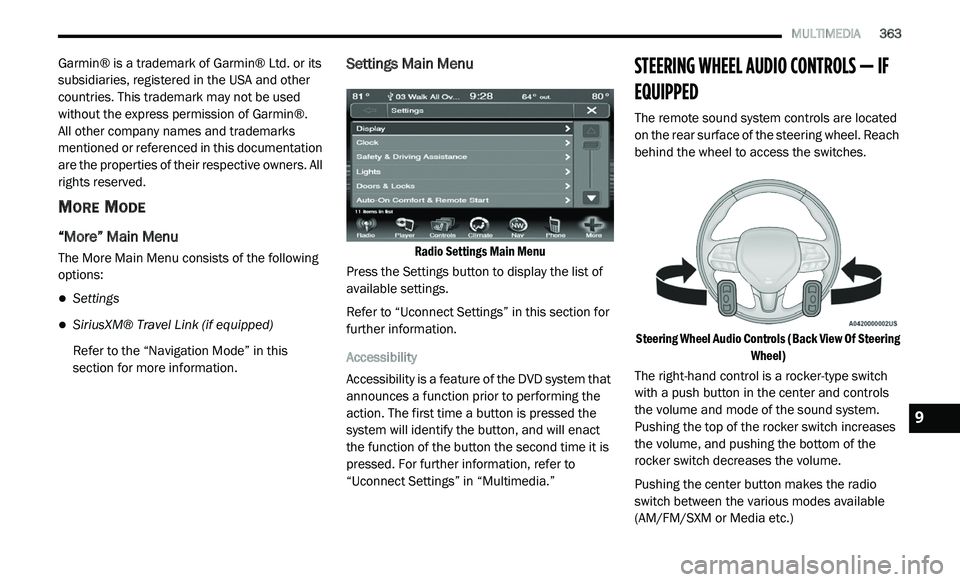
Settings Main Menu
Radio Settings Main Menu
Press the Settings button to display the list of
a v
ailable settings.
Refer to “Uconnect Settings” in this section for
f u
rther information.
Accessibility
Accessibility is a feature of the DVD system that
a n
nounces a function prior to performing the
action. The first time a button is pressed the
system will identify the button, and will enact
the function of the button the second time it is
pressed. For further information, refer to
“Uconnect Settings” in “Multimedia.”
STEERING WHEEL AUDIO CONTROLS — IF
EQUIPPED
The remote sound system controls are located
on the rear surface of the steering wheel. Reach
behind the wheel to access the switches.
Steering Wheel Audio Controls (Back View Of Steering Wh
eel)
The right-hand control is a rocker-type switch
w i
th a push button in the center and controls
the volume and mode of the sound system.
Pushing the top of the rocker switch increases
the volume, and pushing the bottom of the
rocker switch decreases the volume.
Pushing the center button makes the radio
s w
itch between the various modes available
(AM/FM/SXM or Media etc.)
9
Page 367 of 396
MULTIMEDIA 365
UCONNECT MULTIMEDIA — VIDEO
ENTERTAINMENT SYSTEM (VES)
(IF EQUIPPED)
Your rear seat Video Entertainment System
(VES) is designed to give your family years of
enjoyment. You can play your favorite CDs or
DVDs, listen to audio over the wireless
headphones, or plug and play a variety of
standard video games or audio devices. Please
review this Owner's Manual to become familiar
with its features and operation.
NOTE:
The screen is located in the 2nd row overhead
c o
nsole.
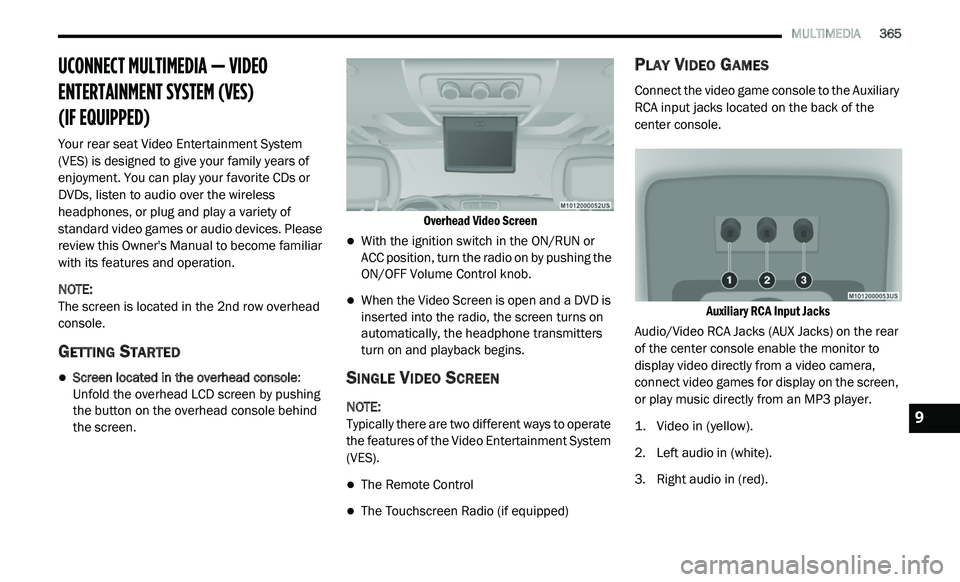
GETTING STARTED
Screen located in the overhead console :
Unfold the overhead LCD screen by pushing
the button on the overhead console behind
the screen.
Overhead Video Screen
With the ignition switch in the ON/RUN or
ACC position, turn the radio on by pushing the
ON/OFF Volume Control knob.
When the Video Screen is open and a DVD is
inserted into the radio, the screen turns on
automatically, the headphone transmitters
turn on and playback begins.
SINGLE VIDEO SCREEN
NOTE:
Typically there are two different ways to operate
t h
e features of the Video Entertainment System
(VES).
The Remote Control
The Touchscreen Radio (if equipped)
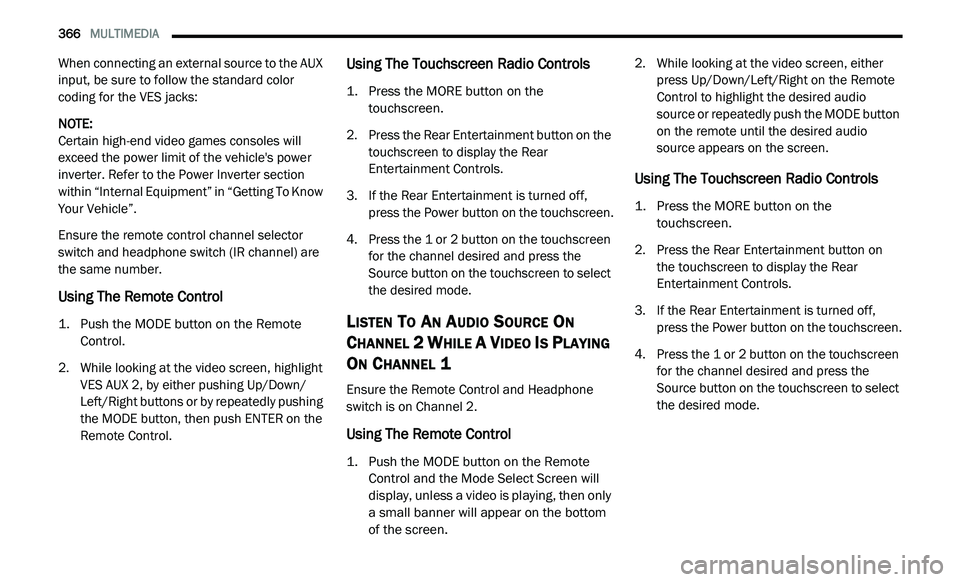
PLAY VIDEO GAMES
Connect the video game console to the Auxiliary
RCA input jacks located on the back of the
center console.
Auxiliary RCA Input Jacks
Audio/Video RCA Jacks (AUX Jacks) on the rear
o f
the center console enable the monitor to
display video directly from a video camera,
connect video games for display on the screen,
or play music directly from an MP3 player.
1. V ideo in (yellow).
2
. Le ft audio in (white).
3
. R ight audio in (red).
9
Page 368 of 396
366 MULTIMEDIA
When connecting an external source to the AUX
input, be sure to follow the standard color
coding for the VES jacks:
NOTE:
Certain high-end video games consoles will
ex
ceed the power limit of the vehicle's power
inverter. Refer to the Power Inverter section
within “Internal Equipment” in “Getting To Know
Your Vehicle”.
Ensure the remote control channel selector
s w
itch and headphone switch (IR channel) are
the same number.
Using The Remote Control
1. Push the MODE button on the Remote Control.
2. W hile looking at the video screen, highlight
V
ES AUX 2, by either pushing Up/Down/
Left/Right buttons or by repeatedly pushing
the MODE button, then push ENTER on the
Remote Control.
Using The Touchscreen Radio Controls
1. Press the MORE button on the touchscreen.
2. P ress the Rear Entertainment button on the
t
ouchscreen to display the Rear
Entertainment Controls.
3. I f the Rear Entertainment is turned off,
p
ress the Power button on the touchscreen.
4. P ress the 1 or 2 button on the touchscreen
f
or the channel desired and press the
Source button on the touchscreen to select
the desired mode.
LISTEN TO AN AUDIO SOURCE ON
C
HANNEL 2 WHILE A VIDEO IS PLAYING
O
N CHANNEL 1
Ensure the Remote Control and Headphone
switch is on Channel 2.
Using The Remote Control
1. Push the MODE button on the Remote
Control and the Mode Select Screen will
display, unless a video is playing, then only
a small banner will appear on the bottom
of the screen.
2. W
hile looking at the video screen, either
p
ress Up/Down/Left/Right on the Remote
Control to highlight the desired audio
source or repeatedly push the MODE button
on the remote until the desired audio
source appears on the screen.
Using The Touchscreen Radio Controls
1. Press the MORE button on the touchscreen.
2. P ress the Rear Entertainment button on
t
he touchscreen to display the Rear
E n
tertainment Controls.
3. I f the Rear Entertainment is turned off,
p
ress the Power button on the touchscreen.
4. P ress the 1 or 2 button on the touchscreen
f
or the channel desired and press the
Source button on the touchscreen to select
the desired mode.
Page 369 of 396
MULTIMEDIA 367
PLAY A DVD USING THE TOUCHSCREEN
R
ADIO
Insert the DVD with the label facing up.
The radio automatically selects the appropriate
m o
de after the disc is recognized and displays
the menu screen or starts playing the first track.
Using The Remote Control
1. Push the MODE button on the Remote Control.
2. W hile looking at the Video Screen, highlight
D
ISC by either pushing Up/Down/Left/Right
buttons or by repeatedly pushing the MODE
button, then push ENTER.
NOTE:
The VES system will retain the last setting
when turned off.
Viewing a DVD on the Touchscreen radio
screen is not available in some regions or
locations, the vehicle must be stopped, and
the gear selector must be in the PARK posi -
tion. Refer to local and state laws.
Using The Touchscreen Radio Controls
1. Press the MORE button on the
touchscreen.
2. P ress the Rear Entertainment button on the
t
ouchscreen to display the Rear
Entertainment Controls.
3. I f the Rear Entertainment is turned off,
p
ress the Power button on the touchscreen.
4. P ress the 1 or 2 button on the touchscreen
f
or the channel desired and press the
Source button on the touchscreen to select
the desired mode.
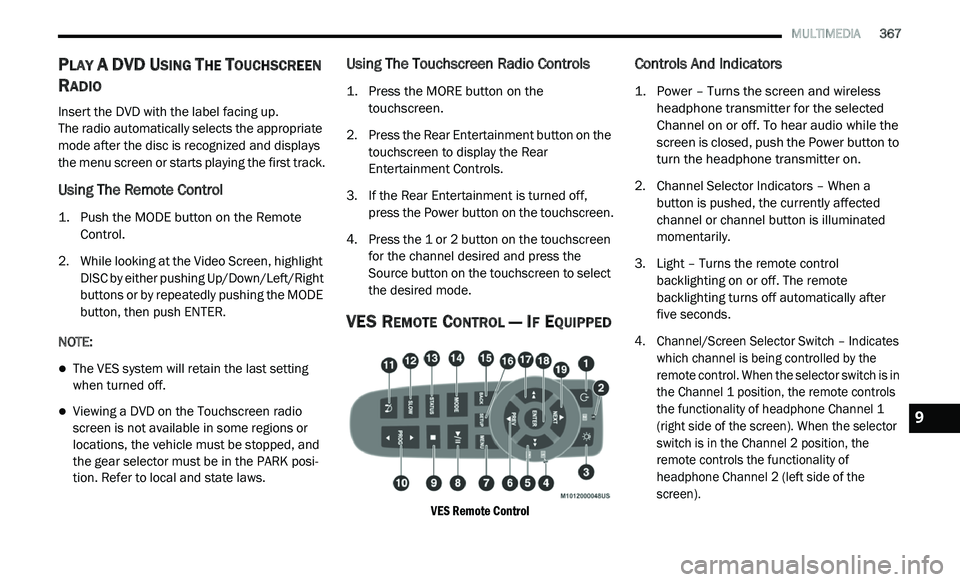
VES REMOTE CONTROL — IF EQUIPPED
VES Remote Control
Controls And Indicators
1. Power – Turns the screen and wireless headphone transmitter for the selected
Channel on or off. To hear audio while the
screen is closed, push the Power button to
turn the headphone transmitter on.
2. C hannel Selector Indicators – When a
b
utton is pushed, the currently affected
channel or channel button is illuminated
momentarily.
3. Light – Turns the remote control b
acklighting on or off. The remote
backlighting turns off automatically after
five seconds.
4. Channel/Screen Selector Switch – Indicates w
hich channel is being controlled by the
remote control. When the selector switch is in
the Channel 1 position, the remote controls
the functionality of headphone Channel 1
(right side of the screen). When the selector
switch is in the Channel 2 position, the
remote controls the functionality of
headphone Channel 2 (left side of the
screen).
9
Page 370 of 396
368 MULTIMEDIA
5.▸▸ – In radio modes, push to seek the
next tunable station. In disc modes, push
and hold to fast forward through the current
audio track or video chapter. In menu
modes use to navigate in the menu.
6.
▾ / Prev – In radio modes, push to select to
the previous station. In disc modes, push
to advance to the start of the current or
p r
evious audio track or video chapter.
In menu modes, use to navigate in the menu.
7. M ENU – Push to return to the main menu of
a
DVD disc, to select an audio or video
channel from the Station list, or select
playback modes (SCAN/RANDOM for a CD).
8.
▸ / ‖ (Play/Pause) – Begin/resume or
pause disc play.
9. (Stop) – Stops disc play. 10. P
ROG Up/Down – When listening to a radio
m
ode, pushing PROG Up selects the next
preset and pushing PROG Down selects the
previous preset stored in the radio.
11. Mute – Push to mute the headphone audio o
utput for the selected channel.
12. S LOW – Push to slow playback of a DVD
d
isc. Push play (
▸) to resume normal play.
13. S TATUS – Push to display the current
s
tatus.
14. M ODE – Push to change the mode of the
s
elected channel. See the Mode Selection
section of this manual for details on
changing modes.
15. BACK – When navigating in menu mode, p
ush to return to the previous screen. When
navigating a DVDs disc menu, the operation
depends on the disc’s contents. 16. S
ETUP – When in a video mode, push the
S
ETUP button to access the display settings
(see the display settings section) to access
the DVD setup menu, select the menu
button on the radio. When a disc is loaded
in the DVD player (if equipped) and the VES
mode is selected and the disc is stopped,
push the SETUP button to access the DVD
Setup menu.
17.
◂◂ – In radio modes, push to seek to the
previous tunable station. In disc modes,
push and hold to fast rewind through the
current audio track or video chapter. In
menu modes, use to navigate in the menu.
18. E NTER – Push to select the highlighted
o
ption in a menu.
19.
▴ / NEXT – In radio modes, push to select
to the next station. In disc modes, push to
advance to the next audio track or video
chapter. In menu modes, use to navigate in
the menu.
Page 371 of 396
MULTIMEDIA 369
REMOTE CONTROL STORAGE
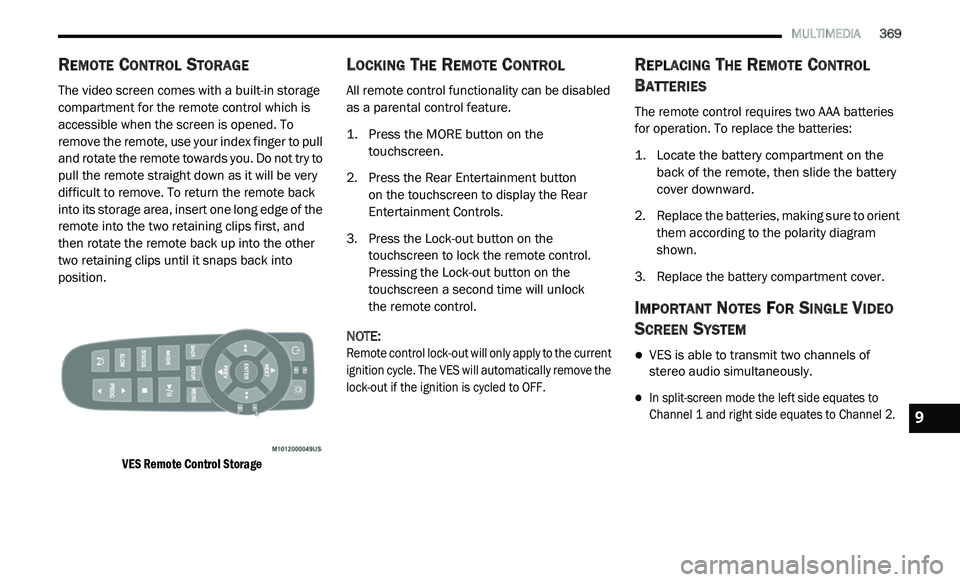
The video screen comes with a built-in storage
compartment for the remote control which is
accessible when the screen is opened. To
remove the remote, use your index finger to pull
and rotate the remote towards you. Do not try to
pull the remote straight down as it will be very
difficult to remove. To return the remote back
into its storage area, insert one long edge of the
remote into the two retaining clips first, and
then rotate the remote back up into the other
two retaining clips until it snaps back into
position.
VES Remote Control Storage
LOCKING THE REMOTE CONTROL
All remote control functionality can be disabled
as a parental control feature.
1. Press the MORE button on the
t
ouchscreen.
2. P ress the Rear Entertainment button
o
n the touchscreen to display the Rear
E n
tertainment Controls.
3. P ress the Lock-out button on the
t
ouchscreen to lock the remote control.
Pressing the Lock-out button on the
touchscreen a second time will unlock
the remote control.
NOTE:
Remote control lock-out will only apply to the current
i g
nition cycle. The VES will automatically remove the
lock-out if the ignition is cycled to OFF.
REPLACING THE REMOTE CONTROL
B
ATTERIES
The remote control requires two AAA batteries
for operation. To replace the batteries:
1. L ocate the battery compartment on the
b
ack of the remote, then slide the battery
cover downward.
2. R eplace the batteries, making sure to orient
t
hem according to the polarity diagram
shown.
3. R eplace the battery compartment cover.
IMPORTANT NOTES FOR SINGLE VIDEO
S
CREEN SYSTEM
VES is able to transmit two channels of
stereo audio simultaneously.
In split-screen mode the left side equates to
Channel 1 and right side equates to Channel 2.
9