audio DODGE JOURNEY 2020 User Guide
[x] Cancel search | Manufacturer: DODGE, Model Year: 2020, Model line: JOURNEY, Model: DODGE JOURNEY 2020Pages: 396, PDF Size: 25.53 MB
Page 289 of 396
MULTIMEDIA 287
5 — CLIMATE
Push the CLIMATE Control button on the
fa
ceplate to access climate controls. Refer to
“Climate Controls” in “Getting To Know Your
Vehicle” for more information.
6 — PLAYER
Push the PLAYER button, located on the
f a
ceplate, to access media sources such as
Disc, USB Device, and AUX as long as the
requested media is present.
RADIO MODE
Overview
The radio is equipped with the following modes:
FM
AM
SAT SiriusXM® Satellite Radio (if equipped)
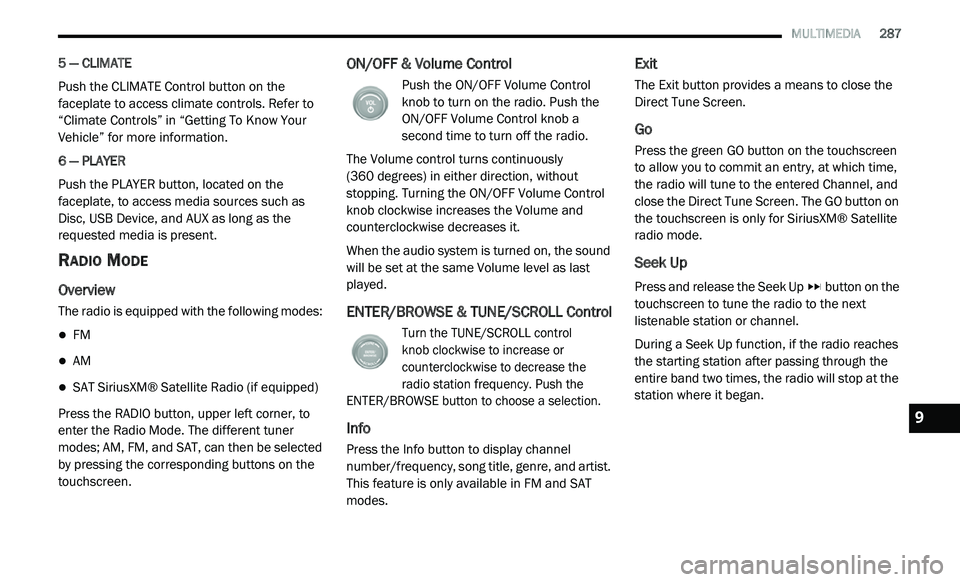
Press the RADIO button, upper left corner, to
e n
ter the Radio Mode. The different tuner
modes; AM, FM, and SAT, can then be selected
by pressing the corresponding buttons on the
touchscreen.
ON/OFF & Volume Control
Push the ON/OFF Volume Control
knob to turn on the radio. Push the
O N
/OFF Volume Control knob a
second time to turn off the radio.
The Volume control turns continuously
(360 degrees) in either direction, without
s t
opping. Turning the ON/OFF Volume Control
knob clockwise increases the Volume and
counterclockwise decreases it.
When the audio system is turned on, the sound
w i
ll be set at the same Volume level as last
played.
ENTER/BROWSE & TUNE/SCROLL Control
Turn the TUNE/SCROLL control
knob clockwise to increase or
c o
unterclockwise to decrease the
radio station frequency. Push the
ENTER/BROWSE button to choose a selection.
Info
Press the Info button to display channel
number/frequency, song title, genre, and artist.
This feature is only available in FM and SAT
modes.
Exit
The Exit button provides a means to close the
Direct Tune Screen.
Go
Press the green GO button on the touchscreen
to allow you to commit an entry, at which time,
the radio will tune to the entered Channel, and
close the Direct Tune Screen. The GO button on
the touchscreen is only for SiriusXM® Satellite
radio mode.
Seek Up
Press and release the Seek Up button on the
touchscreen to tune the radio to the next
l i
stenable station or channel.
During a Seek Up function, if the radio reaches
t h
e starting station after passing through the
entire band two times, the radio will stop at the
station where it began.
9
Page 290 of 396
288 MULTIMEDIA
Fast Seek Up
Press and hold the Seek Up button on the
touchscreen to advance the radio through the
a v
ailable stations or channels at a faster rate,
the radio stops at the next available station or
channel when the button on the touchscreen is
released.
Seek Down
Press and release the Seek Down button on
the touchscreen to tune the radio to the next
l i
stenable station or channel.
During a Seek Down function, if the radio
r e
aches the starting station after passing
through the entire band two times, the radio will
stop at the station where it began.
Fast Seek Down
Press and hold the Seek Down button on the
touchscreen to advance the radio through the
a v
ailable stations or channel at a faster rate,
the radio stops at the next available station or
channel when the button is released.
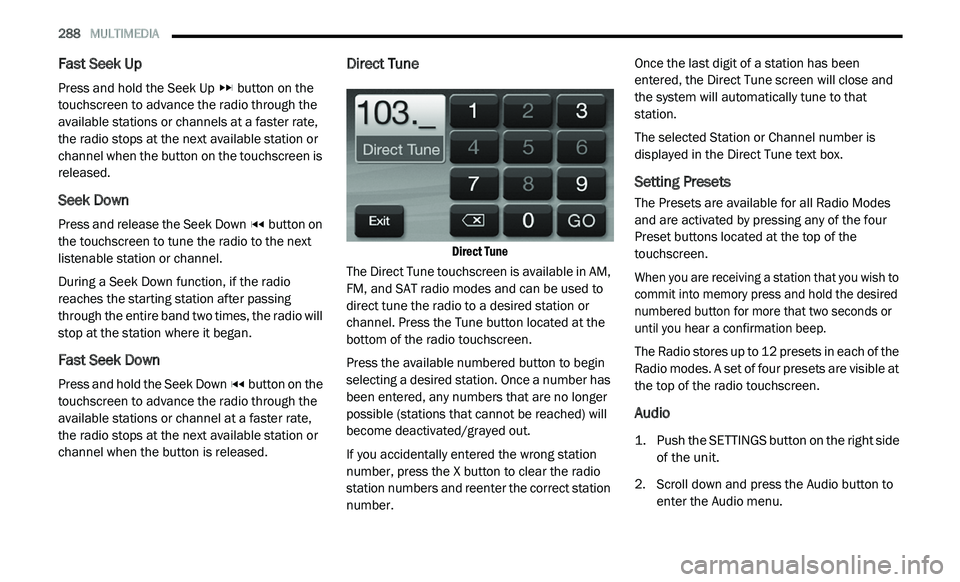
Direct Tune
Direct Tune
The Direct Tune touchscreen is available in AM,
F M
, and SAT radio modes and can be used to
direct tune the radio to a desired station or
channel. Press the Tune button located at the
bottom of the radio touchscreen.
Press the available numbered button to begin
se
lecting a desired station. Once a number has
been entered, any numbers that are no longer
possible (stations that cannot be reached) will
become deactivated/grayed out.
If you accidentally entered the wrong station
nu
mber, press the X button to clear the radio
station numbers and reenter the correct station
number. Once the last digit of a station has been
en
tered, the Direct Tune screen will close and
the system will automatically tune to that
station.
The selected Station or Channel number is
d i
splayed in the Direct Tune text box.
Setting Presets
The Presets are available for all Radio Modes
and are activated by pressing any of the four
Preset buttons located at the top of the
touchscreen.
When you are receiving a station that you wish to
co
mmit into memory press and hold the desired
numbered button for more that two seconds or
until you hear a confirmation beep.
The Radio stores up to 12 presets in each of the
R a
dio modes. A set of four presets are visible at
the top of the radio touchscreen.
Audio
1. Push the SETTINGS button on the right side of the unit.
2. S croll down and press the Audio button to
e
nter the Audio menu.
Page 291 of 396
MULTIMEDIA 289
The Audio Menu shows the following options
for you to customize your audio settings.
Equalizer
Press the Equalizer button to adjust the
Bass, Mid and Treble. Use the + or –
buttons to adjust the equalizer to your
desired settings. Press the Back Arrow
button when done.
Balance/Fade
Press the Balance/Fade button to adjust
the sound from the speakers. Use the
arrow button to adjust the sound level
from the front and rear or right and left
side speakers. Press the Center C button
to reset the balance and fade to the
factory setting. Press the Back Arrow
button when done.
Speed Adjusted Volume
Press the Speed Adjusted Volume button
to select between OFF, 1, 2 or 3. This will
decrease the radio volume relative to a
decrease in vehicle speed. Press the
Back Arrow button when done.
3. P ress the Exit button to exit from the Audio
M
enu.
SiriusXM® Satellite Radio Mode — If
Equipped
SiriusXM® services require a subscription, sold
separately after the 12-month trial period
included with the new vehicle purchase. If you
decide to continue your service at the end of
your trial subscription, the plan you choose will
automatically renew and bill at then-current
rates until you call SiriusXM® at
1-866-635-2349 to cancel.
See SiriusXM® Customer Agreement for
c o
mplete terms at www.siriusxm.com for US
residents, and www.siriusxm.ca for Canadian
residents. All fees and programming subject to
c h
ange. Our satellite service is available only to
those at least 18 and older in the 48 contiguous
USA and D.C. Our Sirius satellite service is also
available in PR (with coverage limitations). Our
Internet radio service is available throughout
our satellite service area and in AK and HI.
© 2020 SiriusXM® Radio Inc. SiriusXM® and
al
l related marks and logos are trademarks of
SiriusXM® Radio Inc.
This functionality is only available for radios
e q
uipped with a Satellite receiver. To receive
satellite radio, the vehicle needs to be outside
with a clear view to the sky. If the screen shows Acquiring Signal, you might
h
a
ve to change the vehicle’s position to receive
a signal. In most cases, the satellite radio does
not receive a signal in underground parking
garages or tunnels.
No Subscription
Radios equipped with a Satellite receiver,
r e
quire a subscription to the SiriusXM® Service.
When the radio does not have the necessary
subscription, the radio is able to receive the
preview channel only.
Acquiring SiriusXM® Subscription
To activate the SiriusXM® subscription, call the
t o
ll free number on the SiriusXM® Settings. You
will need to provide the Sirius ID (ESN) located
on your vehicle's screen.
The satellite mode is activated by pressing the
A M
/SAT button on the touchscreen located
at the bottom of the radio screen. Press the
AM/SAT button on the touchscreen and then
p r
ess the SAT button on the touchscreen.9
Page 292 of 396
290 MULTIMEDIA
When in SiriusXM® Satellite mode:
The SiriusXM® Presets are displayed at the
top of the screen.
The SiriusXM® Channel Number is displayed
along with Artist and Song name.
The SiriusXM® function buttons on the
touchscreen are displayed on the bottom.
In addition to the tuning functions common to
a l
l radio modes, the browse, info, and more
button on the faceplate functions are available
in SiriusXM® Mode. Pressing the more button
slides over the additional functions that are on
the second level of the bottom bar. This second
level stays for 10 seconds and then returns to
the main top level of the bottom bar. The
second level displays audio, Fav, Gamezone
and Replay buttons.
Browse
Press the Browse button at the bottom left of
t h
e screen to enter the browse screen.
The Browse screen in SAT mode provides you
t h
e ability to browse by All, Favorites or Genres.
You can also access Gamezone, and Traffic and
Weather settings in the Browse screen. Favorites
Press the More... button and then the Fav
b
u
tton to access the favorites feature.
The favorites feature enables you to set a
f a
vorite artist, or song. The radio then uses this
information to alert you when either the favorite
song, or works by the favorite artist are being
played at any time by any of the SiriusXM®
Channels.
Gamezone
Press the More... button and then the
G a
mezone button to access the Gamezone
feature. This feature provides you with the
ability to Select teams, edit the selection, and
set Alerts.
Replay
The replay function provides a means to store
a n
d replay up to 22 minutes of music audio and
4 8
minutes of talk radio. Once the channel is
s w
itched, content in replay memory is lost.
Press the Replay button. The Play/Pause,
R e
wind/Forward and Live buttons will display at
the top of the screen, along with the replay time.
You can exit by pressing the Replay button any
t i
me during the Replay mode. Play/Pause
Press the Pause or Play buttons to pause
p
l
aying of the content at any time that the
content is playing live or rewound content.
Play can be resumed again by pressing the
P a
use/Play button.
Rewind
Press the RW button to rewind the content in
st
eps of five seconds. Pressing the RW button
for more than two seconds rewinds the content.
The Radio begins playing the content when the
RW button is released.
Forward
Each press of the FW button forwards the
c o
ntent in steps of five seconds. Forwarding of
the content can only be done when the content
is previously rewound, and therefore, can not be
done for live content. A continuous press of the
FW button also forwards the content. The Radio
begins playing the content when the FW button
is released.
Live
Press the Live button to resume playing Live
c o
ntent.
Page 294 of 396
292 MULTIMEDIA
Source
Press the source button to select the desired
au
dio source: “CD,” “AUX” or “USB”. This screen
will time out after a few seconds and return to
the main radio screen if no selection is made.
Info
Press the Info button to display the current
t r
ack information. Press the X button to cancel
this feature.
Shuffle
Press the More... button on the touchscreen then
t h
e Shuffle button on the touchscreen to play the
selections on the compact disc in random order
to provide an interesting change of pace. Press
the Shuffle button on the touchscreen a second
time to turn this feature off.
Audio
Refer to “Audio” in “Radio Mode” for further
i n
formation on adjusting the audio settings.
USB Mode
Overview
USB/iPod® Mode is entered by either inserting a
US
B Jump Drive or an iPod® cable into the USB port,
or by pushing the PLAYER button located left of the
display. Once in Player Mode, press the Source
button, and select “USB/iPod®.”
Inserting USB Device
Gently insert the USB device into the USB Port.
I f
you insert a USB device into the USB port, with
the ignition ON and the radio ON, the unit will
switch to USB mode and begin to play. The
display will show the track number and index
time in minutes and seconds. Play will begin at
the start of track 1.
Seek Up/Down
Press and release the Seek Up button for the
next selection on the USB/iPod® device. Press
a n
d release the Seek Down button to return
to the beginning of the current selection, or
r e
turn to the beginning of the previous selection
if the USB/iPod® device is within the first eight
seconds of the current selection. Fast Seek Up
Press and hold the Seek Up
button on the
touchscreen and the USB/iPod® device will
b e
gin to fast forward through the current track
until the button on the touchscreen is released.
Fast Seek Down
Press and hold the Seek Down button and
the USB/iPod® device will begin to rewind
t h
rough the current track until the button is
released.
Browse
Press the Browse button on the touchscreen to
s e
lect Artist, Albums, Genres, Songs, Playlists or
Folders from the USB/iPod® device. Once the
desired selection is made you can chose from
the available media by pressing the button on
the touchscreen. Press the exit button on the
touchscreen if you wish to cancel the browse
function.
Source
Press the source button on the touchscreen to
s e
lect the desired audio source, CD, AUX, or
USB/iPod®. This screen will time out after a few
seconds and return to the main radio screen if
no selection is made.
Page 295 of 396
MULTIMEDIA 293
Info
Press the Info button to display the current
tr
ack information. Press the X button to cancel
this feature.
Shuffle
Press the More... button then the Shuffle button
t o
play the selections on the USB/iPod® device
in random order to provide an interesting
change of pace. Press the Shuffle button a
second time to turn this feature off.
Audio
Refer to “Audio” in “Radio Mode” for further
i n
formation on adjusting the audio settings.
AUX Mode
Overview
AUX Mode is entered by inserting a AUX device
us
ing a cable with a 3.5 mm audio jack into the
A U
X port or by pushing the PLAYER button
located left of the display. Once in Player Mode,
press the Source button, and select “AUX.”
Inserting Auxiliary Device
Gently insert the Auxiliary device cable into the
A U
X Port. If you connect an Auxiliary device with a 3.5
mm stereo cable into the AUX Port, with
t h
e ignition ON and the radio ON, the unit will
switch to AUX mode and begin to play.
Controlling The Auxiliary Device
The control of the auxiliary device (e.g.,
s e
lecting playlists, play, fast forward, etc.)
cannot be provided by the radio; use the device
controls instead. Adjust the volume with the
ON/OFF VOLUME rotary knob, or with the
volume of the attached device.
NOTE:
The vehicle radio unit is acting as the amplifier
f o
r audio output from the Auxiliary device.
Therefore if the volume control on the Auxiliary
device is set too low, there will be insufficient
audio signal for the radio unit to play the music
on the device.
Source
Press the source button to select the desired
a u
dio source: “CD,” “AUX” or “USB”. This screen
will time out after a few seconds and return to
the main radio screen if no selection is made.
Audio
Refer to “Audio” in “Radio Mode” for further
i n
formation on adjusting the audio settings.
Bluetooth® Mode
Overview
Bluetooth® Streaming Audio (BTSA) or
Bl
uetooth® Mode is entered by pairing a
Bluetooth® device, containing music, to the
Uconnect System.
Before proceeding, the Bluetooth® device
n e
eds to be paired through Uconnect to
communicate with the Uconnect System.
NOTE:
See the pairing procedure in the Owner's
Ma
nual for more details.
Once the Bluetooth® device is paired to the
U c
onnect System, push the PLAYER button
located on the left side of the display. Once in
Player Mode, press the Source button, and
select “Bluetooth®.”
Seek Up/Down
Press and release the Seek Up button on the
touchscreen for the next selection on the
B l
uetooth® device. Press and release the Seek
Down button on the touchscreen to return to
the beginning of the current selection, or return
t o
the beginning of the previous selection if the
9
Page 296 of 396
294 MULTIMEDIA
Bluetooth® device is within the first eight
seconds of the current selection.
Source
Press the Source button on the touchscreen to
se
lect the desired audio source; CD, USB/iPod®,
AUX or Bluetooth®. This screen will time out after
a few seconds and return to the main radio
screen if no selection is made.
Info
Press the Info button to display the current
t r
ack information. Press the Info button a
second time to cancel this feature.
Audio
Refer to “Audio” in “Radio Mode” for further
i n
formation on adjusting the audio settings.
UCONNECT PHONE (4.3)
Radio 4.3
Uconnect Phone is a voice-activated,
hands-free, in-vehicle communications system.
Uconnect Phone allows you to dial a phone
number with your mobile phone. Uconnect Phone supports the following
f
e
atures:
Voice Activated Features:
Hands-Free dialing via Voice (“Call John
Smith Mobile” or, “Dial 248-555-1212”)
Redialing last dialed numbers (“Redial”)
Calling Back the last incoming call number
(“Call Back”)
Viewing Call logs on screen (“Show Incoming
Calls,” “Show Outgoing Calls,” “Show Missed
Calls,” “Show Recent Calls”)
Searching Contacts phone number (“Search
for John Smith Mobile”)
Screen Activated Features:
Dialing via Keypad using touchscreen
Viewing and Calling contacts from Phone -
books displayed on the touchscreen
Setting Favorite Contact Phone numbers so
they are easily accessible on the Main Phone
screen
Viewing and Calling contacts from Recent
Call logs
Listening to Music on your Bluetooth®
Device via the touchscreen
Pairing up to 10 phones/audio devices for
easy access to connect to them quickly
Your mobile phone’s audio is transmitted
t h
rough your vehicle’s audio system; the system
will automatically mute your radio when using
the Uconnect Phone.
For Uconnect Customer Support:
US residents — visit UconnectPhone.com or
call 1-877-855-8400.
Canadian Residents — visit Uconnect-
Phone.com or call, 1-800-465-2001
(English) or 1-800-387-9983 (French).
If your mobile phone only supports the Headset
P r
ofile you may not be able to use any Uconnect
Phone features. Refer to your mobile service
provider or the phone manufacturer for details.
Uconnect Phone allows you to transfer calls
b e
tween the system and your mobile phone as
you enter or exit your vehicle and enables you to
mute the system's microphone for private
conversation.
Page 297 of 396
MULTIMEDIA 295
The Uconnect Phone is driven through your
Bluetooth® “Hands-Free Profile” mobile phone.
Uconnect features Bluetooth® technology — the
global standard that enables different
electronic devices to connect to each other
without wires or a docking station, so Uconnect
Phone works no matter where you stow your
mobile phone (be it your purse, pocket, or
briefcase), as long as your phone is turned on
and has been paired to the vehicle's Uconnect
Phone. The Uconnect Phone allows up to
10
mobile phones or audio devices to be linked
t o
the system. Only one linked (or paired) mobile
phone and one audio device can be used with
the system at a time. The system is available in
English, Spanish, or French languages. Uconnect Phone Button
The Uconnect Phone Button is
used to enter the phone mode and
ma
ke calls, show recent, incoming,
outgoing calls, view phonebook etc.,
When you press the button you will hear a BEEP.
The beep is your signal to give a command.
Uconnect Voice Command Button
The Uconnect Voice Command Button
is only used for “barge in” and when you
a r
e already in a call and you want to send
Tones or make another call.
The Uconnect Phone is fully integrated with the
v e
hicle's audio system. The volume of the
Uconnect Phone can be adjusted either from
the radio volume control knob or from the
steering wheel radio control (right switch), if so
equipped.
Operation
Voice commands can be used to operate the
Uconnect Phone and to navigate through the
Uconnect Phone menu structure. Voice
commands are required after most Uconnect
Phone prompts. There are two general methods
for how Voice Command works:
1. S ay compound commands like “Call John
S
mith mobile.”
2. S ay the individual commands and allow the
s
ystem to guide you to complete the task.
You will be prompted for a specific command
a n
d then guided through the available options.
Prior to giving a voice command, one must
wait for the beep, which follows the “Listen”
prompt or another prompt.
For certain operations, compound
commands can be used. For example,
instead of saying “Call” and then “John
Smith” and then “mobile,” the following
compound command can be said: “Call John
Smith mobile.”
WARNING!
Any voice commanded system should be
used only in safe driving conditions following
all applicable laws, including laws regarding
phone use. Your attention should be focused
on safely operating the vehicle. Failure to do
so may result in a collision causing serious
injury or death.
9
Page 299 of 396
MULTIMEDIA 297
1. You can do either of the following:
a. Push the Settings button on the faceplate,
p
age down to the Phone/Bluetooth®
button on the touchscreen, press it and
you will see the Paired Phones screen.
If there are no paired phones you will see
< E
mpty> as the first device name.
b. P ush the More button on the faceplate,
t
hen press the Phone button on the
touchscreen and you will go to the
Uconnect Phone main screen. Press the
Settings button on the touchscreen.
If there are no phones currently paired a
p o
p-up appears. If Yes is selected, the
Paired Phones screen will appear. If No is
selected, the Uconnect Phone Main
Menu screen will appear.
2. A t the Paired Phones screen press the Add
D
evice button on the touchscreen and a
pop-up with instructions appears.
3. S earch for available devices on your
B
luetooth®-enabled mobile phone.
When prompted on the phone, select the
“ U
connect” device and enter the PIN.
4. W
hen the pairing process has successfully
c
ompleted, the system prompts you to
choose whether or not this is your favorite
phone. Selecting Yes makes this phone
the highest priority. This phone takes
p r
ecedence over other paired phones within
range.
NOTE:
Software updates on your phone or the
U c
onnect system may interfere with the
Bluetooth® connection. If this happens, simply
r e
peat the pairing process. However, first, make
sure to delete the device from the list of phones
on your Uconnect system. Next, be sure to
remove Uconnect from the list of devices in your
phone’s Bluetooth® settings.
Pair A Bluetooth® Streaming Audio Device
1. P ush the Player button on the faceplate to
b
egin.
2. P ress the Source button on the
t
ouchscreen.
3. C hange the Source to Bluetooth®. 4
. P
ress the “Add Device” button on the
t
ouchscreen.
5. S earch for available devices on your
B
luetooth®-enabled Audio Device. When
prompted on the device, select the
“Uconnect” device and enter the PIN.
6. Uconnect Phone will display an in process s
creen while the system is connecting.
7. W hen the pairing process has successfully
c
ompleted, the system will prompt you to
choose whether or not this is your favorite
device. Selecting Yes will make this device
the highest priority. This device will take
precedence over other paired devices
within range.
NOTE:
If No is selected, device priority is determined by
t h
e order in which it was paired. The latest
device paired will have the higher priority.
You can also use the following VR command to
br
ing up a list of paired audio devices.
“Show Paired Audio Devices.”
9
Page 300 of 396
298 MULTIMEDIA
Connecting To A Particular Mobile Phone Or
Audio Device
Uconnect Phone will automatically connect to
th
e highest priority paired phone and/or Audio
Device within range. If you need to choose a
particular Phone or Audio Device follow these
steps:
1. P ush the Settings button on the faceplate.
2
. P ress the Phone/Bluetooth® button on the
t
ouchscreen.
3. P ress to select the particular Phone or the
P
hone/Audio button on the touchscreen
and then an Audio Device.
4. A t the Options pop-up screen press the
C
onnect Device button on the touchscreen.
5. P ress the X button to exit out of the Settings
s
creen.
Disconnecting A Phone Or Audio Device
1. P ush the SETTINGS button on the
f
aceplate.
2. P ress the Phone/Bluetooth® button on the
t
ouchscreen.
3. S elect the Phone or Audio Device. 4
. A
t the Options pop-up screen press
t
he Disconnect Device button on the
t o
uchscreen.
5. P ress the X to exit out of the Settings
s
creen.
Deleting A Phone Or Audio Device
1. P ush the Settings button on the faceplate.
2
. P ress the Phone/Bluetooth® button on the
t
ouchscreen.
3. S elect the Phone or Audio Device.
4
. A t the Options pop-up screen, press the
D
elete Device button on the touchscreen.
5. P ress the X button to exit out of the Settings
s
creen.
Making A Phone Or Audio Device A Favorite
1. P ush the Settings button on the faceplate.
2
. P ress the Phone/Bluetooth® button on the
t
ouchscreen.
3. S elect a different Phone or Audio Device
t
han the currently connected device. 4. A
t the Options pop-up, screen press the
M
ake Favorite button on the touchscreen;
you will see the chosen device move to the
top of the list.
5. Press the X button to exit out of the Settings s
creen.
Phonebook Download (Automatic Phonebook
T r
ansfer From Mobile Phone) — If Equipped
If equipped and specifically supported by your
p h
one, Uconnect Phone automatically
downloads names (text names) and number
entries from the mobile phone’s phonebook.
Specific Bluetooth® Phones with Phone Book
Access Profile may support this feature. See
Uconnect website, UconnectPhone.com , for
supported phones.
To call a name from a downloaded mobile
phone book, follow the procedure in the
Voice Recognition Quick Reference section.
Automatic download and update of a phone
book, if supported, begins as soon as the
Bluetooth® wireless phone connection is
made to the Uconnect Phone, for example,
after you start the vehicle.