change key battery DODGE JOURNEY 2020 Owners Manual
[x] Cancel search | Manufacturer: DODGE, Model Year: 2020, Model line: JOURNEY, Model: DODGE JOURNEY 2020Pages: 396, PDF Size: 25.53 MB
Page 12 of 396
10 GETTING TO KNOW YOUR VEHICLE
Backup Starting Method
In case the ignition switch does not change with
th
e push of a button, the key fob may have a low
or fully depleted battery.
In a situation of a low or fully depleted battery,
a backup method can be used to operate the
i g
nition switch. Put the nose side of the key fob
(side opposite of the emergency key) against
the START/STOP ignition button and push to
operate the ignition switch.
To Unlock The Doors And Liftgate
Push and release the unlock button on the key
fob once to unlock the driver's door or twice
within five seconds to unlock all doors and the
liftgate.
All doors can be programmed to unlock on the
f i
rst push of the unlock button. Refer to
“Uconnect Settings” in “Multimedia” for further
information.
NOTE:
If the vehicle is unlocked by a key fob, and no
d o
or is opened within 60 seconds, the vehicle
will re-lock and if equipped, the security alarm
will arm. The turn signal lights will flash twice to
a
c
knowledge the unlock signal. The illuminated
entry system will be activated.
1st Push Of Key Fob Unlock Button
This feature lets you program the system to
u n
lock either the driver's door or all doors on
the first push of the unlock button on the key
fob. To change the current setting, refer to
“Uconnect Settings” in “Multimedia” for further
information.
NOTE:
If the vehicle is equipped with Passive Entry,
r e
fer to “Keyless Enter-N-Go — Passive Entry” in
“Doors” in this chapter for further information.
Headlight Illumination On Approach
This feature activates the headlights for up
to 90 seconds when the doors are unlocked
w i
th the key fob. The time for this feature is
programmable, on vehicles equipped, through
Uconnect Settings. To change the current
setting, refer to “Uconnect Settings” in
“Multimedia” for further information.
To Lock The Doors And Liftgate
Push and release the lock button on the key fob
to lock all doors and liftgate.
The turn signal lights will flash and the horn will
c h
irp to acknowledge the signal. Refer to
“Uconnect Settings” in “Multimedia” for further
programmable information.
If the vehicle is equipped with Passive Entry,
r e
fer to “Keyless Enter-N-Go — Passive Entry” in
“Doors” in this chapter for further information.
Vehicles Equipped With Keyless Enter-N-Go —
P a
ssive Entry
If one or more doors are open, or the liftgate is
o p
en, the doors will lock. The doors will unlock
again automatically if the key is left inside the
passenger compartment, otherwise the doors
will stay locked.
Sound Horn With Lock
This feature will cause the horn to chirp
when the doors are locked with the key fob.
This feature can be turned on or turned off.
To change the current setting, refer to
“ U
connect Settings” in “Multimedia” for
further information.
Page 14 of 396
12 GETTING TO KNOW YOUR VEHICLE
4. To assemble the key fob case, snap the two
halves together.
Programming Additional Key Fobs
Programming the key fob may be performed by
an authorized dealer.
NOTE:
Once a key fob is programmed to a vehicle, it
c a
nnot be repurposed and reprogrammed to
another vehicle.
General Information
The following regulatory statement applies to all
Radio Frequency (RF) devices equipped in this
vehicle:
This device complies with Part 15 of the FCC
R u
les and with Innovation, Science and
Economic Development Canada license-exempt
RSS standard(s). Operation is subject to the
following two conditions:
1. T his device may not cause harmful
i
nterference, and
2. T his device must accept any interference
r
eceived, including interference that may
cause undesired operation. Le présent appareil est conforme aux CNR
d
`
Innovation, Science and Economic
Development applicables aux appareils radio
exempts de licence. L'exploitation est autorisée
aux deux conditions suivantes:
1. l 'appareil ne doit pas produire de
b
rouillage, et
2. l 'utilisateur de l'appareil doit accepter tout
b
rouillage radioélectrique subi, même si le
brouillage est susceptible d'en compro -
mettre le fonctionnement.
La operación de este equipo está sujeta a las
s i
guientes dos condiciones:
1. e s posible que este equipo o dispositivo no
c
ause interferencia perjudicial y
2. e ste equipo o dispositivo debe aceptar
c
ualquier interferencia, incluyendo la que
pueda causar su operación no deseada.
NOTE:
Changes or modifications not expressly
a p
proved by the party responsible for compli -
ance could void the user’s authority to operate
t h
e equipment.
IGNITION SWITCH
KEYLESS PUSH BUTTON IGNITION
This feature allows the driver to operate the
ignition with the push of a button as long as the
key fob is in the passenger compartment.
The Keyless Push Button Ignition has four
op
erating positions, three of which are labeled
and will illuminate when in position. The three
positions are OFF, ACC, and ON/RUN. The fourth
position is START. During START, RUN will
illuminate.
NOTE:
If the ignition switch does not change with the
p u
sh of a button, the key fob may have a low or
depleted battery. In this situation, a back up
method can be used to operate the ignition
switch. Put the nose side (side opposite of the
emergency key) of the key fob against the
START/STOP ignition button and push to
operate the ignition switch.
Page 140 of 396
138 SAFETY
(Continued)
Your vehicle may also be designed to perform
any of these other functions in response to the
Enhanced Accident Response System:
Turn off the Fuel Filter Heater, Turn off the
HVAC Blower Motor, Close the HVAC Circula-
tion Door
Cut off battery power to the:
Engine
Electric Motor (if equipped)
Electric power steering
Brake booster
Electric park brake
Automatic transmission gear selector
Horn
Front wiper
Headlamp washer pump NOTE:
After an accident, remember to cycle the ignition
t o
the STOP (OFF/LOCK) position and remove the
key from the ignition switch to avoid draining the
battery. Carefully check the vehicle for fuel leaks
in the engine compartment and on the ground
near the engine compartment and fuel tank
before resetting the system and starting the
engine. If there are no fuel leaks or damage to
the vehicle electrical devices (e.g. headlights)
after an accident, reset the system by following
the procedure described below. If you have any
doubt, contact an authorized dealer.
Enhanced Accident Response System
Reset Procedure
In order to reset the Enhanced Accident
Response System functions after an event, the
ignition switch must be changed from ignition
START or ON/RUN to ignition OFF. Carefully
check the vehicle for fuel leaks in the engine
compartment and on the ground near the
engine compartment and fuel tank before
resetting the system and starting the engine.
Maintaining Your Air Bag System
WARNING!
Modifications to any part of the air bag
system could cause it to fail when you need
it. You could be injured if the air bag system
is not there to protect you. Do not modify
the components or wiring, including adding
any kind of badges or stickers to the
steering wheel hub trim cover or the upper
passenger side of the instrument panel.
Do not modify the front bumper, vehicle
bo
dy structure, or add aftermarket side
steps or running boards.
It is dangerous to try to repair any part of
the air bag system yourself. Be sure to tell
anyone who works on your vehicle that it
has an air bag system.
Page 342 of 396
340 MULTIMEDIA
Be careful of the ambient temperature. Using
the navigation system at extreme tempera -
tures can lead to malfunction or damage.
A ls
o note that the unit can be damaged by
strong vibration, metal objects, or by water
getting inside the unit. Notice
This navigation system can be used when the
i
g
nition key is turned to ON/RUN or ACC.
To preserve the battery, however, it should
be used with the engine running whenever
p o
ssible. Using the navigation system for a long
time with the engine switched off can cause the
battery to run down.
Map Data Information
Garmin® uses a combination of governmental
a n
d private data sources. Virtually all data
sources contain some inaccurate or incomplete
data. In some countries, complete and accurate
map information is either not available or is
prohibitively expensive.
Getting Started
To access the Navigation system, press the Nav
button on bottom of the screen.
Setting Up Your System
When using your navigation system for the first
t i
me, complete the following tasks:
1. Ac quire satellites.
2
. U nderstand the main menu. A
cquiring Satellites
The bars indicate satellite strength.
Go to an open area, away from tall buildings and
t r
ees.
Acquiring satellite signals can take a few
m i
nutes.
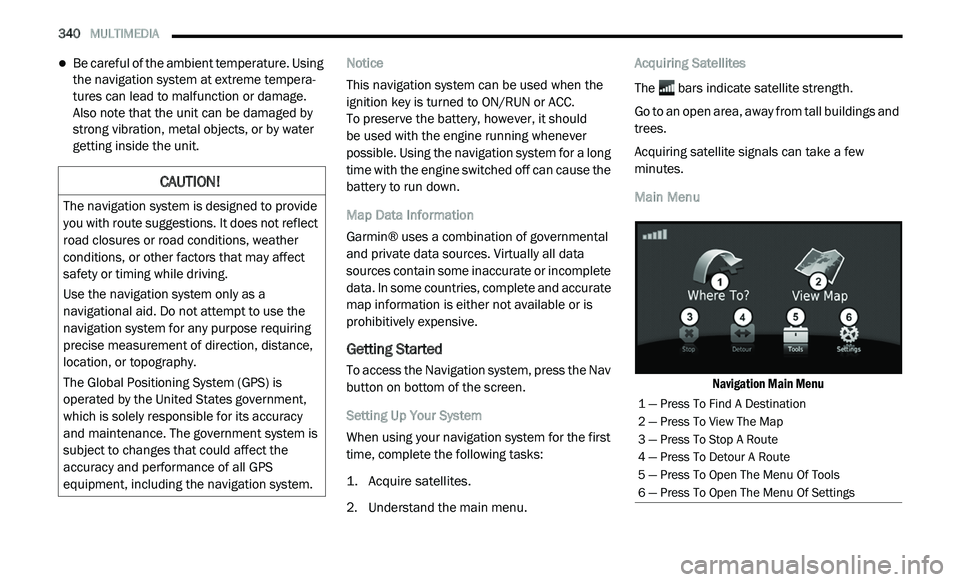
Main Menu
Navigation Main Menu
CAUTION!
The navigation system is designed to provide
you with route suggestions. It does not reflect
road closures or road conditions, weather
conditions, or other factors that may affect
safety or timing while driving.
Use the navigation system only as a
na
vigational aid. Do not attempt to use the
navigation system for any purpose requiring
precise measurement of direction, distance,
location, or topography.
The Global Positioning System (GPS) is
o p
erated by the United States government,
which is solely responsible for its accuracy
and maintenance. The government system is
subject to changes that could affect the
accuracy and performance of all GPS
equipment, including the navigation system.
1 — Press To Find A Destination
2 — Press To View The Map
3 — Press To Stop A Route
4 — Press To Detour A Route
5 — Press To Open The Menu Of Tools
6 — Press To Open The Menu Of Settings
Page 386 of 396
384
INDEX
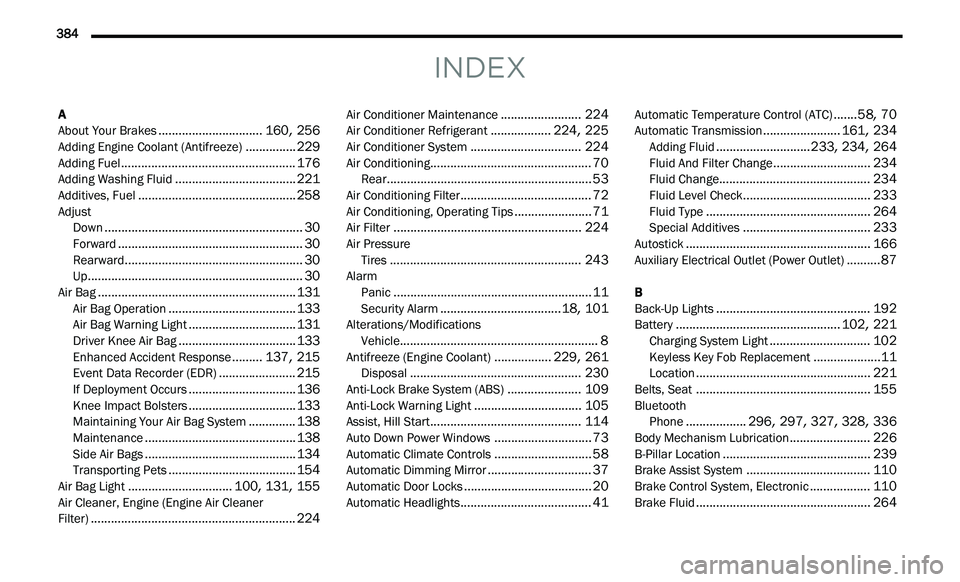
A
About Your Brakes...............................160, 256Adding Engine Coolant (Antifreeze)...............229Adding Fuel....................................................176Adding Washing Fluid....................................221Additives, Fuel...............................................258Adjust
Down...........................................................30Forward.......................................................30Rearward.....................................................30Up................................................................30Air Bag...........................................................131Air Bag Operation......................................133Air Bag Warning Light................................131Driver Knee Air Bag...................................133Enhanced Accident Response.........137, 215Event Data Recorder (EDR).......................215If Deployment Occurs................................136Knee Impact Bolsters................................133Maintaining Your Air Bag System..............138Maintenance.............................................138Side Air Bags.............................................134Transporting Pets......................................154Air Bag Light...............................100, 131, 155Air Cleaner, Engine (Engine Air Cleaner
Filter).............................................................224
Air Conditioner Maintenance........................224Air Conditioner Refrigerant..................224, 225Air Conditioner System.................................224Air Conditioning................................................70Rear.............................................................53Air Conditioning Filter.......................................72Air Conditioning, Operating Tips.......................71Air Filter........................................................224Air Pressure Tires.........................................................243AlarmPanic...........................................................11Security Alarm....................................18, 101Alterations/ModificationsVehicle...........................................................8Antifreeze (Engine Coolant).................229, 261Disposal...................................................230Anti-Lock Brake System (ABS)......................109Anti-Lock Warning Light................................105Assist, Hill Start.............................................114Auto Down Power Windows.............................73Automatic Climate Controls.............................58Automatic Dimming Mirror...............................37Automatic Door Locks......................................20Automatic Headlights.......................................41
Automatic Temperature Control (ATC).......58, 70Automatic Transmission.......................161, 234Adding Fluid............................233, 234, 264Fluid And Filter Change.............................234Fluid Change.............................................234Fluid Level Check......................................233Fluid Type.................................................264Special Additives......................................233Autostick.......................................................166Auxiliary Electrical Outlet (Power Outlet)..........87
B
Back-Up Lights..............................................192Battery.................................................102, 221Charging System Light..............................102Keyless Key Fob Replacement....................11Location....................................................221Belts, Seat....................................................155BluetoothPhone..................296, 297, 327, 328, 336Body Mechanism Lubrication........................226B-Pillar Location............................................239Brake Assist System.....................................110Brake Control System, Electronic..................110Brake Fluid....................................................264
Page 390 of 396
388
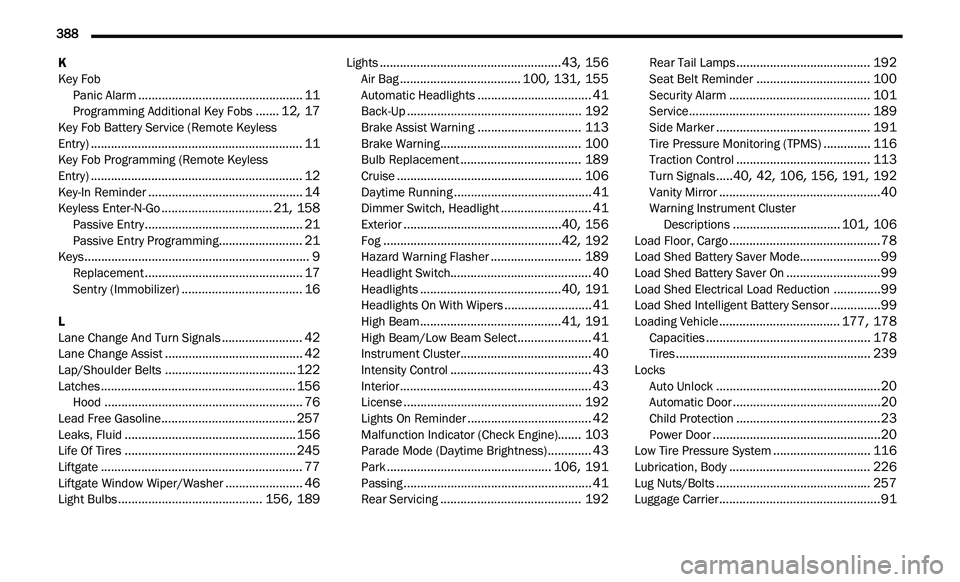
K
Key Fob
Panic Alarm
.................................................11Programming Additional Key Fobs.......12, 17Key Fob Battery Service (Remote Keyless
Entry)...............................................................11Key Fob Programming (Remote Keyless
Entry)...............................................................12Key-In Reminder..............................................14Keyless Enter-N-Go.................................21, 158Passive Entry...............................................21Passive Entry Programming.........................21Keys...................................................................9Replacement...............................................17Sentry (Immobilizer)....................................16
L
Lane Change And Turn Signals........................42Lane Change Assist.........................................42Lap/Shoulder Belts.......................................122Latches..........................................................156Hood...........................................................76Lead Free Gasoline........................................257Leaks, Fluid...................................................156Life Of Tires...................................................245Liftgate............................................................77Liftgate Window Wiper/Washer.......................46Light Bulbs...........................................156, 189
Lights......................................................43, 156Air Bag....................................100, 131, 155Automatic Headlights..................................41Back-Up....................................................192Brake Assist Warning...............................113Brake Warning..........................................100Bulb Replacement....................................189Cruise.......................................................106Daytime Running.........................................41Dimmer Switch, Headlight...........................41Exterior...............................................40, 156Fog.....................................................42, 192Hazard Warning Flasher...........................189Headlight Switch..........................................40Headlights..........................................40, 191Headlights On With Wipers..........................41High Beam..........................................41, 191High Beam/Low Beam Select......................41Instrument Cluster.......................................40Intensity Control..........................................43Interior.........................................................43License.....................................................192Lights On Reminder.....................................42Malfunction Indicator (Check Engine).......103Parade Mode (Daytime Brightness).............43Park.................................................106, 191Passing........................................................41Rear Servicing..........................................192
Rear Tail Lamps........................................192Seat Belt Reminder..................................100Security Alarm..........................................101Service......................................................189Side Marker..............................................191Tire Pressure Monitoring (TPMS)..............116Traction Control........................................113Turn Signals.....40, 42, 106, 156, 191, 192Vanity Mirror................................................40Warning Instrument Cluster
Descriptions................................101, 106Load Floor, Cargo.............................................78Load Shed Battery Saver Mode........................99Load Shed Battery Saver On............................99Load Shed Electrical Load Reduction..............99Load Shed Intelligent Battery Sensor...............99Loading Vehicle....................................177, 178Capacities.................................................178Tires..........................................................239Locks Auto Unlock.................................................20Automatic Door............................................20Child Protection...........................................23Power Door..................................................20Low Tire Pressure System.............................116Lubrication, Body..........................................226Lug Nuts/Bolts..............................................257Luggage Carrier................................................91