interior lights DODGE JOURNEY 2020 Owners Manual
[x] Cancel search | Manufacturer: DODGE, Model Year: 2020, Model line: JOURNEY, Model: DODGE JOURNEY 2020Pages: 396, PDF Size: 25.53 MB
Page 4 of 396
2
INTRODUCTION
HOW TO USE THIS MANUAL .................................. 8
Essential Information .. .................................. 8
Symbols . ......................................................... 8
W
ARNINGS AND CAUTIONS . . ............................... 8
VEHICLE MODIFICATIONS/ALTERATIONS .. ........ 8
GETTING TO KNOW YOUR VEHICLE
KEYS ........................................................................ 9
Key Fob........................................................... 9
I
GNITION SWITCH . . ...............................................12
Keyless Push Button Ignition .. .................... 12
Ignition Or Accessory On Message . . .......... 14
REMOTE START — IF EQUIPPED . . .......................14
How To Use Remote Start .. ......................... 14
Remote Start Abort Message . . .................... 15
To Enter Remote Start Mode . . .................... 15
To Exit Remote Start Mode Without
Driving The Vehicle . .
................................... 15
To Exit Remote Start Mode And Drive
The Vehicle . .
................................................. 15
Remote Start Comfort System —
If Equipped . .
................................................. 16
General Information . . .................................. 16
SENTRY KEY . . .......................................................16
Key Programming .. ..................................... 17
Replacement Keys. . ..................................... 17
General Information . . .................................. 17 VEHICLE SECURITY ALARM — IF EQUIPPED .
.
... 18
To Arm The System .. .................................... 18
To Disarm The System . . .............................. 18
Rearming Of The System. . ........................... 19
Security System Manual Override . . ............ 19
Tamper Alert. . ............................................... 19
DOORS . ................................................................. 19
M anual Door Locks..
.................................... 19
Power Door Locks . . ..................................... 20
Keyless Enter-N-Go — Passive Entry
(If Equipped) . .
.............................................. 21
Child-Protection Door Lock System —
Rear Doors . .
................................................ 23
SEATS . ................................................................... 25
M anual Adjustment (Front Seats) .. ............ 25
Manual Adjustment (Rear Seats) . . ............. 26
Power Adjustment (Front Seat). . ................. 30
Front Heated Seats — If Equipped. . ............ 31
Seatback/Armrest — Second Row
Passenger Seat . .
.......................................... 32
HEAD RESTRAINTS . . ............................................ 32
Supplemental Active Head Restraints
(AHR) — Front Seats. .
................................... 33
Rear Head Restraint Adjustment. . .............. 34
Rear Head Restraint Removal . . .................. 35
STEERING WHEEL . . .............................................. 35
Tilt/Telescoping Steering Column .. ............ 35
Heated Steering Wheel — If Equipped . . .... 35MIRRORS .
.............................................................36
I
nside Day/Night Mirror — If Equipped .. ..... 36
Automatic Dimming Mirror — If Equipped . . . 37
Automatic Dimming Mirror With Rear View
Camera Display — If Equipped . .
................. 37
Outside Mirrors . . ......................................... 38
Interior Observation Mirror . . ...................... 38
Power Mirrors. . ............................................. 38
Heated Mirrors — If Equipped . . ................... 39
Power Folding Mirrors — If Equipped . . ....... 39
Illuminated Vanity Mirrors — If Equipped . . 40
EXTERIOR LIGHTS. . ...............................................40
Multifunction Lever .. ................................... 40
Headlights . ................................................... 40
D aytime Running Lights (DRLs) . . ................ 41
High/Low Beam Switch . . ............................. 41
Flash-To-Pass . . ............................................. 41
Automatic Headlights . . ............................... 41
Headlights On With Wipers (Available With
Automatic Headlights Only) . .
...................... 41
Headlight Time Delay . . ............................... 41
Lights-On Reminder . . ................................... 42
Fog Lights — If Equipped . . ........................... 42
Turn Signals . . .............................................. 42
Lane Change Assist — If Equipped . . ........... 42
INTERIOR LIGHTS . . ...............................................43
Courtesy/Interior Lighting .. ........................ 43
WIPERS AND WASHERS . . ..................................44
Windshield Wiper Operation .. ..................... 44
Rear Window Wiper/Washer . . ................... 46
Page 13 of 396
GETTING TO KNOW YOUR VEHICLE 11
Using The Panic Alarm
To turn the Panic Alarm feature on or off, push
the Panic button on the key fob. When the Panic
Alarm is activated, the turn signals will flash, the
horn will pulse on and off, and the interior lights
will turn on.
The Panic Alarm will stay on for three minutes
un
less you turn it off by either pushing the Panic
button a second time or drive the vehicle at a
speed of 15 mph (24 km/h) or greater.
NOTE:
The interior lights will turn off if you place the
ignition in the ACC or ON/RUN position while
the Panic Alarm is activated. However, the
exterior lights and horn will remain on.
You may need to be less than 35 ft (11 m)
fr
om the vehicle when using the key fob to
turn off the Panic Alarm due to the radio
frequency noises emitted by the system.
Key Fob Battery Replacement
The recommended replacement battery is one
CR2032 battery.
NOTE:
Perchlorate Material – special handling may
apply. See www.dtsc.ca.gov/hazard -
ouswaste/perchlorate .
Do not touch the battery terminals that are
on the back housing or the printed circuit
board.
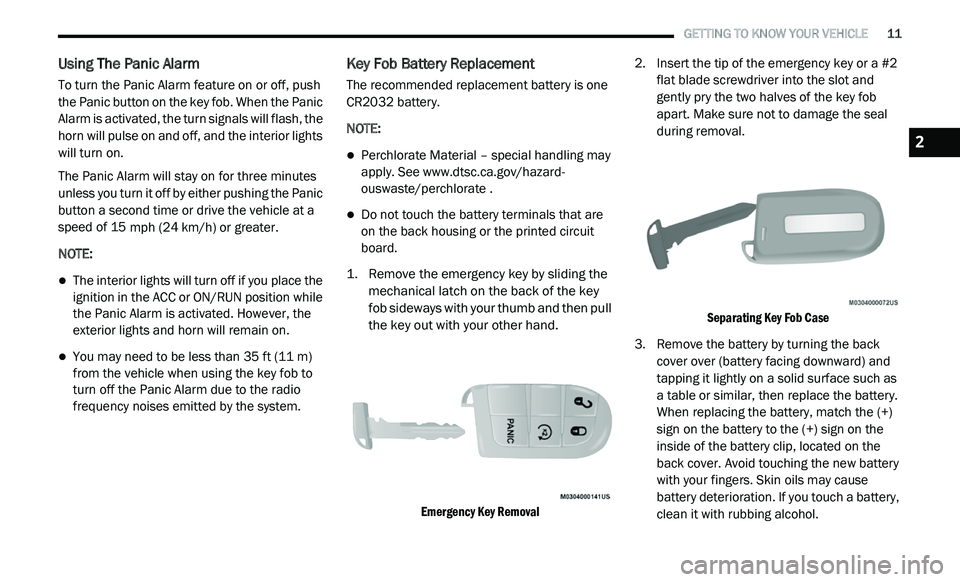
1. R emove the emergency key by sliding the
m
echanical latch on the back of the key
fob sideways with your thumb and then pull
the key out with your other hand.
Emergency Key Removal
2. I
nsert the tip of the emergency key or a #2
f
lat blade screwdriver into the slot and
gently pry the two halves of the key fob
apart. Make sure not to damage the seal
during removal.
Separating Key Fob Case
3. R emove the battery by turning the back
c
over over (battery facing downward) and
tapping it lightly on a solid surface such as
a table or similar, then replace the battery.
When replacing the battery, match the (+)
sign on the battery to the (+) sign on the
inside of the battery clip, located on the
back cover. Avoid touching the new battery
with your fingers. Skin oils may cause
battery deterioration. If you touch a battery,
clean it with rubbing alcohol.
2
Page 20 of 396
18 GETTING TO KNOW YOUR VEHICLE
Le présent appareil est conforme aux CNR
d`Innovation, Science and Economic
Development applicables aux appareils radio
exempts de licence. L'exploitation est autorisée
aux deux conditions suivantes:
1. l 'appareil ne doit pas produire de
b
rouillage, et
2. l 'utilisateur de l'appareil doit accepter tout
b
rouillage radioélectrique subi, même si le
brouillage est susceptible d'en compro -
mettre le fonctionnement.
La operación de este equipo está sujeta a las
s i
guientes dos condiciones:
1. e s posible que este equipo o dispositivo no
c
ause interferencia perjudicial y
2. e ste equipo o dispositivo debe aceptar
c
ualquier interferencia, incluyendo la que
pueda causar su operación no deseada.
NOTE:
Changes or modifications not expressly
a p
proved by the party responsible for compli -
ance could void the user’s authority to operate
t h
e equipment.
VEHICLE SECURITY ALARM — IF EQUIPPED
The vehicle security alarm monitors the vehicle
doors and liftgate for unauthorized entry and the
START/STOP ignition button for unauthorized
operation. While the vehicle security alarm is
armed, interior switches for door locks are
disabled. If something triggers the alarm, the
vehicle security alarm will provide the following
audible and visible signals: the horn will pulse,
the headlights will turn on, the park lamps and/or
turn signals will flash, and the vehicle security
light in the instrument cluster will flash.
TO ARM THE SYSTEM
Follow these steps to arm the vehicle security
alarm:
1. M ake sure the vehicle ignition system is
O
FF (refer to "Starting The Engine" in
"Starting And Operating" for further
information).
2. Perform one of the following methods to l
ock the vehicle:
Push lock on the interior power door lock
switch with the driver and/or passenger
door open.
Push the lock button on the exterior
Passive Entry Door Handle with a valid
key fob available in the same exterior
zone (refer to "Keyless Enter-N-Go —
Passive Entry" in “Doors” in this chapter
for further information).
Push the lock button on the key fob.
3. I f any doors are open, close them.
TO DISARM THE SYSTEM
The vehicle security alarm can be disarmed
using any of the following methods:
Push the unlock button on the key fob.
Grasp the Passive Entry Door Handle with a
valid key fob within 5 ft (1.5 m) of the passive
e n
try door handle (if equipped). Refer to
"Keyless Enter-N-Go — Passive Entry" in
“Doors” in this chapter for further information.
Cycle the vehicle ignition system out of the
OFF position.
For vehicles equipped with Keyless
Enter-N-Go — Passive Entry, push the
START/STOP ignition button (requires at
least one valid key fob in the vehicle).
Page 21 of 396
GETTING TO KNOW YOUR VEHICLE 19
NOTE:
The driver's door key cylinder and the liftgate
button on the key fob cannot arm or disarm
the vehicle security alarm.
When the vehicle security alarm is armed,
the interior power door lock switches will not
unlock the doors.
The vehicle security alarm is designed to protect
y o
ur vehicle; however, you can create
conditions where the system will give you a false
alarm. If one of the previously described arming
sequences has occurred, the vehicle security
alarm will arm regardless of whether you are in
the vehicle or not. If you remain in the vehicle
and open a door, the alarm will sound. If this
occurs, disarm the vehicle security alarm.
If the vehicle security alarm is armed and the
b a
ttery becomes disconnected, the vehicle
security alarm will remain armed when the
battery is reconnected; the exterior lights will
flash, the horn will sound. If this occurs, disarm
the vehicle security alarm.
REARMING OF THE SYSTEM
If something triggers the alarm, and no action is
taken to disarm it, the vehicle security alarm will
turn the horn off after 3 minutes, turn all of the
v i
sual signals off after 15 additional minutes,
and then the vehicle security alarm will rearm
itself.
SECURITY SYSTEM MANUAL OVERRIDE
The vehicle security alarm will not arm/disarm if
you lock/unlock the doors using the manual
door lock.
TAMPER ALERT
If something has triggered the vehicle security
alarm in your absence, the horn will sound three
times and the exterior lights will blink three
times when you disarm the vehicle security
alarm. Check the vehicle for tampering.
DOORS
MANUAL DOOR LOCKS
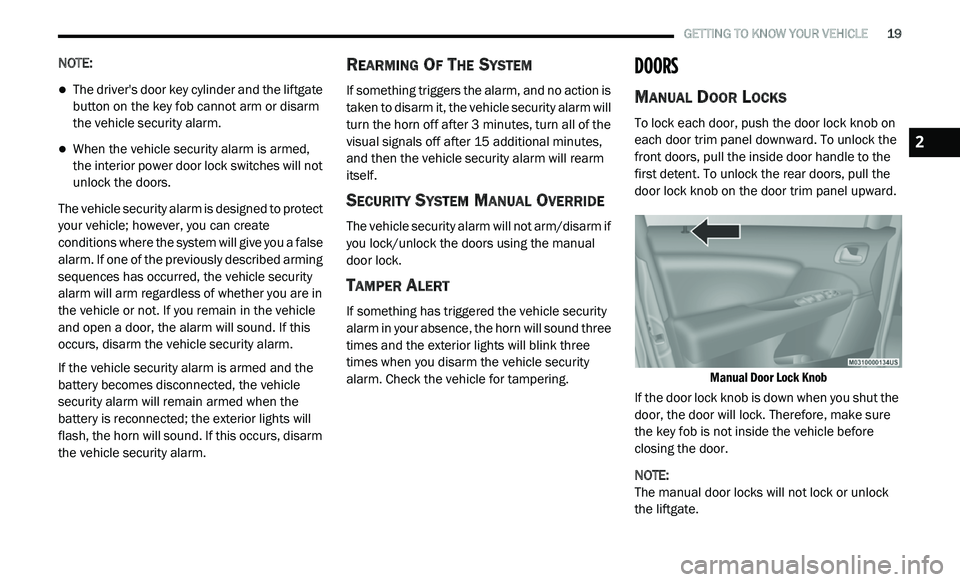
To lock each door, push the door lock knob on
each door trim panel downward. To unlock the
front doors, pull the inside door handle to the
first detent. To unlock the rear doors, pull the
door lock knob on the door trim panel upward.
Manual Door Lock Knob
If the door lock knob is down when you shut the
d o
or, the door will lock. Therefore, make sure
the key fob is not inside the vehicle before
closing the door.
NOTE:
The manual door locks will not lock or unlock
t h
e liftgate.
2
Page 42 of 396
40 GETTING TO KNOW YOUR VEHICLE
ILLUMINATED VANITY MIRRORS — IF
E
QUIPPED
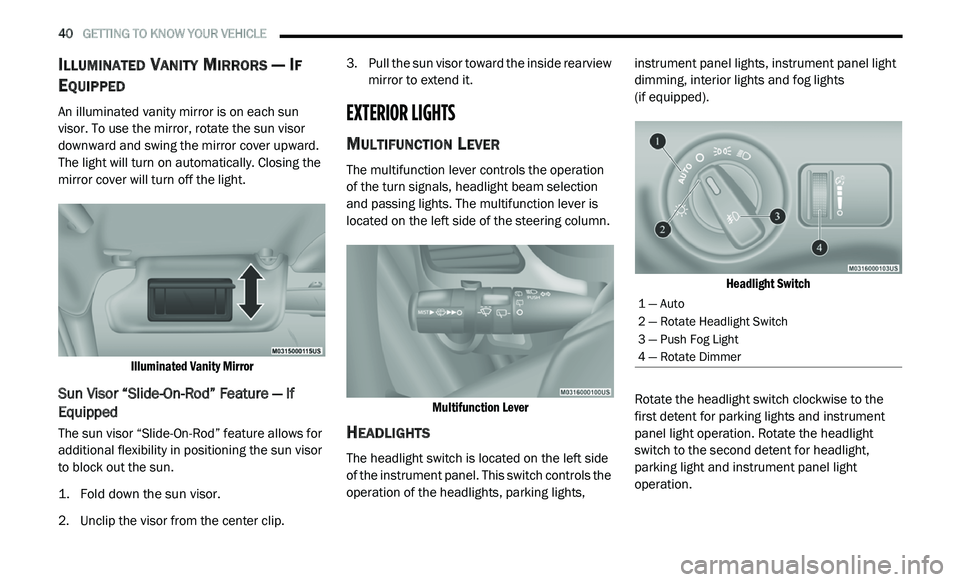
An illuminated vanity mirror is on each sun
visor. To use the mirror, rotate the sun visor
downward and swing the mirror cover upward.
The light will turn on automatically. Closing the
mirror cover will turn off the light.
Illuminated Vanity Mirror
Sun Visor “Slide-On-Rod” Feature — If
Equipped
The sun visor “Slide-On-Rod” feature allows for
additional flexibility in positioning the sun visor
to block out the sun.
1. Fold down the sun visor.
2
. U nclip the visor from the center clip. 3
. P
ull the sun visor toward the inside rearview
m
irror to extend it.
EXTERIOR LIGHTS
MULTIFUNCTION LEVER
The multifunction lever controls the operation
of the turn signals, headlight beam selection
and passing lights. The multifunction lever is
located on the left side of the steering column.
Multifunction Lever
HEADLIGHTS
The headlight switch is located on the left side
of the instrument panel. This switch controls the
operation of the headlights, parking lights, instrument panel lights, instrument panel light
dimming, interior lights and fog lights
(if equipped).
Headlight Switch
Rotate the headlight switch clockwise to the
f i
rst detent for parking lights and instrument
panel light operation. Rotate the headlight
switch to the second detent for headlight,
parking light and instrument panel light
operation.
1 — Auto
2 — Rotate Headlight Switch
3 — Push Fog Light
4 — Rotate Dimmer
Page 45 of 396
GETTING TO KNOW YOUR VEHICLE 43
INTERIOR LIGHTS
COURTESY/INTERIOR LIGHTING
The interior lights come on when a door is
opened.
To protect the battery, the interior lights will turn
of
f automatically 10 minutes after the ignition is
p l
aced in the OFF position. This will occur if the
interior lights were switched on manually or are
on because a door is open. The battery
protection also includes the glove compartment
light. To restore interior light operation after
automatic battery protection is enabled (lights
off), either place the ignition in the ON/RUN
position or cycle the light switch.
Courtesy Lights
The overhead console has two courtesy lights.
The lights turn on when a front door, a rear door
or the liftgate is opened. If your vehicle is
equipped with Remote Keyless Entry, the lights
will also turn on when the unlock button on the
key fob is pushed. The courtesy lights also
function as reading lights. Push in on each lens
to turn these lights on while inside the vehicle.
Push the lens a second time to turn each light
off. You may adjust the direction of these lights by pushing the outside ring, which is identified
with four directional arrows.
Courtesy/Reading Light
Rear Dome Light
Rotate the instrument panel dimmer control
completely upward to the second detent to turn
on the rear dome light. The rear dome light will
remain on when the dimmer control is in this
position.
Rotate the dimmer control downward to the last
de
tent (off position). The rear dome light will
remain off when the doors are open.
Dimmer Controls
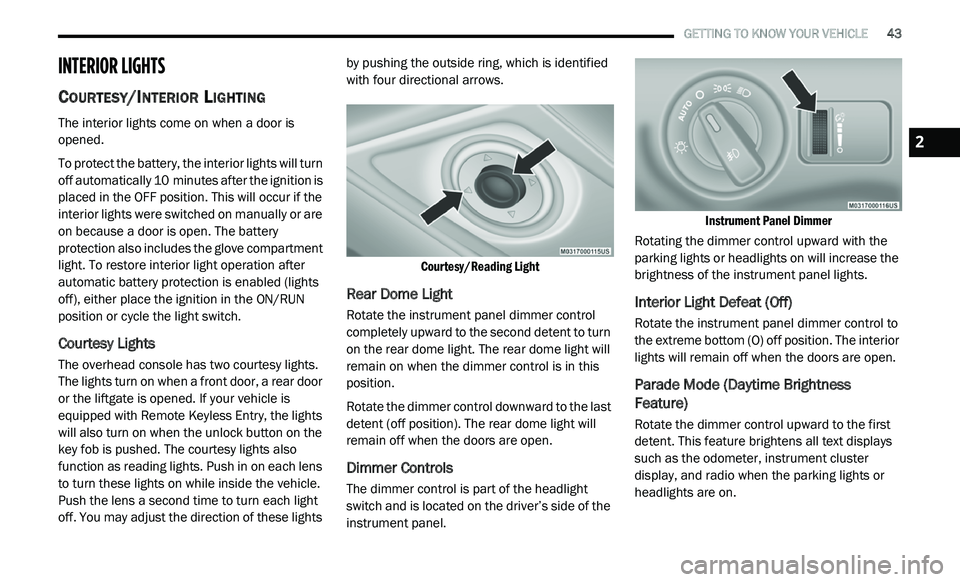
The dimmer control is part of the headlight
switch and is located on the driver’s side of the
instrument panel.
Instrument Panel Dimmer
Rotating the dimmer control upward with the
p a
rking lights or headlights on will increase the
brightness of the instrument panel lights.
Interior Light Defeat (Off)
Rotate the instrument panel dimmer control to
the extreme bottom (O) off position. The interior
lights will remain off when the doors are open.
Parade Mode (Daytime Brightness
Feature)
Rotate the dimmer control upward to the first
detent. This feature brightens all text displays
such as the odometer, instrument cluster
display, and radio when the parking lights or
headlights are on.
2
Page 102 of 396
100 GETTING TO KNOW YOUR INSTRUMENT PANEL
What to do when an electrical load reduction
action message is present (“Battery Saver On”
or “Battery Saver Mode”)
During a trip:
Reduce power to unnecessary loads if possible:
Turn off redundant lights (interior or exterior)
Check what may be plugged in to power
outlets +12 Volts, 115 Volts AC, USB ports
Check HVAC settings (blower, temperature)
Check the audio settings (volume)
After a trip:
Check if any aftermarket equipment was
installed (additional lights, upfitter electrical
accessories, audio systems, alarms) and
review specifications if any (load and ignition
OFF draw currents).
Evaluate the latest driving cycles (distance,
driving time and parking time).
The vehicle should have service performed if
the message is still present during consecu -
tive trips, and if the evaluation and driving
p a
ttern of the vehicle did not help to identify
the cause.
WARNING LIGHTS AND MESSAGES
The warning/indicator lights will illuminate in
the instrument panel together with a dedicated
message and/or acoustic signal when
applicable. These indications are indicative
and precautionary and as such must not be
c o
nsidered as exhaustive. Always refer to the
information in this chapter in the event of a
failure indication. All active telltales will display
first if applicable. The system check menu may
appear different based upon equipment
options and current vehicle status. Some
telltales are optional and may not appear.
RED WARNING LIGHTS
Seat Belt Reminder Warning Light
This warning light indicates when
the driver or passenger seat belt is
u n
buckled. When the ignition is first
placed in the ON/RUN or ACC/ON/RUN
position and if the driver’s seat belt is unbuckled,
a chime will sound and the light will turn on.
When driving, if the driver or front passenger seat
belt remains unbuckled, the Seat Belt Reminder
Light will flash or remain on continuously and a
chime will sound.
Refer to “Occupant Restraint Systems” in
“
S
afety” for further information.
Air Bag Warning Light
This warning light will illuminate to
indicate a fault with the air bag, and
wi
ll turn on for four to eight seconds
as a bulb check when the ignition is
placed in the ON/RUN or ACC/ON/RUN
position. This light will illuminate with a single
chime when a fault with the air bag has been
detected, it will stay on until the fault is cleared.
If the light is either not on during startup, stays
on, or turns on while driving, have the system
inspected at an authorized dealer as soon as
possible.
Brake Warning Light
This warning light monitors various
brake functions, including brake fluid
l e
vel and parking brake application.
If the brake light turns on it may
i n
dicate that the parking brake is applied, that
the brake fluid level is low, or that there is a
problem with the Anti-Lock Brake System
reservoir.
Page 139 of 396
SAFETY 137
If you do have a collision which deploys the air
bags, any or all of the following may occur:
The air bag material may sometimes cause
abrasions and/or skin reddening to the occu -
pants as the air bags deploy and unfold. The
a b
rasions are similar to friction rope burns or
those you might get sliding along a carpet or
gymnasium floor. They are not caused by
contact with chemicals. They are not perma -
nent and normally heal quickly. However, if
y o
u haven’t healed significantly within a few
days, or if you have any blistering, see your
doctor immediately.
As the air bags deflate, you may see some
smoke-like particles. The particles are a
normal by-product of the process that gener -
ates the non-toxic gas used for air bag infla -
tion. These airborne particles may irritate the
s k
in, eyes, nose, or throat. If you have skin or
eye irritation, rinse the area with cool water.
For nose or throat irritation, move to fresh air.
If the irritation continues, see your doctor.
If these particles settle on your clothing,
f o
llow the garment manufacturer’s instruc -
tions for cleaning. Do not drive your vehicle after the air bags have
d
e
ployed. If you are involved in another
collision, the air bags will not be in place to
protect you.
NOTE:
Air bag covers may not be obvious in the inte -
rior trim, but they will open during air bag
d e
ployment.
After any collision, the vehicle should be
taken to an authorized dealer immediately.
Enhanced Accident Response System
In the event of an impact, if the communication
network remains intact, and the power remains
intact, depending on the nature of the event,
the ORC will determine whether to have the
Enhanced Accident Response System perform
the following functions:
Cut off fuel to the engine (if equipped)
Cut off battery power to the electric motor
(if equipped)
Flash hazard lights as long as the battery has
power
Turn on the interior lights, which remain on
as long as the battery has power or for
15 minutes from the intervention of the
E n
hanced Accident Response System
Unlock the power door locks
WARNING!
Deployed air bags and seat belt pretensioners
cannot protect you in another collision. Have
the air bags, seat belt pretensioners, and the
seat belt retractor assemblies replaced by an
authorized dealer immediately. Also, have the
Occupant Restraint Controller System serviced
as well.
4
Page 196 of 396
194 IN CASE OF EMERGENCY
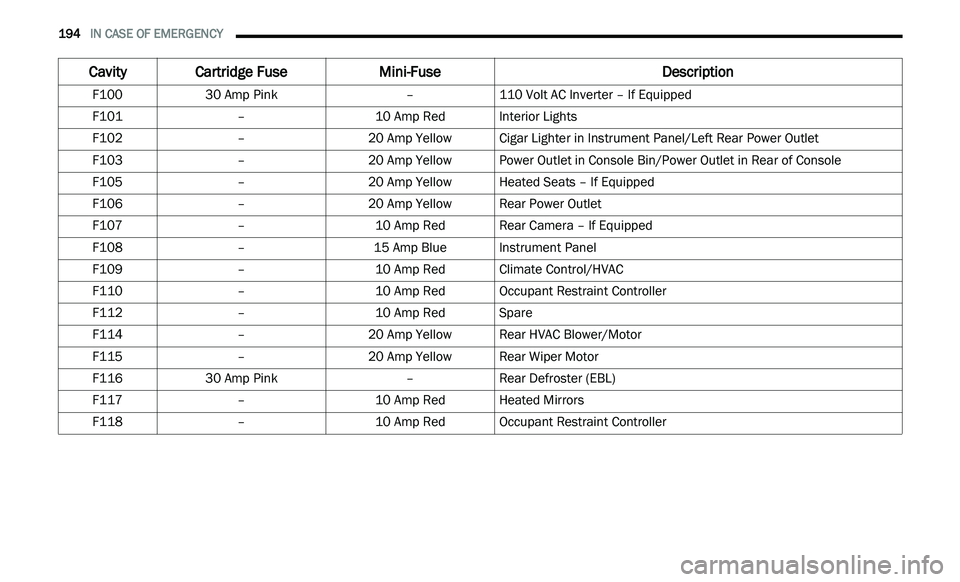
Cavity Cartridge Fuse Mini-Fuse Description
F10030 Amp Pink –110 Volt AC Inverter – If Equipped
F101 –10 Amp RedInterior Lights
F102 –20 Amp Yellow Cigar Lighter in Instrument Panel/Left Rear Power Outlet
F103 –20 Amp Yellow Power Outlet in Console Bin/Power Outlet in Rear of Console
F105 –20 Amp Yellow Heated Seats – If Equipped
F106 –20 Amp Yellow Rear Power Outlet
F107 –10 Amp RedRear Camera – If Equipped
F108 –15 Amp BlueInstrument Panel
F109 –10 Amp RedClimate Control/HVAC
F110 –10 Amp RedOccupant Restraint Controller
F112 –10 Amp RedSpare
F114 –20 Amp Yellow Rear HVAC Blower/Motor
F115 –20 Amp Yellow Rear Wiper Motor
F116 30 Amp Pink –Rear Defroster (EBL)
F117 –10 Amp RedHeated Mirrors
F118 –10 Amp RedOccupant Restraint Controller
Page 199 of 396
IN CASE OF EMERGENCY 197
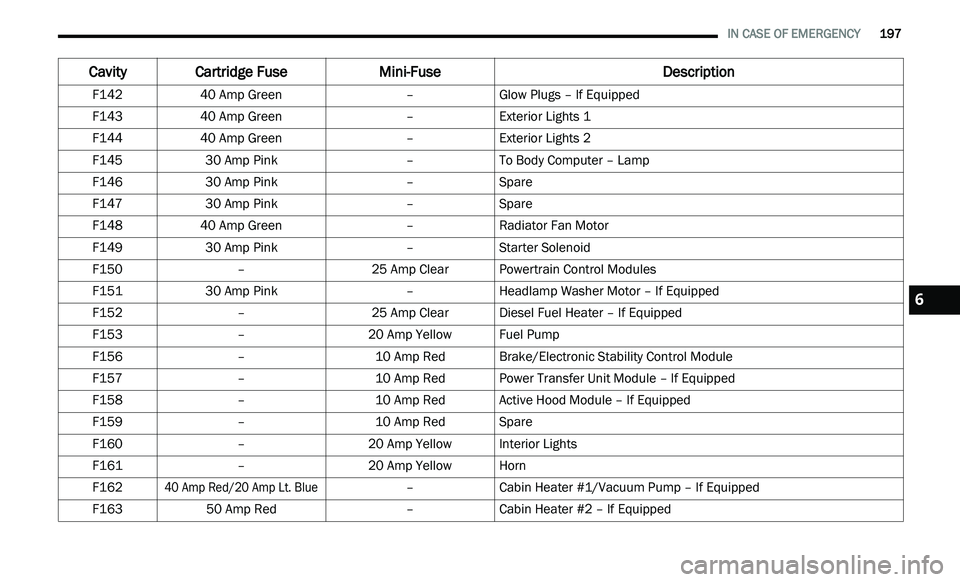
F142 40 Amp Green –Glow Plugs – If Equipped
F143 40 Amp Green –Exterior Lights 1
F144 40 Amp Green –Exterior Lights 2
F145 30 Amp Pink –To Body Computer – Lamp
F146 30 Amp Pink –Spare
F147 30 Amp Pink –Spare
F148 40 Amp Green –Radiator Fan Motor
F149 30 Amp Pink –Starter Solenoid
F150 –25 Amp ClearPowertrain Control Modules
F151 30 Amp Pink –Headlamp Washer Motor – If Equipped
F152 –25 Amp ClearDiesel Fuel Heater – If Equipped
F153 –20 Amp Yellow Fuel Pump
F156 –10 Amp RedBrake/Electronic Stability Control Module
F157 –10 Amp RedPower Transfer Unit Module – If Equipped
F158 –10 Amp RedActive Hood Module – If Equipped
F159 –10 Amp RedSpare
F160 –20 Amp Yellow Interior Lights
F161 –20 Amp Yellow Horn
F162
40 Amp Red/20 Amp Lt. Blue
–Cabin Heater #1/Vacuum Pump – If Equipped
F163 50 Amp Red –Cabin Heater #2 – If Equipped
Cavity Cartridge Fuse Mini-FuseDescription
6