warning DODGE MAGNUM SRT 2007 1.G Workshop Manual
[x] Cancel search | Manufacturer: DODGE, Model Year: 2007, Model line: MAGNUM SRT, Model: DODGE MAGNUM SRT 2007 1.GPages: 380, PDF Size: 6.63 MB
Page 140 of 380
Loose Fuel Filler Cap
If the vehicle diagnostic system determines that the fuel
filler cap is loose, improperly installed, or damaged, a
ªCheck Gascapº message will display in the Electronic
Vehicle Information Center (EVIC). Tighten the fuel filler
cap properly and press the odometer reset button to turn
off the message. If the problem continues, the message
will appear the next time the vehicle is started.
A loose, improperly installed, or damaged fuel filler cap
may also turn on the Malfunction Indicator Light (MIL).
(See page 292 for more information.)
20. Brake System Warning Light
This light monitors various brake functions,
including brake fluid level and parking
brake application. If the brake light turns on,
it may indicate that the parking brake is
applied, that the brake fluid level is low, or that there
is a problem with the anti-lock brake system.
The dual brake system provides a reserve braking capac-
ity to a portion of the hydraulic system in the event of a
failure. Failure of either half of the dual brake system isindicated by the Brake Warning Light, which will turn on
when the brake fluid level in the master cylinder drops
below a specified level.
The light will remain on until the cause is corrected.
NOTE:The light may flash momentarily during sharp
cornering maneuvers, which change fluid level condi-
tions. The vehicle should have service performed, and
the brake fluid level checked.
Immediate repair is necessary if brake failure is indicated.
WARNING!
Driving a vehicle with the brake light on is danger-
ous. Part of the brake system may have failed. It will
take longer to stop the vehicle. You could have an
accident. Have the vehicle checked immediately.
Vehicles equipped with Anti-Lock brakes (ABS) are also
equipped with Electronic Brake Force Distribution (EBD).
Both the Brake Warning Light and the ABS Light will
UNDERSTANDING YOUR INSTRUMENT PANEL 139
4
Page 141 of 380
turn on in the event of an EBD failure. Immediate repair
of the ABS system is required in the event of an EBD
failure.
The operation of the Brake Warning Light can be checked
by turning the ignition switch from the OFF position to
the ON position. The light should turn on for approxi-
mately two seconds and then turn off. The light will
remain on if the parking brake is applied or if a brake
fault is detected. If the parking brake is not applied and
the light remains on, or if the light does not turn on, have
the light inspected by an authorized dealer.
NOTE:The light will turn on when the ignition switch
in the ON position and the parking brake is applied. This
light shows only that the parking brake is applied. It does
not show the degree of brake application. (See page 219
for more information.)
21. Vehicle Security Alarm (VSA) Indicator Light Ð
If Equipped
The VSA indicator Light flashes rapidly when the VSA is
arming, and slowly when the VSA is armed. (See page 15
for more information.)
22. Tire Pressure Monitoring Telltale Light Ð If
Equipped
Each tire, including the spare (if provided),
should be checked monthly when cold and
inflated to the inflation pressure recom-
mended by the vehicle manufacturer on the
vehicle placard or tire inflation pressure label. (If your
vehicle has tires of a different size than the size
indicated on the vehicle placard or tire inflation pres-
sure label, you should determine the proper tire
inflation pressure for those tires.)
As an added safety feature, your vehicle has been
equipped with a tire pressure monitoring system (TPMS)
that illuminates a low tire pressure telltale when one or
more of your tires are significantly under-inflated. Ac-
cordingly, when the low tire pressure telltale illuminates,
you should stop and check your tires as soon as possible,
and inflate them to the proper pressure. Driving on a
significantly under-inflated tire causes the tire to over-
heat and can lead to tire failure. Under-inflation also
reduces fuel efficiency and tire tread life, and may affect
the vehicle's handling and stopping ability.
140 UNDERSTANDING YOUR INSTRUMENT PANEL
Page 142 of 380
Please note that the TPMS is not a substitute for proper
tire maintenance, and it is the driver 's responsibility to
maintain correct tire pressure, even if under-inflation has
not reached the level to trigger illumination of the TPMS
low tire pressure telltale.
The Tire Pressure Monitoring Telltale Light will illumi-
nate in the instrument cluster, and an audible chime will
be activated when one or more tire pressures is low. The
Tire Pressure Monitoring Telltale Light will flash on and
off for 60 seconds when a system fault is detected. The
flash cycle will repeat every ten minutes or until the fault
condition is removed and reset. (See page 246 for more
information.)CAUTION!
The TPMS has been optimized for the original
equipment tires and wheels. TPMS pressures and
warning have been established for the tire size
equipped on your vehicle. Undesirable system op-
eration or sensor damage may result when using
replacement equipment that is not of the same size,
type, and/or style. After-market wheels can cause
sensor damage. Do not use tire sealant from a can, or
balance beads if your vehicle is equipped with a
TPMS, as damage to the sensors may result.
UNDERSTANDING YOUR INSTRUMENT PANEL 141
4
Page 143 of 380
23. Anti-Lock Brake Light
This light monitors the Anti-Lock Brake System.
The light will turn on when the ignition switch
is turned to the ON position and may stay on for as
long as four seconds.
If the ABS light remains on or turns on while driving,
then the Anti-Lock portion of the brake system is not
functioning and service is required. However, the con-
ventional brake system will continue to operate normally
if the BRAKE warning light is not on.
If the ABS light is on, the brake system should be serviced
as soon as possible to restore the benefits of Anti-Lock
brakes. If the ABS light does not turn on when the
Ignition switch is turned to the ON position, have the
light inspected by an authorized dealer. (See page 219 for
more information.)
24. Low Fuel Indicator Light
This light will turn on and a single chime will
sound when the fuel level drops to 1/8 tank. (See
page 257 for more information.)25. Malfunction Indicator Light
This light is part of an onboard diagnostic
system called OBD. The OBD system monitors
engine and automatic transmission control sys-
tems. The light will turn on when the key is in the ON
position before engine start. If the light does not come
on when turning the key from OFF to ON, have the
condition checked promptly.
Certain conditions such as a loose or missing gas cap,
poor fuel quality, etc. may illuminate the light after
engine start. The vehicle should be serviced if the light
stays on through several of your typical driving cycles. In
most situations, the vehicle will drive normally and will
not require towing.
The Malfunction Indicator Light flashes to alert you to
serious conditions that could lead to immediate loss of
power or severe catalytic converter damage. The vehicle
should be serviced as soon as possible if this occurs. (See
page 292 for more information.)
142 UNDERSTANDING YOUR INSTRUMENT PANEL
Page 144 of 380
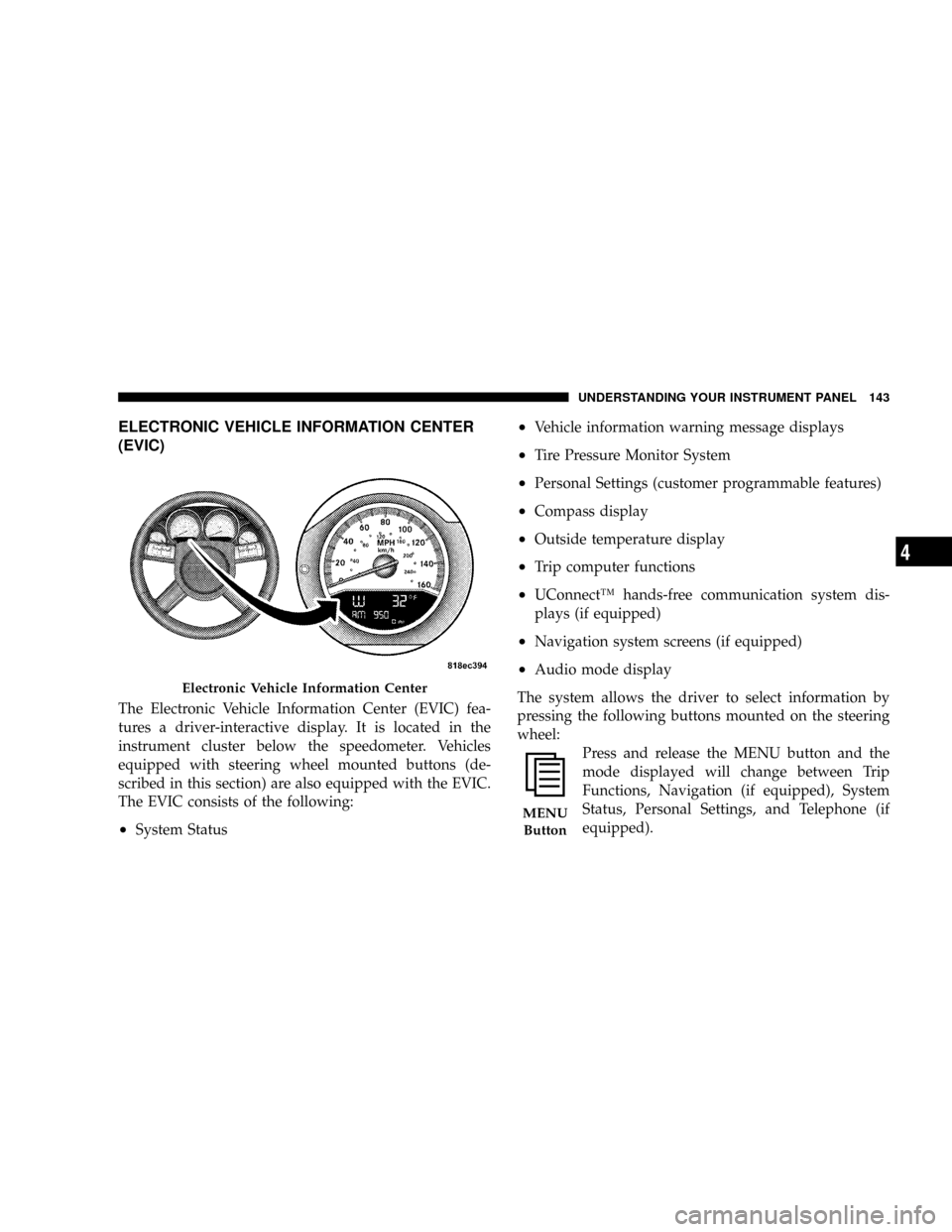
ELECTRONIC VEHICLE INFORMATION CENTER
(EVIC)
The Electronic Vehicle Information Center (EVIC) fea-
tures a driver-interactive display. It is located in the
instrument cluster below the speedometer. Vehicles
equipped with steering wheel mounted buttons (de-
scribed in this section) are also equipped with the EVIC.
The EVIC consists of the following:
²System Status
²Vehicle information warning message displays
²Tire Pressure Monitor System
²Personal Settings (customer programmable features)
²Compass display
²Outside temperature display
²Trip computer functions
²UConnectŸ hands-free communication system dis-
plays (if equipped)
²Navigation system screens (if equipped)
²Audio mode display
The system allows the driver to select information by
pressing the following buttons mounted on the steering
wheel:
Press and release the MENU button and the
mode displayed will change between Trip
Functions, Navigation (if equipped), System
Status, Personal Settings, and Telephone (if
equipped).
Electronic Vehicle Information Center
MENU
Button
UNDERSTANDING YOUR INSTRUMENT PANEL 143
4
Page 145 of 380
Press the FUNCTION SELECT button to accept
a selection. The FUNCTION SELECT button
also advances the radio to the next preset
station, changes the side of the tape being
played (if so equipped), or changes the current
CD track being played (if so equipped) when
the EVIC is in the Compass/Temp/Audio
screen.
Press the SCROLL button to scroll through Trip
Functions, Navigation (if equipped), System
Status Messages, and Personal Settings (Cus-
tomer Programmable Features). The SCROLL
button also seeks up and down the radio
stations, CD track numbers (if so equipped), or
satellite radio channels (if so equipped) when the EVIC is
in the Compass/Temp/Audio screen.
Press the AUDIO MODE button to select the
Compass/Temp/Audio screen. This screen
displays radio station frequencies, any one of
twelve radio station preset frequencies, CD
disc number, CD track number, tape, or any
one of 200 Satellite radio channels depending
on which radio is in the vehicle.If Compass/Temp/Audio is already displayed when the
AUDIO MODE button is pressed, then the radio mode
will change from AM to FM, to Tape, to CD, or to Satellite
(SAT) accordingly.
Electronic Vehicle Information Center (EVIC)
Displays
When the appropriate conditions exist, the Electronic
Vehicle Information Center (EVIC) displays the following
messages:
²Turn Signal On (with a continuous warning chime if
the vehicle is driven more than 1 mile [1.6 km] with
either turn signal on)
²Left Front Turn Signal Light Out (with a single chime)
²Left Rear Turn Signal Light Out (with a single chime)
²Right Front Turn Signal Light Out (with a single
chime)
²Right Rear Turn Signal Light Out (with a single chime)
²RKE Battery Low (with a single chime)
²Personal Settings Not Available ± Vehicle Not in Park
FUNC-
TION
SELECT
Button
SCROLL
Button
AUDIO
MODE
Button
144 UNDERSTANDING YOUR INSTRUMENT PANEL
Page 152 of 380
Navigation Ð If Equipped
Navigation Display Control
Press and release the MENU button until Navigation
displays in the EVIC. When the Navigation System is On,
the steering wheel buttons can be used to select the Map
or Menu display on the Navigation Unit. When the Menu
display is active, the SCROLL button can be used to scroll
through the list, the FUNCTION SELECT button can be
used to select an item, and the AUDIO MODE button can
be used to return to the previous menu. When the Map
display is active, pressing the FUNCTION SELECT but-
ton will change the Navigation Unit Display to the Menu.
Turn By Turn Directions
The EVIC displays turn-by-turn directions to a pro-
grammed destination when Turn by Turn Navigation is
enabled through Personal Settings. When enabled, the
EVIC displays the name of the approaching road at the
top of the screen, followed by an arrow to indicate the
direction to turn the vehicle, and a count down to
indicate the distance to the turn.
NOTE:Refer to your ªNavigation User's Manualº for
detailed operating instructions.
System Warnings (Customer Information
Features)
Press and release the MENU button until ªSYSTEM
WARNINGSº displays in the EVIC. Then, press the
SCROLL button to display anyone of the following
choices:
²Oil Temperature
Shows the actual oil temperature.
²Oil Pressure
Shows the actual oil pressure.
²Tire Pressure
Shows the actual tire pressure for each tire (EXCLUDING
THE SPARE TIRE).
Personal Settings (Customer Programmable
Features)
Personal Settings allows the driver to set and recall
features when the transmission is in PARK.
Press and release the MENU button until Personal Set-
tings displays in the EVIC.
UNDERSTANDING YOUR INSTRUMENT PANEL 151
4
Page 199 of 380
Adding Washer Fluid
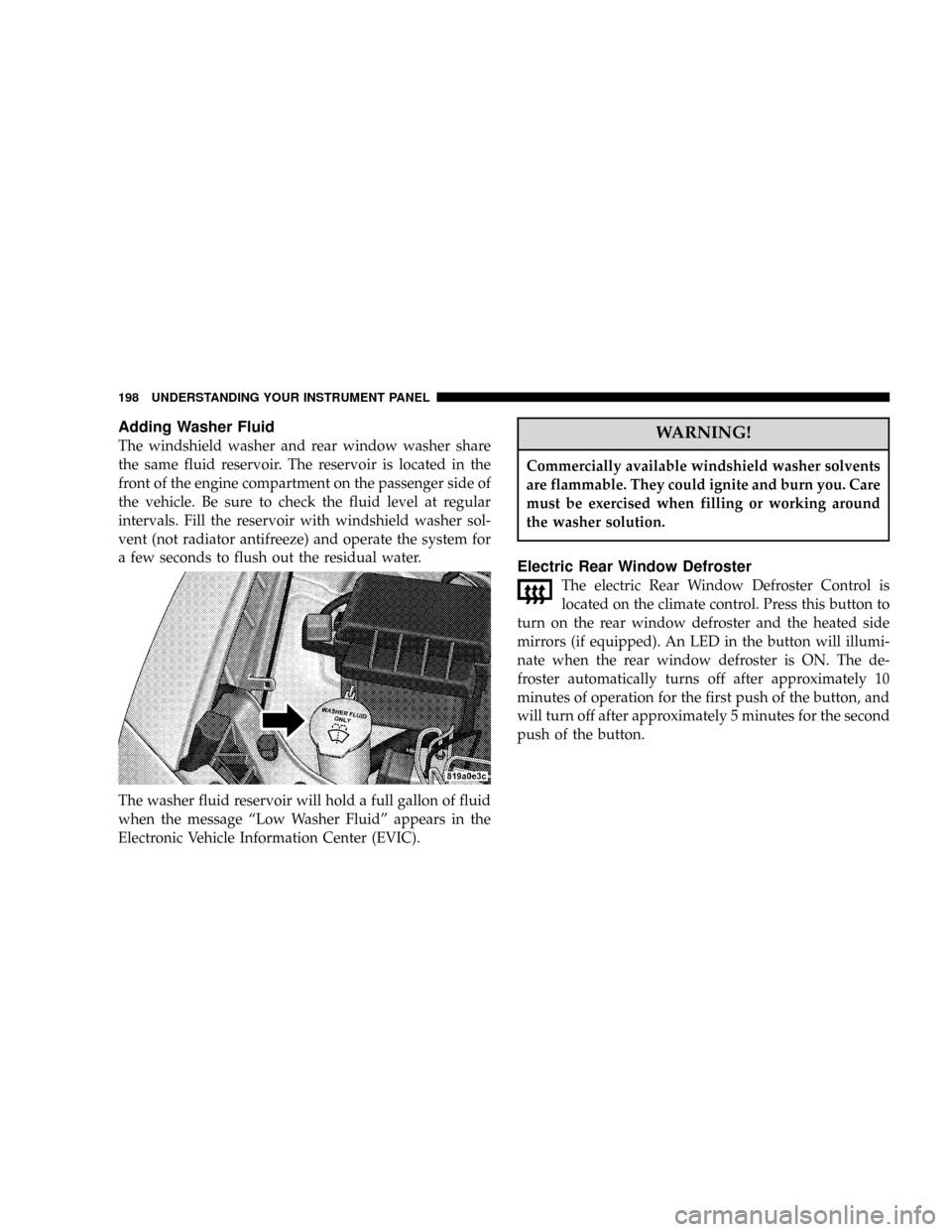
The windshield washer and rear window washer share
the same fluid reservoir. The reservoir is located in the
front of the engine compartment on the passenger side of
the vehicle. Be sure to check the fluid level at regular
intervals. Fill the reservoir with windshield washer sol-
vent (not radiator antifreeze) and operate the system for
a few seconds to flush out the residual water.
The washer fluid reservoir will hold a full gallon of fluid
when the message ªLow Washer Fluidº appears in the
Electronic Vehicle Information Center (EVIC).WARNING!
Commercially available windshield washer solvents
are flammable. They could ignite and burn you. Care
must be exercised when filling or working around
the washer solution.
Electric Rear Window Defroster
The electric Rear Window Defroster Control is
located on the climate control. Press this button to
turn on the rear window defroster and the heated side
mirrors (if equipped). An LED in the button will illumi-
nate when the rear window defroster is ON. The de-
froster automatically turns off after approximately 10
minutes of operation for the first push of the button, and
will turn off after approximately 5 minutes for the second
push of the button.
198 UNDERSTANDING YOUR INSTRUMENT PANEL
Page 204 of 380
N6.1L Engine.........................253
NReformulated Gasoline.................254
NGasoline/Oxygenate Blends..............254
NMMT In Gasoline.....................255
NMaterials Added To Fuel................255
NFuel System Cautions..................255
NCarbon Monoxide Warnings..............256
mAdding Fuel..........................257
NFuel Filler Cap (Gas Cap)...............257
NLoose Fuel Filler Cap Message............259
mVehicle Loading.......................259
NVehicle Certification Label...............259
NGross Vehicle Weight Rating (GVWR).......260
NGross Axle Weight Rating (GAWR).........260
NOverloading.........................260NLoading............................261
mTrailer Towing........................262
NCommon Towing Definitions.............262
NTrailer Hitch Classification...............265
NTrailer Towing Weights (Maximum Trailer
Weight Ratings)......................265
NTrailer And Tongue Weight..............266
NTowing Requirements..................267
NTowing Tips.........................271
mRecreational Towing
(Behind Motorhome, Etc.)
................273
NTowing This Vehicle Behind Another Vehicle
(Flat Towing With All Four Wheels On The
Ground)............................273
mGround Clearance.....................273
STARTING AND OPERATING 203
5
Page 205 of 380
STARTING PROCEDURES
Before starting your vehicle, adjust your seat, adjust the
inside and outside mirrors, fasten your seat belt, and if
present, instruct all other occupants to buckle their seat
belts.WARNING!
²Never leave children alone in a vehicle. Leaving
children in a vehicle unattended is dangerous for
a number of reasons. A child or others could be
seriously or fatally injured. Don't leave the keys
in the ignition. A child could operate power
windows, other controls, or move the vehicle.
²Do not leave animals or children inside parked
vehicles in hot weather; interior heat build up
may cause serious injury or death.
²Be sure to turn off the engine if you want to rest or
sleep in your car. Accidents can be caused by
inadvertently moving the gear selection lever or
by pressing the accelerator pedal. This may cause
excessive heat in the exhaust system, resulting in
overheating and vehicle fire, which may cause
serious or fatal injuries.
204 STARTING AND OPERATING