torque DODGE NEON 2000 Service Repair Manual
[x] Cancel search | Manufacturer: DODGE, Model Year: 2000, Model line: NEON, Model: DODGE NEON 2000Pages: 1285, PDF Size: 29.42 MB
Page 1064 of 1285
DESCRIPTION TORQUE
Reverse Band Shaft Plug...... 7N´m(60in.lbs.)
Ring Gear Screw............ 95N´m(70ft.lbs.)
Speedo. To Ext. Hous. Screw . . . 7 N´m (60 in. lbs.)
Sprag Ret. To Transfer Case
Bolt................... 28N´m(250 in. lbs.)
Starter To Trans. Bell Bolts . . . 54 N´m (40 ft. lbs.)
Stirrup Strap Ret. Bolts..... 23N´m(200 in. lbs.)
Trans. To Cyl. Block Bolt...... 95N´m(70ft.lbs.)
Transfer Shaft Nut........ 271N´m(200 ft. lbs.)
Transfer Gear Strap Bolts..... 23N´m(17ft.lbs.)
Valve Body Assy. To Case
Bolts.................. 12N´m(105 in. lbs.)
Valve Body Screw............ 5N´m(45in.lbs.)
SPECIAL TOOLS
31TH AUTOMATIC TRANSAXLE
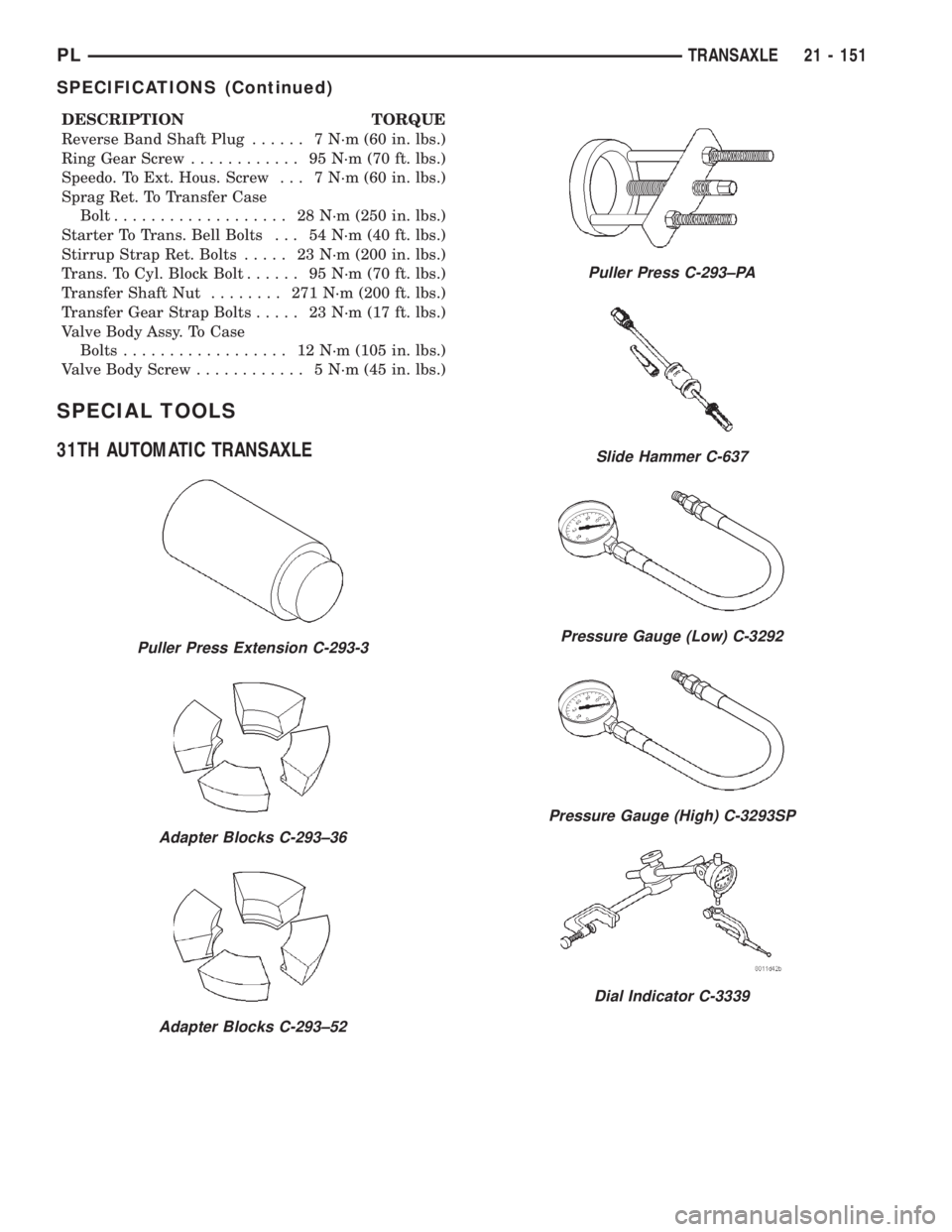
Puller Press Extension C-293-3
Adapter Blocks C-293±36
Adapter Blocks C-293±52
Puller Press C-293±PA
Slide Hammer C-637
Pressure Gauge (Low) C-3292
Pressure Gauge (High) C-3293SP
Dial Indicator C-3339
PLTRANSAXLE 21 - 151
SPECIFICATIONS (Continued)
Page 1065 of 1285
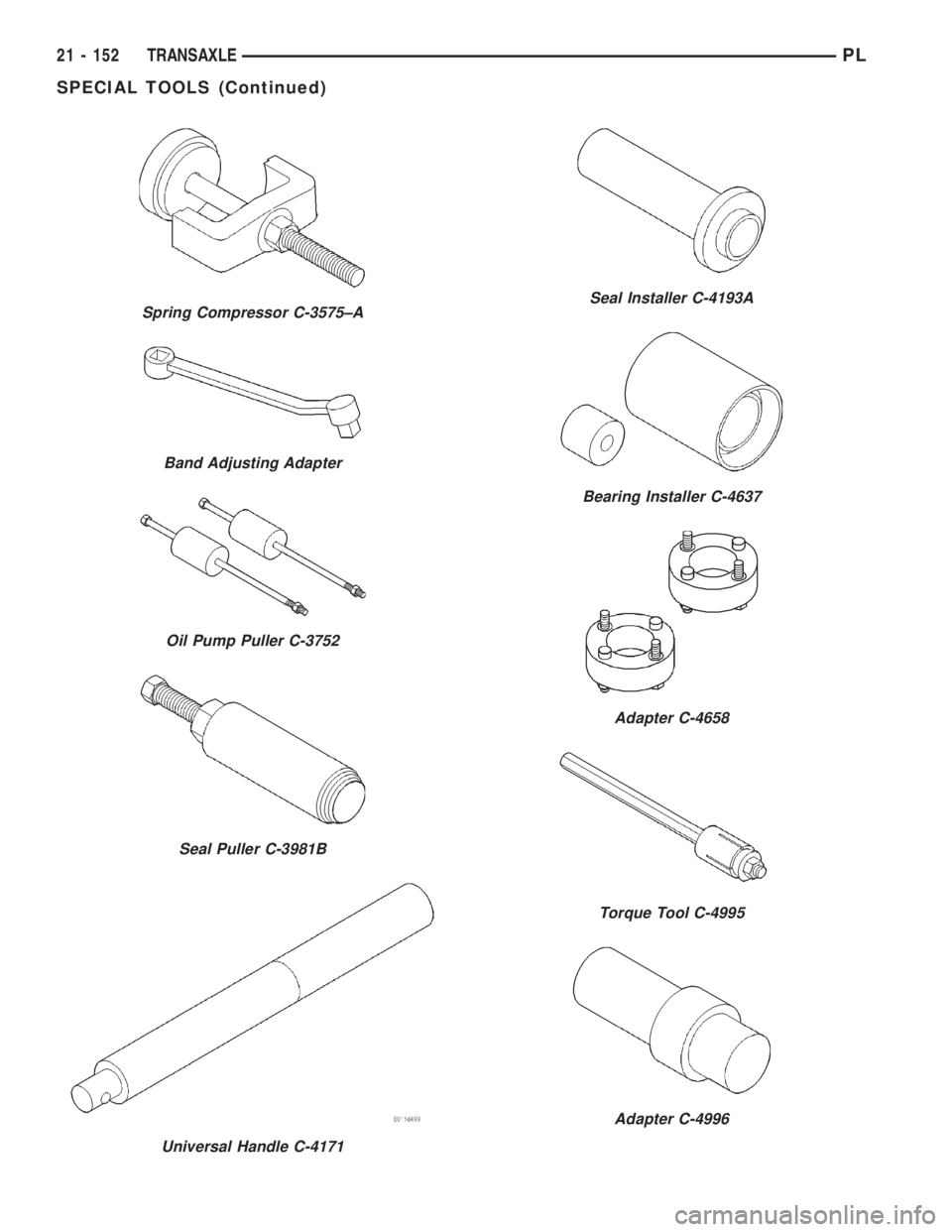
Spring Compressor C-3575±A
Band Adjusting Adapter
Oil Pump Puller C-3752
Seal Puller C-3981B
Universal Handle C-4171
Seal Installer C-4193A
Bearing Installer C-4637
Adapter C-4658
Torque Tool C-4995
Adapter C-4996
21 - 152 TRANSAXLEPL
SPECIAL TOOLS (Continued)
Page 1076 of 1285
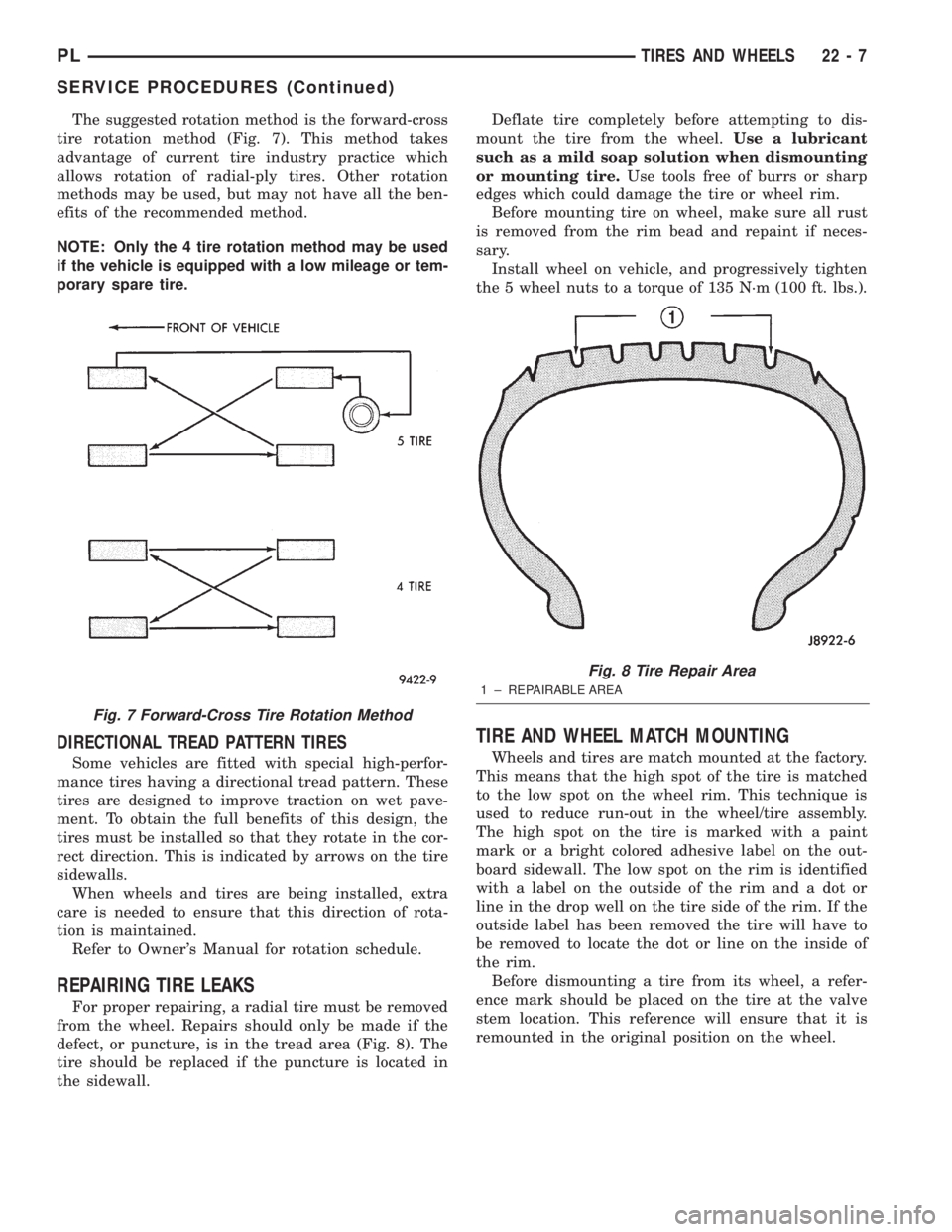
The suggested rotation method is the forward-cross
tire rotation method (Fig. 7). This method takes
advantage of current tire industry practice which
allows rotation of radial-ply tires. Other rotation
methods may be used, but may not have all the ben-
efits of the recommended method.
NOTE: Only the 4 tire rotation method may be used
if the vehicle is equipped with a low mileage or tem-
porary spare tire.
DIRECTIONAL TREAD PATTERN TIRES
Some vehicles are fitted with special high-perfor-
mance tires having a directional tread pattern. These
tires are designed to improve traction on wet pave-
ment. To obtain the full benefits of this design, the
tires must be installed so that they rotate in the cor-
rect direction. This is indicated by arrows on the tire
sidewalls.
When wheels and tires are being installed, extra
care is needed to ensure that this direction of rota-
tion is maintained.
Refer to Owner's Manual for rotation schedule.
REPAIRING TIRE LEAKS
For proper repairing, a radial tire must be removed
from the wheel. Repairs should only be made if the
defect, or puncture, is in the tread area (Fig. 8). The
tire should be replaced if the puncture is located in
the sidewall.Deflate tire completely before attempting to dis-
mount the tire from the wheel.Use a lubricant
such as a mild soap solution when dismounting
or mounting tire.Use tools free of burrs or sharp
edges which could damage the tire or wheel rim.
Before mounting tire on wheel, make sure all rust
is removed from the rim bead and repaint if neces-
sary.
Install wheel on vehicle, and progressively tighten
the 5 wheel nuts to a torque of 135 N´m (100 ft. lbs.).
TIRE AND WHEEL MATCH MOUNTING
Wheels and tires are match mounted at the factory.
This means that the high spot of the tire is matched
to the low spot on the wheel rim. This technique is
used to reduce run-out in the wheel/tire assembly.
The high spot on the tire is marked with a paint
mark or a bright colored adhesive label on the out-
board sidewall. The low spot on the rim is identified
with a label on the outside of the rim and a dot or
line in the drop well on the tire side of the rim. If the
outside label has been removed the tire will have to
be removed to locate the dot or line on the inside of
the rim.
Before dismounting a tire from its wheel, a refer-
ence mark should be placed on the tire at the valve
stem location. This reference will ensure that it is
remounted in the original position on the wheel.
Fig. 7 Forward-Cross Tire Rotation Method
Fig. 8 Tire Repair Area
1 ± REPAIRABLE AREA
PLTIRES AND WHEELS 22 - 7
SERVICE PROCEDURES (Continued)
Page 1081 of 1285
pilot hole and bolt circle of the wheel should be the
same as the original wheel.
WARNING: FAILURE TO USE EQUIVALENT
REPLACEMENT WHEELS MAY ADVERSELY AFFECT
THE SAFETY AND HANDLING OF THE VEHICLE.
USED WHEELS ARE NOT RECOMMENDED. THE
SERVICE HISTORY OF THE WHEEL MAY HAVE
INCLUDED SEVERE TREATMENT OR VERY HIGH
MILEAGE. THE RIM COULD FAIL WITHOUT WARN-
ING.
TIRE AND WHEEL RUNOUT
NOTE: Runout should always be measured off the
vehicle and on a suitable balance machine.
Radial run out is the difference between the high
and low points on the outer edge of the tire or wheel.
Lateral run out is the total side±to±side wobble of
the tire or wheel.
Radial run out of more than 1.5 mm (.060 inch)
measured at the center line of the tread may cause
the vehicle to shake.
Lateral run out of more than 2.0 mm (.080 inch)
measured at the side of the tire as close to the tread
as possible may cause the vehicle to shake.
Sometimes radial run out can be reduced by relo-
cating the wheel and tire on the wheel studs (See
Method 1). If this does not reduce run out to an
acceptable level, the tire can be rotated on the wheel.
(See Method 2).
METHOD 1 (RELOCATE WHEEL ON HUB)
Check accuracy of the wheel mounting surface;
adjust wheel bearings.
Drive vehicle a short distance to eliminate tire flat
spotting from a parked position.
Verify all wheel nuts are tightened and properly
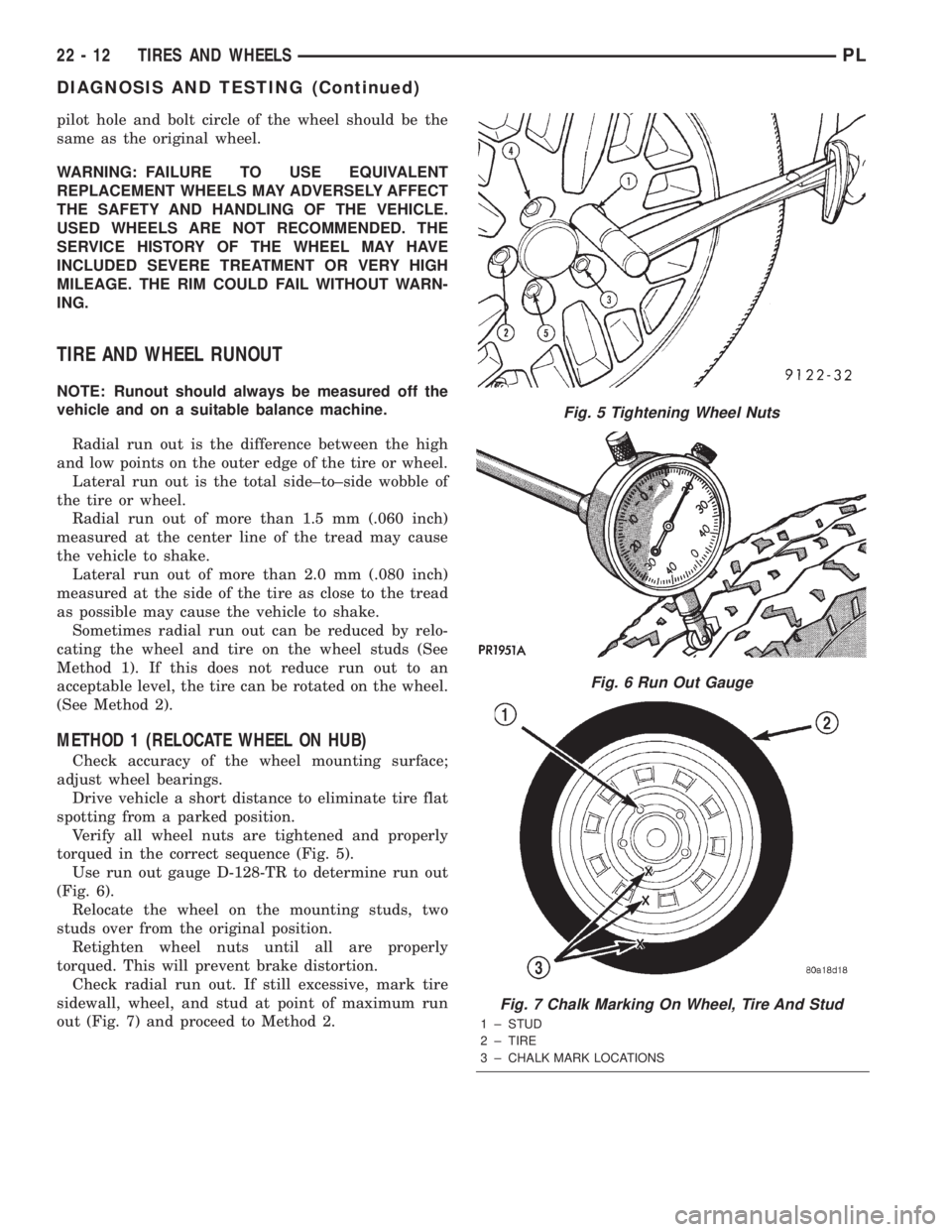
torqued in the correct sequence (Fig. 5).
Use run out gauge D-128-TR to determine run out
(Fig. 6).
Relocate the wheel on the mounting studs, two
studs over from the original position.
Retighten wheel nuts until all are properly
torqued. This will prevent brake distortion.
Check radial run out. If still excessive, mark tire
sidewall, wheel, and stud at point of maximum run
out (Fig. 7) and proceed to Method 2.
Fig. 5 Tightening Wheel Nuts
Fig. 6 Run Out Gauge
Fig. 7 Chalk Marking On Wheel, Tire And Stud
1 ± STUD
2 ± TIRE
3 ± CHALK MARK LOCATIONS
22 - 12 TIRES AND WHEELSPL
DIAGNOSIS AND TESTING (Continued)
Page 1085 of 1285
(3) When flange on retaining nut is past the 2
retaining tabs on the wheel cover, remove retaining
nut from wheel cover by pushing or pulling from hole
in wheel cover.
INSTALL
(1) Install retaining nut in hole of wheel cover
with retaining nut flange positioned under the large
retaining flange (Fig. 13).
(2) Push on hex of retaining nut forcing the retain-
ing nut flange past the 2 small retaining tabs in
wheel cover.
TIRE AND WHEEL ASSEMBLY
CAST WHEEL
REMOVAL
(1) Raise the vehicle. Refer to HOISTING in the
LUBRICATION AND MAINTENANCE section.
(2) Remove the wheel mounting nuts from the
studs.
(3) Remove the tire and wheel assembly from the
hub.
INSTALLATION
CAUTION: Installing the wheel mounting nuts with-
out having good metal-to-mental contact between
the back of the wheel and the hub mounted brake
disc or drum could cause the wheel to bind and
eventually cause loosening of the wheel mounting
nuts.
(1) Install the tire and wheel assembly on the hub
studs against the hub mounted brake disc or drum
using the hub pilot as a guide.
CAUTION: When installing the tire and wheel
assembly, never use oil or grease on studs or nuts.
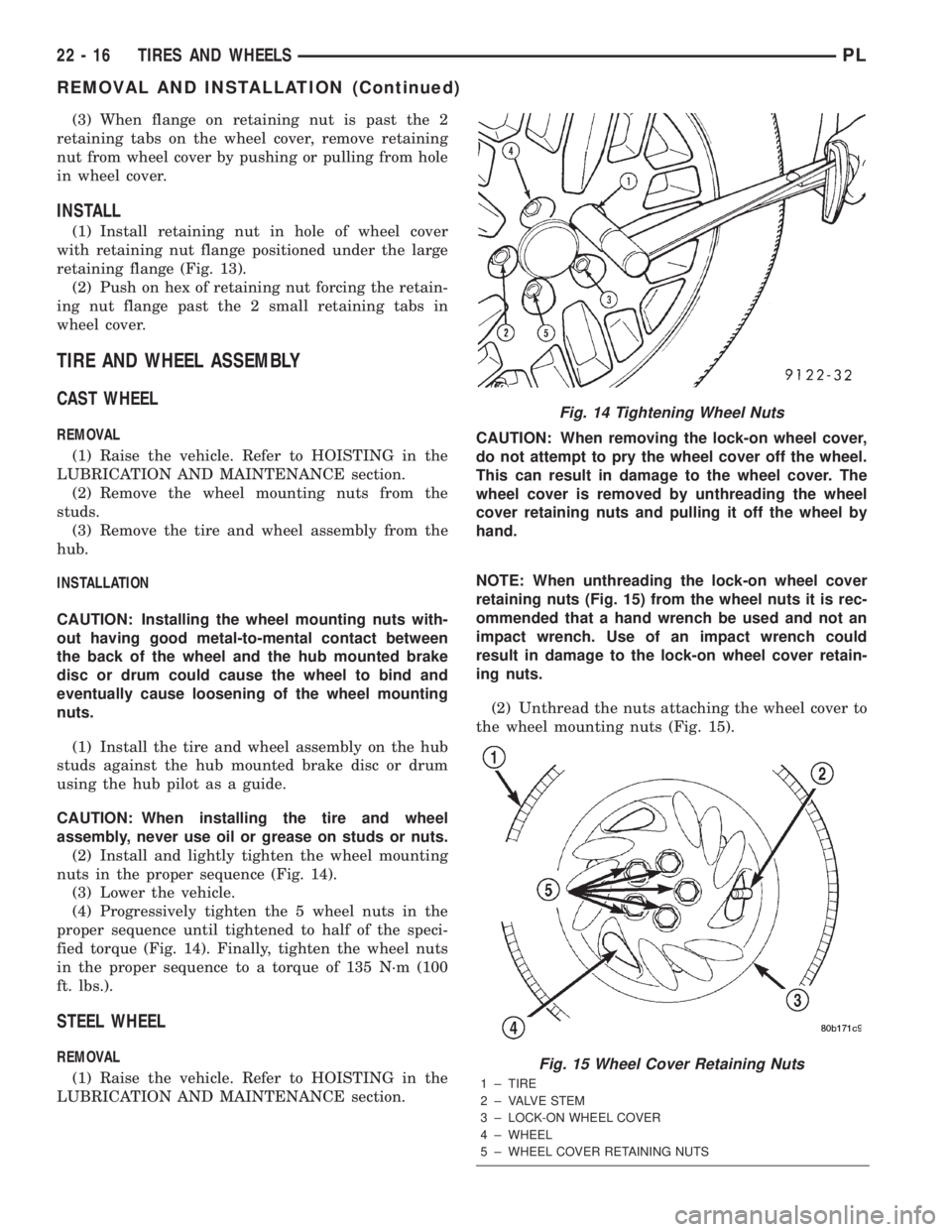
(2) Install and lightly tighten the wheel mounting
nuts in the proper sequence (Fig. 14).
(3) Lower the vehicle.
(4) Progressively tighten the 5 wheel nuts in the
proper sequence until tightened to half of the speci-
fied torque (Fig. 14). Finally, tighten the wheel nuts
in the proper sequence to a torque of 135 N´m (100
ft. lbs.).
STEEL WHEEL
REMOVAL
(1) Raise the vehicle. Refer to HOISTING in the
LUBRICATION AND MAINTENANCE section.CAUTION: When removing the lock-on wheel cover,
do not attempt to pry the wheel cover off the wheel.
This can result in damage to the wheel cover. The
wheel cover is removed by unthreading the wheel
cover retaining nuts and pulling it off the wheel by
hand.
NOTE: When unthreading the lock-on wheel cover
retaining nuts (Fig. 15) from the wheel nuts it is rec-
ommended that a hand wrench be used and not an
impact wrench. Use of an impact wrench could
result in damage to the lock-on wheel cover retain-
ing nuts.
(2) Unthread the nuts attaching the wheel cover to
the wheel mounting nuts (Fig. 15).
Fig. 14 Tightening Wheel Nuts
Fig. 15 Wheel Cover Retaining Nuts
1 ± TIRE
2 ± VALVE STEM
3 ± LOCK-ON WHEEL COVER
4 ± WHEEL
5 ± WHEEL COVER RETAINING NUTS
22 - 16 TIRES AND WHEELSPL
REMOVAL AND INSTALLATION (Continued)
Page 1086 of 1285
(3) Grasp the wheel cover and pull straight out-
ward. This will remove the wheel cover from the
wheel.
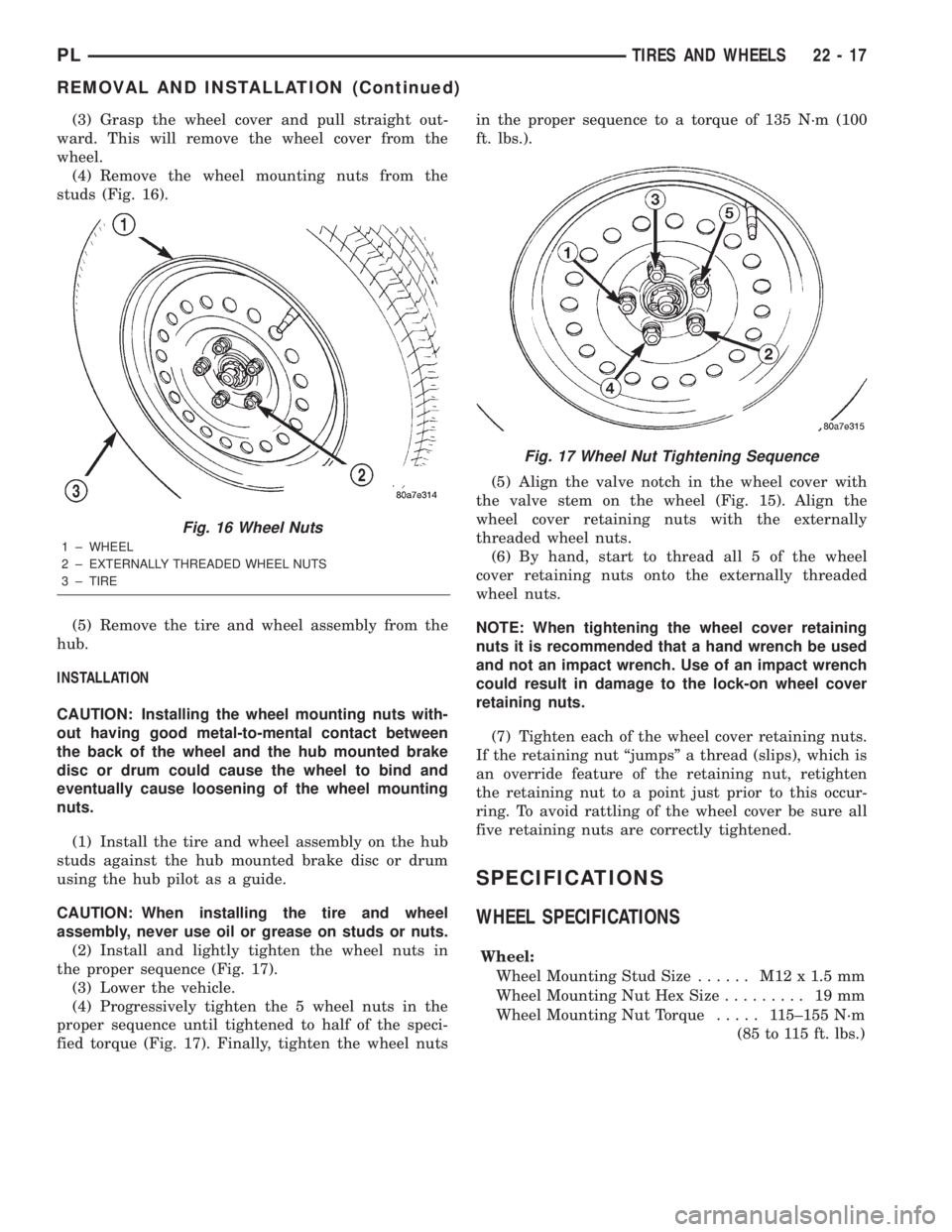
(4) Remove the wheel mounting nuts from the
studs (Fig. 16).
(5) Remove the tire and wheel assembly from the
hub.
INSTALLATION
CAUTION: Installing the wheel mounting nuts with-
out having good metal-to-mental contact between
the back of the wheel and the hub mounted brake
disc or drum could cause the wheel to bind and
eventually cause loosening of the wheel mounting
nuts.
(1) Install the tire and wheel assembly on the hub
studs against the hub mounted brake disc or drum
using the hub pilot as a guide.
CAUTION: When installing the tire and wheel
assembly, never use oil or grease on studs or nuts.
(2) Install and lightly tighten the wheel nuts in
the proper sequence (Fig. 17).
(3) Lower the vehicle.
(4) Progressively tighten the 5 wheel nuts in the
proper sequence until tightened to half of the speci-
fied torque (Fig. 17). Finally, tighten the wheel nutsin the proper sequence to a torque of 135 N´m (100
ft. lbs.).
(5) Align the valve notch in the wheel cover with
the valve stem on the wheel (Fig. 15). Align the
wheel cover retaining nuts with the externally
threaded wheel nuts.
(6) By hand, start to thread all 5 of the wheel
cover retaining nuts onto the externally threaded
wheel nuts.
NOTE: When tightening the wheel cover retaining
nuts it is recommended that a hand wrench be used
and not an impact wrench. Use of an impact wrench
could result in damage to the lock-on wheel cover
retaining nuts.
(7) Tighten each of the wheel cover retaining nuts.
If the retaining nut ªjumpsº a thread (slips), which is
an override feature of the retaining nut, retighten
the retaining nut to a point just prior to this occur-
ring. To avoid rattling of the wheel cover be sure all
five retaining nuts are correctly tightened.
SPECIFICATIONS
WHEEL SPECIFICATIONS
Wheel:
Wheel Mounting Stud Size...... M12x1.5mm
Wheel Mounting Nut Hex Size......... 19mm
Wheel Mounting Nut Torque..... 115±155 N´m
(85 to 115 ft. lbs.)
Fig. 16 Wheel Nuts
1 ± WHEEL
2 ± EXTERNALLY THREADED WHEEL NUTS
3 ± TIRE
Fig. 17 Wheel Nut Tightening Sequence
PLTIRES AND WHEELS 22 - 17
REMOVAL AND INSTALLATION (Continued)
Page 1098 of 1285
(M) Check Engine Lamp (MIL) will illuminate during engine operation if this Diagnostic Trouble Code was recorded.
P0740 (M) Torq Con Clu, No RPM Drop at
LockupRelationship between engine and vehicle speeds
indicated failure of torque convertor clutch lock-up
system (TCC/PTU sol).
P0743 Torque Converter Clutch Solenoid/
Trans Relay CircuitsAn open or shorted condition detected in the torque
converter clutch (part throttle unlock) solenoid control
circuit. Shift solenoid C electrical fault - Aisin
transmission
P0748 Governor Pressur Sol Control/Trans
Relay CircuitsAn open or shorted condition detected in the Governor
Pressure Solenoid circuit or Trans Relay Circuit in JTEC
RE transmissions.
P0751 O/D Switch Pressed (Lo) More
Than 5 MinutesOverdrive override switch input is in a prolonged
depressed state.
P0753 Trans 3-4 Shift Sol/Trans Relay
CircuitsAn open or shorted condition detected in the overdrive
solenoid control circuit or Trans Relay Circuit in JTEC
RE transmissions.
P0756 AW4 Shift Sol B (2-3) Functional
FailureShift solenoid B (2-3) functional fault - Aisin
transmission
P0783 3-4 Shift Sol, No RPM Drop at
LockupThe overdrive solenoid is unable to engage the gear
change from 3rd gear to the overdrive gear.
P0801 Reverse Gear Lockout Circuit Open
or ShortAn open or shorted condition detected in the
transmission reverse gear lock-out solenoid control
circuit.
P01192 Inlet Air Temp. Circuit Low Inlet Air Temp. sensor input below acceptable voltage
P01193 Inlet Air Temp. Circuit High Inlet Air Temp. sensor input above acceptable voltage.
P1195 (M) 1/1 O2 Sensor Slow During Catalyst
MonitorA slow switching oxygen sensor has been detected in
bank 1/1 during catalyst monitor test. (was P0133)
P1196 (M) 2/1 O2 Sensor Slow During Catalyst
MonitorA slow switching oxygen sensor has been detected in
bank 2/1 during catalyst monitor test. (was P0153)
P1197 1/2 O2 Sensor Slow During Catalyst
MonitorA slow switching oxygen sensor has been detected in
bank 1/2 during catalyst monitor test. (was P0139)
P1198 Radiator Temperature Sensor Volts
Too HighRadiator coolant temperature sensor input above the
maximum acceptable voltage.
P1199 Radiator Temperature Sensor Volts
Too LowRadiator coolant temperature sensor input below the
minimum acceptable voltage.
P1281 Engine is Cold Too Long Engine coolant temperature remains below normal
operating temperatures during vehicle travel
(Thermostat).
P1282 Fuel Pump Relay Control Circuit An open or shorted condition detected in the fuel pump
relay control circuit.
P1288 Intake Manifold Short Runner
Solenoid CircuitAn open or shorted condition detected in the short
runner tuning valve circuit.
P1289 Manifold Tune Valve Solenoid
CircuitAn open or shorted condition detected in the manifold
tuning valve solenoid control circuit.
P1290 CNG Fuel System Pressure Too
HighCompressed natural gas system pressure above normal
operating range.
P1291 No Temp Rise Seen From Intake
HeatersEnergizing Heated Air Intake does not change intake air
temperature sensor an acceptable amount.
PLEMISSION CONTROL SYSTEMS 25 - 11
DESCRIPTION AND OPERATION (Continued)
Page 1102 of 1285
MONITORED SYSTEMS
DESCRIPTION
There are new electronic circuit monitors that
check fuel, emission, engine and ignition perfor-
mance. These monitors use information from various
sensor circuits to indicate the overall operation of the
fuel, engine, ignition and emission systems and thus
the emissions performance of the vehicle.
The fuel, engine, ignition and emission systems
monitors do not indicate a specific component prob-
lem. They do indicate that there is an implied prob-
lem within one of the systems and that a specific
problem must be diagnosed.
If any of these monitors detect a problem affecting
vehicle emissions, the Malfunction Indicator (Check
Engine) Lamp will be illuminated. These monitors
generate Diagnostic Trouble Codes that can be dis-
played with the check engine lamp or a scan tool.
The following is a list of the monitored systems:
²EGR Monitor
²Misfire Monitor
²Fuel System Monitor
²Evaporative Emissions Monitor
Following is a description of each system monitor,
and its DTC.
Refer to the appropriate Powertrain Diagnos-
tics Procedures manual for diagnostic proce-
dures.
EGR MONITOR
The Powertrain Control Module (PCM) performs
an on-board diagnostic check of the EGR system.
The EGR system consists of two main components:
a vacuum solenoid back pressure transducer and a
vacuum operated valve. The EGR monitor is used to
test whether the EGR system is operating within
specifications. The diagnostic check activates only
during selected engine/driving conditions. When the
conditions are met, the EGR is turned off (solenoid
energized) and the O2S compensation control is mon-
itored. Turning off the EGR shifts the air fuel (A/F)
ratio in the lean direction. Oxygen sensor voltage
then indicates increased oxygen in the exhaust. Con-
sequently, Short Term Compensation shifts to rich
(increased injector pulse width). By monitoring the
shift, the PCM can indirectly monitor the EGR sys-
tem. While this test does not directly measure the
operation of the EGR system, it can be inferred from
the shift in the O2S data whether the EGR system is
operating correctly. Because the O2S is being used,
the O2S test must pass its test before the EGR test.
Enabling ConditionsÐ
²Engine Temperature
²Engine Run Time
²Engine RPM²MAP Sensor
²TPS
²Vehicle Speed
²Short Term Compensation
Pending ConditionsÐThe EGR Monitor does
not run when any of the following example faults
have illuminated the MIL:
²Misfire
²Oxygen Sensor Monitor
²Oxygen Sensor Heater Monitor
²Fuel System Rich/Lean
²Limp in for MAP, TPS or ECT
²Vehicle Speed Sensor
²Cam or Crank Sensor
²EGR Electrical
²EVAP Electrical
²Fuel Injector
²Ignition Coil
²Idle Speed
²Engine Coolant Temperature (ECT)
²MAP Sensor
²Intake Air Temperature (IAT)
Conflict ConditionsÐThe EGR Monitor typi-
cally does not run if any of the following conditions
are present:
²Fuel System Monitor
²Purge Monitor
²Catalyst Monitor
²Low Fuel Level
²High Altitude
²Low Ambient Air Temperature
The EGR Monitor does not run if any of the follow-
ing example DTCs are present:
²Misfire Monitor, Priority 2
²Upstream Oxygen Sensor Heater, Priority 1
²Fuel System Monitor, Priority 2
²Oxygen Sensor Monitor, Priority 1
MISFIRE MONITOR
Excessive engine misfire results in increased cata-
lyst temperature and causes an increase in HC emis-
sions. Severe misfires could cause catalyst damage.
To prevent catalytic convertor damage, the PCM
monitors engine misfire.
The Powertrain Control Module (PCM) monitors
for misfire during most engine operating conditions
(positive torque) by looking at changes in the crank-
shaft speed. If a misfire occurs the speed of the
crankshaft will vary more than normal.
OBD II regulations for misfire monitoring require
two different tests for misfire. The first is a Catalyst
Damage level of misfire test. The second is for emis-
sions greater than 1.5 times the Federal Tailpipe
(FTP) standards. The tests are monitored by two dif-
ferent counters. These counters are:
PLEMISSION CONTROL SYSTEMS 25 - 15
DESCRIPTION AND OPERATION (Continued)
Page 1107 of 1285
NOTE: Comprehensive component monitors are
continuous. Therefore, enabling conditions do not
apply.
Input RationalityÐWhile input signals to the
PCM are constantly being monitored for electrical
opens and shorts, they are also tested for rationality.
This means that the input signal is compared against
other inputs and information to see if it makes sense
under the current conditions.
PCM sensor inputs that are checked for rationality
include:
²Manifold Absolute Pressure (MAP) Sensor
²Oxygen Sensor (O2S)
²Engine Coolant Temperature (ECT) Sensor
²Camshaft Position (CMP) Sensor
²Vehicle Speed Sensor
²Crankshaft Position (CKP) Sensor
²Intake Air Temperature (IAT) Sensor
²Throttle Position (TPS) Sensor
²Ambient/Battery Temperature Sensors
²Power Steering Switch
²Oxygen Sensor Heater
²Engine Controller
²Brake Switch
²Leak Detection Pump Switch
²P/N Switch
²Trans Controls
Output FunctionalityÐPCM outputs are tested
for functionality in addition to testing for opens and
shorts. When the PCM provides a voltage to an out-
put component, it can verify that the command was
carried out by monitoring specific input signals for
expected changes. For example, when the PCM com-
mands the Idle Air Control (IAC) Motor to a specific
position under certain operating conditions, it expects
to see a specific (target) idle speed (RPM). If it does
not, it stores a DTC.
PCM outputs monitored for functionality include:
²Fuel Injectors
²Ignition Coils
²Torque Converter Clutch Solenoid
²Idle Air Control
²Purge Solenoid
²EGR Solenoid
²LDP Solenoid
²Radiator Fan Control
²Trans Controls
OXYGEN SENSOR (O2S) MONITOR
DESCRIPTIONÐEffective control of exhaust
emissions is achieved by an oxygen feedback system.
The most important element of the feedback system
is the O2S. The O2S is located in the exhaust path.
Once it reaches operating temperature 300É to 350ÉC
(572É to 662ÉF), the sensor generates a voltage that
is inversely proportional to the amount of oxygen inthe exhaust. When there is a large amount of oxygen
in the exhaust caused by a lean condition, the sensor
produces a low voltage, below 450 mV. When the oxy-
gen content is lower, caused by a rich condition, the
sensor produces a higher voltage, above 450mV.
The information obtained by the sensor is used to
calculate the fuel injector pulse width. This main-
tains a 14.7 to 1 air fuel (A/F) ratio. At this mixture
ratio, the catalyst works best to remove hydrocarbons
(HC), carbon monoxide (CO) and nitrous oxide (NOx)
from the exhaust.
The O2S is also the main sensing element for the
EGR, Catalyst and Fuel Monitors.
The O2S may fail in any or all of the following
manners:
²Slow response rate (Big Slope)
²Reduced output voltage (Half Cycle)
²Heater Performance
Slow Response Rate (Big Slope)ÐResponse
rate is the time required for the sensor to switch
from lean to rich signal output once it is exposed to a
richer than optimum A/F mixture or vice versa. As
the PCM adjusts the air/fuel ratio, the sensor must
be able to rapidly detect the change. As the sensor
ages, it could take longer to detect the changes in the
oxygen content of the exhaust gas. The rate of
change that an oxygen sensor experiences is called
'Big Slope'. The PCM checks the oxygen sensor volt-
age in increments of a few milliseconds.
Reduced Output Voltage (Half Cycle)ÐThe
output voltage of the O2S ranges from 0 to 1 volt. A
good sensor can easily generate any output voltage in
this range as it is exposed to different concentrations
of oxygen. To detect a shift in the A/F mixture (lean
or rich), the output voltage has to change beyond a
threshold value. A malfunctioning sensor could have
difficulty changing beyond the threshold value. Each
time the voltage signal surpasses the threshold, a
counter is incremented by one. This is called the Half
Cycle Counter.
Heater PerformanceÐThe heater is tested by a
separate monitor. Refer to the Oxygen Sensor Heater
Monitor.
OPERATIONÐAs the Oxygen Sensor signal
switches, the PCM monitors the half cycle and big
slope signals from the oxygen sensor. If during the
test neither counter reaches a predetermined value, a
malfunction is entered and a Freeze Frame is stored.
Only one counter reaching its predetermined value is
needed for the monitor to pass.
The Oxygen Sensor Monitor is a two trip monitor
that is tested only once per trip. When the Oxygen
Sensor fails the test in two consecutive trips, the
MIL is illuminated and a DTC is set. The MIL is
extinguished when the Oxygen Sensor monitor
passes in three consecutive trips. The DTC is erased
25 - 20 EMISSION CONTROL SYSTEMSPL
DESCRIPTION AND OPERATION (Continued)
Page 1125 of 1285
SEATS
TABLE OF CONTENTS
page page
REMOVAL AND INSTALLATION
FRONT SEAT.............................8
FRONT SEAT BACK........................8
FRONT SEAT BACK COVER.................9FRONT SEAT CUSHION COVER..............9
FRONT SEAT CUSHION....................9
REAR SEAT BACK........................10
REAR SEAT CUSHION.....................11
REMOVAL AND INSTALLATION
FRONT SEAT
REMOVAL
(1) Move seat to forward position.
(2) Remove bolts attaching rear of seat track to
floor.
(3) Move seat to rearward position.
(4) Remove bolts attaching front of seat track to
floor crossmember (Fig. 1).
(5) Remove seat from vehicle.
INSTALLATION
(1) Move seat to mid-position andverifythat both
seat tracks are locked into same position with eight
teeth behind the latch mechanism.
(2) Move seat into position in vehicle. Do not use
the head restraint, side shield, recliner handle, or the
adjuster lift bar to move the seat.(3) Ensure that the locating tabs on the front
mounting feet are installed through the slits in the
carpet and into the openings in the floor pan cross-
member.
(4) Install and tighten front inboard bolt attaching
seat track to floor crossmember.
(5) Install front outboard bolt attaching seat track
to floor crossmember. Tighten front seat bolt to 55
N´m (40 ft. lbs.) torque.
(6) Install rear seat track attaching bolts to floor.
Tighten rear seat bolts outboard first then inboard to
55 N´m (40 ft. lbs.) torque.
FRONT SEAT BACK
REMOVAL
(1) Remove seat from vehicle.
(2) Remove seat cushion side shields.
(3) Remove bolts attaching recliner to seat back
cushion frame (Fig. 2).
(4) Remove inboard pivot bolt (Fig. 3).
(5) Disconnect any electrical connectors to the seat
back, if equipped.
(6) Remove seat back from seat cushion.
Fig. 1 Front Seat
1 ± SEAT
2 ± SEAT BELT BOLT
Fig. 2 Recliner Attaching Bolt
1 ± RECLINER BOLT
23 - 8 BODYPL