diagram DODGE NEON 2000 Service Owner's Manual
[x] Cancel search | Manufacturer: DODGE, Model Year: 2000, Model line: NEON, Model: DODGE NEON 2000Pages: 1285, PDF Size: 29.42 MB
Page 280 of 1285
HORNS
TABLE OF CONTENTS
page page
DESCRIPTION AND OPERATION
INTRODUCTION..........................1
DIAGNOSIS AND TESTING
HORN..................................2
HORN RELAY............................2
HORN SWITCH...........................2HORN SYSTEM TEST......................2
REMOVAL AND INSTALLATION
HORN..................................4
HORN RELAY............................4
HORN SWITCH...........................5
DESCRIPTION AND OPERATION
INTRODUCTION
WARNING: ON VEHICLES EQUIPPED WITH AIR-
BAG, SEE GROUP 8M, PASSIVE RESTRAINT SYS-
TEMS FOR STEERING WHEEL REMOVAL.
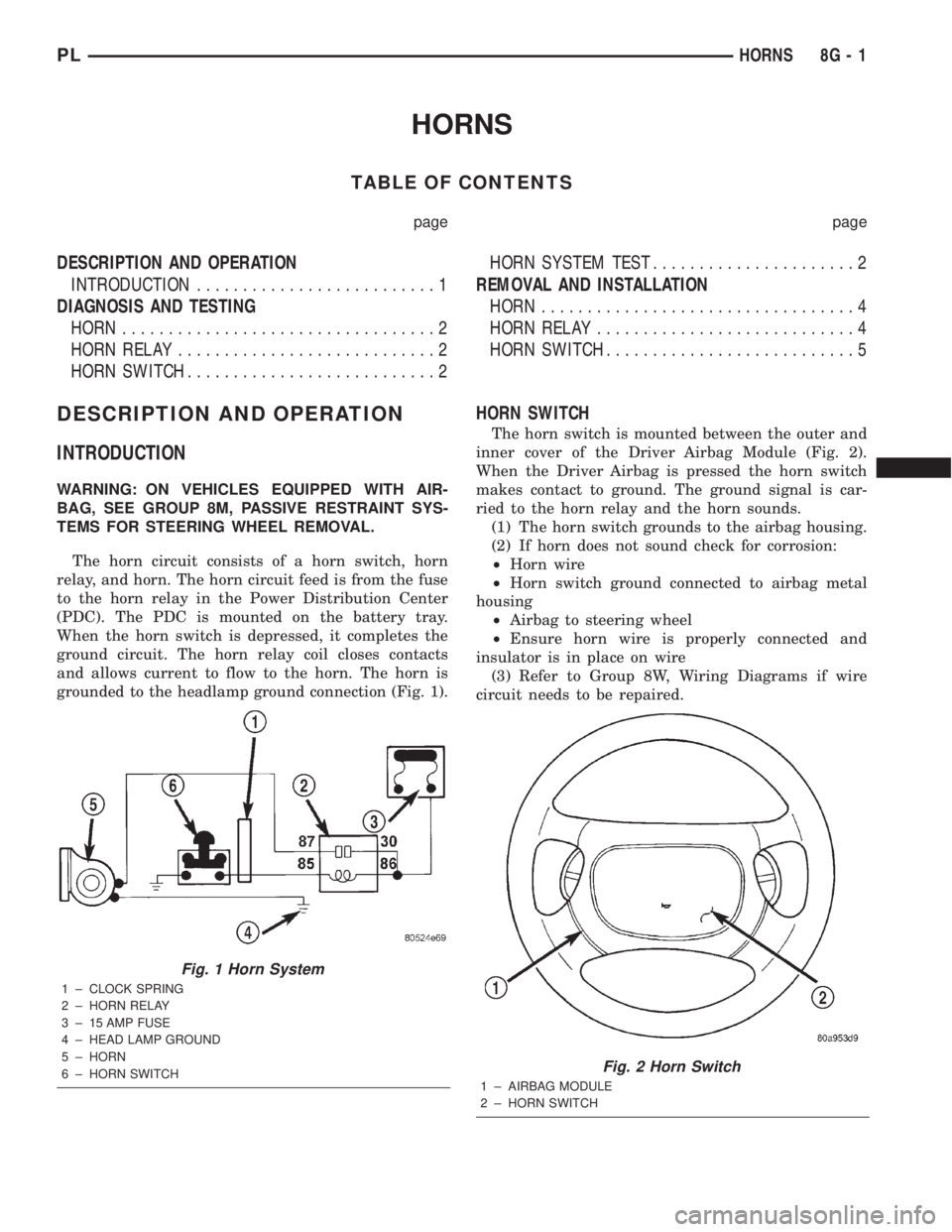
The horn circuit consists of a horn switch, horn
relay, and horn. The horn circuit feed is from the fuse
to the horn relay in the Power Distribution Center
(PDC). The PDC is mounted on the battery tray.
When the horn switch is depressed, it completes the
ground circuit. The horn relay coil closes contacts
and allows current to flow to the horn. The horn is
grounded to the headlamp ground connection (Fig. 1).
HORN SWITCH
The horn switch is mounted between the outer and
inner cover of the Driver Airbag Module (Fig. 2).
When the Driver Airbag is pressed the horn switch
makes contact to ground. The ground signal is car-
ried to the horn relay and the horn sounds.
(1) The horn switch grounds to the airbag housing.
(2) If horn does not sound check for corrosion:
²Horn wire
²Horn switch ground connected to airbag metal
housing
²Airbag to steering wheel
²Ensure horn wire is properly connected and
insulator is in place on wire
(3) Refer to Group 8W, Wiring Diagrams if wire
circuit needs to be repaired.
Fig. 1 Horn System
1 ± CLOCK SPRING
2 ± HORN RELAY
3 ± 15 AMP FUSE
4 ± HEAD LAMP GROUND
5 ± HORN
6 ± HORN SWITCH
Fig. 2 Horn Switch
1 ± AIRBAG MODULE
2 ± HORN SWITCH
PLHORNS 8G - 1
Page 281 of 1285
DIAGNOSIS AND TESTING
HORN
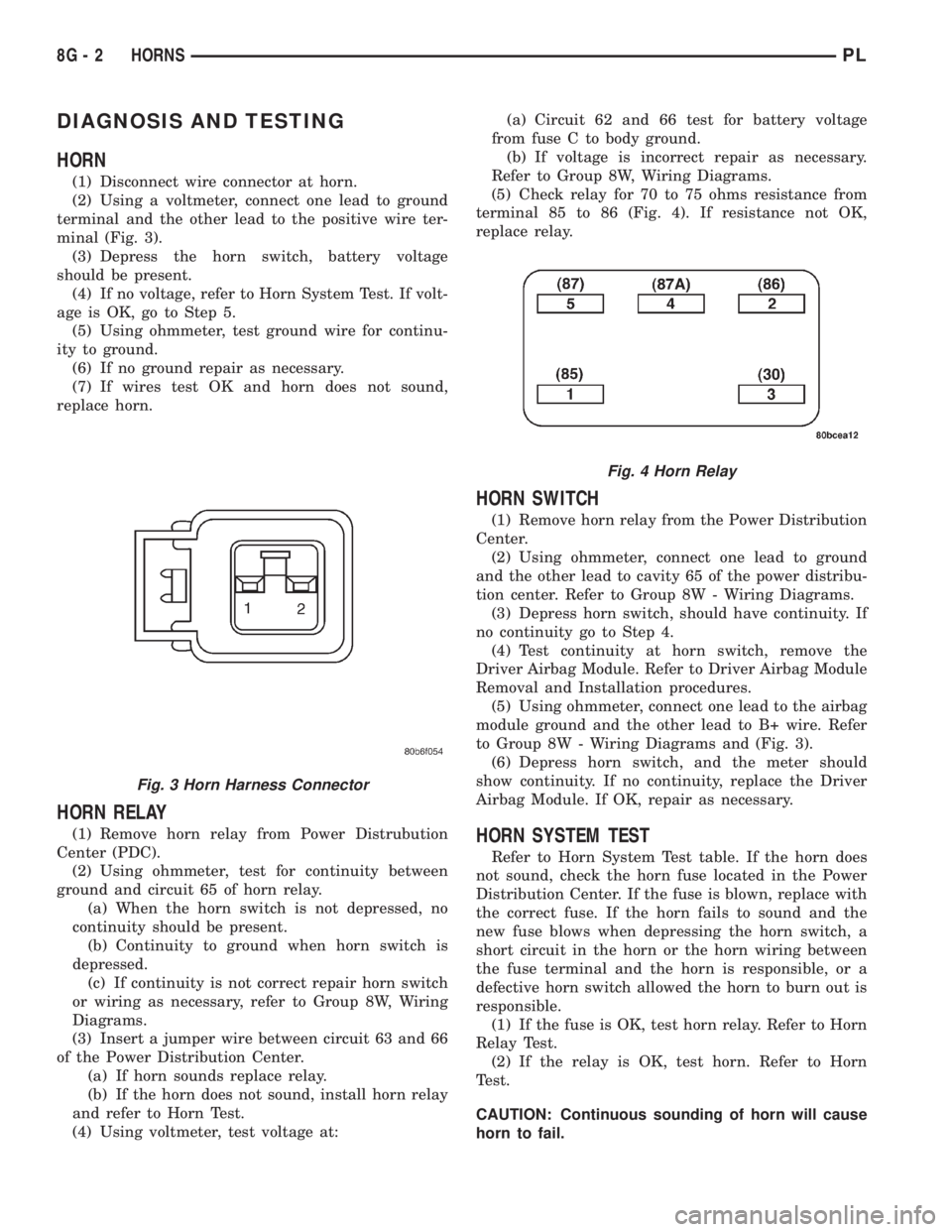
(1) Disconnect wire connector at horn.
(2) Using a voltmeter, connect one lead to ground
terminal and the other lead to the positive wire ter-
minal (Fig. 3).
(3) Depress the horn switch, battery voltage
should be present.
(4) If no voltage, refer to Horn System Test. If volt-
age is OK, go to Step 5.
(5) Using ohmmeter, test ground wire for continu-
ity to ground.
(6) If no ground repair as necessary.
(7) If wires test OK and horn does not sound,
replace horn.
HORN RELAY
(1) Remove horn relay from Power Distrubution
Center (PDC).
(2) Using ohmmeter, test for continuity between
ground and circuit 65 of horn relay.
(a) When the horn switch is not depressed, no
continuity should be present.
(b) Continuity to ground when horn switch is
depressed.
(c) If continuity is not correct repair horn switch
or wiring as necessary, refer to Group 8W, Wiring
Diagrams.
(3) Insert a jumper wire between circuit 63 and 66
of the Power Distribution Center.
(a) If horn sounds replace relay.
(b) If the horn does not sound, install horn relay
and refer to Horn Test.
(4) Using voltmeter, test voltage at:(a) Circuit 62 and 66 test for battery voltage
from fuse C to body ground.
(b) If voltage is incorrect repair as necessary.
Refer to Group 8W, Wiring Diagrams.
(5) Check relay for 70 to 75 ohms resistance from
terminal 85 to 86 (Fig. 4). If resistance not OK,
replace relay.
HORN SWITCH
(1) Remove horn relay from the Power Distribution
Center.
(2) Using ohmmeter, connect one lead to ground
and the other lead to cavity 65 of the power distribu-
tion center. Refer to Group 8W - Wiring Diagrams.
(3) Depress horn switch, should have continuity. If
no continuity go to Step 4.
(4) Test continuity at horn switch, remove the
Driver Airbag Module. Refer to Driver Airbag Module
Removal and Installation procedures.
(5) Using ohmmeter, connect one lead to the airbag
module ground and the other lead to B+ wire. Refer
to Group 8W - Wiring Diagrams and (Fig. 3).
(6) Depress horn switch, and the meter should
show continuity. If no continuity, replace the Driver
Airbag Module. If OK, repair as necessary.
HORN SYSTEM TEST
Refer to Horn System Test table. If the horn does
not sound, check the horn fuse located in the Power
Distribution Center. If the fuse is blown, replace with
the correct fuse. If the horn fails to sound and the
new fuse blows when depressing the horn switch, a
short circuit in the horn or the horn wiring between
the fuse terminal and the horn is responsible, or a
defective horn switch allowed the horn to burn out is
responsible.
(1) If the fuse is OK, test horn relay. Refer to Horn
Relay Test.
(2) If the relay is OK, test horn. Refer to Horn
Test.
CAUTION: Continuous sounding of horn will cause
horn to fail.
Fig. 3 Horn Harness Connector
Fig. 4 Horn Relay
8G - 2 HORNSPL
Page 282 of 1285
Should the horn sound continuously:
²Unplug the horn relay from Power Distribution
Center.²Refer to Horn Relay Test.
Refer to Group 8W, wiring Diagrams for circuit and
wiring information.
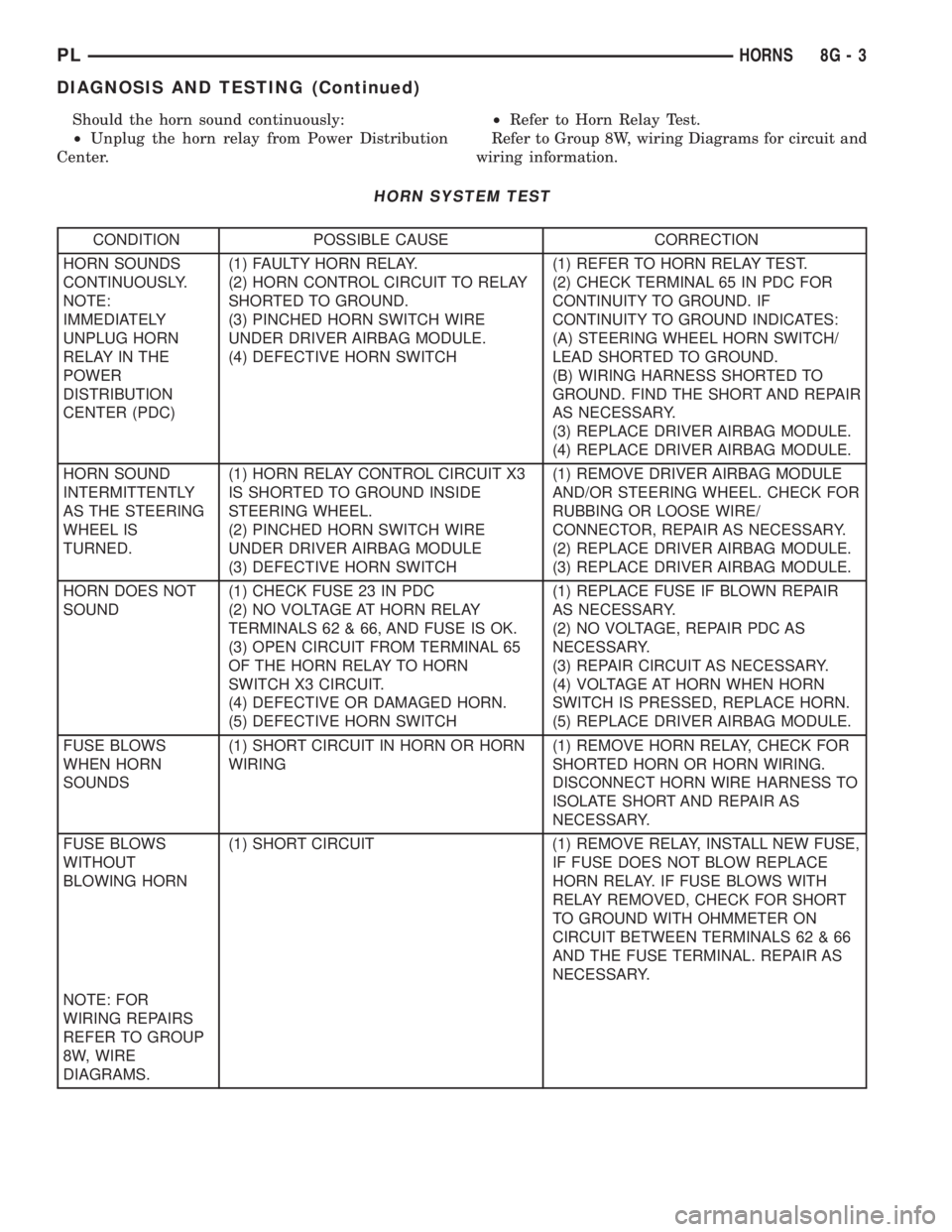
HORN SYSTEM TEST
CONDITION POSSIBLE CAUSE CORRECTION
HORN SOUNDS
CONTINUOUSLY.
NOTE:
IMMEDIATELY
UNPLUG HORN
RELAY IN THE
POWER
DISTRIBUTION
CENTER (PDC)(1) FAULTY HORN RELAY.
(2) HORN CONTROL CIRCUIT TO RELAY
SHORTED TO GROUND.
(3) PINCHED HORN SWITCH WIRE
UNDER DRIVER AIRBAG MODULE.
(4) DEFECTIVE HORN SWITCH(1) REFER TO HORN RELAY TEST.
(2) CHECK TERMINAL 65 IN PDC FOR
CONTINUITY TO GROUND. IF
CONTINUITY TO GROUND INDICATES:
(A) STEERING WHEEL HORN SWITCH/
LEAD SHORTED TO GROUND.
(B) WIRING HARNESS SHORTED TO
GROUND. FIND THE SHORT AND REPAIR
AS NECESSARY.
(3) REPLACE DRIVER AIRBAG MODULE.
(4) REPLACE DRIVER AIRBAG MODULE.
HORN SOUND
INTERMITTENTLY
AS THE STEERING
WHEEL IS
TURNED.(1) HORN RELAY CONTROL CIRCUIT X3
IS SHORTED TO GROUND INSIDE
STEERING WHEEL.
(2) PINCHED HORN SWITCH WIRE
UNDER DRIVER AIRBAG MODULE
(3) DEFECTIVE HORN SWITCH(1) REMOVE DRIVER AIRBAG MODULE
AND/OR STEERING WHEEL. CHECK FOR
RUBBING OR LOOSE WIRE/
CONNECTOR, REPAIR AS NECESSARY.
(2) REPLACE DRIVER AIRBAG MODULE.
(3) REPLACE DRIVER AIRBAG MODULE.
HORN DOES NOT
SOUND(1) CHECK FUSE 23 IN PDC
(2) NO VOLTAGE AT HORN RELAY
TERMINALS 62 & 66, AND FUSE IS OK.
(3) OPEN CIRCUIT FROM TERMINAL 65
OF THE HORN RELAY TO HORN
SWITCH X3 CIRCUIT.
(4) DEFECTIVE OR DAMAGED HORN.
(5) DEFECTIVE HORN SWITCH(1) REPLACE FUSE IF BLOWN REPAIR
AS NECESSARY.
(2) NO VOLTAGE, REPAIR PDC AS
NECESSARY.
(3) REPAIR CIRCUIT AS NECESSARY.
(4) VOLTAGE AT HORN WHEN HORN
SWITCH IS PRESSED, REPLACE HORN.
(5) REPLACE DRIVER AIRBAG MODULE.
FUSE BLOWS
WHEN HORN
SOUNDS(1) SHORT CIRCUIT IN HORN OR HORN
WIRING(1) REMOVE HORN RELAY, CHECK FOR
SHORTED HORN OR HORN WIRING.
DISCONNECT HORN WIRE HARNESS TO
ISOLATE SHORT AND REPAIR AS
NECESSARY.
FUSE BLOWS
WITHOUT
BLOWING HORN(1) SHORT CIRCUIT (1) REMOVE RELAY, INSTALL NEW FUSE,
IF FUSE DOES NOT BLOW REPLACE
HORN RELAY. IF FUSE BLOWS WITH
RELAY REMOVED, CHECK FOR SHORT
TO GROUND WITH OHMMETER ON
CIRCUIT BETWEEN TERMINALS 62 & 66
AND THE FUSE TERMINAL. REPAIR AS
NECESSARY.
NOTE: FOR
WIRING REPAIRS
REFER TO GROUP
8W, WIRE
DIAGRAMS.
PLHORNS 8G - 3
DIAGNOSIS AND TESTING (Continued)
Page 299 of 1285
DIAGNOSIS AND TESTING
WINDSHIELD WIPER CONDITIONS
WARNING: ON VEHICLES EQUIPPED WITH AIR-
BAGS, REFER TO GROUP 8M, PASSIVE
RESTRAINT SYSTEMS FOR STEERING WHEEL
REMOVAL AND INSTALLATION.
The following is a list of general wiper motor sys-
tem problems, the tests that are to be performed to
locate the faulty part, and the corrective action to be
taken.
Whatever the problem, disconnect motor wire har-
ness and clean the terminals, then connect motor
wire harness and test.
Refer to Group 8W Wiring Diagrams for circuit
information and connector call-outs.
MOTOR WILL NOT OPERATE IN SOME OR ALL
SWITCH POSITIONS
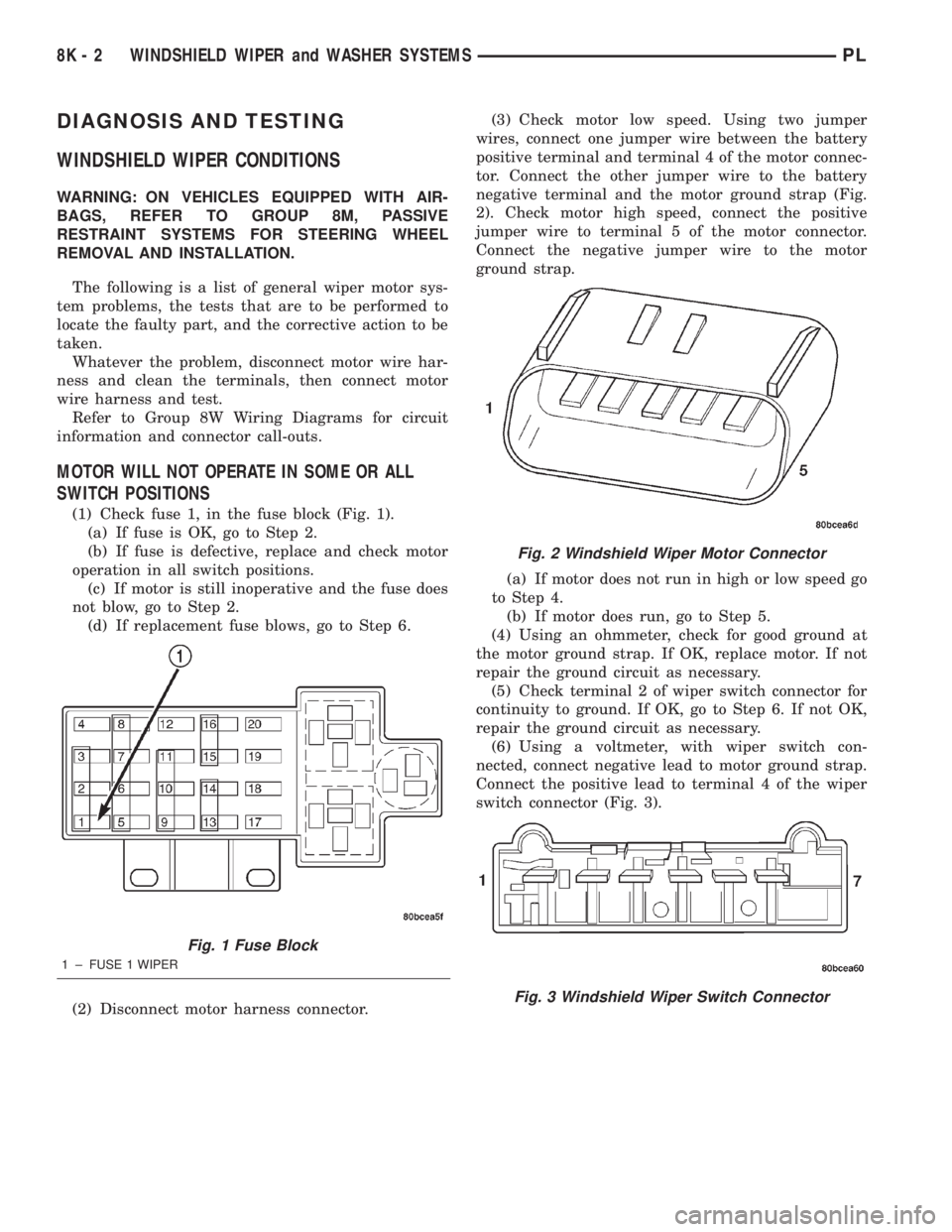
(1) Check fuse 1, in the fuse block (Fig. 1).
(a) If fuse is OK, go to Step 2.
(b) If fuse is defective, replace and check motor
operation in all switch positions.
(c) If motor is still inoperative and the fuse does
not blow, go to Step 2.
(d) If replacement fuse blows, go to Step 6.
(2) Disconnect motor harness connector.(3) Check motor low speed. Using two jumper
wires, connect one jumper wire between the battery
positive terminal and terminal 4 of the motor connec-
tor. Connect the other jumper wire to the battery
negative terminal and the motor ground strap (Fig.
2). Check motor high speed, connect the positive
jumper wire to terminal 5 of the motor connector.
Connect the negative jumper wire to the motor
ground strap.
(a) If motor does not run in high or low speed go
to Step 4.
(b) If motor does run, go to Step 5.
(4) Using an ohmmeter, check for good ground at
the motor ground strap. If OK, replace motor. If not
repair the ground circuit as necessary.
(5) Check terminal 2 of wiper switch connector for
continuity to ground. If OK, go to Step 6. If not OK,
repair the ground circuit as necessary.
(6) Using a voltmeter, with wiper switch con-
nected, connect negative lead to motor ground strap.
Connect the positive lead to terminal 4 of the wiper
switch connector (Fig. 3).
Fig. 1 Fuse Block
1 ± FUSE 1 WIPER
Fig. 2 Windshield Wiper Motor Connector
Fig. 3 Windshield Wiper Switch Connector
8K - 2 WINDSHIELD WIPER and WASHER SYSTEMSPL
Page 300 of 1285
(a) If no voltage, repair wiring as necessary. If
OK, go to Step b.
(b) Check wiper switch low speed. Connect volt-
meter positive lead to terminal 6 of the wiper
switch connector. Move wiper stalk to LOW posi-
tion. If no voltage, replace switch.
(c) Check wiper switch high speed, connect volt-
meter positive lead to terminal 5 of the wiper
switch connector. Move wiper stalk to HIGH posi-
tion. If no voltage, replace switch.
(7) Disconnect motor connector and replace fuse 1
in fuse block.
(a) If fuse does not blow, replace motor.
(b) If fuse blows, disconnect wiper switch and
replace fuse.
(c) If fuse does not blow, replace switch.
(d) If fuse blows, repair wiring as necessary.
MOTOR OPERATES SLOWLY AT ALL SPEEDS
(1) Remove wiper arms and cowl screen. Discon-
nect motor linkage from motor. Connect an ammeter
between battery positive terminal and terminal 4 of
the motor connector. Turn wiper motor on and check
ampere reading.
If motor runs and ammeter reading is more than 6
amps, go to Step 2. If less than 6 amps, go to Step 3.
When replacing drive link nut tighten to 11 to 12
N´m (98 to 106 in. lbs.) torque.
(2) Using an ohmmeter, check the high and low
circuits for a short to ground. Refer to Group 8W,
Wiring Diagrams.
(3) Check to see if wiper linkage or pivots are
binding or caught.
WIPERS RUN AT HIGH SPEED WITH SWITCH IN
LOW SPEED POSITION OR WIPERS RUN AT LOW
SPEED WITH SWITCH IN HIGH SPEED POSITION.
(1) Check for crossed wires in the motor pigtail
wire connector. Refer to Group 8W, Wiring Diagrams.
(2) Check for crossed wires in harness connector
from wiper switch to motor.
(3) If OK, replace wiper switch.
WIPERS WILL OPERATE CONTINUOUSLY WITH
THE SWITCH IN THE INTERMITTENT POSITION -
WHEN WIPER SWITCH IS TURNED OFF, WIPERS
STOP WHEREVER THEY ARE WITHOUT
RETURNING TO PARK POSITION.
(1) Check at motor ground strap for a good ground.
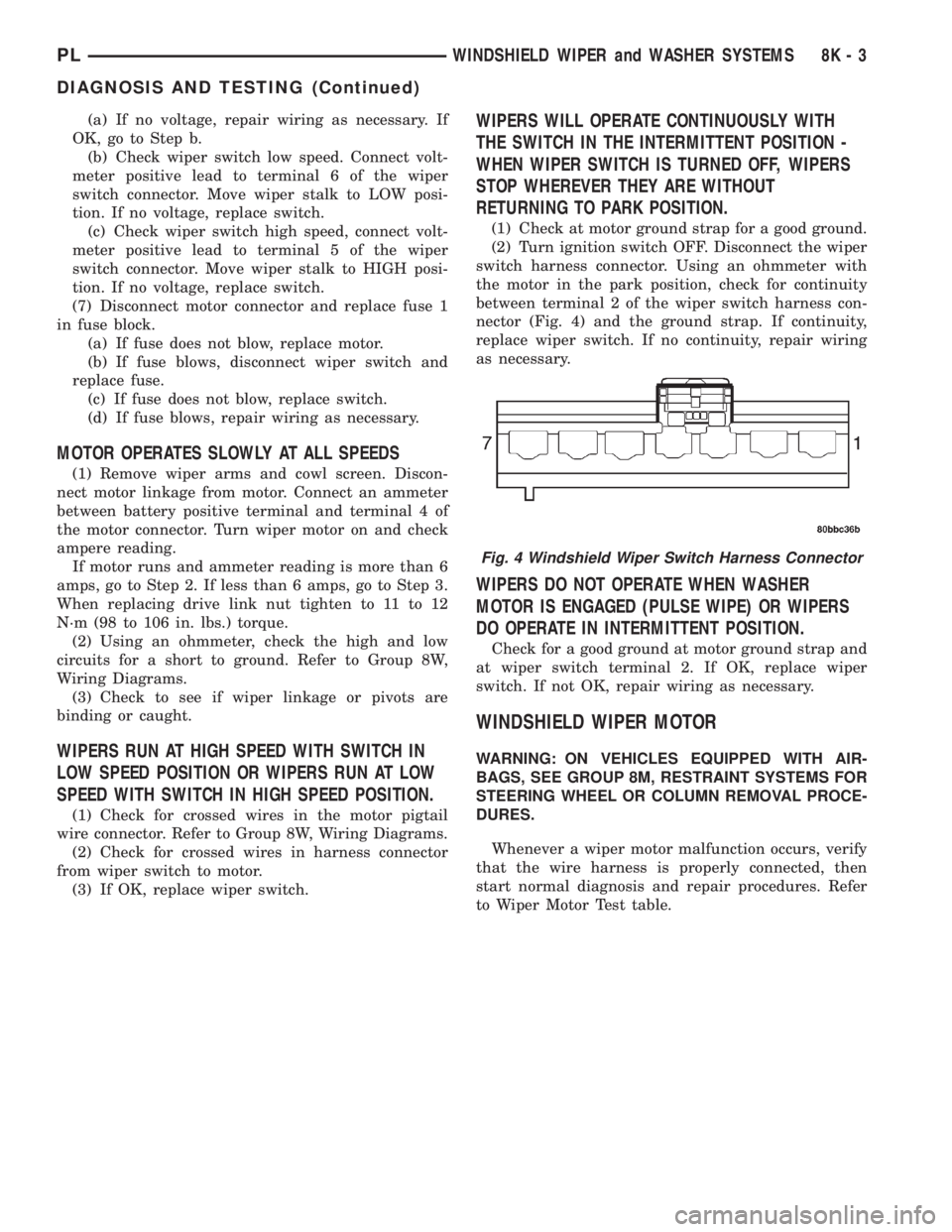
(2) Turn ignition switch OFF. Disconnect the wiper
switch harness connector. Using an ohmmeter with
the motor in the park position, check for continuity
between terminal 2 of the wiper switch harness con-
nector (Fig. 4) and the ground strap. If continuity,
replace wiper switch. If no continuity, repair wiring
as necessary.
WIPERS DO NOT OPERATE WHEN WASHER
MOTOR IS ENGAGED (PULSE WIPE) OR WIPERS
DO OPERATE IN INTERMITTENT POSITION.
Check for a good ground at motor ground strap and
at wiper switch terminal 2. If OK, replace wiper
switch. If not OK, repair wiring as necessary.
WINDSHIELD WIPER MOTOR
WARNING: ON VEHICLES EQUIPPED WITH AIR-
BAGS, SEE GROUP 8M, RESTRAINT SYSTEMS FOR
STEERING WHEEL OR COLUMN REMOVAL PROCE-
DURES.
Whenever a wiper motor malfunction occurs, verify
that the wire harness is properly connected, then
start normal diagnosis and repair procedures. Refer
to Wiper Motor Test table.
Fig. 4 Windshield Wiper Switch Harness Connector
PLWINDSHIELD WIPER and WASHER SYSTEMS 8K - 3
DIAGNOSIS AND TESTING (Continued)
Page 301 of 1285
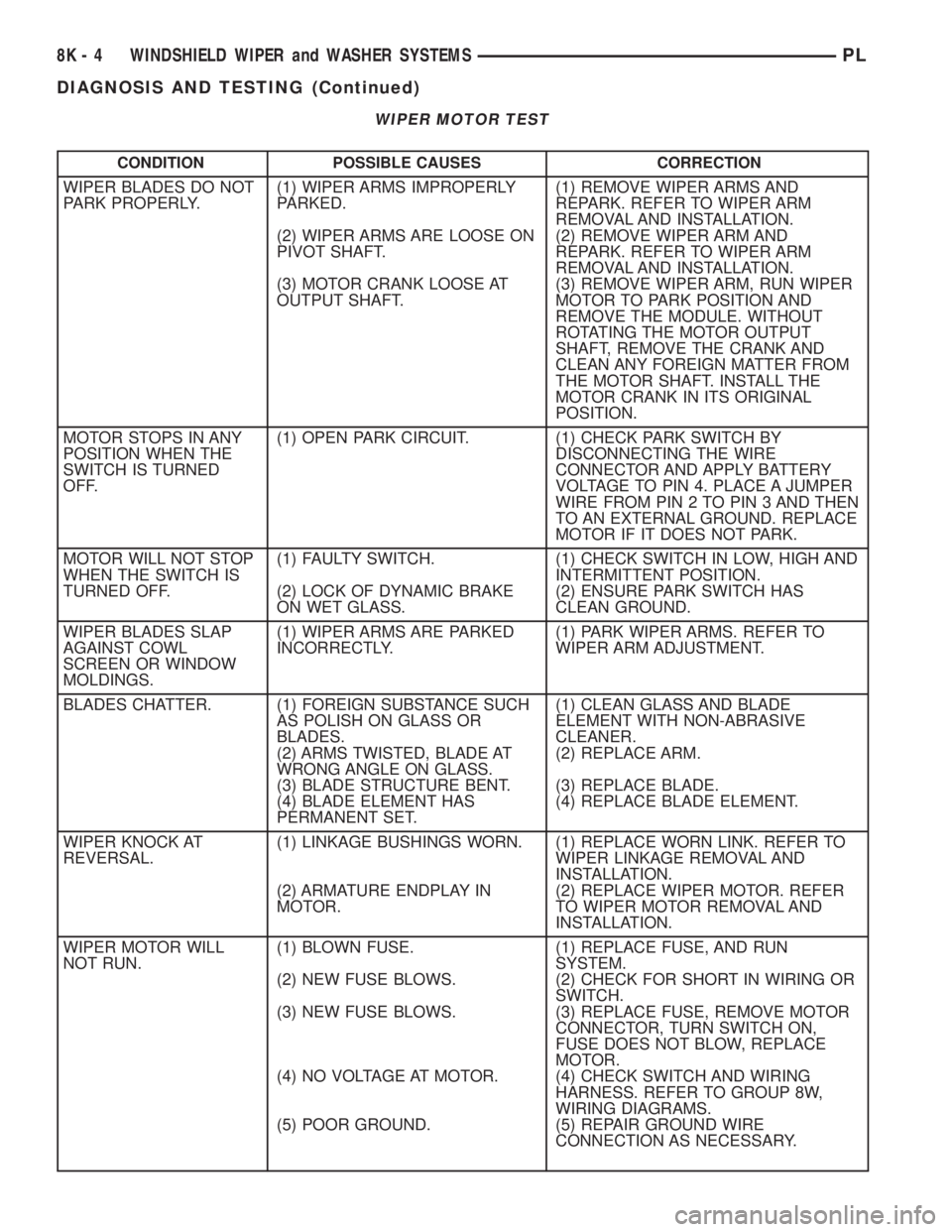
WIPER MOTOR TEST
CONDITION POSSIBLE CAUSES CORRECTION
WIPER BLADES DO NOT
PARK PROPERLY.(1) WIPER ARMS IMPROPERLY
PARKED.
(2) WIPER ARMS ARE LOOSE ON
PIVOT SHAFT.
(3) MOTOR CRANK LOOSE AT
OUTPUT SHAFT.(1) REMOVE WIPER ARMS AND
REPARK. REFER TO WIPER ARM
REMOVAL AND INSTALLATION.
(2) REMOVE WIPER ARM AND
REPARK. REFER TO WIPER ARM
REMOVAL AND INSTALLATION.
(3) REMOVE WIPER ARM, RUN WIPER
MOTOR TO PARK POSITION AND
REMOVE THE MODULE. WITHOUT
ROTATING THE MOTOR OUTPUT
SHAFT, REMOVE THE CRANK AND
CLEAN ANY FOREIGN MATTER FROM
THE MOTOR SHAFT. INSTALL THE
MOTOR CRANK IN ITS ORIGINAL
POSITION.
MOTOR STOPS IN ANY
POSITION WHEN THE
SWITCH IS TURNED
OFF.(1) OPEN PARK CIRCUIT. (1) CHECK PARK SWITCH BY
DISCONNECTING THE WIRE
CONNECTOR AND APPLY BATTERY
VOLTAGE TO PIN 4. PLACE A JUMPER
WIRE FROM PIN 2 TO PIN 3 AND THEN
TO AN EXTERNAL GROUND. REPLACE
MOTOR IF IT DOES NOT PARK.
MOTOR WILL NOT STOP
WHEN THE SWITCH IS
TURNED OFF.(1) FAULTY SWITCH.
(2) LOCK OF DYNAMIC BRAKE
ON WET GLASS.(1) CHECK SWITCH IN LOW, HIGH AND
INTERMITTENT POSITION.
(2) ENSURE PARK SWITCH HAS
CLEAN GROUND.
WIPER BLADES SLAP
AGAINST COWL
SCREEN OR WINDOW
MOLDINGS.(1) WIPER ARMS ARE PARKED
INCORRECTLY.(1) PARK WIPER ARMS. REFER TO
WIPER ARM ADJUSTMENT.
BLADES CHATTER. (1) FOREIGN SUBSTANCE SUCH
AS POLISH ON GLASS OR
BLADES.
(2) ARMS TWISTED, BLADE AT
WRONG ANGLE ON GLASS.
(3) BLADE STRUCTURE BENT.
(4) BLADE ELEMENT HAS
PERMANENT SET.(1) CLEAN GLASS AND BLADE
ELEMENT WITH NON-ABRASIVE
CLEANER.
(2) REPLACE ARM.
(3) REPLACE BLADE.
(4) REPLACE BLADE ELEMENT.
WIPER KNOCK AT
REVERSAL.(1) LINKAGE BUSHINGS WORN.
(2) ARMATURE ENDPLAY IN
MOTOR.(1) REPLACE WORN LINK. REFER TO
WIPER LINKAGE REMOVAL AND
INSTALLATION.
(2) REPLACE WIPER MOTOR. REFER
TO WIPER MOTOR REMOVAL AND
INSTALLATION.
WIPER MOTOR WILL
NOT RUN.(1) BLOWN FUSE.
(2) NEW FUSE BLOWS.
(3) NEW FUSE BLOWS.
(4) NO VOLTAGE AT MOTOR.
(5) POOR GROUND.(1) REPLACE FUSE, AND RUN
SYSTEM.
(2) CHECK FOR SHORT IN WIRING OR
SWITCH.
(3) REPLACE FUSE, REMOVE MOTOR
CONNECTOR, TURN SWITCH ON,
FUSE DOES NOT BLOW, REPLACE
MOTOR.
(4) CHECK SWITCH AND WIRING
HARNESS. REFER TO GROUP 8W,
WIRING DIAGRAMS.
(5) REPAIR GROUND WIRE
CONNECTION AS NECESSARY.
8K - 4 WINDSHIELD WIPER and WASHER SYSTEMSPL
DIAGNOSIS AND TESTING (Continued)
Page 308 of 1285
LAMPS
TABLE OF CONTENTS
page page
LAMP DIAGNOSIS......................... 1
HEADLAMP ALIGNMENT.................... 4
LAMP BULB SERVICE...................... 7LAMP SERVICE........................... 12
LAMP SYSTEMS.......................... 16
BULB APPLICATION....................... 17
LAMP DIAGNOSIS
TABLE OF CONTENTS
page page
DESCRIPTION AND OPERATION
DIAGNOSTIC PROCEDURES................1
SAFETY PRECAUTIONS....................1
DAYTIME RUNNING LAMP MODULE...........1DIAGNOSIS AND TESTING
HEADLAMP DIAGNOSIS....................1
FOG LAMP..............................3
DESCRIPTION AND OPERATION
DIAGNOSTIC PROCEDURES
When a vehicle experiences problems with the
headlamp system, verify the condition of the battery
connections, fuses, charging system, headlamp bulbs,
wire connectors, relay, high beam switch, dimmer
switch, and headlamp switch. Refer to Group 8W,
Wiring Diagrams for component locations and circuit
information.
SAFETY PRECAUTIONS
WARNING: EYE PROTECTION SHOULD BE USED
WHEN SERVICING GLASS COMPONENTS. PER-
SONAL INJURY CAN RESULT.
CAUTION: Do not touch the glass of halogen bulbs
with fingers or other possibly oily surface, reduced
bulb life will result.
Do not use bulbs with higher candle power than
indicated in the Bulb Application table at the end of
this group. Damage to lamp and/or Daytime Run-
ning Lamp Module can result.
Do not use fuses, circuit breakers or relays hav-
ing greater amperage value than indicated on the
fuse panel or in the Owners Manual.When it is necessary to remove components to ser-
vice another, it should not be necessary to apply
excessive force or bend a component to remove it.
Before damaging a trim component, verify hidden
fasteners or captured edges are not holding the com-
ponent in place.
DAYTIME RUNNING LAMP MODULE
PL vehicles built for use in Canada are equipped
with a Daytime Running Lamp (DRL) system. Turn
signal lamp circuitry always comes from the multi-
function switch, and goes to the cluster connector,
into the cluster, then back out to the front turn sig-
nal switch lamps. The Canadian cluster provides
steady illumination of the front turn signal when the
ignition switch is in the ON position. The DRL func-
tion may be inhibited by activating the turn signals,
the hazard flashers, the headlamp switch, or park
brake.
DIAGNOSIS AND TESTING
HEADLAMP DIAGNOSIS
Always begin any diagnosis by testing all of the
fuses and circuit breakers in the system. Refer to
Group 8W, Wiring Diagrams.
Conventional and halogen headlamps are inter-
changeable. It is recommended that they not be
intermixed on a given vehicle.
PLLAMPS 8L - 1
Page 337 of 1285
LAMP SERVICE
TABLE OF CONTENTS
page page
GENERAL INFORMATION
HEADLAMP SWITCH......................12
HEADLAMP LEVELING SWITCH.............12
HEADLAMP DIMMER SWITCH...............12
REMOVAL AND INSTALLATION
CENTER HIGH MOUNTED STOP LAMP
(CHMSL)..............................12HEADLAMP MODULE.....................12
HEADLAMP LEVELING MOTOR..............14
FRONT FOG LAMP.......................15
REAR LICENSE PLATE LAMPS..............15
REAR FOG LAMP........................15
SIDE REPEATER LAMP....................17
TAIL, STOP AND TURN SIGNAL LAMP........18
GENERAL INFORMATION
HEADLAMP SWITCH
Service procedures for the headlamp switch can be
found in Group 8E, Instrument Panel and Gauges.
More information can be found in Group 8W, Wiring
Diagrams.
HEADLAMP LEVELING SWITCH
Service procedures for the headlamp leveling
switch can be found in Group 8E, Instrument Panel
Systems. More information can be found in Group
8W, Wiring Diagrams.
HEADLAMP DIMMER SWITCH
The headlamp dimmer switch is incorporated into
the multi-function (turn signal) switch. Proper proce-
dures can be found in Group 8J, Turn Signal and
Flashers. More information can be found in Group
8W, Wiring Diagrams.
REMOVAL AND INSTALLATION
CENTER HIGH MOUNTED STOP LAMP
(CHMSL)
REMOVAL
(1) Open the trunklid
(2) Remove the CHMSL lamp socket from the
lamp assembly (Fig. 1). Rotate and pull the socket
straight from the CHMSL lamp.
(3) Remove the (2) CHMSL lamp retaining nuts
(Fig. 1) and remove the lamp from the trunklid.
INSTALLATION
(1) Position the CHMSL lamp on the mounting
studs and install the (2) retaining nuts (Fig. 2).
Torque the nuts to 12 N´m (106 in. lbs.).(2) Install the CHMSL lamp socket in the lamp
assembly (Fig. 2).
(3) Close the trunklid and verify lamp operation.
HEADLAMP MODULE
REMOVAL
(1) Open the hood and disconnect the negative bat-
tery cable.
(2) Remove the (2) headlamp module retaining
screws (Fig. 3).
(3) Remove the upper front fascia retaining screw
(Fig. 3).
Fig. 1 Center High Mounted Stop Lamp
1 ± C. H. M. S. L. LAMP RETAINING NUTS
2 ± C. H. M. S. L. LAMP ELECTRICAL CONNECTOR
3 ± TRUNK LID
4 ± C. H. M. S. L. LAMP
8L - 12 LAMPSPL
Page 357 of 1285
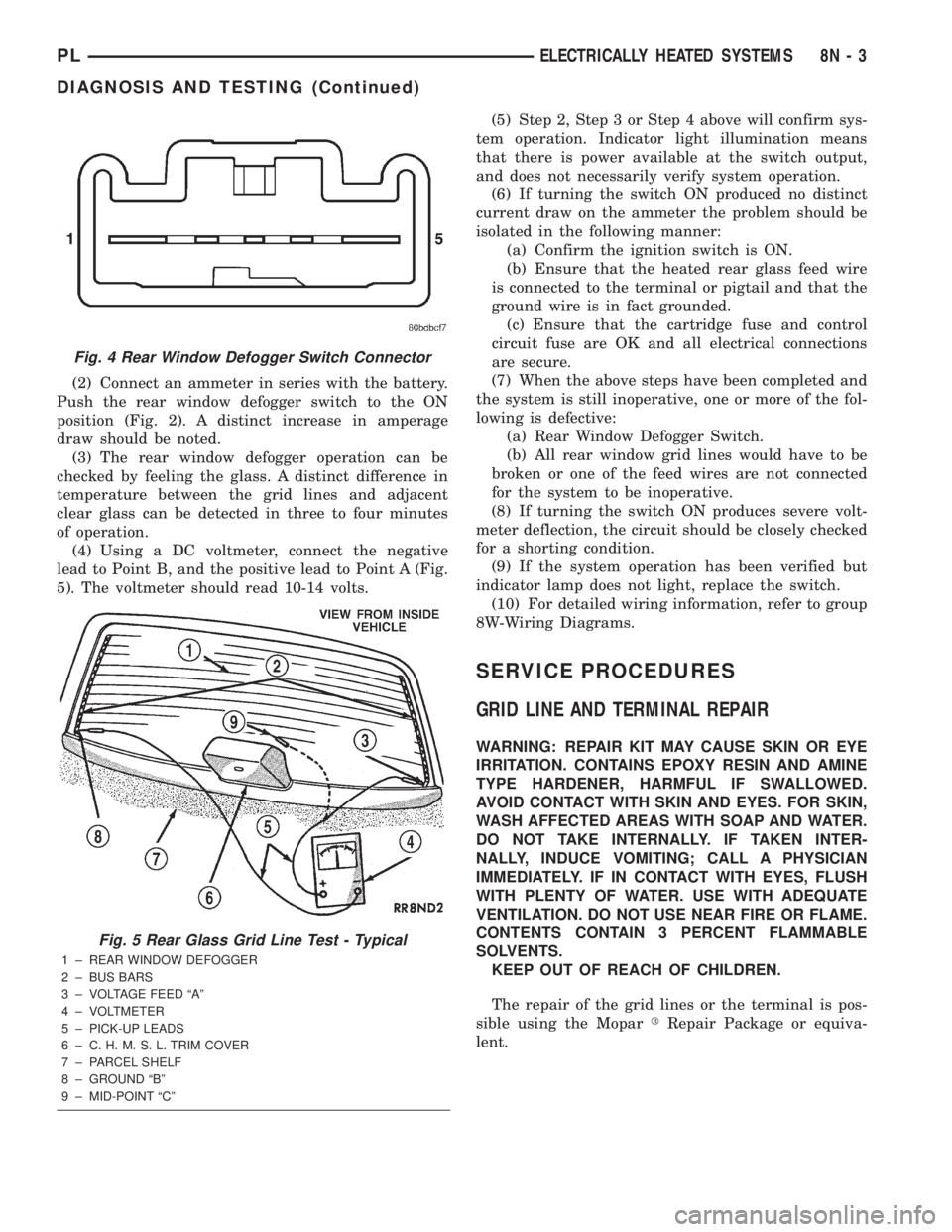
DIAGNOSIS AND TESTING
GRID LINES
The horizontal grid lines and vertical bus bar lines
printed and fired on the inside surface of rear win-
dow glass (Fig. 5) comprise an electrical parallel cir-
cuit. The electrically conductive lines are composed of
a silver-ceramic material which when fired on glass
becomes bonded to the glass and is highly resistant
to abrasion. It is possible however, that a break may
occur in an individual grid line resulting in no cur-
rent flow through the line. To detect breaks in grid
lines the following procedure is required:
(1) Turn ignition ON and turn control switch to
ON. The LED should come on.
(2) Using a DC voltmeter with 0-15 volt range,
contact terminal (B) with the negative lead of the
voltmeter. With the positive lead of the voltmeter,
contact terminal (A) (Fig. 5). The voltmeter should
read 10-14 volts. A lower voltage reading indicates a
poor connection in the feed or the ground circuit.
(3) With the negative lead of the voltmeter, contact
a good body ground point. The voltage reading should
not change.
(4) Connect the negative lead of the voltmeter to
terminal (B) and touch each grid line at Mid-Point
with the positive lead. A reading of:
²Approximately 6 volts indicates the line is OK.
²0 volts indicates a break in line between Mid-
Point (C) and terminal (A).
²10-14 volts indicates a break between Mid-Point
(C) and terminal (B).
Move the lead toward the break and voltage will
change as soon as the break is crossed. Refer to (Fig.
5).
REAR WINDOW DEFOGGER SWITCH
The rear window defogger switch may be tested in
the vehicle or out of the vehicle, on the bench.
IN-VEHICLE TESTING
(1) Remove the switch from the instrument panel
but leave the switch connected, refer to Group 8E-In-
strument Panel and Systems, Auxiliary Switch Bezel
Removal and Installation.
(2) Turn the ignition switch ON.
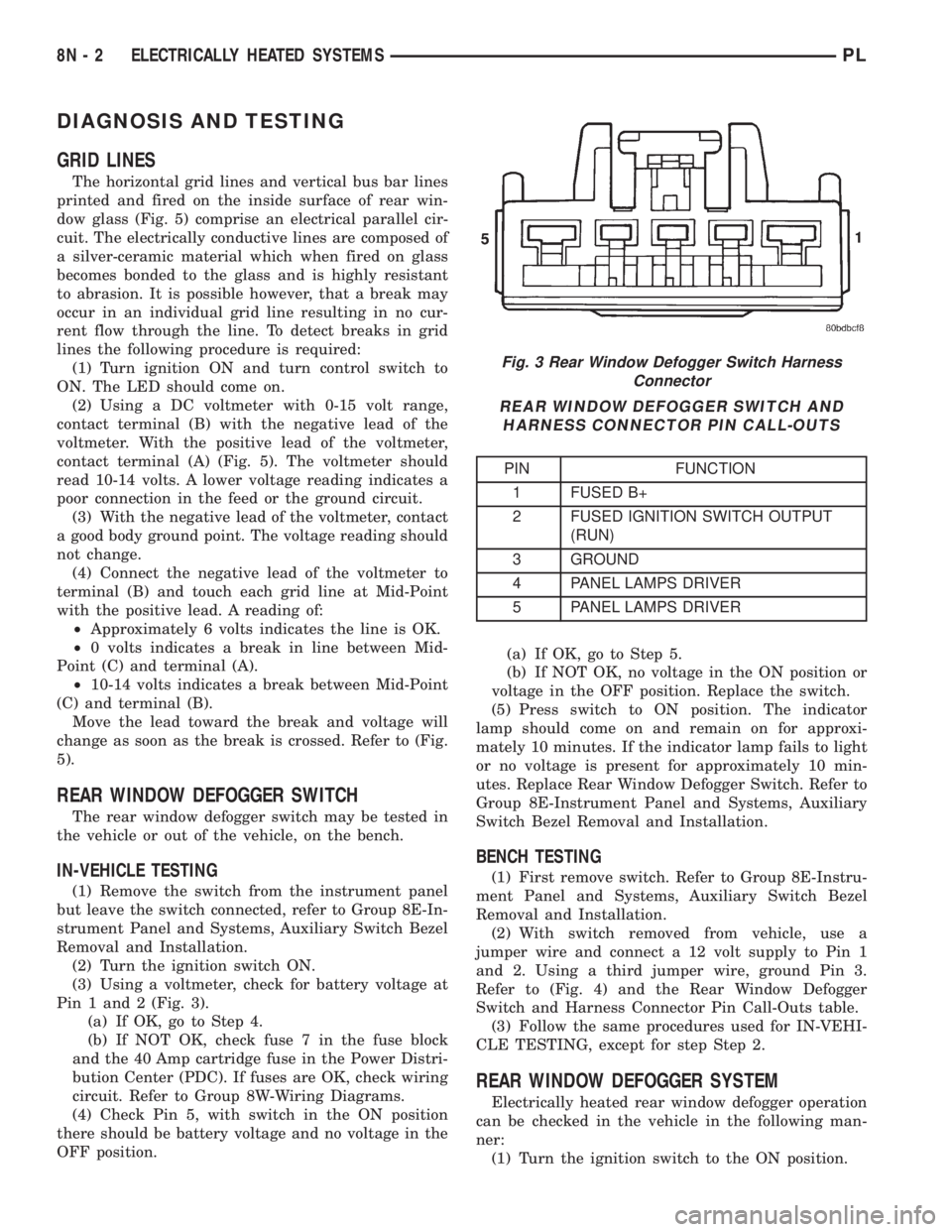
(3) Using a voltmeter, check for battery voltage at
Pin 1 and 2 (Fig. 3).
(a) If OK, go to Step 4.
(b) If NOT OK, check fuse 7 in the fuse block
and the 40 Amp cartridge fuse in the Power Distri-
bution Center (PDC). If fuses are OK, check wiring
circuit. Refer to Group 8W-Wiring Diagrams.
(4) Check Pin 5, with switch in the ON position
there should be battery voltage and no voltage in the
OFF position.(a) If OK, go to Step 5.
(b) If NOT OK, no voltage in the ON position or
voltage in the OFF position. Replace the switch.
(5) Press switch to ON position. The indicator
lamp should come on and remain on for approxi-
mately 10 minutes. If the indicator lamp fails to light
or no voltage is present for approximately 10 min-
utes. Replace Rear Window Defogger Switch. Refer to
Group 8E-Instrument Panel and Systems, Auxiliary
Switch Bezel Removal and Installation.
BENCH TESTING
(1) First remove switch. Refer to Group 8E-Instru-
ment Panel and Systems, Auxiliary Switch Bezel
Removal and Installation.
(2) With switch removed from vehicle, use a
jumper wire and connect a 12 volt supply to Pin 1
and 2. Using a third jumper wire, ground Pin 3.
Refer to (Fig. 4) and the Rear Window Defogger
Switch and Harness Connector Pin Call-Outs table.
(3) Follow the same procedures used for IN-VEHI-
CLE TESTING, except for step Step 2.
REAR WINDOW DEFOGGER SYSTEM
Electrically heated rear window defogger operation
can be checked in the vehicle in the following man-
ner:
(1) Turn the ignition switch to the ON position.
Fig. 3 Rear Window Defogger Switch Harness
Connector
REAR WINDOW DEFOGGER SWITCH AND
HARNESS CONNECTOR PIN CALL-OUTS
PIN FUNCTION
1 FUSED B+
2 FUSED IGNITION SWITCH OUTPUT
(RUN)
3 GROUND
4 PANEL LAMPS DRIVER
5 PANEL LAMPS DRIVER
8N - 2 ELECTRICALLY HEATED SYSTEMSPL
Page 358 of 1285
(2) Connect an ammeter in series with the battery.
Push the rear window defogger switch to the ON
position (Fig. 2). A distinct increase in amperage
draw should be noted.
(3) The rear window defogger operation can be
checked by feeling the glass. A distinct difference in
temperature between the grid lines and adjacent
clear glass can be detected in three to four minutes
of operation.
(4) Using a DC voltmeter, connect the negative
lead to Point B, and the positive lead to Point A (Fig.
5). The voltmeter should read 10-14 volts.(5) Step 2, Step 3 or Step 4 above will confirm sys-
tem operation. Indicator light illumination means
that there is power available at the switch output,
and does not necessarily verify system operation.
(6) If turning the switch ON produced no distinct
current draw on the ammeter the problem should be
isolated in the following manner:
(a) Confirm the ignition switch is ON.
(b) Ensure that the heated rear glass feed wire
is connected to the terminal or pigtail and that the
ground wire is in fact grounded.
(c) Ensure that the cartridge fuse and control
circuit fuse are OK and all electrical connections
are secure.
(7) When the above steps have been completed and
the system is still inoperative, one or more of the fol-
lowing is defective:
(a) Rear Window Defogger Switch.
(b) All rear window grid lines would have to be
broken or one of the feed wires are not connected
for the system to be inoperative.
(8) If turning the switch ON produces severe volt-
meter deflection, the circuit should be closely checked
for a shorting condition.
(9) If the system operation has been verified but
indicator lamp does not light, replace the switch.
(10) For detailed wiring information, refer to group
8W-Wiring Diagrams.
SERVICE PROCEDURES
GRID LINE AND TERMINAL REPAIR
WARNING: REPAIR KIT MAY CAUSE SKIN OR EYE
IRRITATION. CONTAINS EPOXY RESIN AND AMINE
TYPE HARDENER, HARMFUL IF SWALLOWED.
AVOID CONTACT WITH SKIN AND EYES. FOR SKIN,
WASH AFFECTED AREAS WITH SOAP AND WATER.
DO NOT TAKE INTERNALLY. IF TAKEN INTER-
NALLY, INDUCE VOMITING; CALL A PHYSICIAN
IMMEDIATELY. IF IN CONTACT WITH EYES, FLUSH
WITH PLENTY OF WATER. USE WITH ADEQUATE
VENTILATION. DO NOT USE NEAR FIRE OR FLAME.
CONTENTS CONTAIN 3 PERCENT FLAMMABLE
SOLVENTS.
KEEP OUT OF REACH OF CHILDREN.
The repair of the grid lines or the terminal is pos-
sible using the MopartRepair Package or equiva-
lent.
Fig. 4 Rear Window Defogger Switch Connector
Fig. 5 Rear Glass Grid Line Test - Typical
1 ± REAR WINDOW DEFOGGER
2 ± BUS BARS
3 ± VOLTAGE FEED ªAº
4 ± VOLTMETER
5 ± PICK-UP LEADS
6 ± C. H. M. S. L. TRIM COVER
7 ± PARCEL SHELF
8 ± GROUND ªBº
9 ± MID-POINT ªCº
PLELECTRICALLY HEATED SYSTEMS 8N - 3
DIAGNOSIS AND TESTING (Continued)