steering wheel DODGE NEON 2000 Service Manual PDF
[x] Cancel search | Manufacturer: DODGE, Model Year: 2000, Model line: NEON, Model: DODGE NEON 2000Pages: 1285, PDF Size: 29.42 MB
Page 351 of 1285
(9) Do not connect the battery negative cable.
Refer to Diagnosis and Testing for Airbag System
Test procedures.
DRIVER AIRBAG MODULE
WARNING: DISCONNECT AND ISOLATE THE BAT-
TERY NEGATIVE (GROUND) CABLE BEFORE
BEGINNING ANY AIRBAG SYSTEM COMPONENT
REMOVAL OR INSTALLATION PROCEDURE. THIS
WILL DISABLE THE AIRBAG SYSTEM. FAILURE TO
DISCONNECT BATTERY COULD RESULT IN ACCI-
DENTAL AIRBAG DEPLOYMENT AND POSSIBLE
PERSONAL INJURY.
ALLOW SYSTEM CAPACITOR TO DISCHARGE
FOR 1 MINUTE BEFORE REMOVING ANY AIRBAG
COMPONENTS.
REMOVAL
When removing a deployed module, rubber gloves,
eye protection and long sleeved shirt should be worn,
as there may be deposits on the surface which could
irritate the skin and eyes.
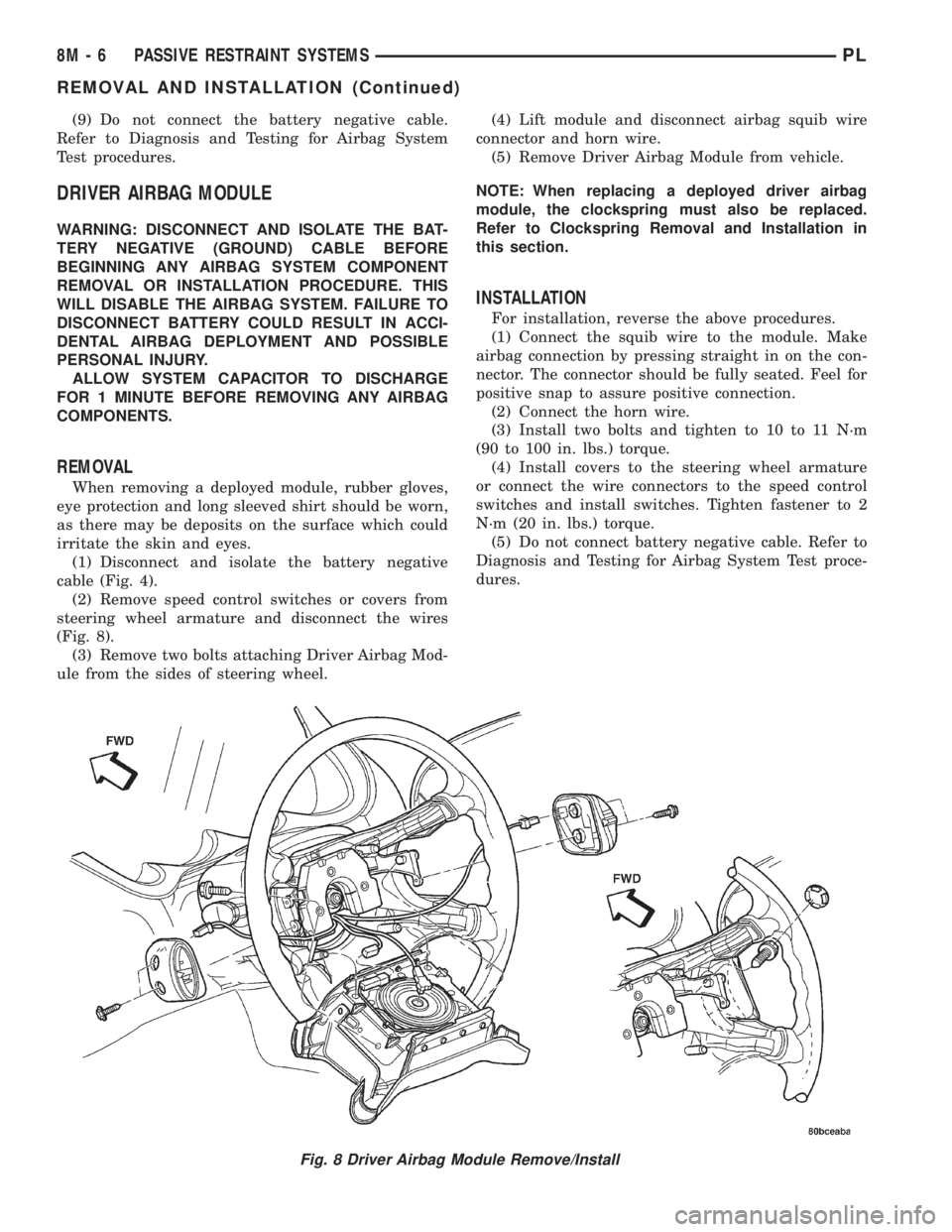
(1) Disconnect and isolate the battery negative
cable (Fig. 4).
(2) Remove speed control switches or covers from
steering wheel armature and disconnect the wires
(Fig. 8).
(3) Remove two bolts attaching Driver Airbag Mod-
ule from the sides of steering wheel.(4) Lift module and disconnect airbag squib wire
connector and horn wire.
(5) Remove Driver Airbag Module from vehicle.
NOTE: When replacing a deployed driver airbag
module, the clockspring must also be replaced.
Refer to Clockspring Removal and Installation in
this section.
INSTALLATION
For installation, reverse the above procedures.
(1) Connect the squib wire to the module. Make
airbag connection by pressing straight in on the con-
nector. The connector should be fully seated. Feel for
positive snap to assure positive connection.
(2) Connect the horn wire.
(3) Install two bolts and tighten to 10 to 11 N´m
(90 to 100 in. lbs.) torque.
(4) Install covers to the steering wheel armature
or connect the wire connectors to the speed control
switches and install switches. Tighten fastener to 2
N´m (20 in. lbs.) torque.
(5) Do not connect battery negative cable. Refer to
Diagnosis and Testing for Airbag System Test proce-
dures.
Fig. 8 Driver Airbag Module Remove/Install
8M - 6 PASSIVE RESTRAINT SYSTEMSPL
REMOVAL AND INSTALLATION (Continued)
Page 353 of 1285
INSTALLATION
For installation, reverse the above procedures.
Ensure that the red locking tab is in the lock position
after installing the connector. Tighten trim screws to
2 N´m (20 in. lbs.) torque. Tighten the three module
retaining nuts to 22 to 34 N´m (200 to 300 in. lbs.)
torque. Do not connect battery negative cable. Refer
to Diagnosis and Testing for Airbag System Test pro-
cedures.
DEPLOYED MODULE
REMOVAL
When removing a deployed module, rubber gloves,
eye protection, and a long-sleeved shirt should be
worn, as there may be deposits on the surface which
could irritate the skin and eyes.
(1) Roll/fold airbag towards instrument panel.
(2) Close door over folded airbag and tape door
closed.
(3) Disconnect and isolate the battery negative
cable (Fig. 4).
(4) Remove instrument panel top cover. Refer to
Group 8E Instrument Panel Systems, Instrument
Panel Top Cover Removal and Installation.
(5) Remove three screws to glove box door and
remove door from instrument panel.
(6) Remove three passenger airbag cover screws
attaching cover to top of instrument panel (Fig. 9).
(7) Remove two passenger airbag cover screws
attaching cover to front lower instrument panel.
(8) Remove three module attaching nuts from the
support structure.
(9) Lift module up until the wire connector is visi-
ble and disconnect the 4-way wire connector from
module. Unlock the red locking tab and compress
lock to release the connector (Fig. 10).
INSTALLATION
For installation, reverse the above procedures.
Ensure that the red locking tab is in the lock position
after installing the connector. Tighten trim screws to
2 N´m (20 in. lbs.) torque. Tighten the module nuts to
22 to 34 N´m (200 to 300 in. lbs.) torque. Do not con-
nect battery negative cable. Refer to Diagnosis and
Testing for Airbag System Test procedures.
STEERING WHEEL
WARNING: DISCONNECT AND ISOLATE THE BAT-
TERY NEGATIVE (GROUND) CABLE BEFORE
BEGINNING ANY AIRBAG SYSTEM COMPONENT
REMOVAL OR INSTALLATION PROCEDURE. THIS
WILL DISABLE THE AIRBAG SYSTEM. FAILURE TO
DISCONNECT BATTERY COULD RESULT IN ACCI-DENTAL AIRBAG DEPLOYMENT AND POSSIBLE
PERSONAL INJURY.
ALLOW SYSTEM CAPACITOR TO DISCHARGE
FOR 1 MINUTE BEFORE REMOVING ANY AIRBAG
COMPONENTS.
REMOVAL
(1) Adjust the steering wheel so that the tires are
in the straight ahead position. Then:
(a) Rotate the steering wheel half turn (180
degrees) to the right (clockwise).
(b) Lock column with the ignition cylinder lock.
(2) Disconnect and isolate the battery negative
cable (Fig. 4).
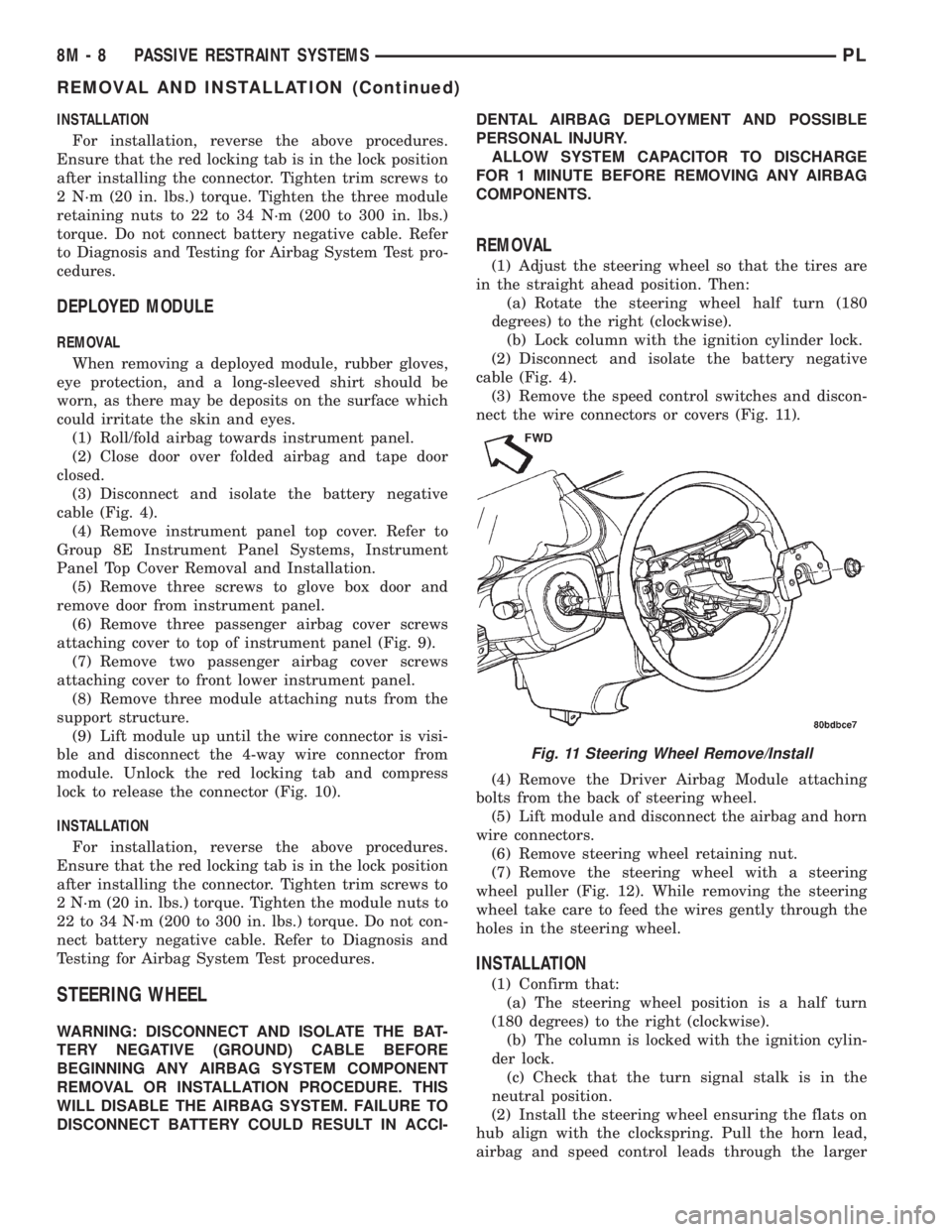
(3) Remove the speed control switches and discon-
nect the wire connectors or covers (Fig. 11).
(4) Remove the Driver Airbag Module attaching
bolts from the back of steering wheel.
(5) Lift module and disconnect the airbag and horn
wire connectors.
(6) Remove steering wheel retaining nut.
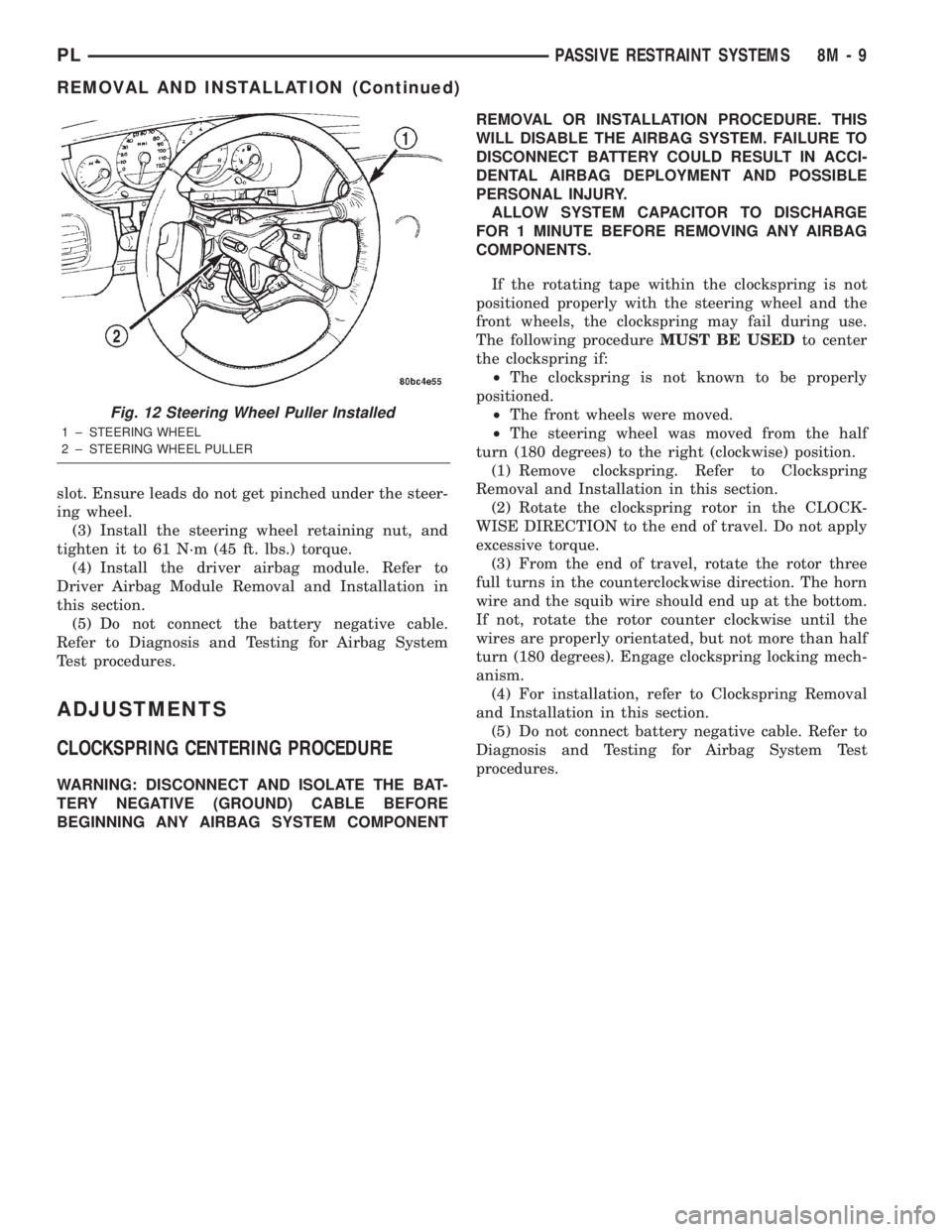
(7) Remove the steering wheel with a steering
wheel puller (Fig. 12). While removing the steering
wheel take care to feed the wires gently through the
holes in the steering wheel.
INSTALLATION
(1) Confirm that:
(a) The steering wheel position is a half turn
(180 degrees) to the right (clockwise).
(b) The column is locked with the ignition cylin-
der lock.
(c) Check that the turn signal stalk is in the
neutral position.
(2) Install the steering wheel ensuring the flats on
hub align with the clockspring. Pull the horn lead,
airbag and speed control leads through the larger
Fig. 11 Steering Wheel Remove/Install
8M - 8 PASSIVE RESTRAINT SYSTEMSPL
REMOVAL AND INSTALLATION (Continued)
Page 354 of 1285
slot. Ensure leads do not get pinched under the steer-
ing wheel.
(3) Install the steering wheel retaining nut, and
tighten it to 61 N´m (45 ft. lbs.) torque.
(4) Install the driver airbag module. Refer to
Driver Airbag Module Removal and Installation in
this section.
(5) Do not connect the battery negative cable.
Refer to Diagnosis and Testing for Airbag System
Test procedures.
ADJUSTMENTS
CLOCKSPRING CENTERING PROCEDURE
WARNING: DISCONNECT AND ISOLATE THE BAT-
TERY NEGATIVE (GROUND) CABLE BEFORE
BEGINNING ANY AIRBAG SYSTEM COMPONENTREMOVAL OR INSTALLATION PROCEDURE. THIS
WILL DISABLE THE AIRBAG SYSTEM. FAILURE TO
DISCONNECT BATTERY COULD RESULT IN ACCI-
DENTAL AIRBAG DEPLOYMENT AND POSSIBLE
PERSONAL INJURY.
ALLOW SYSTEM CAPACITOR TO DISCHARGE
FOR 1 MINUTE BEFORE REMOVING ANY AIRBAG
COMPONENTS.
If the rotating tape within the clockspring is not
positioned properly with the steering wheel and the
front wheels, the clockspring may fail during use.
The following procedureMUST BE USEDto center
the clockspring if:
²The clockspring is not known to be properly
positioned.
²The front wheels were moved.
²The steering wheel was moved from the half
turn (180 degrees) to the right (clockwise) position.
(1) Remove clockspring. Refer to Clockspring
Removal and Installation in this section.
(2) Rotate the clockspring rotor in the CLOCK-
WISE DIRECTION to the end of travel. Do not apply
excessive torque.
(3) From the end of travel, rotate the rotor three
full turns in the counterclockwise direction. The horn
wire and the squib wire should end up at the bottom.
If not, rotate the rotor counter clockwise until the
wires are properly orientated, but not more than half
turn (180 degrees). Engage clockspring locking mech-
anism.
(4) For installation, refer to Clockspring Removal
and Installation in this section.
(5) Do not connect battery negative cable. Refer to
Diagnosis and Testing for Airbag System Test
procedures.
Fig. 12 Steering Wheel Puller Installed
1 ± STEERING WHEEL
2 ± STEERING WHEEL PULLER
PLPASSIVE RESTRAINT SYSTEMS 8M - 9
REMOVAL AND INSTALLATION (Continued)
Page 361 of 1285
The fusible link, fuses and relays are available for
service replacement. The PDC unit cannot be
repaired and is only serviced as a unit with the
engine compartment wire harness. If the PDC is
faulty or damaged, the engine compartment wire har-
ness assembly must be replaced.
FUSE BLOCK
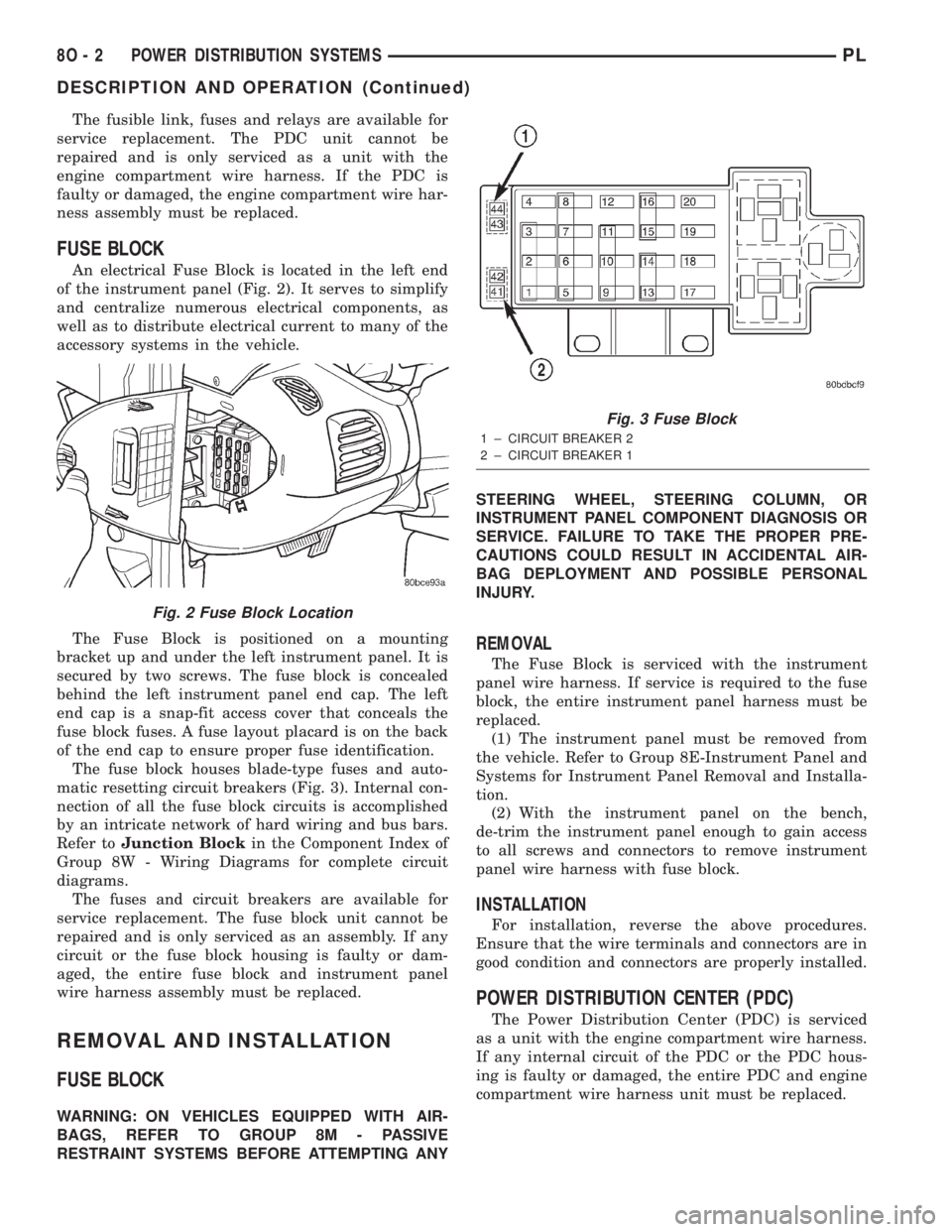
An electrical Fuse Block is located in the left end
of the instrument panel (Fig. 2). It serves to simplify
and centralize numerous electrical components, as
well as to distribute electrical current to many of the
accessory systems in the vehicle.
The Fuse Block is positioned on a mounting
bracket up and under the left instrument panel. It is
secured by two screws. The fuse block is concealed
behind the left instrument panel end cap. The left
end cap is a snap-fit access cover that conceals the
fuse block fuses. A fuse layout placard is on the back
of the end cap to ensure proper fuse identification.
The fuse block houses blade-type fuses and auto-
matic resetting circuit breakers (Fig. 3). Internal con-
nection of all the fuse block circuits is accomplished
by an intricate network of hard wiring and bus bars.
Refer toJunction Blockin the Component Index of
Group 8W - Wiring Diagrams for complete circuit
diagrams.
The fuses and circuit breakers are available for
service replacement. The fuse block unit cannot be
repaired and is only serviced as an assembly. If any
circuit or the fuse block housing is faulty or dam-
aged, the entire fuse block and instrument panel
wire harness assembly must be replaced.
REMOVAL AND INSTALLATION
FUSE BLOCK
WARNING: ON VEHICLES EQUIPPED WITH AIR-
BAGS, REFER TO GROUP 8M - PASSIVE
RESTRAINT SYSTEMS BEFORE ATTEMPTING ANYSTEERING WHEEL, STEERING COLUMN, OR
INSTRUMENT PANEL COMPONENT DIAGNOSIS OR
SERVICE. FAILURE TO TAKE THE PROPER PRE-
CAUTIONS COULD RESULT IN ACCIDENTAL AIR-
BAG DEPLOYMENT AND POSSIBLE PERSONAL
INJURY.
REMOVAL
The Fuse Block is serviced with the instrument
panel wire harness. If service is required to the fuse
block, the entire instrument panel harness must be
replaced.
(1) The instrument panel must be removed from
the vehicle. Refer to Group 8E-Instrument Panel and
Systems for Instrument Panel Removal and Installa-
tion.
(2) With the instrument panel on the bench,
de-trim the instrument panel enough to gain access
to all screws and connectors to remove instrument
panel wire harness with fuse block.
INSTALLATION
For installation, reverse the above procedures.
Ensure that the wire terminals and connectors are in
good condition and connectors are properly installed.
POWER DISTRIBUTION CENTER (PDC)
The Power Distribution Center (PDC) is serviced
as a unit with the engine compartment wire harness.
If any internal circuit of the PDC or the PDC hous-
ing is faulty or damaged, the entire PDC and engine
compartment wire harness unit must be replaced.
Fig. 2 Fuse Block Location
Fig. 3 Fuse Block
1 ± CIRCUIT BREAKER 2
2 ± CIRCUIT BREAKER 1
8O - 2 POWER DISTRIBUTION SYSTEMSPL
DESCRIPTION AND OPERATION (Continued)
Page 375 of 1285
memory to determine whether a valid key is in the
ignition lock cylinder.
The Sentry Key transponder cannot be repaired
and, if faulty or damaged, it must be replaced.
SENTRY KEY IMMOBILIZER SYSTEM
INDICATOR LAMP
The Sentry Key Immobilizer System (SKIS) uses
the Vehicle Theft Security System (VTSS) indicator
LED to give an indication when the SKIS is faulty or
when the vehicle has been immobilized due to the
use of an invalid ignition key. The LED is controlled
by the instrument cluster circuitry based upon mes-
sages received from the Sentry Key Immobilizer
Module (SKIM) through the Body Control Module
(BCM) on the Programmable Communication Inter-
face (PCI) bus.
The SKIM sends messages to the instrument clus-
ter, via the BCM, to turn the LED on for about three
seconds when the ignition switch is turned to the ON
position as a bulb test. After completion of the bulb
test, the SKIM sends PCI bus messages to keep the
LED off for a duration of about one second. Then the
SKIM sends messages to the instrument cluster cir-
cuitry to turn the LED on or off based upon the
results of the SKIS self-tests. If the VTSS indicator
LED comes on and stays on after the bulb test, it
indicates that the SKIM has detected a system mal-
function and/or that the SKIS has become inopera-
tive. If the SKIM detects an invalid key when the
ignition switch is turned to the ON position, it sends
messages to the instrument cluster to flash the VTSS
indicator LED.
The SKIM can also send messages to the instru-
ment cluster to flash the LED and to generate a sin-
gle audible chime tone. These functions serve as an
indication to the customer that the SKIS has been
placed in its ªCustomer Learnº programming mode.
See Sentry Key Immobilizer System Transponder
Programming in this group for more information on
the ªCustomer Learnº programming mode.
The VTSS indicator LED uses a replaceable Light
Emitting Diode (LED) on the instrument cluster elec-
tronic circuit board. Refer to Group 8E - Instrument
Panel Systems for Cluster Lamp Removal and Instal-
lation. If the VTSS indicator LED comes on and
stays on after the bulb test function, diagnosis of the
SKIS should be performed with a DRB IIItscan tool
and the proper Body Diagnostic Procedures Manual.
TRIGGERING THE VTSS
After the VTSS is armed, any of the following will
trigger the system:
²Opening any door.
²Opening the hood.
²Removing the trunk lock cylinder.²Turning the ignition to the RUN/START position
with an invalid Sentry Key.
NOTE: The ignition switch can be turned to the
accessory position without triggering the alarm sys-
tem.
DIAGNOSIS AND TESTING
SENTRY KEY IMMOBILIZER SYSTEM
WARNING: ON VEHICLES EQUIPPED WITH AIR-
BAGS, REFER TO GROUP 8M - PASSIVE
RESTRAINT SYSTEMS BEFORE ATTEMPTING ANY
STEERING WHEEL, STEERING COLUMN, OR
INSTRUMENT PANEL COMPONENT DIAGNOSIS OR
SERVICE. FAILURE TO TAKE THE PROPER PRE-
CAUTIONS COULD RESULT IN ACCIDENTAL AIR-
BAG DEPLOYMENT AND POSSIBLE PERSONAL
INJURY.
NOTE: The following tests may not prove conclu-
sive in the diagnosis of this system. The most reli-
able, efficient, and accurate means to diagnose the
Sentry Key Immobilizer System (SKIS) involves the
use of a DRB lllTscan tool and the proper Body
Diagnostic Procedures Manual.
The Sentry Key Immobilizer System (SKIS) and
the Programmable Communication Interface (PCI)
bus network should be diagnosed using a DRB lllt
scan tool. The DRB IIItwill allow confirmation that
the PCI bus is functional, that the Sentry Key Immo-
bilizer Module (SKIM) is placing the proper messages
on the PCI bus, and that the Powertrain Control
Module (PCM) and the instrument cluster are receiv-
ing the PCI bus messages. Refer to the proper Body
Diagnostic Procedures Manual. Refer to Group
8W-Wiring Diagrams for complete circuit descriptions
and diagrams.
(1) Check the fuses in the fuse block. If OK, go to
Step 2. If not OK, repair the shorted circuit or com-
ponent as required and replace the faulty fuse.
(2) Disconnect and isolate the battery negative
cable (Fig. 3). Unplug the wire harness connector at
the SKIM. Check for continuity between the ground
circuit cavity of the SKIM wire harness connector
and a good ground. There should be continuity. If
OK, go to Step 3. If not OK, repair the open circuit to
ground as required.
(3) Connect the battery negative cable. Check for
battery voltage at the fused B(+) circuit cavity of the
SKIM wire harness connector. If OK, go to Step 4. If
not OK, repair the open circuit to the fuse in the fuse
block as required.
8Q - 4 VEHICLE THEFT/SECURITY SYSTEMPL
DESCRIPTION AND OPERATION (Continued)
Page 378 of 1285
REMOVAL AND INSTALLATION
DOOR CYLINDER LOCK SWITCH
REMOVAL
(1) Refer to Group 23, Body for door trim and
water shield Removal and Installation.
(2) Remove illuminated entry switch wiring clip
and disconnect connector.
(3) Remove door cylinder lock switch from door
handle.
INSTALLATION
For installation reverse the above procedures.
HOOD AJAR SWITCH
REMOVAL
(1) Open hood.
(2) Disconnect and isolate the battery negative
remote cable (Fig. 3).
(3) Using a trim stick (special tool #C-4755) or
equivalent, gently pry switch up and out of mounting
bracket.
(4) Disconnect wire harness connector from hood
ajar switch.
(5) Remove switch from vehicle.
INSTALLATION
For installation reverse above procedures.
SENTRY KEY IMMOBILIZER MODULE (SKIM)
WARNING: ON VEHICLES EQUIPPED WITH AIR-
BAGS, REFER TO GROUP 8M - PASSIVE
RESTRAINT SYSTEMS BEFORE ATTEMPTING ANY
STEERING WHEEL, STEERING COLUMN, OR
INSTRUMENT PANEL COMPONENT DIAGNOSIS OR
SERVICE. FAILURE TO TAKE THE PROPER PRE-
CAUTIONS COULD RESULT IN ACCIDENTAL AIR-
BAG DEPLOYMENT AND POSSIBLE PERSONAL
INJURY.
REMOVAL
(1) Disconnect and isolate the battery negative
remote cable (Fig. 3).
(2) Remove Lower Instrument Panel Cover. Refer
to Group 8E-Instrument Panel and Systems, Lower
Instrument Panel Cover Removal and Installation.
(3) Remove the steering column upper and lower
shrouds. Refer to Group 8E-Inatrument Panel and
Systems, Steering Column Shroud Removal and
Installation.
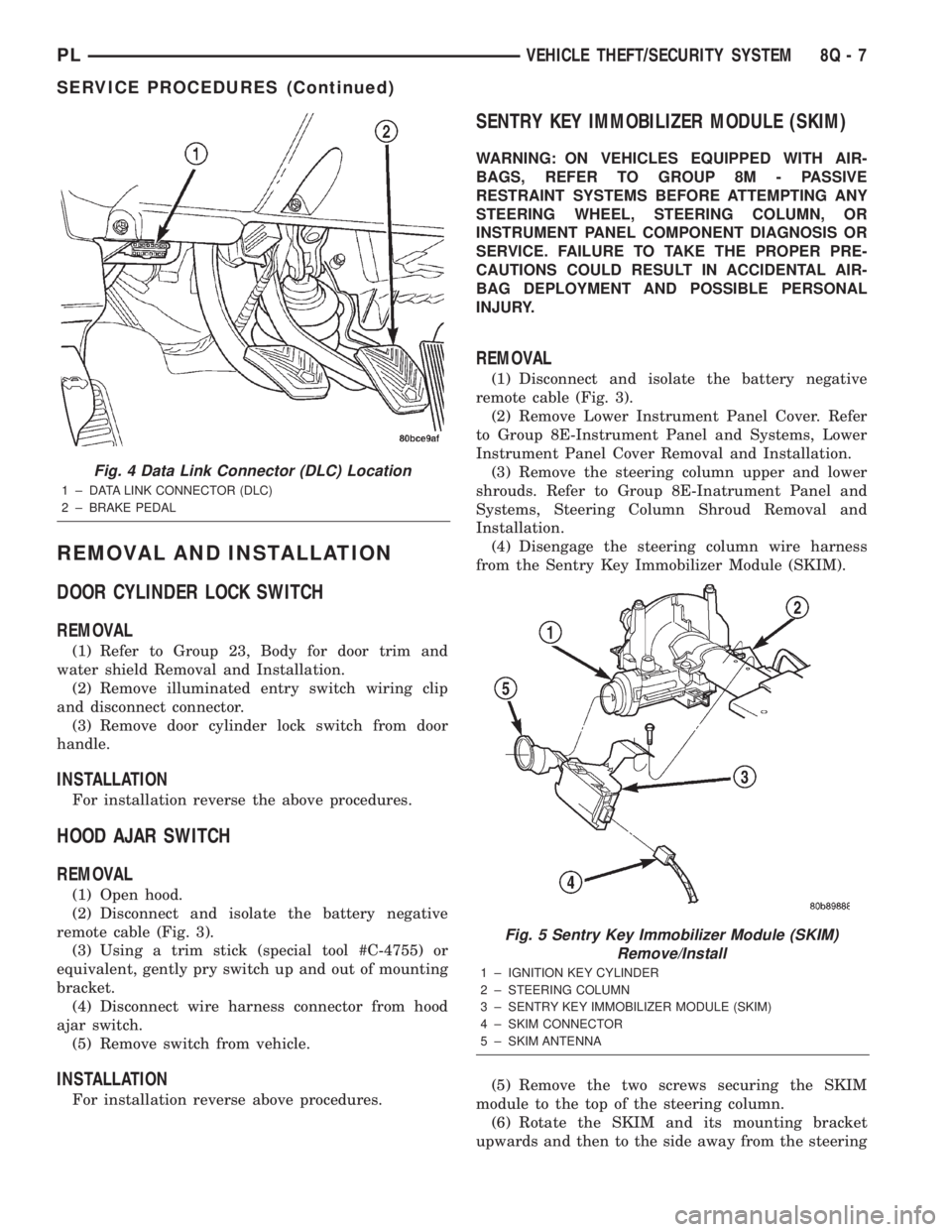
(4) Disengage the steering column wire harness
from the Sentry Key Immobilizer Module (SKIM).
(5) Remove the two screws securing the SKIM
module to the top of the steering column.
(6) Rotate the SKIM and its mounting bracket
upwards and then to the side away from the steering
Fig. 4 Data Link Connector (DLC) Location
1 ± DATA LINK CONNECTOR (DLC)
2 ± BRAKE PEDAL
Fig. 5 Sentry Key Immobilizer Module (SKIM)
Remove/Install
1 ± IGNITION KEY CYLINDER
2 ± STEERING COLUMN
3 ± SENTRY KEY IMMOBILIZER MODULE (SKIM)
4 ± SKIM CONNECTOR
5 ± SKIM ANTENNA
PLVEHICLE THEFT/SECURITY SYSTEM 8Q - 7
SERVICE PROCEDURES (Continued)
Page 390 of 1285
CHIME WARNING/REMINDER SYSTEM
TABLE OF CONTENTS
page page
DESCRIPTION AND OPERATION
INTRODUCTION..........................1
DIAGNOSIS AND TESTING
FASTEN SEAT BELTS......................1
HEADLAMPS LEFT ON.....................1
KEY LEFT IN IGNITION SWITCH.............1CHIME SYSTEM CONDITIONS...............1
REMOVAL AND INSTALLATION
CHIME..................................2
SEAT BELT BUCKLE.......................2
HEADLAMP SWITCH......................2
KEY-IN SWITCH..........................2
DESCRIPTION AND OPERATION
INTRODUCTION
WARNING: ON VEHICLES EQUIPPED WITH AN AIR-
BAG, REFER TO THE AIRBAG PORTION OF THIS
SECTION FOR STEERING WHEEL OR SWITCH
REMOVAL AND INSTALLATION PROCEDURES.
The seat belt reminder system uses both visual
and audible signals. A combined seat belt and key
reminder chime with a red light on the instrument
panel.
The system will always illuminate the seat belt
reminder lamp for four to eight seconds when the
ignition switch is turned to the ON position. The
CHIME will sound during the same time interval if
the driver's seat belt is not fastened. Passenger belts
are not connected to the system.
The chime will activate if the drivers door is
opened and:
²The key is in the ignition switch, with the igni-
tion switch in either the OFF or accessory (ACC)
position.
²The head lamps are ON.
The chime is integral to the instrument cluster.
DIAGNOSIS AND TESTING
FASTEN SEAT BELTS
To test the fasten seat belts function, turn the igni-
tion switch to the ON position with the driver's seat
belt unbuckled and fully retracted. The seat belt
warning lamp should light for four to eight seconds
and the tone should sound three to five times.
If the lamp does not light, check the connection at
the seat belt retractor and the LED in the instru-
ment cluster. Replace as necessary.
HEADLAMPS LEFT ON
These are the conditions that have to be met for
the headlamps on, chime function to work:
²Headlamps ON.
²Driver's door open.
²Key removed from the ignition switch.
Chime should sound until headlamps are turned
off or driver's door is closed.
If these conditions are met and there is still a
problem with the system, replace the instrument
cluster. Refer to Group 8E-Instrument Panel and
Systems, Instrument Cluster Removal and Installa-
tion.
KEY LEFT IN IGNITION SWITCH
To test the key left in ignition function, insert key
into the ignition and open the driver's door. Chime
should sound until key is removed from ignition or
driver's door is closed.
If these conditions are met and there is still a
problem with the system, replace the instrument
cluster. Refer to Group 8E-Instrument Panel and
Systems, Instrument Cluster Removal and Installa-
tion.
CHIME SYSTEM CONDITIONS
NO TONE WHEN IGNITION SWITCH IS TURNED ON
AND DRIVERS SEAT BELT IS UNBUCKLED
(1) Using an ohmmeter, with the seat belt fully
retracted, check for continuity to ground at Pin 25 of
the cluster harness connector. If OK, go to step 2. If
not OK, repair as necessary.
(2) Using voltmeter, check for battery feed at Pin
21 of the cluster harness connector. Check for igni-
tion feed at Pin 15 of the cluster harness connector.
If not OK, repair as necessary.
PLCHIME WARNING/REMINDER SYSTEM 8U - 1
Page 611 of 1285
Component Page
Fuel Pump Module..................8W-80-25
Generator.........................8W-80-25
Glove Box Lamp/Switch..............8W-80-25
Headlamp Leveling Switch............8W-80-25
High Note Horn....................8W-80-25
Hood Ajar Switch...................8W-80-26
Idle Air Control Motor................8W-80-26
Ignition Coil.......................8W-80-26
Ignition Switch.....................8W-80-26
Inlet Air Temperature Sensor..........8W-80-27
Instrument Cluster..................8W-80-27
Knock Sensor......................8W-80-27
Leak Detection Pump................8W-80-28
Left Back-Up Lamp..................8W-80-28
Left City Lamp.....................8W-80-28
Left Front Door Speaker..............8W-80-28
Left Front Fog Lamp..............8W-80-28, 29
Left Front Side Marker Lamp..........8W-80-29
Left Front Turn Signal Lamp..........8W-80-29
Left Front Wheel Speed Sensor.........8W-80-29
Left Headlamp...................8W-80-29, 30
Left Headlamp Leveling Motor.........8W-80-30
Left Instrument Panel Speaker.........8W-80-30
Left License Lamp..................8W-80-30
Left Park/Turn Signal Lamp...........8W-80-30
Left Rear Door Lock Motor............8W-80-31Component Page
Left Rear Fog Lamp.................8W-80-31
Left Rear Speaker...................8W-80-31
Left Rear Turn Signal Lamp...........8W-80-31
Left Rear Wheel Speed Sensor.........8W-80-31
Left Repeater Lamp.................8W-80-32
Left Tail/Stop Lamp.................8W-80-32
Left Tail/Stop/Turn Signal Lamp........8W-80-32
License Lamp......................8W-80-32
Low Note Horn.....................8W-80-32
Manifold Absolute Pressure Sensor......8W-80-33
Map/Reading Lamps.................8W-80-33
Multi-Function Switch...............8W-80-33
Oxygen Sensor 1/1 Upstream..........8W-80-34
Oxygen Sensor 1/2 Downstream........8W-80-34
Park/Neutral Position Switch..........8W-80-34
Passenger Airbag...................8W-80-34
Passenger Cylinder Lock Switch........8W-80-34
Passenger Door Lock Motor...........8W-80-34
Passenger Door Lock Switch...........8W-80-35
Passenger Power Mirror..............8W-80-35
Passenger Power Window Motor........8W-80-35
Passenger Power Window Switch.......8W-80-35
Power Mirror Switch.................8W-80-36
Power Steering Pressure Switch........8W-80-36
Powertrain Control Module - C1........8W-80-37
Powertrain Control Module - C2........8W-80-38
8W - 80 - 2 8W - 80 CONNECTOR PIN-OUTSPL
Page 659 of 1285
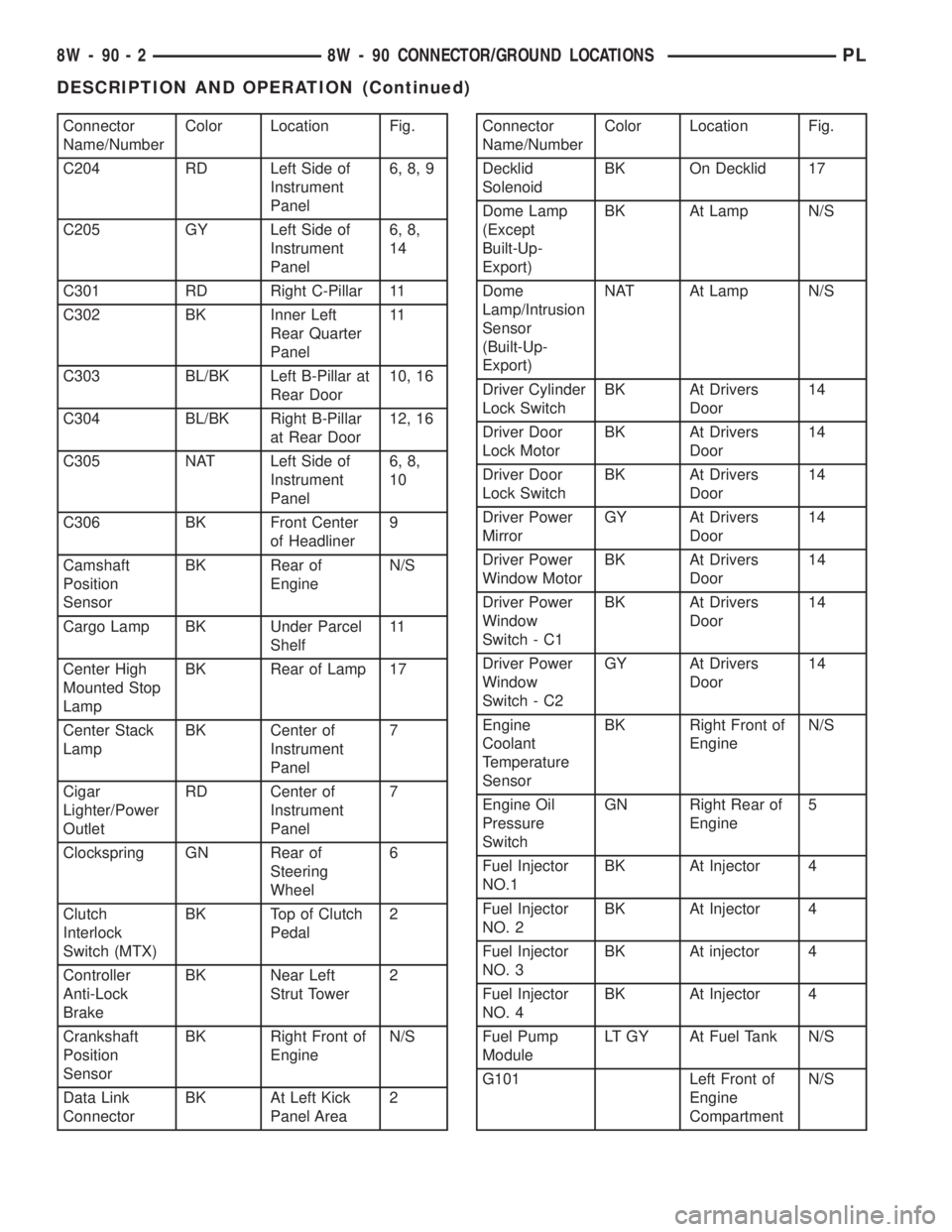
Connector
Name/NumberColor Location Fig.
C204 RD Left Side of
Instrument
Panel6, 8, 9
C205 GY Left Side of
Instrument
Panel6, 8,
14
C301 RD Right C-Pillar 11
C302 BK Inner Left
Rear Quarter
Panel11
C303 BL/BK Left B-Pillar at
Rear Door10, 16
C304 BL/BK Right B-Pillar
at Rear Door12, 16
C305 NAT Left Side of
Instrument
Panel6, 8,
10
C306 BK Front Center
of Headliner9
Camshaft
Position
SensorBK Rear of
EngineN/S
Cargo Lamp BK Under Parcel
Shelf11
Center High
Mounted Stop
LampBK Rear of Lamp 17
Center Stack
LampBK Center of
Instrument
Panel7
Cigar
Lighter/Power
OutletRD Center of
Instrument
Panel7
Clockspring GN Rear of
Steering
Wheel6
Clutch
Interlock
Switch (MTX)BK Top of Clutch
Pedal2
Controller
Anti-Lock
BrakeBK Near Left
Strut Tower2
Crankshaft
Position
SensorBK Right Front of
EngineN/S
Data Link
ConnectorBK At Left Kick
Panel Area2Connector
Name/NumberColor Location Fig.
Decklid
SolenoidBK On Decklid 17
Dome Lamp
(Except
Built-Up-
Export)BK At Lamp N/S
Dome
Lamp/Intrusion
Sensor
(Built-Up-
Export)NAT At Lamp N/S
Driver Cylinder
Lock SwitchBK At Drivers
Door14
Driver Door
Lock MotorBK At Drivers
Door14
Driver Door
Lock SwitchBK At Drivers
Door14
Driver Power
MirrorGY At Drivers
Door14
Driver Power
Window MotorBK At Drivers
Door14
Driver Power
Window
Switch - C1BK At Drivers
Door14
Driver Power
Window
Switch - C2GY At Drivers
Door14
Engine
Coolant
Temperature
SensorBK Right Front of
EngineN/S
Engine Oil
Pressure
SwitchGN Right Rear of
Engine5
Fuel Injector
NO.1BK At Injector 4
Fuel Injector
NO. 2BK At Injector 4
Fuel Injector
NO. 3BK At injector 4
Fuel Injector
NO. 4BK At Injector 4
Fuel Pump
ModuleLT GY At Fuel Tank N/S
G101 Left Front of
Engine
CompartmentN/S
8W - 90 - 2 8W - 90 CONNECTOR/GROUND LOCATIONSPL
DESCRIPTION AND OPERATION (Continued)
Page 661 of 1285
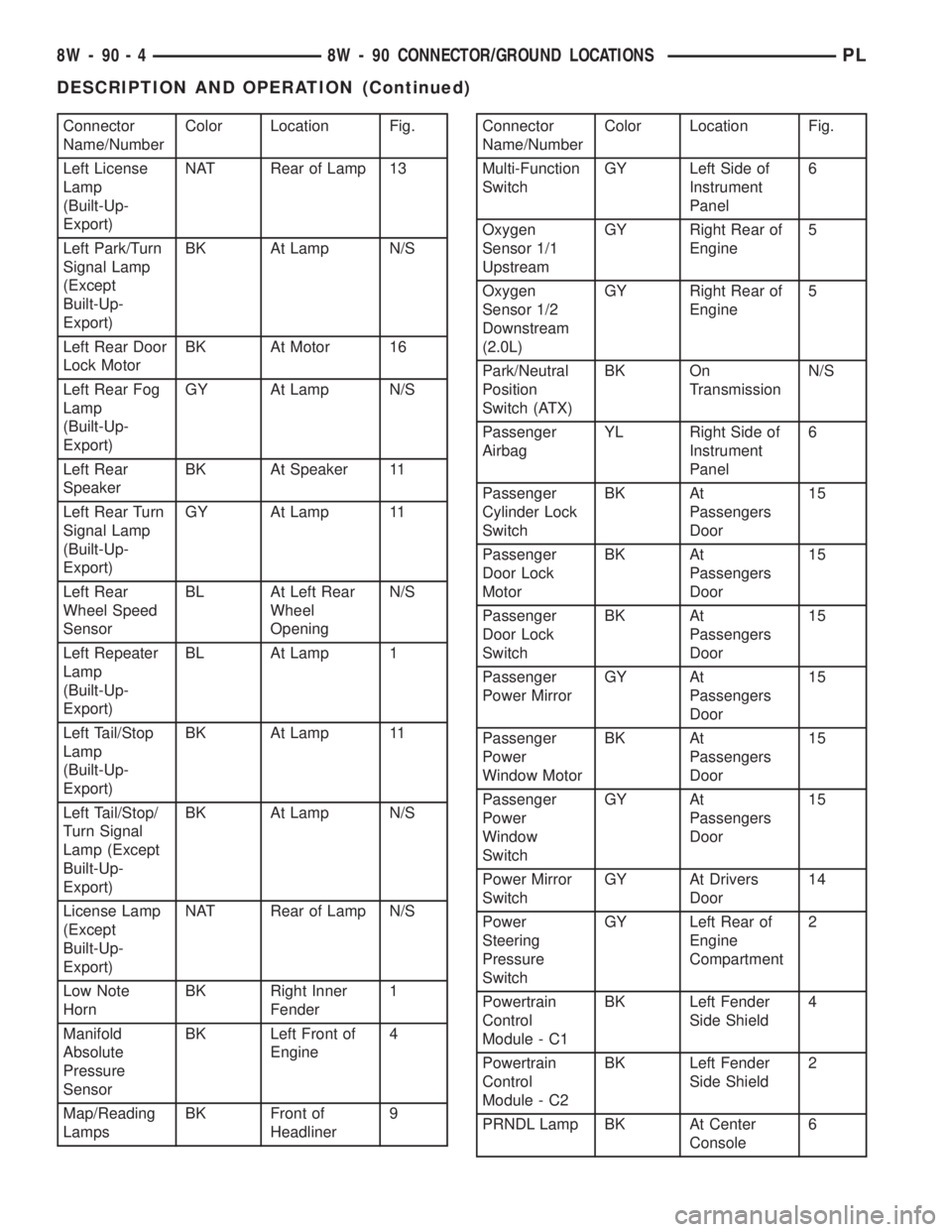
Connector
Name/NumberColor Location Fig.
Left License
Lamp
(Built-Up-
Export)NAT Rear of Lamp 13
Left Park/Turn
Signal Lamp
(Except
Built-Up-
Export)BK At Lamp N/S
Left Rear Door
Lock MotorBK At Motor 16
Left Rear Fog
Lamp
(Built-Up-
Export)GY At Lamp N/S
Left Rear
SpeakerBK At Speaker 11
Left Rear Turn
Signal Lamp
(Built-Up-
Export)GY At Lamp 11
Left Rear
Wheel Speed
SensorBL At Left Rear
Wheel
OpeningN/S
Left Repeater
Lamp
(Built-Up-
Export)BL At Lamp 1
Left Tail/Stop
Lamp
(Built-Up-
Export)BK At Lamp 11
Left Tail/Stop/
Turn Signal
Lamp (Except
Built-Up-
Export)BK At Lamp N/S
License Lamp
(Except
Built-Up-
Export)NAT Rear of Lamp N/S
Low Note
HornBK Right Inner
Fender1
Manifold
Absolute
Pressure
SensorBK Left Front of
Engine4
Map/Reading
LampsBK Front of
Headliner9Connector
Name/NumberColor Location Fig.
Multi-Function
SwitchGY Left Side of
Instrument
Panel6
Oxygen
Sensor 1/1
UpstreamGY Right Rear of
Engine5
Oxygen
Sensor 1/2
Downstream
(2.0L)GY Right Rear of
Engine5
Park/Neutral
Position
Switch (ATX)BK On
TransmissionN/S
Passenger
AirbagYL Right Side of
Instrument
Panel6
Passenger
Cylinder Lock
SwitchBK At
Passengers
Door15
Passenger
Door Lock
MotorBK At
Passengers
Door15
Passenger
Door Lock
SwitchBK At
Passengers
Door15
Passenger
Power MirrorGY At
Passengers
Door15
Passenger
Power
Window MotorBK At
Passengers
Door15
Passenger
Power
Window
SwitchGY At
Passengers
Door15
Power Mirror
SwitchGY At Drivers
Door14
Power
Steering
Pressure
SwitchGY Left Rear of
Engine
Compartment2
Powertrain
Control
Module - C1BK Left Fender
Side Shield4
Powertrain
Control
Module - C2BK Left Fender
Side Shield2
PRNDL Lamp BK At Center
Console6
8W - 90 - 4 8W - 90 CONNECTOR/GROUND LOCATIONSPL
DESCRIPTION AND OPERATION (Continued)