MULTI-FUNCTION SWITCH CONTINUITY TEST DODGE NEON 2000 Service Repair Manual
[x] Cancel search | Manufacturer: DODGE, Model Year: 2000, Model line: NEON, Model: DODGE NEON 2000Pages: 1285, PDF Size: 29.42 MB
Page 295 of 1285
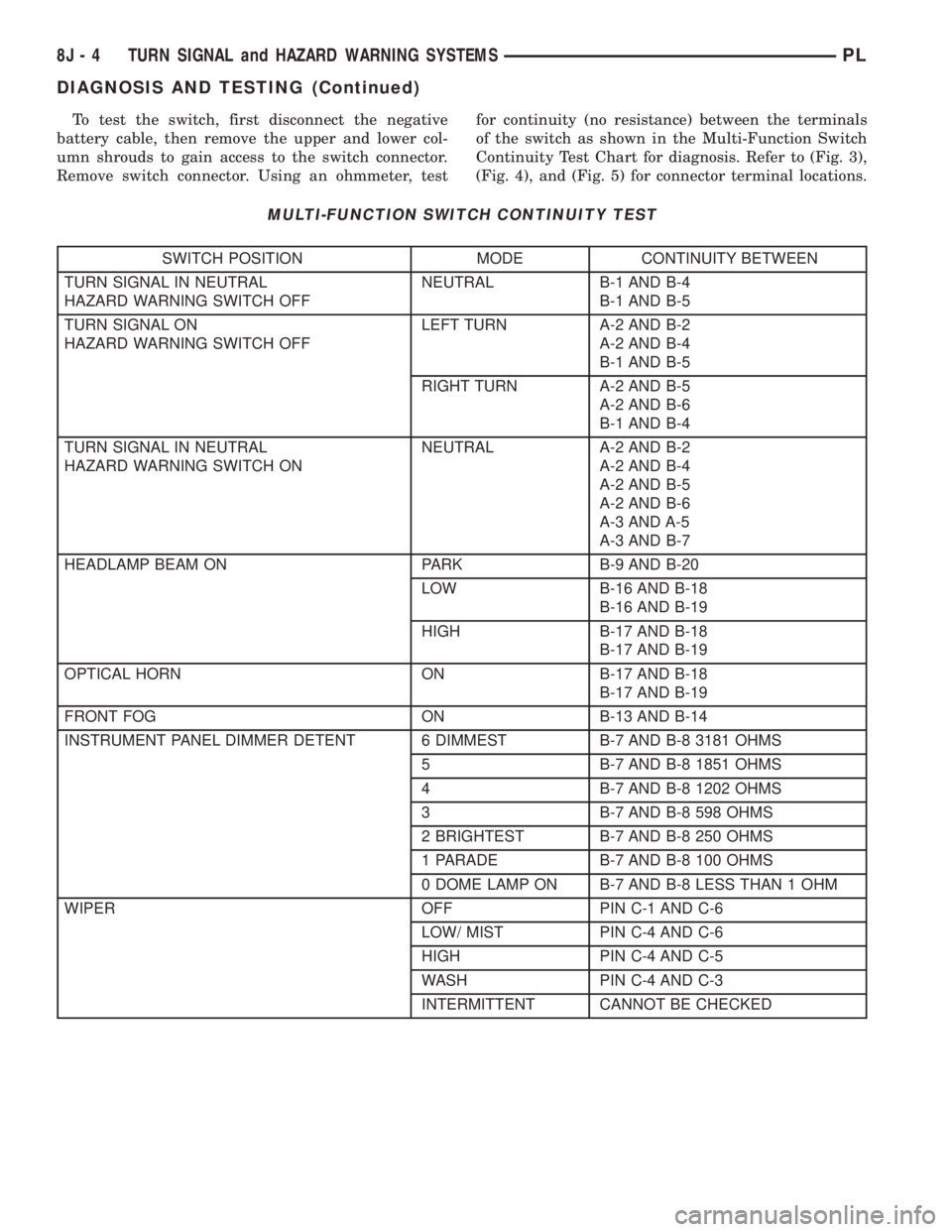
To test the switch, first disconnect the negative
battery cable, then remove the upper and lower col-
umn shrouds to gain access to the switch connector.
Remove switch connector. Using an ohmmeter, testfor continuity (no resistance) between the terminals
of the switch as shown in the Multi-Function Switch
Continuity Test Chart for diagnosis. Refer to (Fig. 3),
(Fig. 4), and (Fig. 5) for connector terminal locations.
MULTI-FUNCTION SWITCH CONTINUITY TEST
SWITCH POSITION MODE CONTINUITY BETWEEN
TURN SIGNAL IN NEUTRAL
HAZARD WARNING SWITCH OFFNEUTRAL B-1 AND B-4
B-1 AND B-5
TURN SIGNAL ON
HAZARD WARNING SWITCH OFFLEFT TURN A-2 AND B-2
A-2 AND B-4
B-1 AND B-5
RIGHT TURN A-2 AND B-5
A-2 AND B-6
B-1 AND B-4
TURN SIGNAL IN NEUTRAL
HAZARD WARNING SWITCH ONNEUTRAL A-2 AND B-2
A-2 AND B-4
A-2 AND B-5
A-2 AND B-6
A-3 AND A-5
A-3 AND B-7
HEADLAMP BEAM ON PARK B-9 AND B-20
LOW B-16 AND B-18
B-16 AND B-19
HIGH B-17 AND B-18
B-17 AND B-19
OPTICAL HORN ON B-17 AND B-18
B-17 AND B-19
FRONT FOG ON B-13 AND B-14
INSTRUMENT PANEL DIMMER DETENT 6 DIMMEST B-7 AND B-8 3181 OHMS
5 B-7 AND B-8 1851 OHMS
4 B-7 AND B-8 1202 OHMS
3 B-7 AND B-8 598 OHMS
2 BRIGHTEST B-7 AND B-8 250 OHMS
1 PARADE B-7 AND B-8 100 OHMS
0 DOME LAMP ON B-7 AND B-8 LESS THAN 1 OHM
WIPER OFF PIN C-1 AND C-6
LOW/ MIST PIN C-4 AND C-6
HIGH PIN C-4 AND C-5
WASH PIN C-4 AND C-3
INTERMITTENT CANNOT BE CHECKED
8J - 4 TURN SIGNAL and HAZARD WARNING SYSTEMSPL
DIAGNOSIS AND TESTING (Continued)
Page 302 of 1285
WINDSHIELD WIPER/WASHER SWITCH
To test the switch, first disconnect the switch wires
from the body wiring in the steering column. Using
an ohmmeter test for continuity between the termi-
nals of the wiper switch. Refer to Group 8T Turn Sig-
nal and Hazard Warning Systems, Multi-Function
Switch Diagnosis and Testing.
REMOVAL AND INSTALLATION
WINDSHIELD WIPER ARM(S)
REMOVAL
(1) Place the wiper arm/blades in the PARK posi-
tion and turn ignition OFF.
(2) Using a trim stick (special tool #C-4755), gently
pry up on arm cap and remove.
(3) Remove wiper arm retaining nut.
(4) Remove the arm from the pivot using a rocking
motion while the arm is in an over/centered position.
(5) Clean metal splinters OFF the pivot shafts.
INSTALLATION
For installation reverse above procedures. Before
installation activate wiper system to ensure the
wiper module is in the PARK position. Position wiper
arms so that the heel of the blade(s) is on the park
line on the windshield. Refer to Adjustments in this
section for Wiper Arm Adjustment.
WINDSHIELD WIPER BLADE(S)
REMOVAL
(1) Lift wiper arm to the over center position.
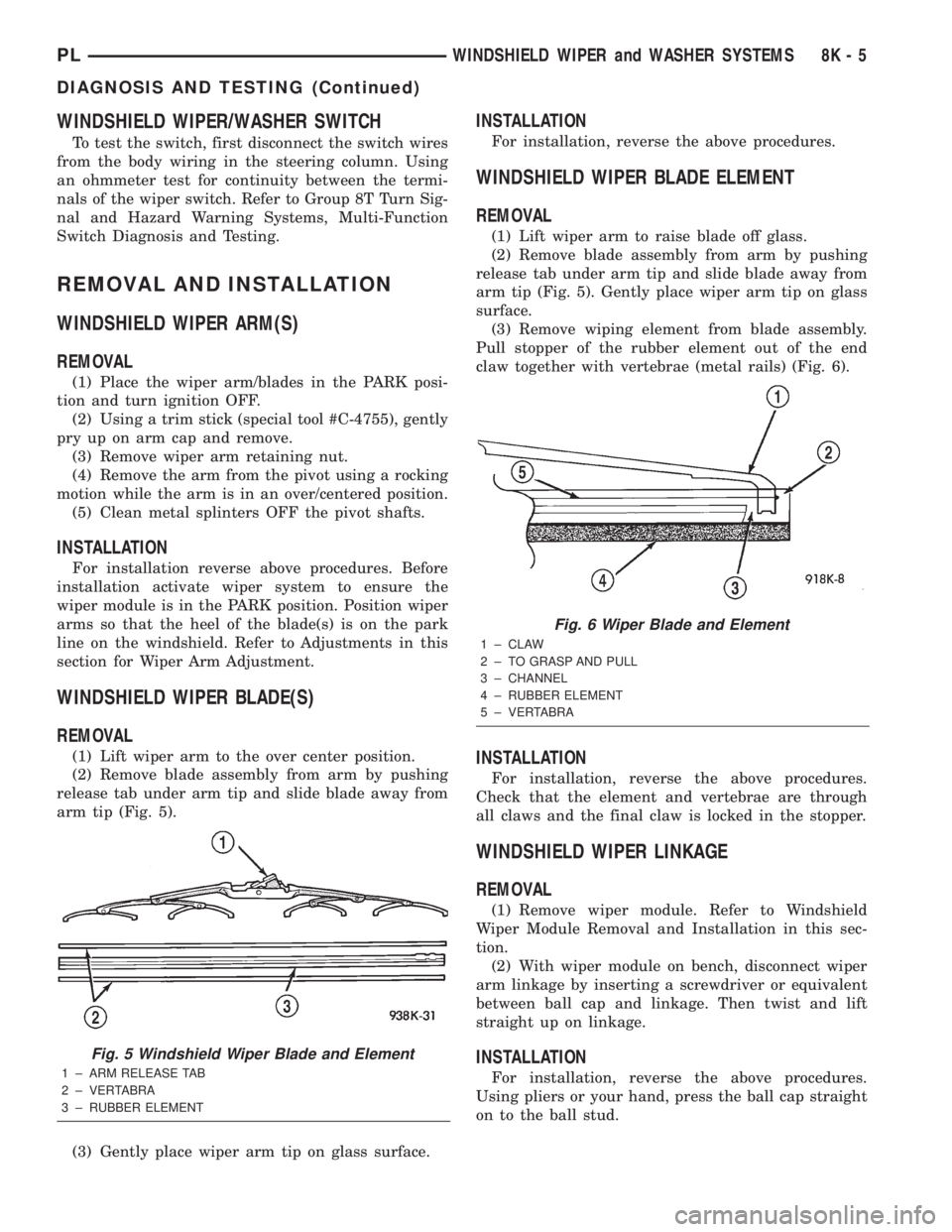
(2) Remove blade assembly from arm by pushing
release tab under arm tip and slide blade away from
arm tip (Fig. 5).
(3) Gently place wiper arm tip on glass surface.
INSTALLATION
For installation, reverse the above procedures.
WINDSHIELD WIPER BLADE ELEMENT
REMOVAL
(1) Lift wiper arm to raise blade off glass.
(2) Remove blade assembly from arm by pushing
release tab under arm tip and slide blade away from
arm tip (Fig. 5). Gently place wiper arm tip on glass
surface.
(3) Remove wiping element from blade assembly.
Pull stopper of the rubber element out of the end
claw together with vertebrae (metal rails) (Fig. 6).
INSTALLATION
For installation, reverse the above procedures.
Check that the element and vertebrae are through
all claws and the final claw is locked in the stopper.
WINDSHIELD WIPER LINKAGE
REMOVAL
(1) Remove wiper module. Refer to Windshield
Wiper Module Removal and Installation in this sec-
tion.
(2) With wiper module on bench, disconnect wiper
arm linkage by inserting a screwdriver or equivalent
between ball cap and linkage. Then twist and lift
straight up on linkage.
INSTALLATION
For installation, reverse the above procedures.
Using pliers or your hand, press the ball cap straight
on to the ball stud.
Fig. 5 Windshield Wiper Blade and Element
1 ± ARM RELEASE TAB
2 ± VERTABRA
3 ± RUBBER ELEMENT
Fig. 6 Wiper Blade and Element
1 ± CLAW
2 ± TO GRASP AND PULL
3 ± CHANNEL
4 ± RUBBER ELEMENT
5 ± VERTABRA
PLWINDSHIELD WIPER and WASHER SYSTEMS 8K - 5
DIAGNOSIS AND TESTING (Continued)
Page 391 of 1285
NO FASTEN SEAT BELT LAMP WHEN IGNITION
SWITCH IS ON
(1) Check for battery feed at cluster harness con-
nector Pin 21.
(2) Check for ignition feed at cluster harness con-
nector Pin 15. Repair as necessary.
NO TONE WHEN HEADLAMPS ARE ON AND
DRIVERS DOOR IS OPEN
(1) Check left door jamb switch for good ground
when drivers door is open.
(2) Check for ground at Pin 10.
(3) Check for battery feed at cluster harness con-
nector Pin 21.
(4) Check for NO voltage at Pin 14. Ignition volt-
age must not be present for the chime to work.
(5) Check headlamp switch.
NO TONE WHEN KEY IS LEFT IN IGNITION AND
DRIVERS DOOR IS OPEN
(1) Check for continuity to ground at Pin 23 of the
cluster harness connector. If OK, go to Step 3. If not
OK, repair as necessary.
(2) Using voltmeter, check for battery feed at Pin
21 of the cluster harness connector. Check for NO
ignition feed at Pin 15 of the cluster harness connec-
tor. If OK, go to Step 3. If not OK, repair as neces-
sary.
(3) Open driver's door and ensure the ignition key
is in the OFF or ACC position. Check for continuity
to ground at Pin 10 of the cluster harness connector.
If ground OK, replace cluster printed circuit board. If
no ground, check key-in switch or door switch wiring
and repair as necessary.
CHIMES CONTINUE WHEN HEADLAMPS ARE
TURNED OFF AND/OR KEY IS REMOVED FROM
IGNITION
Check for ground at Pin 10. If grounded the chime
should activate. Make sure the door is closed, key isin ignition and parking lamps are OFF. If ground is
still present check door switch, key in switch, head-
lamp switch and repair as necessary.
REMOVAL AND INSTALLATION
CHIME
The functions previously performed by the chime
module are now part of the smart cluster. There is no
servicable part of the instrument cluster chime func-
tion. Replacement of the instrument cluster is neces-
sary. Refer to Group 8E-Instrument Panel and
Systems, Instrument Cluster Removal and Installa-
tion.
SEAT BELT BUCKLE
Refer to Group 23-Body, Front Seat Belt Buckle
Removal and Installation.
HEADLAMP SWITCH
Refer to Group 8J-Turn Signal and Hazard Warn-
ing Systems, Multi-Function Switch Removal and
Installation.
KEY-IN SWITCH
The Key-in switch is built into the ignition switch
assembly. Should the Key-in switch require service,
the ignition switch assembly must be replaced. Refer
to Group 8D-Ignition System, Ignition Switch
Removal and Installation.
8U - 2 CHIME WARNING/REMINDER SYSTEMPL
DIAGNOSIS AND TESTING (Continued)