instrument panel DODGE POWER WAGON 2007 2.G User Guide
[x] Cancel search | Manufacturer: DODGE, Model Year: 2007, Model line: POWER WAGON, Model: DODGE POWER WAGON 2007 2.GPages: 492, PDF Size: 8.25 MB
Page 51 of 492
²The airbag control module also monitors the readiness
of the electronic parts of the system whenever the
ignition switch is in the START or RUN positions.
These include all of the items listed above except the
knee bolsters, the instrument panel, and the steering
wheel and column. If the key is in the9Off9position, in
the ACC position or not in the ignition, the airbags are
not on and will not inflate
²The airbag control module also turns on the AIR BAG
light in the instrument panel for 6 to 8 seconds when
the ignition is first turned on, then turns the light off.
²If it detects a malfunction in any part of the
system, it turns on the light either momen-
tarily or continuously. The instrument clus-
ter will flash the seat belt indicator if it
detects a fault with the airbag indicator.
WARNING!
Ignoring the AIR BAG light in your instrument
panel could mean you won't have the airbags to
protect you in a collision. If the light does not come
on, stays on after you start the vehicle, or if it comes
on as you drive, have the airbag system checked
right away.
²When the airbag control module detects a collision
requiring the airbags, it signals the inflator units. A
large quantity of nontoxic gas is generated to inflate
the airbags. The airbag covers separate and fold out of
the way as the airbags inflate to their full size. The
airbags fully inflate in milliseconds. This is less time
than it takes you to blink your eyes. The airbags then
quickly deflate while helping to restrain the driver and
front passenger. The driver's front airbag deflates
through vents towards the instrument panel. The
50 THINGS TO KNOW BEFORE STARTING YOUR VEHICLE
Page 53 of 492
because the infant has a medical condition which
makes it necessary for the driver to be able to see the
infant,
²is a child, age 1 to 12 who must ride in the front seat
because there is no rear seat, because there is no rear
seat position available, or because the child has a
medical condition which makes it necessary for the
driver to be able to see the child,
²has a medical condition which makes passenger airbag
inflation (deployment) a greater risk for the passenger
than the risk of hitting the dashboard (instrument
panel) or windshield in a crash.
WARNING!
Whenever an airbag is turned off, even a lap/
shoulder belted passenger may hit their head, neck,
or chest on the dashboard (instrument panel) or
windshield in a crash. This may result in serious
injury or death.
To Shut Off the Passenger Airbag (Standard Cab Ve-
hicles Only)
Place the ignition key in the Passenger Airbag On/Off
Switch, push the key in and turn clockwise, and remove
the key from the switch. This will shut off the passenger
side airbag. The ªOffº light near the switch will illumi-
nate when the ignition switch is turned to the ON
position.
52 THINGS TO KNOW BEFORE STARTING YOUR VEHICLE
Page 55 of 492
irritation, move to fresh air. If the irritation continues,
see your doctor. If these particles settle on your
clothing, follow the garment manufacturer's instruc-
tions for cleaning.
²It is not advisable to drive your vehicle after the
airbags have deployed. If you are involved in another
collision, the airbags will not be in place to protect you.
WARNING!
Deployed airbags can't protect you in another colli-
sion. Have the airbags replaced by an authorized
dealer as soon as possible.
Window Airbags Supplemental Restraint System
(SRS)ÐIf Equipped
The window airbag control module determines if a side
collision is severe enough to require the side airbags to
inflate. The window airbag control module will not
detect roll over, front or rear collisions.
The airbag control module monitors the readiness of the
electronic parts of the system whenever the ignition
switch is in the9START9or9RUN9positions. These
include all of the items listed above. The airbag control
module also turns on the AIRBAG light in the instrument
panel for 6 to 8 seconds when the ignition is first turned
on as a diagnostic or system check, then turns the light
off. If it detects a malfunction in any part of the system,
it turns on the light either momentarily or continuously.
The side (window) impact SRS Airbags are designed to
activate only in certain side collisions. When the airbag
control module detects a collision requiring the window
54 THINGS TO KNOW BEFORE STARTING YOUR VEHICLE
Page 56 of 492
bags to inflate, it signals the inflators on the crash side of
the vehicle. A quantity of nontoxic gas is generated to
inflate the window bag. The inflating window bag
pushes the side pillar molding out of the way and covers
the window. The airbag inflates in about 30 milliseconds
(about one-quarter of the time it takes to blink your eyes)
with enough force to injure you if you are not belted and
seated properly, or if items are positioned in the area
where the window bag inflates. This especially applies to
children. The window bag is only about 3
1¤2inches (8.9
cm) thick when it is inflated.
Enhanced Accident Response System
If the airbags deploy after an impact and the electrical
system remains functional, vehicles equipped with
power door locks will unlock automatically. In addition,
approximately 10 seconds after the vehicle has stopped
moving, the interior lights will light until the ignition
switch is turned off.
Maintaining Your Airbag Systems
WARNING!
²Modifications to any part of the airbag system
could cause it to fail when you need it. You could
be injured because the airbags are not there to
protect you. Do not modify the components or
wiring, including adding any kind of badges or
stickers to the steering wheel hub trim cover or
the upper right side of the instrument panel. Do
not modify the front bumper, vehicle body struc-
ture, or frame.
²You need proper knee impact protection in a
collision. Do not mount or locate any aftermarket
equipment on or behind the knee bolster.
²It is dangerous to try to repair any part of the
airbag system yourself. Be sure to tell anyone who
works on your vehicle that it has airbags.
THINGS TO KNOW BEFORE STARTING YOUR VEHICLE 55
2
Page 78 of 492
mElectrical Power Outlets..................148
mCigar Lighter And Ash Receiver............150
mCupholders...........................151
NFront Instrument Panel Cupholders........151
NRear Cupholder Ð Quad Cab Ð If Equipped . 151
mStorage..............................152
NCenter Storage Compartment Ð If Equipped . . 152
NStorage And Seats Ð If Equipped..........153
mRear Window Features...................154
NElectric Rear Window Defroster And Heated
Side View Mirrors Ð If Equipped..........154
NPower Sliding Rear WindowÐIf Equipped . . . 154
NSliding Rear WindowÐIf Equipped........155mFold Flat Load Floor Ð If Equipped.........155
mPickup Box...........................159
mSlide-In Campers.......................160
mEasy-Off Tailgate.......................160
mSafety Tips...........................162
NTransporting Passengers................162
NLock Your Vehicle.....................162
NExhaust Gas.........................163
NSafety Checks You Should Make Inside The
Vehicle.............................163
NSafety Checks You Should Make Outside The
Vehicle.............................164
UNDERSTANDING THE FEATURES OF YOUR VEHICLE 77
3
Page 102 of 492
When calling a number with your UConnectŸ system
that normally requires you to enter in a touch-tone
sequence on your cellular phone keypad, you can push
the 'Voice Recognition' button and say the sequence you
wish to enter followed by the word9Send.9For example,
if required to enter your pin number followed with a
pound3746#,youcanpressthe'Voice Recognition'
button and say93746#Send.9Saying a number, or
sequence of numbers, followed by9Send9is also to be
used to navigate through an automated customer service
center menu structure and to leave a number on a pager.
Barge In - Overriding Prompts
The 'Voice Recognition' button can be used when you
wish to skip part of a prompt and issue your voice
recognition command immediately. For example, if a
prompt is playing9Would you like to pair a phone, clear
a{,9you could press the 'Voice Recognition' button and
say9Pair a Phone9to select that option without having to
listen to the rest of the voice prompt.
Turning Confirmation Prompts On/Off
Turning confirmation prompts off will stop the system
from confirming your choices (e.g., the UConnectŸ
system will not repeat a phone number before you dial
it).
²Press the 'Phone' button to begin.
²After the9Ready9prompt and the following beep, say
9Setup Confirmations.9The UConnectŸ system will
play the current confirmation prompt status and you
will be given the choice to change it.
Phone and Network Status Indicators
If available on the radio and/or on a premium display
such as the instrument panel cluster, and supported by
your cell phone, the UConnectŸ system will provide
notification to inform you of your phone and network
status when you are attempting to make a phone call
using UConnectŸ. The status is given for roaming net-
work signal strength, phone battery strength, etc.
UNDERSTANDING THE FEATURES OF YOUR VEHICLE 101
3
Page 116 of 492
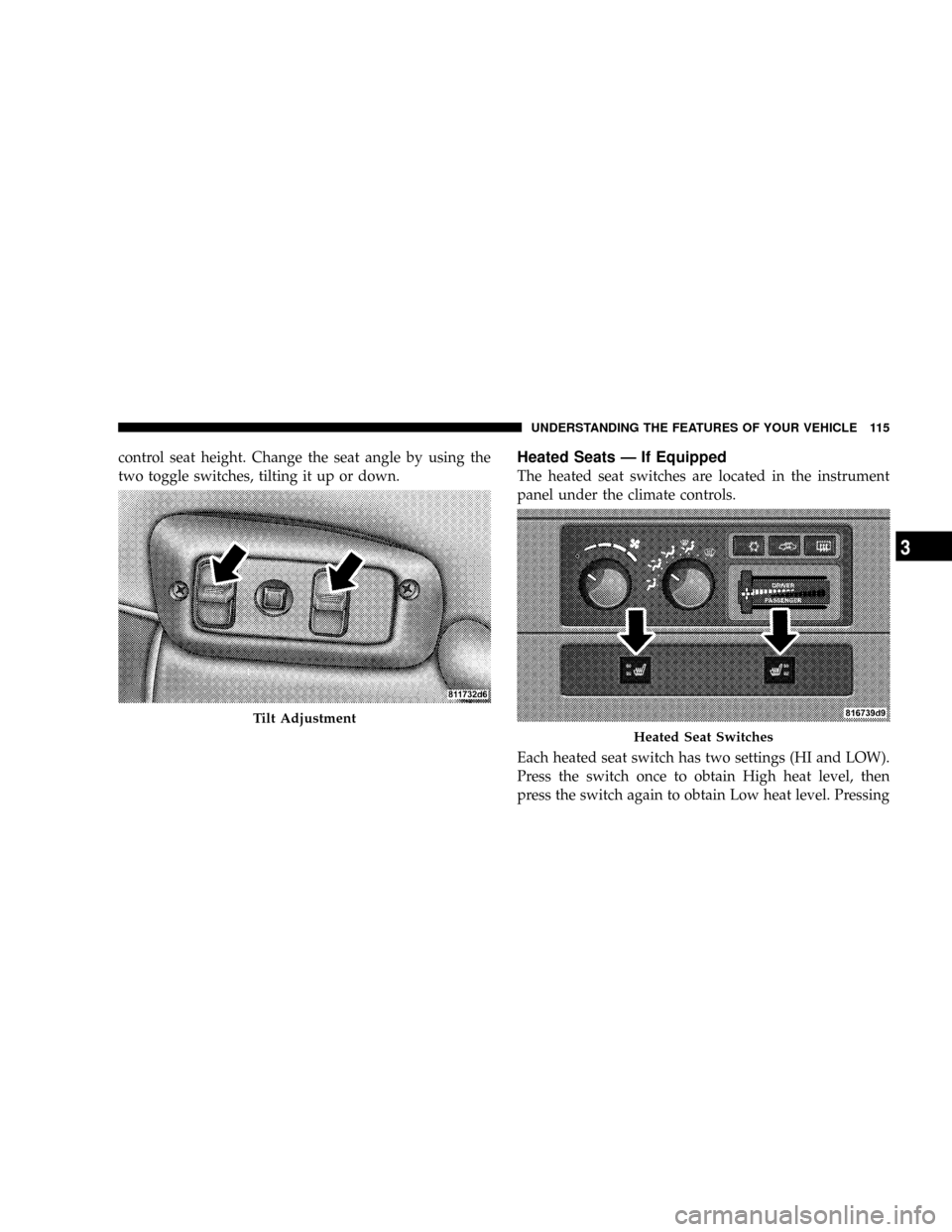
control seat height. Change the seat angle by using the
two toggle switches, tilting it up or down.Heated Seats Ð If Equipped
The heated seat switches are located in the instrument
panel under the climate controls.
Each heated seat switch has two settings (HI and LOW).
Press the switch once to obtain High heat level, then
press the switch again to obtain Low heat level. Pressing
Tilt Adjustment
Heated Seat Switches
UNDERSTANDING THE FEATURES OF YOUR VEHICLE 115
3
Page 118 of 492
TO OPEN AND CLOSE THE HOOD
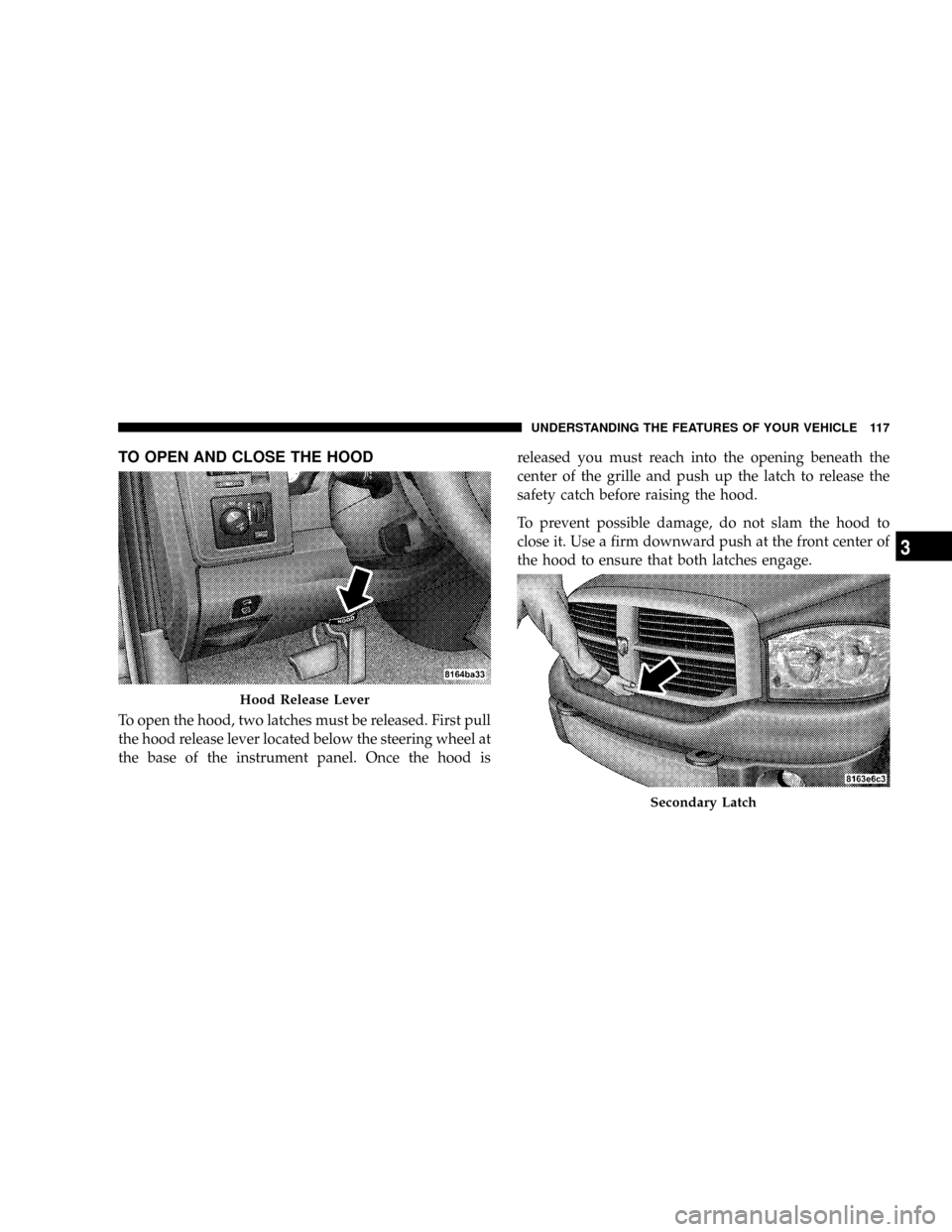
To open the hood, two latches must be released. First pull
the hood release lever located below the steering wheel at
the base of the instrument panel. Once the hood isreleased you must reach into the opening beneath the
center of the grille and push up the latch to release the
safety catch before raising the hood.
To prevent possible damage, do not slam the hood to
close it. Use a firm downward push at the front center of
the hood to ensure that both latches engage.
Hood Release Lever
Secondary Latch
UNDERSTANDING THE FEATURES OF YOUR VEHICLE 117
3
Page 120 of 492
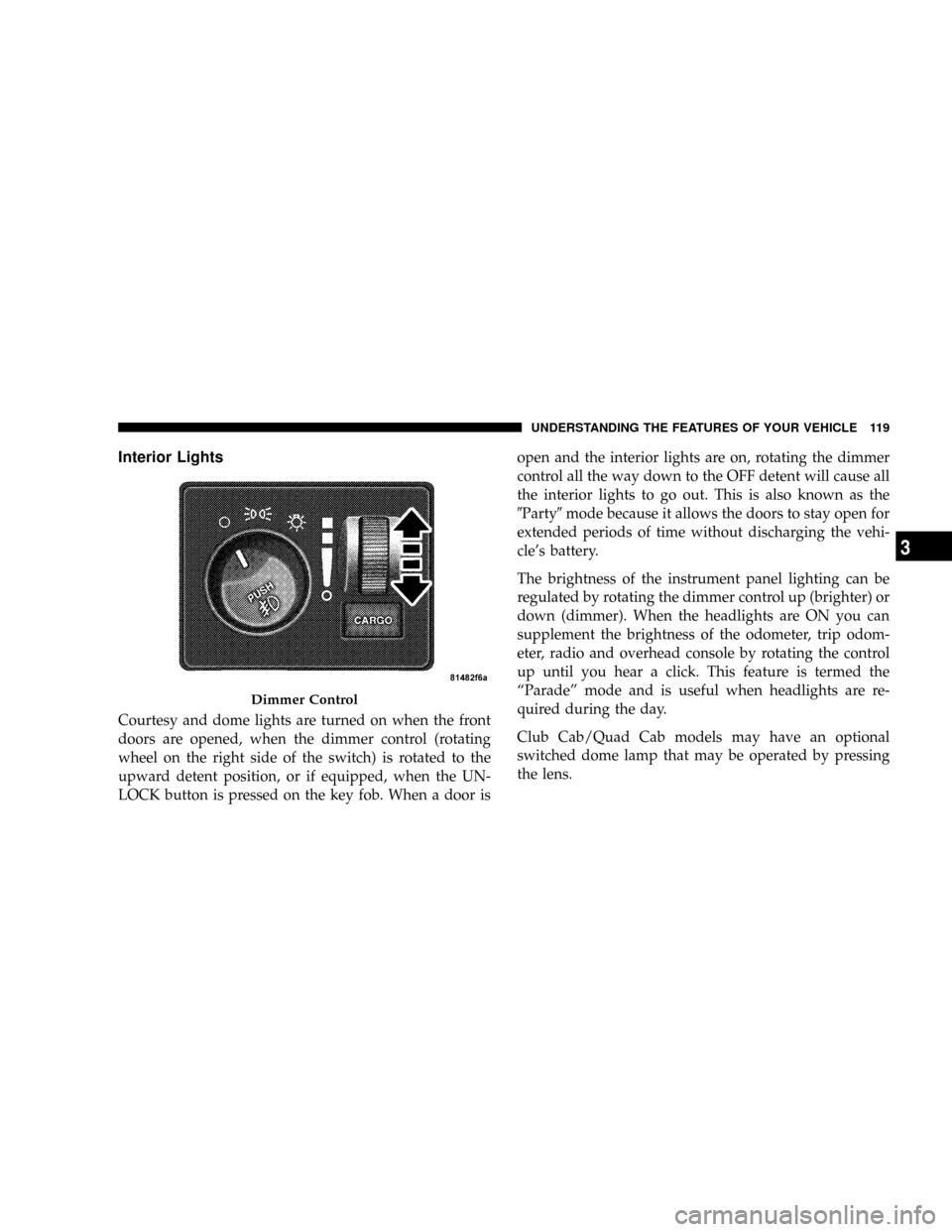
Interior Lights
Courtesy and dome lights are turned on when the front
doors are opened, when the dimmer control (rotating
wheel on the right side of the switch) is rotated to the
upward detent position, or if equipped, when the UN-
LOCK button is pressed on the key fob. When a door isopen and the interior lights are on, rotating the dimmer
control all the way down to the OFF detent will cause all
the interior lights to go out. This is also known as the
9Party9mode because it allows the doors to stay open for
extended periods of time without discharging the vehi-
cle's battery.
The brightness of the instrument panel lighting can be
regulated by rotating the dimmer control up (brighter) or
down (dimmer). When the headlights are ON you can
supplement the brightness of the odometer, trip odom-
eter, radio and overhead console by rotating the control
up until you hear a click. This feature is termed the
ªParadeº mode and is useful when headlights are re-
quired during the day.
Club Cab/Quad Cab models may have an optional
switched dome lamp that may be operated by pressing
the lens.
Dimmer Control
UNDERSTANDING THE FEATURES OF YOUR VEHICLE 119
3
Page 121 of 492
Battery Saver
To protect the life of your vehicle's battery, Load Shed-
ding is provided for both the interior and exterior lights.
If the ignition is off and any door is left ajar for 10
minutes or the dimmer control is rotated upwards for 10
minutes, the interior lights will automatically turn off.
If the headlamps remain on while the ignition is cycled
off, the exterior lights will automatically turn off after 8
minutes. If the headlamps are turned on and left on for 8
minutes while the ignition is off, the exterior lights will
automatically turn off.
NOTE:Battery Saver mode is cancelled if the ignition is
ON.
Headlamp Delay
To aid in your exit, your vehicle is equipped with a
headlamp delay that will leave the headlamps on for 90
seconds. This delay is initiated when the ignition is
turned OFF while the headlamp switch is on, and then
the headlamp switch is cycled off. Headlamp delay can
be cancelled by either turning the headlamp switch ON
then OFF or by turning the ignition ON.
Headlights, Parking Lights, Panel Lights
When the headlight switch is rotated to the first
position, the parking lights, taillights, side marker
lights, license plate light and instrument panel
lights are all turned on. The headlights will turn ON
when the switch is rotated to the second position.
120 UNDERSTANDING THE FEATURES OF YOUR VEHICLE