Drive belt removal DODGE RAM 1500 1998 2.G User Guide
[x] Cancel search | Manufacturer: DODGE, Model Year: 1998, Model line: RAM 1500, Model: DODGE RAM 1500 1998 2.GPages: 2627
Page 375 of 2627

engine warm-up preventing the coolant from flowing
through the radiator (Fig. 44).
OPERATION
OPERATIONÐWATER PUMP
A centrifugal water pump circulates coolant
through the water jackets, passages, intake manifold,
radiator core, cooling system hoses and heater core,
this coolant absorbs the heat generated when the
engine is running. The pump is driven by the engine
crankshaft via a drive belt.
OPERATION - WATER PUMP BYPASS
When the thermostat is in the closed position the
bypass gallery is not obstructed allowing 100% flow.
When the thermostat is in the open position the pill
partially covers the bypass hole, reducing the amount
of bypass flow. This design allows the coolant to
reach operating temperature quickly when cold,
while adding extra cooling during normal tempera-
ture operation.
REMOVAL
The water pump on 3.7L/4.7L engines is bolted
directly to the engine timing chain case cover.
(1) Disconnect the negative battery cable.(2) Drain cooling system (Refer to 7 - COOLING -
STANDARD PROCEDURE).
(3) Remove fan/viscous fan drive assembly from
water pump (Fig. 45) (Refer to 7 - COOLING/EN-
GINE/FAN DRIVE VISCOUS CLUTCH -
REMOVAL). Do not attempt to remove fan/viscous
fan drive assembly from vehicle at this time.
WARNING: CONSTANT TENSION HOSE CLAMPS
ARE USED ON MOST COOLING SYSTEM HOSES.
WHEN REMOVING OR INSTALLING, USE ONLY
TOOLS DESIGNED FOR SERVICING THIS TYPE OF
CLAMP. ALWAYS WEAR SAFETY GLASSES WHEN
SERVICING CONSTANT TENSION CLAMPS.
CAUTION: A number or letter is stamped into the
tongue of constant tension clamps. If replacement
is necessary, use only an original equipment clamp
with matching number or letter and width.
(4) If the water pump is being replaced, do not
unbolt the fan blade assembly from the thermal vis-
cous fan drive.
Fig. 43 Water Pump and Timing Chain Cover - 4.7L
1 - INTEGRAL WATER PUMP PULLEY
2 - TIMING CHAIN COVER
3 - THERMOSTAT HOUSING
4 - HEATER HOSE FITTINGS
5 - WATER PUMP
Fig. 44 Water/Coolant Bypass Flow and Thermostat
1 - FROM HEATER AND DEGAS CONTAINER
2 - FROM RADIATOR
3 - TO WATER PUMP
4- THERMOSTAT
7 - 60 ENGINEDR
WATER PUMP - 3.7L/4.7L (Continued)
Page 376 of 2627

(5) Remove the radiator fan (Refer to 7 - COOL-
ING/ENGINE/RADIATOR FAN - REMOVAL).
(6) Remove accessory drive belt (Fig. 46) (Refer to
7 - COOLING/ACCESSORY DRIVE/DRIVE BELTS -
REMOVAL).
(7) Remove the lower radiator hose clamp and
remove the lower hose at the water pump.
(8) Remove the water pump mounting bolts.
CAUTION: Do not pry water pump at timing chain
case/cover. The machined surfaces may be dam-
aged resulting in leaks.
(9) Remove the water pump and gasket. Discard
gasket.
CLEANING
Clean the gasket mating surface. Use caution not
to damage the gasket sealing surface.
INSPECTION
Inspect the water pump assembly for cracks in the
housing, water leaks from shaft seal, worn bearing or
impeller rubbing either the pump body or timing
chain case/cover.
INSTALLATION
The water pump on 3.7L/4.7L engine is bolted
directly to the engine timing chain case cover.
(1) Clean the gasket mating surfaces.(2) Using a new gasket, position water pump and
install the mounting bolts. (Fig. 47). Tighten the
water pump mounting bolts to 58 N´m (43 ft. lbs.).
Fig. 45 Viscous Fan and Fan Drive 4.7L Engine
1 - SPECIAL TOOL 6958 SPANNER WRENCH WITH ADAPTER
PINS 8346
2-FAN
Fig. 46 Automatic Belt TensionerÐ4.7L
1 - AUTOMATIC TENSIONER
2 - WATER PUMP PULLEY
Fig. 47 Water Pump InstallationÐ3.7L/4.7L Typical
1 - WATER PUMP
2 - TIMING CHAIN COVER
DRENGINE 7 - 61
WATER PUMP - 3.7L/4.7L (Continued)
Page 377 of 2627

(3) Spin the water pump to be sure that the pump
impeller does not rub against the timing chain case/
cover.
(4) Connect the radiator lower hose to the water
pump.
(5) Relax the tension from the belt tensioner (Fig.
46). Install the drive belt (Refer to 7 - COOLING/AC-
CESSORY DRIVE/DRIVE BELTS - INSTALLA-
TION).
CAUTION: When installing the serpentine accessory
drive belt, the belt must be routed correctly. If not,
the engine may overheat due to the water pump
rotating in the wrong direction. Refer to (Fig. 48) for
the correct belt routing. Or, refer to the Belt Routing
Label located in the engine compartment. The cor-
rect belt with correct length must be used.
(6) Install the radiator fan (Refer to 7 - COOLING/
ENGINE/RADIATOR FAN - INSTALLATION).
(7) Fill cooling system (Refer to 7 - COOLING -
STANDARD PROCEDURE).
(8) Connect the negative battery cable.
(9) Start and warm the engine. Check for leaks.WATER PUMP - 5.9L DIESEL
DESCRIPTION
The water pump is mounted to the front of the
engine block between the automatic belt tensioner
and the fan drive pulley.
The water pump impeller is pressed onto the rear
of a shaft that rotates in a bearing pressed into the
water pump body. The body has a small hole for ven-
tilation. The water pump seals are lubricated by
antifreeze in the coolant mixture. Additional lubrica-
tion is not necessary.
OPERATION
The diesel engine water pump draws coolant from
the radiator outlet and circulates it through engine,
heater core and back to radiator inlet. The crank-
shaft pulley drives the water pump with a serpentine
drive belt.
DIAGNOSIS AND TESTINGÐWATER PUMP
A quick test to determine if pump is working is to
check if heater warms properly. A defective water
pump will not be able to circulate heated coolant
through the long heater hose to the heater core.
REMOVAL
(1) Disconnect battery negative cables.
(2) Drain cooling system (Refer to 7 - COOLING -
STANDARD PROCEDURE).
(3) Remove the accessory drive belt (Refer to 7 -
COOLING/ACCESSORY DRIVE/DRIVE BELTS -
REMOVAL).
(4) Remove water pump mounting bolts (Fig. 49).
(5) Clean water pump sealing surface on cylinder
block.
CLEANING
Clean gasket mating surfaces as necessary.
INSPECTION
Visually inspect the water pump and replace if it
has any of the following conditions:
²The body is cracked or damaged
²Water leaks from the shaft seal. This is evident
by traces of coolant below the vent hole
²Loose or rough turning bearing.
²Impeller rubbing the pump body
INSTALLATION
(1) Install new O-ring seal in groove on water
pump (Fig. 50).
(2) Install water pump with the weep hole facing
downward. Tighten mounting bolts to 24 N´m (18 ft.
lbs.) torque.
Fig. 48 Belt Routing 3.7L
1 - GENERATOR PULLEY
2 - ACCESSORY DRIVE BELT
3 - POWER STEERING PUMP PULLEY
4 - CRANKSHAFT PULLEY
5 - IDLER PULLEY
6 - TENSIONER
7 - A/C COMPRESSOR PULLEY
8 - WATER PUMP PULLEY
7 - 62 ENGINEDR
WATER PUMP - 3.7L/4.7L (Continued)
Page 378 of 2627

(3) Install accessory drive belt (Refer to 7 - COOL-
ING/ACCESSORY DRIVE/DRIVE BELTS - INSTAL-
LATION).
(4) Fill cooling system (Refer to 7 - COOLING -
STANDARD PROCEDURE).
(5) Connect both battery cables.
(6) Start and warm the engine. Check for leaks.
WATER PUMP - 5.7L
REMOVAL
(1) Disconnect negative battery cable.
(2) Drain coolant.
(3) Remove serpentine belt.
(4) Remove fan clutch assembly.
(5) Remove coolant fill bottle.
(6) Disconnect washer bottle wiring and hose.
(7) Remove fan shroud assembly.
(8) Remove A/C compressor and generator brace.
(9) Remove idler pulleys.
(10) Remove belt tensioner assembly.
(11) Remove upper and lower radiator hoses.
(12) Remove heater hoses.
(13) Remove water pump mounting bolts and
remove pump.
INSTALLATION
(1) Install water pump and mounting bolts.
Tighten moubting bolts to 24 N´m (18 ft. lbs.).
(2) Install heater hoses.
(3) Install upper and lower radiator hoses.
(4) Install belt tensioner assembly.
(5) Install idler pulleys.
(6) Install A/C compressor and alternator brace.
Tighten bolt and nuts to 28 N´m (21 ft. lbs.).
(7) Install fan shroud assembly.
(8) Connect washer bottle wiring and hose.
(9) Install coolant fill bottle.
(10) Install fan clutch assembly.
(11) Install serpentine belt.
(12) Connect negative battery cable.
(13) Fill coolant.
(14) Pressure test coolant system
WATER PUMP - 8.0L
DIAGNOSIS AND TESTING - WATER PUMP
A quick test to determine if pump is working is to
check if heater warms properly. A defective water
pump will not be able to circulate heated coolant
through the long heater hose to the heater core.
Fig. 49 Water Pump Removal/Installation
1 - O-RING SEAL (SQUARE)
2 - WATER PUMP
3 - BOLT (2)
Fig. 50 Pump O-ring Seal
1 - O-RING SEAL
2 - GROOVE
3 - WATER PUMP
DRENGINE 7 - 63
WATER PUMP - 5.9L DIESEL (Continued)
Page 380 of 2627

fluid in the viscous drive could drain into its bearing
assembly and contaminate the bearing lubricant.
(9) Remove accessory drive belt (Refer to 7 -
COOLING/ACCESSORY DRIVE/DRIVE BELTS -
REMOVAL) (Fig. 54).
(10) Remove the radiator lower hose at water
pump.(11) Remove heater hose at water pump fitting.
(12) Remove the seven water pump mounting bolts
(Fig. 55).
(13) Loosen the clamp at the water pump end of
bypass hose. Slip the bypass hose from the water
pump while removing pump from vehicle. Do not
remove the clamp from the bypass hose.
(14) Discard the water pump-to-timing chain/case
cover o-ring seal (Fig. 56).
Fig. 53 Water Pump Location - Typical
1 - WATER PUMP BYPASS HOSE
2 - FAN BLADE ASSEMBLY
3 - VISCOUS FAN DRIVE
4 - WATER PUMP AND PULLEY
Fig. 54 Belt Tensioner - 8.0L V-10 Engines
1 - PULLEY BOLT
2 - IDLER PULLEY
3 - TENSIONER PULLEY
4 - TENSIONER
5 - TENSIONER MOUNTING BOLT
Fig. 55 Water Pump Bolts - 8.0L V-10 - Typical
1 - WATER PUMP MOUNTING BOLTS (7)
Fig. 56 Water Pump O-Ring Seal - 8.0L V-10
1 - WATER PUMP
2 - O-RING SEAL
DRENGINE 7 - 65
WATER PUMP - 8.0L (Continued)
Page 381 of 2627

(15) Remove the heater hose fitting from water
pump if pump replacement is necessary. Note posi-
tion (direction) of fitting before removal. Fitting must
be re-installed to same position.
CAUTION: Do not pry the water pump at timing
chain case/cover. The machined surfaces may be
damaged resulting in leaks.
CLEANING
Clean gasket mating surfaces as necessary.
INSPECTION
Visually inspect the water pump and replace if it
has any of the following conditions:
²The body is cracked or damaged
²Water leaks from the shaft seal. This is evident
by traces of coolant below the vent hole
²Loose or rough turning bearing. Also inspect
thermal fan drive
²Impeller rubbing the pump body
INSTALLATION
(1) If water pump is being replaced, install the
heater hose fitting to the pump. Tighten fitting to 16
N´m (144 in. lbs.) torque. After fitting has been
torqued, position fitting as shown in (Fig. 57). When
positioning fitting, do not back off (rotate counter-
clockwise). Use a sealant on the fitting such as
MopartThread Sealant With Teflon. Refer to the
directions on the package.
CAUTION: This heater hose fitting must be installed
to pump before pump is installed to engine.
(2) Clean the o-ring mating surfaces at rear of
water pump and front of timing chain/case cover.
(3) Apply a small amount of petroleum jelly to
o-ring (Fig. 56). This will help retain o-ring to water
pump.
(4) Install water pump to engine as follows: Guide
water pump fitting into bypass hose as pump is being
installed. Install water pump bolts (Fig. 55). Tighten
water pump mounting bolts to 40 N´m (30 ft. lbs.)
torque.
(5) Position bypass hose clamp to bypass hose.
(6) Spin water pump to be sure that pump impel-
ler does not rub against timing chain case/cover.
(7) Connect radiator lower hose to water pump.
(8) Connect heater hose and hose clamp to heater
hose fitting.
(9) Install drive belt (Refer to 7 - COOLING/AC-
CESSORY DRIVE/DRIVE BELTS - INSTALLA-
TION).
(10) Position fan shroud and fan blade/viscous fan
drive assembly to vehicle as a complete unit.(11) Install fan shroud to radiator. Tighten bolts to
6 N´m (50 in. lbs.) torque.
(12) Install fan blade/viscous fan drive assembly to
water pump shaft.
(13) Fill cooling system (Refer to 7 - COOLING -
STANDARD PROCEDURE).
(14) Connect negative battery cable.
(15) Start and warm the engine. Check for leaks.
Fig. 57 Heater Hose Fitting Position - 8.0L V-10
1 - HEATER HOSE FITTING
2 - WATER PUMP
7 - 66 ENGINEDR
WATER PUMP - 8.0L (Continued)
Page 397 of 2627
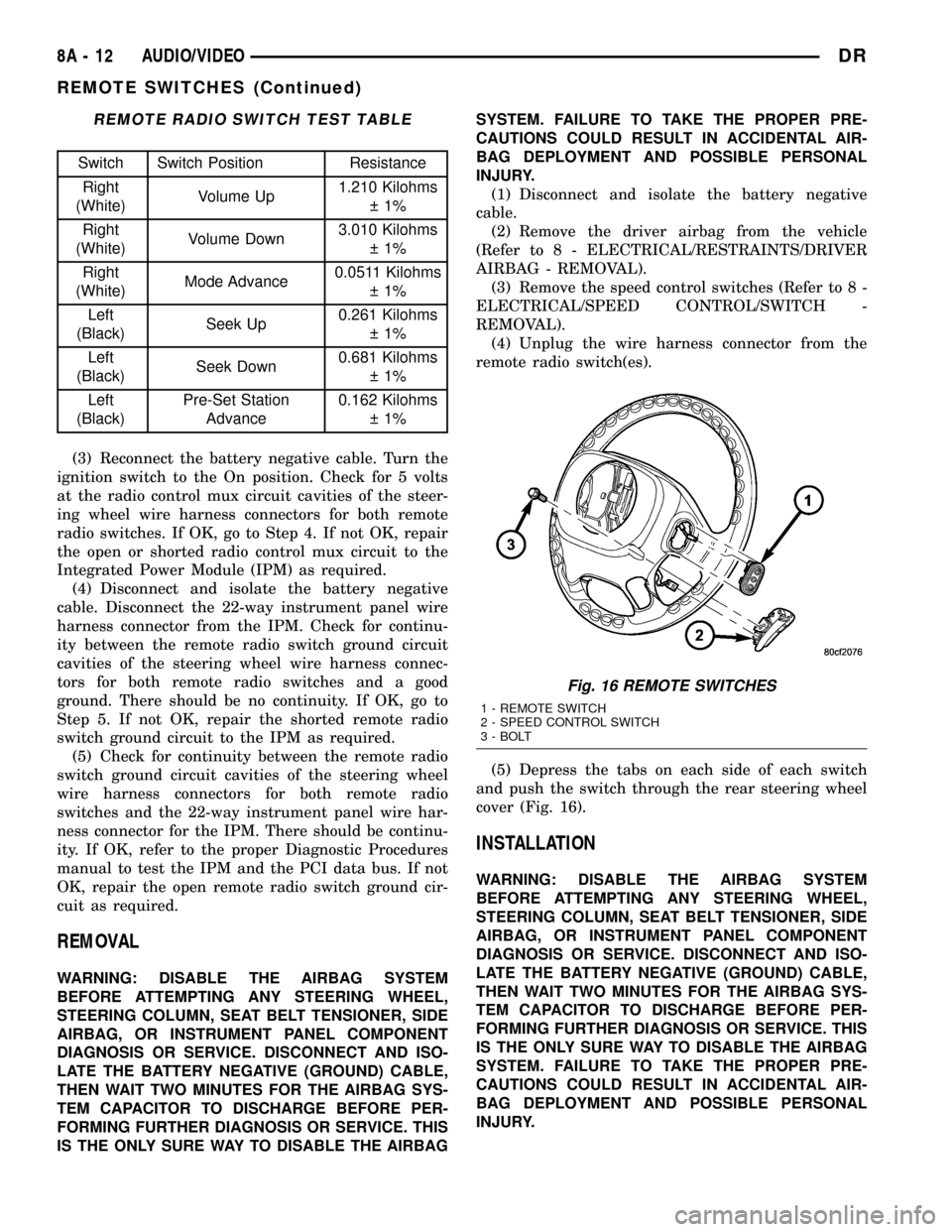
REMOTE RADIO SWITCH TEST TABLE
Switch Switch Position Resistance
Right
(White)Volume Up1.210 Kilohms
1%
Right
(White)Volume Down3.010 Kilohms
1%
Right
(White)Mode Advance0.0511 Kilohms
1%
Left
(Black)Seek Up0.261 Kilohms
1%
Left
(Black)Seek Down0.681 Kilohms
1%
Left
(Black)Pre-Set Station
Advance0.162 Kilohms
1%
(3) Reconnect the battery negative cable. Turn the
ignition switch to the On position. Check for 5 volts
at the radio control mux circuit cavities of the steer-
ing wheel wire harness connectors for both remote
radio switches. If OK, go to Step 4. If not OK, repair
the open or shorted radio control mux circuit to the
Integrated Power Module (IPM) as required.
(4) Disconnect and isolate the battery negative
cable. Disconnect the 22-way instrument panel wire
harness connector from the IPM. Check for continu-
ity between the remote radio switch ground circuit
cavities of the steering wheel wire harness connec-
tors for both remote radio switches and a good
ground. There should be no continuity. If OK, go to
Step 5. If not OK, repair the shorted remote radio
switch ground circuit to the IPM as required.
(5) Check for continuity between the remote radio
switch ground circuit cavities of the steering wheel
wire harness connectors for both remote radio
switches and the 22-way instrument panel wire har-
ness connector for the IPM. There should be continu-
ity. If OK, refer to the proper Diagnostic Procedures
manual to test the IPM and the PCI data bus. If not
OK, repair the open remote radio switch ground cir-
cuit as required.
REMOVAL
WARNING: DISABLE THE AIRBAG SYSTEM
BEFORE ATTEMPTING ANY STEERING WHEEL,
STEERING COLUMN, SEAT BELT TENSIONER, SIDE
AIRBAG, OR INSTRUMENT PANEL COMPONENT
DIAGNOSIS OR SERVICE. DISCONNECT AND ISO-
LATE THE BATTERY NEGATIVE (GROUND) CABLE,
THEN WAIT TWO MINUTES FOR THE AIRBAG SYS-
TEM CAPACITOR TO DISCHARGE BEFORE PER-
FORMING FURTHER DIAGNOSIS OR SERVICE. THIS
IS THE ONLY SURE WAY TO DISABLE THE AIRBAGSYSTEM. FAILURE TO TAKE THE PROPER PRE-
CAUTIONS COULD RESULT IN ACCIDENTAL AIR-
BAG DEPLOYMENT AND POSSIBLE PERSONAL
INJURY.
(1) Disconnect and isolate the battery negative
cable.
(2) Remove the driver airbag from the vehicle
(Refer to 8 - ELECTRICAL/RESTRAINTS/DRIVER
AIRBAG - REMOVAL).
(3) Remove the speed control switches (Refer to 8 -
ELECTRICAL/SPEED CONTROL/SWITCH -
REMOVAL).
(4) Unplug the wire harness connector from the
remote radio switch(es).
(5) Depress the tabs on each side of each switch
and push the switch through the rear steering wheel
cover (Fig. 16).
INSTALLATION
WARNING: DISABLE THE AIRBAG SYSTEM
BEFORE ATTEMPTING ANY STEERING WHEEL,
STEERING COLUMN, SEAT BELT TENSIONER, SIDE
AIRBAG, OR INSTRUMENT PANEL COMPONENT
DIAGNOSIS OR SERVICE. DISCONNECT AND ISO-
LATE THE BATTERY NEGATIVE (GROUND) CABLE,
THEN WAIT TWO MINUTES FOR THE AIRBAG SYS-
TEM CAPACITOR TO DISCHARGE BEFORE PER-
FORMING FURTHER DIAGNOSIS OR SERVICE. THIS
IS THE ONLY SURE WAY TO DISABLE THE AIRBAG
SYSTEM. FAILURE TO TAKE THE PROPER PRE-
CAUTIONS COULD RESULT IN ACCIDENTAL AIR-
BAG DEPLOYMENT AND POSSIBLE PERSONAL
INJURY.
Fig. 16 REMOTE SWITCHES
1 - REMOTE SWITCH
2 - SPEED CONTROL SWITCH
3 - BOLT
8A - 12 AUDIO/VIDEODR
REMOTE SWITCHES (Continued)
Page 451 of 2627
²a faulty or improperly adjusted switch that
allows a lamp to stay on. Refer to Ignition-Off Draw
Test in 8, Battery for more information.
INSPECTION
The PCM (Powertrain Control Module), or ECM
(Diesel) monitors critical input and output circuits of
the charging system, making sure they are opera-
tional. A Diagnostic Trouble Code (DTC) is assigned
to each input and output circuit monitored by the
On-Board Diagnostic (OBD) system. Some charging
system circuits are checked continuously, and some
are checked only under certain conditions.
Refer to Diagnostic Trouble Codes in; Powertrain
Control Module; Electronic Control Modules for more
DTC information. This will include a complete list of
DTC's including DTC's for the charging system.
To perform a complete test of the charging system,
refer to the appropriate Powertrain Diagnostic Proce-
dures service manual and the DRBtscan tool. Per-
form the following inspections before attaching the
scan tool.
(1) Inspect the battery condition. Refer to 8, Bat-
tery for procedures.(2) Inspect condition of battery cable terminals,
battery posts, connections at engine block, starter
solenoid and relay. They should be clean and tight.
Repair as required.
(3) Inspect all fuses in both the fuseblock and
Power Distribution Center (PDC) for tightness in
receptacles. They should be properly installed and
tight. Repair or replace as required.
(4) Inspect generator mounting bolts for tightness.
Replace or tighten bolts if required. Refer to the Gen-
erator Removal/Installation section of this group for
torque specifications.
(5) Inspect generator drive belt condition and ten-
sion. Tighten or replace belt as required. Refer to
Belt Tension Specifications in 7, Cooling System.
(6) Inspect automatic belt tensioner (if equipped).
Refer to 7, Cooling System for information.
(7) Inspect generator electrical connections at gen-
erator field, battery output, and ground terminal (if
equipped). Also check generator ground wire connec-
tion at engine (if equipped). They should all be clean
and tight. Repair as required.
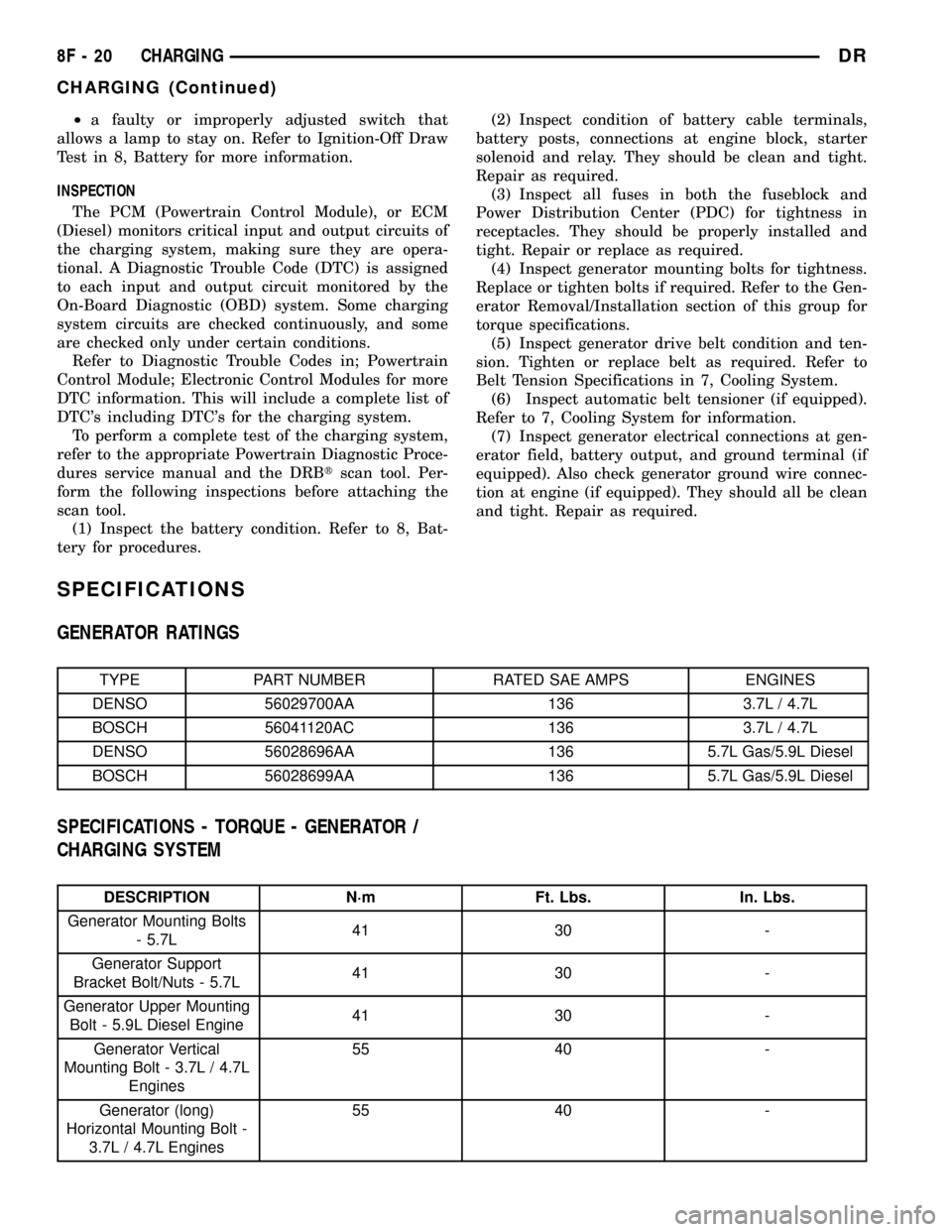
SPECIFICATIONS
GENERATOR RATINGS
TYPE PART NUMBER RATED SAE AMPS ENGINES
DENSO 56029700AA 136 3.7L / 4.7L
BOSCH 56041120AC 136 3.7L / 4.7L
DENSO 56028696AA 136 5.7L Gas/5.9L Diesel
BOSCH 56028699AA 136 5.7L Gas/5.9L Diesel
SPECIFICATIONS - TORQUE - GENERATOR /
CHARGING SYSTEM
DESCRIPTION N´m Ft. Lbs. In. Lbs.
Generator Mounting Bolts
- 5.7L41 30 -
Generator Support
Bracket Bolt/Nuts - 5.7L41 30 -
Generator Upper Mounting
Bolt - 5.9L Diesel Engine41 30 -
Generator Vertical
Mounting Bolt - 3.7L / 4.7L
Engines55 40 -
Generator (long)
Horizontal Mounting Bolt -
3.7L / 4.7L Engines55 40 -
8F - 20 CHARGINGDR
CHARGING (Continued)
Page 452 of 2627

DESCRIPTION N´m Ft. Lbs. In. Lbs.
Generator (short)
Horizontal Mounting Bolt -
3.7L / 4.7L Engines74 55 -
Generator B+ Output
Cable Terminal Nut12 - 108
BATTERY TEMPERATURE
SENSOR
DESCRIPTION
The Battery Temperature Sensor (BTS) is attached
to the battery tray located under the battery.
OPERATION
The BTS is used to determine the battery temper-
ature and control battery charging rate. This temper-
ature data, along with data from monitored line
voltage, is used by the PCM (ECM Diesel) to vary the
battery charging rate. System voltage will be higher
at colder temperatures and is gradually reduced at
warmer temperatures.
The PCM sends 5 volts to the sensor and is
grounded through the sensor return line. As temper-
ature increases, resistance in the sensor decreases
and the detection voltage at the PCM increases.
The BTS is also used for OBD II diagnostics. Cer-
tain faults and OBD II monitors are either enabled
or disabled, depending upon BTS input (for example,
disable purge and enable Leak Detection Pump
(LDP) and O2 sensor heater tests). Most OBD II
monitors are disabled below 20ÉF.
REMOVAL
The battery temperature sensor is located under
the vehicle battery and is attached (snapped into) a
mounting hole on battery tray (Fig. 1).
(1) Remove battery. Refer to 8, Battery for proce-
dures.
(2) Pry sensor straight up from battery tray
mounting hole to gain access to electrical connector
(Fig. 1).
(3) Disconnect sensor from engine wire harness
electrical connector.
INSTALLATION
The battery temperature sensor is located under
the vehicle battery and is attached (snapped into) a
mounting hole on battery tray.
(1) Pull electrical connector up through mounting
hole in top of battery tray.
(2) Connect sensor.
(3) Snap sensor into battery tray.(4) Install battery. Refer to 8, Battery for proce-
dures.
GENERATOR
DESCRIPTION
The generator is belt-driven by the engine using a
serpentine type drive belt. It is serviced only as a
complete assembly. If the generator fails for any rea-
son, the entire assembly must be replaced.
OPERATION
As the energized rotor begins to rotate within the
generator, the spinning magnetic field induces a cur-
rent into the windings of the stator coil. Once the
generator begins producing sufficient current, it also
provides the current needed to energize the rotor.
Fig. 1 BATTERY TEMPERATURE SENSOR
LOCATION
1 - BATTERY TEMP. SENSOR
2 - BATTERY
3 - SENSOR ELEC. CONNECT.
4 - BATTERY TRAY
DRCHARGING 8F - 21
CHARGING (Continued)
Page 453 of 2627

The stator winding connections deliver the induced
alternating current to 3 positive and 3 negative
diodes for rectification. From the diodes, rectified
direct current is delivered to the vehicle electrical
system through the generator battery terminal.
Although the generators appear the same exter-
nally, different generators with different output rat-
ings are used on this vehicle. Be certain that the
replacement generator has the same output rating
and part number as the original unit. Refer to Gen-
erator Ratings in the Specifications section at the
back of this group for amperage ratings and part
numbers.
Noise emitting from the generator may be caused
by: worn, loose or defective bearings; a loose or defec-
tive drive pulley; incorrect, worn, damaged or misad-
justed fan drive belt; loose mounting bolts; a
misaligned drive pulley or a defective stator or diode.
REMOVAL
3.7L / 4.7L
WARNING: DISCONNECT NEGATIVE CABLE FROM
BATTERY BEFORE REMOVING BATTERY OUTPUT
WIRE (B+ WIRE) FROM GENERATOR. FAILURE TO
DO SO CAN RESULT IN INJURY OR DAMAGE TO
ELECTRICAL SYSTEM.
(1) Disconnect negative battery cable at battery.
(2) Remove generator drive belt. Refer to 7, Cool-
ing System for procedure.
(3) Unsnap plastic insulator cap from B+ output
terminal (Fig. 2).
(4) Remove B+ terminal mounting nut at rear of
generator (Fig. 2). Disconnect terminal from genera-
tor.
(5) Disconnect field wire connector at rear of gen-
erator (Fig. 2) by pushing on connector tab.
(6) Remove 1 rear vertical generator mounting bolt
(Fig. 3).
(7) Remove 2 front horizontal generator mounting
bolts (Fig. 3).
(8) Remove generator from vehicle.
5.7L
WARNING: DISCONNECT NEGATIVE CABLE FROM
BATTERY BEFORE REMOVING BATTERY OUTPUT
WIRE (B+ WIRE) FROM GENERATOR. FAILURE TO
DO SO CAN RESULT IN INJURY OR DAMAGE TO
ELECTRICAL SYSTEM.
(1) Disconnect negative battery cable at battery.
(2) Remove generator drive belt. Refer to 7, Cool-
ing System for procedure.(3) Unsnap plastic insulator cap from B+ output
terminal.
(4) Remove B+ terminal mounting nut at rear of
generator. Disconnect terminal from generator.
(5) Disconnect field wire connector at rear of gen-
erator by pushing on connector tab.
Fig. 2 GENERATOR CONNECTORS - 3.7L / 4.7L
1 - GENERATOR
2-B+NUT
3 - PLASTIC INSULATOR CAP
4 - FIELD WIRE CONNECTOR
Fig. 3 REMOVE / INSTALL GENERATOR - 3.7L / 4.7L
1 - LOWER BOLTS
2 - REAR BOLT
3 - GENERATOR
8F - 22 CHARGINGDR
GENERATOR (Continued)