ad blue DODGE RAM 1500 1998 2.G User Guide
[x] Cancel search | Manufacturer: DODGE, Model Year: 1998, Model line: RAM 1500, Model: DODGE RAM 1500 1998 2.GPages: 2627
Page 551 of 2627

cator is electronically disabled. The upshift indicator
consists of an upward pointed arrow icon, which
appears on the right side of the electronic gear selec-
tor indicator Vacuum Fluorescent Display (VFD)
unit. The VFD is soldered onto the cluster electronic
circuit board and is visible through a window with a
smoked clear lens located on the lower edge of the
speedometer gauge dial face of the cluster overlay.
The dark lens over the VFD prevents the indicator
from being clearly visible when it is not illuminated.
The icon appears in a blue-green color and at the
same lighting level as the odometer/trip odometer
information when it is illuminated by the instrument
cluster electronic circuit board. The upshift indicator
is serviced as a unit with the instrument cluster.
OPERATION
The upshift indicator gives an indication to the
vehicle operator when the manual transmission
should be shifted to the next highest gear in order to
achieve the best fuel economy. This indicator is con-
trolled by the instrument cluster circuit board based
upon cluster programming and electronic messages
received by the cluster from the Powertrain Control
Module (PCM) on vehicles with a gasoline engine, or
from the Engine Control Module (ECM) on vehicles
with a diesel engine over the Programmable Commu-
nications Interface (PCI) data bus. The upshift indi-
cator is completely controlled by the instrument
cluster logic circuit, and that logic will only allow
this indicator to operate when the instrument cluster
receives a battery current input on the fused ignition
switch output (run-start) circuit. Therefore, the indi-
cator will always be off when the ignition switch is in
any position except On or Start. The indicator only
illuminates when it is switched to ground by the
instrument cluster circuitry. The instrument cluster
will turn on the upshift indicator for the following
reasons:
²Upshift Lamp-On Message- Each time the
cluster receives an upshift lamp-on message from the
PCM or ECM indicating the engine speed and load
conditions are right for a transmission upshift to
occur, the upshift indicator is illuminated. The indi-
cator remains illuminated until the cluster receives
an upshift lamp-off message from the PCM or ECM,
or until the ignition switch is turned to the Off posi-
tion, whichever occurs first. The PCM or ECM will
normally send an upshift lamp-off message three to
five seconds after a lamp-on message, if an upshift is
not performed. The indicator will then remain off
until the vehicle stops accelerating and is brought
back into the range of indicator operation, or until
the transmission is shifted into another gear.
²Actuator Test- Each time the cluster is put
through the actuator test, the upshift indicator willbe turned on, then off again during the VFD portion
of the test to confirm the functionality of the VFD
and the cluster control circuitry.
On vehicles with a gasoline engine, the PCM con-
tinually monitors the engine speed and load condi-
tions to determine the proper fuel and ignition
requirements. On vehicles with a diesel engine, the
ECM continually monitors the engine speed and load
conditions to determine the proper fuel requirements.
The PCM or ECM then sends the proper upshift indi-
cator lamp-on and lamp-off messages to the instru-
ment cluster. For further diagnosis of the upshift
indicator or the instrument cluster circuitry that con-
trols the indicator, (Refer to 8 - ELECTRICAL/IN-
STRUMENT CLUSTER - DIAGNOSIS AND
TESTING). For proper diagnosis of the PCM, the
ECM, the PCI data bus, or the electronic message
inputs to the instrument cluster that control the
upshift indicator, a DRBIIItscan tool is required.
Refer to the appropriate diagnostic information.
VOLTAGE GAUGE
DESCRIPTION
A voltage gauge is standard equipment on all
instrument clusters. The voltage gauge is located in
the upper left quadrant of the instrument cluster,
above the fuel gauge. The voltage gauge consists of a
movable gauge needle or pointer controlled by the
instrument cluster circuitry and a fixed 90 degree
scale on the cluster overlay that reads left-to-right
from ªLº (or Low) to ªHº (or High) for gasoline
engines. On vehicles with a diesel engine, the scale
reads from ª8º to ª18º volts. An International Control
and Display Symbol icon for ªBattery Charging Con-
ditionº is located on the cluster overlay, directly
below the right end of the gauge scale (Fig. 34). The
voltage gauge graphics are black against a white
field except for a single red graduation at each end of
the gauge scale, making them clearly visible within
the instrument cluster in daylight. When illuminated
from behind by the panel lamps dimmer controlled
cluster illumination lighting with the exterior lamps
turned On, the black graphics appear blue and the
red graphics still appear red. The orange gauge nee-
dle is internally illuminated. Gauge illumination is
provided by replaceable incandescent bulb and bulb
holder units located on the instrument cluster elec-
tronic circuit board. The voltage gauge is serviced as
a unit with the instrument cluster.
Fig. 34 Battery Charging Condition Icon
8J - 42 INSTRUMENT CLUSTERDR
UPSHIFT INDICATOR (Continued)
Page 724 of 2627

NAVIGATION/TELECOMMUNICATION
TABLE OF CONTENTS
page page
NAVIGATION/TELECOMMUNICATION
DESCRIPTION..........................1
OPERATION............................1HANDS FREE MODULE
REMOVAL.............................2
INSTALLATION..........................2
NAVIGATION/
TELECOMMUNICATION
DESCRIPTION
TELECOMMUNICATIONS
The hands-free cellular system on this vehicle uses
BluetoothŸ technology to provide wireless communi-
cation between the operator's compatible cellular
telephone and the vehicle's on-board receiver.
The system uses voice recognition technology to
control operation. The incoming voice is broadcast
through the vehicle's radio speakers, automatically
overriding any other audio signals on the front
speakers when the hands-free system is in use. A
microphone in the rearview mirror picks up vehicle
occupant's voices. If a call is in progress when the
ignition is switched off, the hands-free system will
continue to operate for up to 45 seconds as part of
the Accessory Relay Delay function. Thereafter, the
call can continue on the hand-held telephone.
The system will communicate with a telephone
that is anywhere within the vehicle. However, cover-
ing the hand held phone or the hands-free phone
module with a metal object may block the signal. The
system will recognize up to seven telephones, each of
which is given a spoken identification by the user
during the setup process. The system includes Span-
ish and French voice recognition in addition to
English.
Two buttons on the rearview mirror, identified with
ISO icons, control the system: A9phone9button turns
the system on and off; a9voice recognition9(or voice
command) button prompts the hands-free system to
listen for a voice command.
OPERATION
TELECOMMUNICATION
Two buttons on the rearview mirror, identified with
ISO icons, control the system: A9phone9button turns
the system on and off; a9voice recognition9(or voice
command) button prompts the hands-free system to
listen for a voice command. The system includes the
following features:
²Phone book - Stores telephone numbers for later
recall by name or other verbal identification, called a
voice tag, and memory location.
²Four memory locations - Home, Work, Cellular
and Pager. A maximum of 32 unique names or voice
tags may be stored at the same time, with a different
number in each of the four memory locations.
²Voice tag dialing - Dials the number associated
with a voice tag and memory location.
²Digit dialing - Dials the telephone number by
recognizing the names of the digits as they are spo-
ken.
²Receiving calls - A voice prompt notifies the user
of an incoming call. A voice response accepts or
rejects the call without manual intervention.
²Privacy Mode - Switches the call to the hand-
held telephone and the hands-free system and back
again using the ªvoice recognitionº (or ªvoice com-
mandº) button and a voice command, if desired.
DRNAVIGATION/TELECOMMUNICATION 8T - 1
Page 732 of 2627
TERMINOLOGY
This is a list of terms and definitions used in the
wiring diagrams.
LHD.................Left Hand Drive Vehicles
RHD ...............Right Hand Drive Vehicles
ATX . . Automatic Transmissions-Front Wheel Drive
MTX . . . Manual Transmissions-Front Wheel Drive
AT....Automatic Transmissions-Rear Wheel Drive
MT .....Manual Transmissions-Rear Wheel Drive
SOHC...........Single Over Head Cam Engine
DOHC..........Double Over Head Cam Engine
Export . . Vehicles Built For Sale In Markets Other
Than North America
Except Export.... Vehicles Built For Sale In North
America
DESCRIPTION - CIRCUIT INFORMATION
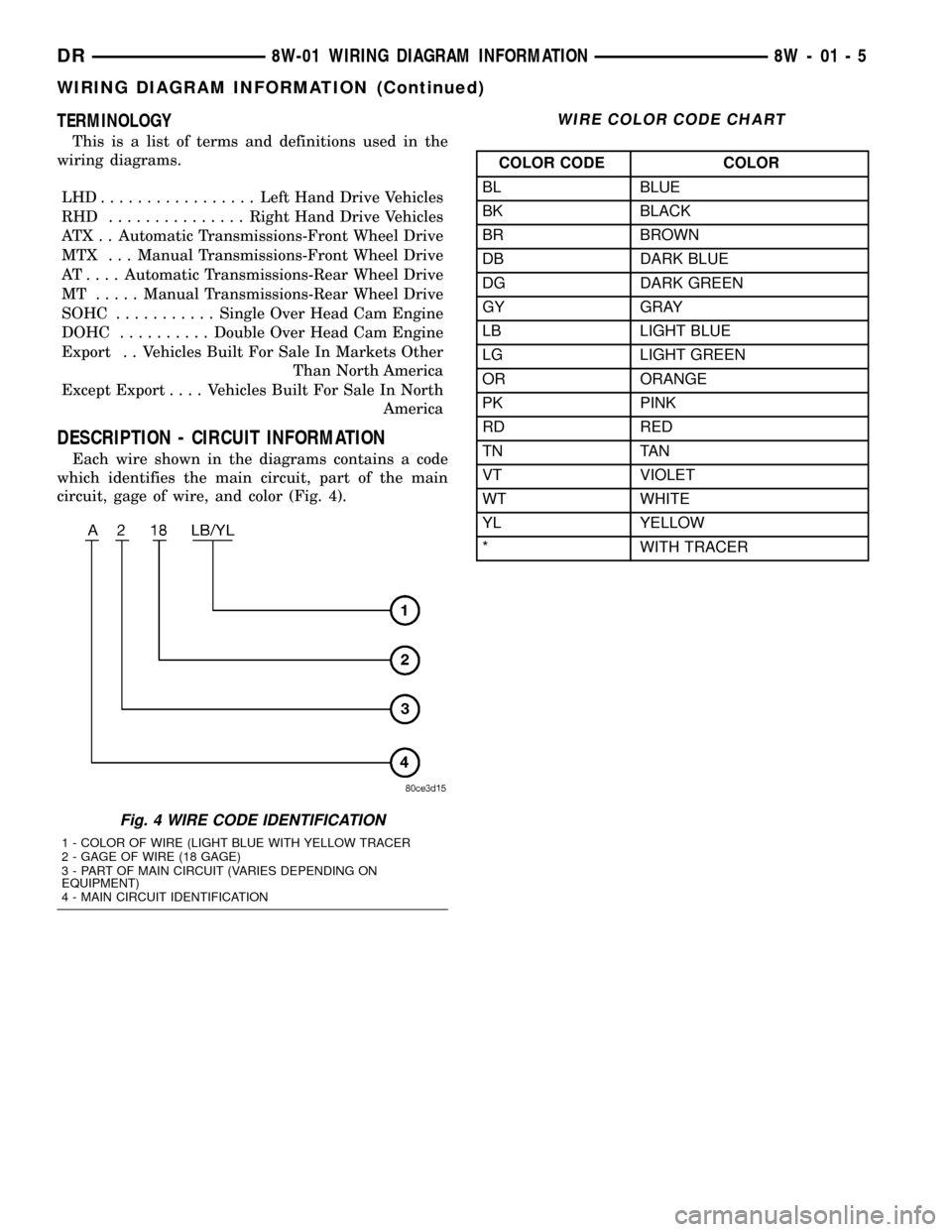
Each wire shown in the diagrams contains a code
which identifies the main circuit, part of the main
circuit, gage of wire, and color (Fig. 4).
WIRE COLOR CODE CHART
COLOR CODE COLOR
BL BLUE
BK BLACK
BR BROWN
DB DARK BLUE
DG DARK GREEN
GY GRAY
LB LIGHT BLUE
LG LIGHT GREEN
OR ORANGE
PK PINK
RD RED
TN TAN
VT VIOLET
WT WHITE
YL YELLOW
* WITH TRACER
Fig. 4 WIRE CODE IDENTIFICATION
1 - COLOR OF WIRE (LIGHT BLUE WITH YELLOW TRACER
2 - GAGE OF WIRE (18 GAGE)
3 - PART OF MAIN CIRCUIT (VARIES DEPENDING ON
EQUIPMENT)
4 - MAIN CIRCUIT IDENTIFICATION
DR8W-01 WIRING DIAGRAM INFORMATION 8W - 01 - 5
WIRING DIAGRAM INFORMATION (Continued)
Page 1057 of 2627
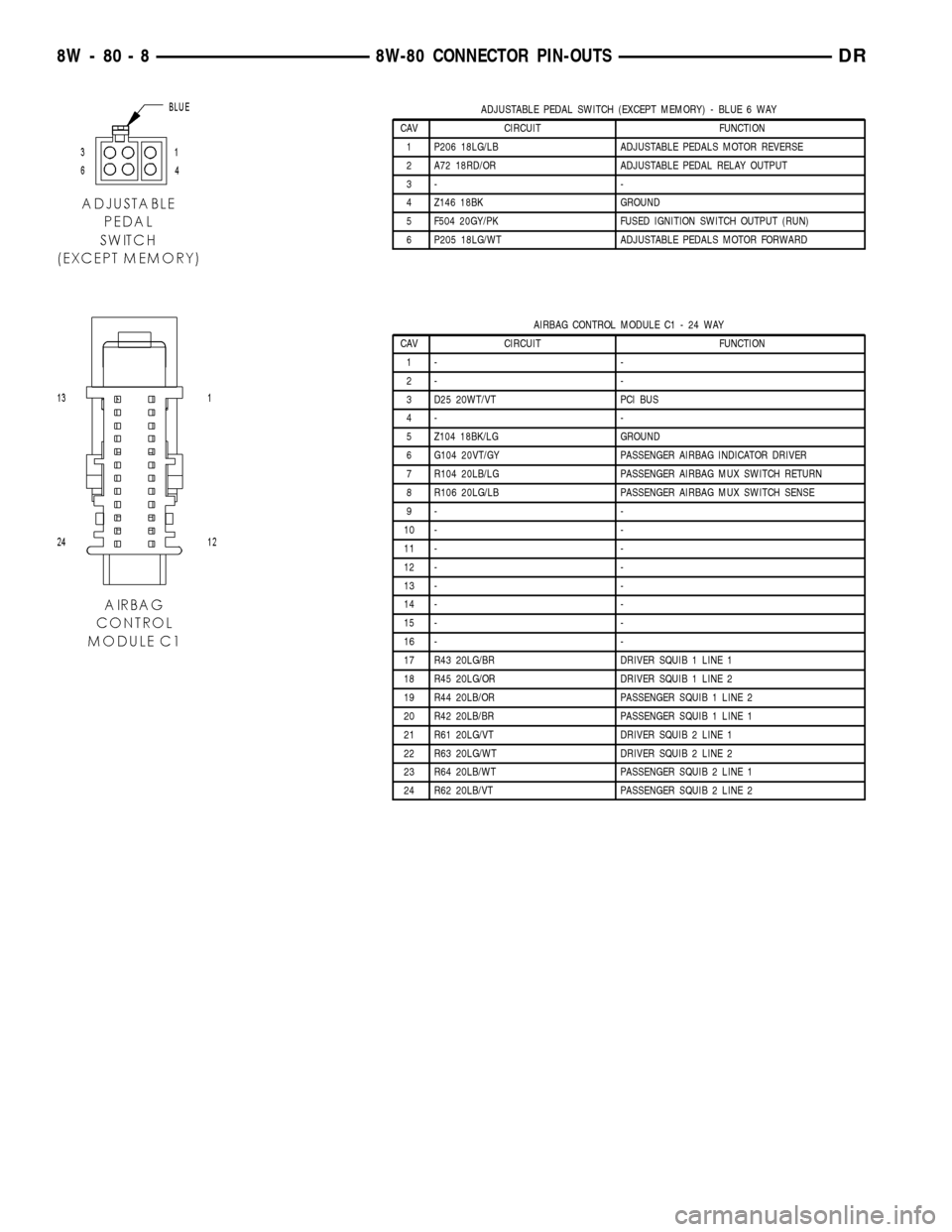
ADJUSTABLE PEDAL SWITCH (EXCEPT MEMORY) - BLUE 6 WAY
CAV CIRCUIT FUNCTION
1 P206 18LG/LB ADJUSTABLE PEDALS MOTOR REVERSE
2 A72 18RD/OR ADJUSTABLE PEDAL RELAY OUTPUT
3- -
4 Z146 18BK GROUND
5 F504 20GY/PK FUSED IGNITION SWITCH OUTPUT (RUN)
6 P205 18LG/WT ADJUSTABLE PEDALS MOTOR FORWARD
AIRBAG CONTROL MODULE C1 - 24 WAY
CAV CIRCUIT FUNCTION
1- -
2- -
3 D25 20WT/VT PCI BUS
4- -
5 Z104 18BK/LG GROUND
6 G104 20VT/GY PASSENGER AIRBAG INDICATOR DRIVER
7 R104 20LB/LG PASSENGER AIRBAG MUX SWITCH RETURN
8 R106 20LG/LB PASSENGER AIRBAG MUX SWITCH SENSE
9- -
10 - -
11 - -
12 - -
13 - -
14 - -
15 - -
16 - -
17 R43 20LG/BR DRIVER SQUIB 1 LINE 1
18 R45 20LG/OR DRIVER SQUIB 1 LINE 2
19 R44 20LB/OR PASSENGER SQUIB 1 LINE 2
20 R42 20LB/BR PASSENGER SQUIB 1 LINE 1
21 R61 20LG/VT DRIVER SQUIB 2 LINE 1
22 R63 20LG/WT DRIVER SQUIB 2 LINE 2
23 R64 20LB/WT PASSENGER SQUIB 2 LINE 1
24 R62 20LB/VT PASSENGER SQUIB 2 LINE 2
8W - 80 - 8 8W-80 CONNECTOR PIN-OUTSDR
Page 1106 of 2627
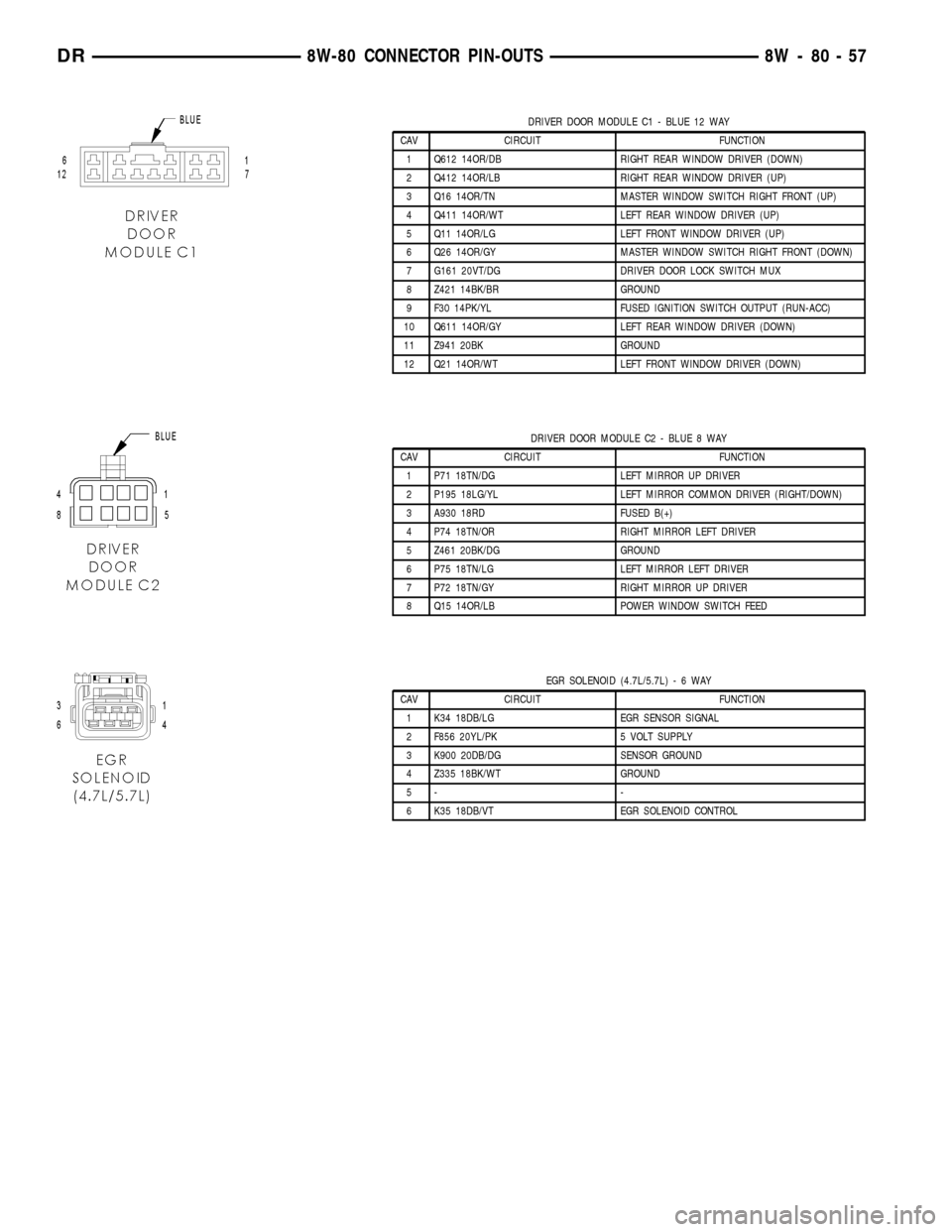
DRIVER DOOR MODULE C1 - BLUE 12 WAY
CAV CIRCUIT FUNCTION
1 Q612 14OR/DB RIGHT REAR WINDOW DRIVER (DOWN)
2 Q412 14OR/LB RIGHT REAR WINDOW DRIVER (UP)
3 Q16 14OR/TN MASTER WINDOW SWITCH RIGHT FRONT (UP)
4 Q411 14OR/WT LEFT REAR WINDOW DRIVER (UP)
5 Q11 14OR/LG LEFT FRONT WINDOW DRIVER (UP)
6 Q26 14OR/GY MASTER WINDOW SWITCH RIGHT FRONT (DOWN)
7 G161 20VT/DG DRIVER DOOR LOCK SWITCH MUX
8 Z421 14BK/BR GROUND
9 F30 14PK/YL FUSED IGNITION SWITCH OUTPUT (RUN-ACC)
10 Q611 14OR/GY LEFT REAR WINDOW DRIVER (DOWN)
11 Z941 20BK GROUND
12 Q21 14OR/WT LEFT FRONT WINDOW DRIVER (DOWN)
DRIVER DOOR MODULE C2 - BLUE 8 WAY
CAV CIRCUIT FUNCTION
1 P71 18TN/DG LEFT MIRROR UP DRIVER
2 P195 18LG/YL LEFT MIRROR COMMON DRIVER (RIGHT/DOWN)
3 A930 18RD FUSED B(+)
4 P74 18TN/OR RIGHT MIRROR LEFT DRIVER
5 Z461 20BK/DG GROUND
6 P75 18TN/LG LEFT MIRROR LEFT DRIVER
7 P72 18TN/GY RIGHT MIRROR UP DRIVER
8 Q15 14OR/LB POWER WINDOW SWITCH FEED
EGR SOLENOID (4.7L/5.7L)-6WAY
CAV CIRCUIT FUNCTION
1 K34 18DB/LG EGR SENSOR SIGNAL
2 F856 20YL/PK 5 VOLT SUPPLY
3 K900 20DB/DG SENSOR GROUND
4 Z335 18BK/WT GROUND
5- -
6 K35 18DB/VT EGR SOLENOID CONTROL
DR8W-80 CONNECTOR PIN-OUTS 8W - 80 - 57
Page 1117 of 2627
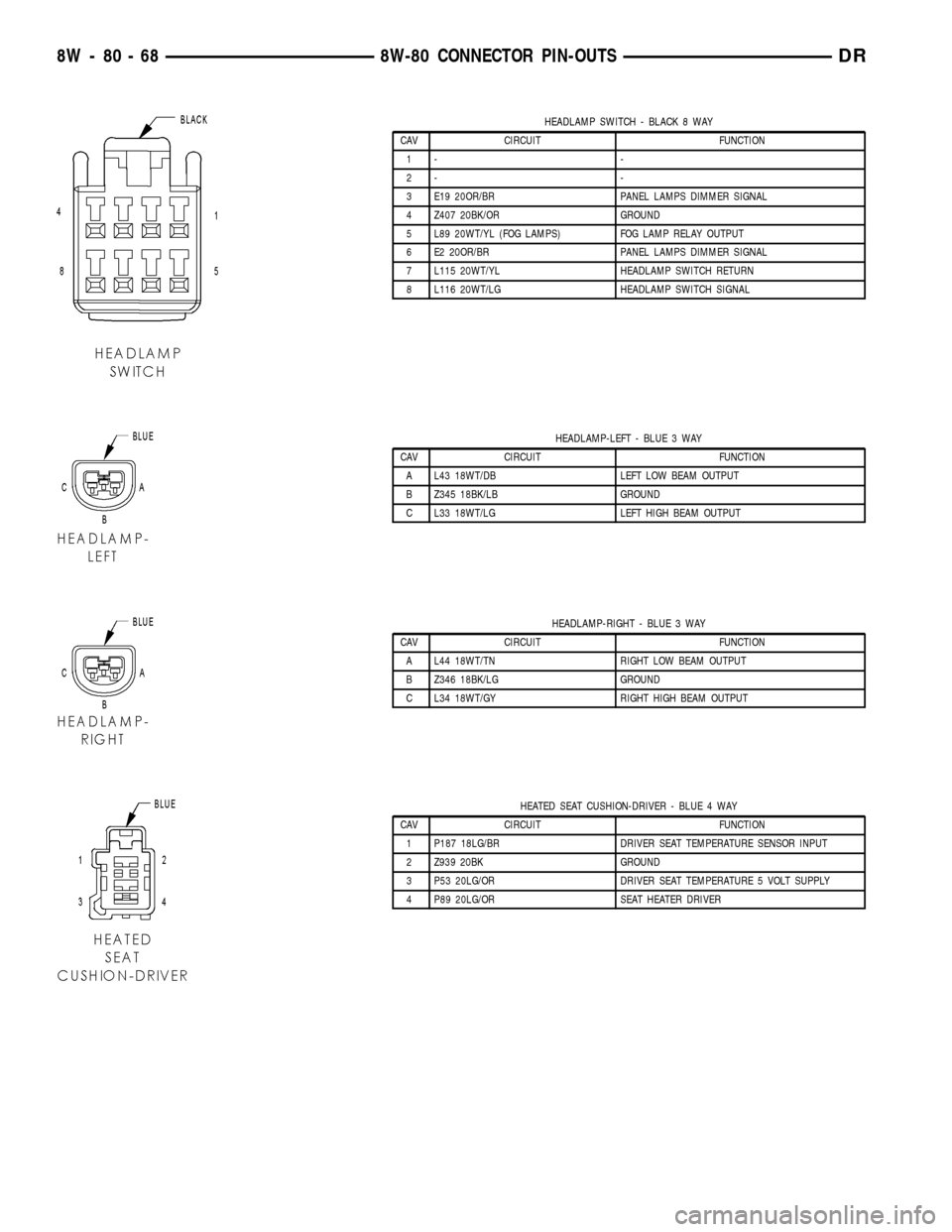
HEADLAMP SWITCH - BLACK 8 WAY
CAV CIRCUIT FUNCTION
1- -
2- -
3 E19 20OR/BR PANEL LAMPS DIMMER SIGNAL
4 Z407 20BK/OR GROUND
5 L89 20WT/YL (FOG LAMPS) FOG LAMP RELAY OUTPUT
6 E2 20OR/BR PANEL LAMPS DIMMER SIGNAL
7 L115 20WT/YL HEADLAMP SWITCH RETURN
8 L116 20WT/LG HEADLAMP SWITCH SIGNAL
HEADLAMP-LEFT - BLUE 3 WAY
CAV CIRCUIT FUNCTION
A L43 18WT/DB LEFT LOW BEAM OUTPUT
B Z345 18BK/LB GROUND
C L33 18WT/LG LEFT HIGH BEAM OUTPUT
HEADLAMP-RIGHT - BLUE 3 WAY
CAV CIRCUIT FUNCTION
A L44 18WT/TN RIGHT LOW BEAM OUTPUT
B Z346 18BK/LG GROUND
C L34 18WT/GY RIGHT HIGH BEAM OUTPUT
HEATED SEAT CUSHION-DRIVER - BLUE 4 WAY
CAV CIRCUIT FUNCTION
1 P187 18LG/BR DRIVER SEAT TEMPERATURE SENSOR INPUT
2 Z939 20BK GROUND
3 P53 20LG/OR DRIVER SEAT TEMPERATURE 5 VOLT SUPPLY
4 P89 20LG/OR SEAT HEATER DRIVER
8W - 80 - 68 8W-80 CONNECTOR PIN-OUTSDR
Page 1118 of 2627
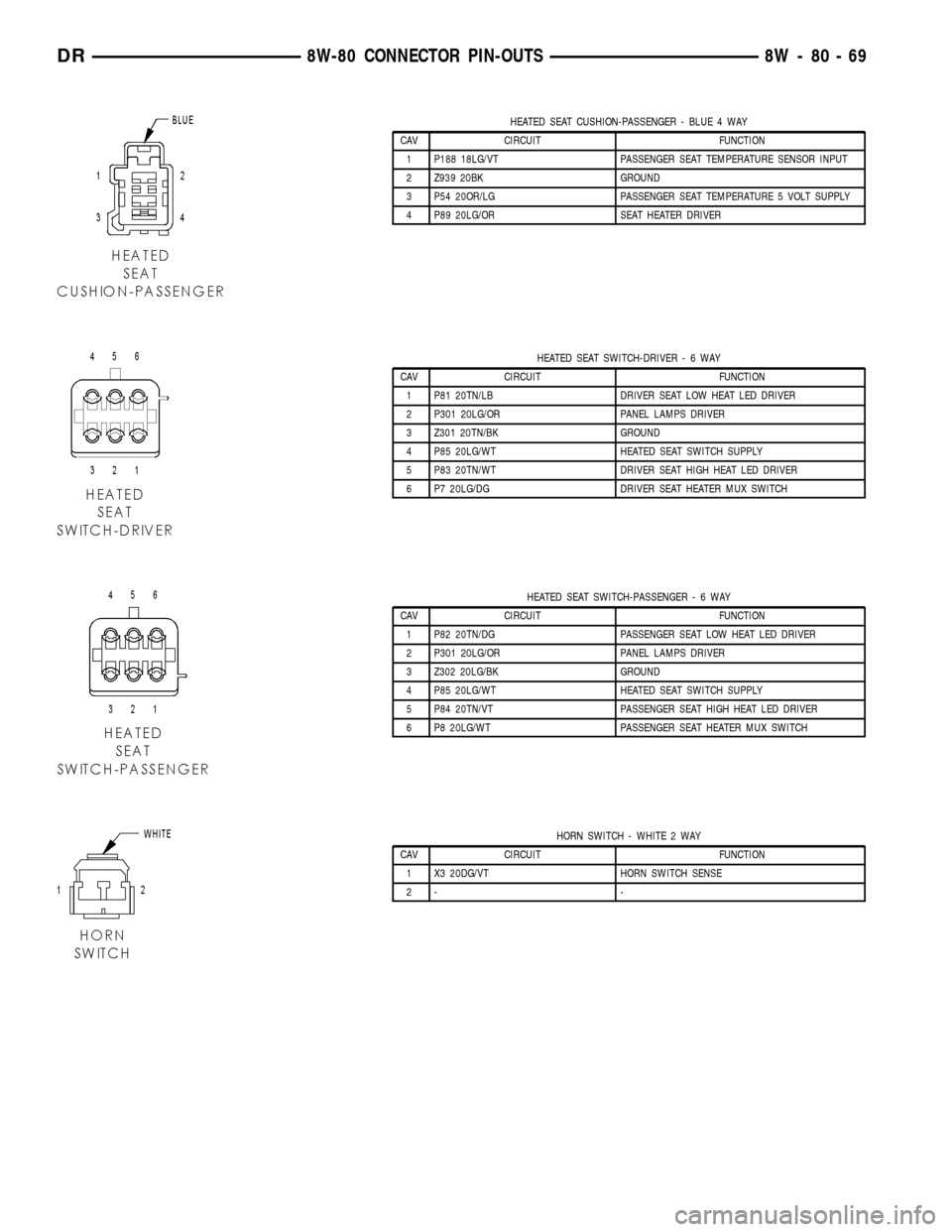
HEATED SEAT CUSHION-PASSENGER - BLUE 4 WAY
CAV CIRCUIT FUNCTION
1 P188 18LG/VT PASSENGER SEAT TEMPERATURE SENSOR INPUT
2 Z939 20BK GROUND
3 P54 20OR/LG PASSENGER SEAT TEMPERATURE 5 VOLT SUPPLY
4 P89 20LG/OR SEAT HEATER DRIVER
HEATED SEAT SWITCH-DRIVER-6WAY
CAV CIRCUIT FUNCTION
1 P81 20TN/LB DRIVER SEAT LOW HEAT LED DRIVER
2 P301 20LG/OR PANEL LAMPS DRIVER
3 Z301 20TN/BK GROUND
4 P85 20LG/WT HEATED SEAT SWITCH SUPPLY
5 P83 20TN/WT DRIVER SEAT HIGH HEAT LED DRIVER
6 P7 20LG/DG DRIVER SEAT HEATER MUX SWITCH
HEATED SEAT SWITCH-PASSENGER-6WAY
CAV CIRCUIT FUNCTION
1 P82 20TN/DG PASSENGER SEAT LOW HEAT LED DRIVER
2 P301 20LG/OR PANEL LAMPS DRIVER
3 Z302 20LG/BK GROUND
4 P85 20LG/WT HEATED SEAT SWITCH SUPPLY
5 P84 20TN/VT PASSENGER SEAT HIGH HEAT LED DRIVER
6 P8 20LG/WT PASSENGER SEAT HEATER MUX SWITCH
HORN SWITCH - WHITE 2 WAY
CAV CIRCUIT FUNCTION
1 X3 20DG/VT HORN SWITCH SENSE
2- -
DR8W-80 CONNECTOR PIN-OUTS 8W - 80 - 69
Page 1129 of 2627
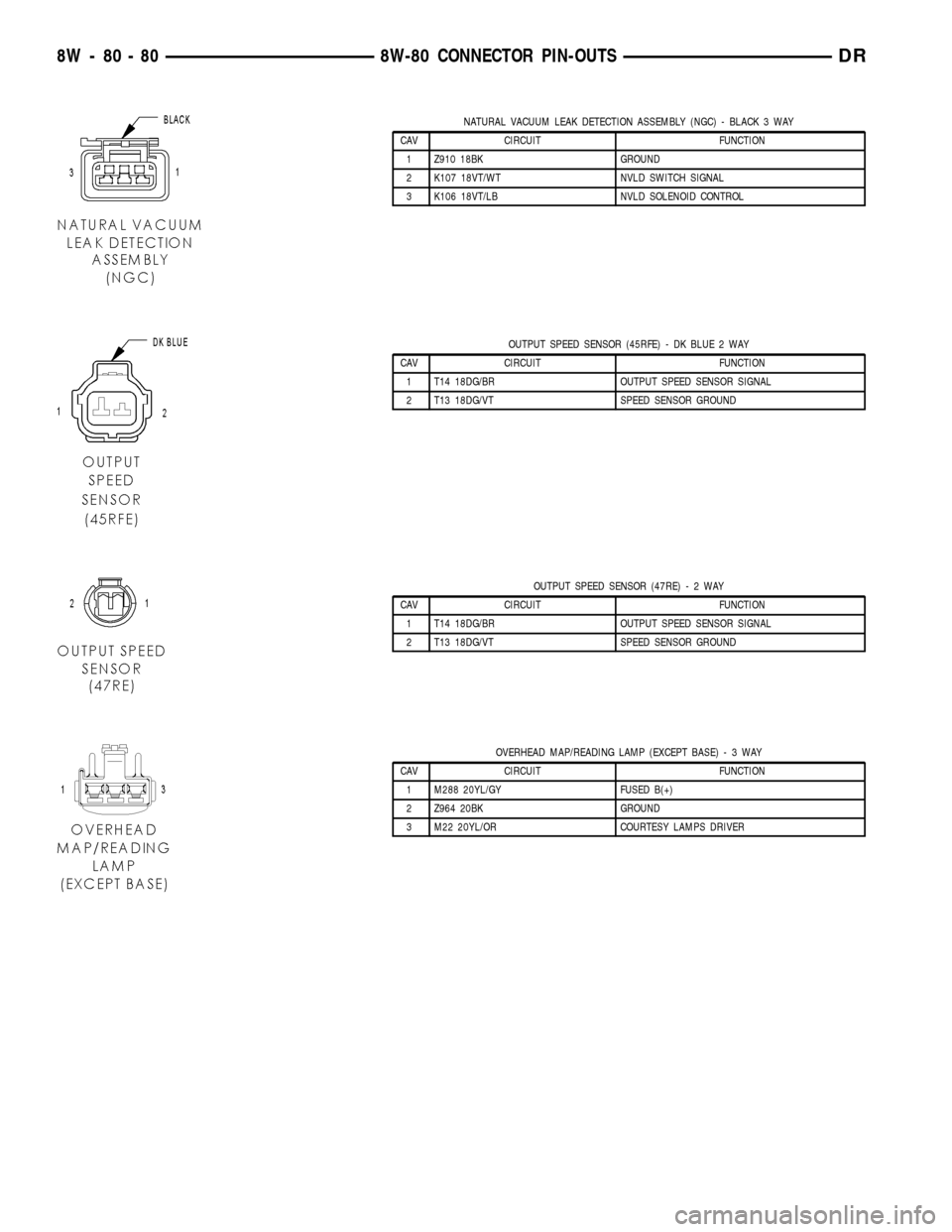
NATURAL VACUUM LEAK DETECTION ASSEMBLY (NGC) - BLACK 3 WAY
CAV CIRCUIT FUNCTION
1 Z910 18BK GROUND
2 K107 18VT/WT NVLD SWITCH SIGNAL
3 K106 18VT/LB NVLD SOLENOID CONTROL
OUTPUT SPEED SENSOR (45RFE) - DK BLUE 2 WAY
CAV CIRCUIT FUNCTION
1 T14 18DG/BR OUTPUT SPEED SENSOR SIGNAL
2 T13 18DG/VT SPEED SENSOR GROUND
OUTPUT SPEED SENSOR (47RE)-2WAY
CAV CIRCUIT FUNCTION
1 T14 18DG/BR OUTPUT SPEED SENSOR SIGNAL
2 T13 18DG/VT SPEED SENSOR GROUND
OVERHEAD MAP/READING LAMP (EXCEPT BASE)-3WAY
CAV CIRCUIT FUNCTION
1 M288 20YL/GY FUSED B(+)
2 Z964 20BK GROUND
3 M22 20YL/OR COURTESY LAMPS DRIVER
8W - 80 - 80 8W-80 CONNECTOR PIN-OUTSDR
Page 1136 of 2627
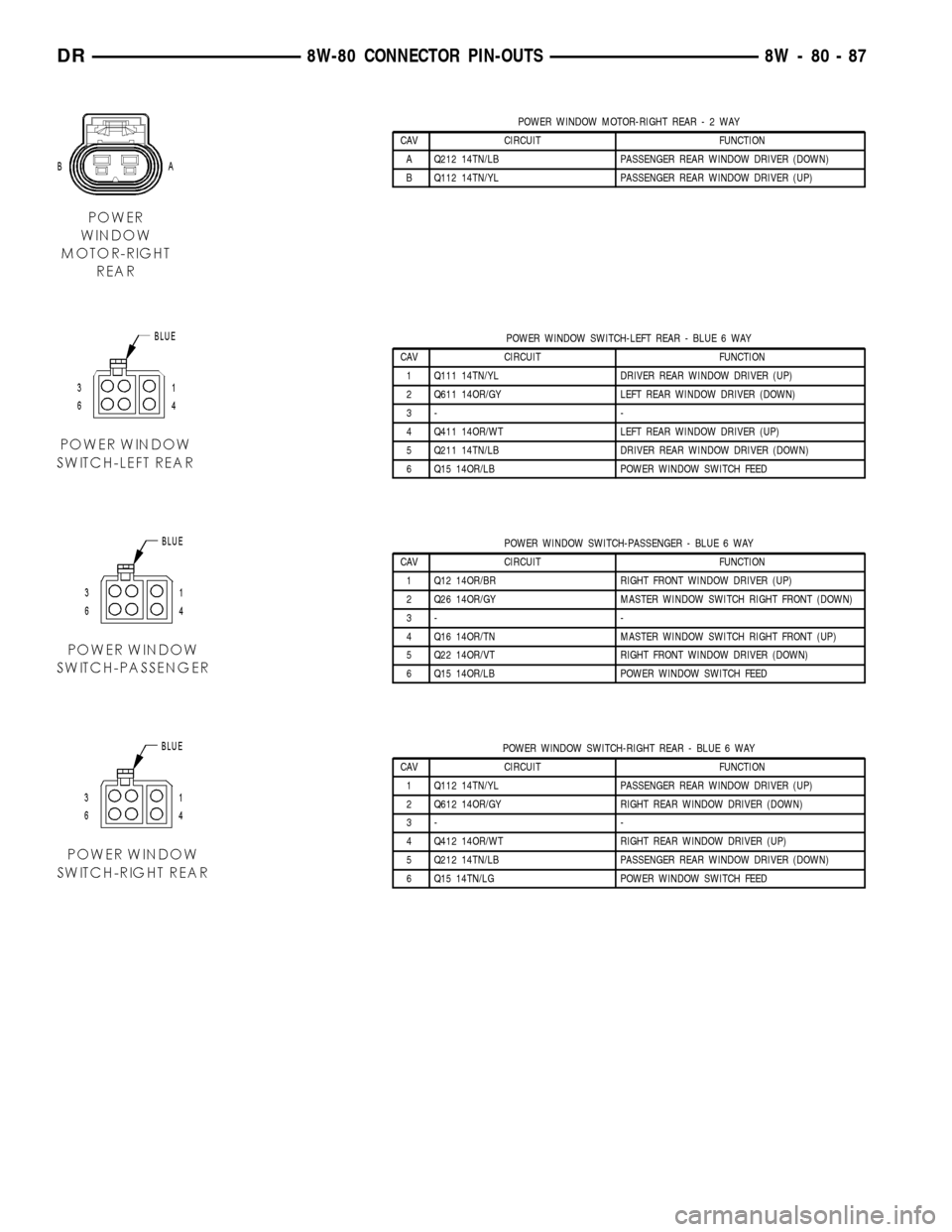
POWER WINDOW MOTOR-RIGHT REAR-2WAY
CAV CIRCUIT FUNCTION
A Q212 14TN/LB PASSENGER REAR WINDOW DRIVER (DOWN)
B Q112 14TN/YL PASSENGER REAR WINDOW DRIVER (UP)
POWER WINDOW SWITCH-LEFT REAR - BLUE 6 WAY
CAV CIRCUIT FUNCTION
1 Q111 14TN/YL DRIVER REAR WINDOW DRIVER (UP)
2 Q611 14OR/GY LEFT REAR WINDOW DRIVER (DOWN)
3- -
4 Q411 14OR/WT LEFT REAR WINDOW DRIVER (UP)
5 Q211 14TN/LB DRIVER REAR WINDOW DRIVER (DOWN)
6 Q15 14OR/LB POWER WINDOW SWITCH FEED
POWER WINDOW SWITCH-PASSENGER - BLUE 6 WAY
CAV CIRCUIT FUNCTION
1 Q12 14OR/BR RIGHT FRONT WINDOW DRIVER (UP)
2 Q26 14OR/GY MASTER WINDOW SWITCH RIGHT FRONT (DOWN)
3- -
4 Q16 14OR/TN MASTER WINDOW SWITCH RIGHT FRONT (UP)
5 Q22 14OR/VT RIGHT FRONT WINDOW DRIVER (DOWN)
6 Q15 14OR/LB POWER WINDOW SWITCH FEED
POWER WINDOW SWITCH-RIGHT REAR - BLUE 6 WAY
CAV CIRCUIT FUNCTION
1 Q112 14TN/YL PASSENGER REAR WINDOW DRIVER (UP)
2 Q612 14OR/GY RIGHT REAR WINDOW DRIVER (DOWN)
3- -
4 Q412 14OR/WT RIGHT REAR WINDOW DRIVER (UP)
5 Q212 14TN/LB PASSENGER REAR WINDOW DRIVER (DOWN)
6 Q15 14TN/LG POWER WINDOW SWITCH FEED
DR8W-80 CONNECTOR PIN-OUTS 8W - 80 - 87
Page 1219 of 2627

(4) Remove the integrated power module retaining
bolt and screw (Fig. 2).
(5) Grasp the integrated power module with two
hands and slide the assembly in the direction shown
(Fig. 3) to free the module from its mounting bracket.
Position the assembly upside down to access the elec-
trical connectors located on the bottom of the unit.
(6) Disconnect the electrical connectors by depress-
ing the locking tab and rotating the connector arm
outboard, until the connector is free from the module
assembly. Be certain to pull the connectors straight
off.
(7) Position the integrated power module on a
bench and remove the four front control module
retaining screws.
(8) Disconnect the front control module by pulling
it straight off the integrated power module.LLATION
INSTALLATION
(1) Connect the front control module by pushing it
straight on the integrated power module electrical
receptacle.
(2) Install the four front control module retaining
screws. Torque to 30 in. lbs. +/-5.
NOTE: Integrated power module electrical connec-
tors are color coded to ease location reference (Fig.
4).
Fig. 3 REMOVING INTEGRATED POWER MODULE
Fig. 4 INTEGRATED POWER MODULE ELECTRICAL
CONNECTIONS
1 - RETAINING LATCH
2 - GRAY CONNECTOR
3 - GREEN CONNECTOR
4 - GREEN CONNECTOR
5 - BLUE CONNECTOR
6 - WHITE CONNECTOR
7 - BLACK CONNECTOR
8 - BLACK CONNECTOR
8W - 97 - 4 8W-97 POWER DISTRIBUTIONDR
INTEGRATED POWER MODULE (Continued)