belt DODGE RAM 1500 1998 2.G Repair Manual
[x] Cancel search | Manufacturer: DODGE, Model Year: 1998, Model line: RAM 1500, Model: DODGE RAM 1500 1998 2.GPages: 2627
Page 397 of 2627
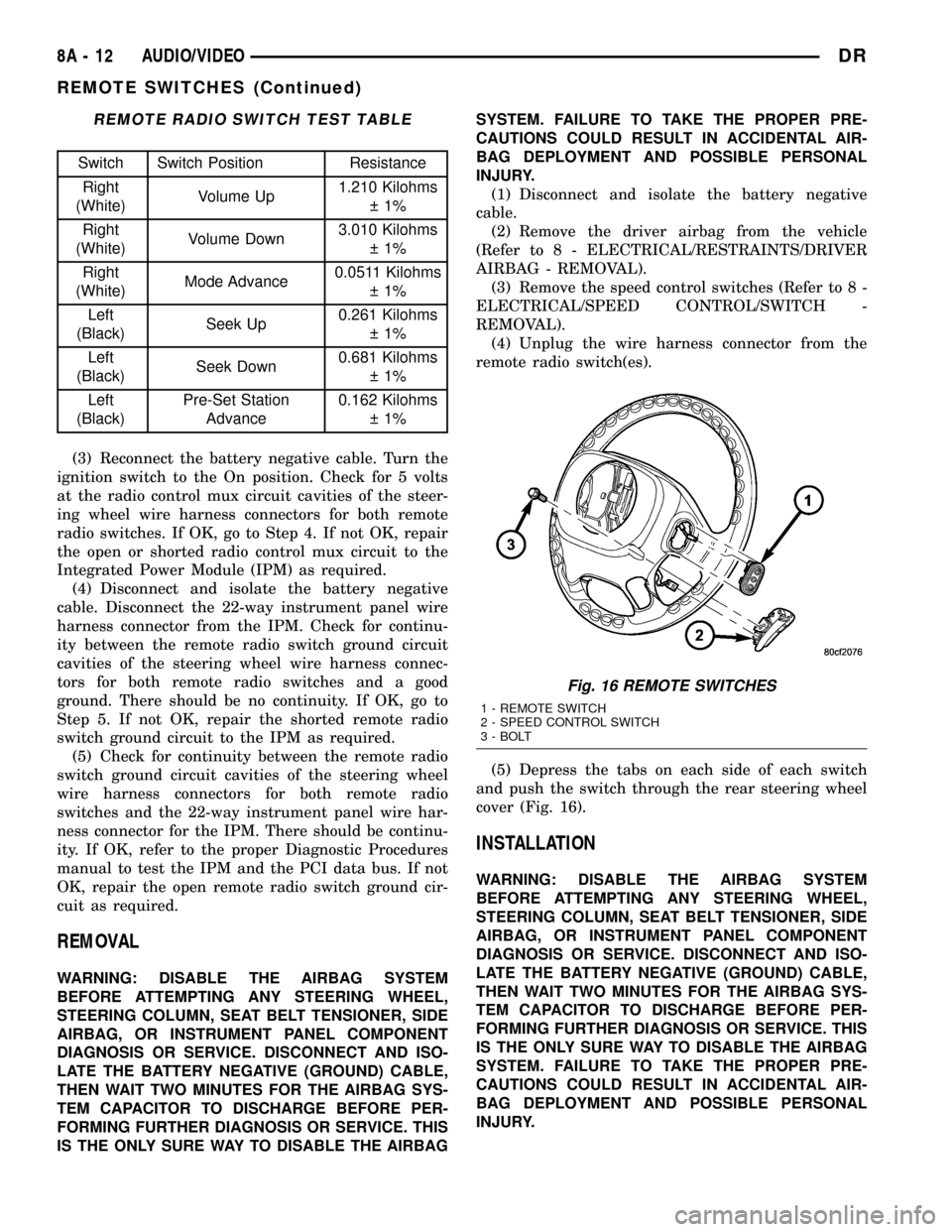
REMOTE RADIO SWITCH TEST TABLE
Switch Switch Position Resistance
Right
(White)Volume Up1.210 Kilohms
1%
Right
(White)Volume Down3.010 Kilohms
1%
Right
(White)Mode Advance0.0511 Kilohms
1%
Left
(Black)Seek Up0.261 Kilohms
1%
Left
(Black)Seek Down0.681 Kilohms
1%
Left
(Black)Pre-Set Station
Advance0.162 Kilohms
1%
(3) Reconnect the battery negative cable. Turn the
ignition switch to the On position. Check for 5 volts
at the radio control mux circuit cavities of the steer-
ing wheel wire harness connectors for both remote
radio switches. If OK, go to Step 4. If not OK, repair
the open or shorted radio control mux circuit to the
Integrated Power Module (IPM) as required.
(4) Disconnect and isolate the battery negative
cable. Disconnect the 22-way instrument panel wire
harness connector from the IPM. Check for continu-
ity between the remote radio switch ground circuit
cavities of the steering wheel wire harness connec-
tors for both remote radio switches and a good
ground. There should be no continuity. If OK, go to
Step 5. If not OK, repair the shorted remote radio
switch ground circuit to the IPM as required.
(5) Check for continuity between the remote radio
switch ground circuit cavities of the steering wheel
wire harness connectors for both remote radio
switches and the 22-way instrument panel wire har-
ness connector for the IPM. There should be continu-
ity. If OK, refer to the proper Diagnostic Procedures
manual to test the IPM and the PCI data bus. If not
OK, repair the open remote radio switch ground cir-
cuit as required.
REMOVAL
WARNING: DISABLE THE AIRBAG SYSTEM
BEFORE ATTEMPTING ANY STEERING WHEEL,
STEERING COLUMN, SEAT BELT TENSIONER, SIDE
AIRBAG, OR INSTRUMENT PANEL COMPONENT
DIAGNOSIS OR SERVICE. DISCONNECT AND ISO-
LATE THE BATTERY NEGATIVE (GROUND) CABLE,
THEN WAIT TWO MINUTES FOR THE AIRBAG SYS-
TEM CAPACITOR TO DISCHARGE BEFORE PER-
FORMING FURTHER DIAGNOSIS OR SERVICE. THIS
IS THE ONLY SURE WAY TO DISABLE THE AIRBAGSYSTEM. FAILURE TO TAKE THE PROPER PRE-
CAUTIONS COULD RESULT IN ACCIDENTAL AIR-
BAG DEPLOYMENT AND POSSIBLE PERSONAL
INJURY.
(1) Disconnect and isolate the battery negative
cable.
(2) Remove the driver airbag from the vehicle
(Refer to 8 - ELECTRICAL/RESTRAINTS/DRIVER
AIRBAG - REMOVAL).
(3) Remove the speed control switches (Refer to 8 -
ELECTRICAL/SPEED CONTROL/SWITCH -
REMOVAL).
(4) Unplug the wire harness connector from the
remote radio switch(es).
(5) Depress the tabs on each side of each switch
and push the switch through the rear steering wheel
cover (Fig. 16).
INSTALLATION
WARNING: DISABLE THE AIRBAG SYSTEM
BEFORE ATTEMPTING ANY STEERING WHEEL,
STEERING COLUMN, SEAT BELT TENSIONER, SIDE
AIRBAG, OR INSTRUMENT PANEL COMPONENT
DIAGNOSIS OR SERVICE. DISCONNECT AND ISO-
LATE THE BATTERY NEGATIVE (GROUND) CABLE,
THEN WAIT TWO MINUTES FOR THE AIRBAG SYS-
TEM CAPACITOR TO DISCHARGE BEFORE PER-
FORMING FURTHER DIAGNOSIS OR SERVICE. THIS
IS THE ONLY SURE WAY TO DISABLE THE AIRBAG
SYSTEM. FAILURE TO TAKE THE PROPER PRE-
CAUTIONS COULD RESULT IN ACCIDENTAL AIR-
BAG DEPLOYMENT AND POSSIBLE PERSONAL
INJURY.
Fig. 16 REMOTE SWITCHES
1 - REMOTE SWITCH
2 - SPEED CONTROL SWITCH
3 - BOLT
8A - 12 AUDIO/VIDEODR
REMOTE SWITCHES (Continued)
Page 398 of 2627

(1) Install remote radio switch to the steering
wheel.
(2) Connect the wire harness to the remote radio
switch.
(3) Install the speed control switches (Refer to 8 -
ELECTRICAL/SPEED CONTROL/SWITCH -
INSTALLATION).
(4) Install the driver airbag
(5) Connect the battery negative cable.
SPEAKER
DESCRIPTION
STANDARD
The standard equipment speaker system includes
speakers in four locations. One 15.2 X 22.8 centime-
ter (6 X 9 inch) full-range speaker is located in each
front door. There is also one full-range 13.3 centime-
ter (5.25 inch) diameter full-range speaker located in
each rear door.
PREMIUM
The optional premium speaker system features
eleven Premium model speakers in seven locations.
Each of the standard speakers is replaced with Pre-
mium model speakers. One 8.8 centimeter (3.50 inch)
diameter speaker is located on each end of the
instrument panel top pad. One 6.3 centimeter (2.50
inch) diameter speaker is located in the center of the
instrument panel top pad. One 15.2 X 22.8 centime-
ter (6 X 9 inch) Premium speaker is located in each
front door. There is also one coaxial 13.3 centimeter
(5.25 inch) diameter Premium full-range speaker
located in each rear door. The premium speaker sys-
tem also includes a power amplifier mounted behind
the glove box. The total available power of the pre-
mium speaker system is 240 watts.
OPERATION
Two wires connected to each speaker, one feed cir-
cuit (+) and one return circuit (±), allow the audio
output signal electrical current to flow through the
voice coil. For complete circuit diagrams, refer to the
appropriate wiring information. The wiring informa-
tion includes wiring diagrams, proper wire and con-
nector repair procedures, details of wire harness
routing and retention, connector pin-out information
and location views for the various wire harness con-
nectors, splices and grounds.
DIAGNOSIS AND TESTING - SPEAKER
Any diagnosis of the Audio system should
begin with the use of the DRB IIItdiagnostic
tool. For information on the use of the
DRB IIIt, refer to the appropriate Diagnostic
Service Manual.
Refer to the appropriate wiring information.
WARNING: DISABLE THE AIRBAG SYSTEM
BEFORE ATTEMPTING ANY STEERING WHEEL,
STEERING COLUMN, SEAT BELT TENSIONER, SIDE
AIRBAG, OR INSTRUMENT PANEL COMPONENT
DIAGNOSIS OR SERVICE. DISCONNECT AND ISO-
LATE THE BATTERY NEGATIVE (GROUND) CABLE,
THEN WAIT TWO MINUTES FOR THE AIRBAG SYS-
TEM CAPACITOR TO DISCHARGE BEFORE PER-
FORMING FURTHER DIAGNOSIS OR SERVICE. THIS
IS THE ONLY SURE WAY TO DISABLE THE AIRBAG
SYSTEM. FAILURE TO TAKE THE PROPER PRE-
CAUTIONS COULD RESULT IN ACCIDENTAL AIR-
BAG DEPLOYMENT AND POSSIBLE PERSONAL
INJURY.
CAUTION: The speaker output of the radio is a
ªfloating groundº system. Do not allow any speaker
lead to short to ground, as damage to the radio
and/or amplifier may result.
(1) If all speakers are inoperative, check the fuses
in the Integrated Power Module (IPM). If OK, go to
Step 2. If not OK, repair the shorted circuit or com-
ponent as required and replace the faulty fuse.
(2) Check the amplifier fuse (if equipped) in the
IPM. If OK, go to Step 3. If not OK, repair the
shorted circuit or component as required and replace
the faulty fuse.
(3) Turn the ignition switch to the ON position.
Turn the radio receiver ON. Adjust the balance and
fader control controls to check the performance of
each individual speaker. Note the speaker locations
that are not performing correctly. Go to Step 4.
(4) Turn the radio receiver OFF. Turn the ignition
OFF. Disconnect and isolate the battery negative
cable. If vehicle isnotequipped with a amplifier,
remove the radio receiver. If vehicle is equipped with
an amplifier. disconnect wire harness connector at
output side of amplifier. Go to Step 5.
(5) Check both the speaker feed (+) circuit and
return (-) circuit cavities for the inoperative speaker
at the radio receiver wire harness connector for con-
tinuity to ground. There should be no continuity. If
OK, go to Step 6. If not OK, repair the shorted
speaker feed (+) and/or return (-) circuits(s) to the
speaker as required.
DRAUDIO/VIDEO 8A - 13
REMOTE SWITCHES (Continued)
Page 402 of 2627

CHIME/BUZZER
TABLE OF CONTENTS
page page
CHIME WARNING SYSTEM
DESCRIPTION..........................1
OPERATION............................1DIAGNOSIS AND TESTING - CHIME
WARNING SYSTEM.....................3
CHIME WARNING SYSTEM
DESCRIPTION
A chime warning system is standard factory-in-
stalled equipment on this model. The chime warning
system uses a single chime tone generator that is
integral to the instrument cluster to provide an audi-
ble indication of various vehicle conditions that may
require the attention of the vehicle operator. The
chime warning system includes the following major
components, which are described in further detail
elsewhere in this service information:
²Door Ajar Switch- A door ajar switch is inte-
gral to each door latch. This switch provides an input
to the chime warning system indicating whether the
front doors are open or closed.
²Ignition Switch- A key-in ignition switch is
integral to the ignition switch. The key-in ignition
switch provides an input to the chime warning sys-
tem indicating whether a key is present in the igni-
tion lock cylinder.
²Instrument Cluster- The instrument cluster
contains an integral chime tone generator, integrated
circuitry, a central processing unit and the program-
ming to provide all of the proper chime warning sys-
tem features based upon the monitored inputs. The
instrument cluster circuitry monitors hard-wired
switch inputs, as well as message inputs received
from other vehicle electronic modules on the Pro-
grammable Communications Interface (PCI) data bus
network.
²Headlamp Switch- The headlamp switch pro-
vides an input to the chime warning system indicat-
ing when the exterior lamps are turned On or Off.
²Seat Belt Switch- A seat belt switch is inte-
gral to the driver seat belt buckle-half unit. The seat
belt switch provides an input to the chime warning
system indicating whether the driver seat belt is fas-
tened.
Hard wired circuitry connects many of the chime
warning system components to each other through
the electrical system of the vehicle. These hard wired
circuits are integral to several wire harnesses, which
are routed throughout the vehicle and retained bymany different methods. Refer to the appropriate
wiring information.
The instrument cluster chime warning system cir-
cuitry and the integral chime tone generator cannot
be adjusted or repaired. If the instrument cluster or
the chime tone generator are damaged or faulty, the
instrument cluster must be replaced.
OPERATION
The chime warning system is designed to provide
an audible output as an indication of various condi-
tions that may require the attention or awareness of
the vehicle operator. The chime warning system com-
ponents operate on battery voltage received through
the Ignition-Off Draw (IOD) fuse in the Power Distri-
bution Center (PDC) so that the system may operate
regardless of the ignition switch position.
The chime warning system provides an audible
warning to the vehicle operator under the following
conditions:
²Air Bag Warning- The instrument cluster
chime tone generator will generate a single chime
tone when the airbag indicator is illuminated for an
airbag system fault condition. The instrument cluster
uses airbag indicator lamp-on and lamp-off message
inputs received from the Airbag Control Module
(ACM) over the Programmable Communications
Interface (PCI) data bus indicating that the airbag
indicator should be illuminated for an airbag system
fault condition.
²Door Ajar Warning- The instrument cluster
chime tone generator will generate a single chimes to
announce that the hard wired inputs from the door
ajar switches and the ignition switch as well as an
engine speed message input received from the PCM
over the PCI data bus indicate that a driver or pas-
senger door is opened with the ignition switch in the
On position and vehicle speed present.
²Engine Coolant Temperature High Warning
(Diesel Engine Only)- The instrument cluster
chime tone generator will generate a single chime
tone when the check gauges indicator is illuminated
for a high or critical engine coolant temperature con-
dition. The instrument cluster uses engine coolant
temperature message inputs received from the diesel
DRCHIME/BUZZER 8B - 1
Page 403 of 2627

Engine Control Module (ECM) over the PCI data bus
to illuminate the check gauges indicator for a coolant
temperature high condition.
²Fasten Seat Belt Warning- The instrument
cluster chime tone generator will generate repetitive
chimes at a slow rate each time the ignition switch is
turned to the On or Start positions to announce that
the hard wired inputs from the seat belt switch and
the ignition switch indicate that the driver side front
seat belt is not fastened. The chimes will continue to
sound for a duration of about six seconds, until the
driver side front seat belt is fastened, or until the
ignition switch is turned to the Off position, which-
ever occurs first.
²Head/Park Lamps-On Warning- The instru-
ment cluster chime tone generator will generate
repetitive chimes at a slow rate to announce that the
hard wired inputs from the driver door ajar switch,
the ignition switch, and the exterior lighting circuitry
of the headlamp switch indicate that the exterior
lamps are turned On with the driver door opened
and the ignition switch in the Off position. The
chimes will continue to sound until the exterior
lamps are turned Off, the driver door is closed, or the
ignition switch is turned to the On position, or the
battery protection time-out expires, whichever occurs
first.
²Key-In-Ignition Warning- The instrument
cluster chime tone generator will generate repetitive
chimes at a slow rate to announce that the hard
wired inputs from the driver door ajar switch, the
ignition switch, and the key-in ignition circuitry of
the ignition switch indicate that the key is in the
ignition lock cylinder with the driver door opened
and the ignition switch in the Off position. The
chimes will continue to sound until the key is
removed from the ignition lock cylinder, the driver
door is closed, or the ignition switch is turned to the
On position, whichever occurs first.
²Low Fuel Warning- The instrument cluster
chime tone generator will generate one chime tone
when the low fuel indicator is illuminated by the
instrument cluster. The instrument cluster uses a
percent tank full message input received from the
PCM over the PCI data bus indicating that there is
less than about one-eighth tank of fuel remaining to
illuminate the low fuel indicator. This chime feature
will only occur once in an ignition cycle.
²Low Oil Pressure Warning (Diesel Engine
Only)- The instrument cluster chime tone generator
will generate repetitive chimes at a fast rate when
the check gauges indicator is illuminated for a low oil
pressure condition. The instrument cluster uses
engine speed and oil pressure message inputs
received from the diesel Engine Control Module
(ECM) over the PCI data bus indicating that theengine is running and that the oil pressure is low to
illuminate the check gauges indicator. The chimes
will continue to sound for five seconds, until the
engine oil pressure message indicates that the oil
pressure is not low, or until the engine speed mes-
sage indicates that the engine is not running, which-
ever occurs first. This chime tone will only occur once
in an ignition cycle.
²Low Wash Warning- The instrument cluster
chime tone generator will generate one chime tone
when the low washer fluid indicator is illuminated by
the instrument cluster. The instrument cluster uses a
message input received from the Front Control Mod-
ule (FCM) over the PCI data bus indicating that
washer fluid level is low within the washer reservoir.
This chime feature will only occur once in an ignition
cycle.
²Overspeed Warning- The instrument cluster
chime tone generator will generate one chime tone to
announce that a vehicle speed message input
received from the PCM over the PCI data bus indi-
cates that the vehicle speed is above a pre-programed
limit.
²Park Brake Reminder- The instrument clus-
ter chime tone generator will generate ten repetitive
chimes at a slow rate to announce that the hard
wired input from the park brake switch and a vehicle
speed message input received from the PCM over the
PCI data bus indicates that the park brake is applied
and the vehicle is moving. This chime feature will
repeat each time the input conditions are met.
²Sentry Key Immobilizer System ªCustomer
Learnº Mode Announcement- This chime feature
is only active on vehicles equipped with the optional
Sentry Key Immobilizer System (SKIS) and sold in
markets where the optional ªCustomer Learnº pro-
gramming feature is available. The instrument clus-
ter chime tone generator will generate one chime to
announce that a status message input received from
the Sentry Key Immobilizer Module (SKIM) over the
PCI data bus indicates that the SKIS is in the ªCus-
tomer Learnº mode, which is used for programming
additional sentry key transponders.
²Transmission Temperature High Warning
(Automatic Transmission only)- The instrument
cluster chime tone generator will generate repetitive
chimes at a slow rate when the transmission temper-
ature indicator is illuminated for a high or critical
transmission fluid temperature condition. The instru-
ment cluster uses transmission temperature message
inputs received from the Transmission Control Mod-
ule (TCM) over the PCI data bus to illuminate the
indicator for a transmission temperature high condi-
tion.
²Turn Signal On Warning- The instrument
cluster chime tone generator will generate repetitive
8B - 2 CHIME/BUZZERDR
CHIME WARNING SYSTEM (Continued)
Page 405 of 2627

CONDITION POSSIBLE CAUSES CORRECTION
NO SEAT BELT WARNING
CHIME WITH SEAT BELT
UNBUCKLED, BUT OTHER
CHIME FEATURES OK1. Seat belt switch ground
circuit open.1. Check for continuity between the ground
circuit for the driver seat belt switch and a good
ground. Repair open ground circuit, if required.
2. Seat belt switch sense
circuit open.2. Check for continuity between the seat belt
switch sense circuit for the driver seat belt switch
and the instrument cluster connector. Repair the
open seat belt switch sense circuit, if required.
3. Faulty seat belt switch. 3. Check for continuity between the ground
circuit and the driver seat belt switch sense
circuit of the seat belt switch. There should be
continuity with the seat belt unbuckled. Replace
the faulty seat belt, if required.
SEAT BELT WARNING
CHIME WITH SEAT BELT
BUCKLED1. Seat belt switch sense
circuit shorted.1. With the driver seat belt switch and the
instrument cluster connector disconnected, there
should be no continuity between the seat belt
switch sense circuit and a good ground. Repair
the shorted seat belt switch sense circuit, if
required.
2. Faulty seat belt switch. 2. Check for continuity between the ground
circuit cavity and the seat belt switch sense
circuit of the driver seat belt switch. There should
be no continuity with the seat belt buckled.
Replace the faulty seat belt, if required.
NO KEY-IN IGNITION
WARNING CHIME, BUT
OTHER CHIME FEATURES
OK1. Driver door ajar switch
sense circuit open.1. Check for continuity between the driver door
ajar switch sense circuit connector and the
instrument cluster connector. Repair the open
driver door ajar switch sense circuit, if required.
2. Key-in ignition switch
sense circuit open.2. Check for continuity between the key-in
ignition switch sense circuit connector and
instrument cluster connector. Repair the open
key-in ignition switch sense circuit, if required.
3. Key-in ignition switch
ground circuit open.3. Check for continuity between the ground
circuit cavity of the ignition switch connector and
a good ground. Repair the open ground circuit, if
required
4. Faulty ignition switch. 4. Check for continuity between the ground
circuit terminal and the key-in ignition switch
sense circuit terminal in the ignition switch
connector. There should be continuity with a key
in the ignition lock cylinder. Replace the faulty
ignition switch, if required.
8B - 4 CHIME/BUZZERDR
CHIME WARNING SYSTEM (Continued)
Page 451 of 2627
²a faulty or improperly adjusted switch that
allows a lamp to stay on. Refer to Ignition-Off Draw
Test in 8, Battery for more information.
INSPECTION
The PCM (Powertrain Control Module), or ECM
(Diesel) monitors critical input and output circuits of
the charging system, making sure they are opera-
tional. A Diagnostic Trouble Code (DTC) is assigned
to each input and output circuit monitored by the
On-Board Diagnostic (OBD) system. Some charging
system circuits are checked continuously, and some
are checked only under certain conditions.
Refer to Diagnostic Trouble Codes in; Powertrain
Control Module; Electronic Control Modules for more
DTC information. This will include a complete list of
DTC's including DTC's for the charging system.
To perform a complete test of the charging system,
refer to the appropriate Powertrain Diagnostic Proce-
dures service manual and the DRBtscan tool. Per-
form the following inspections before attaching the
scan tool.
(1) Inspect the battery condition. Refer to 8, Bat-
tery for procedures.(2) Inspect condition of battery cable terminals,
battery posts, connections at engine block, starter
solenoid and relay. They should be clean and tight.
Repair as required.
(3) Inspect all fuses in both the fuseblock and
Power Distribution Center (PDC) for tightness in
receptacles. They should be properly installed and
tight. Repair or replace as required.
(4) Inspect generator mounting bolts for tightness.
Replace or tighten bolts if required. Refer to the Gen-
erator Removal/Installation section of this group for
torque specifications.
(5) Inspect generator drive belt condition and ten-
sion. Tighten or replace belt as required. Refer to
Belt Tension Specifications in 7, Cooling System.
(6) Inspect automatic belt tensioner (if equipped).
Refer to 7, Cooling System for information.
(7) Inspect generator electrical connections at gen-
erator field, battery output, and ground terminal (if
equipped). Also check generator ground wire connec-
tion at engine (if equipped). They should all be clean
and tight. Repair as required.
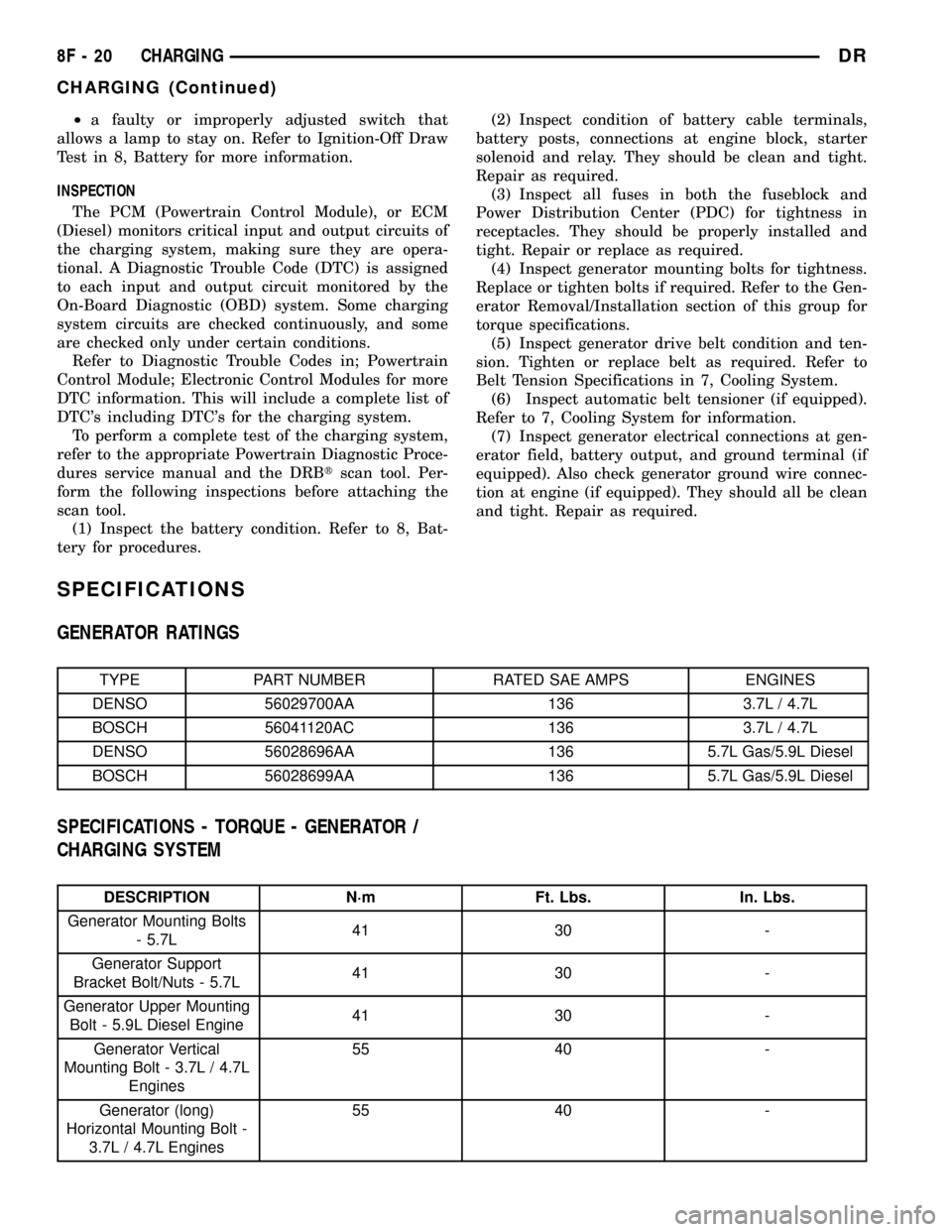
SPECIFICATIONS
GENERATOR RATINGS
TYPE PART NUMBER RATED SAE AMPS ENGINES
DENSO 56029700AA 136 3.7L / 4.7L
BOSCH 56041120AC 136 3.7L / 4.7L
DENSO 56028696AA 136 5.7L Gas/5.9L Diesel
BOSCH 56028699AA 136 5.7L Gas/5.9L Diesel
SPECIFICATIONS - TORQUE - GENERATOR /
CHARGING SYSTEM
DESCRIPTION N´m Ft. Lbs. In. Lbs.
Generator Mounting Bolts
- 5.7L41 30 -
Generator Support
Bracket Bolt/Nuts - 5.7L41 30 -
Generator Upper Mounting
Bolt - 5.9L Diesel Engine41 30 -
Generator Vertical
Mounting Bolt - 3.7L / 4.7L
Engines55 40 -
Generator (long)
Horizontal Mounting Bolt -
3.7L / 4.7L Engines55 40 -
8F - 20 CHARGINGDR
CHARGING (Continued)
Page 452 of 2627

DESCRIPTION N´m Ft. Lbs. In. Lbs.
Generator (short)
Horizontal Mounting Bolt -
3.7L / 4.7L Engines74 55 -
Generator B+ Output
Cable Terminal Nut12 - 108
BATTERY TEMPERATURE
SENSOR
DESCRIPTION
The Battery Temperature Sensor (BTS) is attached
to the battery tray located under the battery.
OPERATION
The BTS is used to determine the battery temper-
ature and control battery charging rate. This temper-
ature data, along with data from monitored line
voltage, is used by the PCM (ECM Diesel) to vary the
battery charging rate. System voltage will be higher
at colder temperatures and is gradually reduced at
warmer temperatures.
The PCM sends 5 volts to the sensor and is
grounded through the sensor return line. As temper-
ature increases, resistance in the sensor decreases
and the detection voltage at the PCM increases.
The BTS is also used for OBD II diagnostics. Cer-
tain faults and OBD II monitors are either enabled
or disabled, depending upon BTS input (for example,
disable purge and enable Leak Detection Pump
(LDP) and O2 sensor heater tests). Most OBD II
monitors are disabled below 20ÉF.
REMOVAL
The battery temperature sensor is located under
the vehicle battery and is attached (snapped into) a
mounting hole on battery tray (Fig. 1).
(1) Remove battery. Refer to 8, Battery for proce-
dures.
(2) Pry sensor straight up from battery tray
mounting hole to gain access to electrical connector
(Fig. 1).
(3) Disconnect sensor from engine wire harness
electrical connector.
INSTALLATION
The battery temperature sensor is located under
the vehicle battery and is attached (snapped into) a
mounting hole on battery tray.
(1) Pull electrical connector up through mounting
hole in top of battery tray.
(2) Connect sensor.
(3) Snap sensor into battery tray.(4) Install battery. Refer to 8, Battery for proce-
dures.
GENERATOR
DESCRIPTION
The generator is belt-driven by the engine using a
serpentine type drive belt. It is serviced only as a
complete assembly. If the generator fails for any rea-
son, the entire assembly must be replaced.
OPERATION
As the energized rotor begins to rotate within the
generator, the spinning magnetic field induces a cur-
rent into the windings of the stator coil. Once the
generator begins producing sufficient current, it also
provides the current needed to energize the rotor.
Fig. 1 BATTERY TEMPERATURE SENSOR
LOCATION
1 - BATTERY TEMP. SENSOR
2 - BATTERY
3 - SENSOR ELEC. CONNECT.
4 - BATTERY TRAY
DRCHARGING 8F - 21
CHARGING (Continued)
Page 453 of 2627

The stator winding connections deliver the induced
alternating current to 3 positive and 3 negative
diodes for rectification. From the diodes, rectified
direct current is delivered to the vehicle electrical
system through the generator battery terminal.
Although the generators appear the same exter-
nally, different generators with different output rat-
ings are used on this vehicle. Be certain that the
replacement generator has the same output rating
and part number as the original unit. Refer to Gen-
erator Ratings in the Specifications section at the
back of this group for amperage ratings and part
numbers.
Noise emitting from the generator may be caused
by: worn, loose or defective bearings; a loose or defec-
tive drive pulley; incorrect, worn, damaged or misad-
justed fan drive belt; loose mounting bolts; a
misaligned drive pulley or a defective stator or diode.
REMOVAL
3.7L / 4.7L
WARNING: DISCONNECT NEGATIVE CABLE FROM
BATTERY BEFORE REMOVING BATTERY OUTPUT
WIRE (B+ WIRE) FROM GENERATOR. FAILURE TO
DO SO CAN RESULT IN INJURY OR DAMAGE TO
ELECTRICAL SYSTEM.
(1) Disconnect negative battery cable at battery.
(2) Remove generator drive belt. Refer to 7, Cool-
ing System for procedure.
(3) Unsnap plastic insulator cap from B+ output
terminal (Fig. 2).
(4) Remove B+ terminal mounting nut at rear of
generator (Fig. 2). Disconnect terminal from genera-
tor.
(5) Disconnect field wire connector at rear of gen-
erator (Fig. 2) by pushing on connector tab.
(6) Remove 1 rear vertical generator mounting bolt
(Fig. 3).
(7) Remove 2 front horizontal generator mounting
bolts (Fig. 3).
(8) Remove generator from vehicle.
5.7L
WARNING: DISCONNECT NEGATIVE CABLE FROM
BATTERY BEFORE REMOVING BATTERY OUTPUT
WIRE (B+ WIRE) FROM GENERATOR. FAILURE TO
DO SO CAN RESULT IN INJURY OR DAMAGE TO
ELECTRICAL SYSTEM.
(1) Disconnect negative battery cable at battery.
(2) Remove generator drive belt. Refer to 7, Cool-
ing System for procedure.(3) Unsnap plastic insulator cap from B+ output
terminal.
(4) Remove B+ terminal mounting nut at rear of
generator. Disconnect terminal from generator.
(5) Disconnect field wire connector at rear of gen-
erator by pushing on connector tab.
Fig. 2 GENERATOR CONNECTORS - 3.7L / 4.7L
1 - GENERATOR
2-B+NUT
3 - PLASTIC INSULATOR CAP
4 - FIELD WIRE CONNECTOR
Fig. 3 REMOVE / INSTALL GENERATOR - 3.7L / 4.7L
1 - LOWER BOLTS
2 - REAR BOLT
3 - GENERATOR
8F - 22 CHARGINGDR
GENERATOR (Continued)
Page 454 of 2627

(6) Remove generator support bracket nuts and
bolt (Fig. 4) and remove support bracket.
(7) Remove 2 generator mounting bolts (Fig. 5).
(8) Remove generator from vehicle.
5.9L Diesel
WARNING: DISCONNECT BOTH NEGATIVE CABLES
FROM BOTH BATTERIES BEFORE REMOVING BAT-
TERY OUTPUT WIRE (B+ WIRE) FROM GENERA-
TOR. FAILURE TO DO SO CAN RESULT IN INJURY
OR DAMAGE TO ELECTRICAL SYSTEM.
(1) Disconnect both negative battery cables at both
batteries.
(2) Remove generator drive belt. Refer to 7, Cool-
ing System for procedure.
(3) Unsnap plastic insulator cap from B+ output
terminal.
(4) Remove B+ terminal mounting nut at rear of
generator (Fig. 7). Disconnect terminal from genera-
tor.
(5) Disconnect field wire connector at rear of gen-
erator by pushing on connector tab.
(6) Remove upper mounting bracket bolt (Fig. 6).
(7) Remove lower mounting bracket bolt and nut
(Fig. 6).
(8) Remove generator from vehicle.
Fig. 4 GENERATOR SUPPORT BRACKET- 5.7L
1 - GENERATOR
2 - SUPPORT BRACKET
3 - BRACKET NUTS
4 - BRACKET BOLT
Fig. 5 REMOVE / INSTALL GENERATOR - 5.7L
1 - MOUNTING BOLT
2 - GENERATOR
3 - MOUNTING STUD / BOLT
Fig. 6 5.9L DIESEL GENERATOR
1 - GENERATOR
2 - MOUNTING BOLTS
DRCHARGING 8F - 23
GENERATOR (Continued)
Page 455 of 2627

INSTALLATION
3.7L / 4.7L
(1) Position generator to engine and install 2 hor-
izontal bolts and 1 vertical bolt.
(2) Tighten all 3 bolts. Refer to Torque Specifica-
tions.
(3) Snap field wire connector into rear of genera-
tor.
(4) Install B+ terminal eyelet to generator output
stud. Tighten mounting nut. Refer to Torque Specifi-
cations.
CAUTION: Never force a belt over a pulley rim
using a screwdriver. The synthetic fiber of the belt
can be damaged.
CAUTION: When installing a serpentine accessory
drive belt, the belt MUST be routed correctly. The
water pump may be rotating in the wrong direction
if the belt is installed incorrectly, causing the
engine to overheat. Refer to belt routing label in
engine compartment, or refer to Belt Schematics in
7, Cooling System.
(5) Install generator drive belt. Refer to 7, Cooling
System for procedure.
(6) Install negative battery cable to battery.5.7L
(1) Position generator to engine and install 2
mounting bolts.
(2) Tighten bolts. Refer to Torque Specifications.
(3) Position support bracket to front of generator
and install bolt and nuts. Tighten bolt / nuts. Refer
to Torque Specifications.
(4) Snap field wire connector into rear of genera-
tor.
(5) Install B+ terminal eyelet to generator output
stud. Tighten mounting nut. Refer to Torque Specifi-
cations.
CAUTION: Never force a belt over a pulley rim
using a screwdriver. The synthetic fiber of the belt
can be damaged.
CAUTION: When installing a serpentine accessory
drive belt, the belt MUST be routed correctly. The
water pump may be rotating in the wrong direction
if the belt is installed incorrectly, causing the
engine to overheat. Refer to belt routing label in
engine compartment, or refer to Belt Schematics in
7, Cooling System.
(6) Install generator drive belt. Refer to 7, Cooling
System for procedure.
(7) Install negative battery cable to battery.
5.9L Diesel
(1) Position generator to upper and lower mount-
ing brackets and install upper bolt and lower bolt /
nut.
(2) Tighten all bolts / nut. Refer to Torque Specifi-
cations.
(3) Snap field wire connector into rear of genera-
tor.
(4) Install B+ terminal eyelet to generator output
stud. Tighten mounting nut. Refer to Torque Specifi-
cations.
CAUTION: Never force a belt over a pulley rim
using a screwdriver. The synthetic fiber of the belt
can be damaged.
CAUTION: When installing a serpentine accessory
drive belt, the belt MUST be routed correctly. The
water pump may be rotating in the wrong direction
if the belt is installed incorrectly, causing the
engine to overheat. Refer to belt routing label in
engine compartment, or refer to Belt Schematics in
7, Cooling System.
(5) Install generator drive belt. Refer to 7, Cooling
System for procedure.
Fig. 7 5.9L DIESEL GENER. CONNECTORS
1 - B+ CONNECTOR
2 - GENERATOR
3 - FIELD WIRE CONNECTOR
8F - 24 CHARGINGDR
GENERATOR (Continued)