Ground DODGE RAM 1999 Service Workshop Manual
[x] Cancel search | Manufacturer: DODGE, Model Year: 1999, Model line: RAM, Model: DODGE RAM 1999Pages: 1691, PDF Size: 40.34 MB
Page 263 of 1691

9) Check and record freeze frame data to determine conditions
which set code. Turn ignition off. Disconnect transmission solenoid
harness connector. Disconnect PCM harness connectors. Inspect
connectors and terminals for damage. Repair as necessary. If connector
and terminals are okay, measure resistance of governor pressure sensor
ground circuit between transmission solenoid harness connector and
Black PCM harness connector C1. If resistance is greater than 5 ohms,
repair open governor pressure sensor ground circuit. If resistance is
5 ohms or less, go to next step.
10) Measure resistance of governor pressure sensor signal
circuit between White PCM harness connector C2 and governor pressure
sensor harness connector. If resistance is greater than 5 ohms, repair
open governor pressure sensor signal circuit. If resistance is 5 ohms
or less, go to next step.
11) Connect a fused jumper wire between fused B+ circuit and
transmission control relay output circuit at transmission relay
connector. Turn ignition on. Measure voltage between ground and
governor pressure signal circuit at White PCM harness connector C2. If
voltage is greater than one volt, repair governor pressure signal
circuit for short to voltage. If voltage is one volt or less, go to
next step.
12) Drain transmission fluid and remove oil pan. Disconnect
pressure/temperature sensor harness connector. Inspect connector and
terminals for damage. Repair as necessary. If connector and terminals
are okay, reconnect transmission solenoid harness connector. Carefully
connect a fused jumper wire between ground circuit and governor
pressure signal circuit at governor pressure sensor harness connector.
Turn ignition on. Using scan tool, read governor pressure sensor
voltage. If voltage is .1 volt or less, replace pressure/temperature
sensor. If voltage is greater than .1 volt, go to next step.
13) Measure resistance of governor pressure sensor signal
circuit between White PCM harness connector C2 and governor pressure
sensor harness connector. If resistance is greater than 5 ohms, repair
or replace transmission solenoid and harness assembly. If resistance
is 5 ohms or less, go to next step.
14) Measure resistance of governor pressure sensor ground
circuit between Black PCM harness connector C1 and governor pressure
sensor harness connector. If resistance is greater than 5 ohms, repair
or replace transmission solenoid and harness assembly. If resistance
is 5 ohms or less, go to next step.
15) Turn ignition on. Measure voltage between ground and
governor pressure signal circuit at governor pressure sensor harness
connector. If voltage is greater than one volt, repair or replace
transmission solenoid and harness assembly. If voltage is one volt or
less, replace PCM.
16) Turn ignition off. Disconnect PCM harness connectors.
Disconnect transmission solenoid harness connector. Inspect connector
and terminals for damage. Repair as necessary. If connector and
terminals are okay, measure resistance of sensor ground circuit
between Black PCM harness connector C1 and solenoid harness connector.
If resistance is less than 5 ohms, go to next step. If resistance is 5
ohms or greater, repair open in governor pressure sensor ground
circuit.
17) Turn ignition on. Measure voltage between ground and
governor pressure signal circuit at governor pressure sensor harness
connector. If voltage is greater than one volt, repair governor
pressure signal circuit for short to voltage. If voltage is one volt
or less, go to next step.
18) Turn ignition off. Measure resistance of governor
pressure sensor signal circuit between White PCM harness connector C2
and solenoid harness connector. If resistance is greater than 5 ohms,
repair open governor pressure sensor signal circuit. If resistance is
5 ohms or less, go to next step.
Page 264 of 1691

19) Turn ignition on. Using scan tool, read governor pressure
sensor voltage. If voltage is 4.65 volts or less, replace PCM. If
resistance is greater than 4.65 volts, go to next step.
20) Turn ignition off. Drain transmission fluid and remove
oil pan. Disconnect pressure/temperature sensor harness connector.
Inspect connector and terminals for damage. Repair as necessary. If
connector and terminals are okay, reconnect transmission solenoid
harness connector. Measure resistance of governor pressure sensor
signal circuit between White PCM harness connector C2 and governor
pressure sensor harness connector. If resistance is greater than 5
ohms, repair or replace transmission solenoid and harness assembly. If
resistance is 5 ohms or less, go to next step.
21) Measure resistance of governor pressure sensor ground
circuit between Black PCM harness connector C1 and governor pressure
sensor harness connector. If resistance is greater than 5 ohms, repair
or replace transmission solenoid and harness assembly. If resistance
is 5 ohms or less, go to next step.
22) Turn ignition on. Measure voltage between ground and
governor pressure signal circuit at governor pressure sensor harness
connector. If voltage is greater than one volt, repair or replace
transmission solenoid and harness assembly. If voltage is one volt or
less, replace pressure/temperature sensor.
23) Check and record freeze frame data to determine
conditions which set code. Conditions required to set DTC P1764 are
not present at this time. Using wiring diagram as a guide, inspect
wiring and connectors. Repair wiring harness as necessary. If wiring
and connectors are okay, go to next step.
24) Using scan tool, clear DTCs. While reading DTCs, wiggle
wiring harness between PCM and governor pressure sensor. If DTC P1764
resets while wiggling wiring harness, repair wiring harness as
necessary. If DTC P1764 does not reset, go next step.
25) DTC P1764 sets if governor pressure sensor input is less
than .1 volt for 8.36 seconds. Possible causes are: PCM internally
shorted or open, incorrectly wired, dirty or corroded connectors or
open or shorted wiring. See INACTIVE DTC CONDITION under SELF-
DIAGNOSTIC SYSTEM. Testing is complete.
DTC P1765: TRANS 12-VOLT SUPPLY RELAY CNTRL CIRCUIT
Circuit Description
Circuit is monitored continuously while key is on. Code sets
if voltage on transmission control relay circuit at PCM is different
than expected voltage for 3 seconds.
Possible Causes
* Generator source circuit open.
* Transmission relay control circuit open.
* Transmission relay control circuit short to ground.
* Transmission control relay wiring harness defective.
* PCM defective.
* Transmission control relay defective.
Diagnostic Procedures
1) Using scan tool, read DTCs. On AN and DN bodies, go to
next step. On all except AN and DN bodies, if DTC SPECIFIC GOOD TRIPS
counter is not displayed or displayed count is not "0", go to step 9).
If DTC SPECIFIC GOOD TRIPS counter is displayed and displayed count is
"0", go to next step.
2) Using scan tool, actuate transmission control relay. If
transmission control relay does not click, go to step 5). If
transmission control relay clicks, go to next step.
3) Wiggle wiring harness between transmission control relay
Page 265 of 1691

and PCM. Ensure scan tool is still actuating transmission control
relay. If transmission control relay stops clicking, repair wiring
harness as necessary. If transmission control relay continues
clicking, go to next step.
4) Using wiring diagram as a guide, inspect wiring and
connectors. Repair wiring harness as necessary. If wiring and
connectors are okay, see INACTIVE DTC CONDITION under SELF-DIAGNOSTIC
SYSTEM. Testing is complete.
5) Remove transmission control relay. Inspect connector and
terminals for damage. Repair as necessary. If connector and terminals
are okay, turn ignition on. Using scan tool, actuate generator field.
Measure voltage between ground and generator source circuit at
transmission control relay harness connector. If voltage is 10 volts
or less, repair open generator source circuit. If voltage is greater
than 10 volts, go to next step.
6) Turn ignition off. Measure resistance between transmission
control relay terminals No. 85 and 86. If resistance is 100 ohms or
greater, replace transmission control relay. If resistance is less
than 100 ohms, go to next step.
7) Disconnect White PCM harness connector C2. Inspect
connector and terminals for damage. Repair as necessary. If connector
and terminals are okay, measure resistance between ground and
transmission relay control circuit at White PCM harness connector C2.
If resistance is less than 5 ohms, repair short to ground in
transmission relay control circuit. If resistance is 5 ohms or
greater, go to next step.
8) Measure resistance of transmission relay control circuit
between transmission control relay connector and White PCM harness
connector C2. If resistance is 5 ohms or greater, repair open
transmission relay control circuit. If resistance is less than 5 ohms,
replace PCM.
9) Conditions required to set DTC P1765 are not present at
this time. DTC P1765 sets if transmission control relay is not in a
state requested by PCM for greater than 3 seconds. Possible causes
are: faulty relay, open or shorted control circuit, faulty PCM or
faulty connector terminals. Inspect all related wiring and connectors.
Repair as necessary. If wiring and connectors are okay, erase DTCs.
Using scan tool, read DTCs while wiggling wiring harness between
governor pressure sensor and PCM. If DTC P1765 resets, repair wiring
harness as necessary. If DTC P1765 does not reset, see INACTIVE DTC
CONDITION under SELF-DIAGNOSTIC SYSTEM. Testing is complete.
DTC P1899: P/N SWITCH STUCK IN PARK OR IN GEAR
Circuit Description
Circuit is monitored with transmission in "D", "N" or "P"
position. Code sets if PCM detects an incorrect park/neutral switch
state for any given mode of vehicle operation.
Possible Causes
* Park Neutral Position (PNP) switch wiring harness
defective.
* PNP switch sense circuit open.
* PNP switch defective.
* PNP switch sense circuit short to ground.
* PNP switch stuck.
Diagnostic Procedures (AN, DN & WJ Bodies)
1) Using scan tool, read DTCs. On AN and DN bodies, go to
next step. On WJ body, if DTC SPECIFIC GOOD TRIPS counter is not
displayed or displayed count is not "0", go to step 8). If DTC
SPECIFIC GOOD TRIPS counter is displayed and displayed count is "0",
Page 266 of 1691

go to next step.
2) Using scan tool, read PARK/NEUTRAL SWITCH input state.
Monitor scan tool while moving gear selector from Park to Reverse. If
PARK/NEUTRAL SWITCH state goes from P/N to D/R, go to next step. If
PARK/NEUTRAL SWITCH state does not go from P/N to D/R, go to step 4).
3) Inspect all related wiring and connectors. Repair as
necessary. If wiring is okay, see INACTIVE DTC CONDITION under SELF-
DIAGNOSTIC SYSTEM. Testing is complete.
4) Turn ignition off. Disconnect PCM harness connectors.
Inspect connector and terminals for damage. Repair as necessary. If
connector and terminals are okay, measure resistance between ground
and Park Neutral Position (PNP) switch sense circuit at Black PCM
harness connector C1 while moving gear selector from Park to Reverse
and back to Park. If resistance changes from less than 10 ohms to
greater than 10 ohms, replace PCM. If resistance does not change as
specified, go to next step.
5) If resistance is less than 10 ohms at all times, go to
next step. If resistance is not as specified, go to step 7).
6) Disconnect PNP switch harness connector. Measure
resistance between ground and PNP switch sense circuit at PNP switch
harness connector. If resistance is less than 5 ohms, repair PNP
switch sense circuit for a short to ground. If resistance is not as
specified, replace PNP switch.
7) Disconnect PNP switch harness connector. Measure
resistance of PNP switch sense circuit between Black PCM harness
connector C1 and PNP switch harness connector. If resistance is less
than 5 ohms, replace PNP switch. If resistance is not as specified,
repair open in PNP switch sense circuit.
8) Conditions required to set DTC P1899 are not present at
this time. DTC P1899 sets if PCM detects an incorrect Park Neutral
Position (PNP) switch state for a given mode of vehicle operation.
Possible causes are: faulty connections, faulty PNP switch, mechanical
transmission problem or PCM failure. Inspect all related wiring and
connectors. Repair as necessary. If wiring is okay, see INACTIVE DTC
CONDITION under SELF-DIAGNOSTIC SYSTEM. Testing is complete.
Diagnostic Procedures (AB & BR Bodies)
1) Using scan tool, read DTCs. If DTC SPECIFIC GOOD TRIPS
counter is not displayed or displayed count is not "0", go to step 7).
If DTC SPECIFIC GOOD TRIPS counter is displayed and displayed count is
"0", go to next step.
2) Using scan tool, check and record FREEZE FRAME data. Use
FREEZE FRAME data to determine conditions when DTC P1899 was set. Turn
ignition on. Using scan tool, read PARK/NEUTRAL SWITCH input state.
Monitor scan tool while moving gear selector from Park to Reverse. If
PARK/NEUTRAL SWITCH state goes from P/N to D/R, go to step 7). If
PARK/NEUTRAL SWITCH state does not go from P/N to D/R, go to next
step.
3) Turn ignition off. Disconnect PCM harness connectors.
Inspect connector and terminals for damage. Repair as necessary. If
connector and terminals are okay, measure resistance between ground
and Park Neutral Position (PNP) switch sense circuit at Black PCM
harness connector C1 while moving gear selector from Park to Reverse
and back to Park. If resistance changes from less than 10 ohms to
greater than 10 ohms, replace PCM. If resistance does not change as
specified, go to next step.
4) If resistance is less than 10 ohms at all times, go to
next step. If resistance is not as specified, go to step 6).
5) Disconnect PNP switch harness connector. Measure
resistance between ground and PNP switch sense circuit at PNP switch
harness connector. If resistance is less than 5 ohms, repair PNP
switch sense circuit for a short to ground. If resistance is not as
specified, replace PNP switch.
Page 287 of 1691
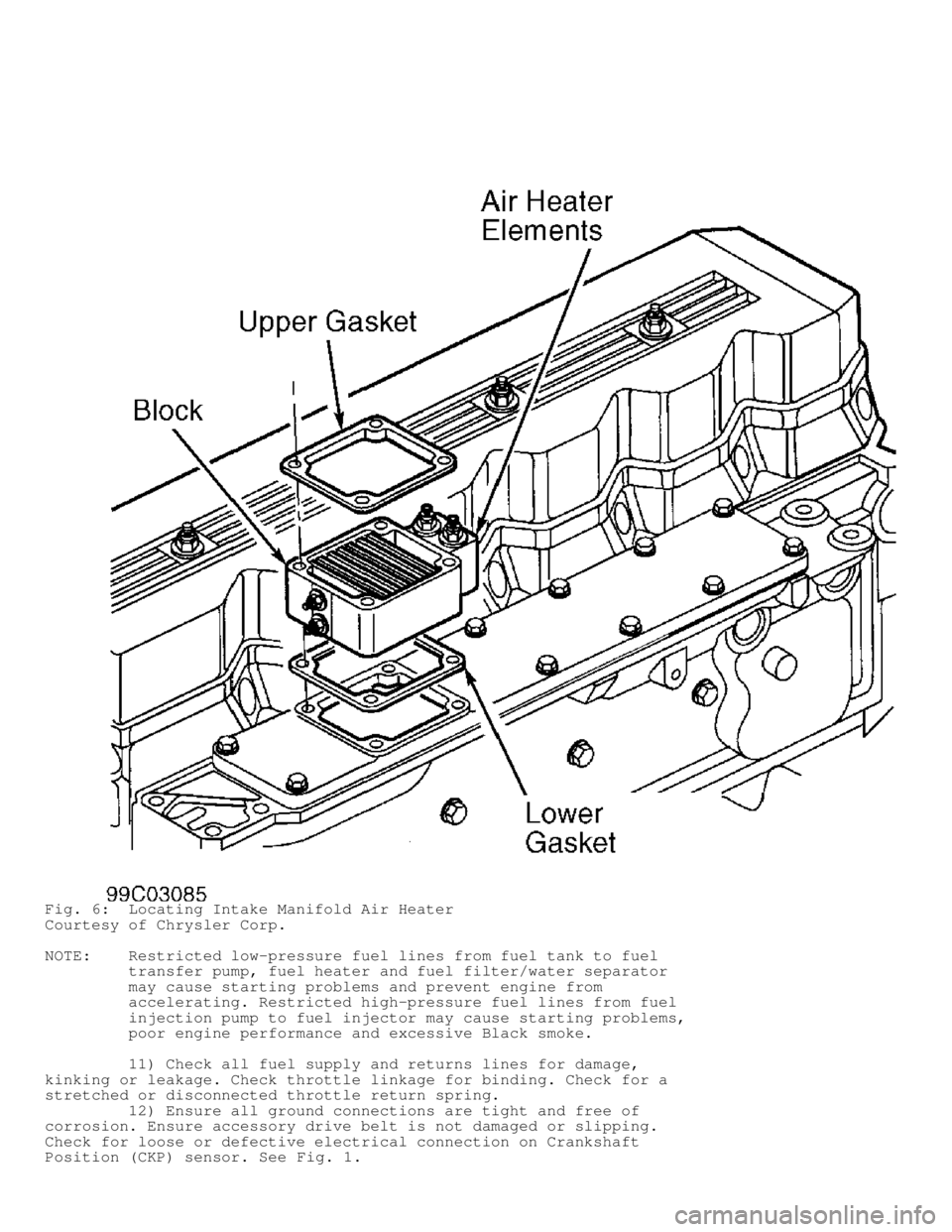
Fig. 6: Locating Intake Manifold Air Heater
Courtesy of Chrysler Corp.
NOTE: Restricted low-pressure fuel lines from fuel tank to fuel
transfer pump, fuel heater and fuel filter/water separator
may cause starting problems and prevent engine from
accelerating. Restricted high-pressure fuel lines from fuel
injection pump to fuel injector may cause starting problems,
poor engine performance and excessive Black smoke.
11) Check all fuel supply and returns lines for damage,
kinking or leakage. Check throttle linkage for binding. Check for a
stretched or disconnected throttle return spring.
12) Ensure all ground connections are tight and free of
corrosion. Ensure accessory drive belt is not damaged or slipping.
Check for loose or defective electrical connection on Crankshaft
Position (CKP) sensor. See Fig. 1.
Page 299 of 1691
Connect a jumper wire between OPS connector terminals. Start engine
and allow to idle for 20 seconds. Increase engine speed to 1600 RPM.
If chime sounds, system is currently functioning properly. If chime
does not sound, go to next step.
4) Remove instrument cluster. See appropriate INSTRUMENT
PANELS article. Disconnect Instrument cluster 10-pin Gray connector
"B". Connect a jumper wire between ground and Dark Blue/Red wire of
instrument cluster 10-pin Gray connector terminal No. 7. Turn ignition
on. If chime sounds, replace instrument cluster. If chime does not
sound, repair open Dark Blue/Red wire.
CHIME INOPERATIVE - KEY IN IGNITION & LF DOOR OPEN
NOTE: For connector terminal identification and wiring diagrams,
see BODY CONTROL COMPUTER - INTRODUCTION article. Perform
VERIFICATION TEST VER-1A after each repair.
CAUTION: Always turn ignition switch to OFF position prior to
disconnecting any module connector.
1) Turn ignition off. Open driver's door. If chime does not
sound, go to next step. If chime sounds, system is currently
functioning correctly.
2) Using scan tool, read driver's door ajar switch status. If
scan tool displays LFDOOR AJAR SWITCH: CLOSED, go to next step. If
scan tool does not display LFDOOR AJAR SWITCH: CLOSED, go to OPEN LEFT
DOOR AJAR CIRCUIT.
3) Using scan tool, read key-in ignition chime state. If scan
tool does not display KEY-IN IGNITION CHIME STATE: ON, go to next
step. If scan tool displays KEY-IN IGNITION CHIME STATE: ON, replace
Central Timer Module (CTM). CTM is located under left side of
instrument panel.
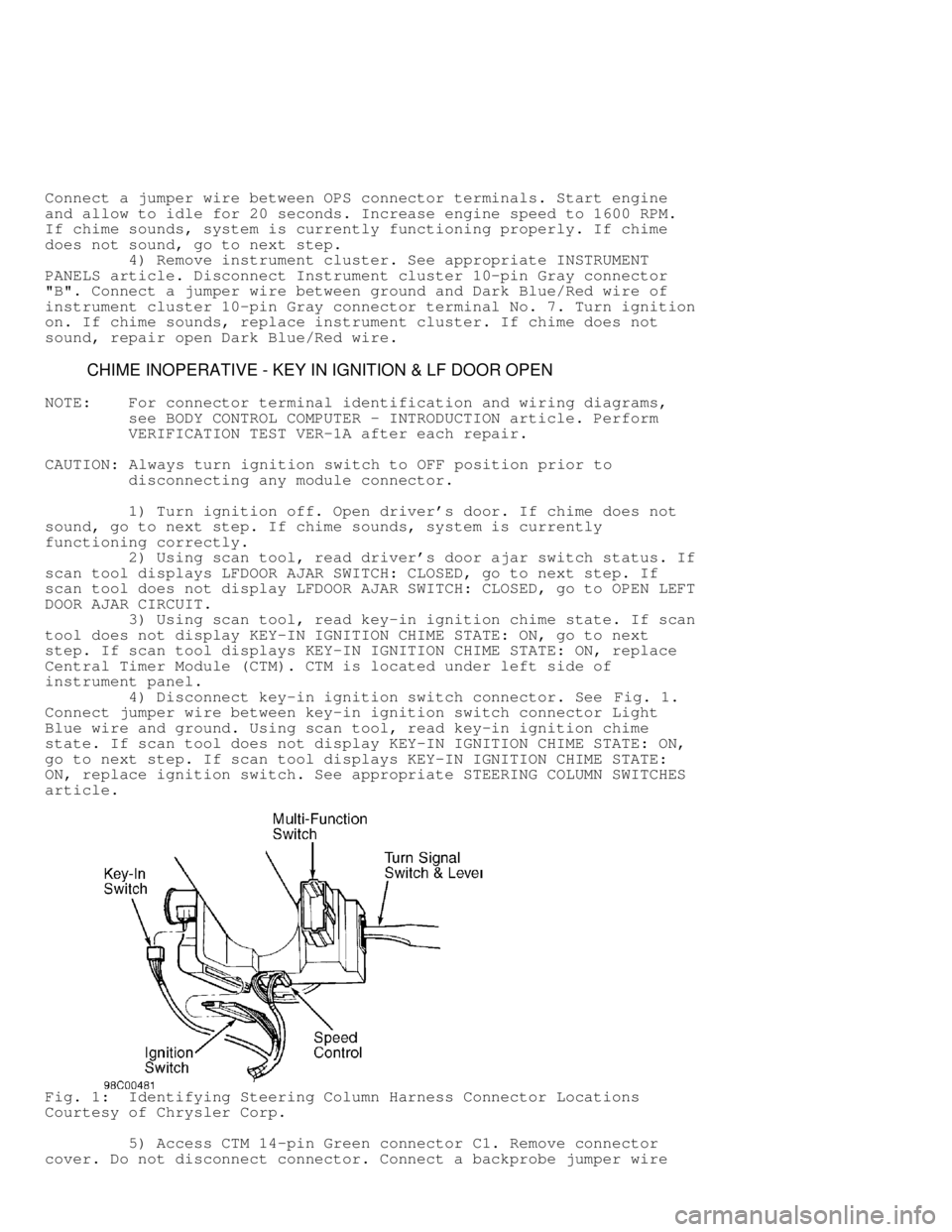
4) Disconnect key-in ignition switch connector. See Fig. 1.
Connect jumper wire between key-in ignition switch connector Light
Blue wire and ground. Using scan tool, read key-in ignition chime
state. If scan tool does not display KEY-IN IGNITION CHIME STATE: ON,
go to next step. If scan tool displays KEY-IN IGNITION CHIME STATE:
ON, replace ignition switch. See appropriate STEERING COLUMN SWITCHES
article.
Fig. 1: Identifying Steering Column Harness Connector Locations
Courtesy of Chrysler Corp.
5) Access CTM 14-pin Green connector C1. Remove connector
cover. Do not disconnect connector. Connect a backprobe jumper wire
Page 300 of 1691

between terminal No. 9 (Light Blue wire) and chassis ground. Using
scan tool, read key-in ignition switch status. If scan tool does not
display KEY-IN IGNITION CHIME STATE: ON, replace CTM. If scan tool
displays KEY-IN IGNITION CHIME STATE: ON, repair open Light Blue wire
between CTM and ignition switch.
CHIME INOPERATIVE AT ALL TIMES
NOTE: Perform VERIFICATION TEST VER-1A after each repair.
Turn ignition on. Using scan tool, select BODY SYSTEM, BODY
COMPUTER then ACTUATORS. Actuate chime. If chime sounds, system is
currently functioning correctly. If chime does not sound, replace
Central Timer Module (CTM). CTM is located under left side of
instrument panel.
CHIME INOPERATIVE WITH EXTERIOR LIGHTS ON
NOTE: For connector terminal identification and wiring diagrams,
see BODY CONTROL COMPUTER - INTRODUCTION article. Perform
VERIFICATION TEST VER-1A after each repair.
CAUTION: Always turn ignition switch to OFF position prior to
disconnecting any module connector.
1) Remove ignition key. Using scan tool, read key-in ignition
chime state. If scan tool does not display KEY-IN IGNITION CHIME
STATE:
OFF, go to step 4). If scan tool displays KEY-IN IGNITION CHIME STATE:
OFF, go to next step.
2) Open driver's door. Using scan tool, read door ajar
status. If scan tool displays LFDOOR AJAR SWITCH: CLOSED, go to next
step. If scan tool does not display LFDOOR AJAR SWITCH: CLOSED, go to
OPEN LEFT DOOR AJAR CIRCUIT.
3) Turn on headlights. If chime does not sound, repair open
headlight sense circuit (Light Blue wire) between CTM and headlight
switch. See appropriate wiring diagram in BODY CONTROL COMPUTER -
INTRODUCTION article. If chime sounds, system is currently functioning
correctly.
4) Open driver's door. Using scan tool, read door ajar
status. If scan tool displays LFDOOR AJAR SWITCH: CLOSED, go to next
step. If scan tool does not display LFDOOR AJAR SWITCH: CLOSED, go to
OPEN LEFT DOOR AJAR CIRCUIT.
5) Disconnect key-in ignition switch connector. See Fig. 1.
Using scan tool, read key-in ignition chime state. If scan tool
displays KEY-IN IGNITION CHIME STATE: ON, go to next step. If scan
tool does not display KEY-IN IGNITION CHIME STATE: ON, replace
ignition switch. See appropriate STEERING COLUMN SWITCHES article.
6) Turn ignition off. Disconnect Central Timer Module (CTM).\
CTM is located under left side of instrument panel. Remove ignition
key. Ensure all lights and accessories are off. Close all doors. Using
external ohmmeter, measure resistance between ground and terminal No.
9 (Light Blue wire) on CTM Green connector "A". If resistance is less
than 10 ohms, repair Light Blue wire between CTM and ignition switch
for short to ground. If resistance is 10 ohms or more, replace CTM.
CHIME INOPERATIVE WITH LOW OIL PRESSURE
NOTE: For connector terminal identification and wiring diagrams,
see BODY CONTROL COMPUTER - INTRODUCTION article. Perform
VERIFICATION TEST VER-1A after each repair.
CAUTION: Always turn ignition switch to OFF position prior to
Page 301 of 1691
 Disconnect Oil Pressure Switch (OPS). OPS is located near\
bottom of distributor. Connect a jumper wire between OPS connector
terminals. Start")
disconnecting any module connector.
1) Disconnect Oil Pressure Switch (OPS). OPS is located near\
bottom of distributor. Connect a jumper wire between OPS connector
terminals. Start engine and allow to idle for 20 seconds. Increase
engine speed to 1600 RPM. If chime sounds, go to next step. If chime
does not sound, go to step 3).
2) Turn ignition on. Using scan tool, actuate chime. If chime
does not sound, replace Central Timer Module (CTM). CTM is located
under left side of instrument panel. If chime sounds, system is
currently functioning properly.
3) Using scan tool, access CLUSTER MONITOR. With engine
running, read CCD oil pressure. If scan tool reading does not match
instrument cluster reading, replace instrument cluster. If scan tool
reading matches instrument cluster reading, go to next step.
4) Remove jumper wire. Connect a jumper wire between ground
and OPS connector Gray wire. Start engine and allow to idle for 20
seconds. Increase engine speed to 1600 RPM. If chime sounds, repair
open ground circuit between OPS connector and ground. If chime does
not sound, go to next step.
5) Turn ignition on. Using scan tool, actuate chime. If chime
does not sound, replace Central Timer Module (CTM). CTM is located
under left side of instrument panel. If chime sounds, go to next step.
6) Remove instrument cluster. See appropriate INSTRUMENT
PANELS article. Disconnect CTM 14-pin Green connector C1. Using an
external ohmmeter, measure resistance of Dark Blue/Red wire between
CTM 14-pin Green connector C1 terminal No. 2 and instrument cluster
10-pin connector C2 terminal No. 7. If resistance is less than 5 ohms,
replace CTM. If resistance is 5 ohms or more, repair open Dark
Blue/Red wire.
CHIME SOUNDS WITH DRIVER DOOR OPEN
NOTE: For connector terminal identification and wiring diagrams,
see BODY CONTROL COMPUTER - INTRODUCTION article. Perform
VERIFICATION TEST VER-1A after each repair.
CAUTION: Always turn ignition switch to OFF position prior to
disconnecting any module connector.
1) Ensure all interior and exterior lights are off. Remove
ignition key and open driver's door. If chime does not sound, system
is currently functioning correctly. If chime sounds, go to next step.
2) Using scan tool, read key-in ignition chime state. If scan
tool displays KEY-IN IGNITION CHIME STATE: "ON/OFF", go to next step.
If scan tool does not display KEY-IN IGNITION CHIME STATE: "ON/OFF",
replace Central Timer Module (CTM). CTM is located under left side of
instrument panel.
3) Disconnect key-in ignition switch connector. See Fig. 1.
Using scan tool, read key-in ignition chime state. If scan tool
displays KEY-IN IGNITION CHIME STATE: ON, go to next step. If scan
tool does not display KEY-IN IGNITION CHIME STATE: ON, replace
ignition switch. See appropriate STEERING COLUMN SWITCHES article.
4) Turn ignition off. Disconnect Central Timer Module (CTM).\
CTM is located under left side of instrument panel. Remove ignition
key. Ensure all lights and accessories are off. Close all doors. Using
external ohmmeter, measure resistance between ground and terminal No.
9 (Light Blue wire) on CTM Green connector "A". If resistance is less
than 10 ohms, repair Light Blue wire between CTM and ignition switch
for short to ground. If resistance is 10 ohms or more, replace CTM.
DOOR AJAR SYSTEM
Page 302 of 1691

OPEN LEFT DOOR AJAR CIRCUIT
NOTE: For connector terminal identification and wiring diagrams,
see BODY CONTROL COMPUTER - INTRODUCTION article. Perform
VERIFICATION TEST VER-1A after each repair.
CAUTION: Always turn ignition switch to OFF position prior to
disconnecting any module connector.
1) Remove driver's door panel. Disconnect driver's door ajar
switch and ensure connector is clean and not damaged. Connect a jumper
wire between left front door ajar switch connector Tan wire and
Black/Light Green wire. Using scan tool, read left front door ajar
switch status. If scan tool displays DRDOOR AJAR SW: CLOSED, replace
left front door ajar switch. If scan tool does not display DRDOOR AJAR
SW:
CLOSED, go to next step.
2) Disconnect jumper wire from Black/Light Green wire. Take
jumper wire end removed from Black/Light Green wire and connect to
ground. If scan tool displays DRDOOR AJAR SW: CLOSED, repair open
ground circuit (Black/Light Green wire). If scan tool does not display\
DRDOOR AJAR SW: CLOSED, go to next step.
3) Disconnect jumper wire. Locate Central Timer Module (CTM)\
.
CTM is located under left side of instrument panel. Access CTM 14-pin
Green connector C1. Remove connector cover. Do not disconnect
connector. Connect a backprobe jumper wire between chassis ground and
terminal No. 1 (Tan wire). Using scan tool, read left front door ajar
switch status. If scan tool displays DRDOOR AJAR SW: CLOSED, repair
open in Tan wire between left front door ajar switch and CTM. If scan
tool does not display DRDOOR AJAR SW: CLOSED, replace CTM.
OPEN RIGHT DOOR AJAR CIRCUIT
NOTE: For connector terminal identification and wiring diagrams,
see BODY CONTROL COMPUTER - INTRODUCTION article. Perform
VERIFICATION TEST VER-1A after each repair.
CAUTION: Always turn ignition switch to OFF position prior to
disconnecting any module connector.
1) Remove passenger's door panel. Disconnect right front door
ajar switch and ensure connector is clean and not damaged. Connect a
jumper wire between right front door ajar switch connector Black/Light
Blue wire and Black/Light Green wire. Using scan tool, read right
front door ajar switch status. If scan tool displays PASSDOOR AJAR SW:
CLOSED, replace right front door ajar switch. If scan tool does not
display PASSDOOR AJAR SW: CLOSED, go to next step.
2) Disconnect jumper from Black/Light Green wire. Take jumper
wire end removed from Black/Light Green wire and connect to ground. If
scan tool displays PASSDOOR AJAR SWITCH: CLOSED, repair open ground
circuit (Black/Light Green wire). If scan tool does not display
PASSDOOR AJAR SW: CLOSED, go to next step.
3) Disconnect jumper wire. Locate Central Timer Module (CTM)\
.
CTM is located under left side of instrument panel. Access CTM 14-pin
Green connector C1. Remove connector cover. Do not disconnect
connector. Connect a backprobe jumper wire between chassis ground and
terminal No. 5 (Black/Light Blue wire). If scan tool displays PASS
DOOR AJAR SW: CLOSED, repair open Black/Light Blue wire between CTM
and right front door ajar switch. If scan tool does not display PASS
DOOR AJAR SW: CLOSED, replace CTM.
SHORTED LEFT DOOR AJAR CIRCUIT
Page 303 of 1691

NOTE: For connector terminal identification and wiring diagrams,
see BODY CONTROL COMPUTER - INTRODUCTION article. Perform
VERIFICATION TEST VER-1A after each repair.
CAUTION: Always turn ignition switch to OFF position prior to
disconnecting any module connector.
1) Remove driver's door panel. Disconnect driver's door ajar
switch. Using scan tool, read left front door ajar switch status. If
scan tool displays DRDOOR AJAR SW: CLOSED, go to next step. If scan
tool does not display DRDOOR AJAR SW: CLOSED, replace left front door
ajar switch.
2) Disconnect Central Timer Module (CTM) 14-pin Green
connector C1. CTM is located under left side of instrument panel.
Using an external ohmmeter, measure resistance between ground and CTM
14-pin Green connector C1 terminal No. 1 (Tan wire). If resistance is
less than 5 ohms, repair short to ground in Tan wire between CTM 14-
pin connector C1 and left front door ajar switch. If resistance is 5
ohms or more, replace CTM.
SHORTED RIGHT DOOR AJAR CIRCUIT
NOTE: For connector terminal identification and wiring diagrams,
see BODY CONTROL COMPUTER - INTRODUCTION article. Perform
VERIFICATION TEST VER-1A after each repair.
CAUTION: Always turn ignition switch to OFF position prior to
disconnecting any module connector.
1) Ensure all doors are closed. Open right front door and
remove door panel. Disconnect right front door ajar switch. Using scan
tool, read right front door ajar switch status. If scan tool displays
PASSDOOR AJAR SW: CLOSED, go to next step. If scan tool does not
display PASSDOOR AJAR SW: CLOSED, replace right front door ajar
switch.
2) Disconnect Central Timer Module (CTM) 14-pin Green
connector C1. CTM is located under left side of instrument panel.
Using an external ohmmeter, measure resistance between ground and CTM
14-pin Green connector C1 terminal No. 5 (Black/Light Blue wire). If
resistance is less than 5 ohms, repair short to ground in Black/Light
Blue wire. If resistance is 5 ohms or more, replace CTM.
INSTRUMENT CLUSTER
ALL GAUGES DO NOT OPERATE
NOTE: For connector terminal identification and wiring diagrams,
see BODY CONTROL COMPUTER - INTRODUCTION article. Perform
VERIFICATION TEST VER-1A after each repair.
CAUTION: Always turn ignition switch to OFF position prior to
disconnecting or connecting any module connector.
1) Turn ignition on. Using scan tool, select ELECTRO/MECH
CLUSTER. If scan tool displays BUS OPERATIONAL, go to next step. If
scan tool does not display BUS OPERATIONAL, go to appropriate VEHICLE
COMMUNICATIONS article and follow appropriate symptom diagnostics.
2) If scan tool displays NO RESPONSE, go to appropriate
VEHICLE COMMUNICATIONS article. If scan tool does not display NO
RESPONSE, go to next step.
3) Using scan tool, select SYSTEM TEST. If scan tool displays