Control vacuum DODGE RAM 2001 Service Owner's Manual
[x] Cancel search | Manufacturer: DODGE, Model Year: 2001, Model line: RAM, Model: DODGE RAM 2001Pages: 2889, PDF Size: 68.07 MB
Page 584 of 2889
The odometer can display values up to 499,999
kilometers (499,999 miles). The odometer latches at
these values, and will not roll over to zero. The trip
odometer can display values up to 999.9 kilometers
(999.9 miles) before it rolls over to zero. The odome-
ter display does not have a decimal point and will
not show values less than a full unit (kilometer or
mile), the trip odometer display does have a decimal
point and will show tenths of a unit (kilometer or
mile). The unit of measure (kilometers or miles) for
the odometer and trip odometer display is not shown
in the VFD. The unit of measure for the instrument
cluster odometer/trip odometer is selected at the time
that it is manufactured, and cannot be changed. Dur-
ing daylight hours (exterior lamps Off) the VFD is
illuminated at full brightness for clear visibility. At
night (exterior lamps are On) the VFD lighting level
is adjusted with the other cluster illumination lamps
using the panel lamps dimmer thumbwheel on the
headlamp switch. However, a ªParadeº mode position
of the panel lamps dimmer thumbwheel allows the
VFD to be illuminated at full brightness while the
exterior lamps are turned On during daylight hours.
The VFD, the trip odometer switch, and the trip
odometer switch button are serviced as a unit with
the instrument cluster.
OPERATION
The odometer and trip odometer give an indication
to the vehicle operator of the distance the vehicle has
traveled. This gauge is controlled by the instrument
cluster circuit board based upon the cluster program-
ming and electronic messages received by the cluster
from the Powertrain Control Module (PCM) over the
Chrysler Collision Detection (CCD) data bus. The
odometer and trip odometer information is displayed
by the instrument cluster Vacuum Fluorescent Dis-
play (VFD), and the VFD will not display odometer
or trip odometer information after the ignition switch
is turned to the Off position. The instrument cluster
circuitry controls the VFD and provides the following
features:
²Odometer/Trip Odometer Display Toggling-
Actuating the trip odometer reset switch momen-
tarily with the ignition switch in the On position will
toggle the VFD between the odometer and trip odom-
eter display. Each time the ignition switch is turned
to the On position the VFD will automatically return
to the mode (odometer or trip odometer) last dis-
played when the ignition switch was turned to the
Off position.
²Trip Odometer Reset- When the trip odome-
ter reset switch is pressed and held for longer than
about two seconds, the trip odometer will be reset to
000.0 kilometers (miles). The VFD must be display-ing the trip odometer information in order for the
trip odometer information to be reset.
²Message Failure- If the cluster fails to receive
a distance message during normal operation, it will
flash the odometer/trip odometer distance informa-
tion on and off repeatedly until a distance message is
received, or until the ignition switch is turned to the
Off position, whichever occurs first. If the cluster
does not receive a distance message within one sec-
ond after the ignition switch is turned to the On posi-
tion, it will display the last distance message stored
in the cluster memory. If the cluster is unable to dis-
play distance information due to an error internal to
the cluster, the VFD display will be blank.
²Actuator Test- Each time the cluster is put
through the actuator test, the VFD will display all of
its characters at once, then step through each char-
acter segment individually during the VFD portion of
the test to confirm the functionality of the VFD and
the cluster control circuitry.
The PCM continually monitors the vehicle speed
sensor, then sends the proper distance messages to
the instrument cluster. For further diagnosis of the
odometer/trip odometer or the instrument cluster cir-
cuitry that controls these functions, (Refer to 8 -
ELECTRICAL/INSTRUMENT CLUSTER - DIAGNO-
SIS AND TESTING). For proper diagnosis of the
vehicle speed sensor, the PCM, the CCD data bus, or
the message inputs to the instrument cluster that
control the odometer/trip odometer, a DRBIIItscan
tool is required. Refer to the appropriate diagnostic
information.
OIL PRESSURE GAUGE
DESCRIPTION
An oil pressure gauge is standard equipment on all
instrument clusters. The oil pressure gauge is located
in the upper right quadrant of the instrument clus-
ter, above the fuel gauge. The oil pressure gauge con-
sists of a movable gauge needle or pointer controlled
by the instrument cluster circuitry and a fixed 90
degree scale on the cluster overlay that reads left-to-
right either from 0 kPa (0 psi) to 758 kPa (110 psi).
An International Control and Display Symbol icon for
ªEngine Oilº is located on the cluster overlay, directly
below the highest graduation of the gauge scale. The
oil pressure gauge graphics are white against a black
field except for a single red graduation at the low
end of the gauge scale, making them clearly visible
within the instrument cluster in daylight. When illu-
minated from behind by the panel lamps dimmer
controlled cluster illumination lighting with the exte-
rior lamps turned On, the white graphics appear
blue-green and the red graphics appear red. The
BR/BEINSTRUMENT CLUSTER 8J - 25
ODOMETER (Continued)
Page 588 of 2889
SHIFT INDICATOR (TRANSFER
CASE)
DESCRIPTION
A four-wheel drive indicator is standard equipment
on all instrument clusters. However, on vehicles not
equipped with the optional four-wheel drive system,
this indicator is mechanically disabled. The four-
wheel drive indicator is located near the lower edge
of the instrument cluster overlay, to the right of cen-
ter. The four-wheel drive indicator consists of a sten-
cilled cutout of the text ª4WDº in the opaque layer of
the instrument cluster overlay. The dark outer layer
of the overlay prevents the indicator from being
clearly visible when it is not illuminated. An amber
lens behind the cutout in the opaque layer of the
overlay causes the ª4WDº text to appear in amber
through the translucent outer layer of the overlay
when the indicator is illuminated from behind by a
Light Emitting Diode (LED) soldered onto the instru-
ment cluster electronic circuit board. The four-wheel
drive indicator is serviced as a unit with the instru-
ment cluster.
OPERATION
The four-wheel drive indicator lamp gives an indi-
cation to the vehicle operator that a four-wheel drive
operating mode is engaged. The indicator will be illu-
minated when either high range (4H) or low range
(4L) have been selected with the transfer case shift
lever. This indicator is controlled by a transistor on
the instrument cluster circuit board based upon the
cluster programming, and a hard wired input from
the four-wheel drive switch on the front axle discon-
nect housing. The four-wheel drive indicator Light
Emitting Diode (LED) receives battery current on the
instrument cluster electronic circuit board through
the fused ignition switch output (st-run) circuit
whenever the ignition switch is in the On or Start
positions; therefore, the lamp will always be off when
the ignition switch is in any position except On or
Start. The LED only illuminates when it is switched
to ground by the instrument cluster transistor.
The four-wheel drive switch is connected in series
between ground and the four-wheel drive switch
sense input to the instrument cluster. For further
information on the transfer case and the transfer
case operating ranges, (Refer to 21 - TRANSMIS-
SION/TRANSAXLE/TRANSFER CASE - OPERA-
TION. For further information on the front axle
disconnect mechanism, (Refer to 3 - DIFFERENTIAL
& DRIVELINE/FRONT AXLE/AXLE VACUUM
MOTOR - OPERATION). The four-wheel drive switch
input to the instrument cluster circuitry can be diag-nosed using conventional diagnostic tools and meth-
ods.
DIAGNOSIS AND TESTING - FOUR-WHEEL
DRIVE INDICATOR
The diagnosis found here addresses an inoperative
four-wheel drive indicator condition. If the problem
being diagnosed is related to indicator accuracy, be
certain to confirm that the problem is with the indi-
cator and not with a damaged or inoperative front
axle disconnect mechanism. (Refer to 3 - DIFFEREN-
TIAL & DRIVELINE/FRONT AXLE/AXLE VACUUM
MOTOR - DIAGNOSIS AND TESTING). If no front
axle disconnect problem is found, the following proce-
dure will help locate a short or open in the four-
wheel drive switch input to the instrument cluster.
Refer to the appropriate wiring information. The wir-
ing information includes wiring diagrams, proper
wire and connector repair procedures, details of wire
harness routing and retention, connector pin-out
information and location views for the various wire
harness connectors, splices and grounds.
WARNING: ON VEHICLES EQUIPPED WITH AIR-
BAGS, DISABLE THE AIRBAG SYSTEM BEFORE
ATTEMPTING ANY STEERING WHEEL, STEERING
COLUMN, OR INSTRUMENT PANEL COMPONENT
DIAGNOSIS OR SERVICE. DISCONNECT AND ISO-
LATE THE BATTERY NEGATIVE (GROUND) CABLE,
THEN WAIT TWO MINUTES FOR THE AIRBAG SYS-
TEM CAPACITOR TO DISCHARGE BEFORE PER-
FORMING FURTHER DIAGNOSIS OR SERVICE. THIS
IS THE ONLY SURE WAY TO DISABLE THE AIRBAG
SYSTEM. FAILURE TO TAKE THE PROPER PRE-
CAUTIONS COULD RESULT IN ACCIDENTAL AIR-
BAG DEPLOYMENT AND POSSIBLE PERSONAL
INJURY.
INDICATOR DOES NOT ILLUMINATE WITH FOUR-WHEEL
DRIVE MODE SELECTED
(1) Disconnect and isolate the battery negative
cable. Disconnect the engine wire harness connector
for the four-wheel drive switch from the switch con-
nector receptacle. Check for continuity between the
ground circuit cavity of the engine wire harness con-
nector for the four-wheel drive switch and a good
ground. There should be continuity. If OK, go to Step
2. If not OK, repair the open ground circuit to ground
(G100) as required.
(2) Reconnect the battery negative cable. Turn the
ignition switch to the On position. Install a jumper
wire between the 4WD switch sense circuit cavity of
the engine wire harness connector for the four-wheel
drive switch and a good ground. The four-wheel drive
indicator should light. If OK, replace the faulty four-
wheel drive switch. If not OK, go to Step 3.
BR/BEINSTRUMENT CLUSTER 8J - 29
Page 601 of 2889
(9) Disconnect the instrument panel wire harness
connector for the multi-function switch from the
switch connector receptacle. Check for continuity
between the hazard flasher signal circuit cavities in
the JB receptacle for the combination flasher and the
instrument panel wire harness connector for the
multi-function switch. There should be continuity. If
OK, go to Step 10. If not OK, repair the open hazard
flasher signal circuit between the JB and the multi-
function switch as required.
(10) Check for continuity between the flasher out-
put circuit cavities of the JB receptacle for the com-
bination flasher and in the instrument panel wire
harness connector for the multi-function switch.
There should be continuity. If OK, test the multi-
function switch. (Refer to 8 - ELECTRICAL/LAMPS/
LIGHTING - EXTERIOR/MULTI-FUNCTION
SWITCH - DIAGNOSIS AND TESTING). If not OK,
repair the open flasher output circuit between the JB
and the multi-function switch as required.
SPECIFICATIONS
EXTERIOR LAMPS
LAMP BULB
Back-up 3157
Cargo 921
Center High Mounted
Stop921
Clearance Roof Mounted 168
Fog Lamps 896
Headlamp - SLT 9004LL
Headlamp - Sport Low
Beam9007
Headlamp - Sport High
Beam9004LL
License Plate w/o
Bumper1155
License Plate -Step
Bumper168
Park/Turn Signal 3157NA
Snow Plow Control 161
Tail/Brake/Turn Signal 3157
Tail/Brake/Cab - Chassis 1157
Underhood 105
SPECIAL TOOLS
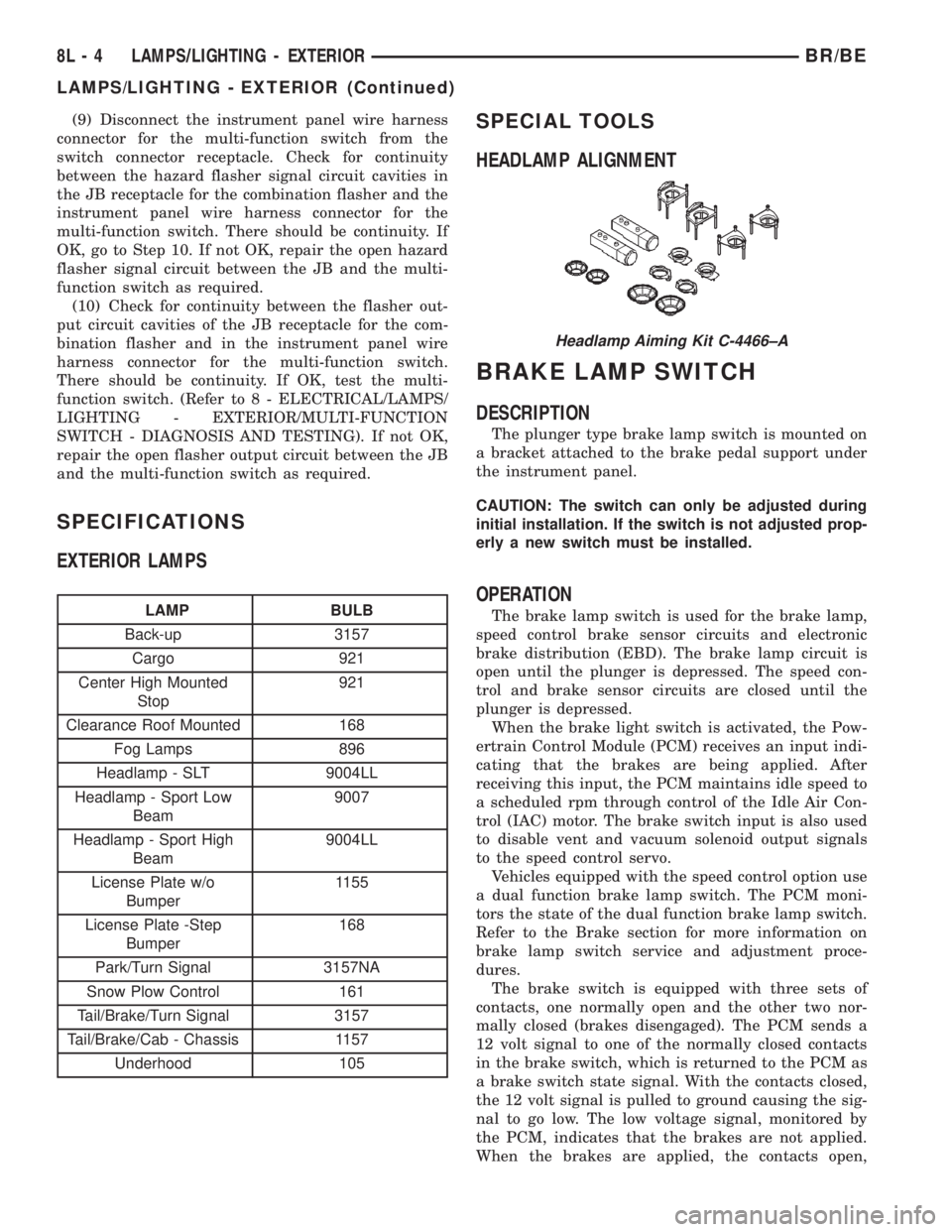
HEADLAMP ALIGNMENT
BRAKE LAMP SWITCH
DESCRIPTION
The plunger type brake lamp switch is mounted on
a bracket attached to the brake pedal support under
the instrument panel.
CAUTION: The switch can only be adjusted during
initial installation. If the switch is not adjusted prop-
erly a new switch must be installed.
OPERATION
The brake lamp switch is used for the brake lamp,
speed control brake sensor circuits and electronic
brake distribution (EBD). The brake lamp circuit is
open until the plunger is depressed. The speed con-
trol and brake sensor circuits are closed until the
plunger is depressed.
When the brake light switch is activated, the Pow-
ertrain Control Module (PCM) receives an input indi-
cating that the brakes are being applied. After
receiving this input, the PCM maintains idle speed to
a scheduled rpm through control of the Idle Air Con-
trol (IAC) motor. The brake switch input is also used
to disable vent and vacuum solenoid output signals
to the speed control servo.
Vehicles equipped with the speed control option use
a dual function brake lamp switch. The PCM moni-
tors the state of the dual function brake lamp switch.
Refer to the Brake section for more information on
brake lamp switch service and adjustment proce-
dures.
The brake switch is equipped with three sets of
contacts, one normally open and the other two nor-
mally closed (brakes disengaged). The PCM sends a
12 volt signal to one of the normally closed contacts
in the brake switch, which is returned to the PCM as
a brake switch state signal. With the contacts closed,
the 12 volt signal is pulled to ground causing the sig-
nal to go low. The low voltage signal, monitored by
the PCM, indicates that the brakes are not applied.
When the brakes are applied, the contacts open,
Headlamp Aiming Kit C-4466±A
8L - 4 LAMPS/LIGHTING - EXTERIORBR/BE
LAMPS/LIGHTING - EXTERIOR (Continued)
Page 602 of 2889
causing the PCM's output brake signal to go high,
disengaging the speed control, cutting off PCM power
to the speed control solenoids.
The second set of normally closed contacts supplies
12 volts from the PCM any time speed control is
turned on. Through the brake switch, current is
routed to the speed control servo solenoids. The
speed control solenoids (vacuum, vent and dump) are
provided this current any time the speed control is
ON and the brakes are disengaged.
When the driver applies the brakes, the contacts
open and current is interrupted to the solenoids. The
normally open contacts are fed battery voltage. When
the brakes are applied, battery voltage is supplied to
the brake lamps.
DIAGNOSIS AND TESTING - BRAKE LAMP
SWITCH
The brake lamp switch can be tested with an ohm-
meter. The ohmmeter is used to check continuity
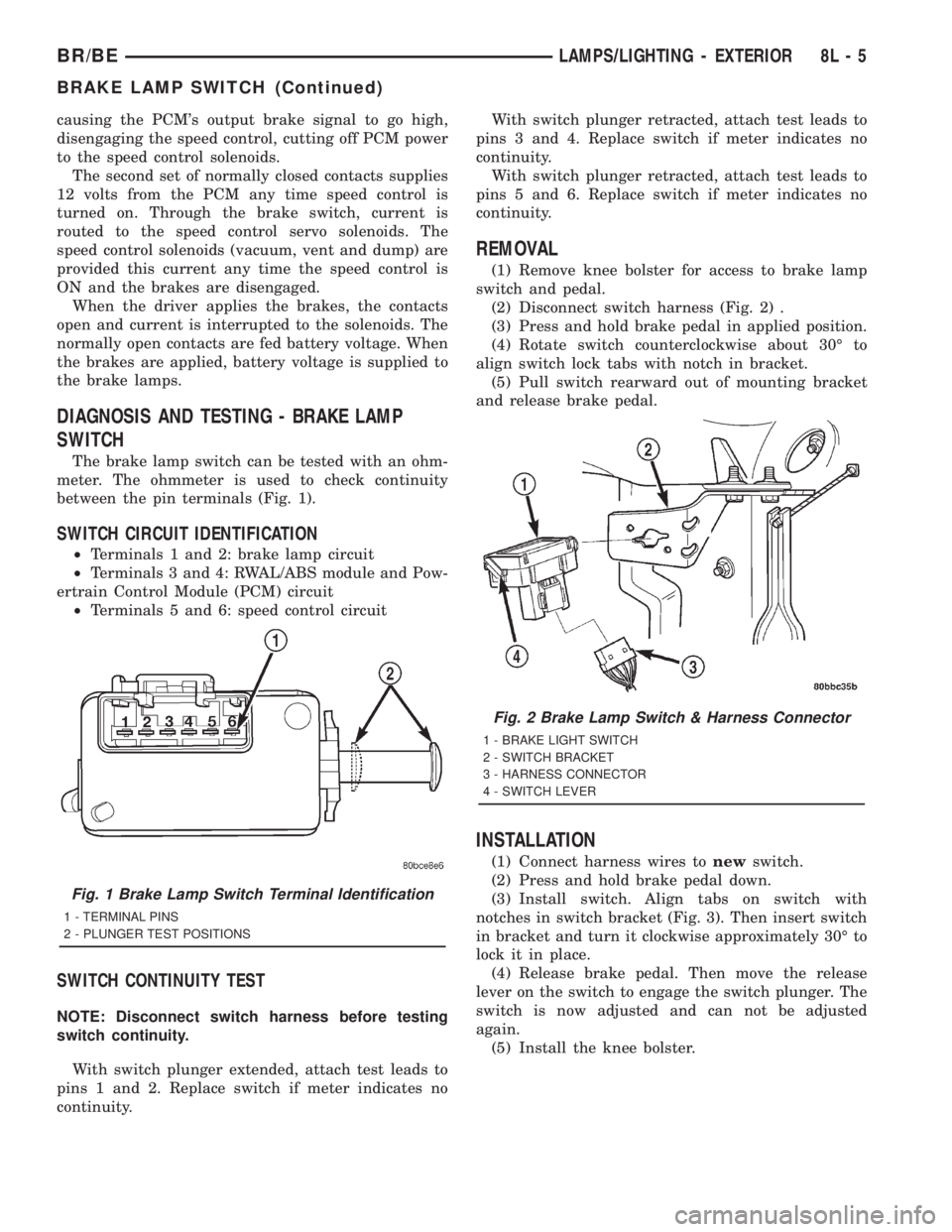
between the pin terminals (Fig. 1).
SWITCH CIRCUIT IDENTIFICATION
²Terminals 1 and 2: brake lamp circuit
²Terminals 3 and 4: RWAL/ABS module and Pow-
ertrain Control Module (PCM) circuit
²Terminals 5 and 6: speed control circuit
SWITCH CONTINUITY TEST
NOTE: Disconnect switch harness before testing
switch continuity.
With switch plunger extended, attach test leads to
pins 1 and 2. Replace switch if meter indicates no
continuity.With switch plunger retracted, attach test leads to
pins 3 and 4. Replace switch if meter indicates no
continuity.
With switch plunger retracted, attach test leads to
pins 5 and 6. Replace switch if meter indicates no
continuity.
REMOVAL
(1) Remove knee bolster for access to brake lamp
switch and pedal.
(2) Disconnect switch harness (Fig. 2) .
(3) Press and hold brake pedal in applied position.
(4) Rotate switch counterclockwise about 30É to
align switch lock tabs with notch in bracket.
(5) Pull switch rearward out of mounting bracket
and release brake pedal.
INSTALLATION
(1) Connect harness wires tonewswitch.
(2) Press and hold brake pedal down.
(3) Install switch. Align tabs on switch with
notches in switch bracket (Fig. 3). Then insert switch
in bracket and turn it clockwise approximately 30É to
lock it in place.
(4) Release brake pedal. Then move the release
lever on the switch to engage the switch plunger. The
switch is now adjusted and can not be adjusted
again.
(5) Install the knee bolster.
Fig. 1 Brake Lamp Switch Terminal Identification
1 - TERMINAL PINS
2 - PLUNGER TEST POSITIONS
Fig. 2 Brake Lamp Switch & Harness Connector
1 - BRAKE LIGHT SWITCH
2 - SWITCH BRACKET
3 - HARNESS CONNECTOR
4 - SWITCH LEVER
BR/BELAMPS/LIGHTING - EXTERIOR 8L - 5
BRAKE LAMP SWITCH (Continued)
Page 643 of 2889
the latch. Repeat this step to engage the second pivot
pin with its pivot latch.
(3) Close the garage door opener storage bin door.
(4) If the vehicle is so equipped, position the com-
pass mini-trip computer module to the back side of
the overhead console housing. Install and tighten the
three screws that secure the module to the housing.
Tighten the screws to 2.2 N´m (20 in. lbs.).
(5) Install the overhead console onto the headliner.
Refer toOverhead Consolein the Removal and
Installation section of this group for the procedures.
SUNGLASS STORAGE BIN
(1) From the face side of the overhead console
housing, position the sunglasses storage bin pivot
arms through the openings in the front of the storage
bin housing in the overhead console.
(2) From the back side of the of the overhead con-
sole housing, align one of the pivot pins of the sun-
glasses storage bin with the pivot latch integral to
the overhead console housing. Press the pivot arm
forward until the pivot pin is engaged in the latch.
Repeat this step to engage the second pivot pin with
its pivot latch.
(3) Close the sunglasses storage bin.
(4) Position the reading and courtesy lamp housing
to the back side of the overhead console housing.
Install and tighten the four screws that secure the
lamp housing to the back of the overhead console
housing. Tighten the screws to 2.2 N´m (20 in. lbs.).
(5) Install the overhead console onto the headliner.
Refer toOverhead Consolein the Removal and
Installation section of this group for the procedures.
MINI-TRIP COMPUTER LENS
Overhead consoles equipped with the optional com-
pass mini-trip computer have a lens installed in the
front of the overhead console housing through which
the Vacuum-Fluorescent Display can be viewed. If
the overhead console is not equipped with the com-
pass mini-trip computer option, a plastic cover plug
is installed in the front of the overhead console hous-
ing in place of the lens.
(1) Remove the trip computer lens or the cover
plug onto the overhead console housing.
(2) From the face of the overhead console, push the
trip computer lens or the cover plug forward far
enough to engage the four forward mounting tabs in
the overhead console unit.
(3) From the face of the overhead console, align
the rear mounting boss of the trip computer lens or
the alignment pin of the cover plug with the recepta-
cle in the overhead console housing.
(4) Press firmly and evenly on the rear edge of the
trip computer lens or the cover plug until the rear
mounting boss is fully seated in the receptacle, or thesnap features of the cover plug are fully engaged in
the overhead console housing.
(5) If the vehicle is so equipped, install the com-
pass mini-trip computer module onto the overhead
console. Refer toCompass Mini-Trip Computerin
the Removal and Installation section of this group for
the procedures.
(6) Install the overhead console onto the headliner.
Refer toOverhead Consolein the Removal and
Installation section of this group for the procedures.
INSTALLATION
(1) Position the overhead console near the mount-
ing location on the headliner in the vehicle.
(2) Reconnect the roof wire harness connector to
the overhead console wire harness connector.
(3) Engage the two mounting hooks on the rear of
the overhead console housing in the mounting holes
in the inner roof panel.
(4) Slide the overhead console forward far enough
to align the two latches on the front of the housing
with their receptacles in the inner roof panel.
(5) Push upward firmly and evenly on the front of
the overhead console until each of the two latches is
fully engaged in its receptacle in the inner roof panel.
(6) Close the garage door opener storage bin door.
(7) Reconnect the battery negative cable.
SPECIAL TOOLS
OVERHEAD CONSOLE SYSTEMS
COMPASS/MINI-TRIP
COMPUTER
DESCRIPTION
The compass mini-trip computer is located in the
premium overhead console on models equipped with
this option. Two compass mini-trip computer units
are available. One unit is used on vehicles not
equipped with the Vehicle Theft Security System
(VTSS) option, and the other is used on vehicles with
the VTSS option. Both compass mini-trip computer
units include the electronic control module, a Vacu-
um-Fluorescent Display (VFD), a compass flux-gate
unit and two push button function switches.
Degaussing Tool 6029
8M - 8 MESSAGE SYSTEMSBR/BE
OVERHEAD CONSOLE (Continued)
Page 706 of 2889
SPEED CONTROL
TABLE OF CONTENTS
page page
SPEED CONTROL
DESCRIPTION............................1
OPERATION.............................2
DIAGNOSIS AND TESTING..................2
VACUUM SUPPLY.......................2
ROAD TEST............................3
SPECIFICATIONS.........................4
CABLE
DESCRIPTION............................4
OPERATION.............................4
REMOVAL...............................4
INSTALLATION............................4
SPEED CONTROL SERVO
DESCRIPTION............................5OPERATION.............................5
REMOVAL...............................6
INSTALLATION...........................10
SWITCH
DESCRIPTION...........................12
OPERATION.............................12
REMOVAL..............................13
INSTALLATION...........................13
VACUUM RESERVOIR
DESCRIPTION...........................13
REMOVAL..............................13
INSTALLATION...........................14
SPEED CONTROL
DESCRIPTION - SPEED CONTROL SYSTEM
Gas Engines and/or Diesel With Automatic Trans.
The speed control system is operated by the use of
a cable and a vacuum controlled servo. Electronic
control of the speed control system is integrated into
the Powertrain Control Module (PCM). The controls
consist of two steering wheel mounted switches. The
switches are labeled: ON/OFF, RES/ACCEL, SET,
COAST, and CANCEL.
The system is designed to operate at speeds above
30 mph (50 km/h).
WARNING: THE USE OF SPEED CONTROL IS NOT
RECOMMENDED WHEN DRIVING CONDITIONS DO
NOT PERMIT MAINTAINING A CONSTANT SPEED,
SUCH AS IN HEAVY TRAFFIC OR ON ROADS THAT
ARE WINDING, ICY, SNOW COVERED, OR SLIP-
PERY.
Diesel With Manual Trans.
The speed control system is fully electronically con-
trolled by the Engine Control Module (ECM).A
cable and a vacuum controlled servo are not
used if the vehicle is equipped with a manual
transmission and a diesel engine. This is a ser-
vo-less system.The controls consist of two steering
wheel mounted switches. The switches are labeled:
ON/OFF, RES/ACCEL, SET, COAST, and CANCEL.
The system is designed to operate at speeds above
30 mph (50 km/h).WARNING: THE USE OF SPEED CONTROL IS NOT
RECOMMENDED WHEN DRIVING CONDITIONS DO
NOT PERMIT MAINTAINING A CONSTANT SPEED,
SUCH AS IN HEAVY TRAFFIC OR ON ROADS THAT
ARE WINDING, ICY, SNOW COVERED, OR SLIP-
PERY.
DESCRIPTION - VEHICLE SPEED INPUT
Gas Engines and/or Diesel With Automatic Trans.
The Vehicle Speed Sensor (VSS) is no longer used
for any Dodge Truck.
Vehicle speed and distance covered are measured by
the Rear Wheel Speed Sensor. The sensor is mounted
to the rear axle. A signal is sent from this sensor to the
Controller Antilock Brake (CAB) computer. A signal is
then sent from the CAB to the Powertrain Control
Module (PCM) to determine vehicle speed and distance
covered. The PCM will then determine strategies for
speed control system operation.
Diesel With Manual Trans.
The Vehicle Speed Sensor (VSS) is no longer used
for any Dodge Truck.
Vehicle speed and distance covered are measured
by the Rear Wheel Speed Sensor. The sensor is
mounted to the rear axle. A signal is sent from this
sensor to the Controller Antilock Brake (CAB) com-
puter. A signal is then sent from the CAB to the
Engine Control Module (ECM) to determine vehicle
speed and distance covered. The ECM will then
determine strategies for speed control system opera-
tion.
BR/BESPEED CONTROL 8P - 1
Page 707 of 2889
OPERATION - SPEED CONTROL SYSTEM
Gas Engines and/or Diesel With Automatic Trans.
When speed control is selected by depressing the
ON switch, the PCM allows a set speed to be stored
in PCM RAM for speed control. To store a set speed,
depress the SET switch while the vehicle is moving
at a speed between 35 and 85 mph. In order for the
speed control to engage, the brakes cannot be
applied, nor can the gear selector be indicating the
transmission is in Park or Neutral.The speed control
can be disengaged manually by:
²Stepping on the brake pedal
²Depressing the OFF switch
²Depressing the CANCEL switch.
²Depressing the clutch pedal (if equipped)
NOTE: Depressing the OFF switch or turning off the
ignition switch will erase the set speed stored in
the PCM.
For added safety, the speed control system is pro-
grammed to disengage for any of the following condi-
tions:
²An indication of Park or Neutral
²A rapid increase of rpm (indication that the
clutch has been disengaged)
²Excessive engine rpm (indicates that the trans-
mission may be in a low gear)
²The speed signal increases at a rate of 10 mph
per second (indicates that the coefficient of friction
between the road surface and tires is extremely low)
²The speed signal decreases at a rate of 10 mph
per second (indicates that the vehicle may have
decelerated at an extremely high rate)
Once the speed control has been disengaged,
depressing the RES/ACCEL switch (when speed is
greater than 30 mph) restores the vehicle to the tar-
get speed that was stored in the PCM.
While the speed control is engaged, the driver can
increase the vehicle speed by depressing the RES/AC-
CEL switch. The new target speed is stored in the
PCM when the RES/ACCEL is released. The PCM
also has a9tap-up9feature in which vehicle speed
increases at a rate of approximately 2 mph for each
momentary switch activation of the RES/ACCEL
switch.
A ªtap downº feature is used to decelerate without
disengaging the speed control system. To decelerate
from an existing recorded target speed, momentarily
depress the COAST switch. For each switch activa-
tion, speed will be lowered approximately 1 mph.
Diesel With Manual Trans.
When speed control is selected by depressing the
ON switch, the Engine Control Module (ECM) allows
a set speed to be stored in ECM RAM for speed con-trol. To store a set speed, depress the SET switch
while the vehicle is moving at a speed between 35
and 85 mph. In order for the speed control to engage,
the brakes cannot be applied.The speed control can
be disengaged manually by:
²Stepping on the brake pedal
²Depressing the OFF switch
²Depressing the CANCEL switch.
²Depressing the clutch pedal
NOTE: Depressing the OFF switch or turning off the
ignition switch will erase the set speed stored in
the ECM.
For added safety, the speed control system is pro-
grammed to disengage for any of the following condi-
tions:
²A rapid increase of rpm (indication that the
clutch has been disengaged)
²Excessive engine rpm (indicates that the trans-
mission may be in a low gear)
²The speed signal increases at a rate of 10 mph
per second (indicates that the coefficient of friction
between the road surface and tires is extremely low)
²The speed signal decreases at a rate of 10 mph
per second (indicates that the vehicle may have
decelerated at an extremely high rate)
Once the speed control has been disengaged,
depressing the RES/ACCEL switch (when speed is
greater than 30 mph) restores the vehicle to the tar-
get speed that was stored in the ECM.
While the speed control is engaged, the driver can
increase the vehicle speed by depressing the RES/AC-
CEL switch. The new target speed is stored in the
ECM when the RES/ACCEL is released. The ECM also
has a9tap-up9feature in which vehicle speed increases
at a rate of approximately 2 mph for each momentary
switch activation of the RES/ACCEL switch.
A ªtap downº feature is used to decelerate without
disengaging the speed control system. To decelerate
from an existing recorded target speed, momentarily
depress the COAST switch. For each switch activa-
tion, speed will be lowered approximately 1 mph.
DIAGNOSIS AND TESTING - VACUUM SUPPLY
Gas Powered Engines
On gasoline powered engines: actual engine vac-
uum, a vacuum reservoir, a one-way check valve and
vacuum lines are used to supply vacuum to the speed
control servo.
(1)
Disconnect vacuum hose at speed control servo
and install a vacuum gauge into the disconnected hose.
(2) Start engine and observe gauge at idle. Vac-
uum gauge should read at least ten inches of mer-
cury.
8P - 2 SPEED CONTROLBR/BE
SPEED CONTROL (Continued)
Page 708 of 2889
(3) If vacuum is less than ten inches of mercury,
determine source of leak. Check vacuum line to
engine for leaks. Also check actual engine intake
manifold vacuum. If manifold vacuum does not meet
this requirement, check for poor engine performance
and repair as necessary.
(4) If vacuum line to engine is not leaking, check
for leak at vacuum reservoir. To locate and gain
access to reservoir, refer to Vacuum Reservoir Remov-
al/Installation in this group. Disconnect vacuum line
at reservoir and connect a hand-operated vacuum
pump to reservoir fitting. Apply vacuum. Reservoir
vacuum should not bleed off. If vacuum is being lost,
replace reservoir.
(5) Verify operation of one-way check valve and
check it for leaks.
(a) Locate one-way check valve. The valve is
located in vacuum line between vacuum reservoir
and engine vacuum source. Disconnect vacuum
hoses (lines) at each end of valve.
(b) Connect a hand-operated vacuum pump to
reservoir end of check valve. Apply vacuum. Vac-
uum should not bleed off. If vacuum is being lost,
replace one-way check valve.
(c) Connect a hand-operated vacuum pump to
vacuum source end of check valve. Apply vacuum.
Vacuum should flow through valve. If vacuum is
not flowing, replace one-way check valve. Seal the
fitting at opposite end of valve with a finger and
apply vacuum. If vacuum will not hold, diaphragm
within check valve has ruptured. Replace valve.
Diesel Engines With Automatic Trans.
On diesel powered engines equipped with an auto-
matic transmission: an engine driven vacuum pump,
a one-way check valve and vacuum lines are used to
supply vacuum to the speed control servo. A vacuum
reservoir is not used.
(1) Disconnect vacuum hose at speed control servo
and install a vacuum gauge into the disconnected
hose.
(2) Start engine and observe gauge at idle. For
vacuum testing and vacuum specifications, refer to
Vacuum Pump OutputÐDiesel Engine in 9, Engines.
(3) If vacuum pump output is OK, determine other
source of leak. Check all vacuum lines to: speed con-
trol servo, engine vacuum pump and heating/air con-
ditioning system for leaks.
(4) Verify operation of one-way check valve and
check it for leaks.(a) Locate one-way check valve. The valve is
located in vacuum line between speed control servo
and engine vacuum pump. Disconnect vacuum
hoses (lines) at each end of valve.
(b) Connect a hand-operated vacuum pump to
reservoir end of check valve. Apply vacuum. Vac-
uum should not bleed off. If vacuum is being lost,
replace one-way check valve.
(c) Connect a hand-operated vacuum pump to
vacuum source end of check valve. Apply vacuum.
Vacuum should flow through valve. If vacuum is
not flowing, replace one-way check valve. Seal the
fitting at opposite end of valve with a finger and
apply vacuum. If vacuum will not hold, diaphragm
within check valve has ruptured. Replace valve.
Diesel Engine With Manual Trans.
Vacuum is not used for any part of the speed con-
trol system if equipped with a diesel engine and a
manual transmission.
DIAGNOSIS AND TESTING - ROAD TEST
Perform a vehicle road test to verify reports of
speed control system malfunction. The road test
should include attention to the speedometer.
If a road test verifies a system problem and the
speedometer operates properly, check for:
²A Diagnostic Trouble Code (DTC). If a DTC
exists, conduct tests per the Powertrain Diagnostic
Procedures service manual.
²A misadjusted brake (stop) lamp switch. This
could also cause an intermittent problem.
²Loose, damaged or corroded electrical connec-
tions at the servo. Corrosion should be removed from
electrical terminals and a light coating of Mopar
MultiPurpose Grease, or equivalent, applied.
²Leaking vacuum reservoir.
²Loose or leaking vacuum hoses or connections.
²Defective one-way vacuum check valve.
²Secure attachment of both ends of the speed con-
trol servo cable.
²Smooth operation of throttle linkage and throttle
body air valve.
²Failed speed control servo. Do the servo vacuum
test.
CAUTION: When test probing for voltage or conti-
nuity at electrical connectors, care must be taken
not to damage connector, terminals or seals. If
these components are damaged, intermittent or
complete system failure may occur.
BR/BESPEED CONTROL 8P - 3
SPEED CONTROL (Continued)
Page 709 of 2889
SPECIFICATIONS
TORQUE - SPEED CONTROL SYSTEM
DESCRIPTION N-m Ft. Lbs. In. Lbs.
Servo Mounting Bracket
Nuts8.5 75
Switch Module Mounting
Screws326
Vacuum Reservoir
Mounting Screws2.2
20
CABLE
DESCRIPTION
The speed control servo cable is connected between
the speed control vacuum servo diaphragm and the
throttle body control linkage.
OPERATION
This cable causes the throttle control linkage to
open or close the throttle valve in response to move-
ment of the vacuum servo diaphragm.
REMOVAL - GAS ENGINES
(1) Disconnect negative battery cable at battery.
(2) Remove air cleaner (all except 8.0L V-10
engine).
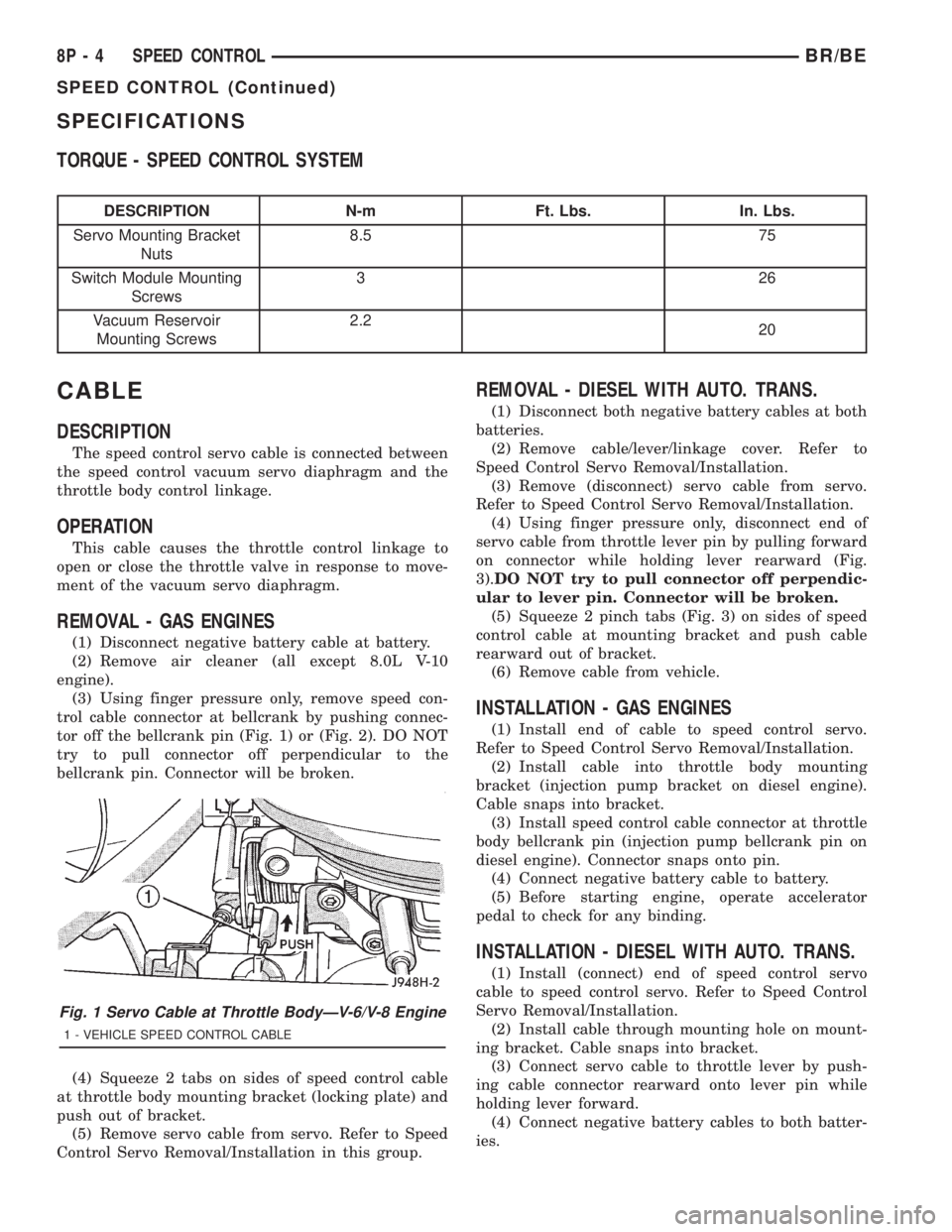
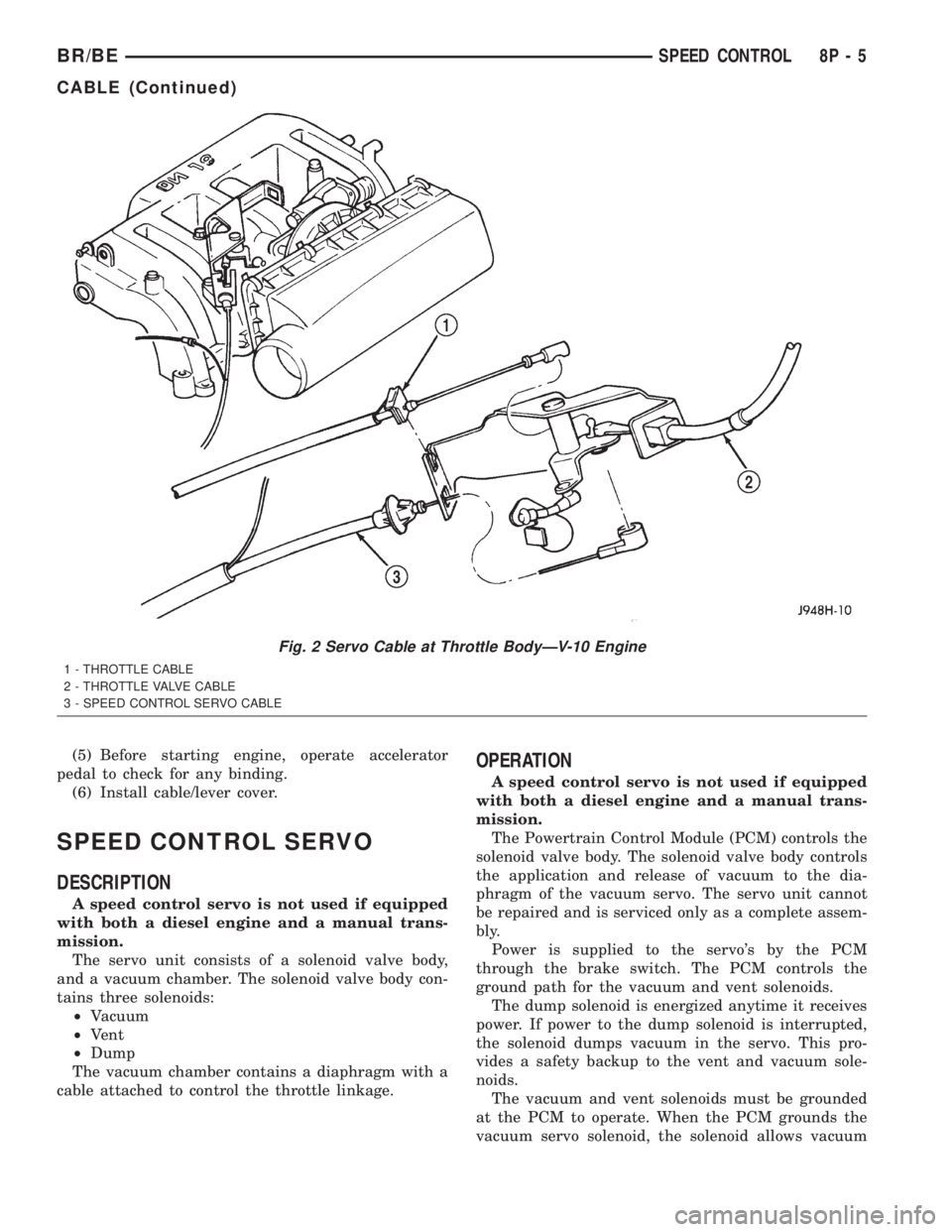
(3) Using finger pressure only, remove speed con-
trol cable connector at bellcrank by pushing connec-
tor off the bellcrank pin (Fig. 1) or (Fig. 2). DO NOT
try to pull connector off perpendicular to the
bellcrank pin. Connector will be broken.
(4) Squeeze 2 tabs on sides of speed control cable
at throttle body mounting bracket (locking plate) and
push out of bracket.
(5) Remove servo cable from servo. Refer to Speed
Control Servo Removal/Installation in this group.
REMOVAL - DIESEL WITH AUTO. TRANS.
(1) Disconnect both negative battery cables at both
batteries.
(2) Remove cable/lever/linkage cover. Refer to
Speed Control Servo Removal/Installation.
(3) Remove (disconnect) servo cable from servo.
Refer to Speed Control Servo Removal/Installation.
(4) Using finger pressure only, disconnect end of
servo cable from throttle lever pin by pulling forward
on connector while holding lever rearward (Fig.
3).DO NOT try to pull connector off perpendic-
ular to lever pin. Connector will be broken.
(5) Squeeze 2 pinch tabs (Fig. 3) on sides of speed
control cable at mounting bracket and push cable
rearward out of bracket.
(6) Remove cable from vehicle.
INSTALLATION - GAS ENGINES
(1) Install end of cable to speed control servo.
Refer to Speed Control Servo Removal/Installation.
(2) Install cable into throttle body mounting
bracket (injection pump bracket on diesel engine).
Cable snaps into bracket.
(3) Install speed control cable connector at throttle
body bellcrank pin (injection pump bellcrank pin on
diesel engine). Connector snaps onto pin.
(4) Connect negative battery cable to battery.
(5) Before starting engine, operate accelerator
pedal to check for any binding.
INSTALLATION - DIESEL WITH AUTO. TRANS.
(1) Install (connect) end of speed control servo
cable to speed control servo. Refer to Speed Control
Servo Removal/Installation.
(2) Install cable through mounting hole on mount-
ing bracket. Cable snaps into bracket.
(3) Connect servo cable to throttle lever by push-
ing cable connector rearward onto lever pin while
holding lever forward.
(4) Connect negative battery cables to both batter-
ies.
Fig. 1 Servo Cable at Throttle BodyÐV-6/V-8 Engine
1 - VEHICLE SPEED CONTROL CABLE
8P - 4 SPEED CONTROLBR/BE
SPEED CONTROL (Continued)
Page 710 of 2889
(5) Before starting engine, operate accelerator
pedal to check for any binding.
(6) Install cable/lever cover.
SPEED CONTROL SERVO
DESCRIPTION
A speed control servo is not used if equipped
with both a diesel engine and a manual trans-
mission.
The servo unit consists of a solenoid valve body,
and a vacuum chamber. The solenoid valve body con-
tains three solenoids:
²Vacuum
²Vent
²Dump
The vacuum chamber contains a diaphragm with a
cable attached to control the throttle linkage.
OPERATION
A speed control servo is not used if equipped
with both a diesel engine and a manual trans-
mission.
The Powertrain Control Module (PCM) controls the
solenoid valve body. The solenoid valve body controls
the application and release of vacuum to the dia-
phragm of the vacuum servo. The servo unit cannot
be repaired and is serviced only as a complete assem-
bly.
Power is supplied to the servo's by the PCM
through the brake switch. The PCM controls the
ground path for the vacuum and vent solenoids.
The dump solenoid is energized anytime it receives
power. If power to the dump solenoid is interrupted,
the solenoid dumps vacuum in the servo. This pro-
vides a safety backup to the vent and vacuum sole-
noids.
The vacuum and vent solenoids must be grounded
at the PCM to operate. When the PCM grounds the
vacuum servo solenoid, the solenoid allows vacuum
Fig. 2 Servo Cable at Throttle BodyÐV-10 Engine
1 - THROTTLE CABLE
2 - THROTTLE VALVE CABLE
3 - SPEED CONTROL SERVO CABLE
BR/BESPEED CONTROL 8P - 5
CABLE (Continued)