ECU DODGE RAM 2001 Service Manual PDF
[x] Cancel search | Manufacturer: DODGE, Model Year: 2001, Model line: RAM, Model: DODGE RAM 2001Pages: 2889, PDF Size: 68.07 MB
Page 436 of 2889
²Wiper motor.
If the source of RFI or EMI noise is identified as a
component on the vehicle (i.e., generator, blower
motor, etc.), the ground path for that component
should be checked. If excessive resistance is found in
any ground circuit, clean, tighten, or repair the
ground circuits or connections to ground as required
before considering any component replacement.
For service and inspection of secondary ignition
components, refer to Electrical, Ignition Control.
Inspect the following secondary ignition system com-
ponents:
²Distributor cap and rotor
²Ignition coil
²Spark plugs
²Spark plug wire routing and condition.
Reroute the spark plug wires or replace the faulty
components as required.
If the source of the RFI or EMI noise is identified
as two-way mobile radio or telephone equipment,
check the equipment installation for the following:
²Power connections should be made directly to
the battery, and fused as closely to the battery as
possible.
²The antenna should be mounted on the roof or
toward the rear of the vehicle. Remember that mag-
netic antenna mounts on the roof panel can adversely
affect the operation of an overhead console compass,
if the vehicle is so equipped.
²The antenna cable should be fully shielded coax-
ial cable, should be as short as is practical, and
should be routed away from the factory-installed
vehicle wire harnesses whenever possible.
²The antenna and cable must be carefully
matched to ensure a low Standing Wave Ratio
(SWR).
Fleet vehicles are available with an extra-cost RFI-
suppressed Powertrain Control Module (PCM). This
unit reduces interference generated by the PCM on
some radio frequencies used in two-way radio com-
munications. However, this unit will not resolve com-
plaints of RFI in the commercial AM or FM radio
frequency ranges.
ENGINE-TO-BODY GROUND
STRAP
REMOVAL
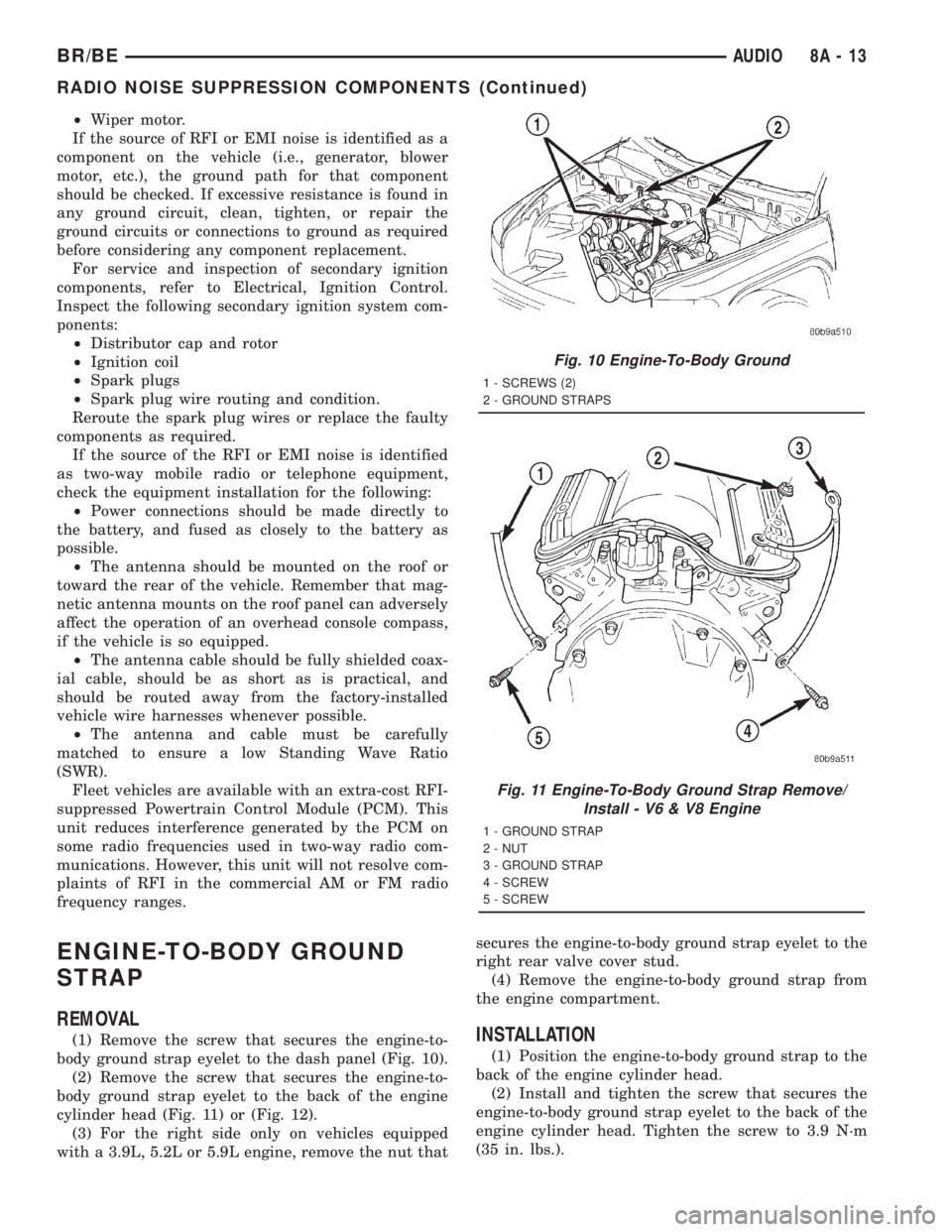
(1) Remove the screw that secures the engine-to-
body ground strap eyelet to the dash panel (Fig. 10).
(2) Remove the screw that secures the engine-to-
body ground strap eyelet to the back of the engine
cylinder head (Fig. 11) or (Fig. 12).
(3) For the right side only on vehicles equipped
with a 3.9L, 5.2L or 5.9L engine, remove the nut thatsecures the engine-to-body ground strap eyelet to the
right rear valve cover stud.
(4) Remove the engine-to-body ground strap from
the engine compartment.INSTALLATION
(1) Position the engine-to-body ground strap to the
back of the engine cylinder head.
(2) Install and tighten the screw that secures the
engine-to-body ground strap eyelet to the back of the
engine cylinder head. Tighten the screw to 3.9 N´m
(35 in. lbs.).
Fig. 10 Engine-To-Body Ground
1 - SCREWS (2)
2 - GROUND STRAPS
Fig. 11 Engine-To-Body Ground Strap Remove/
Install - V6 & V8 Engine
1 - GROUND STRAP
2 - NUT
3 - GROUND STRAP
4 - SCREW
5 - SCREW
BR/BEAUDIO 8A - 13
RADIO NOISE SUPPRESSION COMPONENTS (Continued)
Page 437 of 2889
(3) For the right side only on vehicles equipped
with a 3.9L, 5.2L or 5.9L engine, position the engine-
to-body ground strap eyelet over the right rear valve
cover stud.
(4) For the right side only on vehicles equipped
with a 3.9L, 5.2L or 5.9L engine, install and tighten
the nut that secures the engine-to-body ground strap
eyelet to the right rear valve cover stud. Tighten the
nut to 3.9 N´m (35 in. lbs.).
(5) Position the engine-to-body ground strap to the
dash panel.
(6) Install and tighten the screw that secures the
engine-to-body ground strap eyelet to the dash panel.
Tighten the screw to 3.9 N´m (35 in. lbs.).
CAB-TO- BED GROUND STRAP
REMOVAL
(1) Raise and support the vehicle.
(2) Remove the screw that secures the cab-to-bed
ground strap eyelet to the front crossmember of the
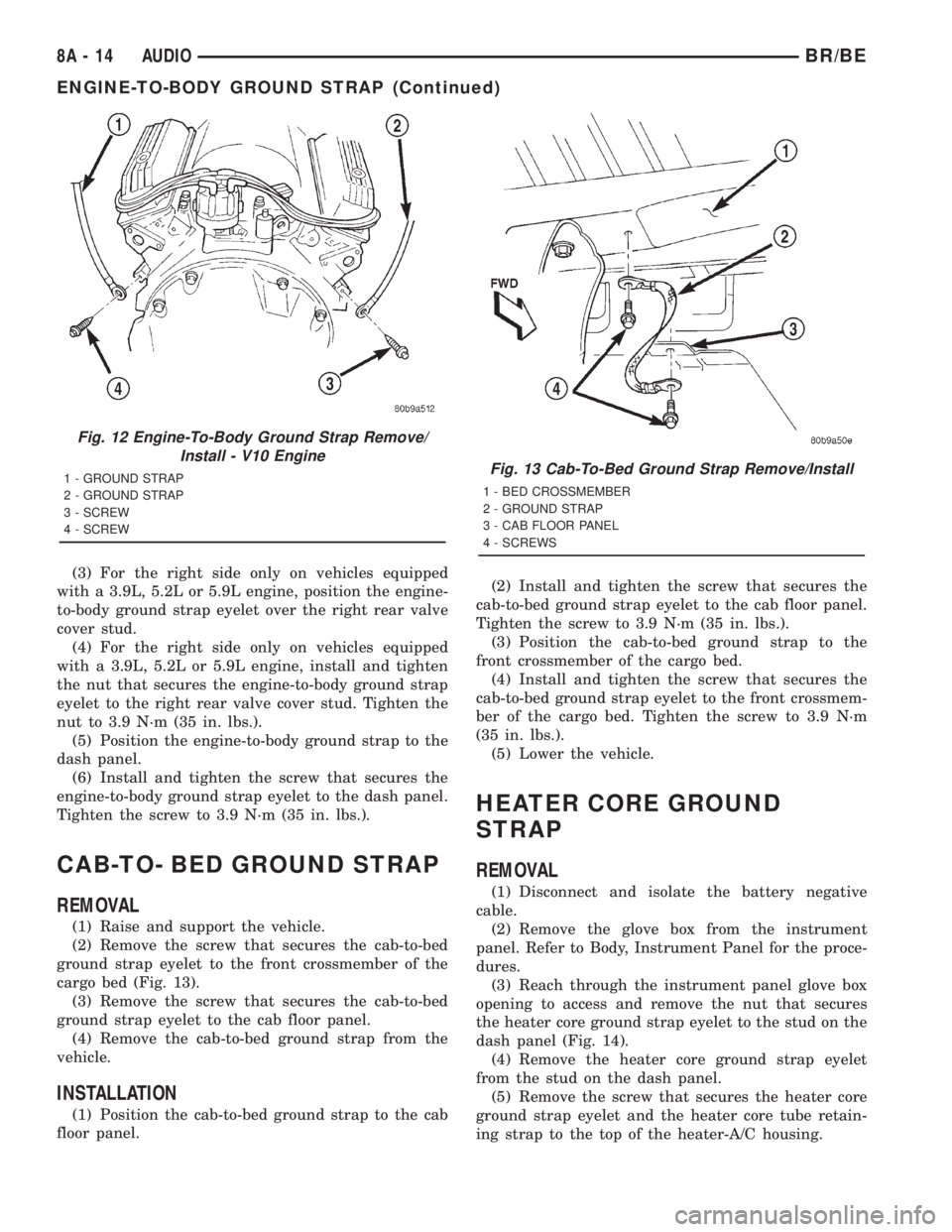
cargo bed (Fig. 13).
(3) Remove the screw that secures the cab-to-bed
ground strap eyelet to the cab floor panel.
(4) Remove the cab-to-bed ground strap from the
vehicle.
INSTALLATION
(1) Position the cab-to-bed ground strap to the cab
floor panel.(2) Install and tighten the screw that secures the
cab-to-bed ground strap eyelet to the cab floor panel.
Tighten the screw to 3.9 N´m (35 in. lbs.).
(3) Position the cab-to-bed ground strap to the
front crossmember of the cargo bed.
(4) Install and tighten the screw that secures the
cab-to-bed ground strap eyelet to the front crossmem-
ber of the cargo bed. Tighten the screw to 3.9 N´m
(35 in. lbs.).
(5) Lower the vehicle.
HEATER CORE GROUND
STRAP
REMOVAL
(1) Disconnect and isolate the battery negative
cable.
(2) Remove the glove box from the instrument
panel. Refer to Body, Instrument Panel for the proce-
dures.
(3) Reach through the instrument panel glove box
opening to access and remove the nut that secures
the heater core ground strap eyelet to the stud on the
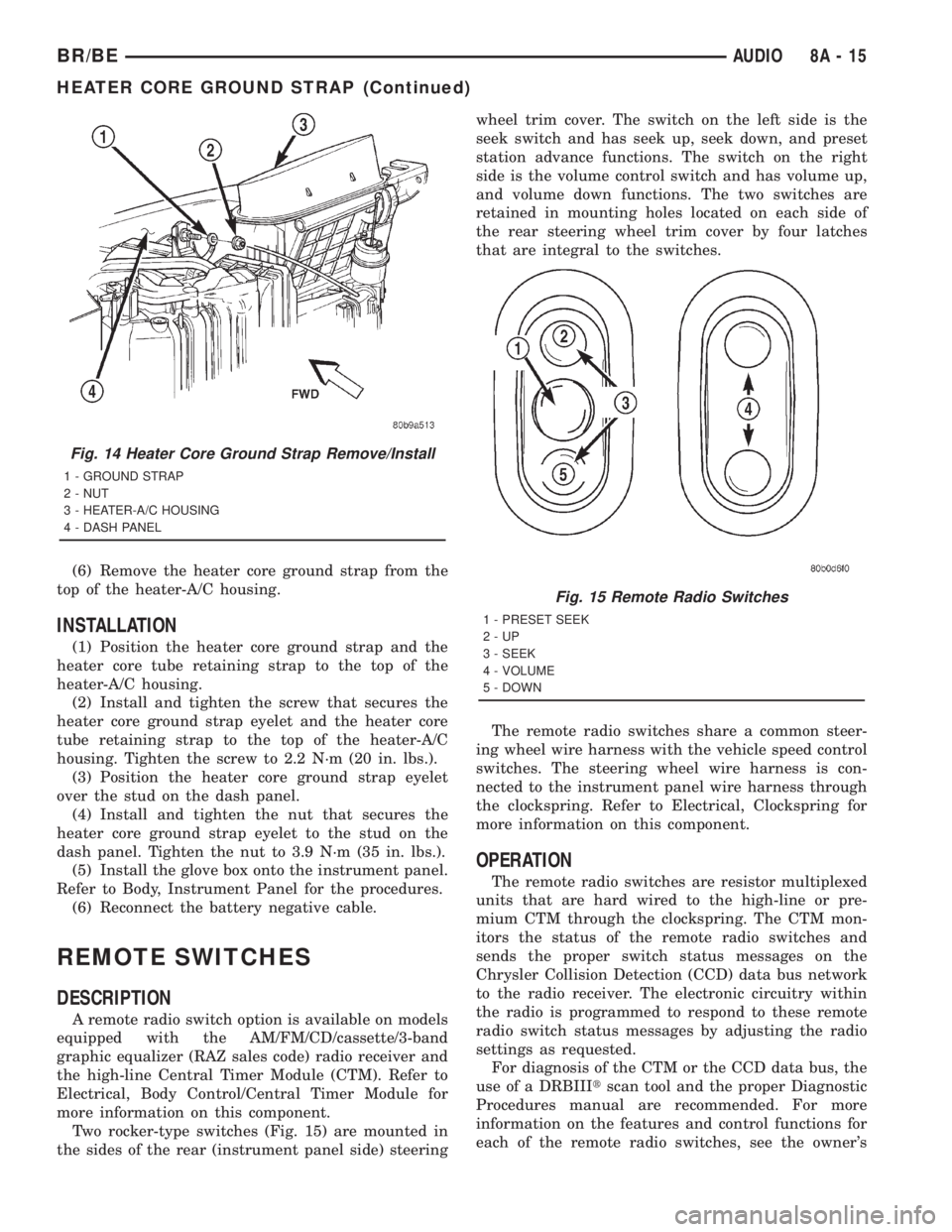
dash panel (Fig. 14).
(4) Remove the heater core ground strap eyelet
from the stud on the dash panel.
(5) Remove the screw that secures the heater core
ground strap eyelet and the heater core tube retain-
ing strap to the top of the heater-A/C housing.
Fig. 12 Engine-To-Body Ground Strap Remove/
Install - V10 Engine
1 - GROUND STRAP
2 - GROUND STRAP
3 - SCREW
4 - SCREWFig. 13 Cab-To-Bed Ground Strap Remove/Install
1 - BED CROSSMEMBER
2 - GROUND STRAP
3 - CAB FLOOR PANEL
4 - SCREWS
8A - 14 AUDIOBR/BE
ENGINE-TO-BODY GROUND STRAP (Continued)
Page 438 of 2889
(6) Remove the heater core ground strap from the
top of the heater-A/C housing.
INSTALLATION
(1) Position the heater core ground strap and the
heater core tube retaining strap to the top of the
heater-A/C housing.
(2) Install and tighten the screw that secures the
heater core ground strap eyelet and the heater core
tube retaining strap to the top of the heater-A/C
housing. Tighten the screw to 2.2 N´m (20 in. lbs.).
(3) Position the heater core ground strap eyelet
over the stud on the dash panel.
(4) Install and tighten the nut that secures the
heater core ground strap eyelet to the stud on the
dash panel. Tighten the nut to 3.9 N´m (35 in. lbs.).
(5) Install the glove box onto the instrument panel.
Refer to Body, Instrument Panel for the procedures.
(6) Reconnect the battery negative cable.
REMOTE SWITCHES
DESCRIPTION
A remote radio switch option is available on models
equipped with the AM/FM/CD/cassette/3-band
graphic equalizer (RAZ sales code) radio receiver and
the high-line Central Timer Module (CTM). Refer to
Electrical, Body Control/Central Timer Module for
more information on this component.
Two rocker-type switches (Fig. 15) are mounted in
the sides of the rear (instrument panel side) steeringwheel trim cover. The switch on the left side is the
seek switch and has seek up, seek down, and preset
station advance functions. The switch on the right
side is the volume control switch and has volume up,
and volume down functions. The two switches are
retained in mounting holes located on each side of
the rear steering wheel trim cover by four latches
that are integral to the switches.
The remote radio switches share a common steer-
ing wheel wire harness with the vehicle speed control
switches. The steering wheel wire harness is con-
nected to the instrument panel wire harness through
the clockspring. Refer to Electrical, Clockspring for
more information on this component.
OPERATION
The remote radio switches are resistor multiplexed
units that are hard wired to the high-line or pre-
mium CTM through the clockspring. The CTM mon-
itors the status of the remote radio switches and
sends the proper switch status messages on the
Chrysler Collision Detection (CCD) data bus network
to the radio receiver. The electronic circuitry within
the radio is programmed to respond to these remote
radio switch status messages by adjusting the radio
settings as requested.
For diagnosis of the CTM or the CCD data bus, the
use of a DRBIIItscan tool and the proper Diagnostic
Procedures manual are recommended. For more
information on the features and control functions for
each of the remote radio switches, see the owner's
Fig. 14 Heater Core Ground Strap Remove/Install
1 - GROUND STRAP
2 - NUT
3 - HEATER-A/C HOUSING
4 - DASH PANEL
Fig. 15 Remote Radio Switches
1 - PRESET SEEK
2-UP
3 - SEEK
4 - VOLUME
5 - DOWN
BR/BEAUDIO 8A - 15
HEATER CORE GROUND STRAP (Continued)
Page 440 of 2889
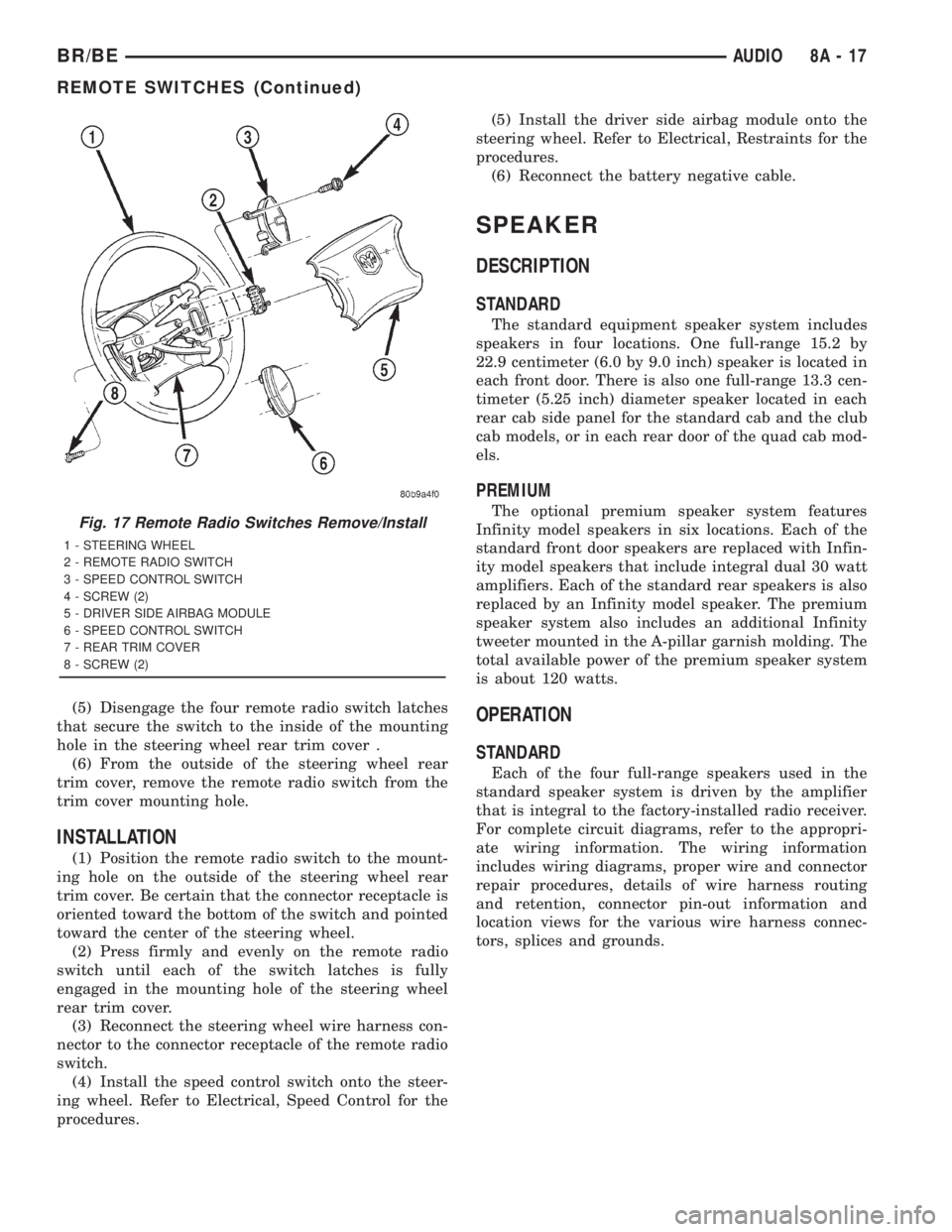
(5) Disengage the four remote radio switch latches
that secure the switch to the inside of the mounting
hole in the steering wheel rear trim cover .
(6) From the outside of the steering wheel rear
trim cover, remove the remote radio switch from the
trim cover mounting hole.
INSTALLATION
(1) Position the remote radio switch to the mount-
ing hole on the outside of the steering wheel rear
trim cover. Be certain that the connector receptacle is
oriented toward the bottom of the switch and pointed
toward the center of the steering wheel.
(2) Press firmly and evenly on the remote radio
switch until each of the switch latches is fully
engaged in the mounting hole of the steering wheel
rear trim cover.
(3) Reconnect the steering wheel wire harness con-
nector to the connector receptacle of the remote radio
switch.
(4) Install the speed control switch onto the steer-
ing wheel. Refer to Electrical, Speed Control for the
procedures.(5) Install the driver side airbag module onto the
steering wheel. Refer to Electrical, Restraints for the
procedures.
(6) Reconnect the battery negative cable.
SPEAKER
DESCRIPTION
STANDARD
The standard equipment speaker system includes
speakers in four locations. One full-range 15.2 by
22.9 centimeter (6.0 by 9.0 inch) speaker is located in
each front door. There is also one full-range 13.3 cen-
timeter (5.25 inch) diameter speaker located in each
rear cab side panel for the standard cab and the club
cab models, or in each rear door of the quad cab mod-
els.
PREMIUM
The optional premium speaker system features
Infinity model speakers in six locations. Each of the
standard front door speakers are replaced with Infin-
ity model speakers that include integral dual 30 watt
amplifiers. Each of the standard rear speakers is also
replaced by an Infinity model speaker. The premium
speaker system also includes an additional Infinity
tweeter mounted in the A-pillar garnish molding. The
total available power of the premium speaker system
is about 120 watts.
OPERATION
STANDARD
Each of the four full-range speakers used in the
standard speaker system is driven by the amplifier
that is integral to the factory-installed radio receiver.
For complete circuit diagrams, refer to the appropri-
ate wiring information. The wiring information
includes wiring diagrams, proper wire and connector
repair procedures, details of wire harness routing
and retention, connector pin-out information and
location views for the various wire harness connec-
tors, splices and grounds.
Fig. 17 Remote Radio Switches Remove/Install
1 - STEERING WHEEL
2 - REMOTE RADIO SWITCH
3 - SPEED CONTROL SWITCH
4 - SCREW (2)
5 - DRIVER SIDE AIRBAG MODULE
6 - SPEED CONTROL SWITCH
7 - REAR TRIM COVER
8 - SCREW (2)
BR/BEAUDIO 8A - 17
REMOTE SWITCHES (Continued)
Page 442 of 2889
(8) Turn the radio receiver off. Turn the ignition
switch to the Off position. Disconnect and isolate the
battery negative cable. Disconnect the wire harness
connector for the Infinity-amplified front door-
mounted speaker on the same side of the vehicle as
the inoperative speaker. Check both the amplified
feed (+) circuit and amplified return (±) circuit cavi-
ties for the inoperative speaker location in the body
half of the front door speaker wire harness connector
for continuity to ground. In each case, there should
be no continuity. If OK, go to Step 9. If not OK,
repair the shorted amplified feed (+) and/or amplified
return (±) circuit(s) as required.
(9) Disconnect the wire harness connector at the
inoperative speaker. Check for continuity between
the amplified feed (+) circuit cavities in the body half
of the wire harness connector for the Infinity-ampli-
fied front door-mounted speaker on the same side of
the vehicle as the inoperative speaker and the inop-
erative speaker wire harness connector. Repeat the
check between the amplified return (±) circuit cavi-
ties in the body half of the wire harness connector for
the Infinity-amplified front door-mounted speaker on
the same side of the vehicle as the inoperative
speaker and the inoperative speaker wire harness
connector. In each case, there should be continuity. If
OK, go to Step 10. If not OK, repair the open ampli-
fied feed (+) and/or amplified return (±) circuit(s) as
required.
(10) Check the resistance between the amplified
feed (+) circuit and amplified return (±) circuit cavi-
ties for the inoperative speaker in the body half of
the wire harness connector for the Infinity-amplified
front door-mounted speaker on the same side of the
vehicle as the inoperative speaker. The meter should
read between 2.5 and 4 ohms (speaker resistance). If
OK, replace the faulty front door-mounted Infinity
speaker and amplifier unit. If not OK, replace the
faulty A-pillar or rear-mounted Infinity speaker.
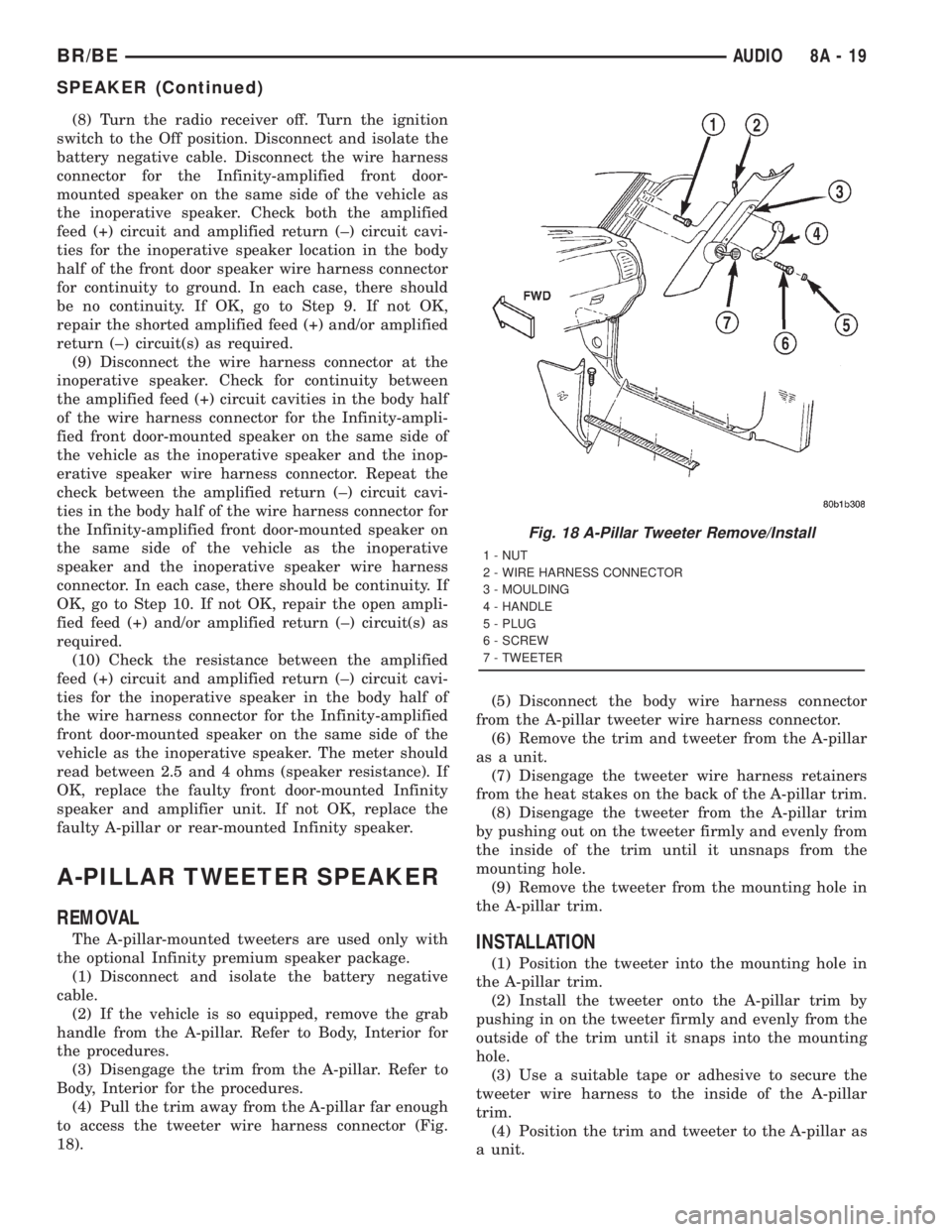
A-PILLAR TWEETER SPEAKER
REMOVAL
The A-pillar-mounted tweeters are used only with
the optional Infinity premium speaker package.
(1) Disconnect and isolate the battery negative
cable.
(2) If the vehicle is so equipped, remove the grab
handle from the A-pillar. Refer to Body, Interior for
the procedures.
(3) Disengage the trim from the A-pillar. Refer to
Body, Interior for the procedures.
(4) Pull the trim away from the A-pillar far enough
to access the tweeter wire harness connector (Fig.
18).(5) Disconnect the body wire harness connector
from the A-pillar tweeter wire harness connector.
(6) Remove the trim and tweeter from the A-pillar
as a unit.
(7) Disengage the tweeter wire harness retainers
from the heat stakes on the back of the A-pillar trim.
(8) Disengage the tweeter from the A-pillar trim
by pushing out on the tweeter firmly and evenly from
the inside of the trim until it unsnaps from the
mounting hole.
(9) Remove the tweeter from the mounting hole in
the A-pillar trim.INSTALLATION
(1) Position the tweeter into the mounting hole in
the A-pillar trim.
(2) Install the tweeter onto the A-pillar trim by
pushing in on the tweeter firmly and evenly from the
outside of the trim until it snaps into the mounting
hole.
(3) Use a suitable tape or adhesive to secure the
tweeter wire harness to the inside of the A-pillar
trim.
(4) Position the trim and tweeter to the A-pillar as
a unit.
Fig. 18 A-Pillar Tweeter Remove/Install
1 - NUT
2 - WIRE HARNESS CONNECTOR
3 - MOULDING
4 - HANDLE
5 - PLUG
6 - SCREW
7 - TWEETER
BR/BEAUDIO 8A - 19
SPEAKER (Continued)
Page 443 of 2889
(5) Reconnect the body wire harness connector to
the A-pillar tweeter wire harness connector.
(6) Engage the trim onto the A-pillar. Refer to
Body, Interior for the procedures.
(7) If the vehicle is so equipped, install the grab
handle onto the A-pillar. Refer to Body, Interior for
the procedures.
(8) Reconnect the battery negative cable.
FRONT DOOR SPEAKER
REMOVAL
(1) Disconnect and isolate the battery negative
cable.
(2) Remove the trim panel from the front door.
Refer to Body, Door Front for the procedures.
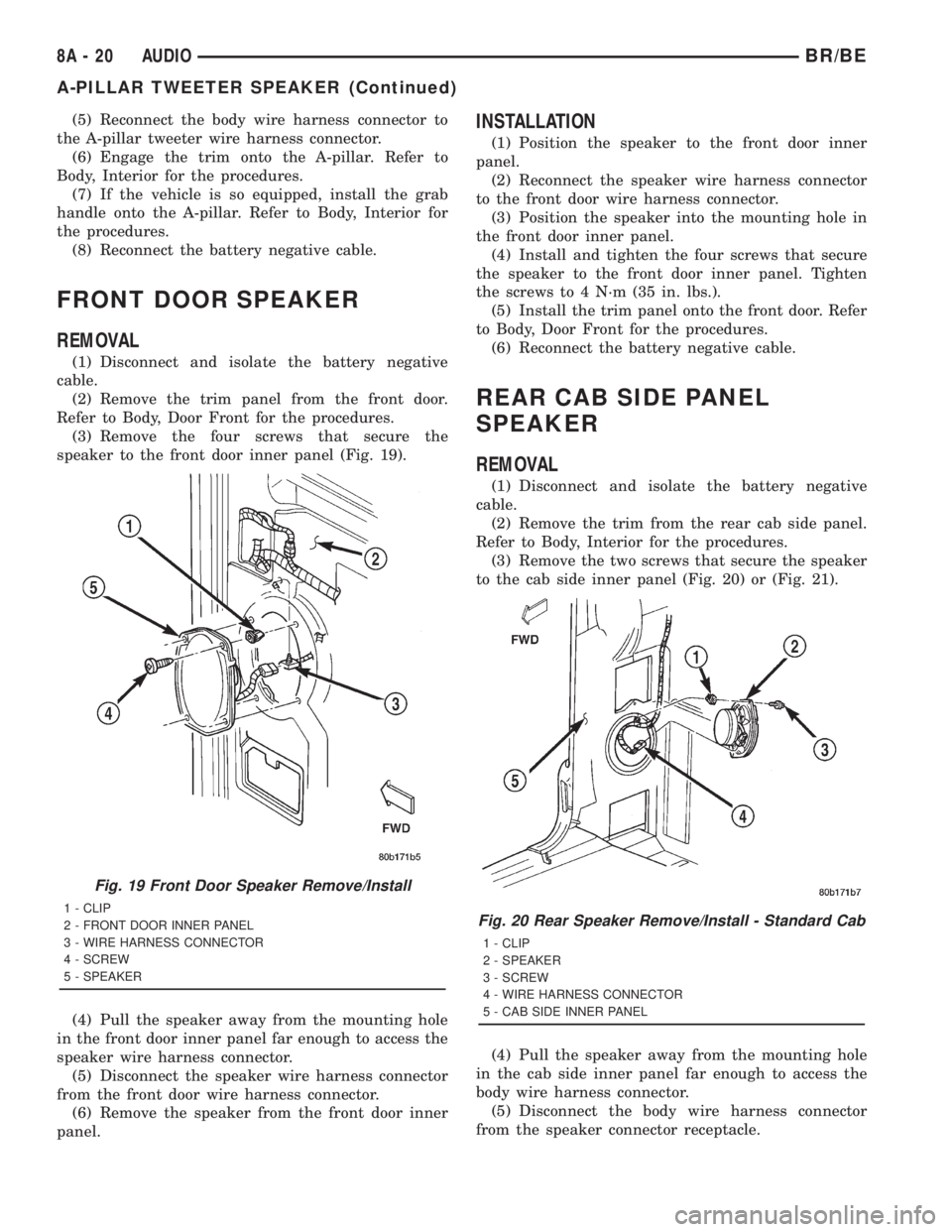
(3) Remove the four screws that secure the
speaker to the front door inner panel (Fig. 19).
(4) Pull the speaker away from the mounting hole
in the front door inner panel far enough to access the
speaker wire harness connector.
(5) Disconnect the speaker wire harness connector
from the front door wire harness connector.
(6) Remove the speaker from the front door inner
panel.
INSTALLATION
(1) Position the speaker to the front door inner
panel.
(2) Reconnect the speaker wire harness connector
to the front door wire harness connector.
(3) Position the speaker into the mounting hole in
the front door inner panel.
(4) Install and tighten the four screws that secure
the speaker to the front door inner panel. Tighten
the screws to 4 N´m (35 in. lbs.).
(5) Install the trim panel onto the front door. Refer
to Body, Door Front for the procedures.
(6) Reconnect the battery negative cable.
REAR CAB SIDE PANEL
SPEAKER
REMOVAL
(1) Disconnect and isolate the battery negative
cable.
(2) Remove the trim from the rear cab side panel.
Refer to Body, Interior for the procedures.
(3) Remove the two screws that secure the speaker
to the cab side inner panel (Fig. 20) or (Fig. 21).
(4) Pull the speaker away from the mounting hole
in the cab side inner panel far enough to access the
body wire harness connector.
(5) Disconnect the body wire harness connector
from the speaker connector receptacle.
Fig. 19 Front Door Speaker Remove/Install
1 - CLIP
2 - FRONT DOOR INNER PANEL
3 - WIRE HARNESS CONNECTOR
4 - SCREW
5 - SPEAKERFig. 20 Rear Speaker Remove/Install - Standard Cab
1 - CLIP
2 - SPEAKER
3 - SCREW
4 - WIRE HARNESS CONNECTOR
5 - CAB SIDE INNER PANEL
8A - 20 AUDIOBR/BE
A-PILLAR TWEETER SPEAKER (Continued)
Page 444 of 2889
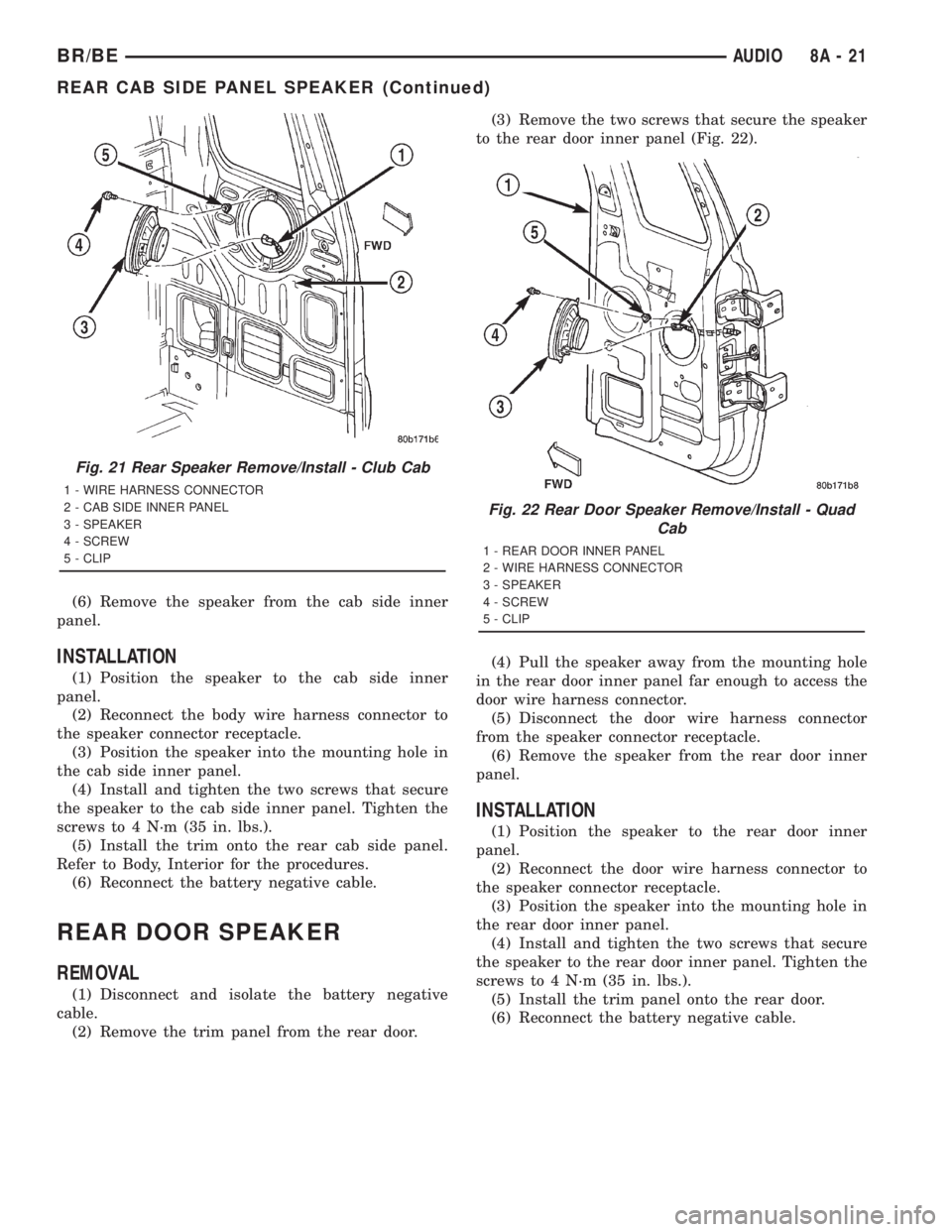
(6) Remove the speaker from the cab side inner
panel.
INSTALLATION
(1) Position the speaker to the cab side inner
panel.
(2) Reconnect the body wire harness connector to
the speaker connector receptacle.
(3) Position the speaker into the mounting hole in
the cab side inner panel.
(4) Install and tighten the two screws that secure
the speaker to the cab side inner panel. Tighten the
screws to 4 N´m (35 in. lbs.).
(5) Install the trim onto the rear cab side panel.
Refer to Body, Interior for the procedures.
(6) Reconnect the battery negative cable.
REAR DOOR SPEAKER
REMOVAL
(1) Disconnect and isolate the battery negative
cable.
(2) Remove the trim panel from the rear door.(3) Remove the two screws that secure the speaker
to the rear door inner panel (Fig. 22).
(4) Pull the speaker away from the mounting hole
in the rear door inner panel far enough to access the
door wire harness connector.
(5) Disconnect the door wire harness connector
from the speaker connector receptacle.
(6) Remove the speaker from the rear door inner
panel.
INSTALLATION
(1) Position the speaker to the rear door inner
panel.
(2) Reconnect the door wire harness connector to
the speaker connector receptacle.
(3) Position the speaker into the mounting hole in
the rear door inner panel.
(4) Install and tighten the two screws that secure
the speaker to the rear door inner panel. Tighten the
screws to 4 N´m (35 in. lbs.).
(5) Install the trim panel onto the rear door.
(6) Reconnect the battery negative cable.
Fig. 21 Rear Speaker Remove/Install - Club Cab
1 - WIRE HARNESS CONNECTOR
2 - CAB SIDE INNER PANEL
3 - SPEAKER
4 - SCREW
5 - CLIP
Fig. 22 Rear Door Speaker Remove/Install - Quad
Cab
1 - REAR DOOR INNER PANEL
2 - WIRE HARNESS CONNECTOR
3 - SPEAKER
4 - SCREW
5 - CLIP
BR/BEAUDIO 8A - 21
REAR CAB SIDE PANEL SPEAKER (Continued)
Page 452 of 2889
ELECTRONIC CONTROL MODULES
TABLE OF CONTENTS
page page
BODY CONTROL/CENTRAL TIMER MODULE
DESCRIPTION............................1
OPERATION.............................3
DIAGNOSIS AND TESTING..................4
CENTRAL TIMER MODULE................4
REMOVAL...............................5
INSTALLATION............................6
COMMUNICATION
DESCRIPTION............................6
OPERATION.............................7
DIAGNOSIS AND TESTING.................11
CCDDATABUS ........................11
CONTROLLER ANTILOCK BRAKE
DESCRIPTION...........................11
OPERATION.............................11REMOVAL..............................12
INSTALLATION...........................12
DATA LINK CONNECTOR
DESCRIPTION...........................12
OPERATION.............................12
ENGINE CONTROL MODULE
DESCRIPTION...........................13
OPERATION.............................13
REMOVAL..............................14
INSTALLATION...........................14
POWERTRAIN CONTROL MODULE
DESCRIPTION...........................14
OPERATION.............................17
REMOVAL..............................19
INSTALLATION...........................20
BODY CONTROL/CENTRAL
TIMER MODULE
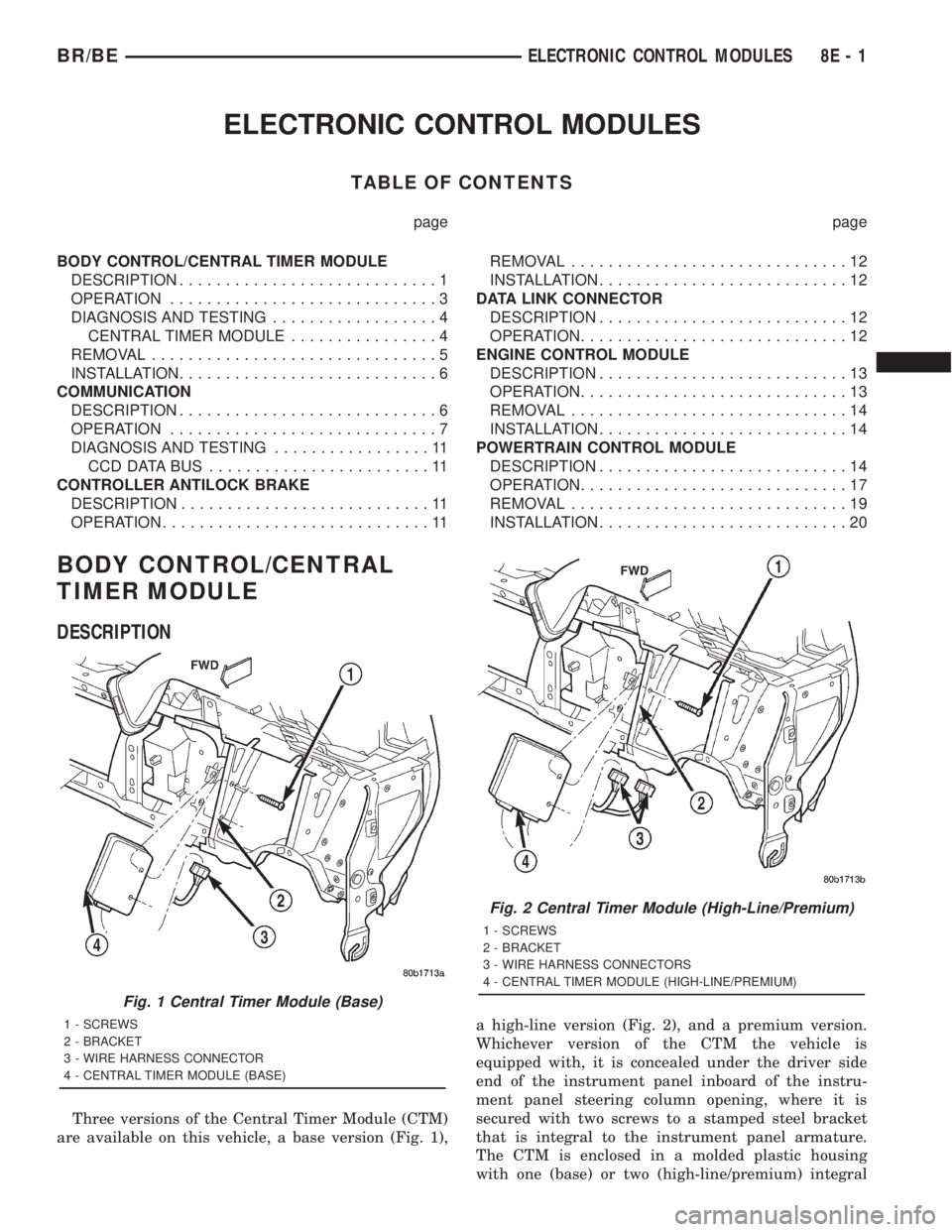
DESCRIPTION
Three versions of the Central Timer Module (CTM)
are available on this vehicle, a base version (Fig. 1),a high-line version (Fig. 2), and a premium version.
Whichever version of the CTM the vehicle is
equipped with, it is concealed under the driver side
end of the instrument panel inboard of the instru-
ment panel steering column opening, where it is
secured with two screws to a stamped steel bracket
that is integral to the instrument panel armature.
The CTM is enclosed in a molded plastic housing
with one (base) or two (high-line/premium) integral
Fig. 1 Central Timer Module (Base)
1 - SCREWS
2 - BRACKET
3 - WIRE HARNESS CONNECTOR
4 - CENTRAL TIMER MODULE (BASE)
Fig. 2 Central Timer Module (High-Line/Premium)
1 - SCREWS
2 - BRACKET
3 - WIRE HARNESS CONNECTORS
4 - CENTRAL TIMER MODULE (HIGH-LINE/PREMIUM)
BR/BEELECTRONIC CONTROL MODULES 8E - 1
Page 454 of 2889
base version of the CTM and the hard wired inputs
or outputs of all CTM versions can be diagnosed
using conventional diagnostic tools and methods;
however, for diagnosis of the high-line or premium
versions of the CTM or the CCD data bus, the use of
a DRBIIItscan tool is required. Refer to the appro-
priate diagnostic information.
OPERATION
The Central Timer Module (CTM) is designed to
control and integrate many of the electronic features
and functions of the vehicle. The base version of the
CTM monitors only hard wired inputs and responds
with the proper hard wired outputs. The microproces-
sor-based high-line/premium version of the CTM
monitors many hard wired switch and sensor inputs
as well as those resources it shares with other elec-
tronic modules in the vehicle through its communica-
tion over the Chrysler Collision Detection (CCD) data
bus network. The internal programming and all of
these inputs allow the high-line/premium CTM
microprocessor to determine the tasks it needs to
perform and their priorities, as well as both the stan-
dard and optional features that it should provide.
The high-line/premium CTM programming then per-
forms those tasks and provides those features
through both CCD data bus communication with
other electronic modules and through hard wired out-
puts to a number of circuits, relays, and actuators.
These outputs allow the high-line/premium CTM the
ability to control numerous accessory systems in the
vehicle.
All versions of the CTM operate on battery current
received through fuses in the Junction Block (JB) on
a non-switched fused B(+) circuit, a fused ignition
switch output (st-run) circuit (base version only), and
a fused ignition switch output (run-acc) circuit (high-
line/premium version only). This arrangement allows
the CTM to provide some features regardless of the
ignition switch position, while other features will
operate only with the ignition switch in the Acces-
sory, On, and/or Start positions. All versions of the
CTM are grounded through their connector and take
out of the instrument panel wire harness. The high-
line/premium CTM has another ground received
through a second connector and take out of the
instrument panel wire harness. The first ground cir-
cuit receives ground through a take out with an eye-
let terminal connector of the instrument panel wire
harness that is secured by a nut to a ground stud
located on the left instrument panel end bracket,
while the second ground circuit (high-line/premium
version only) receives ground through a take out with
an eyelet terminal connector of the instrument panel
wire harness that is secured by a nut to a ground
stud located on the back of the instrument panelarmature above the inboard side of the instrument
panel steering column opening.
The high-line/premium CTM monitors its own
internal circuitry as well as many of its input and
output circuits, and will store a Diagnostic Trouble
Code (DTC) in electronic memory for any failure it
detects. These DTCs can be retrieved and diagnosed
using a DRBIIItscan tool. Refer to the appropriate
diagnostic information.
HARD WIRED INPUTS
The hard wired inputs to the CTM include the fol-
lowing:
²CCD bus± - high-line/premium version only
²CCD bus+ - high-line/premium version only
²Cylinder lock switch mux - high-line premium
version only
²Driver door ajar switch sense
²Fused B(+)
²Fused ignition switch output (run-acc) - high-
line/premium version only
²Fused ignition switch output (st-run) - base ver-
sion only
²Ground (one circuit - base version, two circuits -
high-line/premium version)
²Key-in ignition switch sense
²Passenger door ajar switch sense - high-line/pre-
mium version only
²Power door lock motor B(+) lock - high-line/pre-
mium version only
²Power door lock motor B(+) unlock - high-line/
premium version only
²Radio control mux - high-line/premium version
only
²Tone request signal
²Washer switch sense
²Wiper park switch sense
²Wiper switch mode sense
²Wiper switch mode signal
HARD WIRED OUTPUTS
The hard wired outputs of the CTM include the fol-
lowing:
²CCD bus± - high-line/premium version only
²CCD bus+ - high-line/premium version only
²Courtesy lamp switch output - high-line/pre-
mium version only
²Door lock driver - high-line/premium version
only
²Door unlock driver - high-line/premium version
only
²Headlamp relay control - high-line/premium ver-
sion only
²Heated seat relay control - premium version
only
BR/BEELECTRONIC CONTROL MODULES 8E - 3
BODY CONTROL/CENTRAL TIMER MODULE (Continued)
Page 456 of 2889
CTM from the CTM connector receptacle(s). Check
the wire harness connectors and the CTM receptacles
for loose, corroded, or damaged terminals and pins. If
OK, go to Step 6. If not OK, repair as required.
(6) Check for continuity between the ground cir-
cuit cavity of the instrument panel wire harness con-
nector (Connector C1) for the CTM and a good
ground. For the high-line/premium version of the
CTM only, repeat the check between the ground cir-
cuit cavity of the instrument panel wire harness con-
nector (Connector C2) for the CTM and a good
ground. In each case, there should be continuity. If
OK, go to Step 7. If not OK, repair the open ground
circuit(s) to ground as required.
(7) Reconnect the battery negative cable. Check for
battery voltage at the fused B(+) circuit cavity of the
instrument panel wire harness connector (Connector
C1) for the CTM. If OK, go to Step 8. If not OK,
repair the open fused B(+) circuit between the CTM
and the JB as required.
(8) Turn the ignition switch to the On position.
Check for battery voltage at the fused ignition switch
output (st-run) circuit cavity (base version) or fused
ignition switch output (run-acc) circuit cavity (high-
line/premium version) of the instrument panel wire
harness connector (Connector C1) for the CTM. If OK
with a base version CTM, replace the faulty CTM. If
OK with a high-line/premium version CTM, use a
DRBIIItscan tool and the appropriate diagnostic
information to perform further diagnosis of the CTM.
If not OK, repair the open fused ignition switch out-
put circuit between the CTM and the JB.
REMOVAL
WARNING: ON VEHICLES EQUIPPED WITH AIR-
BAGS, DISABLE THE AIRBAG SYSTEM BEFORE
ATTEMPTING ANY STEERING WHEEL, STEERING
COLUMN, OR INSTRUMENT PANEL COMPONENT
DIAGNOSIS OR SERVICE. DISCONNECT AND ISO-
LATE THE BATTERY NEGATIVE (GROUND) CABLE,
THEN WAIT TWO MINUTES FOR THE AIRBAG SYS-
TEM CAPACITOR TO DISCHARGE BEFORE PER-
FORMING FURTHER DIAGNOSIS OR SERVICE. THIS
IS THE ONLY SURE WAY TO DISABLE THE AIRBAG
SYSTEM. FAILURE TO TAKE THE PROPER PRE-
CAUTIONS COULD RESULT IN ACCIDENTAL AIR-
BAG DEPLOYMENT AND POSSIBLE PERSONAL
INJURY.
NOTE: Before replacing a high-line/premium version
Central Timer Module (CTM), use a DRBIIITscan
tool to retrieve the current settings for the CTM pro-
grammable features. Refer to the appropriate diag-
nostic information. These settings should be
duplicated in the replacement high-line/premiumCTM using the DRBIIITscan tool before returning
the vehicle to service.
(1) Disconnect and isolate the battery negative
cable.
(2) Remove the steering column opening cover
from the instrument panel. (Refer to 23 - BODY/IN-
STRUMENT PANEL/STEERING COLUMN OPEN-
ING COVER - REMOVAL).
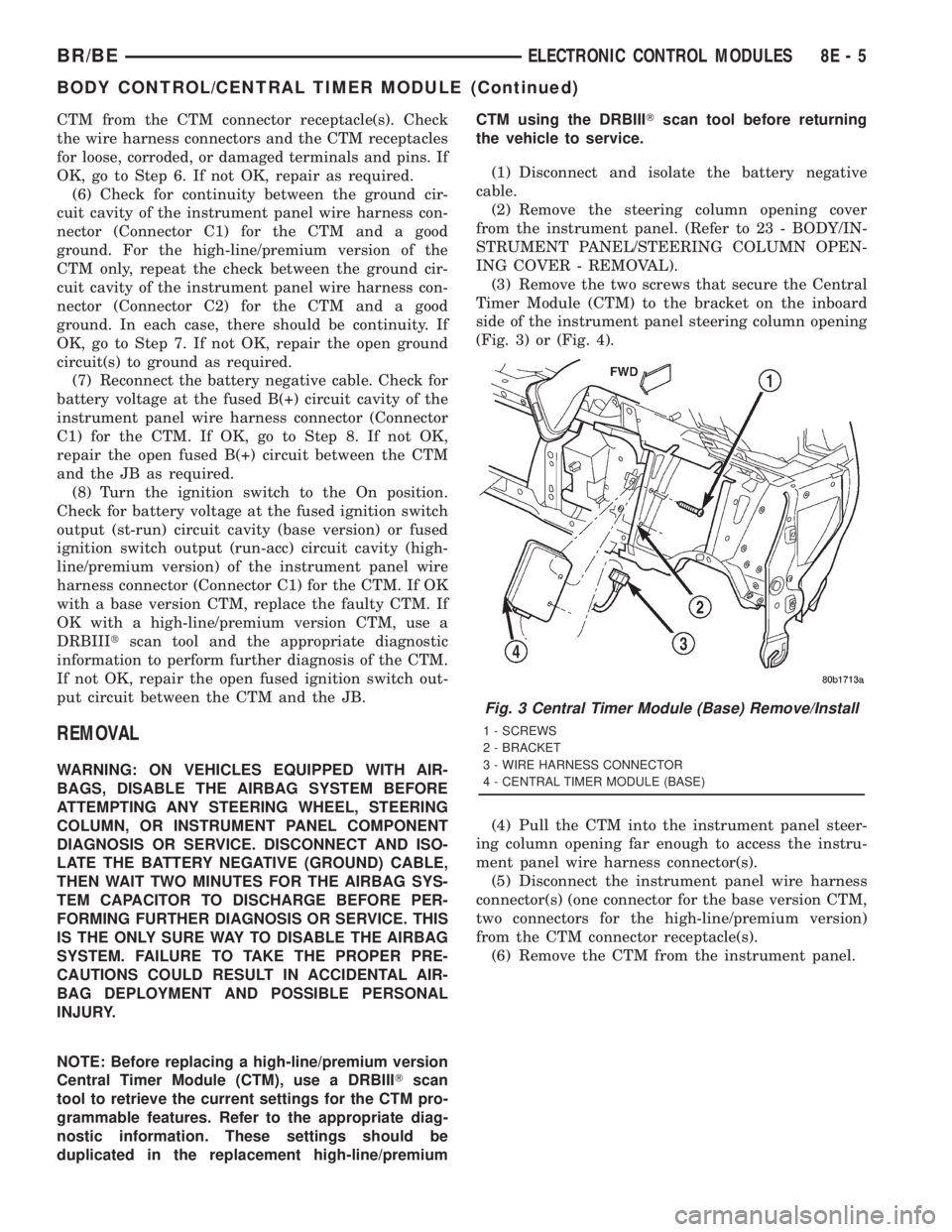
(3) Remove the two screws that secure the Central
Timer Module (CTM) to the bracket on the inboard
side of the instrument panel steering column opening
(Fig. 3) or (Fig. 4).
(4) Pull the CTM into the instrument panel steer-
ing column opening far enough to access the instru-
ment panel wire harness connector(s).
(5) Disconnect the instrument panel wire harness
connector(s) (one connector for the base version CTM,
two connectors for the high-line/premium version)
from the CTM connector receptacle(s).
(6) Remove the CTM from the instrument panel.
Fig. 3 Central Timer Module (Base) Remove/Install
1 - SCREWS
2 - BRACKET
3 - WIRE HARNESS CONNECTOR
4 - CENTRAL TIMER MODULE (BASE)
BR/BEELECTRONIC CONTROL MODULES 8E - 5
BODY CONTROL/CENTRAL TIMER MODULE (Continued)