Transmission control system DODGE RAM 2002 Service Owner's Manual
[x] Cancel search | Manufacturer: DODGE, Model Year: 2002, Model line: RAM, Model: DODGE RAM 2002Pages: 2255, PDF Size: 62.07 MB
Page 510 of 2255
sage is not received after about four seconds, the
gauge needle will return to the far left (low) end of
the scale.
²Actuator Test- Each time the cluster is put
through the actuator test, the gauge needle will be
swept to several calibration points on the gauge scale
in a prescribed sequence in order to confirm the func-
tionality of the gauge and the cluster control cir-
cuitry.
The PCM continually monitors the crankshaft posi-
tion sensor to determine the engine speed, then
sends the proper engine speed messages to the
instrument cluster. For further diagnosis of the
tachometer or the instrument cluster circuitry that
controls the gauge, (Refer to 8 - ELECTRICAL/IN-
STRUMENT CLUSTER - DIAGNOSIS AND TEST-
ING). For proper diagnosis of the crankshaft position
sensor, the PCM, the CCD data bus, or the message
inputs to the instrument cluster that control the
tachometer, a DRBIIItscan tool is required. Refer to
the appropriate diagnostic information.
TRANS OVERTEMP
INDICATOR
DESCRIPTION
A transmission over-temperature indicator lamp is
standard equipment on all instrument clusters. How-
ever, on vehicles not equipped with the optional auto-
matic transmission, this indicator is electronically
disabled. The transmission over-temperature indica-
tor is located near the lower edge of the instrument
cluster overlay, to the left of center. The transmission
over-temperature indicator consists of a stencilled
cutout of the words ªTRANS TEMPº in the opaque
layer of the instrument cluster overlay. The dark
outer layer of the overlay prevents the indicator from
being clearly visible when it is not illuminated. A red
lens behind the cutout in the opaque layer of the
overlay causes the ªTRANS TEMPº text to appear in
red through the translucent outer layer of the over-
lay when the indicator is illuminated from behind by
a Light Emitting Diode (LED) soldered onto the
instrument cluster electronic circuit board. The
transmission over-temperature indicator is serviced
as a unit with the instrument cluster.
OPERATION
The transmission over-temperature indicator gives
an indication to the vehicle operator when the trans-
mission fluid temperature is excessive, which may
lead to accelerated transmission component wear or
failure. This indicator is controlled by a transistor on
the instrument cluster circuit board based upon the
cluster programming and electronic messagesreceived by the cluster from the Powertrain Control
Module (PCM) over the Chrysler Collision Detection
(CCD) data bus. The transmission over-temperature
indicator Light Emitting Diode (LED) receives bat-
tery current on the instrument cluster electronic cir-
cuit board through the fused ignition switch output
(st-run) circuit whenever the ignition switch is in the
On or Start positions; therefore, the LED will always
be off when the ignition switch is in any position
except On or Start. The LED only illuminates when
it is provided a path to ground by the instrument
cluster transistor. The instrument cluster will turn
on the transmission over-temperature indicator for
the following reasons:
²Bulb Test- Each time the ignition switch is
turned to the On position the transmission over-tem-
perature indicator is illuminated for about two sec-
onds as a bulb test.
²Trans Over-Temp Lamp-On Message- Each
time the cluster receives a trans over-temp lamp-on
message from the PCM indicating that the transmis-
sion fluid temperature is 135É C (275É F) or higher,
the indicator will be illuminated and a single chime
tone is sounded. The lamp remains illuminated until
the cluster receives a trans over-temp lamp-off mes-
sage from the PCM, or until the ignition switch is
turned to the Off position, whichever occurs first.
The chime tone feature will only repeat during the
same ignition cycle if the transmission over-tempera-
ture indicator is cycled off and then on again by the
appropriate trans over-temp messages from the PCM.
²Actuator Test- Each time the cluster is put
through the actuator test, the indicator will be
turned on during the bulb check portion of the test to
confirm the functionality of the LED and the cluster
control circuitry.
The PCM continually monitors the transmission
temperature sensor to determine the transmission
operating condition, then sends the proper messages
to the instrument cluster. If the instrument cluster
turns on the transmission over-temperature indicator
due to a high transmission oil temperature condition,
it may indicate that the transmission and/or the
transmission cooling system are being overloaded or
that they require service. For further diagnosis of the
transmission over-temperature indicator or the
instrument cluster circuitry that controls the LED,
(Refer to 8 - ELECTRICAL/INSTRUMENT CLUS-
TER - DIAGNOSIS AND TESTING). For proper
diagnosis of the transmission temperature sensor, the
PCM, the CCD data bus, or the message inputs to
the instrument cluster that control the transmission
over-temperature indicator, a DRBIIItscan tool is
required. Refer to the appropriate diagnostic infor-
mation.
BR/BEINSTRUMENT CLUSTER 8J - 31
TACHOMETER (Continued)
Page 511 of 2255
TURN SIGNAL INDICATOR
DESCRIPTION
Two turn signal indicators are standard equipment
on all instrument clusters. The turn signal indicators
are located near the upper edge of the instrument
cluster overlay, between the speedometer and the
tachometer. Each turn signal indicator consists of a
stenciled cutout of the International Control and Dis-
play Symbol icon for ªTurn Warningº in the opaque
layer of the instrument cluster overlay. The dark
outer layer of the overlay prevents these icons from
being clearly visible when their lamps are not illumi-
nated. The icons appear in green through the trans-
lucent outer layer of the overlay when the indicator
is illuminated from behind by a replaceable incandes-
cent bulb and bulb holder unit located on the instru-
ment cluster electronic circuit board. The turn signal
indicators are serviced as a unit with the instrument
cluster.
OPERATION
The turn signal indicators give an indication to the
vehicle operator that the turn signal (left or right
indicator flashing) or hazard warning (both left and
right indicators flashing) have been selected. These
indicators are controlled by two individual hard
wired inputs to the instrument cluster electronic cir-
cuit board. The turn signal indicator bulbs are
grounded on the instrument cluster electronic circuit
board at all times. The turn signal indicator bulbs
only illuminate when they are provided with battery
current by the turn signal and hazard warning
switch circuitry of the left multi-function switch on
the steering column through separate left and right
turn signal inputs to the instrument cluster; there-
fore, these indicators can be illuminated, regardless
of the ignition switch position.
The turn signal indicators are connected in series
between ground and the output of the turn signal
and hazard warning switch circuitry, but in parallel
with the other turn signal circuits. This arrangement
allows the turn signal indicators to remain functional
regardless of the condition of the other circuits in the
turn signal and hazard warning system. For more
information on the turn signal and hazard warning
system, (Refer to 8 - ELECTRICAL/LAMPS/LIGHT-
ING - EXTERIOR - OPERATION - TURN SIGNAL &
HAZARD WARNING SYSTEM). The turn signal
indicators can be diagnosed using conventional diag-
nostic tools and methods.
DIAGNOSIS AND TESTING - TURN SIGNAL
INDICATOR
The diagnosis found here addresses an inoperative
turn signal indicator lamp condition. If the problem
being diagnosed is related to inoperative turn signals
or hazard warning lamps, be certain to repair the
turn signal and hazard warning system before
attempting to diagnose or repair the turn signal indi-
cators. If no turn signal or hazard warning system
problems are found, the following procedure will help
locate a short or open in the left or right turn signal
indicator circuit. Refer to the appropriate wiring
information. The wiring information includes wiring
diagrams, proper wire and connector repair proce-
dures, details of wire harness routing and retention,
connector pin-out information and location views for
the various wire harness connectors, splices and
grounds.
(1) Disconnect and isolate the battery negative
cable. Remove the instrument cluster.
(2) Connect the battery negative cable. Activate
the hazard warning system by moving the hazard
warning switch button to the On position. Check for
battery voltage at the inoperative (right or left) turn
signal circuit cavity of the instrument panel wire
harness connector (Connector C2) for the instrument
cluster. There should be a switching (on and off) bat-
tery voltage signal. If OK, replace the faulty turn sig-
nal indicator bulb. If not OK, repair the open (right
or left) turn signal circuit to the left multi-function
switch as required.
UPSHIFT INDICATOR
DESCRIPTION
An upshift indicator is standard equipment on all
instrument clusters. However, on vehicles not
equipped with a manual transmission, this indicator
is disabled. The upshift indicator is located near the
fuel gauge in the instrument cluster overlay, to the
left of center. The upshift indicator consists of an
upward pointed arrow icon that is a stenciled cutout
in the opaque layer of the instrument cluster overlay.
The dark outer layer of the overlay prevents the indi-
cator from being clearly visible when it is not illumi-
nated. An amber lens behind the cutout in the
opaque layer of the overlay causes the icon to appear
in amber through the translucent outer layer of the
overlay when the indicator is illuminated from
behind by a replaceable incandescent bulb and bulb
holder unit located on the instrument cluster elec-
tronic circuit board. The upshift indicator is serviced
as a unit with the instrument cluster.
8J - 32 INSTRUMENT CLUSTERBR/BE
Page 512 of 2255
OPERATION
The upshift indicator gives an indication to the
vehicle operator when the transmission should be
shifted to the next highest gear in order to achieve
the best fuel economy. This indicator is controlled by
a transistor on the instrument cluster circuit board
based upon the cluster programming and electronic
messages received by the cluster from the Powertrain
Control Module (PCM) over the Chrysler Collision
Detection (CCD) data bus. The upshift indicator bulb
receives battery current on the instrument cluster
electronic circuit board through the fused ignition
switch output (st-run) circuit whenever the ignition
switch is in the On or Start positions; therefore, the
lamp will always be off when the ignition switch is in
any position except On or Start. The bulb only illu-
minates when it is provided a path to ground by the
instrument cluster transistor. On models not
equipped with a manual transmission, the incandes-
cent bulb and bulb holder unit are not installed at
the factory when the vehicle is built. The instrument
cluster will turn on the upshift indicator for the fol-
lowing reasons:
²Upshift Lamp-On Message- Each time the
cluster receives an upshift lamp-on message from the
PCM indicating the engine speed and load conditions
are right for a transmission upshift to occur, the
upshift indicator is illuminated. The indicator
remains illuminated until the cluster receives an
upshift lamp-off message from the PCM or until the
ignition switch is turned to the Off position, which-
ever occurs first. The PCM will normally send an
upshift lamp-off message three to five seconds after a
lamp-on message, if an upshift is not performed. The
indicator will then remain off until the vehicle stops
accelerating and is brought back into the range of
indicator operation, or until the transmission is
shifted into another gear.
²Actuator Test- Each time the cluster is put
through the actuator test, the indicator will be
turned on during the bulb check portion of the test to
confirm the functionality of the indicator and the
cluster control circuitry.
The PCM continually monitors the engine speed
and load conditions to determine the proper fuel and
ignition requirements. The PCM then sends the
proper messages to the instrument cluster. If the
upshift indicator fails to light during normal vehicle
operation, replace the bulb with a known good unit.
For further diagnosis of the upshift indicator or the
instrument cluster circuitry that controls the indica-
tor, (Refer to 8 - ELECTRICAL/INSTRUMENT
CLUSTER - DIAGNOSIS AND TESTING). For
proper diagnosis of the PCM, the CCD data bus, or
the message inputs to the instrument cluster that
control the upshift indicator, a DRBIIItscan tool isrequired. Refer to the appropriate diagnostic infor-
mation.
VOLTAGE GAUGE
DESCRIPTION
A voltage gauge is standard equipment on all
instrument clusters. The voltage gauge is located in
the upper left quadrant of the instrument cluster,
above the temperature gauge. The voltage gauge con-
sists of a movable gauge needle or pointer controlled
by the instrument cluster circuitry and a fixed 90
degree scale on the cluster overlay that reads left-to-
right from 8 volts to 18 volts. An International Con-
trol and Display Symbol icon for ªBattery Charging
Conditionº is located directly below the lowest grad-
uation of the gauge scale. The voltage gauge graphics
are white against a black field except for a single red
graduation at each end of the gauge scale, making
them clearly visible within the instrument cluster in
daylight. When illuminated from behind by the panel
lamps dimmer controlled cluster illumination lighting
with the exterior lamps turned On, the white graph-
ics appear blue-green and the red graphics appear
red. The orange gauge needle is internally illumi-
nated. Gauge illumination is provided by replaceable
incandescent bulb and bulb holder units located on
the instrument cluster electronic circuit board. The
voltage gauge is serviced as a unit with the instru-
ment cluster.
OPERATION
The voltage gauge gives an indication to the vehi-
cle operator of the electrical system voltage. This
gauge is controlled by the instrument cluster circuit
board based upon the cluster programming and elec-
tronic messages received by the cluster from the
Powertrain Control Module (PCM) over the Chrysler
Collision Detection (CCD) data bus. The voltage
gauge is an air core magnetic unit that receives bat-
tery current on the instrument cluster electronic cir-
cuit board through the fused ignition switch output
(st-run) circuit whenever the ignition switch is in the
On or Start positions. The cluster is programmed to
move the gauge needle back to the low end of the
scale after the ignition switch is turned to the Off
position. The instrument cluster circuitry controls
the gauge needle position and provides the following
features:
²Charge Fail Message- Each time the cluster
receives a message from the PCM indicating a charge
fail condition (system voltage is 10.8 volts or lower),
the gauge needle is moved to the 8 volt graduation
on the gauge scale and the check gauges indicator is
illuminated. The gauge needle remains on the 8 volt
BR/BEINSTRUMENT CLUSTER 8J - 33
UPSHIFT INDICATOR (Continued)
Page 595 of 2255
²Airbag Control Module- The Airbag Control
Module (ACM) is located in a stamped mounting
bracket on the floor panel transmission tunnel, below
the center of the instrument panel.
²Airbag Indicator- The airbag indicator is inte-
gral to the ElectroMechanical Instrument Cluster
(EMIC), which is located on the instrument panel in
front of the driver.
²Clockspring- The clockspring is located near
the top of the steering column, directly beneath the
steering wheel.
²Driver Airbag- The driver airbag is located in
the center of the steering wheel, beneath the driver
airbag trim cover.
²Driver Knee Blocker- The driver knee blocker
is a molded plastic structural unit secured to the
back side of and integral to the instrument panel
steering column opening cover.
²Passenger Airbag- The passenger airbag is
located on the instrument panel, beneath the passen-
ger airbag door on the instrument panel above the
glove box on the passenger side of the vehicle.
²Passenger Airbag On/Off Switch- The pas-
senger airbag on/off switch is located in a dedicated
opening in the upper right corner of the instrument
panel cluster bezel, to the right of the center panel
outlets of the climate control system.
²Passenger Knee Blocker- The passenger knee
blocker is a structural reinforcement that is integral
to and concealed within the glove box door.
The ACM and the EMIC each contain a central
processing unit and programming that allow them to
communicate with each other using the Chrysler Col-
lision Detection (CCD) data bus network. This
method of communication is used for control of the
airbag indicator on all models. (Refer to 8 - ELEC-
TRICAL/ELECTRONIC CONTROL MODULES/
COMMUNICATION - DESCRIPTION).Hard wired circuitry connects the airbag system
components to each other through the electrical sys-
tem of the vehicle. These hard wired circuits are
integral to several wire harnesses, which are routed
throughout the vehicle and retained by many differ-
ent methods. These circuits may be connected to each
other, to the vehicle electrical system, and to the air-
bag system components through the use of a combi-
nation of soldered splices, splice block connectors,
and many different types of wire harness terminal
connectors and insulators. Refer to the appropriate
wiring information. The wiring information includes
wiring diagrams, proper wire and connector repair
procedures, further details on wire harness routing
and retention, as well as pin-out and location views
for the various wire harness connectors, splices and
grounds.OPERATION
The airbag system is referred to as a supplemental
restraint system because it was designed and is
intended to enhance the protection for the front seat
occupants of the vehicleonlywhen used in conjunc-
tion with the seat belts. It is referred to as a passive
system because the vehicle occupants are not
required to do anything to make it work. The pri-
mary passenger restraints in this or any other vehi-
cle are the standard equipment factory-installed seat
belts. Seat belts are referred to as an active restraint
because the vehicle occupants are required to physi-
cally fasten and properly adjust these restraints in
order to benefit from them. The vehicle occupants
must be wearing their seat belts in order to obtain
the maximum safety benefit from the factory-in-
stalled airbag system.
The airbag system electrical circuits are continu-
ously monitored and controlled by a microprocessor
and software contained within the Airbag Control
Module (ACM). An airbag indicator in the ElectroMe-
chanical Instrument Cluster (EMIC) lights for about
seven seconds as a bulb test each time the ignition
switch is turned to the On or Start positions. Follow-
ing the bulb test, the airbag indicator is turned on or
off by the ACM to indicate the status of the airbag
system. If the airbag indicator comes on at any time
other than during the bulb test, it indicates that
there is a problem in the airbag system electrical cir-
cuits. Such a problem may cause the airbags not to
deploy when required, or to deploy when not
required.
The clockspring on the top of the steering column
allows a continuous electrical circuit to be main-
tained between the stationary steering column and
the driver airbag inflator, which rotates with the
steering wheel. The passenger airbag on/off switch
allows the passenger side airbag to be disabled when
Fig. 1 SRS Logo
8O - 2 RESTRAINTSBR/BE
RESTRAINTS (Continued)
Page 599 of 2255
fault or malfunction. Refer to the appropriate diag-
nostic information to diagnose the problem.
SPECIAL TOOLS - AIRBAG SYSTEM
AIRBAG CONTROL MODULE
DESCRIPTION
The Airbag Control Module (ACM) is concealed
underneath the plastic ACM trim cover (automatic
transmission) or center console (manual transmis-
sion), directly below the instrument panel in the pas-
senger compartment of the vehicle. The ACM is
secured with screws to a stamped steel mounting
bracket located under the instrument panel center
support bracket on the floor panel transmission tun-
nel. The ACM contains an electronic microprocessor,
an electronic impact sensor, an electromechanical saf-
ing sensor, and an energy storage capacitor. TheACM is connected to the vehicle electrical system
through a take out and connector of the instrument
panel wire harness.
The ACM cannot be repaired or adjusted and, if
damaged or faulty, it must be replaced.
OPERATION
The microprocessor in the ACM contains the airbag
system logic circuits, and it monitors and controls all
of the airbag system components. The ACM also uses
On-Board Diagnostics (OBD) and can communicate
with other electronic modules in the vehicle as well
as with the DRBIIItscan tool using the Chrysler
Collision Detection (CCD) data bus network. This
method of communication is used for control of the
airbag indicator in the ElectroMechanical Instrument
Cluster (EMIC) and for airbag system diagnosis and
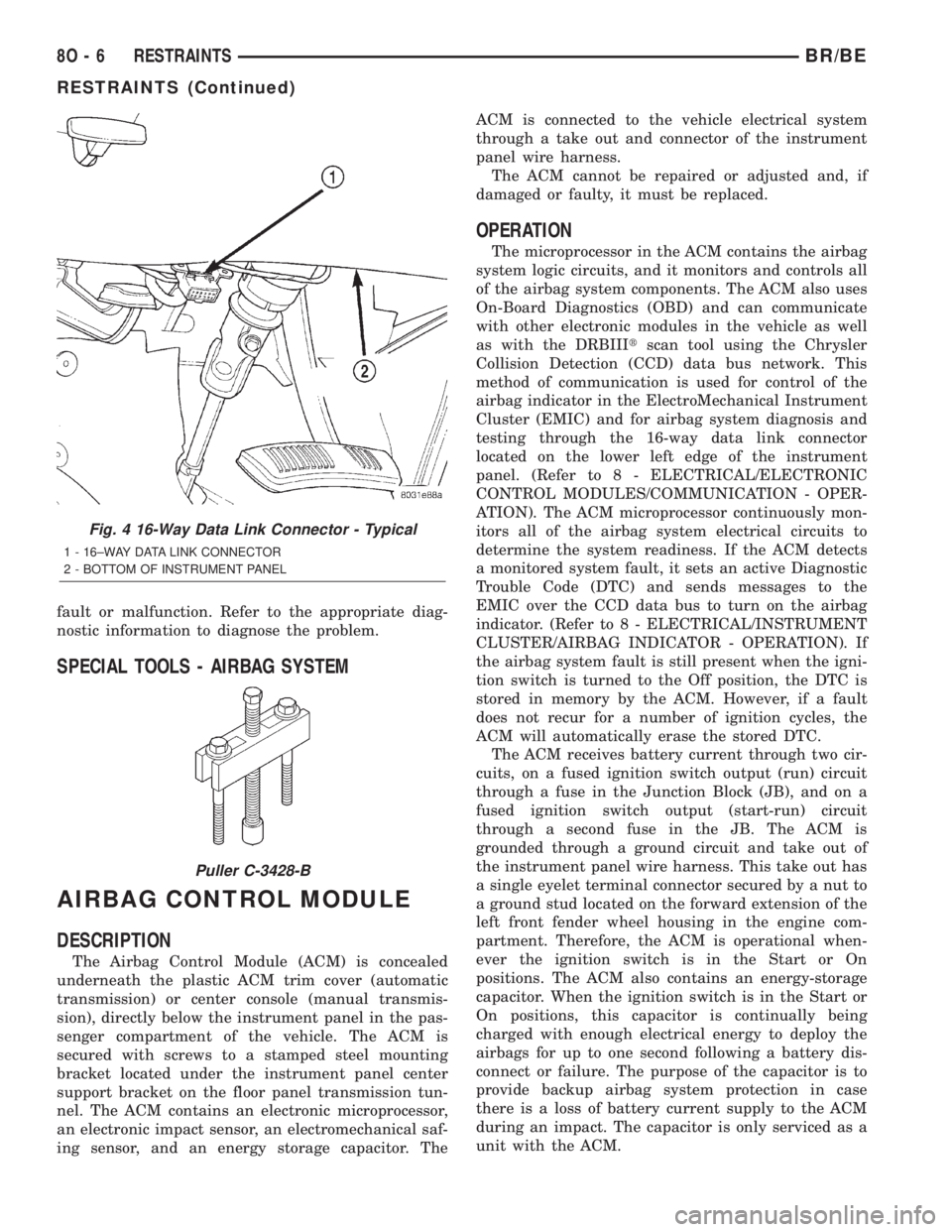
testing through the 16-way data link connector
located on the lower left edge of the instrument
panel. (Refer to 8 - ELECTRICAL/ELECTRONIC
CONTROL MODULES/COMMUNICATION - OPER-
ATION). The ACM microprocessor continuously mon-
itors all of the airbag system electrical circuits to
determine the system readiness. If the ACM detects
a monitored system fault, it sets an active Diagnostic
Trouble Code (DTC) and sends messages to the
EMIC over the CCD data bus to turn on the airbag
indicator. (Refer to 8 - ELECTRICAL/INSTRUMENT
CLUSTER/AIRBAG INDICATOR - OPERATION). If
the airbag system fault is still present when the igni-
tion switch is turned to the Off position, the DTC is
stored in memory by the ACM. However, if a fault
does not recur for a number of ignition cycles, the
ACM will automatically erase the stored DTC.
The ACM receives battery current through two cir-
cuits, on a fused ignition switch output (run) circuit
through a fuse in the Junction Block (JB), and on a
fused ignition switch output (start-run) circuit
through a second fuse in the JB. The ACM is
grounded through a ground circuit and take out of
the instrument panel wire harness. This take out has
a single eyelet terminal connector secured by a nut to
a ground stud located on the forward extension of the
left front fender wheel housing in the engine com-
partment. Therefore, the ACM is operational when-
ever the ignition switch is in the Start or On
positions. The ACM also contains an energy-storage
capacitor. When the ignition switch is in the Start or
On positions, this capacitor is continually being
charged with enough electrical energy to deploy the
airbags for up to one second following a battery dis-
connect or failure. The purpose of the capacitor is to
provide backup airbag system protection in case
there is a loss of battery current supply to the ACM
during an impact. The capacitor is only serviced as a
unit with the ACM.
Fig. 4 16-Way Data Link Connector - Typical
1 - 16±WAY DATA LINK CONNECTOR
2 - BOTTOM OF INSTRUMENT PANEL
Puller C-3428-B
8O - 6 RESTRAINTSBR/BE
RESTRAINTS (Continued)
Page 600 of 2255
Two sensors are contained within the ACM, an
electronic impact sensor and a safing sensor. The
electronic impact sensor is an accelerometer that
senses the rate of vehicle deceleration, which pro-
vides verification of the direction and severity of an
impact. A pre-programmed decision algorithm in the
ACM microprocessor determines when the decelera-
tion rate as signaled by the impact sensor indicates
an impact that is severe enough to require airbag
system protection. When the programmed conditions
are met, the ACM sends an electrical signal to deploy
the airbags. The safing sensor is an electromechani-
cal sensor within the ACM that is connected in series
between the ACM microprocessor airbag deployment
circuit and the airbags. The safing sensor is a nor-
mally open switch that is used to verify or confirm
the need for an airbag deployment by detecting
impact energy of a lesser magnitude than that of the
electronic impact sensor, and must be closed in order
for the airbags to deploy. The impact sensor and saf-
ing sensor are calibrated for the specific vehicle, and
are only serviced as a unit with the ACM.
REMOVAL
WARNING: DISABLE THE AIRBAG SYSTEM
BEFORE ATTEMPTING ANY STEERING WHEEL,
STEERING COLUMN, OR INSTRUMENT PANEL
COMPONENT DIAGNOSIS OR SERVICE. DISCON-
NECT AND ISOLATE THE BATTERY NEGATIVE
(GROUND) CABLE, THEN WAIT TWO MINUTES FOR
THE AIRBAG SYSTEM CAPACITOR TO DISCHARGE
BEFORE PERFORMING FURTHER DIAGNOSIS OR
SERVICE. THIS IS THE ONLY SURE WAY TO DIS-
ABLE THE AIRBAG SYSTEM. FAILURE TO TAKE
THE PROPER PRECAUTIONS COULD RESULT IN
ACCIDENTAL AIRBAG DEPLOYMENT AND POSSI-
BLE PERSONAL INJURY.
WARNING: THE AIRBAG CONTROL MODULE CON-
TAINS THE IMPACT SENSOR, WHICH ENABLES
THE SYSTEM TO DEPLOY THE AIRBAGS. NEVER
STRIKE OR KICK THE AIRBAG CONTROL MODULE,
AS IT CAN DAMAGE THE IMPACT SENSOR OR
AFFECT ITS CALIBRATION. IF AN AIRBAG CON-
TROL MODULE IS ACCIDENTALLY DROPPED DUR-
ING SERVICE, THE MODULE MUST BE SCRAPPED
AND REPLACED WITH A NEW UNIT. FAILURE TO
OBSERVE THIS WARNING COULD RESULT IN ACCI-
DENTAL, INCOMPLETE, OR IMPROPER AIRBAG
DEPLOYMENT AND POSSIBLE OCCUPANT INJU-
RIES.
(1) Disconnect and isolate the battery negative
cable. If either of the airbags has not been deployed,wait two minutes for the system capacitor to dis-
charge before further service.
(2) If the vehicle is equipped with a manual trans-
mission, remove the center floor console from the
floor panel transmission tunnel. (Refer to 23 - BODY/
INTERIOR/CENTER CONSOLE - REMOVAL).
(3) If the vehicle is equipped with an automatic
transmission, remove the two screws that secure the
trim cover to the Airbag Control Module (ACM)
mounting bracket on the floor panel transmission
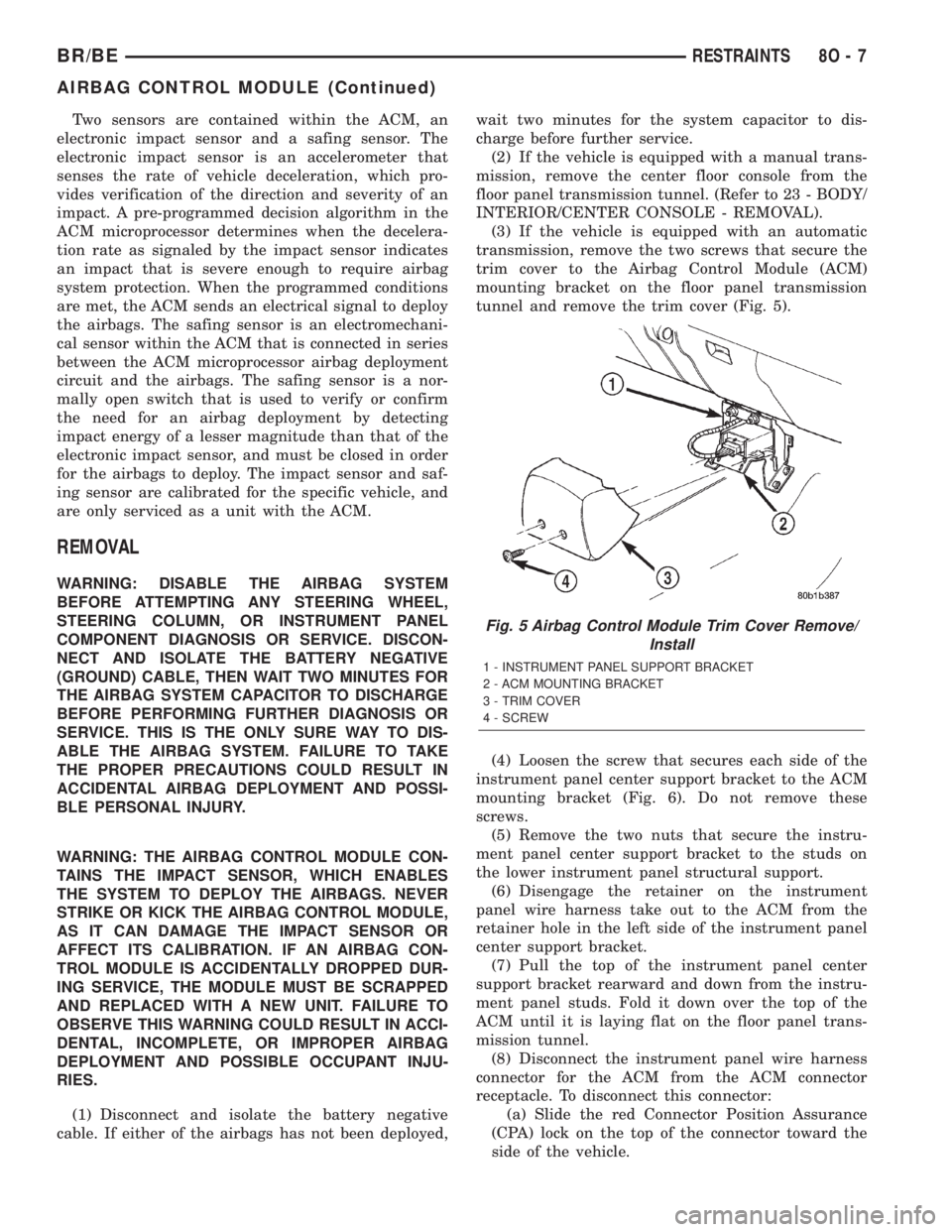
tunnel and remove the trim cover (Fig. 5).
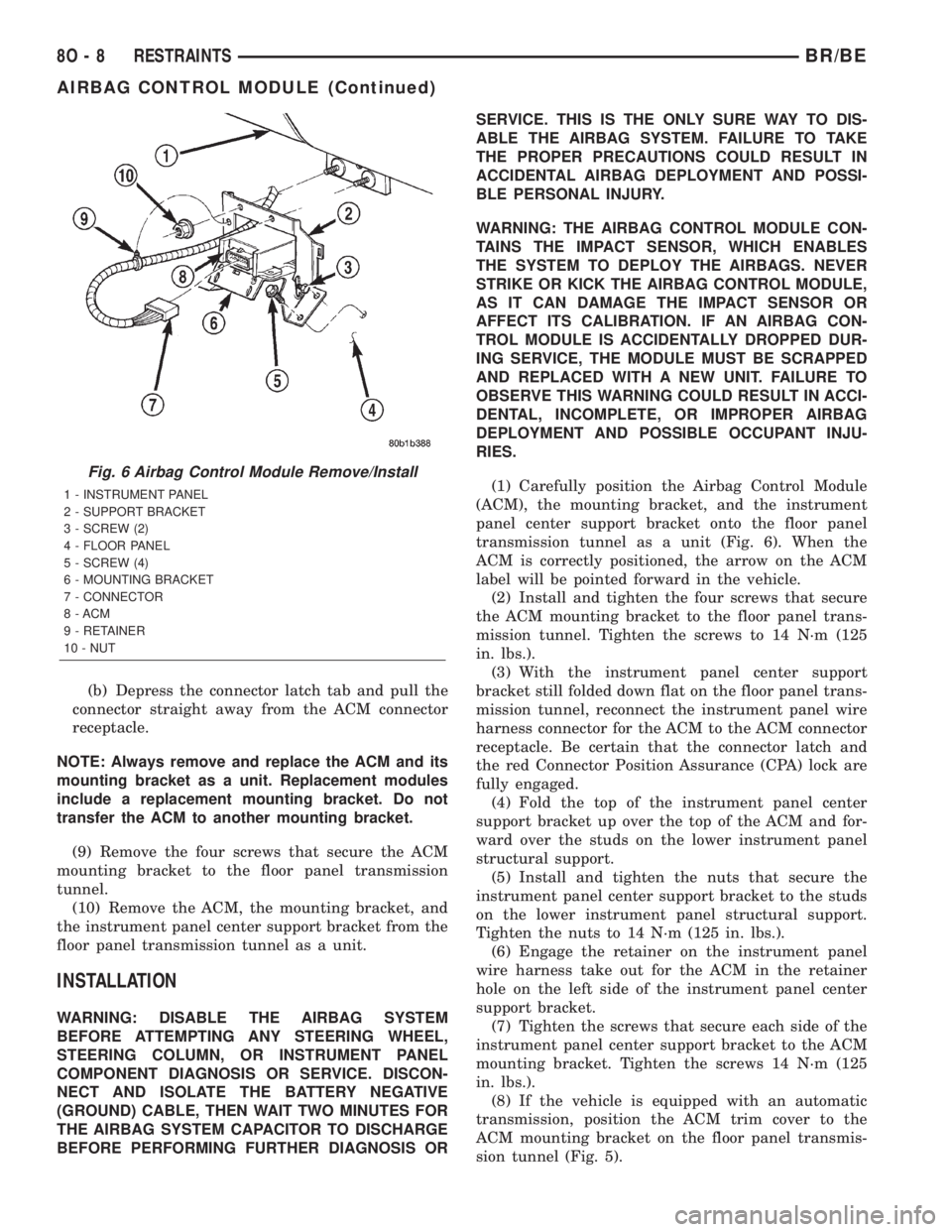
(4) Loosen the screw that secures each side of the
instrument panel center support bracket to the ACM
mounting bracket (Fig. 6). Do not remove these
screws.
(5) Remove the two nuts that secure the instru-
ment panel center support bracket to the studs on
the lower instrument panel structural support.
(6) Disengage the retainer on the instrument
panel wire harness take out to the ACM from the
retainer hole in the left side of the instrument panel
center support bracket.
(7) Pull the top of the instrument panel center
support bracket rearward and down from the instru-
ment panel studs. Fold it down over the top of the
ACM until it is laying flat on the floor panel trans-
mission tunnel.
(8) Disconnect the instrument panel wire harness
connector for the ACM from the ACM connector
receptacle. To disconnect this connector:
(a) Slide the red Connector Position Assurance
(CPA) lock on the top of the connector toward the
side of the vehicle.
Fig. 5 Airbag Control Module Trim Cover Remove/
Install
1 - INSTRUMENT PANEL SUPPORT BRACKET
2 - ACM MOUNTING BRACKET
3 - TRIM COVER
4 - SCREW
BR/BERESTRAINTS 8O - 7
AIRBAG CONTROL MODULE (Continued)
Page 601 of 2255
(b) Depress the connector latch tab and pull the
connector straight away from the ACM connector
receptacle.
NOTE: Always remove and replace the ACM and its
mounting bracket as a unit. Replacement modules
include a replacement mounting bracket. Do not
transfer the ACM to another mounting bracket.
(9) Remove the four screws that secure the ACM
mounting bracket to the floor panel transmission
tunnel.
(10) Remove the ACM, the mounting bracket, and
the instrument panel center support bracket from the
floor panel transmission tunnel as a unit.
INSTALLATION
WARNING: DISABLE THE AIRBAG SYSTEM
BEFORE ATTEMPTING ANY STEERING WHEEL,
STEERING COLUMN, OR INSTRUMENT PANEL
COMPONENT DIAGNOSIS OR SERVICE. DISCON-
NECT AND ISOLATE THE BATTERY NEGATIVE
(GROUND) CABLE, THEN WAIT TWO MINUTES FOR
THE AIRBAG SYSTEM CAPACITOR TO DISCHARGE
BEFORE PERFORMING FURTHER DIAGNOSIS ORSERVICE. THIS IS THE ONLY SURE WAY TO DIS-
ABLE THE AIRBAG SYSTEM. FAILURE TO TAKE
THE PROPER PRECAUTIONS COULD RESULT IN
ACCIDENTAL AIRBAG DEPLOYMENT AND POSSI-
BLE PERSONAL INJURY.
WARNING: THE AIRBAG CONTROL MODULE CON-
TAINS THE IMPACT SENSOR, WHICH ENABLES
THE SYSTEM TO DEPLOY THE AIRBAGS. NEVER
STRIKE OR KICK THE AIRBAG CONTROL MODULE,
AS IT CAN DAMAGE THE IMPACT SENSOR OR
AFFECT ITS CALIBRATION. IF AN AIRBAG CON-
TROL MODULE IS ACCIDENTALLY DROPPED DUR-
ING SERVICE, THE MODULE MUST BE SCRAPPED
AND REPLACED WITH A NEW UNIT. FAILURE TO
OBSERVE THIS WARNING COULD RESULT IN ACCI-
DENTAL, INCOMPLETE, OR IMPROPER AIRBAG
DEPLOYMENT AND POSSIBLE OCCUPANT INJU-
RIES.
(1) Carefully position the Airbag Control Module
(ACM), the mounting bracket, and the instrument
panel center support bracket onto the floor panel
transmission tunnel as a unit (Fig. 6). When the
ACM is correctly positioned, the arrow on the ACM
label will be pointed forward in the vehicle.
(2) Install and tighten the four screws that secure
the ACM mounting bracket to the floor panel trans-
mission tunnel. Tighten the screws to 14 N´m (125
in. lbs.).
(3) With the instrument panel center support
bracket still folded down flat on the floor panel trans-
mission tunnel, reconnect the instrument panel wire
harness connector for the ACM to the ACM connector
receptacle. Be certain that the connector latch and
the red Connector Position Assurance (CPA) lock are
fully engaged.
(4) Fold the top of the instrument panel center
support bracket up over the top of the ACM and for-
ward over the studs on the lower instrument panel
structural support.
(5) Install and tighten the nuts that secure the
instrument panel center support bracket to the studs
on the lower instrument panel structural support.
Tighten the nuts to 14 N´m (125 in. lbs.).
(6) Engage the retainer on the instrument panel
wire harness take out for the ACM in the retainer
hole on the left side of the instrument panel center
support bracket.
(7) Tighten the screws that secure each side of the
instrument panel center support bracket to the ACM
mounting bracket. Tighten the screws 14 N´m (125
in. lbs.).
(8) If the vehicle is equipped with an automatic
transmission, position the ACM trim cover to the
ACM mounting bracket on the floor panel transmis-
sion tunnel (Fig. 5).
Fig. 6 Airbag Control Module Remove/Install
1 - INSTRUMENT PANEL
2 - SUPPORT BRACKET
3 - SCREW (2)
4 - FLOOR PANEL
5 - SCREW (4)
6 - MOUNTING BRACKET
7 - CONNECTOR
8 - ACM
9 - RETAINER
10 - NUT
8O - 8 RESTRAINTSBR/BE
AIRBAG CONTROL MODULE (Continued)
Page 602 of 2255
(9) If the vehicle is equipped with an automatic
transmission, install and tighten the two screws that
secure the ACM trim cover to the ACM mounting
bracket. Tighten the screws to 2.2 N´m (20 in. lbs.).
(10) If the vehicle is equipped with a manual
transmission, reinstall the center floor console onto
the floor panel transmission tunnel. (Refer to 23 -
BODY/INTERIOR/CENTER CONSOLE - INSTALLA-
TION).
(11) Do not reconnect the battery negative cable at
this time. The airbag system verification test proce-
dure should be performed following service of any
airbag system component. (Refer to 8 - ELECTRI-
CAL/RESTRAINTS - STANDARD PROCEDURE -
VERIFICATION TEST).
CHILD TETHER
REMOVAL
Standard cab models have two child tether anchors
secured near the top of the cab back panel. Club cab
and quad cab models have three child tethers
secured near the top of the cab back panel.
WARNING: DURING AND FOLLOWING ANY SEAT
BELT SERVICE, CAREFULLY INSPECT ALL SEAT
BELTS, BUCKLES, MOUNTING HARDWARE, AND
RETRACTORS FOR PROPER INSTALLATION,
OPERATION, OR DAMAGE. REPLACE ANY BELTTHAT IS CUT, FRAYED, OR TORN. STRAIGHTEN
ANY BELT THAT IS TWISTED. TIGHTEN ANY
LOOSE FASTENERS. REPLACE ANY BELT THAT
HAS A DAMAGED OR INOPERATIVE BUCKLE OR
RETRACTOR. REPLACE ANY BELT THAT HAS A
BENT OR DAMAGED LATCH PLATE OR ANCHOR
PLATE. NEVER ATTEMPT TO REPAIR A SEAT BELT
COMPONENT. ALWAYS REPLACE DAMAGED OR
FAULTY SEAT BELT COMPONENTS WITH THE COR-
RECT, NEW AND UNUSED REPLACEMENT PARTS
LISTED IN THE MOPAR PARTS CATALOG.
(1) Remove the trim from the inside of the cab
back panel. (Refer to 23 - BODY/INTERIOR/REAR
CLOSURE PANEL TRIM - REMOVAL).
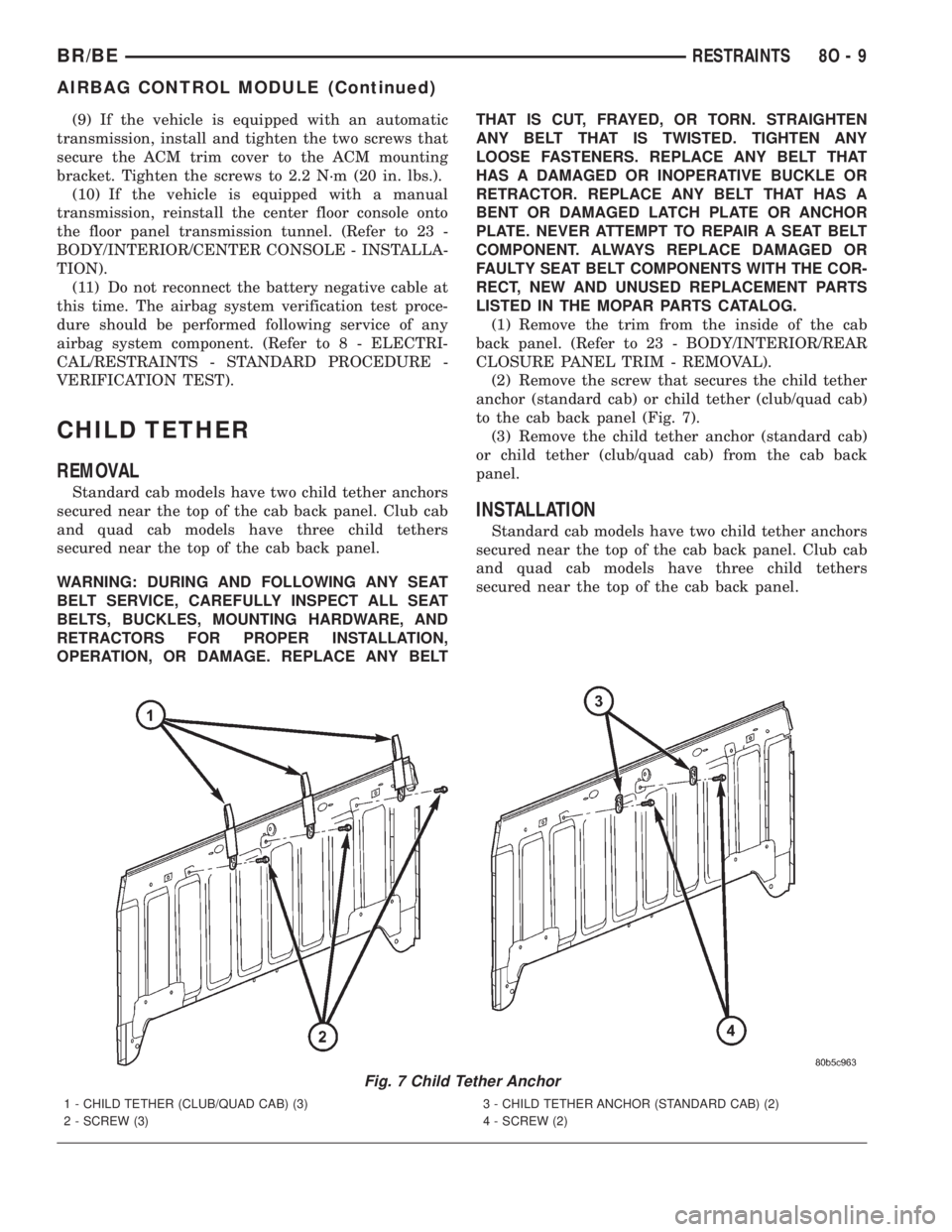
(2) Remove the screw that secures the child tether
anchor (standard cab) or child tether (club/quad cab)
to the cab back panel (Fig. 7).
(3) Remove the child tether anchor (standard cab)
or child tether (club/quad cab) from the cab back
panel.
INSTALLATION
Standard cab models have two child tether anchors
secured near the top of the cab back panel. Club cab
and quad cab models have three child tethers
secured near the top of the cab back panel.
Fig. 7 Child Tether Anchor
1 - CHILD TETHER (CLUB/QUAD CAB) (3)
2 - SCREW (3)3 - CHILD TETHER ANCHOR (STANDARD CAB) (2)
4 - SCREW (2)
BR/BERESTRAINTS 8O - 9
AIRBAG CONTROL MODULE (Continued)
Page 624 of 2255
SPEED CONTROL
TABLE OF CONTENTS
page page
SPEED CONTROL
DESCRIPTION
DESCRIPTION - SPEED CONTROL SYSTEM . 1
DESCRIPTION - VEHICLE SPEED INPUT....2
OPERATION - SPEED CONTROL SYSTEM....2
DIAGNOSIS AND TESTING
DIAGNOSIS AND TESTING - VACUUM
SUPPLY TEST.........................3
DIAGNOSIS AND TESTING - ROAD TEST....4
SPECIFICATIONS
TORQUE - SPEED CONTROL SYSTEM.....4
CABLE
DESCRIPTION..........................4
OPERATION............................4
REMOVAL
REMOVAL - GAS ENGINES...............4
REMOVAL - DIESEL WITH AUTO. TRANS. . . . 5
INSTALLATION
INSTALLATION - GAS ENGINES...........5
INSTALLATION - DIESEL WITH AUTO.
TRANS...............................6SPEED CONTROL SERVO
DESCRIPTION..........................6
OPERATION............................6
REMOVAL
REMOVAL............................6
REMOVAL - DIESEL WITH AUTO. TRANS. . . . 9
INSTALLATION
INSTALLATION.......................11
INSTALLATION - DIESEL WITH AUTO.
TRANS..............................12
SWITCH
DESCRIPTION.........................12
OPERATION...........................12
REMOVAL.............................13
INSTALLATION.........................14
VACUUM RESERVOIR
DESCRIPTION.........................14
REMOVAL.............................14
INSTALLATION.........................15
SPEED CONTROL
DESCRIPTION
DESCRIPTION - SPEED CONTROL SYSTEM
Gas Engines and/or Diesel With Automatic Trans.
The speed control system is operated by the use of
a cable and a vacuum controlled servo. Electronic
control of the speed control system is integrated into
the Powertrain Control Module (PCM). The controls
consist of two steering wheel mounted switches. The
switches are labeled: ON/OFF, RES/ACCEL, SET,
COAST, and CANCEL.
The system is designed to operate at speeds above
30 mph (50 km/h).
WARNING: THE USE OF SPEED CONTROL IS NOT
RECOMMENDED WHEN DRIVING CONDITIONS DO
NOT PERMIT MAINTAINING A CONSTANT SPEED,
SUCH AS IN HEAVY TRAFFIC OR ON ROADS THATARE WINDING, ICY, SNOW COVERED, OR SLIP-
PERY.
Diesel With Manual Trans.
The speed control system is fully electronically con-
trolled by the Engine Control Module (ECM).A
cable and a vacuum controlled servo are not
used if the vehicle is equipped with a manual
transmission and a diesel engine. This is a ser-
vo-less system.The controls consist of two steering
wheel mounted switches. The switches are labeled:
ON/OFF, RES/ACCEL, SET, COAST, and CANCEL.
The system is designed to operate at speeds above
30 mph (50 km/h).
WARNING: THE USE OF SPEED CONTROL IS NOT
RECOMMENDED WHEN DRIVING CONDITIONS DO
NOT PERMIT MAINTAINING A CONSTANT SPEED,
SUCH AS IN HEAVY TRAFFIC OR ON ROADS THAT
ARE WINDING, ICY, SNOW COVERED, OR SLIP-
PERY.
BR/BESPEED CONTROL 8P - 1
Page 625 of 2255
DESCRIPTION - VEHICLE SPEED INPUT
Gas Engines and/or Diesel With Automatic Trans.
The Vehicle Speed Sensor (VSS) is no longer used
for any Dodge Truck.
Vehicle speed and distance covered are measured
by the Rear Wheel Speed Sensor. The sensor is
mounted to the rear axle. A signal is sent from this
sensor to the Controller Antilock Brake (CAB) com-
puter. A signal is then sent from the CAB to the Pow-
ertrain Control Module (PCM) to determine vehicle
speed and distance covered. The PCM will then
determine strategies for speed control system opera-
tion.
Diesel With Manual Trans.
The Vehicle Speed Sensor (VSS) is no longer used
for any Dodge Truck.
Vehicle speed and distance covered are measured
by the Rear Wheel Speed Sensor. The sensor is
mounted to the rear axle. A signal is sent from this
sensor to the Controller Antilock Brake (CAB) com-
puter. A signal is then sent from the CAB to the
Engine Control Module (ECM) to determine vehicle
speed and distance covered. The ECM will then
determine strategies for speed control system opera-
tion.
OPERATION - SPEED CONTROL SYSTEM
Gas Engines and/or Diesel With Automatic Trans.
When speed control is selected by depressing the
ON switch, the PCM allows a set speed to be stored
in PCM RAM for speed control. To store a set speed,
depress the SET switch while the vehicle is moving
at a speed between 35 and 85 mph. In order for the
speed control to engage, the brakes cannot be
applied, nor can the gear selector be indicating the
transmission is in Park or Neutral.
The speed control can be disengaged manually by:
²Stepping on the brake pedal.
²Depressing the OFF switch.
²Depressing the CANCEL switch.
²Depressing the clutch pedal (if equipped).
NOTE: Depressing the OFF switch or turning off the
ignition switch will erase the set speed stored in
the PCM.
For added safety, the speed control system is pro-
grammed to disengage for any of the following condi-
tions:
²An indication of Park or Neutral.
²A rapid increase of rpm (indication that the
clutch has been disengaged).²Excessive engine rpm (indicates that the trans-
mission may be in a low gear).
²The speed signal increases at a rate of 10 mph
per second (indicates that the coefficient of friction
between the road surface and tires is extremely low).
²The speed signal decreases at a rate of 10 mph
per second (indicates that the vehicle may have
decelerated at an extremely high rate).
Once the speed control has been disengaged,
depressing the RES/ACCEL switch (when speed is
greater than 30 mph) restores the vehicle to the tar-
get speed that was stored in the PCM.
While the speed control is engaged, the driver can
increase the vehicle speed by depressing the RES/AC-
CEL switch. The new target speed is stored in the
PCM when the RES/ACCEL is released. The PCM
also has a9tap-up9feature in which vehicle speed
increases at a rate of approximately 2 mph for each
momentary switch activation of the RES/ACCEL
switch.
A ªtap downº feature is used to decelerate without
disengaging the speed control system. To decelerate
from an existing recorded target speed, momentarily
depress the COAST switch. For each switch activa-
tion, speed will be lowered approximately 1 mph.
Diesel With Manual Trans.
When speed control is selected by depressing the
ON switch, the Engine Control Module (ECM) allows
a set speed to be stored in ECM RAM for speed con-
trol. To store a set speed, depress the SET switch
while the vehicle is moving at a speed between 35
and 85 mph. In order for the speed control to engage,
the brakes cannot be applied.The speed control can
be disengaged manually by:
²Stepping on the brake pedal.
²Depressing the OFF switch.
²Depressing the CANCEL switch.
²Depressing the clutch pedal.
NOTE: Depressing the OFF switch or turning off the
ignition switch will erase the set speed stored in
the ECM.
For added safety, the speed control system is pro-
grammed to disengage for any of the following condi-
tions:
²A rapid increase of rpm (indication that the
clutch has been disengaged).
²Excessive engine rpm (indicates that the trans-
mission may be in a low gear).
²The speed signal increases at a rate of 10 mph
per second (indicates that the coefficient of friction
between the road surface and tires is extremely low).
²The speed signal decreases at a rate of 10 mph
per second (indicates that the vehicle may have
decelerated at an extremely high rate).
8P - 2 SPEED CONTROLBR/BE
SPEED CONTROL (Continued)