glove box DODGE RAM 2003 Service User Guide
[x] Cancel search | Manufacturer: DODGE, Model Year: 2003, Model line: RAM, Model: DODGE RAM 2003Pages: 2895, PDF Size: 83.15 MB
Page 506 of 2895
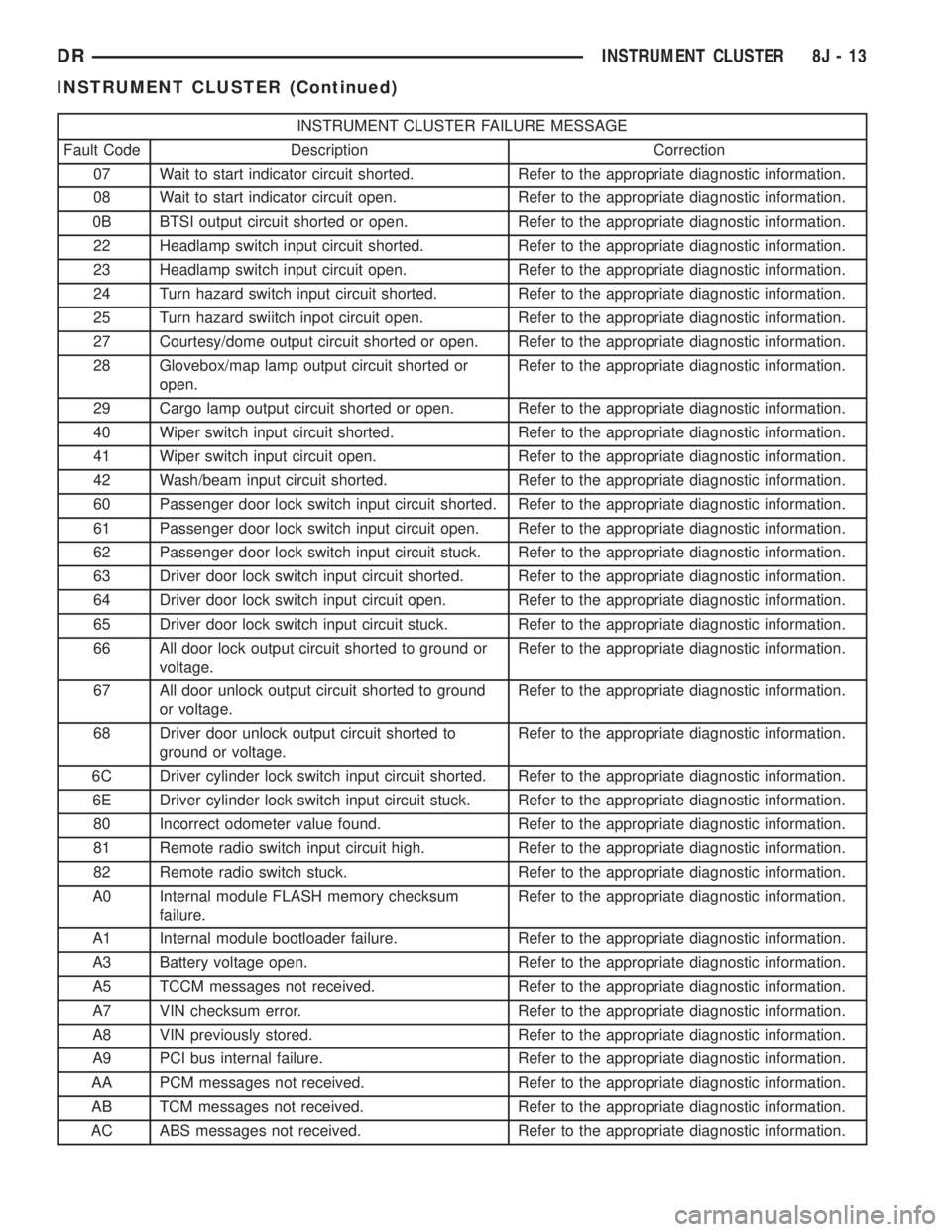
INSTRUMENT CLUSTER FAILURE MESSAGE
Fault Code Description Correction
07 Wait to start indicator circuit shorted. Refer to the appropriate diagnostic information.
08 Wait to start indicator circuit open. Refer to the appropriate diagnostic information.
0B BTSI output circuit shorted or open. Refer to the appropriate diagnostic information.
22 Headlamp switch input circuit shorted. Refer to the appropriate diagnostic information.
23 Headlamp switch input circuit open. Refer to the appropriate diagnostic information.
24 Turn hazard switch input circuit shorted. Refer to the appropriate diagnostic information.
25 Turn hazard swiitch inpot circuit open. Refer to the appropriate diagnostic information.
27 Courtesy/dome output circuit shorted or open. Refer to the appropriate diagnostic information.
28 Glovebox/map lamp output circuit shorted or
open.Refer to the appropriate diagnostic information.
29 Cargo lamp output circuit shorted or open. Refer to the appropriate diagnostic information.
40 Wiper switch input circuit shorted. Refer to the appropriate diagnostic information.
41 Wiper switch input circuit open. Refer to the appropriate diagnostic information.
42 Wash/beam input circuit shorted. Refer to the appropriate diagnostic information.
60 Passenger door lock switch input circuit shorted. Refer to the appropriate diagnostic information.
61 Passenger door lock switch input circuit open. Refer to the appropriate diagnostic information.
62 Passenger door lock switch input circuit stuck. Refer to the appropriate diagnostic information.
63 Driver door lock switch input circuit shorted. Refer to the appropriate diagnostic information.
64 Driver door lock switch input circuit open. Refer to the appropriate diagnostic information.
65 Driver door lock switch input circuit stuck. Refer to the appropriate diagnostic information.
66 All door lock output circuit shorted to ground or
voltage.Refer to the appropriate diagnostic information.
67 All door unlock output circuit shorted to ground
or voltage.Refer to the appropriate diagnostic information.
68 Driver door unlock output circuit shorted to
ground or voltage.Refer to the appropriate diagnostic information.
6C Driver cylinder lock switch input circuit shorted. Refer to the appropriate diagnostic information.
6E Driver cylinder lock switch input circuit stuck. Refer to the appropriate diagnostic information.
80 Incorrect odometer value found. Refer to the appropriate diagnostic information.
81 Remote radio switch input circuit high. Refer to the appropriate diagnostic information.
82 Remote radio switch stuck. Refer to the appropriate diagnostic information.
A0 Internal module FLASH memory checksum
failure.Refer to the appropriate diagnostic information.
A1 Internal module bootloader failure. Refer to the appropriate diagnostic information.
A3 Battery voltage open. Refer to the appropriate diagnostic information.
A5 TCCM messages not received. Refer to the appropriate diagnostic information.
A7 VIN checksum error. Refer to the appropriate diagnostic information.
A8 VIN previously stored. Refer to the appropriate diagnostic information.
A9 PCI bus internal failure. Refer to the appropriate diagnostic information.
AA PCM messages not received. Refer to the appropriate diagnostic information.
AB TCM messages not received. Refer to the appropriate diagnostic information.
AC ABS messages not received. Refer to the appropriate diagnostic information.
DRINSTRUMENT CLUSTER 8J - 13
INSTRUMENT CLUSTER (Continued)
Page 561 of 2895
LAMPS/LIGHTING - INTERIOR
TABLE OF CONTENTS
page page
DOME LAMP
DESCRIPTION.........................24
OPERATION...........................24
REMOVAL.............................24
INSTALLATION.........................24
DOOR AJAR SWITCH
DESCRIPTION.........................25
OPERATION...........................25GLOVE BOX LAMP/SWITCH
REMOVAL.............................25
INSTALLATION.........................25
READING LAMP
DESCRIPTION.........................26
OPERATION...........................26
REMOVAL.............................26
INSTALLATION.........................26
DOME LAMP
DESCRIPTION
The dome lamp is controlled by the instrument
cluster which provides power at all times, regardless
of the ignition switch position. The ground circuit for
the lamp is switched through the integral dome lamp
switch or through the door ajar switches via the
instrument cluster.
The dome lamp lens and bulb are available for ser-
vice replacement. If either of the lamp switch or bulb
holders is faulty or damaged, the dome lamp assem-
bly must be replaced.
For service of the dome lamp bulb, refer to the
appropriate wiring information.
OPERATION
The dome lamp is activated by the door ajar
switches via the instrument cluster. When all of the
doors are closed, the lamp can be activated by
depressing the lens. When any door is open, depress-
ing the lamp lense to activate the lamp switch will
not turn the lamps off.
The instrument cluster monitors the door ajar
switches. When a door is open the instrument cluster
grounds the low side drivers to turn on the lamp.
Upon closing all doors, the instrument cluster ini-
tiates a 30 second timer. If any of the doors are
opened during the ªtime outº cycle, the instrument
cluster will reset the timer until all doors are closed.
The instrument cluster will faid to off when the doors
are closed and the ignition is turned ON, the time
out expires or the power locks are activated.
REMOVAL
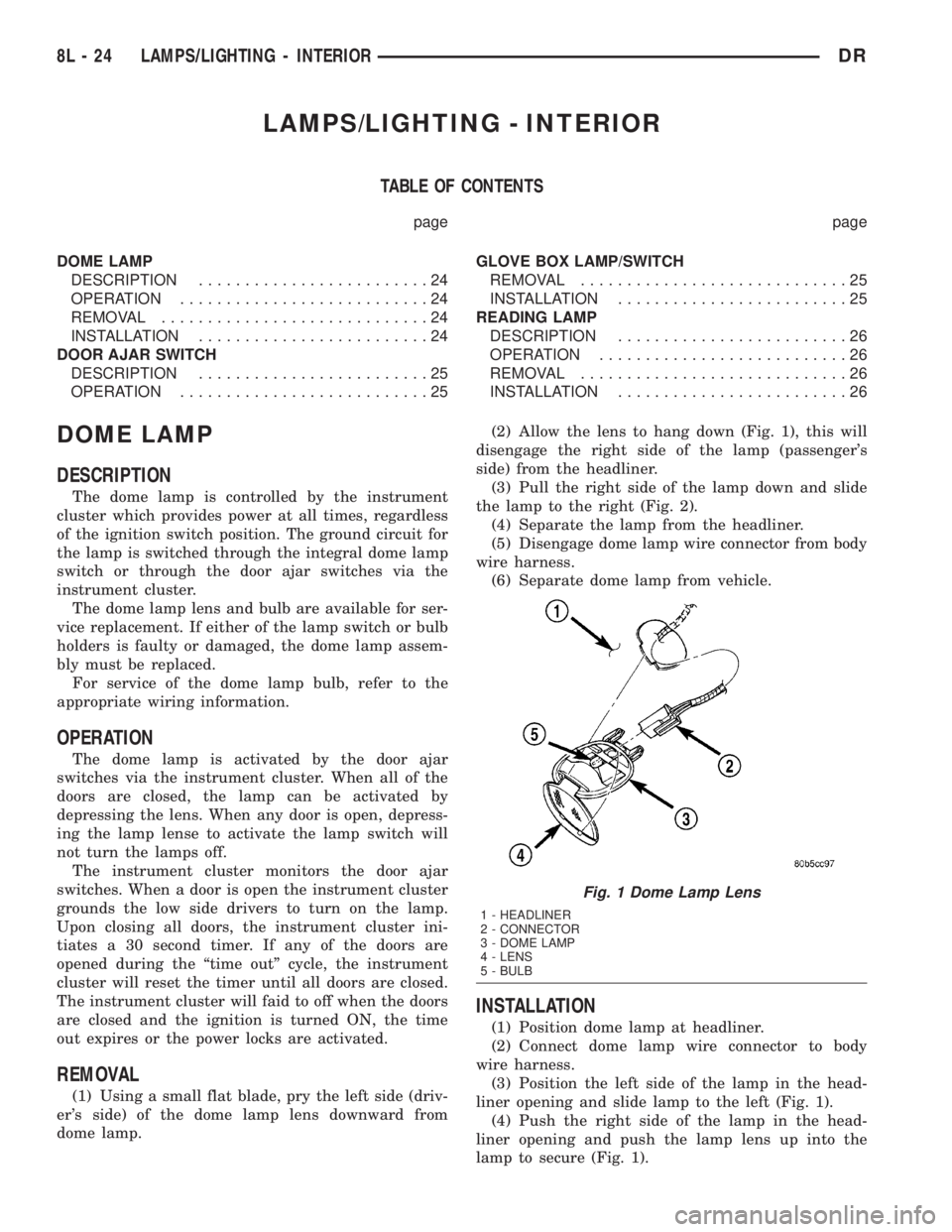
(1) Using a small flat blade, pry the left side (driv-
er's side) of the dome lamp lens downward from
dome lamp.(2) Allow the lens to hang down (Fig. 1), this will
disengage the right side of the lamp (passenger's
side) from the headliner.
(3) Pull the right side of the lamp down and slide
the lamp to the right (Fig. 2).
(4) Separate the lamp from the headliner.
(5) Disengage dome lamp wire connector from body
wire harness.
(6) Separate dome lamp from vehicle.
INSTALLATION
(1) Position dome lamp at headliner.
(2) Connect dome lamp wire connector to body
wire harness.
(3) Position the left side of the lamp in the head-
liner opening and slide lamp to the left (Fig. 1).
(4) Push the right side of the lamp in the head-
liner opening and push the lamp lens up into the
lamp to secure (Fig. 1).
Fig. 1 Dome Lamp Lens
1 - HEADLINER
2 - CONNECTOR
3 - DOME LAMP
4 - LENS
5 - BULB
8L - 24 LAMPS/LIGHTING - INTERIORDR
Page 562 of 2895
DOOR AJAR SWITCH
DESCRIPTION
The door ajar switches are integral to the door
latches on each door. The switches close a path to
ground for the Instrument Cluster when a door is
opened.
The door ajar switches cannot be repaired and, if
faulty or damaged, the door latch unit must be
replaced. Refer to the Body section under Doors for
the removal and installation procedure.
OPERATION
The door ajar switches close a path to ground for
the Instrument Cluster when a door is opened. The
passenger front door is connected in a parallel-series
circuit between ground and the Instrument Cluster,
while the driver side front door ajar switch is con-
nected in series between ground and the Instrument
Cluster to provide a unique input. The Instrument
Cluster reads the switch status, then sends the
proper switch status messages to other electronic
modules over the Programmable Communications
Interface (PCI) data bus network. The door ajar
switches can be diagnosed using conventional diag-
nostic tools and methods. Refer to the Body section
under Doors for the Removal and Installation proce-
dures.
GLOVE BOX LAMP/SWITCH
REMOVAL
(1) Disconnect and isolate the battery negative
cable.
(2) Remove the glove box from the instrument
panel. (Refer to 23 - BODY/INSTRUMENT PANEL/
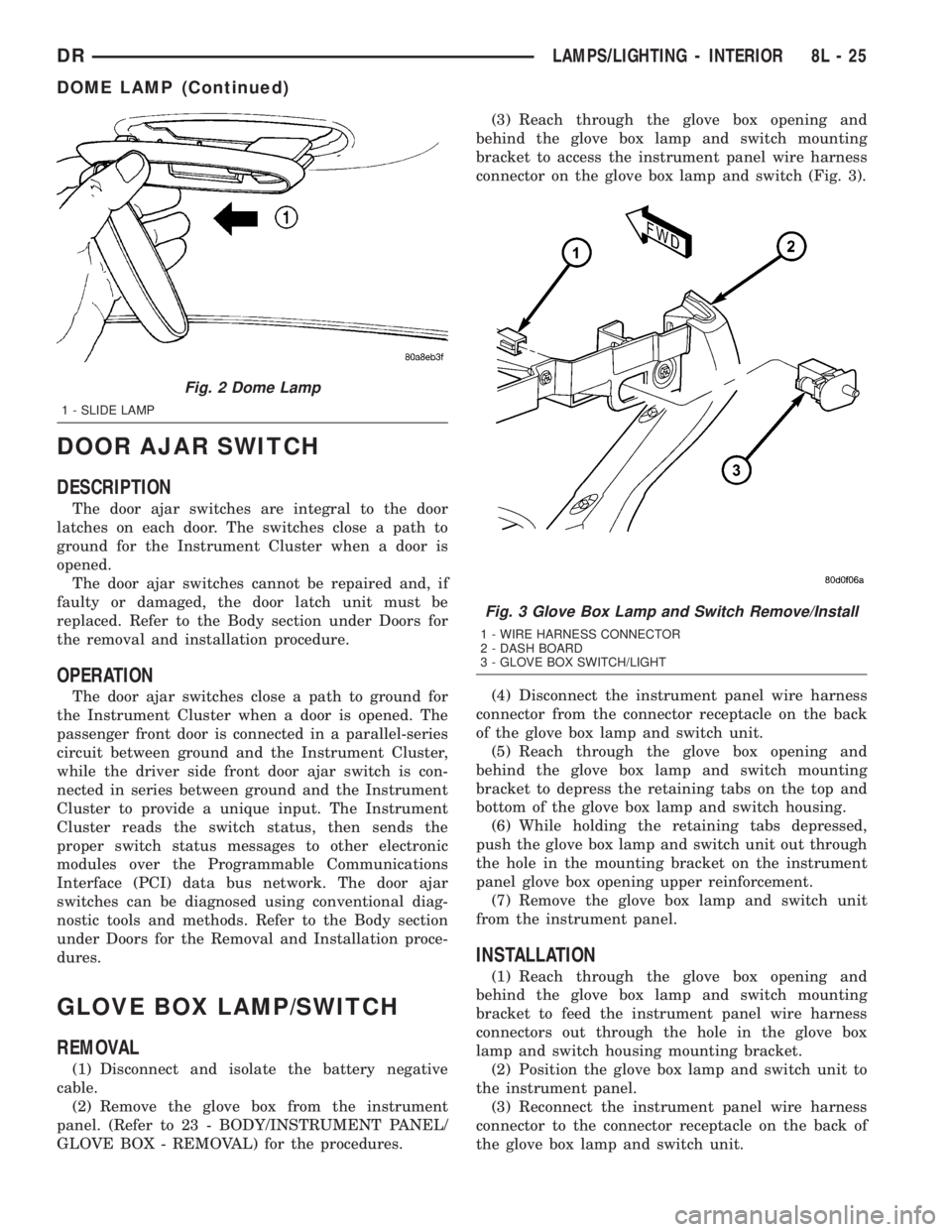
GLOVE BOX - REMOVAL) for the procedures.(3) Reach through the glove box opening and
behind the glove box lamp and switch mounting
bracket to access the instrument panel wire harness
connector on the glove box lamp and switch (Fig. 3).
(4) Disconnect the instrument panel wire harness
connector from the connector receptacle on the back
of the glove box lamp and switch unit.
(5) Reach through the glove box opening and
behind the glove box lamp and switch mounting
bracket to depress the retaining tabs on the top and
bottom of the glove box lamp and switch housing.
(6) While holding the retaining tabs depressed,
push the glove box lamp and switch unit out through
the hole in the mounting bracket on the instrument
panel glove box opening upper reinforcement.
(7) Remove the glove box lamp and switch unit
from the instrument panel.
INSTALLATION
(1) Reach through the glove box opening and
behind the glove box lamp and switch mounting
bracket to feed the instrument panel wire harness
connectors out through the hole in the glove box
lamp and switch housing mounting bracket.
(2) Position the glove box lamp and switch unit to
the instrument panel.
(3) Reconnect the instrument panel wire harness
connector to the connector receptacle on the back of
the glove box lamp and switch unit.
Fig. 2 Dome Lamp
1 - SLIDE LAMP
Fig. 3 Glove Box Lamp and Switch Remove/Install
1 - WIRE HARNESS CONNECTOR
2 - DASH BOARD
3 - GLOVE BOX SWITCH/LIGHT
DRLAMPS/LIGHTING - INTERIOR 8L - 25
DOME LAMP (Continued)
Page 563 of 2895
(4) Push the glove box lamp and switch unit into
the hole in the mounting bracket on the instrument
panel glove box opening upper reinforcement.
(5) Install the glove box onto the instrument panel.
(Refer to 23 - BODY/INSTRUMENT PANEL/GLOVE
BOX - INSTALLATION) for the procedures.
(6) Close the glove box.
(7) Reconnect the battery negative cable.
READING LAMP
DESCRIPTION
The overhead console in this vehicle is equipped
with two individual reading and courtesy lamps. The
lamp lenses are the only visible components of these
lamps. Each lamp has its own switch, bulb, reflector
and lens within the overhead console.
The overhead console reading and courtesy lamps
are controlled by the instrument cluster which pro-
vides power at all times, regardless of the ignition
switch position. The ground circuit for the lamps is
switched through the integral reading and courtesy
lamp switches or through the door ajar switches.
Each lamp is designed and aimed to provide illumi-
nation that will be directed only to that side of the
vehicle on which the lamp is located.
The reading and courtesy lamp lenses and bulbs
are available for service replacement. The reading
and courtesy lamp switches, bulb holders and wiring
are only available as part of the overhead console
wire harness. If either of the lamp switches or bulb
holders is faulty or damaged, the entire overhead
console wire harness assembly must be replaced.
For service of the reading and courtesy lamp bulbs,
refer to the appropriate wiring information.
OPERATION
All reading and courtesy lamps located in the over-
head console are activated by the door ajar switches
via the instrument cluster. When all of the doors are
closed, these lamps can be individually activated by
depressing the corresponding lens. When any door is
open, depressing the lamp lenses to activate the lamp
switches will not turn the lamps off.
The instrument cluster monitors the door ajar
switches. When a door is open the instrument cluster
grounds the low side drivers to turn on the lamps.
Upon closing all doors, the instrument cluster ini-
tiates a 30 second timer. If any of the doors are
opened during the ªtime outº cycle, the instrument
cluster will reset the timer until all doors are closed.
The instrument cluster will faid to off when the doors
are closed and the ignition is turned ON, the time
out expires or the power locks are activated.
REMOVAL
(1) Disconnect and isolate the battery negative
cable.
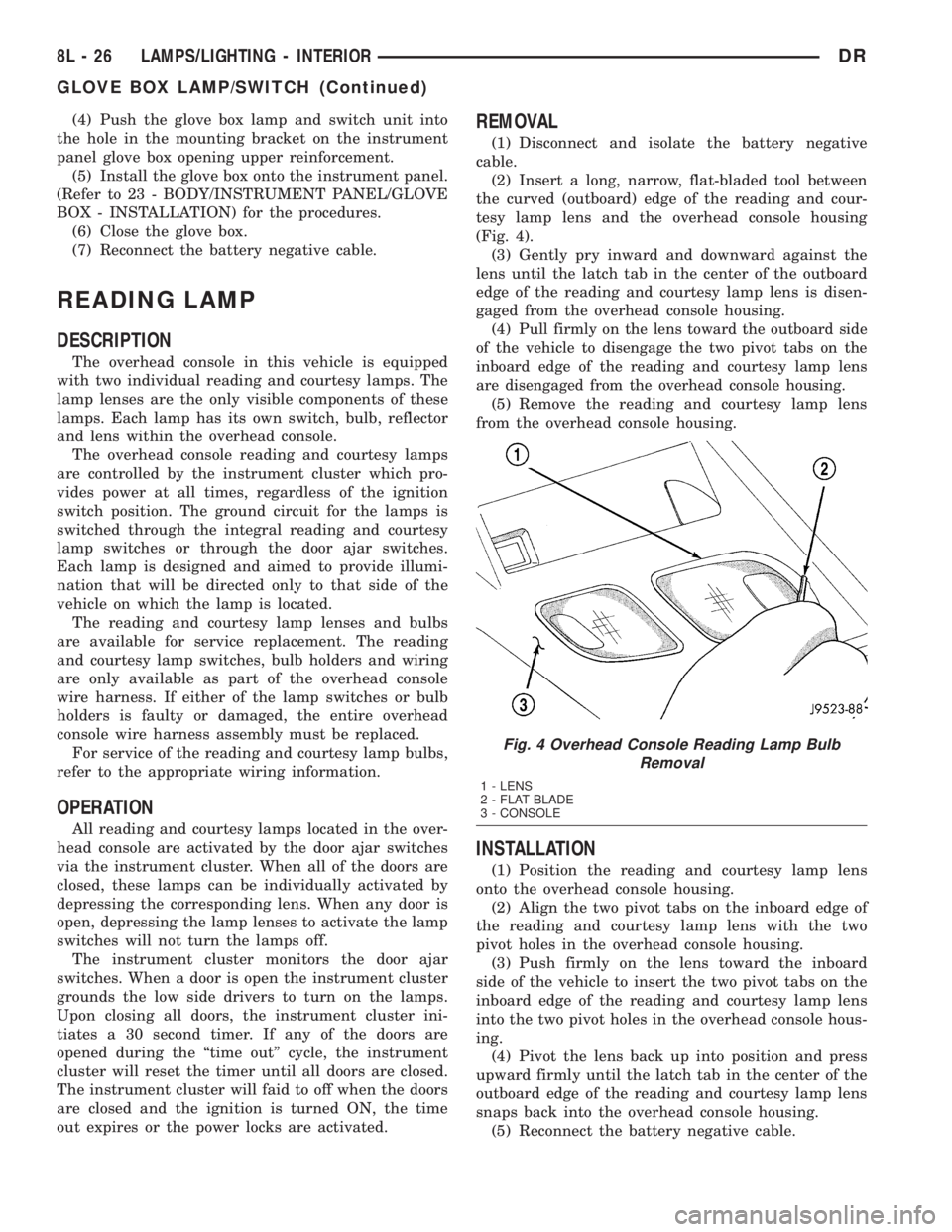
(2) Insert a long, narrow, flat-bladed tool between
the curved (outboard) edge of the reading and cour-
tesy lamp lens and the overhead console housing
(Fig. 4).
(3) Gently pry inward and downward against the
lens until the latch tab in the center of the outboard
edge of the reading and courtesy lamp lens is disen-
gaged from the overhead console housing.
(4)
Pull firmly on the lens toward the outboard side
of the vehicle to disengage the two pivot tabs on the
inboard edge of the reading and courtesy lamp lens
are disengaged from the overhead console housing.
(5) Remove the reading and courtesy lamp lens
from the overhead console housing.
INSTALLATION
(1) Position the reading and courtesy lamp lens
onto the overhead console housing.
(2) Align the two pivot tabs on the inboard edge of
the reading and courtesy lamp lens with the two
pivot holes in the overhead console housing.
(3) Push firmly on the lens toward the inboard
side of the vehicle to insert the two pivot tabs on the
inboard edge of the reading and courtesy lamp lens
into the two pivot holes in the overhead console hous-
ing.
(4) Pivot the lens back up into position and press
upward firmly until the latch tab in the center of the
outboard edge of the reading and courtesy lamp lens
snaps back into the overhead console housing.
(5) Reconnect the battery negative cable.
Fig. 4 Overhead Console Reading Lamp Bulb
Removal
1 - LENS
2 - FLAT BLADE
3 - CONSOLE
8L - 26 LAMPS/LIGHTING - INTERIORDR
GLOVE BOX LAMP/SWITCH (Continued)
Page 571 of 2895
Refer toELECTRONIC VEHICLE INFORMA-
TION CENTER PROGRAMMINGin the Standard
Procedures section of this group for more information
on the customer programmable feature options.
If the vehicle is equipped with the optional univer-
sal transmitter transceiver, the EVIC will also dis-
play messages and an icon indicating when the
universal transmitter transceiver is being trained,
which of the three transmitter buttons is transmit-
ting, and when the transceiver is cleared.
Data input for all EVIC functions, including VFD
dimming level, is received through the J1850 PCI
data bus circuit. The EVIC module uses its internal
programming and all of its data inputs to calculate
and display the requested data. If the data displayed
is incorrect, perform the self-diagnostic tests as
described in this group. If these tests prove inconclu-
sive, the use of a DRB IIItscan tool and the proper
Diagnostic Procedures manual are recommended for
further testing of the EVIC module and the J1850
PCI data bus circuit.
The EVIC module cannot be repaired, and is avail-
able for service only as a unit. If any part is faulty or
damaged, the complete EVIC module must be
replaced.
OPERATION
The Electronic Vehicle Information Center is wired
to both constant 12v and ignition switched sources of
battery current so that some of its features remain
operational at any time, while others may only oper-
ate with the ignition switch in the On position. When
the ignition switch is turned to the On position, the
EVIC module display will return to the last function
being displayed before the ignition was turned to the
Off position.
The compass/temperature display is the normal
EVIC display. With the ignition switch in the On
position, momentarily depressing and releasing the
C/T (compass/temperature) push button switch will
cause the EVIC to return to the compass/tempera-
ture display mode from any other mode. While in the
compass/temperature display mode, momentarily
depressing and releasing the Step push button will
step through the available trip computer display
options.
The EVIC trip computer features several functions
that can be reset. The functions that can be reset
are: average fuel economy, trip odometer and elapsed
time. With the ignition switch in the On position and
with one of the functions of the trip computer that
can be reset currently displayed, depressing the
Reset push button twice within three seconds will
perform a global reset, and all of the trip computer
information that can be reset will be reset to zero.
With the ignition switch in the On position and thefunction that is to be reset currently displayed,
momentarily depressing and releasing the Reset
push button once will perform a local reset, and only
the value of the displayed function will be reset to
zero. A global or local reset will only occur if the
function currently displayed is a function that can be
reset. The distance to service function can also be
reset using the local reset method, but it will reset
back to the Service Interval distance that is set in
the EVIC programmable features mode. Refer to
ELECTRONIC VEHICLE INFORMATION CEN-
TER PROGRAMMINGin the Standard Procedures
section of this group for more information on setting
the Service Interval.
For more information on the features, control func-
tions and setting procedures for the EVIC module,
see the owner's manual in the vehicle glove box.
DIAGNOSIS AND TESTING - ELECTRONIC
VEHICLE INFORMATION CENTER
Electronic Vehicle Information Center (EVIC) data
is obtained from other electronic modules (CCN,
FCM, JTEC) on the J1850 Data Bus circuit. The
EVIC will display dashes (- -) for any of the screens
it did not receive the bus messages. The label corre-
sponding to the missing information will be lit. If no
EVIC data is displayed, check the J1850 Data Bus
circuit communications and the other modules. If the
brightness level is improper check the J1850 Data
Bus circuit.
Refer to Overhead Console Diagnosis and Testing
for instructions on performing a EVIC module Self-
Diagnostic Test. The DRB IIItis recommended for
checking the J1850 Data Bus circuit and other mod-
ules. Perform the EVIC self diagnosis before replac-
ing the EVIC module.
STANDARD PROCEDURE - ELECTRONIC
VEHICLE INFORMATION CENTER
PROGRAMMING
EVIC PROGRAMMING MODE
Some vehicles are equipped with a Electronic Vehi-
cle Information Center (EVIC) equipped overhead
console. The Electronic Vehicle Information Center
(EVIC) provides the vehicle operator with a user
interface, which allows the selection of several
optional customer programmable electronic features
to suit individual preferences. The EVIC must be
placed into its programming mode in order to view or
change the programmable features. To enter the
EVIC programming mode and to view or change the
selected programmable features options, proceed as
follows:
(1) Turn the ignition switch to the On position.
8M - 8 MESSAGE SYSTEMSDR
ELECTRONIC VEHICLE INFO CENTER (Continued)
Page 575 of 2895
tion. The universal transmitter is capable of operat-
ing systems using either rolling code or non-rolling
code technology.
The electronics module displays messages and a
small house-shaped icon with one, two or three dots
corresponding to the three transmitter buttons to
indicate the status of the universal transmitter. The
EVIC messages are:
²Clearing Channels- Indicates that all of the
transmitter codes stored in the universal transmitter
have been successfully cleared.
²Channel ªXº Training- Indicates that the uni-
versal transmitter is in its transmitter learning
mode.
²Channel ªXº Trained- Indicates that the uni-
versal transmitter has successfully acquired a new
transmitter code.
²Channel ªXº Transmitting- Indicates that a
trained universal transmitter button has been
depressed and that the universal transmitter is
transmitting.
The universal transmitter cannot be repaired, and
is available for service only as a unit with the EVIC
or CMTC modules. If any part of the universal trans-
mitter is faulty or damaged, the complete EVIC or
CMTC module must be replaced.
OPERATION
The universal transmitter operates on a non-
switched source of battery current so the unit will
remain functional, regardless of the ignition switch
position. For more information on the features, pro-
gramming procedures and operation of the universal
transmitter, see the owner's manual in the vehicle
glove box.
DIAGNOSIS AND TESTING - UNIVERSAL
TRANSMITTER
If the Universal Transmitter is inoperative, but the
Electronic Vehicle Information Center (EVIC) is oper-
ating normally, see the owner's manual in the vehicle
glove box for instructions on training the Transmit-
ter. Retrain the Transmitter with a known good
transmitter as instructed in the owner's manual and
test the Transmitter operation again. If the unit is
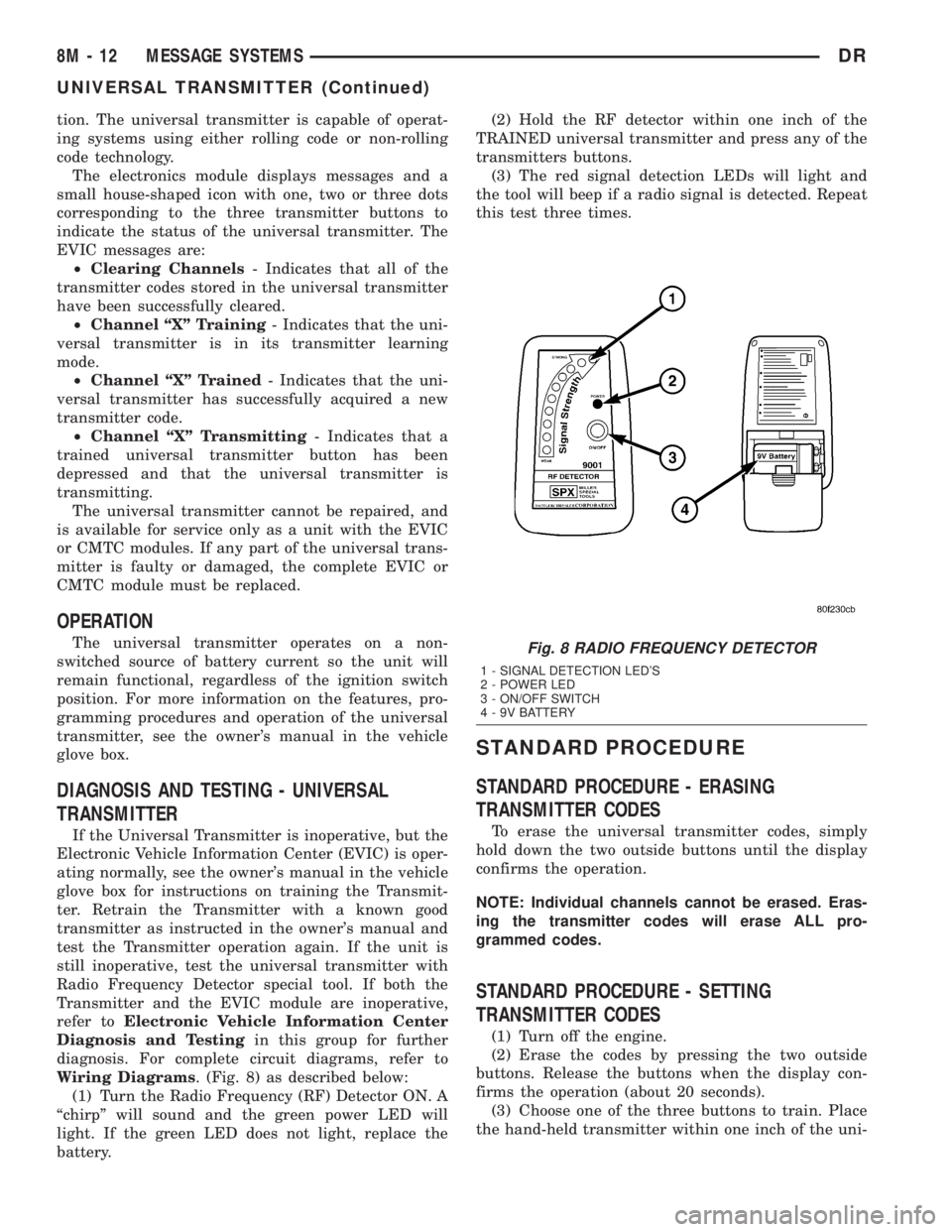
still inoperative, test the universal transmitter with
Radio Frequency Detector special tool. If both the
Transmitter and the EVIC module are inoperative,
refer toElectronic Vehicle Information Center
Diagnosis and Testingin this group for further
diagnosis. For complete circuit diagrams, refer to
Wiring Diagrams. (Fig. 8) as described below:
(1) Turn the Radio Frequency (RF) Detector ON. A
ªchirpº will sound and the green power LED will
light. If the green LED does not light, replace the
battery.(2) Hold the RF detector within one inch of the
TRAINED universal transmitter and press any of the
transmitters buttons.
(3) The red signal detection LEDs will light and
the tool will beep if a radio signal is detected. Repeat
this test three times.
STANDARD PROCEDURE
STANDARD PROCEDURE - ERASING
TRANSMITTER CODES
To erase the universal transmitter codes, simply
hold down the two outside buttons until the display
confirms the operation.
NOTE: Individual channels cannot be erased. Eras-
ing the transmitter codes will erase ALL pro-
grammed codes.
STANDARD PROCEDURE - SETTING
TRANSMITTER CODES
(1) Turn off the engine.
(2) Erase the codes by pressing the two outside
buttons. Release the buttons when the display con-
firms the operation (about 20 seconds).
(3) Choose one of the three buttons to train. Place
the hand-held transmitter within one inch of the uni-
Fig. 8 RADIO FREQUENCY DETECTOR
1 - SIGNAL DETECTION LED'S
2 - POWER LED
3 - ON/OFF SWITCH
4 - 9V BATTERY
8M - 12 MESSAGE SYSTEMSDR
UNIVERSAL TRANSMITTER (Continued)
Page 591 of 2895
POWER SEATS
TABLE OF CONTENTS
page page
POWER SEATS
DESCRIPTION.........................14
OPERATION...........................14
DIAGNOSIS AND TESTING - POWER SEAT
SYSTEM............................14
DRIVER SEAT SWITCH
DESCRIPTION.........................15
OPERATION...........................15
DIAGNOSIS AND TESTING - DRIVER SEAT
SWITCH............................15
REMOVAL.............................16
INSTALLATION.........................16
PASSENGER SEAT SWITCH
DESCRIPTION.........................16
OPERATION...........................17
DIAGNOSIS AND TESTING - PASSENGER
SEAT SWITCH........................17REMOVAL.............................17
INSTALLATION.........................18
POWER SEAT TRACK
DESCRIPTION.........................18
OPERATION...........................18
DIAGNOSIS AND TESTING - POWER SEAT
TRACK.............................18
REMOVAL.............................19
INSTALLATION.........................19
LUMBAR CONTROL SWITCH
DESCRIPTION.........................19
OPERATION...........................19
REMOVAL.............................19
LUMBAR MOTOR
DESCRIPTION.........................19
OPERATION...........................20
DIAGNOSIS AND TESTING - LUMBAR MOTOR..20
POWER SEATS
DESCRIPTION
The power seat system option allows the driver or
passenger to electrically adjust the seat position for
optimum control and comfort using the power seat
switches located on the outboard seat cushion side
shield. The power seat system allows the seating
position to be adjusted forward, rearward, front up,
front down, rear up, or rear down. The power seat
system receives battery current through a fuse in the
Integrated Power Module, regardless of the ignition
switch position. The power seat system includes the
following components:
²Driver Power Seat Switch
²Passenger Power Seat Switch
²Driver Power Seat Track
²Passenger Power Seat Track
²Power Lumbar Adjuster(s)
Some models equipped with the power seat option
also feature a power operated lumbar support in the
seat back. The power lumbar support allows the user
to inflate or deflate a bladder located in the lower
seat back to achieve optimum comfort and support in
the lower lumbar region of the spinal column. The
power lumbar support shares the battery feed circuit
of the power seat system.
Following are general descriptions of the major
components in the power seat system. Refer to
Heated Seat Systemfor information on the individ-ually controlled heated front seats. Refer to the own-
er's manual in the vehicle glove box for more
information on the features, use and operation of the
power seat system.
OPERATION
The power seat system allows the driver and/or
front passenger seating positions to be adjusted elec-
trically and independently using the separate power
seat switches found on the outboard seat cushion
side shield of each front seat. See the owner's manual
in the vehicle glove box for more information on the
features, use and operation of the power seat system.
DIAGNOSIS AND TESTING - POWER SEAT
SYSTEM
Before any testing of the power seat system is
attempted, the battery should be fully-charged and
all wire harness connections and pins checked to
ensure proper continuity and grounds. For circuit
descriptions and diagrams, refer to Wiring Diagrams.
With the dome lamp on, apply the power seat
switch in the direction of the failure. If the dome
lamp dims, the seat may be jamming. Check under
and behind the seat for binding or obstructions. If
the dome lamp does not dim, proceed with testing of
the individual components and circuits.
8N - 14 POWER SEATSDR
Page 592 of 2895
DRIVER SEAT SWITCH
DESCRIPTION
The power seat on this model can be adjusted in
eight different directions, up, down, front up, front
down, rear up, rear down, rearward and forward.
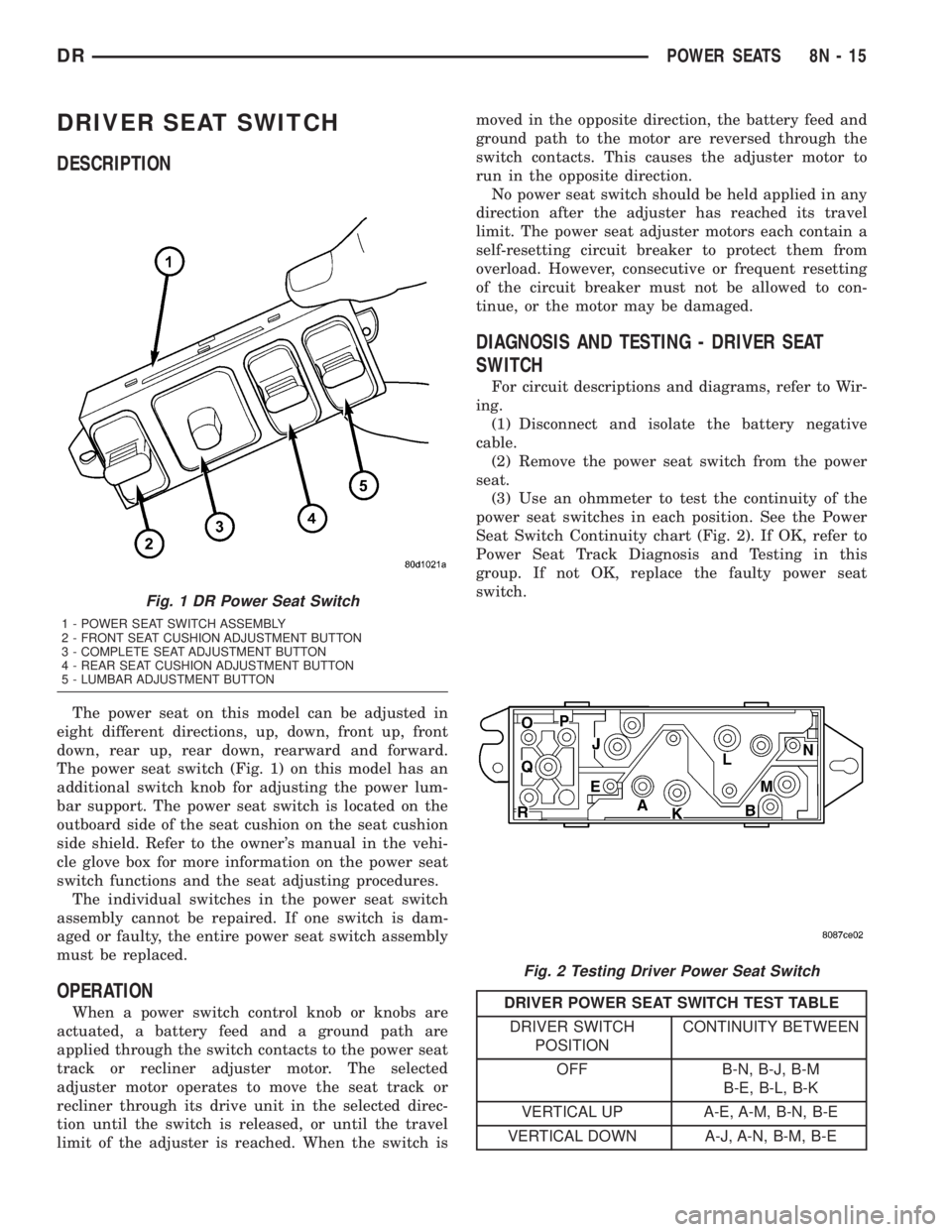
The power seat switch (Fig. 1) on this model has an
additional switch knob for adjusting the power lum-
bar support. The power seat switch is located on the
outboard side of the seat cushion on the seat cushion
side shield. Refer to the owner's manual in the vehi-
cle glove box for more information on the power seat
switch functions and the seat adjusting procedures.
The individual switches in the power seat switch
assembly cannot be repaired. If one switch is dam-
aged or faulty, the entire power seat switch assembly
must be replaced.
OPERATION
When a power switch control knob or knobs are
actuated, a battery feed and a ground path are
applied through the switch contacts to the power seat
track or recliner adjuster motor. The selected
adjuster motor operates to move the seat track or
recliner through its drive unit in the selected direc-
tion until the switch is released, or until the travel
limit of the adjuster is reached. When the switch ismoved in the opposite direction, the battery feed and
ground path to the motor are reversed through the
switch contacts. This causes the adjuster motor to
run in the opposite direction.
No power seat switch should be held applied in any
direction after the adjuster has reached its travel
limit. The power seat adjuster motors each contain a
self-resetting circuit breaker to protect them from
overload. However, consecutive or frequent resetting
of the circuit breaker must not be allowed to con-
tinue, or the motor may be damaged.
DIAGNOSIS AND TESTING - DRIVER SEAT
SWITCH
For circuit descriptions and diagrams, refer to Wir-
ing.
(1) Disconnect and isolate the battery negative
cable.
(2) Remove the power seat switch from the power
seat.
(3) Use an ohmmeter to test the continuity of the
power seat switches in each position. See the Power
Seat Switch Continuity chart (Fig. 2). If OK, refer to
Power Seat Track Diagnosis and Testing in this
group. If not OK, replace the faulty power seat
switch.
DRIVER POWER SEAT SWITCH TEST TABLE
DRIVER SWITCH
POSITIONCONTINUITY BETWEEN
OFF B-N, B-J, B-M
B-E, B-L, B-K
VERTICAL UP A-E, A-M, B-N, B-E
VERTICAL DOWN A-J, A-N, B-M, B-E
Fig. 1 DR Power Seat Switch
1 - POWER SEAT SWITCH ASSEMBLY
2 - FRONT SEAT CUSHION ADJUSTMENT BUTTON
3 - COMPLETE SEAT ADJUSTMENT BUTTON
4 - REAR SEAT CUSHION ADJUSTMENT BUTTON
5 - LUMBAR ADJUSTMENT BUTTON
Fig. 2 Testing Driver Power Seat Switch
DRPOWER SEATS 8N - 15
Page 593 of 2895
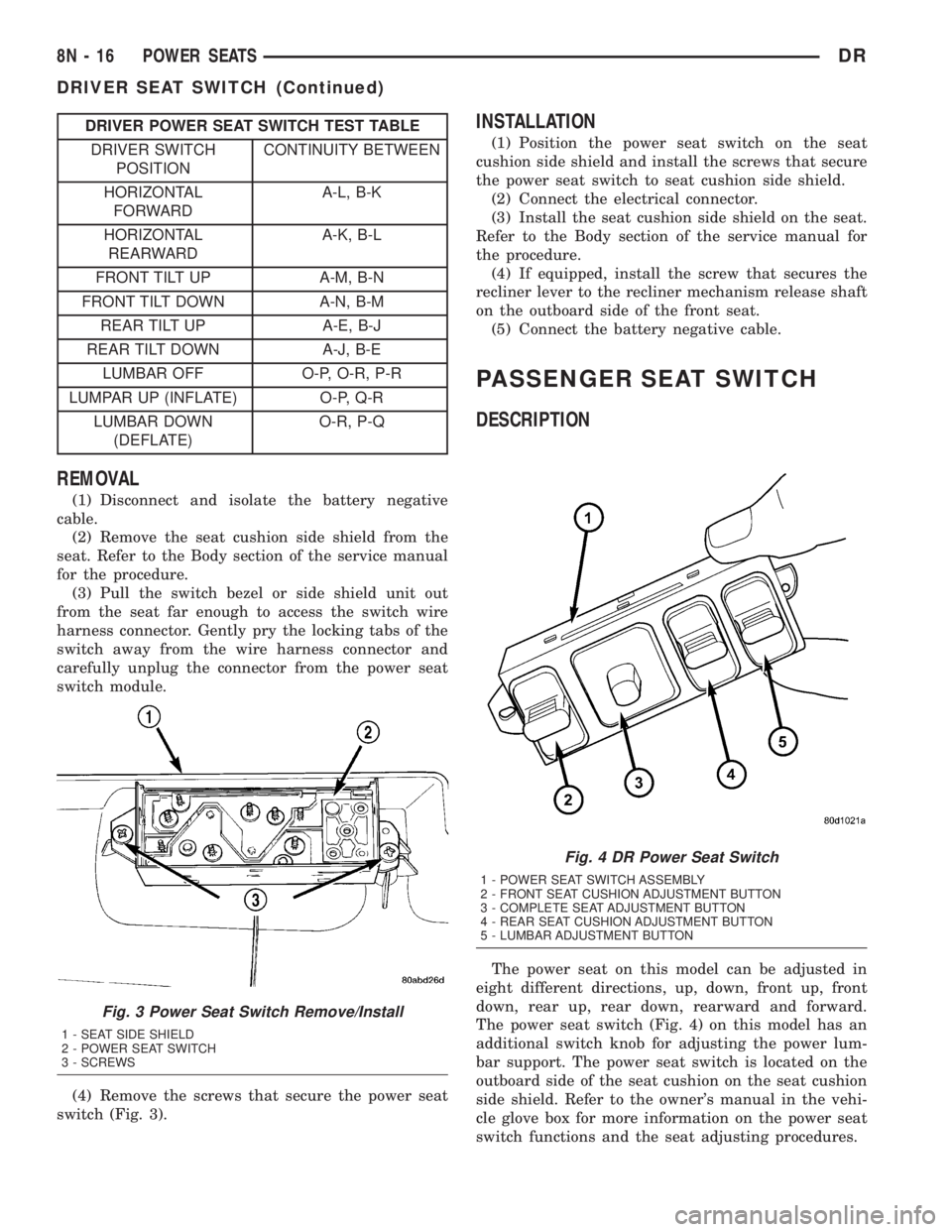
DRIVER POWER SEAT SWITCH TEST TABLE
DRIVER SWITCH
POSITIONCONTINUITY BETWEEN
HORIZONTAL
FORWARDA-L, B-K
HORIZONTAL
REARWARDA-K, B-L
FRONT TILT UP A-M, B-N
FRONT TILT DOWN A-N, B-M
REAR TILT UP A-E, B-J
REAR TILT DOWN A-J, B-E
LUMBAR OFF O-P, O-R, P-R
LUMPAR UP (INFLATE) O-P, Q-R
LUMBAR DOWN
(DEFLATE)O-R, P-Q
REMOVAL
(1) Disconnect and isolate the battery negative
cable.
(2) Remove the seat cushion side shield from the
seat. Refer to the Body section of the service manual
for the procedure.
(3) Pull the switch bezel or side shield unit out
from the seat far enough to access the switch wire
harness connector. Gently pry the locking tabs of the
switch away from the wire harness connector and
carefully unplug the connector from the power seat
switch module.
(4) Remove the screws that secure the power seat
switch (Fig. 3).
INSTALLATION
(1) Position the power seat switch on the seat
cushion side shield and install the screws that secure
the power seat switch to seat cushion side shield.
(2) Connect the electrical connector.
(3) Install the seat cushion side shield on the seat.
Refer to the Body section of the service manual for
the procedure.
(4) If equipped, install the screw that secures the
recliner lever to the recliner mechanism release shaft
on the outboard side of the front seat.
(5) Connect the battery negative cable.
PASSENGER SEAT SWITCH
DESCRIPTION
The power seat on this model can be adjusted in
eight different directions, up, down, front up, front
down, rear up, rear down, rearward and forward.
The power seat switch (Fig. 4) on this model has an
additional switch knob for adjusting the power lum-
bar support. The power seat switch is located on the
outboard side of the seat cushion on the seat cushion
side shield. Refer to the owner's manual in the vehi-
cle glove box for more information on the power seat
switch functions and the seat adjusting procedures.
Fig. 3 Power Seat Switch Remove/Install
1 - SEAT SIDE SHIELD
2 - POWER SEAT SWITCH
3 - SCREWS
Fig. 4 DR Power Seat Switch
1 - POWER SEAT SWITCH ASSEMBLY
2 - FRONT SEAT CUSHION ADJUSTMENT BUTTON
3 - COMPLETE SEAT ADJUSTMENT BUTTON
4 - REAR SEAT CUSHION ADJUSTMENT BUTTON
5 - LUMBAR ADJUSTMENT BUTTON
8N - 16 POWER SEATSDR
DRIVER SEAT SWITCH (Continued)
Page 603 of 2895
DIAGNOSIS AND TESTING - SEAT BELT
TENSION REDUCER...................49
SEAT BELT TURNING LOOP ADJUSTER
REMOVAL.............................50
INSTALLATION.........................50
SIDE CURTAIN AIRBAG
DESCRIPTION.........................51
OPERATION...........................51
REMOVAL.............................52
INSTALLATION.........................53SIDE IMPACT AIRBAG CONTROL MODULE
DESCRIPTION.........................53
OPERATION...........................54
REMOVAL
REMOVAL...........................55
REMOVAL...........................55
INSTALLATION
INSTALLATION.......................56
INSTALLATION.......................57
RESTRAINTS
DESCRIPTION
An occupant restraint system is standard factory-
installed safety equipment on this model. Available
occupant restraints for this model include both active
and passive types. Active restraints are those which
require the vehicle occupants to take some action to
employ, such as fastening a seat belt; while passive
restraints require no action by the vehicle occupants
to be employed (Fig. 1).
ACTIVE RESTRAINTS
The active restraints for this model include:
²Front Seat Belts- Both outboard front seating
positions are equipped with three-point seat belt sys-
tems employing a lower B-pillar mounted inertia
latch-type emergency locking retractor, height-adjust-
able upper B-pillar mounted turning loops, a fixed
lower seat belt anchor secured to the lower B-pillar
(standard cab) or floor panel adjacent to the B-pillar
(quad cab), and a traveling end-release seat belt
buckle secured to the inboard seat track. The driver
side retractor for standard cab models includes an
electrically actuated seat belt tension reducer. The
passenger side front seat retractor for all models is
also switchable from an emergency locking retractor
to an automatic locking retractor. The front seat belt
buckle for the driver side of all models includes an
integral seat belt switch that detects whether its seat
belt has been fastened. The center front seating posi-
tion for standard cab models is also equipped with a
three-point seat belt employing a floor panel
mounted inertia latch-type retractor, a routing
bracket and bezel near the top of the cab back panel,
and two fixed end-release buckles secured to the cen-
ter seat cushion frame. The center front seating posi-
tion for quad cab models is equipped with a fixed lap
belt and an end-release buckle secured to the center
seat cushion frame.
²Rear Seat Belts- All three rear seating posi-
tions are equipped with three-point seat belt sys-
tems. The outboard seating position belts employ a
lower C-pillar mounted inertia latch-type emergency
locking retractor, a fixed position upper C-pillar
mounted turning loop, and a fixed lower seat beltanchor secured to the lower C-pillar. The rear seat
center seating position belt has a rear floor panel
mounted inertia latch-type emergency locking retrac-
tor and a routing bracket and bezel on the top of the
cab back panel. The end-release buckle units for the
right outboard seating position and the center seat-
ing position lower anchor are integral to the center
retractor mounting bracket on the rear floor panel.
The end-release buckle units for the center and left
outboard seating positions are individually secured to
the rear floor panel on models with the standard
equipment rear bench seat, or secured with the rear
seat mounting hardware on models with the optional
60/40 split rear bench seat.
²Child Restraint Anchors- All standard cab
models are equipped with two, fixed-position, child
seat upper tether anchors that are integral to the
upper cab back panel reinforcement and concealed
behind individual trim cover and bezel units that are
integral to the cab back trim panel. All quad cab
models are equipped with three child seat upper
tether anchor straps that are secured to the upper
cab back panel reinforcement, behind the upright
rear seat back. Two lower anchors are also provided
for the front outboard seating position of standard
cab models, and for each rear outboard seating posi-
tion on quad cab models. These lower anchors are
accessed from the front of the seat where the seat
back meets the seat cushion. The child seat tether
and lower anchors for the front seat are deleted on
quad cab models.
PASSIVE RESTRAINTS
The passive restraints available for this model
include the following:
²Dual Front Airbags- Next Generation driver
and front passenger airbags are available for this
model. This airbag system is a passive, inflatable,
Supplemental Restraint System (SRS) and vehicles
with this equipment can be readily identified by the
ªSRS - AIRBAGº logo molded into the driver airbag
trim cover in the center of the steering wheel and
also into the passenger airbag door on the instru-
ment panel above the glove box (Fig. 2). Vehicles
with the airbag system can also be identified by the
airbag indicator, which will illuminate in the instru-
8O - 2 RESTRAINTSDR