lock DODGE RAM 2003 Service Repair Manual
[x] Cancel search | Manufacturer: DODGE, Model Year: 2003, Model line: RAM, Model: DODGE RAM 2003Pages: 2895, PDF Size: 83.15 MB
Page 380 of 2895
CHIME/BUZZER
TABLE OF CONTENTS
page page
CHIME/BUZZER
DESCRIPTION..........................1
OPERATION............................1DIAGNOSIS AND TESTING - CHIME
CONDITIONS..........................2
CHIME/BUZZER
DESCRIPTION
The chime module is located within the instrument
cluster and is not serviceable. The chime system pro-
vides the driver with warning chimes for:
²Air Bag
²Seat Belt
²Low Fuel
²Door Ajar
²Low Wash
²Park Brake
²Over Speed
²Turn Signal On
²Key-In Ignition
²Exterior Lamps ON
²Warning Lamp Announcement
²Transmission Over Temperature
OPERATION
FASTEN SEAT BELT
The seat belt reminder system uses both visual
and audible signals. The Instrument Cluster moni-
tors the driver seat belt buckle switch. When the
ignition switch transitions from OFF to RUN and the
driver seat belt has not been buckled, the Instrument
Cluster will illuminate the seat belt indicator lamp
and sound the chime. The system will always illumi-
nate the seat belt reminder lamp for four to eight
seconds when the ignition switch is turned to the ON
position. The CHIME will sound during the same
time interval if the driver's seat belt is not fastened.
The warning lamp will remain illuminated as long as
the seat belt remains unbuckled, and the ignition
switch is in the RUN position. Passenger seat belts
are not connected to the system.
HEADLAMPS REMINDER
The Instrument Cluster monitors the multiplex
headlamp switch. The headlamp audible warning will
alert the driver that the exterior lamps have been
left on. If the ignition switch is left off, the driver's
door open, and the headlamp switch is in the parklamp or headlamp position, the chime will sound
until the headlamp switch is turned off, the door is
closed or the battery protection time out expires.
KEY IN IGNITION REMINDER
The Instrument Cluster monitors the ignition
switch. The chime will activate if the drivers door is
opened and the key is in the ignition switch, with the
ignition switch in either the OFF, LOCK, or the
accessory (ACC) position. The chime will continue
until the key is removed from the ignition switch or
the door is closed.
DOOR AJAR CHIME
The Instrument Cluster monitors the door ajar
switches. A chime will sound once when the door is
opened, the ignition is in RUN position and vehicle
speed is present.
TURN SIGNAL ON
The Instrument Cluster monitors the multiplex
multifunction switch. The instrument cluster shall
remind the driver that either turn signal has been
left on by a continuous chime after the turn signal
indicator is left ON for 1.0 miles and the vehicle
speed is 15 mph or greater.
LOW FUEL REMINDER
When the fuel level drops to approximately 1/8
tank, the fuel symbol will light and a single chime
will sound. The light will remain on until fuel is
added.
OVER SPEED
During any ignition ON, the Instrument Cluster
maintains the most recently received speed. If the
vehicle speed exceeds a preprogramed limit set in the
instrument cluster it will activate a single chime.
WARNING LAMP ANNOUNCEMENT
The Instrument Cluster monitors critical engine
and transmission system parameters. If any of the
systems are out of their operating parameters, the
instrument cluster will illuminate a lamp and acti-
vate and audible chime.
DRCHIME/BUZZER 8B - 1
Page 382 of 2895
ELECTRONIC CONTROL MODULES
TABLE OF CONTENTS
page page
COMMUNICATION
DESCRIPTION..........................1
OPERATION............................2
CONTROLLER ANTILOCK BRAKE
DESCRIPTION..........................3
OPERATION............................3
REMOVAL.............................3
INSTALLATION..........................3
DATA LINK CONNECTOR
DESCRIPTION - DATA LINK CONNECTOR.....3
OPERATION - DATA LINK CONNECTOR......3
ENGINE CONTROL MODULE
DESCRIPTION - ECM.....................4
OPERATION - ECM......................4
REMOVAL.............................4
INSTALLATION..........................5
FRONT CONTROL MODULE
DESCRIPTION..........................5
OPERATION............................5
DIAGNOSIS AND TESTING - FRONT
CONTROL MODULE....................6
REMOVAL.............................6
INSTALLATION..........................6
HEATED SEAT MODULE
DESCRIPTION..........................6
OPERATION............................6
DIAGNOSIS AND TESTING - HEATED SEAT
MODULE.............................7
REMOVAL.............................7
INSTALLATION..........................7
POWERTRAIN CONTROL MODULE
DESCRIPTION
DESCRIPTION - PCM...................8DESCRIPTION - MODES OF OPERATION....8
DESCRIPTION - 5 VOLT SUPPLIES.......10
DESCRIPTION - IGNITION CIRCUIT SENSE . 10
DESCRIPTION - POWER GROUNDS......10
DESCRIPTION - SENSOR RETURN.......10
OPERATION
OPERATION - PCM....................11
OPERATION - 5 VOLT SUPPLIES.........11
OPERATION - IGNITION CIRCUIT SENSE . . . 12
REMOVAL.............................12
INSTALLATION.........................12
SENTRY KEY IMMOBILIZER MODULE
DESCRIPTION.........................13
OPERATION...........................13
STANDARD PROCEDURE - PCM/SKIM
PROGRAMMING......................14
REMOVAL.............................15
INSTALLATION.........................15
TRANSFER CASE CONTROL MODULE
DESCRIPTION.........................15
OPERATION...........................15
TRANSMISSION CONTROL MODULE
DESCRIPTION.........................19
OPERATION...........................19
STANDARD PROCEDURE
STANDARD PROCEDURE - TCM QUICK
LEARN..............................21
STANDARD PROCEDURE - DRIVE LEARN . . 21
COMMUNICATION
DESCRIPTION
The DaimlerChrysler Programmable Communica-
tion Interface (PCI) data bus system is a single wire
multiplex system used for vehicle communications on
many DaimlerChrysler Corporation vehicles. Multi-plexing is a system that enables the transmission of
several messages over a single channel or circuit. All
DaimlerChrysler vehicles use this principle for com-
munication between various microprocessor-based
electronic control modules. The PCI data bus exceeds
the Society of Automotive Engineers (SAE) J1850
Standard for Class B Multiplexing.
DRELECTRONIC CONTROL MODULES 8E - 1
Page 384 of 2895
²Cyclic Redundancy Check (CRC) Byte- This
byte is used to detect errors during a message trans-
mission.
²In-Frame Response (IFR) byte(s)-Ifa
response is required from the target module(s), it can
be sent during this frame. This function is described
in greater detail in the following paragraph.
The IFR consists of one or more bytes, which are
transmitted during a message. If the sending module
requires information to be received immediately, the
target module(s) can send data over the bus during
the original message. This allows the sending module
to receive time-critical information without having to
wait for the target module to access the bus. After
the IFR is received, the sending module broadcasts
an End of Frame (EOF) message and releases control
of the bus.
The PCI data bus can be monitored using the
DRBIIItscan tool. It is possible, however, for the bus
to pass all DRBIIIttests and still be faulty if the
voltage parameters are all within the specified range
and false messages are being sent.
CONTROLLER ANTILOCK
BRAKE
DESCRIPTION
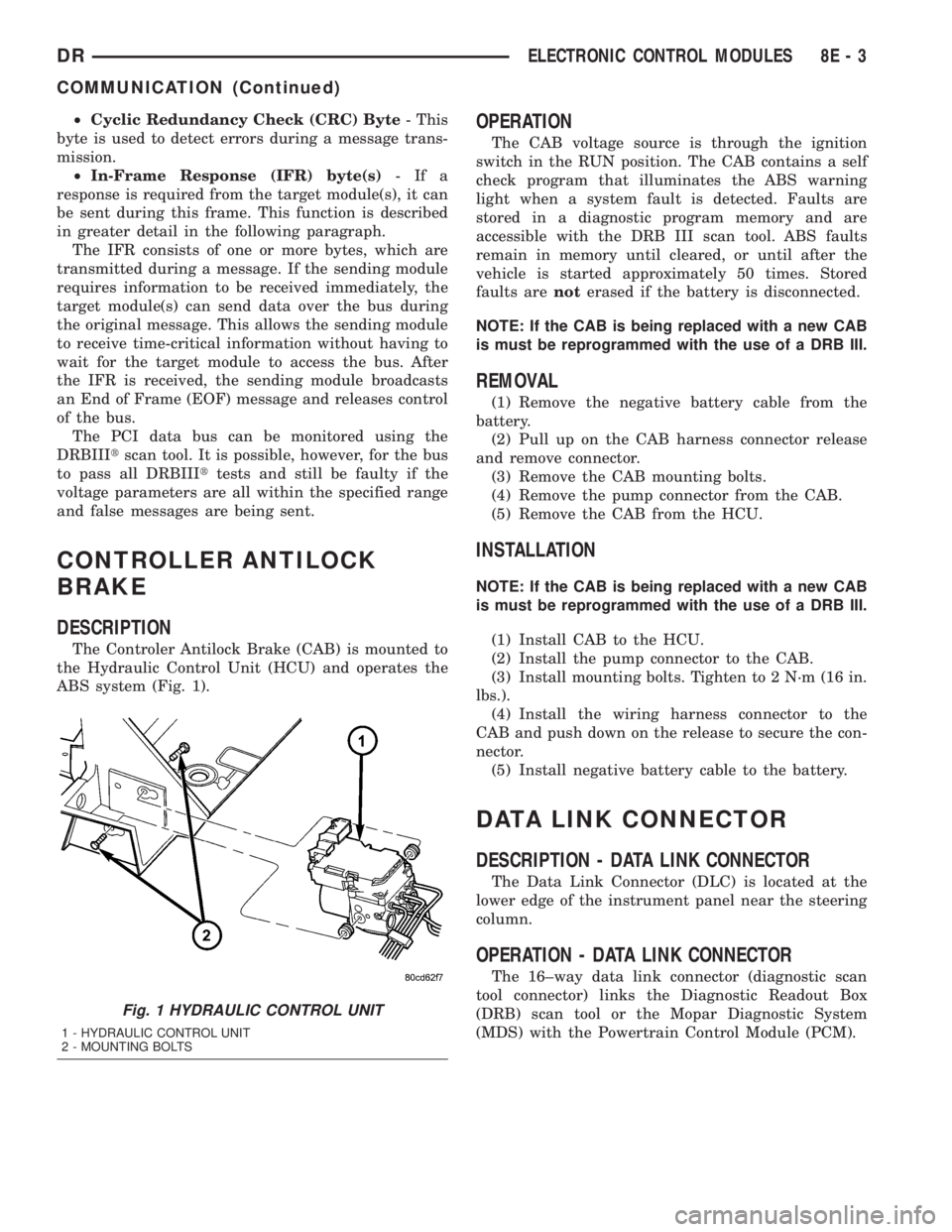
The Controler Antilock Brake (CAB) is mounted to
the Hydraulic Control Unit (HCU) and operates the
ABS system (Fig. 1).
OPERATION
The CAB voltage source is through the ignition
switch in the RUN position. The CAB contains a self
check program that illuminates the ABS warning
light when a system fault is detected. Faults are
stored in a diagnostic program memory and are
accessible with the DRB III scan tool. ABS faults
remain in memory until cleared, or until after the
vehicle is started approximately 50 times. Stored
faults arenoterased if the battery is disconnected.
NOTE: If the CAB is being replaced with a new CAB
is must be reprogrammed with the use of a DRB III.
REMOVAL
(1) Remove the negative battery cable from the
battery.
(2) Pull up on the CAB harness connector release
and remove connector.
(3) Remove the CAB mounting bolts.
(4) Remove the pump connector from the CAB.
(5) Remove the CAB from the HCU.
INSTALLATION
NOTE: If the CAB is being replaced with a new CAB
is must be reprogrammed with the use of a DRB III.
(1) Install CAB to the HCU.
(2) Install the pump connector to the CAB.
(3) Install mounting bolts. Tighten to 2 N´m (16 in.
lbs.).
(4) Install the wiring harness connector to the
CAB and push down on the release to secure the con-
nector.
(5) Install negative battery cable to the battery.
DATA LINK CONNECTOR
DESCRIPTION - DATA LINK CONNECTOR
The Data Link Connector (DLC) is located at the
lower edge of the instrument panel near the steering
column.
OPERATION - DATA LINK CONNECTOR
The 16±way data link connector (diagnostic scan
tool connector) links the Diagnostic Readout Box
(DRB) scan tool or the Mopar Diagnostic System
(MDS) with the Powertrain Control Module (PCM).
Fig. 1 HYDRAULIC CONTROL UNIT
1 - HYDRAULIC CONTROL UNIT
2 - MOUNTING BOLTS
DRELECTRONIC CONTROL MODULES 8E - 3
COMMUNICATION (Continued)
Page 385 of 2895
ENGINE CONTROL MODULE
DESCRIPTION - ECM
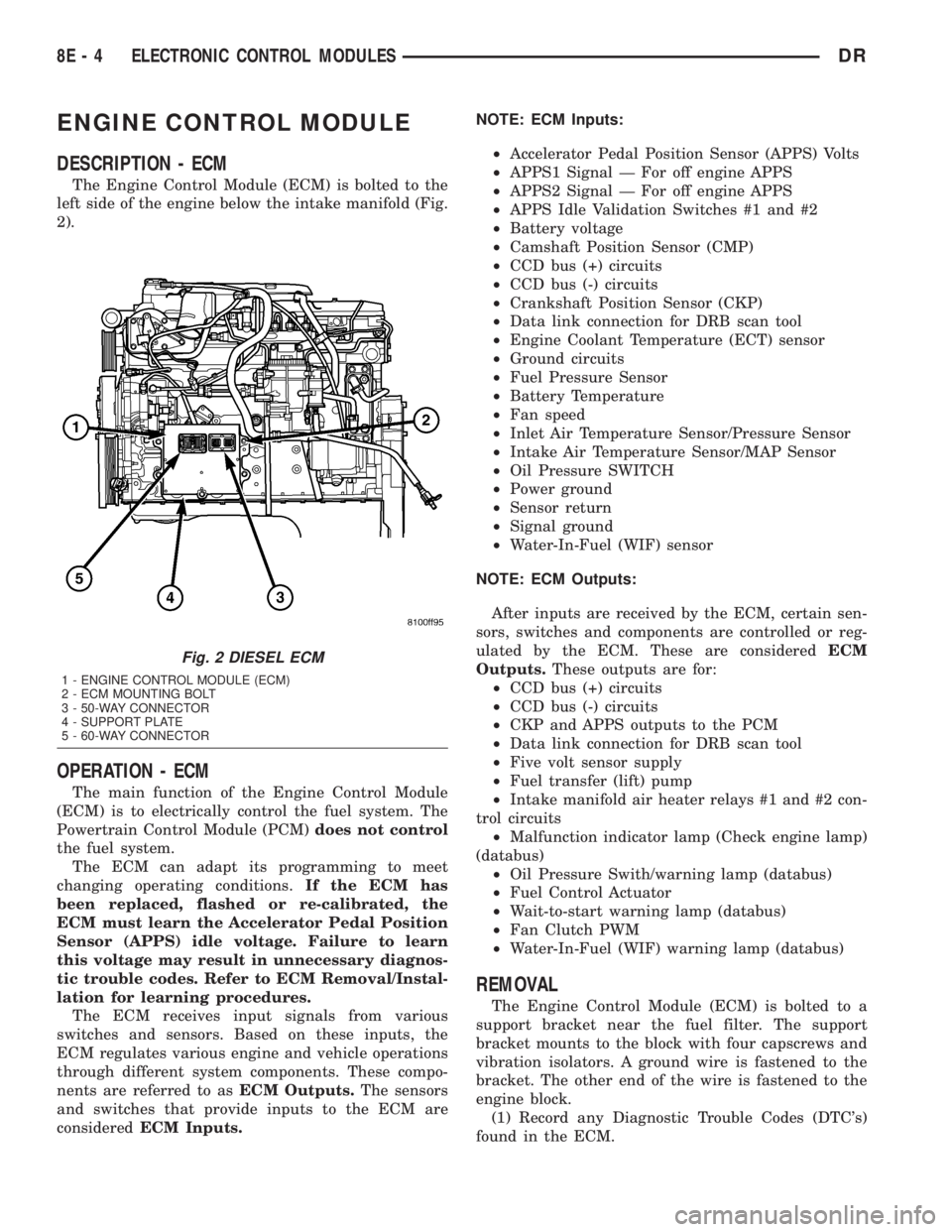
The Engine Control Module (ECM) is bolted to the
left side of the engine below the intake manifold (Fig.
2).
OPERATION - ECM
The main function of the Engine Control Module
(ECM) is to electrically control the fuel system. The
Powertrain Control Module (PCM)does not control
the fuel system.
The ECM can adapt its programming to meet
changing operating conditions.If the ECM has
been replaced, flashed or re-calibrated, the
ECM must learn the Accelerator Pedal Position
Sensor (APPS) idle voltage. Failure to learn
this voltage may result in unnecessary diagnos-
tic trouble codes. Refer to ECM Removal/Instal-
lation for learning procedures.
The ECM receives input signals from various
switches and sensors. Based on these inputs, the
ECM regulates various engine and vehicle operations
through different system components. These compo-
nents are referred to asECM Outputs.The sensors
and switches that provide inputs to the ECM are
consideredECM Inputs.NOTE: ECM Inputs:
²Accelerator Pedal Position Sensor (APPS) Volts
²APPS1 Signal Ð For off engine APPS
²APPS2 Signal Ð For off engine APPS
²APPS Idle Validation Switches #1 and #2
²Battery voltage
²Camshaft Position Sensor (CMP)
²CCD bus (+) circuits
²CCD bus (-) circuits
²Crankshaft Position Sensor (CKP)
²Data link connection for DRB scan tool
²Engine Coolant Temperature (ECT) sensor
²Ground circuits
²Fuel Pressure Sensor
²Battery Temperature
²Fan speed
²Inlet Air Temperature Sensor/Pressure Sensor
²Intake Air Temperature Sensor/MAP Sensor
²Oil Pressure SWITCH
²Power ground
²Sensor return
²Signal ground
²Water-In-Fuel (WIF) sensor
NOTE: ECM Outputs:
After inputs are received by the ECM, certain sen-
sors, switches and components are controlled or reg-
ulated by the ECM. These are consideredECM
Outputs.These outputs are for:
²CCD bus (+) circuits
²CCD bus (-) circuits
²CKP and APPS outputs to the PCM
²Data link connection for DRB scan tool
²Five volt sensor supply
²Fuel transfer (lift) pump
²Intake manifold air heater relays #1 and #2 con-
trol circuits
²Malfunction indicator lamp (Check engine lamp)
(databus)
²Oil Pressure Swith/warning lamp (databus)
²Fuel Control Actuator
²Wait-to-start warning lamp (databus)
²Fan Clutch PWM
²Water-In-Fuel (WIF) warning lamp (databus)
REMOVAL
The Engine Control Module (ECM) is bolted to a
support bracket near the fuel filter. The support
bracket mounts to the block with four capscrews and
vibration isolators. A ground wire is fastened to the
bracket. The other end of the wire is fastened to the
engine block.
(1) Record any Diagnostic Trouble Codes (DTC's)
found in the ECM.
Fig. 2 DIESEL ECM
1 - ENGINE CONTROL MODULE (ECM)
2 - ECM MOUNTING BOLT
3 - 50-WAY CONNECTOR
4 - SUPPORT PLATE
5 - 60-WAY CONNECTOR
8E - 4 ELECTRONIC CONTROL MODULESDR
Page 394 of 2895
(2) Tighten bolts. Refer to torque specifications.
(3) Check pin connectors in the PCM and the three
32±way connectors (four 38±way connectors if
equipped with NGC) for corrosion or damage. Also,
the pin heights in connectors should all be same.
Repair as necessary before installing connectors.
(4) Install three 32±way connectors (four 38±way
connectors if equipped with NGC).
(5) Install cover over electrical connectors. Cover
snaps onto PCM.
(6) Install negative battery cable.
(7) Use the DRB scan tool to reprogram new PCM
with vehicles original Vehicle Identification Number
(VIN) and original vehicle mileage.
SENTRY KEY IMMOBILIZER
MODULE
DESCRIPTION
The Sentry Key Immobilizer Module (SKIM) con-
tains a Radio Frequency (RF) transceiver and a cen-
tral processing unit, which includes the Sentry Key
Immobilizer System (SKIS) program logic. The SKIS
programming enables the SKIM to program and
retain in memory the codes of at least two, but no
more than eight electronically coded Sentry Key
transponders. The SKIS programming also enables
the SKIM to communicate over the Programmable
Communication Interface (PCI) bus network with the
Powertrain Control Module (PCM), and/or the
DRBIIItscan tool.
OPERATION
The SKIM transmits and receives RF signals
through a tuned antenna enclosed within a molded
plastic ring that is integral to the SKIM housing.
When the SKIM is properly installed on the steering
column, the antenna ring is oriented around the igni-
tion lock cylinder housing. This antenna ring must be
located within eight millimeters (0.31 inches) of the
Sentry Key in order to ensure proper RF communica-
tion between the SKIM and the Sentry Key tran-
sponder.
For added system security, each SKIM is pro-
grammed with a unique ªSecret Keyº code and a
security code. The SKIM keeps the ªSecret Keyº code
in memory. The SKIM also sends the ªSecret Keyº
code to each of the programmed Sentry Key tran-
sponders. The security code is used by the assembly
plant to access the SKIS for initialization, or by the
dealer technician to access the system for service.
The SKIM also stores in its memory the Vehicle
Identification Number (VIN), which it learns through
a PCI bus message from the PCM during initializa-
tion.The SKIM and the PCM both use software that
includes a rolling code algorithm strategy, which
helps to reduce the possibility of unauthorized SKIS
disarming. The rolling code algorithm ensures secu-
rity by preventing an override of the SKIS through
the unauthorized substitution of the SKIM or the
PCM. However, the use of this strategy also means
that replacement of either the SKIM or the PCM
units will require a system initialization procedure to
restore system operation.
When the ignition switch is turned to the ON or
START positions, the SKIM transmits an RF signal
to excite the Sentry Key transponder. The SKIM then
listens for a return RF signal from the transponder
of the Sentry Key that is inserted in the ignition lock
cylinder. If the SKIM receives an RF signal with
valid ªSecret Keyº and transponder identification
codes, the SKIM sends a ªvalid keyº message to the
PCM over the PCI bus. If the SKIM receives an
invalid RF signal or no response, it sends ªinvalid
keyº messages to the PCM. The PCM will enable or
disable engine operation based upon the status of the
SKIM messages.
The SKIM also sends messages to the Instrument
Cluster which controls the VTSS indicator LED. The
SKIM sends messages to the Instrument Cluster to
turn the LED on for about three seconds when the
ignition switch is turned to the ON position as a bulb
test. After completion of the bulb test, the SKIM
sends bus messages to keep the LED off for a dura-
tion of about one second. Then the SKIM sends mes-
sages to turn the LED on or off based upon the
results of the SKIS self-tests. If the VTSS indicator
LED comes on and stays on after the bulb test, it
indicates that the SKIM has detected a system mal-
function and/or that the SKIS has become inopera-
tive.
If the SKIM detects an invalid key when the igni-
tion switch is turned to the ON position, it sends
messages to flash the VTSS indicator LED. The
SKIM can also send messages to flash the LED as an
indication to the customer that the SKIS has been
placed in it's ªCustomer Learnº programming mode.
See Sentry Key Immobilizer System Transponder
Programming in this section for more information on
the ªCustomer Learnº programming mode.
For diagnosis or initialization of the SKIM and the
PCM, a DRBIIItscan tool and the proper Powertrain
Diagnostic Procedures manual are required. The
SKIM cannot be repaired and, if faulty or damaged,
the unit must be replaced.
DRELECTRONIC CONTROL MODULES 8E - 13
POWERTRAIN CONTROL MODULE (Continued)
Page 395 of 2895
STANDARD PROCEDURE - PCM/SKIM
PROGRAMMING
NOTE: There are two procedures for transfering the
secret key to the SKIM:
²When ONLY the SKIM module is replaced, the
secret key is transfered from the PCM to the SKIM.
The ORGINAL KEYS may then be programmed to
the SKIM.
²When ONLY the PCM is replaced, then the
secret key is transfered from the SKIM to the PCM.
The ORGINAL KEYS may be used.
²When BOTH the SKIM and the PCM are
replaced the secret key is transferred from the
SKIM to the PCM, and NEW KEYS must be pro-
grammed.
NOTE: Before replacing the Powertrain Control
Module (PCM) for a failed driver, control circuit, or
ground circuit, be sure to check the related compo-
nent/circuit integrity for failures not detected due to
a double fault in the circuit. Most PCM driver/con-
trol circuit failures are caused by internal compo-
nent failures (i.e. relay and solenoids) and shorted
circuits (i.e. pull-ups, drivers and switched circuits).
These failures are difficult to detect when a double
fault has occurred and only one Diagnostic Trouble
Code (DTC) has set.
When a PCM (SBEC) and the Sentry Key Immobi-
lizer Module (SKIM) are replaced at the same time
perform the following steps in order:
(1) Program the new PCM (SBEC).
(2) Program the new SKIM.
(3) Replace all ignition keys and program them to
the new SKIM.
PROGRAMMING THE PCM (SBEC)
The Sentry Key Immobilizer System (SKIS) Secret
Key is an ID code that is unique to each SKIM. This
code is programmed and stored in the SKIM, PCM
and transponder chip (ignition keys). When replacing
the PCM it is necessary to program the secret key
into the new PCM using the DRBIIItscan tool. Per-
form the following steps to program the secret key
into the PCM.
(1) Turn the ignition switch on (transmission in
park/neutral).
(2) Use the DRBIIItscan tool and select THEFT
ALARM, SKIM then MISCELLANEOUS.
(3) Select PCM REPLACED (GAS ENGINE).
(4) Enter secured access mode by entering the
vehicle four-digit PIN.
(5) Select ENTER to update PCM VIN.NOTE: If three attempts are made to enter secure
access mode using an incorrect PIN, secured
access mode will be locked out for one hour. To
exit this lockout mode, turn the ignition to the RUN
position for one hour then enter the correct PIN.
(Ensure all accessories are turned OFF. Also moni-
tor the battery state and connect a battery charger
if necessary).
(6) Press ENTER to transfer the secret key (the
SKIM will send the secret key to the PCM).
(7) Press Page Back to get to the Select System
menu and select ENGINE, MISCELLANEOUS, and
SRI MEMORY CHECK.
(8) The DRBIIItscan tool will ask, Is odometer
reading between XX and XX? Select the YES or NO
button on the DRB IIItscan tool. If NO is selected,
the DRBIIItscan tool will read, Enter odometer
Reading
reading from the instrument cluster and press
ENTER.
PROGRAMMING THE SKIM
(1) Turn the ignition switch on (transmission in
park/neutral).
(2) Use the DRBIIItscan tool and select THEFT
ALARM, SKIM then MISCELLANEOUS.
(3) Select SKIM REPLACED (GAS ENGINE).
(4) Program the vehicle four-digit PIN into SKIM.
(5) Select COUNTRY CODE and enter the correct
country.
NOTE: Be sure to enter the correct country code. If
the incorrect country code is programmed into the
SKIM, the SKIM must be replaced.
(6) Select YES to update the VIN (the SKIM will
learn the VIN from the PCM).
(7) Press ENTER to transfer the secret key (the
PCM will send the secret key information to the
SKIM).
(8) Program ignition keys to the SKIM.
NOTE: If the PCM and the SKIM are replaced at the
same time, all vehicle keys will need to be replaced
and programmed to the new SKIM.
PROGRAMMING IGNITION KEYS TO THE SKIM
(1) Turn the ignition switch on (transmission in
park/neutral).
(2) Use the DRBIIItscan tool and select THEFT
ALARM, SKIM then MISCELLANEOUS.
(3) Select PROGRAM IGNITION KEY'S.
(4) Enter secured access mode by entering the
vehicle four-digit PIN.
8E - 14 ELECTRONIC CONTROL MODULESDR
SENTRY KEY IMMOBILIZER MODULE (Continued)
Page 396 of 2895
NOTE: A maximum of eight keys can be learned to
each SKIM. Once a key is learned to a SKIM, it (the
key) cannot be transferred to another vehicle.
(5) If ignition key programming is unsuccessful,
the DRBIIItscan tool will display one of the follow-
ing messages:
(a) Programming Not Attempted - The DRBIIIt
scan tool attempts to read the programmed key
status and there are no keys programmed into
SKIM memory.
(b) Programming Key Failed (Possible Used Key
From Wrong Vehicle) - SKIM is unable to program
key due to one of the following:
²Faulty ignition key transponder.
²Ignition key is programmed to another vehicle.
(c) 8 Keys Already Learned, Programming Not
Done - SKIM transponder ID memory is full.
(6) Obtain ignition keys to be programmed from
customer (8 keys maximum).
(7) Using the DRBIIItscan tool, erase all ignition
keys by selecting MISCELLANEOUS and ERASE
ALL CURRENT IGN. KEYS.
(8) Program all ignition keys.
Learned Key In Ignition - Ignition key transponder
ID is currently programmed in SKIM memory.
REMOVAL
(1) Disconnect and isolate the battery negative
cable.
(2) Remove the steering column upper and lower
shrouds. Refer to Steering, Column, Shroud,
Removal.
(3) Disconnect the steering column wire harness
connector from the Sentry Key Immobilizer Module
(SKIM)
(4) Remove the screw securing the SKIM module
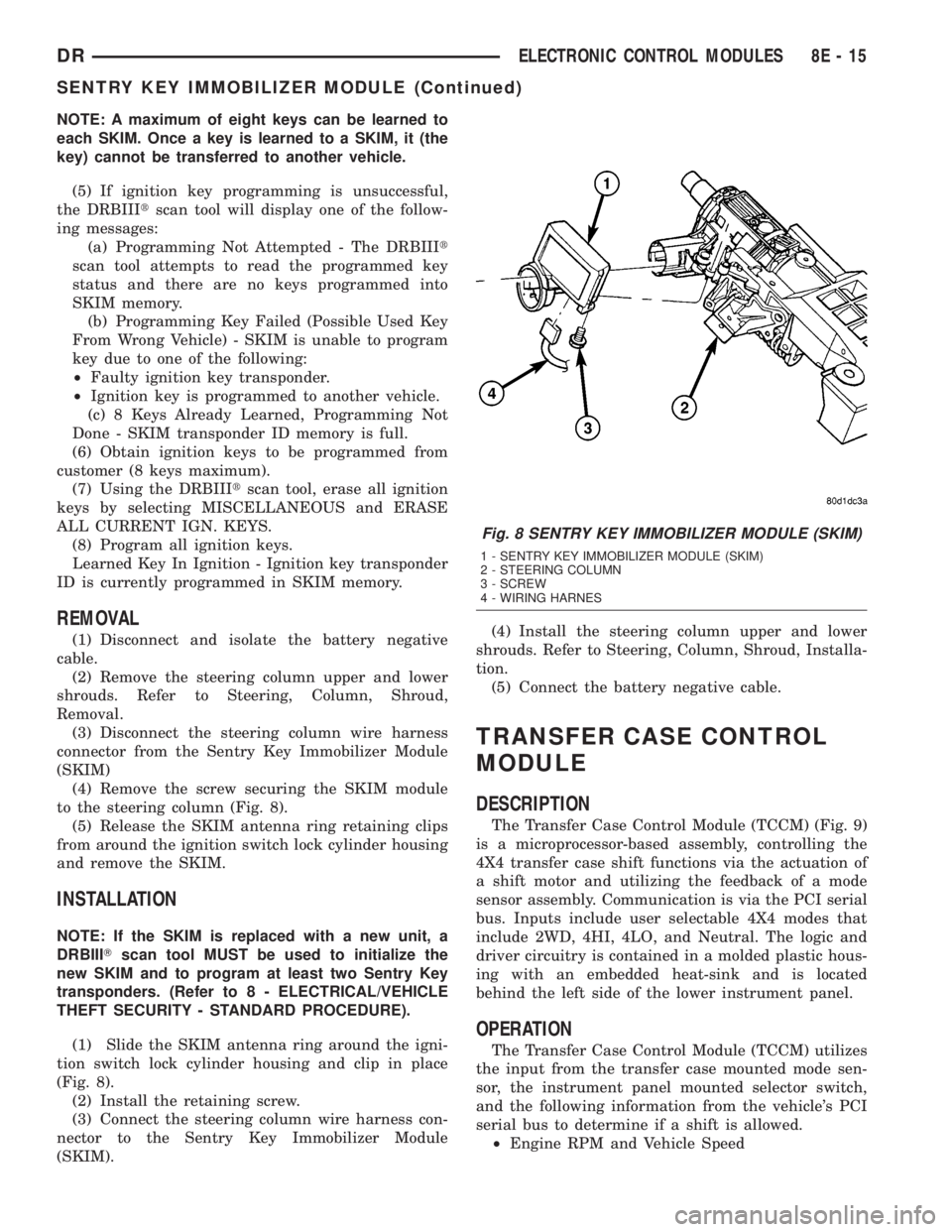
to the steering column (Fig. 8).
(5) Release the SKIM antenna ring retaining clips
from around the ignition switch lock cylinder housing
and remove the SKIM.
INSTALLATION
NOTE: If the SKIM is replaced with a new unit, a
DRBIIITscan tool MUST be used to initialize the
new SKIM and to program at least two Sentry Key
transponders. (Refer to 8 - ELECTRICAL/VEHICLE
THEFT SECURITY - STANDARD PROCEDURE).
(1) Slide the SKIM antenna ring around the igni-
tion switch lock cylinder housing and clip in place
(Fig. 8).
(2) Install the retaining screw.
(3) Connect the steering column wire harness con-
nector to the Sentry Key Immobilizer Module
(SKIM).(4) Install the steering column upper and lower
shrouds. Refer to Steering, Column, Shroud, Installa-
tion.
(5) Connect the battery negative cable.
TRANSFER CASE CONTROL
MODULE
DESCRIPTION
The Transfer Case Control Module (TCCM) (Fig. 9)
is a microprocessor-based assembly, controlling the
4X4 transfer case shift functions via the actuation of
a shift motor and utilizing the feedback of a mode
sensor assembly. Communication is via the PCI serial
bus. Inputs include user selectable 4X4 modes that
include 2WD, 4HI, 4LO, and Neutral. The logic and
driver circuitry is contained in a molded plastic hous-
ing with an embedded heat-sink and is located
behind the left side of the lower instrument panel.
OPERATION
The Transfer Case Control Module (TCCM) utilizes
the input from the transfer case mounted mode sen-
sor, the instrument panel mounted selector switch,
and the following information from the vehicle's PCI
serial bus to determine if a shift is allowed.
²Engine RPM and Vehicle Speed
Fig. 8 SENTRY KEY IMMOBILIZER MODULE (SKIM)
1 - SENTRY KEY IMMOBILIZER MODULE (SKIM)
2 - STEERING COLUMN
3 - SCREW
4 - WIRING HARNES
DRELECTRONIC CONTROL MODULES 8E - 15
SENTRY KEY IMMOBILIZER MODULE (Continued)
Page 398 of 2895
²The recessed Neutral Selection switch has been
depressed continuously for 4.0 seconds 100 msec
while all shift conditions have been continuously met.
²Transmission in NEUTRAL signal recognized
from the bus. (Automatic transmissions only)
²Clutch signal is recognized from the bus (Manu-
al transmissions only).
²Proper message transmissions/receptions are
occurring on the PCI bus.
²Vehicle speed is less than or equal to 4.8 km/hr
(3 miles per hour).
²Ignition key switch is in the RUN position,
engine off.
²Foot Brake is applied.
²A valid mode sensor signal is being sensed by
the TCCM.
Ashift out of transfer case Neutralwill be
allowed only if all of the following conditions are met:
²Front and rear wheel speed are within 21 km/hr
(13 mph).
²The recessed Neutral Selection switch has been
depressed continuously for 1.0 seconds 100 msec
while all shift conditions have been continuously met.
²Transmission in NEUTRAL signal recognized
from the bus.(Automatic transmissions only)
²Clutch signal is recognized from the bus (Manu-
al transmissions only).
²Proper message transmissions/receptions are
occurring on the PCI bus.
²Vehicle speed is less than or equal to 4.8 km/hr
(3 miles per hour).
²Ignition key switch is in the RUN position.
²Foot Brake is applied.
²A valid mode sensor signal is being sensed by
the TCCM.
SHIFT SEQUENCES
Once all the driver controllable conditions for the
requested shift have been met, the TCCM begins a
shift timer with a maximum duration of 1 second per
'D' channel transition. If the shift timer expires
before the TCCM recognizes to correct mode sensor
code, the shift is considered to have been blocked.
The blocked shift will increment the blocked shift
counter by one. The TCCM strategy for handling
blocked shifts will be described later. The process the
TCCM performs for the various shifts will be
described first.
RANGE AND MODE SHIFTS
The process for performing all the range and mode
shifts are the same. The following steps describe the
process.
²Allow time for Selector Switch debounce; 250
msec 50 msec.²Extinguish the source gear's LED while flashing
desired transfer case position's LED.
²Engage the shift motor for a maximum of 1 sec-
ond 100 msec per 'D' channel transition in the des-
tination gear's direction while monitoring the mode
sensor channel transitions.
²Disengage the shift motor when the correct
mode sensor code is recognized.
²Solidly illuminate the selected gear's LED.
²Transmit a bus message that the transfer case
shift is complete.
²If the desired mode sensor code is not received
after the shift timer expires (ie. a blocked or other
condition exists), stop driving the motor and wait for
200 msec 50 msec. The shift motor is then reversed
in the direction back toward the source gear for up to
1.0 seconds 100 msec. per 'D' channel. The TCCM
waits for 2.0 seconds 50 msec. and repeats the
attempt to shift to the desired position.
The exception to the preceding sequence is when a
shift from 4L to 2WD/AWD is requested. If 2WD/
AWD is requested from the 4L position, the transfer
case is first driven to the 4H position. If the 4H posi-
tion is reached, the transfer case is then driven back
to the 2WD/AWD position and the shift is considered
complete. If the transfer case does not reach any the
4H position, but is in the 2WD/AWD 'D' channel, or
the 2WD/AWD between gear position on the 4H side
of 2WD/AWD, the shift is also considered complete.
SHIFT OUT OF NEUTRAL
²Extinguish the Neutral LED.
²Engage the shift motor for a maximum of 1 sec-
ond 100 msec toward the transfer case 4H mode
position while monitoring the mode sensor channel
transitions.
²Disengage the shift motor when the correct
mode sensor code is recognized.
²Extinguish the Neutral LED.
²Transmit a bus message that the transfer case
shift is complete.
²If the desired mode sensor code is not received
after the shift timer expires (ie. a blocked or other
condition exists), stop driving the motor and wait for
200 msec 50 msec. The shift motor is then reversed
in the direction back toward the source gear for up to
1.0 seconds 100 msec. The TCCM waits for 2.0 sec-
onds 50 msec. and repeats the attempt to shift to
the desired position.
²When the Neutral button is released, if the 4H
position is the desired position, the shift is complete.
Illuminate the 4H LED.
²Otherwise when the Neutral button is released,
if all of the shift requirements are being met then
engage the shift motor towards the desired position
for 1 second 100 msec per 'D' channel. (if require-
DRELECTRONIC CONTROL MODULES 8E - 17
TRANSFER CASE CONTROL MODULE (Continued)
Page 399 of 2895
ments for shifting are not met, illuminate the 4H
LED and flash the destination LED as an indication
to the driver that all of the driver controllable shift
conditions are not being met). If this requires
another range or mode shift, begin the range/mode
shift process.
²If the desired mode sensor code is not received
after the shift timer expires (i.e. a blocked or other
condition exists), refer to the section on Blocked Shift
Strategy.
BLOCKED SHIFT STRATEGY
When a shift is commanded, the shift motor will be
driven towards its destination position, except in the
case of shifting out of Neutral if 4L was selected (the
transfer case will shift to the 4H position first, before
proceeding to 4L). If the shift is blocked on the way
to the destination, the TCCM may attempt to drive
the motor back to the original position. This process
will be allowed to occur 5 times. If the transfer case
has reached a non-NEUTRAL 'D' channel during the
shift re-attempts, the LED for the achieved gear posi-
tion is illuminated and the shift attempts are
stopped. To re-attempt the desired shift, the selector
switch will need to be rotated to the current position
until the switch debounce timer expires then a shift
will need to be requested again.
At the end of the 5th blocked attempt, the shift
motor is driven towards the last known 'D' channel
position. If this motor drive allows the transfer case
to reach the 2WD/AWD 'D' channel, or the 2WD/AWD
between gear position on the 4H side of 2WD/AWD,
the shift is considered complete and the shift
attempts are ended.
If the mode sensor is in the NEUTRAL region at
the expiration of the shift timer, the TCCM will con-
tinue to make the shift attempts according to the
blocked shift strategy independent of whether or not
the driver controlled conditions are met.
For shifts from NEUTRAL, if all 5 attempts fail to
reach the desired position (which by default is 4H),
the motor will be driven to stall in the direction of
4H or 4L, depending on the achieved position. If the
transfer case has reached the 2WD/AWD or 4L
between gear position nearest the NEUTRAL posi-
tions and the shift conditions are no longer being
met, the transfer case will be driven toward the cor-
responding 'D' channel. Otherwise, the transfer case
will be driven in the direction opposite the last
attempt with the desired target being 4H or 4L.
If the transfer case reaches the 2WD/AWD 'D'
channel when being driven in the 4H direction, then
one final 1.0 second drive toward 4H is attempted. If
the transfer case then reaches any of the 4H posi-
tions, the shift is considered complete and the 4H
LED is illuminated. If the transfer case is still the2WD/AWD position, the shift is considered complete
and the 2WD/AWD LED is illuminated.
NOTE: If after the 5th blocked shift and reversal
attempt, if the transfer case position is in the NEU-
TRAL region, shift attempts will continue until a
non-NEUTRAL 'D' channel is reached.
SHIFT REVERSAL TARGETS
If the shift timer expires (1 second per 'D' channel)
and the transfer case has not reached the desired
position, all shifts will attempt to return to their
original position with the exceptions of:
²If the intended shift is going to the High rail
from Low and can't make it, but it can make the
2WD/AWD position, the motor stops at that position.
The TCCM will not attempt to cross back over NEU-
TRAL if it does not have to. This means that there
was a block on the first attempt to go to 4H and the
transfer case has made it through NEUTRAL to a
known good position, then the motor will go back
only to the 2WD/4WD position and execute the
remainder of the attempts from there.
²For shifts out of NEUTRAL, any time a shift is
commanded out of NEUTRAL, the system needs to
get out. The TCCM should never go to NEUTRAL
unless the driver is commanding it and all required
conditions are being met
ENCODER DRIFT CORRECTION
Whenever a shift is completed, the TCCM stores
the position in memory as the transfer case's
intended position. The TCCM continuously monitors
the mode sensor and if the mode sensor drifts toward
into a NEUTRAL region sensor position for 2.0 sec-
onds, the TCCM will perform a motor drive to correct
the drift. The transfer case will be driven toward the
intended position for 1.0 seconds 100 msec. The
TCCM will wait for 2.0 seconds 50 msec. and repeat
the attempt to shift to the desired position. This will
continue until the intended position is reached.
SHIFT MOTOR BRAKING
Two modes of shift motor braking are employed to
improve shift performance, static and dynamic. Static
shift motor braking is utilized under the following
conditions:
²Whenever the transfer case is in the 2WD/AWD
or 4L 'D' channel position.
²Whenever an invalid mode sensor code is
present.
Static motor braking is achieved by applying +12V
on both shift motor wires.
NOTE: Static Shift Motor Braking is independent of
ignition key position.
8E - 18 ELECTRONIC CONTROL MODULESDR
TRANSFER CASE CONTROL MODULE (Continued)
Page 400 of 2895
SHIFT ATTEMPT LIMIT
To protect the transfer case system, the TCCM will
impose a limit on the number of shifts that can occur
over a calibrated time period. The system will monitor
the number of 'D' channel segment transitions that
occur in any 30 second time period. If the number of
segment transitions is 30 or greater, the system will go
into a default mode. The default mode of operation for
shifting is that the number of allowed 'D' channel tran-
sitions permitted to occur will be 3 over each 15 second
100 msec calibrated window of time. After 5 minutes
100 msec, the motor can be assumed to have cooled
down and the system will revert to normal operation.
The following rules also apply to the shift limit:
²The attempt limit will not prevent shifts coming
out of NEUTRAL, they will be allowed regardless of
the counter/timer.
²Any shift that is in progress when the counter
reaches a maximum count in time will be allowed to
complete before the default mode is entered. D-chan-
nel transitions during this period will not be counted
towards the default mode limit.
²A block, regardless of the direction, whether
towards destination or back towards reversal target
(shift timer expiring), will count as a value of 2 tran-
sitions towards the 30 segment transitions to go into
default mode as defined above. Current attempt limit
values are 30 transitions in 30 seconds and default
mode values are 3 transitions every 15 seconds for 5
minutes.
TRANSMISSION CONTROL
MODULE
DESCRIPTION
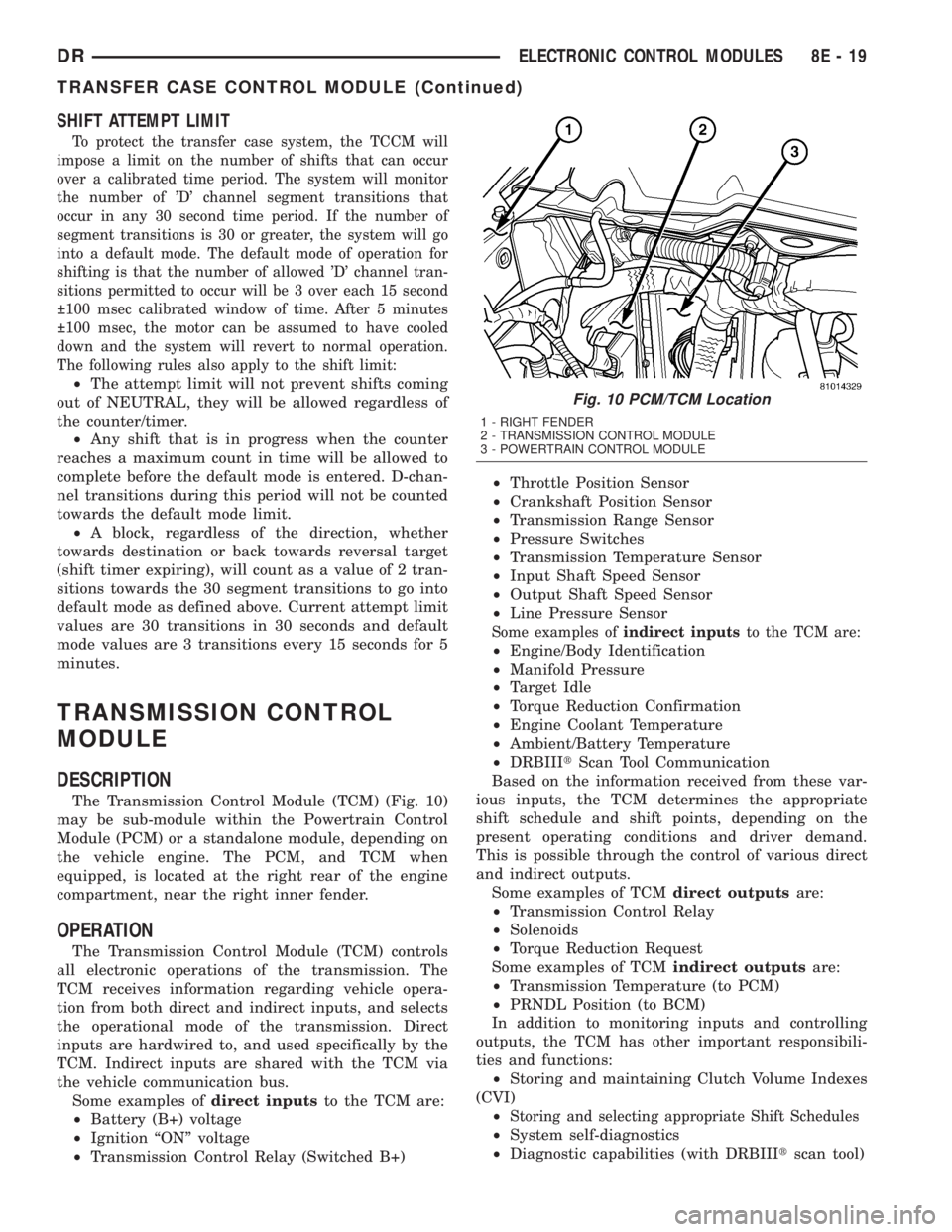
The Transmission Control Module (TCM) (Fig. 10)
may be sub-module within the Powertrain Control
Module (PCM) or a standalone module, depending on
the vehicle engine. The PCM, and TCM when
equipped, is located at the right rear of the engine
compartment, near the right inner fender.
OPERATION
The Transmission Control Module (TCM) controls
all electronic operations of the transmission. The
TCM receives information regarding vehicle opera-
tion from both direct and indirect inputs, and selects
the operational mode of the transmission. Direct
inputs are hardwired to, and used specifically by the
TCM. Indirect inputs are shared with the TCM via
the vehicle communication bus.
Some examples ofdirect inputsto the TCM are:
²Battery (B+) voltage
²Ignition ªONº voltage
²Transmission Control Relay (Switched B+)²Throttle Position Sensor
²Crankshaft Position Sensor
²Transmission Range Sensor
²Pressure Switches
²Transmission Temperature Sensor
²Input Shaft Speed Sensor
²Output Shaft Speed Sensor
²Line Pressure Sensor
Some examples ofindirect inputsto the TCM are:
²Engine/Body Identification
²Manifold Pressure
²Target Idle
²Torque Reduction Confirmation
²Engine Coolant Temperature
²Ambient/Battery Temperature
²DRBIIItScan Tool Communication
Based on the information received from these var-
ious inputs, the TCM determines the appropriate
shift schedule and shift points, depending on the
present operating conditions and driver demand.
This is possible through the control of various direct
and indirect outputs.
Some examples of TCMdirect outputsare:
²Transmission Control Relay
²Solenoids
²Torque Reduction Request
Some examples of TCMindirect outputsare:
²Transmission Temperature (to PCM)
²PRNDL Position (to BCM)
In addition to monitoring inputs and controlling
outputs, the TCM has other important responsibili-
ties and functions:
²Storing and maintaining Clutch Volume Indexes
(CVI)
²
Storing and selecting appropriate Shift Schedules
²System self-diagnostics
²Diagnostic capabilities (with DRBIIItscan tool)
Fig. 10 PCM/TCM Location
1 - RIGHT FENDER
2 - TRANSMISSION CONTROL MODULE
3 - POWERTRAIN CONTROL MODULE
DRELECTRONIC CONTROL MODULES 8E - 19
TRANSFER CASE CONTROL MODULE (Continued)