Electrical connectors DODGE RAM 2003 Service User Guide
[x] Cancel search | Manufacturer: DODGE, Model Year: 2003, Model line: RAM, Model: DODGE RAM 2003Pages: 2895, PDF Size: 83.15 MB
Page 429 of 2895
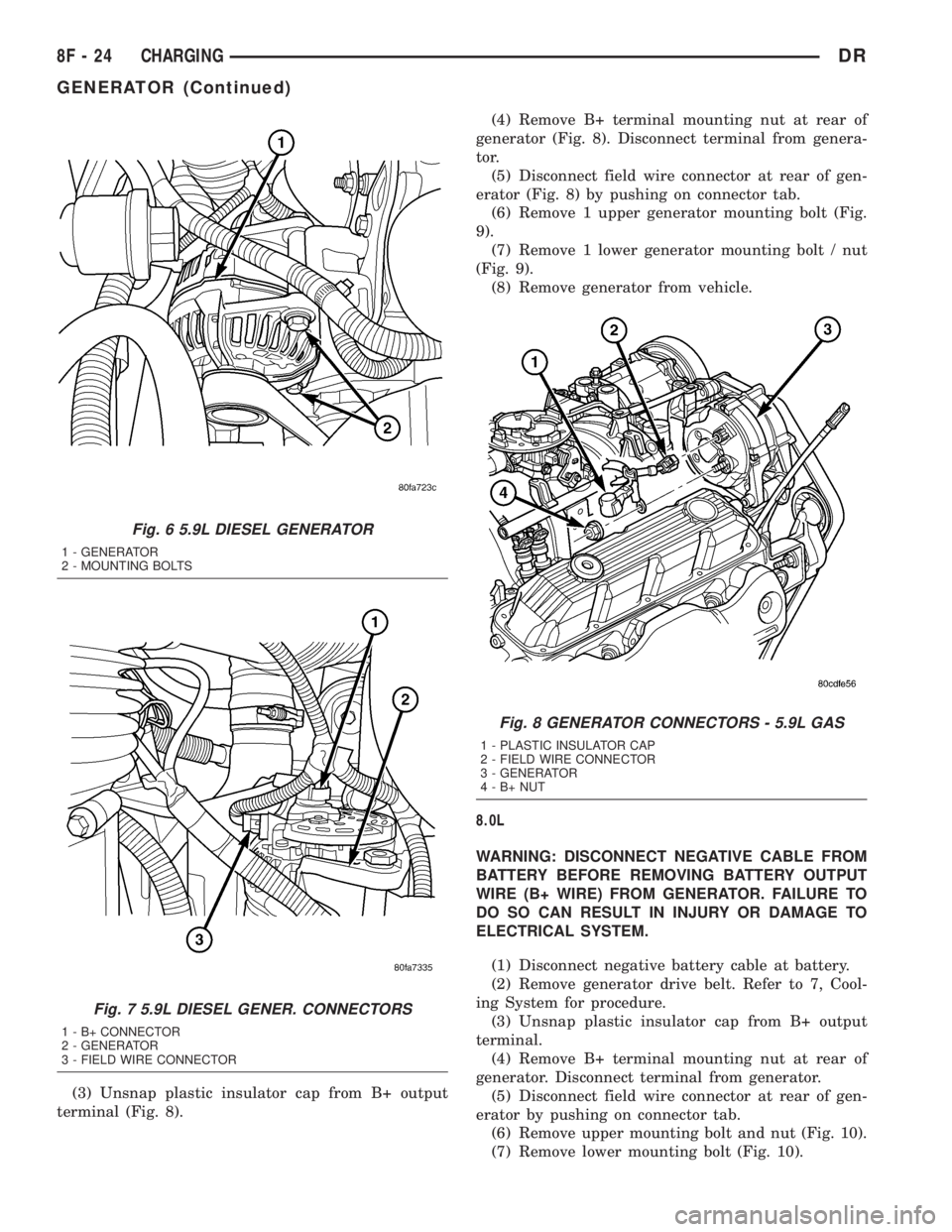
(3) Unsnap plastic insulator cap from B+ output
terminal (Fig. 8).(4) Remove B+ terminal mounting nut at rear of
generator (Fig. 8). Disconnect terminal from genera-
tor.
(5) Disconnect field wire connector at rear of gen-
erator (Fig. 8) by pushing on connector tab.
(6) Remove 1 upper generator mounting bolt (Fig.
9).
(7) Remove 1 lower generator mounting bolt / nut
(Fig. 9).
(8) Remove generator from vehicle.
8.0L
WARNING: DISCONNECT NEGATIVE CABLE FROM
BATTERY BEFORE REMOVING BATTERY OUTPUT
WIRE (B+ WIRE) FROM GENERATOR. FAILURE TO
DO SO CAN RESULT IN INJURY OR DAMAGE TO
ELECTRICAL SYSTEM.
(1) Disconnect negative battery cable at battery.
(2) Remove generator drive belt. Refer to 7, Cool-
ing System for procedure.
(3) Unsnap plastic insulator cap from B+ output
terminal.
(4) Remove B+ terminal mounting nut at rear of
generator. Disconnect terminal from generator.
(5) Disconnect field wire connector at rear of gen-
erator by pushing on connector tab.
(6) Remove upper mounting bolt and nut (Fig. 10).
(7) Remove lower mounting bolt (Fig. 10).
Fig. 6 5.9L DIESEL GENERATOR
1 - GENERATOR
2 - MOUNTING BOLTS
Fig. 7 5.9L DIESEL GENER. CONNECTORS
1 - B+ CONNECTOR
2 - GENERATOR
3 - FIELD WIRE CONNECTOR
Fig. 8 GENERATOR CONNECTORS - 5.9L GAS
1 - PLASTIC INSULATOR CAP
2 - FIELD WIRE CONNECTOR
3 - GENERATOR
4-B+NUT
8F - 24 CHARGINGDR
GENERATOR (Continued)
Page 441 of 2895
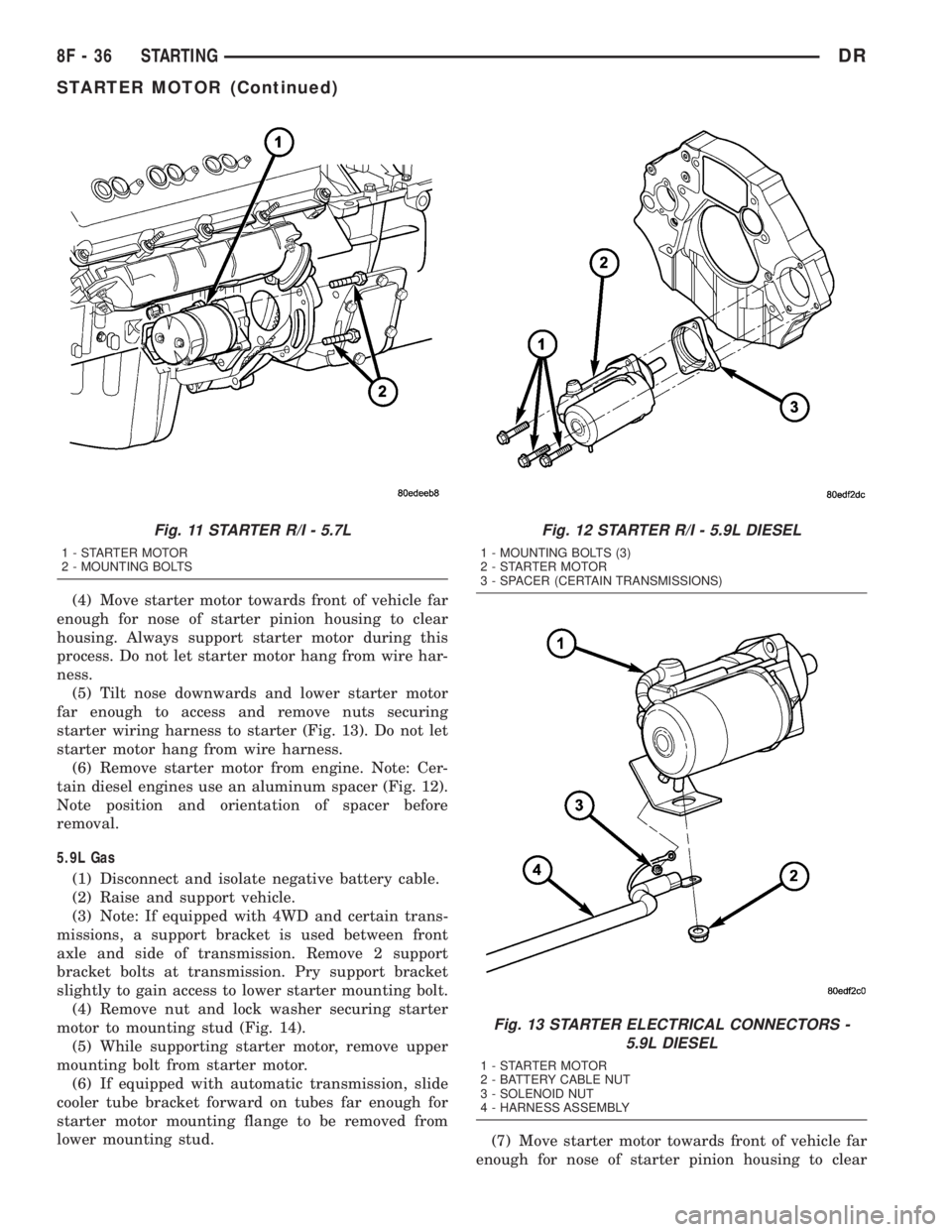
(4) Move starter motor towards front of vehicle far
enough for nose of starter pinion housing to clear
housing. Always support starter motor during this
process. Do not let starter motor hang from wire har-
ness.
(5) Tilt nose downwards and lower starter motor
far enough to access and remove nuts securing
starter wiring harness to starter (Fig. 13). Do not let
starter motor hang from wire harness.
(6) Remove starter motor from engine. Note: Cer-
tain diesel engines use an aluminum spacer (Fig. 12).
Note position and orientation of spacer before
removal.
5.9L Gas
(1) Disconnect and isolate negative battery cable.
(2) Raise and support vehicle.
(3) Note: If equipped with 4WD and certain trans-
missions, a support bracket is used between front
axle and side of transmission. Remove 2 support
bracket bolts at transmission. Pry support bracket
slightly to gain access to lower starter mounting bolt.
(4) Remove nut and lock washer securing starter
motor to mounting stud (Fig. 14).
(5) While supporting starter motor, remove upper
mounting bolt from starter motor.
(6) If equipped with automatic transmission, slide
cooler tube bracket forward on tubes far enough for
starter motor mounting flange to be removed from
lower mounting stud.
(7) Move starter motor towards front of vehicle far
enough for nose of starter pinion housing to clear
Fig. 11 STARTER R/I - 5.7L
1 - STARTER MOTOR
2 - MOUNTING BOLTS
Fig. 12 STARTER R/I - 5.9L DIESEL
1 - MOUNTING BOLTS (3)
2 - STARTER MOTOR
3 - SPACER (CERTAIN TRANSMISSIONS)
Fig. 13 STARTER ELECTRICAL CONNECTORS -
5.9L DIESEL
1 - STARTER MOTOR
2 - BATTERY CABLE NUT
3 - SOLENOID NUT
4 - HARNESS ASSEMBLY
8F - 36 STARTINGDR
STARTER MOTOR (Continued)
Page 450 of 2895
Diagnostic logic is built into the heated seat mod-
ule to help the person trying to locate the problem by
the most efficient means possible. Anytime a problem
is suspected, locate the diagnosis and testing proce-
dure for the component in question and follow the
steps until the specific problem is located and
resolved. Once the problem is thought to be cor-
rected, verify correct system operation. If the heated
seat system is functioning correctly return the vehi-
cle to service.
If a problem could not be verified such as not find-
ing anything wrong when following the diagnostic
procedure, this is a good indication that a INTER-
MITTENT problem may be present. You must then
attempt to find the intermittent problem, such as
moving the heating element within the seat while
testing continuity or wiggling the wire harness's/elec-
trical connectors under the seat while testing conti-
nuity. Always, eliminate all other potential problems
before attempting to replace the heated seat module.
PRELIMINARY TEST
Refer toWiringfor the location of complete heated
seat system wiring diagrams. Before testing the indi-
vidual components in the heated seat system, per-
form the following preliminary checks:
WARNING: DISABLE THE AIRBAG SYSTEM
BEFORE ATTEMPTING ANY STEERING WHEEL,
STEERING COLUMN, OR INSTRUMENT PANEL
COMPONENT DIAGNOSIS OR SERVICE. DISCON-
NECT AND ISOLATE THE BATTERY NEGATIVE
CABLE, THEN WAIT TWO MINUTES FOR THE AIR-
BAG SYSTEM CAPACITOR TO DISCHARGE
BEFORE PERFORMING FURTHER DIAGNOSIS OR
SERVICE. THIS IS THE ONLY SURE WAY TO DIS-
ABLE THE AIRBAG SYSTEM. FAILURE TO TAKE
THE PROPER PRECAUTIONS COULD RESULT IN
ACCIDENTAL AIRBAG DEPLOYMENT AND POSSI-
BLE PERSONAL INJURY.
²If the heated seat switch back lighting and the
cluster illumination lamps do not illuminate with the
headlamps or park lamps turned On, refer to the
Instrument Clustersection of the service manual
for the location of cluster illumination lamp diagnosis
and testing procedures. If the heated seat switch
back lighting does not illuminate, but the cluster illu-
mination lamps do illuminate with the headlamps or
park lamps turned On, refer toDiagnosis and Test-
ing the Heated Seat Switchin this section for the
location of the heated seat switch diagnosis and test-
ing procedures.
²If a single LED indicator lamp for one heated
seat switch does not operate and the heated seat ele-
ments do heat, refer toDiagnosis and Testing theHeated Seat Switchin this section for heated seat
switch diagnosis and testing procedures.
²If both LED indicator lamps for a heated seat
switch operate, but the heated seat elements do not
heat, refer toDiagnosis and Testing the Heated
Seat Modulein Electronic Control Modules for
heated seat module diagnosis and testing procedures.
²If the indicator lamp on either heated seat
switch remains illuminated after the heated seat has
been turned Off, refer toDiagnosis and Testing
the Heated Seat Modulein Electronic Control
Modules for heated seat module diagnosis and test-
ing procedures.
HEATED SEAT ELEMENT
DESCRIPTION
Vehicles equipped with the optional heated seat
system have two sets of electrically operated heating
element grids located in each front seat, one set for
the seat cushion and the other set for the seat back.
Each of the heated seat element grids consists of a
single length of resistor wire that is routed in a zig-
zag pattern and captured between a covering and the
adhesive foam rubber backing. Short pigtail wires
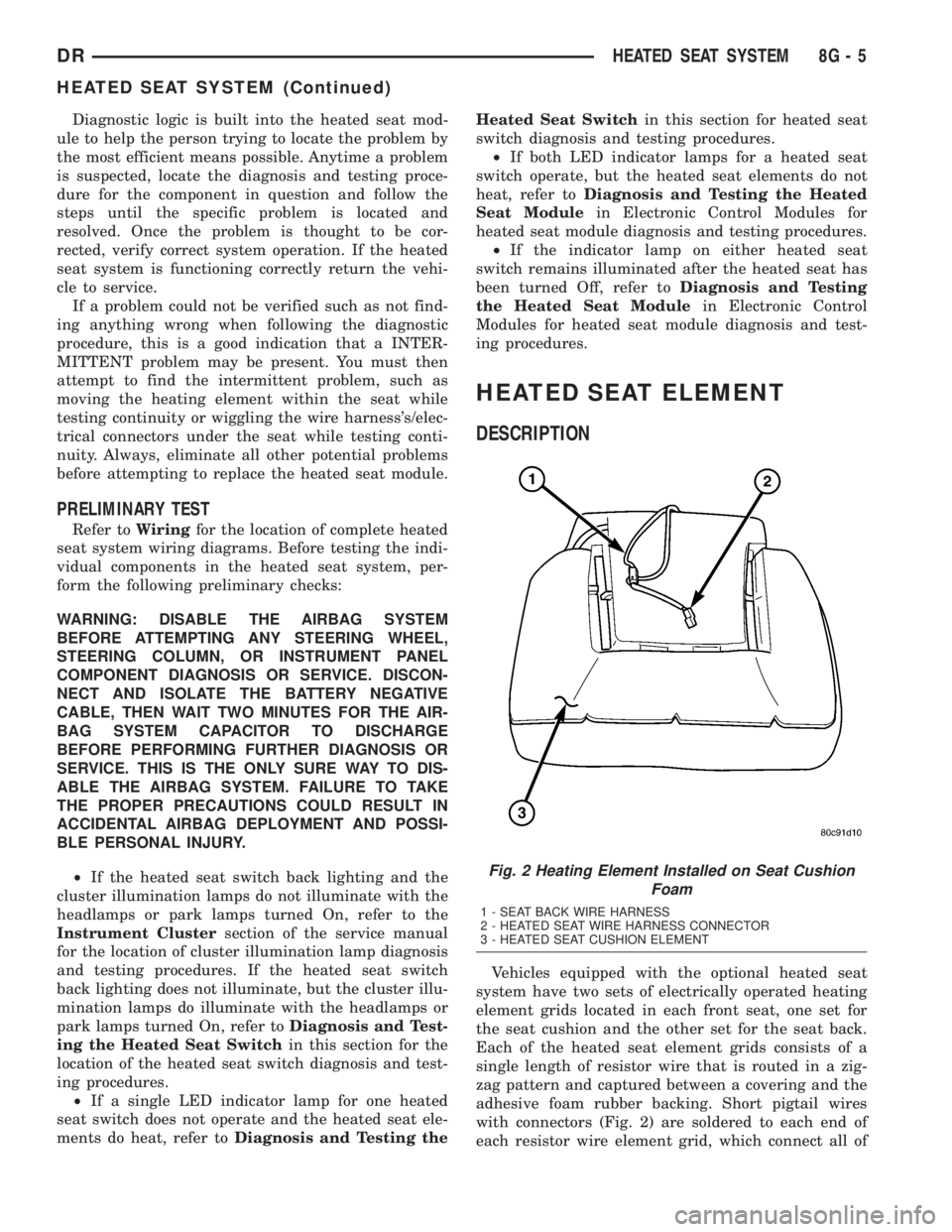
with connectors (Fig. 2) are soldered to each end of
each resistor wire element grid, which connect all of
Fig. 2 Heating Element Installed on Seat Cushion
Foam
1 - SEAT BACK WIRE HARNESS
2 - HEATED SEAT WIRE HARNESS CONNECTOR
3 - HEATED SEAT CUSHION ELEMENT
DRHEATED SEAT SYSTEM 8G - 5
HEATED SEAT SYSTEM (Continued)
Page 451 of 2895
the element grids to the heated seat module through
the seat wire harness.
One temperature sensor is used for each front seat,
and it is located in the center insert area of the seat
cushion element. The heated seat sensors and their
pigtail wires are also captured between a covering
and the adhesive foam rubber backing. The heated
seat sensors are Negative Thermal Coefficient (NTC)
thermistors. The sensors for both front seats receive
a voltage feed from a single output of the heated seat
module, but the module receives individual sensor
inputs from the driver side and passenger side sen-
sors.
The heated seat elements and sensors should not
be repaired. If damaged or faulty, the heated seat ele-
ment assembly must be replaced.
OPERATION
One end of the heated seat element resistor wire is
connected to ground at all times through a splice in
the heated seat module ground circuit. Battery cur-
rent is directed to the other end of the heated seat
element resistor wire by the energized N-channel
Field Effect Transistor (N-FET) located within the
heated seat module. The heated seat module will
energize the N-FET only when the heated seat
switch is in the Low or High position and the heated
seat sensor indicates that the seat cushion surface
temperature is below the selected (Low or High) tem-
perature set point. As electrical current passes
through the heating element grid, the resistance of
the wire used in the element disperses some of that
electrical current in the form of heat. The heat pro-
duced by the heated seat element grid then radiates
through the seat trim cover, warming its occupant.
The resistance of the heated seat sensor increases
and decreases as the surface temperature of the seat
cushion cover changes. The heated seat module sup-
plies each sensor with a 5v voltage feed, then uses
the sensor resistance to determine when the heated
seat element grids need to be cycled on or off in order
to maintain the selected temperature set point.
DIAGNOSIS AND TESTING - HEATED SEAT
ELEMENT
The heated seat module will self-diagnose shorted
or open heated seat element circuits and sensor cir-
cuits. Refer to Heated Seat System Diagnosis and
Testing in this section for additional diagnosis and
testing procedures. To manually check the heated
seat element, proceed as follows. The wire harness
connectors for the seat cushion and seat back heating
elements and sensor are located on the right side of
the seat, near the edge of the seat cushion frame.
The proper connector can be identified by the foam
wrapping.NOTE: When checking heated seat elements for
continuity, be certain to move the heating element
being checked. Moving the element, such as sitting
in the seat will eliminate the possibility of an inter-
mittent open in the element which would only be
evident if the element was in a certain position.
Failure to check the element in various positions
could result in an incomplete test.
(1) Position the appropriate seat in the full for-
ward position.
(2) Make certain the ignition switch is in the OFF
position.
(3) Disconnect the heated seat element connector
which requires testing. Check for continuity between
the two heated seat element circuit cavities while
moving the appropriate seat cushion. Refer toWir-
ingfor the location of complete heated seat system
wiring diagrams. There should be continuity. If OK,
the elements within the seat assembly test OK, go to
Step 4. If not OK, replace the faulty seat heating ele-
ment, refer to the procedure in this section.
(4) Test the seat wire harness between the heated
seat module connector and the appropriate heated
seat wire harness connector for shorted or open cir-
cuits. If OK, element is OK, proceed with testing the
heated seat sensor and module. If not OK, repair the
shorted or open seat wire harness as required.
REMOVAL
Do not remove the heating element from the seat
or seat back cushion. The original element is perma-
nently attached to the seat cushions and cannot be
removed without damaging the cushion. The replace-
ment heating element is designed to be applied
directly over the original seat heating element.
(1) Disconnect and isolate the negative battery
cable.
(2) Remove the appropriate seat cushion or seat
back trim cover. Refer to the Body section of this
manual for the procedures.
(3) Disconnect the inoperative heated seat cushion
or seat back element electrical connectors.
(4) Locate the wires leading from the inoperative
heating element and cut them off flush with the edge
of the original heating element.
INSTALLATION
(1) Peel off the adhesive backing on the back of the
replacement heating element and stick directly over
the original heating element (Fig. 3).
CAUTION: During the installation of the replace-
ment heating element, be careful not to fold or
crease the element assembly. Folds or creases will
cause premature failure.
8G - 6 HEATED SEAT SYSTEMDR
HEATED SEAT ELEMENT (Continued)
Page 452 of 2895
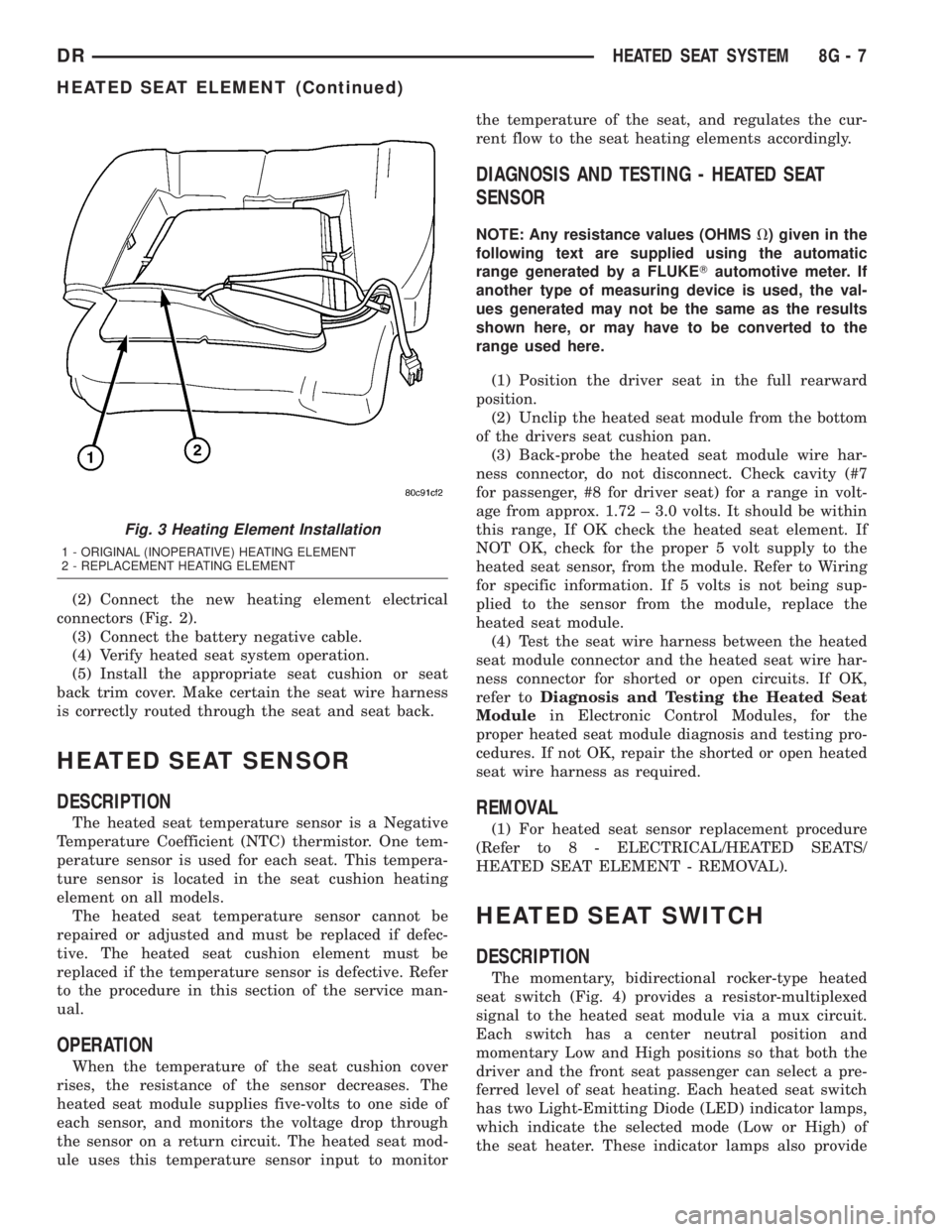
(2) Connect the new heating element electrical
connectors (Fig. 2).
(3) Connect the battery negative cable.
(4) Verify heated seat system operation.
(5) Install the appropriate seat cushion or seat
back trim cover. Make certain the seat wire harness
is correctly routed through the seat and seat back.
HEATED SEAT SENSOR
DESCRIPTION
The heated seat temperature sensor is a Negative
Temperature Coefficient (NTC) thermistor. One tem-
perature sensor is used for each seat. This tempera-
ture sensor is located in the seat cushion heating
element on all models.
The heated seat temperature sensor cannot be
repaired or adjusted and must be replaced if defec-
tive. The heated seat cushion element must be
replaced if the temperature sensor is defective. Refer
to the procedure in this section of the service man-
ual.
OPERATION
When the temperature of the seat cushion cover
rises, the resistance of the sensor decreases. The
heated seat module supplies five-volts to one side of
each sensor, and monitors the voltage drop through
the sensor on a return circuit. The heated seat mod-
ule uses this temperature sensor input to monitorthe temperature of the seat, and regulates the cur-
rent flow to the seat heating elements accordingly.
DIAGNOSIS AND TESTING - HEATED SEAT
SENSOR
NOTE: Any resistance values (OHMSV) given in the
following text are supplied using the automatic
range generated by a FLUKETautomotive meter. If
another type of measuring device is used, the val-
ues generated may not be the same as the results
shown here, or may have to be converted to the
range used here.
(1) Position the driver seat in the full rearward
position.
(2) Unclip the heated seat module from the bottom
of the drivers seat cushion pan.
(3) Back-probe the heated seat module wire har-
ness connector, do not disconnect. Check cavity (#7
for passenger, #8 for driver seat) for a range in volt-
age from approx. 1.72 ± 3.0 volts. It should be within
this range, If OK check the heated seat element. If
NOT OK, check for the proper 5 volt supply to the
heated seat sensor, from the module. Refer to Wiring
for specific information. If 5 volts is not being sup-
plied to the sensor from the module, replace the
heated seat module.
(4) Test the seat wire harness between the heated
seat module connector and the heated seat wire har-
ness connector for shorted or open circuits. If OK,
refer toDiagnosis and Testing the Heated Seat
Modulein Electronic Control Modules, for the
proper heated seat module diagnosis and testing pro-
cedures. If not OK, repair the shorted or open heated
seat wire harness as required.
REMOVAL
(1) For heated seat sensor replacement procedure
(Refer to 8 - ELECTRICAL/HEATED SEATS/
HEATED SEAT ELEMENT - REMOVAL).
HEATED SEAT SWITCH
DESCRIPTION
The momentary, bidirectional rocker-type heated
seat switch (Fig. 4) provides a resistor-multiplexed
signal to the heated seat module via a mux circuit.
Each switch has a center neutral position and
momentary Low and High positions so that both the
driver and the front seat passenger can select a pre-
ferred level of seat heating. Each heated seat switch
has two Light-Emitting Diode (LED) indicator lamps,
which indicate the selected mode (Low or High) of
the seat heater. These indicator lamps also provide
Fig. 3 Heating Element Installation
1 - ORIGINAL (INOPERATIVE) HEATING ELEMENT
2 - REPLACEMENT HEATING ELEMENT
DRHEATED SEAT SYSTEM 8G - 7
HEATED SEAT ELEMENT (Continued)
Page 453 of 2895
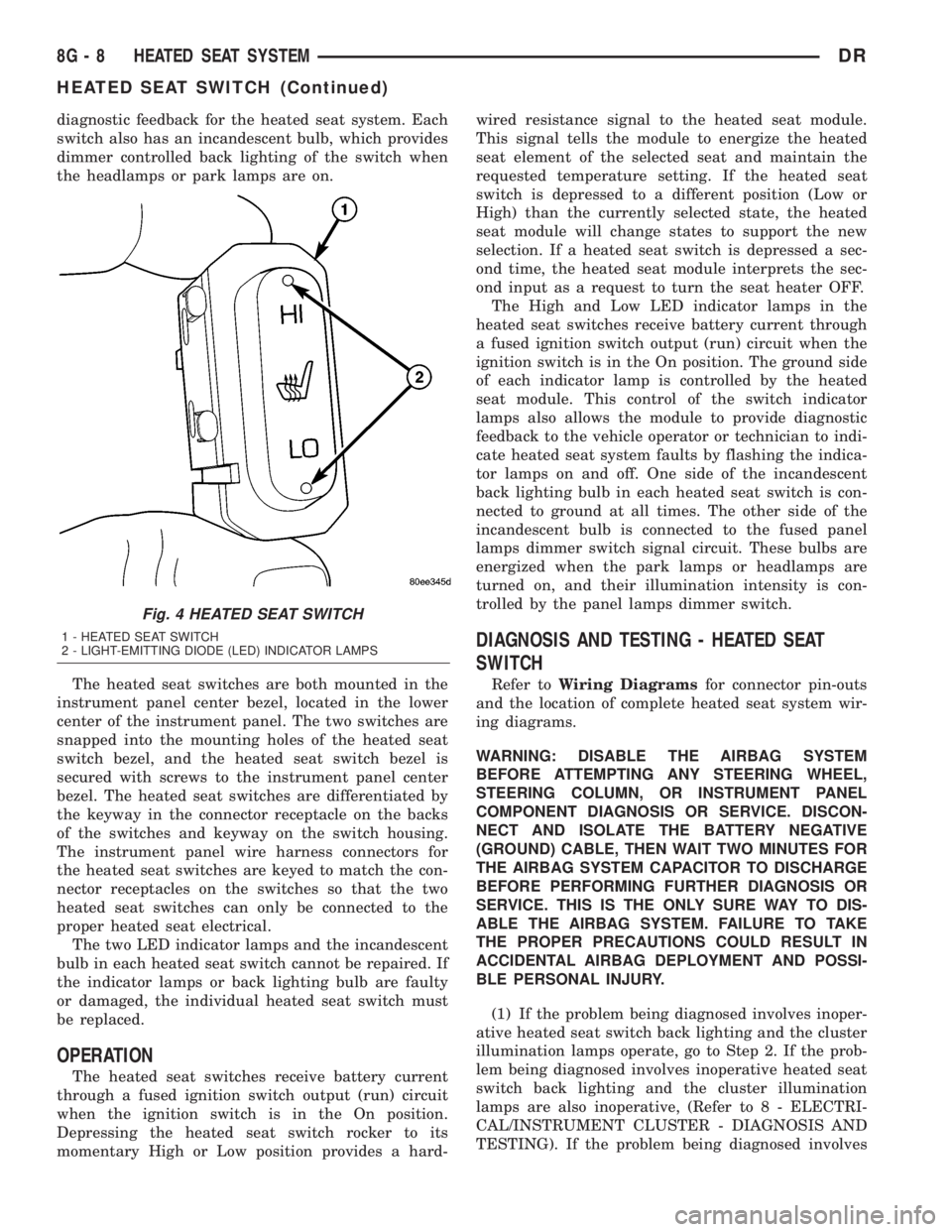
diagnostic feedback for the heated seat system. Each
switch also has an incandescent bulb, which provides
dimmer controlled back lighting of the switch when
the headlamps or park lamps are on.
The heated seat switches are both mounted in the
instrument panel center bezel, located in the lower
center of the instrument panel. The two switches are
snapped into the mounting holes of the heated seat
switch bezel, and the heated seat switch bezel is
secured with screws to the instrument panel center
bezel. The heated seat switches are differentiated by
the keyway in the connector receptacle on the backs
of the switches and keyway on the switch housing.
The instrument panel wire harness connectors for
the heated seat switches are keyed to match the con-
nector receptacles on the switches so that the two
heated seat switches can only be connected to the
proper heated seat electrical.
The two LED indicator lamps and the incandescent
bulb in each heated seat switch cannot be repaired. If
the indicator lamps or back lighting bulb are faulty
or damaged, the individual heated seat switch must
be replaced.
OPERATION
The heated seat switches receive battery current
through a fused ignition switch output (run) circuit
when the ignition switch is in the On position.
Depressing the heated seat switch rocker to its
momentary High or Low position provides a hard-wired resistance signal to the heated seat module.
This signal tells the module to energize the heated
seat element of the selected seat and maintain the
requested temperature setting. If the heated seat
switch is depressed to a different position (Low or
High) than the currently selected state, the heated
seat module will change states to support the new
selection. If a heated seat switch is depressed a sec-
ond time, the heated seat module interprets the sec-
ond input as a request to turn the seat heater OFF.
The High and Low LED indicator lamps in the
heated seat switches receive battery current through
a fused ignition switch output (run) circuit when the
ignition switch is in the On position. The ground side
of each indicator lamp is controlled by the heated
seat module. This control of the switch indicator
lamps also allows the module to provide diagnostic
feedback to the vehicle operator or technician to indi-
cate heated seat system faults by flashing the indica-
tor lamps on and off. One side of the incandescent
back lighting bulb in each heated seat switch is con-
nected to ground at all times. The other side of the
incandescent bulb is connected to the fused panel
lamps dimmer switch signal circuit. These bulbs are
energized when the park lamps or headlamps are
turned on, and their illumination intensity is con-
trolled by the panel lamps dimmer switch.
DIAGNOSIS AND TESTING - HEATED SEAT
SWITCH
Refer toWiring Diagramsfor connector pin-outs
and the location of complete heated seat system wir-
ing diagrams.
WARNING: DISABLE THE AIRBAG SYSTEM
BEFORE ATTEMPTING ANY STEERING WHEEL,
STEERING COLUMN, OR INSTRUMENT PANEL
COMPONENT DIAGNOSIS OR SERVICE. DISCON-
NECT AND ISOLATE THE BATTERY NEGATIVE
(GROUND) CABLE, THEN WAIT TWO MINUTES FOR
THE AIRBAG SYSTEM CAPACITOR TO DISCHARGE
BEFORE PERFORMING FURTHER DIAGNOSIS OR
SERVICE. THIS IS THE ONLY SURE WAY TO DIS-
ABLE THE AIRBAG SYSTEM. FAILURE TO TAKE
THE PROPER PRECAUTIONS COULD RESULT IN
ACCIDENTAL AIRBAG DEPLOYMENT AND POSSI-
BLE PERSONAL INJURY.
(1) If the problem being diagnosed involves inoper-
ative heated seat switch back lighting and the cluster
illumination lamps operate, go to Step 2. If the prob-
lem being diagnosed involves inoperative heated seat
switch back lighting and the cluster illumination
lamps are also inoperative, (Refer to 8 - ELECTRI-
CAL/INSTRUMENT CLUSTER - DIAGNOSIS AND
TESTING). If the problem being diagnosed involves
Fig. 4 HEATED SEAT SWITCH
1 - HEATED SEAT SWITCH
2 - LIGHT-EMITTING DIODE (LED) INDICATOR LAMPS
8G - 8 HEATED SEAT SYSTEMDR
HEATED SEAT SWITCH (Continued)
Page 457 of 2895
WARNING: DISABLE THE AIRBAG SYSTEM
BEFORE ATTEMPTING ANY STEERING WHEEL,
STEERING COLUMN, SEAT BELT TENSIONER, SIDE
AIRBAG, OR INSTRUMENT PANEL COMPONENT
DIAGNOSIS OR SERVICE. DISCONNECT AND ISO-
LATE THE BATTERY NEGATIVE (GROUND) CABLE,
THEN WAIT TWO MINUTES FOR THE AIRBAG SYS-
TEM CAPACITOR TO DISCHARGE BEFORE PER-
FORMING FURTHER DIAGNOSIS OR SERVICE. THIS
IS THE ONLY SURE WAY TO DISABLE THE AIRBAG
SYSTEM. FAILURE TO TAKE THE PROPER PRE-
CAUTIONS COULD RESULT IN ACCIDENTAL AIR-
BAG DEPLOYMENT AND POSSIBLE PERSONAL
INJURY.
REMOVAL
(1) Disconnect and isolate the battery negative
cable.
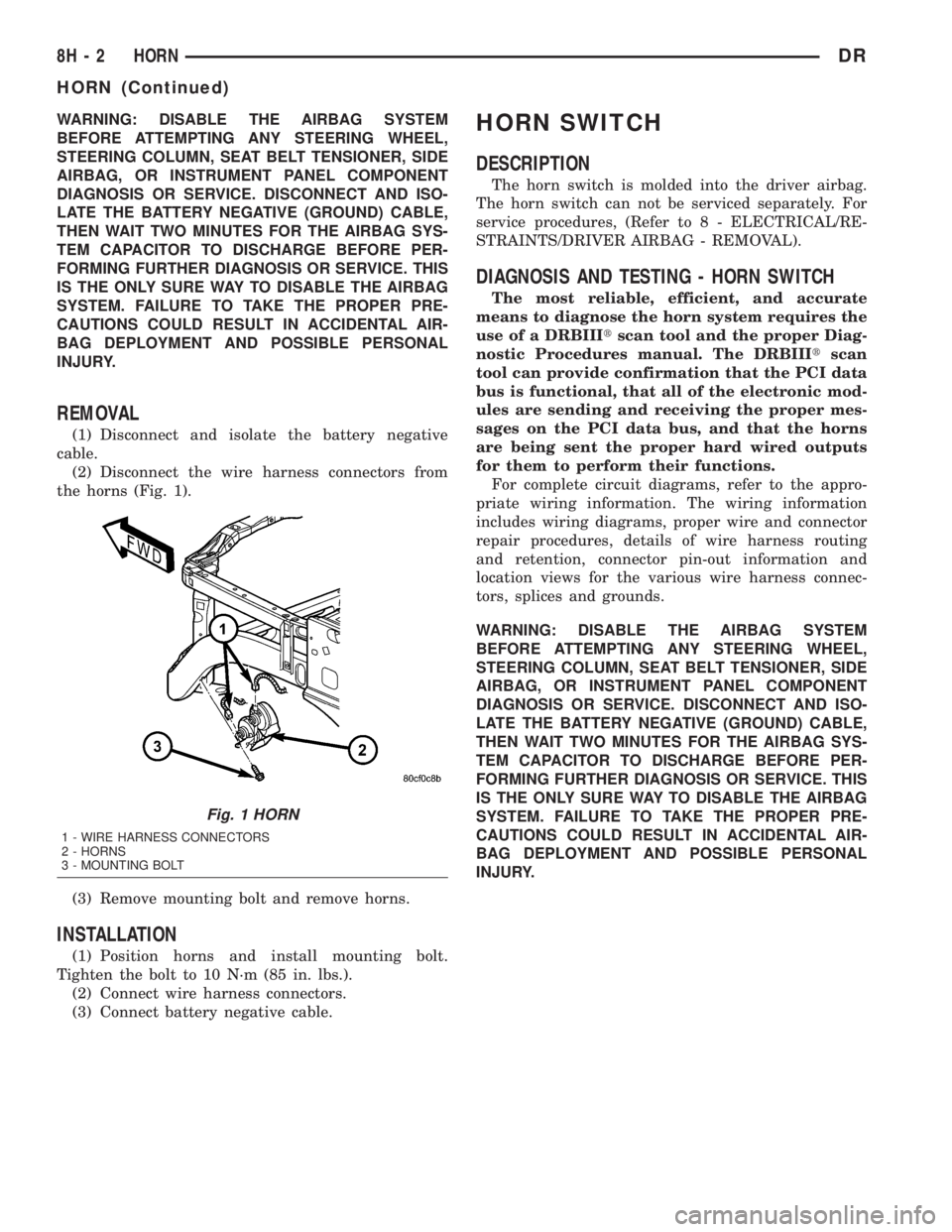
(2) Disconnect the wire harness connectors from
the horns (Fig. 1).
(3) Remove mounting bolt and remove horns.
INSTALLATION
(1) Position horns and install mounting bolt.
Tighten the bolt to 10 N´m (85 in. lbs.).
(2) Connect wire harness connectors.
(3) Connect battery negative cable.
HORN SWITCH
DESCRIPTION
The horn switch is molded into the driver airbag.
The horn switch can not be serviced separately. For
service procedures, (Refer to 8 - ELECTRICAL/RE-
STRAINTS/DRIVER AIRBAG - REMOVAL).
DIAGNOSIS AND TESTING - HORN SWITCH
The most reliable, efficient, and accurate
means to diagnose the horn system requires the
use of a DRBIIItscan tool and the proper Diag-
nostic Procedures manual. The DRBIIItscan
tool can provide confirmation that the PCI data
bus is functional, that all of the electronic mod-
ules are sending and receiving the proper mes-
sages on the PCI data bus, and that the horns
are being sent the proper hard wired outputs
for them to perform their functions.
For complete circuit diagrams, refer to the appro-
priate wiring information. The wiring information
includes wiring diagrams, proper wire and connector
repair procedures, details of wire harness routing
and retention, connector pin-out information and
location views for the various wire harness connec-
tors, splices and grounds.
WARNING: DISABLE THE AIRBAG SYSTEM
BEFORE ATTEMPTING ANY STEERING WHEEL,
STEERING COLUMN, SEAT BELT TENSIONER, SIDE
AIRBAG, OR INSTRUMENT PANEL COMPONENT
DIAGNOSIS OR SERVICE. DISCONNECT AND ISO-
LATE THE BATTERY NEGATIVE (GROUND) CABLE,
THEN WAIT TWO MINUTES FOR THE AIRBAG SYS-
TEM CAPACITOR TO DISCHARGE BEFORE PER-
FORMING FURTHER DIAGNOSIS OR SERVICE. THIS
IS THE ONLY SURE WAY TO DISABLE THE AIRBAG
SYSTEM. FAILURE TO TAKE THE PROPER PRE-
CAUTIONS COULD RESULT IN ACCIDENTAL AIR-
BAG DEPLOYMENT AND POSSIBLE PERSONAL
INJURY.
Fig. 1 HORN
1 - WIRE HARNESS CONNECTORS
2 - HORNS
3 - MOUNTING BOLT
8H - 2 HORNDR
HORN (Continued)
Page 481 of 2895
WARNING: 5.9L V-8 LDC-GAS ENGINES: DO NOT
REMOVE THE COIL MOUNTING BRACKET-TO-CYL-
INDER HEAD MOUNTING BOLTS. THE COIL
MOUNTING BRACKET IS UNDER ACCESSORY
DRIVE BELT TENSION. IF THIS BRACKET IS TO BE
REMOVED FOR ANY REASON, ALL BELT TENSION
MUST FIRST BE RELIEVED. REFER TO THE BELT
SECTION OF GROUP 7, COOLING SYSTEM.
5.9L V-8 HDC-Gas Engine: The coil is mounted to
a bracket that is bolted to the air injection pump
(AIR pump) mounting bracket (Fig. 36).
(1) Disconnect primary coil connector from ignition
coil.
(2) Disconnect secondary cable from ignition coil.
(3) Remove ignition coil from coil mounting
bracket (two bolts).
8.0L V-10
Two separate coil packs containing a total of five
independent coils are attached to a common mount-
ing bracket located above the right engine valve
cover (Fig. 37). The front and rear coil packs can be
serviced separately.
(1) Depending on which coil is being removed, the
throttle body air intake tube or intake box may need
to be removed to gain access to coils.
(2) Remove secondary spark plug cables from coil
packs. Note position of cables before removal.
(3) Disconnect primary wiring harness connectors
at coil packs.
(4) Remove four (4) coil pack-to-coil mounting
bracket bolts for coil pack being serviced (Fig. 37).
(5) Remove coil(s) from mounting bracket.
INSTALLATION
3.7L V-6
(1) Using compressed air, blow out any dirt or con-
taminants from around top of spark plug.
(2) Check condition of coil o-ring and replace as
necessary. To aid in coil installation, apply silicone to
coil o-ring.
(3) Position ignition coil into cylinder head opening
and push onto spark plug. Do this while guiding coil
base over mounting stud.
(4) Install coil mounting stud nut. Refer to torque
specifications.
(5) Connect electrical connector to coil by snapping
into position.
(6) If necessary, install throttle body air tube.
4.7L V-8
(1) Using compressed air, blow out any dirt or con-
taminants from around top of spark plug.
(2) Check condition of coil o-ring and replace as
necessary. To aid in coil installation, apply silicone to
coil o-ring.
(3) Position ignition coil into cylinder head opening
and push onto spark plug. Do this while guiding coil
base over mounting stud.
(4) Install coil mounting stud nut. Refer to torque
specifications.
(5) Connect electrical connector to coil by snapping
into position.
(6) If necessary, install throttle body air tube.
5.7L V-8
(1) Using compressed air, blow out any dirt or con-
taminants from around top of spark plug.
(2) Before installing spark plug cables to either the
spark plugs or coils, or before installing a coil to a
spark plug, apply dielectric grease to inside of boots.
(3) Position ignition coil into cylinder head opening
and push onto spark plug. Twist coil into position.
(4) Install 2 coil mounting bolts. Refer to torque
specifications.
(5) Connect electrical connector to coil by snapping
into position.
(6) Install cable to coil. To prevent ignition cross-
fire, spark plug cablesMUSTbe placed in cable tray
(routing loom) into their original position. Refer to
Spark Plug Cable Removal for a graphic.
(7) If necessary, install throttle body air tube.
5.9L V-8
The ignition coil is an epoxy filled type. If the coil
is replaced, it must be replaced with the same type.
(1) Install ignition coil to coil bracket. If nuts and
bolts are used to secure coil to coil bracket, tighten to
11 N´m (100 in. lbs.) torque. If coil mounting bracket
has been tapped for coil mounting bolts, tighten bolts
to 5 N´m (50 in. lbs.) torque.
(2) Connect all wiring to ignition coil.
8.0L V-10
(1) Position coil packs to mounting bracket (prima-
ry wiring connectors face downward).
(2) Install coil pack mounting bolts. Tighten bolts
to 10 N´m (90 in. lbs.) torque.
(3) Install coil pack-to-engine mounting bracket (if
necessary).
(4) Connect primary wiring connectors to coil
packs (four wire connector to front coil pack and
three wire connector to rear coil pack).
(5) Connect secondary spark plug cables to coil
packs. Refer to (Fig. 38) for correct cable order.
8I - 24 IGNITION CONTROLDR
IGNITION COIL (Continued)
Page 495 of 2895
WASHER FLUID INDICATOR
DESCRIPTION.........................42
OPERATION...........................42WATER-IN-FUEL INDICATOR
DESCRIPTION.........................43
OPERATION...........................43
INSTRUMENT CLUSTER
DESCRIPTION
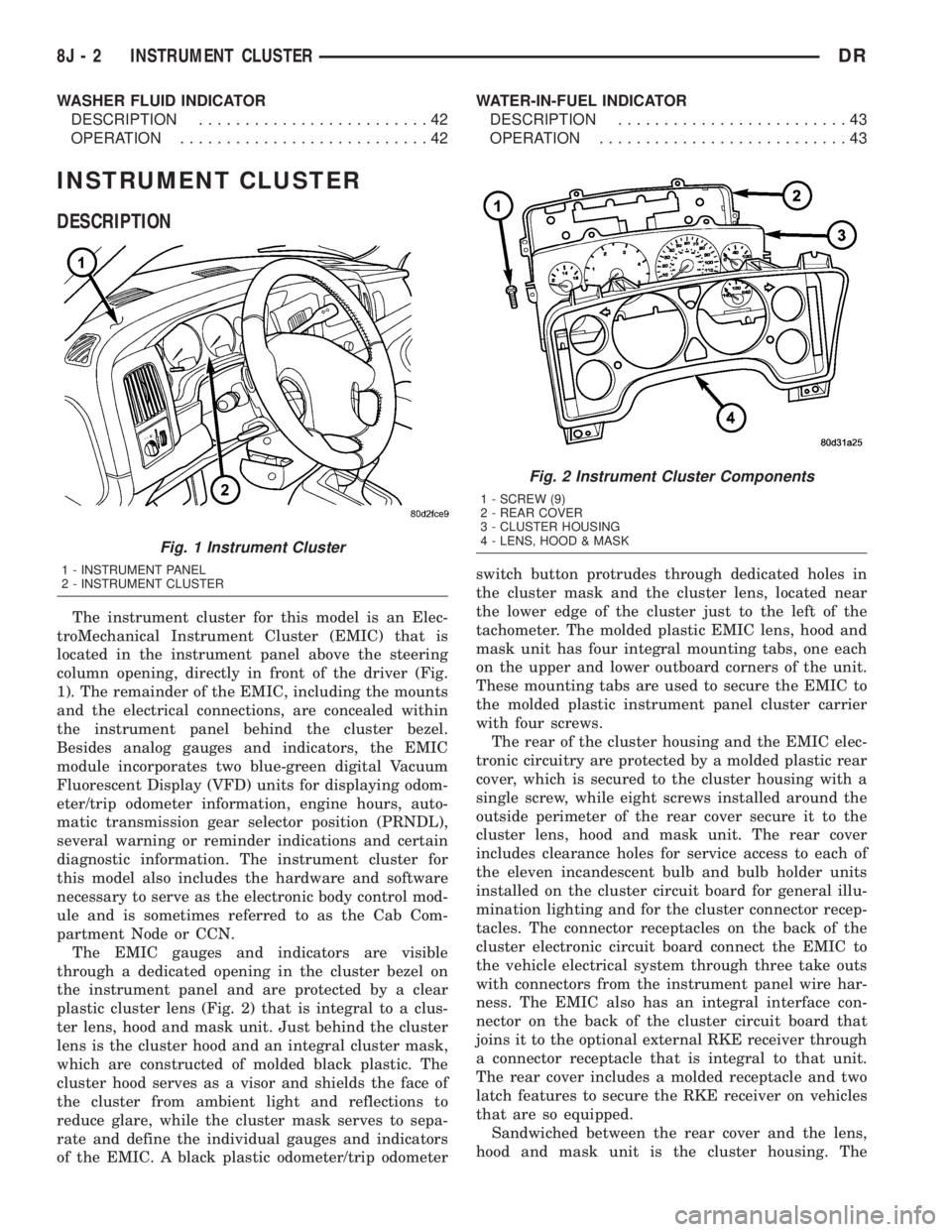
The instrument cluster for this model is an Elec-
troMechanical Instrument Cluster (EMIC) that is
located in the instrument panel above the steering
column opening, directly in front of the driver (Fig.
1). The remainder of the EMIC, including the mounts
and the electrical connections, are concealed within
the instrument panel behind the cluster bezel.
Besides analog gauges and indicators, the EMIC
module incorporates two blue-green digital Vacuum
Fluorescent Display (VFD) units for displaying odom-
eter/trip odometer information, engine hours, auto-
matic transmission gear selector position (PRNDL),
several warning or reminder indications and certain
diagnostic information. The instrument cluster for
this model also includes the hardware and software
necessary to serve as the electronic body control mod-
ule and is sometimes referred to as the Cab Com-
partment Node or CCN.
The EMIC gauges and indicators are visible
through a dedicated opening in the cluster bezel on
the instrument panel and are protected by a clear
plastic cluster lens (Fig. 2) that is integral to a clus-
ter lens, hood and mask unit. Just behind the cluster
lens is the cluster hood and an integral cluster mask,
which are constructed of molded black plastic. The
cluster hood serves as a visor and shields the face of
the cluster from ambient light and reflections to
reduce glare, while the cluster mask serves to sepa-
rate and define the individual gauges and indicators
of the EMIC. A black plastic odometer/trip odometerswitch button protrudes through dedicated holes in
the cluster mask and the cluster lens, located near
the lower edge of the cluster just to the left of the
tachometer. The molded plastic EMIC lens, hood and
mask unit has four integral mounting tabs, one each
on the upper and lower outboard corners of the unit.
These mounting tabs are used to secure the EMIC to
the molded plastic instrument panel cluster carrier
with four screws.
The rear of the cluster housing and the EMIC elec-
tronic circuitry are protected by a molded plastic rear
cover, which is secured to the cluster housing with a
single screw, while eight screws installed around the
outside perimeter of the rear cover secure it to the
cluster lens, hood and mask unit. The rear cover
includes clearance holes for service access to each of
the eleven incandescent bulb and bulb holder units
installed on the cluster circuit board for general illu-
mination lighting and for the cluster connector recep-
tacles. The connector receptacles on the back of the
cluster electronic circuit board connect the EMIC to
the vehicle electrical system through three take outs
with connectors from the instrument panel wire har-
ness. The EMIC also has an integral interface con-
nector on the back of the cluster circuit board that
joins it to the optional external RKE receiver through
a connector receptacle that is integral to that unit.
The rear cover includes a molded receptacle and two
latch features to secure the RKE receiver on vehicles
that are so equipped.
Sandwiched between the rear cover and the lens,
hood and mask unit is the cluster housing. The
Fig. 1 Instrument Cluster
1 - INSTRUMENT PANEL
2 - INSTRUMENT CLUSTER
Fig. 2 Instrument Cluster Components
1 - SCREW (9)
2 - REAR COVER
3 - CLUSTER HOUSING
4 - LENS, HOOD & MASK
8J - 2 INSTRUMENT CLUSTERDR
Page 498 of 2895
the vehicle speed remains greater than about twenty-
four kilometers-per-hour (fifteen miles-per-hour).
²Vacuum Fluorescent Display Synchroniza-
tion- The EMIC transmits electronic panel lamp
dimming level messages which allows all other elec-
tronic modules on the PCI data bus with Vacuum
Fluorescent Display (VFD) units to coordinate their
illumination intensity with that of the EMIC VFD
units.
²Vehicle Theft Security System- The EMIC
monitors inputs from the door cylinder lock switch-
(es), the door ajar switches, the ignition switch, and
the Remote Keyless Entry (RKE) receiver module,
then provides electronic horn and lighting request
messages to the Front Control Module (FCM) located
on the Integrated Power Module (IPM) for the appro-
priate VTSS alarm output features.
²Wiper/Washer System Control- The EMIC
provides electronic wiper and/or washer request mes-
sages to the Front Control Module (FCM) located on
the Integrated Power Module (IPM) for the appropri-
ate wiper and washer system features. (Refer to 8 -
ELECTRICAL/WIPERS/WASHERS - DESCRIP-
TION).
The EMIC houses six analog gauges and has pro-
visions for up to twenty-three indicators (Fig. 3) or
(Fig. 4). The EMIC includes the following analog
gauges:
²Coolant Temperature Gauge
²Fuel Gauge
²Oil Pressure Gauge
²Speedometer
²Tachometer
²Voltage Gauge
Some of the EMIC indicators are automatically
configured when the EMIC is connected to the vehi-
cle electrical system for compatibility with certain
optional equipment or equipment required for regula-
tory purposes in certain markets. While each EMIC
may have provisions for indicators to support every
available option, the configurable indicators will not
be functional in a vehicle that does not have the
equipment that an indicator supports. The EMIC
includes provisions for the following indicators (Fig.
3) or (Fig. 4):
²Airbag Indicator (with Airbag System only)
²Antilock Brake System (ABS) Indicator
(with ABS or Rear Wheel Anti-Lock [RWAL]
brakes only)
²Brake Indicator
²Cargo Lamp Indicator
²Check Gauges Indicator
²Cruise Indicator (with Speed Control only)
²Door Ajar Indicator
²Electronic Throttle Control (ETC) Indicator
(with 5.7L Gasoline Engine only)²Gear Selector Indicator (with Automatic
Transmission only)
²High Beam Indicator
²Lamp Out Indicator
²Low Fuel Indicator
²Malfunction Indicator Lamp (MIL)
²Overdrive-Off Indicator (with Automatic
Transmission only)
²Seatbelt Indicator
²Security Indicator (with Sentry Key Immo-
bilizer & Vehicle Theft Security Systems only)
²Service Four-Wheel Drive Indicator (with
Four-Wheel Drive only)
²Transmission Overtemp Indicator (with
Automatic Transmission only)
²Turn Signal (Right and Left) Indicators
²Upshift Indicator (with Manual Transmis-
sion only)
²Washer Fluid Indicator
²Wait-To-Start Indicator (with Diesel Engine
only)
²Water-In-Fuel Indicator (with Diesel Engine
only)
Each indicator in the EMIC, except those located
within one of the VFD units, is illuminated by a ded-
icated LED that is soldered onto the EMIC electronic
circuit board. The LED units are not available for
service replacement and, if damaged or faulty, the
entire EMIC must be replaced. Cluster illumination
is accomplished by dimmable incandescent back
lighting, which illuminates the gauges for visibility
when the exterior lighting is turned on. Each of the
incandescent bulbs is secured by an integral bulb
holder to the electronic circuit board from the back of
the cluster housing.
Hard wired circuitry connects the EMIC to the
electrical system of the vehicle. These hard wired cir-
cuits are integral to several wire harnesses, which
are routed throughout the vehicle and retained by
many different methods. These circuits may be con-
nected to each other, to the vehicle electrical system
and to the EMIC through the use of a combination of
soldered splices, splice block connectors, and many
different types of wire harness terminal connectors
and insulators. Refer to the appropriate wiring infor-
mation. The wiring information includes wiring dia-
grams, proper wire and connector repair procedures,
further details on wire harness routing and reten-
tion, as well as pin-out and location views for the
various wire harness connectors, splices and grounds.
The EMIC modules for this model are serviced only
as complete units. The EMIC module cannot be
adjusted or repaired. If a gauge, an LED indicator, a
VFD unit, the electronic circuit board, the circuit
board hardware, the cluster overlay, or the EMIC
housing are damaged or faulty, the entire EMIC mod-
DRINSTRUMENT CLUSTER 8J - 5
INSTRUMENT CLUSTER (Continued)