Electrical connectors DODGE RAM 2003 Service Owner's Manual
[x] Cancel search | Manufacturer: DODGE, Model Year: 2003, Model line: RAM, Model: DODGE RAM 2003Pages: 2895, PDF Size: 83.15 MB
Page 509 of 2895
WARNING: ON VEHICLES EQUIPPED WITH AIR-
BAGS, DISABLE THE SUPPLEMENTAL RESTRAINT
SYSTEM BEFORE ATTEMPTING ANY STEERING
WHEEL, STEERING COLUMN, DRIVER AIRBAG,
PASSENGER AIRBAG, SEAT BELT TENSIONER,
SIDE CURTAIN AIRBAG, OR INSTRUMENT PANEL
COMPONENT DIAGNOSIS OR SERVICE. DISCON-
NECT AND ISOLATE THE BATTERY NEGATIVE
(GROUND) CABLE, THEN WAIT TWO MINUTES FOR
THE SYSTEM CAPACITOR TO DISCHARGE BEFORE
PERFORMING FURTHER DIAGNOSIS OR SERVICE.
THIS IS THE ONLY SURE WAY TO DISABLE THE
SUPPLEMENTAL RESTRAINT SYSTEM. FAILURE TO
TAKE THE PROPER PRECAUTIONS COULD
RESULT IN ACCIDENTAL AIRBAG DEPLOYMENT
AND POSSIBLE PERSONAL INJURY.
CLUSTER BULB
This procedure applies to each of the incandescent
cluster illumination lamp bulb and bulb holder units.
If the vehicle is equipped with the optional Remote
Keyless Entry (RKE) system, and the RKE receiver
module was removed from the instrument cluster
rear cover to access the lower center cluster illumi-
nation lamp, reinstall the RKE module after the bulb
is replaced on the circuit board. (Refer to 8 - ELEC-
TRICAL/POWER LOCKS/REMOTE KEYLESS
ENTRY MODULE - INSTALLATION).
CAUTION: Always use the correct bulb size and
type for replacement. An incorrect bulb size or type
may overheat and cause damage to the instrument
cluster, the electronic circuit board and/or the
gauges.
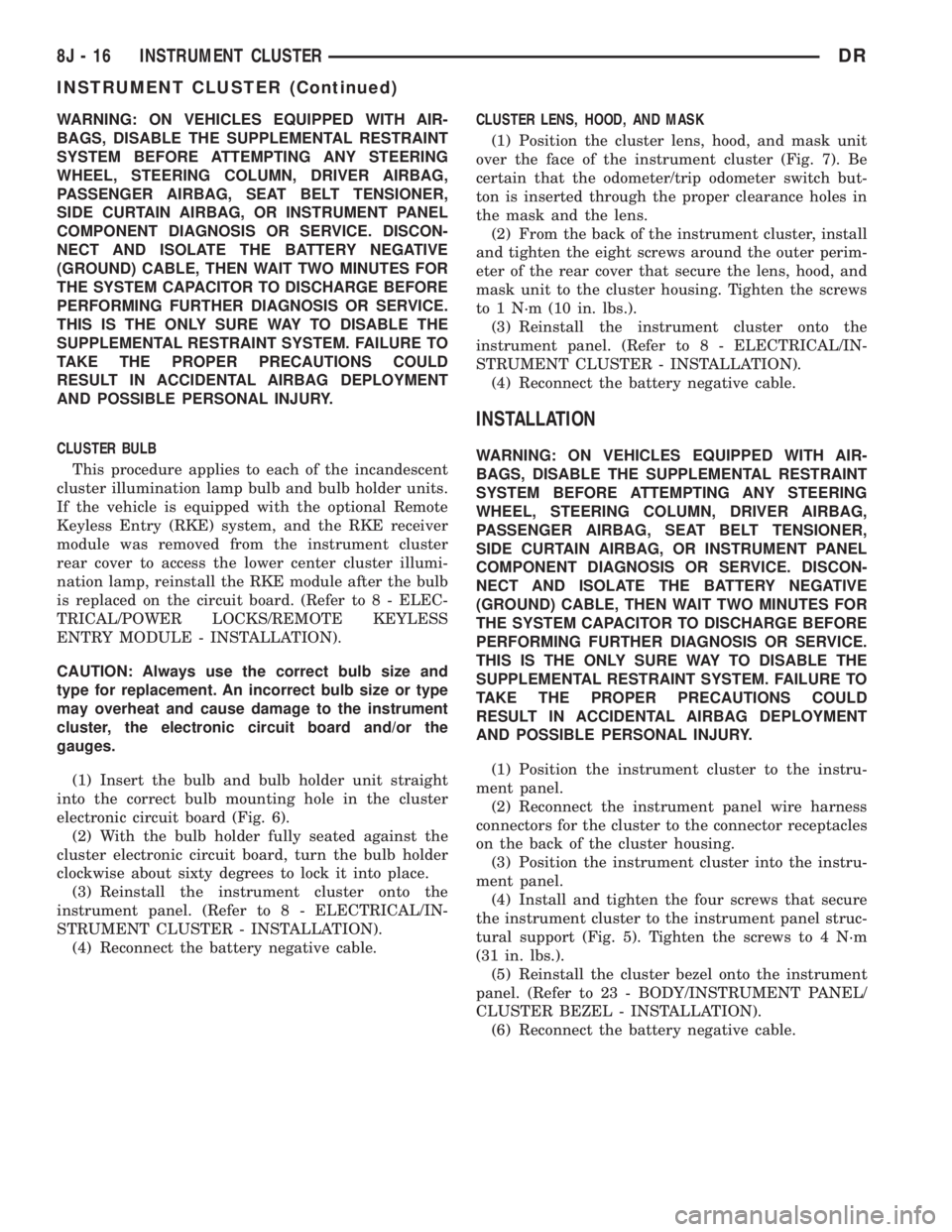
(1) Insert the bulb and bulb holder unit straight
into the correct bulb mounting hole in the cluster
electronic circuit board (Fig. 6).
(2) With the bulb holder fully seated against the
cluster electronic circuit board, turn the bulb holder
clockwise about sixty degrees to lock it into place.
(3) Reinstall the instrument cluster onto the
instrument panel. (Refer to 8 - ELECTRICAL/IN-
STRUMENT CLUSTER - INSTALLATION).
(4) Reconnect the battery negative cable.CLUSTER LENS, HOOD, AND MASK
(1) Position the cluster lens, hood, and mask unit
over the face of the instrument cluster (Fig. 7). Be
certain that the odometer/trip odometer switch but-
ton is inserted through the proper clearance holes in
the mask and the lens.
(2) From the back of the instrument cluster, install
and tighten the eight screws around the outer perim-
eter of the rear cover that secure the lens, hood, and
mask unit to the cluster housing. Tighten the screws
to 1 N´m (10 in. lbs.).
(3) Reinstall the instrument cluster onto the
instrument panel. (Refer to 8 - ELECTRICAL/IN-
STRUMENT CLUSTER - INSTALLATION).
(4) Reconnect the battery negative cable.
INSTALLATION
WARNING: ON VEHICLES EQUIPPED WITH AIR-
BAGS, DISABLE THE SUPPLEMENTAL RESTRAINT
SYSTEM BEFORE ATTEMPTING ANY STEERING
WHEEL, STEERING COLUMN, DRIVER AIRBAG,
PASSENGER AIRBAG, SEAT BELT TENSIONER,
SIDE CURTAIN AIRBAG, OR INSTRUMENT PANEL
COMPONENT DIAGNOSIS OR SERVICE. DISCON-
NECT AND ISOLATE THE BATTERY NEGATIVE
(GROUND) CABLE, THEN WAIT TWO MINUTES FOR
THE SYSTEM CAPACITOR TO DISCHARGE BEFORE
PERFORMING FURTHER DIAGNOSIS OR SERVICE.
THIS IS THE ONLY SURE WAY TO DISABLE THE
SUPPLEMENTAL RESTRAINT SYSTEM. FAILURE TO
TAKE THE PROPER PRECAUTIONS COULD
RESULT IN ACCIDENTAL AIRBAG DEPLOYMENT
AND POSSIBLE PERSONAL INJURY.
(1) Position the instrument cluster to the instru-
ment panel.
(2) Reconnect the instrument panel wire harness
connectors for the cluster to the connector receptacles
on the back of the cluster housing.
(3) Position the instrument cluster into the instru-
ment panel.
(4) Install and tighten the four screws that secure
the instrument cluster to the instrument panel struc-
tural support (Fig. 5). Tighten the screws to 4 N´m
(31 in. lbs.).
(5) Reinstall the cluster bezel onto the instrument
panel. (Refer to 23 - BODY/INSTRUMENT PANEL/
CLUSTER BEZEL - INSTALLATION).
(6) Reconnect the battery negative cable.
8J - 16 INSTRUMENT CLUSTERDR
INSTRUMENT CLUSTER (Continued)
Page 539 of 2895
MULTI-FUNCTION SWITCH
DESCRIPTION - TURN SIGNAL SYSTEM.....17
OPERATION - TURN SIGNAL SYSTEM.......18
DIAGNOSIS AND TESTING - MULTI-
FUNCTION SWITCH...................18
REMOVAL.............................18
INSTALLATION.........................19
PARK LAMP RELAY
DESCRIPTION.........................19
OPERATION...........................19
DIAGNOSIS AND TESTING - PARK LAMP
RELAY..............................20
REMOVAL.............................20
INSTALLATION.........................21
PARK/TURN SIGNAL LAMP
REMOVAL.............................21
INSTALLATION.........................21TAIL LAMP
REMOVAL.............................21
INSTALLATION.........................21
TAIL LAMP UNIT
REMOVAL.............................21
INSTALLATION.........................21
TRAILER TOW WIRING
DESCRIPTION.........................22
TURN LAMP
REMOVAL.............................22
INSTALLATION.........................22
UNDERHOOD LAMP
REMOVAL.............................22
INSTALLATION.........................22
UNDERHOOD LAMP UNIT
REMOVAL.............................22
INSTALLATION.........................23
LAMPS/LIGHTING - EXTERIOR
DESCRIPTION
The exterior lighting system for this model include
the following components:
²Backup Lamps
²Brake Lamps
²Daytime Running Lamps
²Front Fog Lamps
²Hazard Warning Lamps
²Headlamps
²Park Lamps
²Turn Signal Lamps
Other components of the exterior lighting system
for this model include:
²Backup Lamp Switch
²Brake Lamp Switch
²Front Control Module
²Front Fog Lamp Relay
²Hazard Switch
²Multi-Function Switch
²Park Lamp Relay
²Trailer Tow Connectors
Some of the interior and exterior lighting functions
are governed by the front control module. The head-
lamp, dome, and door ajar switchs provide signals to
the instrument cluster. The instrument cluster sends
a J1850 message to the front control module to
enable the necessary components for illumination.
Hard wired circuitry connects the exterior lighting
system components to the electrical system of the
vehicle. Refer to the appropriate wiring information.
OPERATION
DAYTIME RUNNING LAMPS
Power is reduced using pulse-width modulation to
the high beams, where by the power is switched on
and off rapidly instead of remaining on continuously.
The duration and interval of the power pulses is pro-
grammed into the Front Control Module (FCM).
HEADLAMP SYSTEM
The instrument cluster monitors both the multi-
plexed headlamp and multifunction switches. The
instrument cluster transmits a J1850 bus message to
the front control module (FCM) to activate the head-
lamps. The headlamp system will default to head-
lamps ON position when ignition switch is ON and
when an open or short circuit failure occurs on the
headlamp switch input to the instrument cluster. The
system will return to normal operation when the
open or short is repaired. A fault will be reported by
the Instrument Cluster when a failure occurs on the
dimmer or headlamp switch input.
If the exterior lamps are ON, and the headlamp
switch is in any position other than OFF, with the
ignition switch OFF (LOCK) after 5 minutes, the
Instrument Cluster transmits a message via J1850
informing the the FCM. The FCM will then turn off
the headlamps, park lamps and fog lamps. This fea-
ture (load shed) prevents the vehicle battery from
being discharged when the vehicle lights have been
left ON.
HEADLAMP TIME DELAY SYSTEM
The headlamp time delay system is activated by
turning the headlamps ON (high or low beam) while
the engine is running, turning the ignition switch
OFF, and then turning the headlamp switch OFF
8L - 2 LAMPS/LIGHTING - EXTERIORDR
Page 541 of 2895
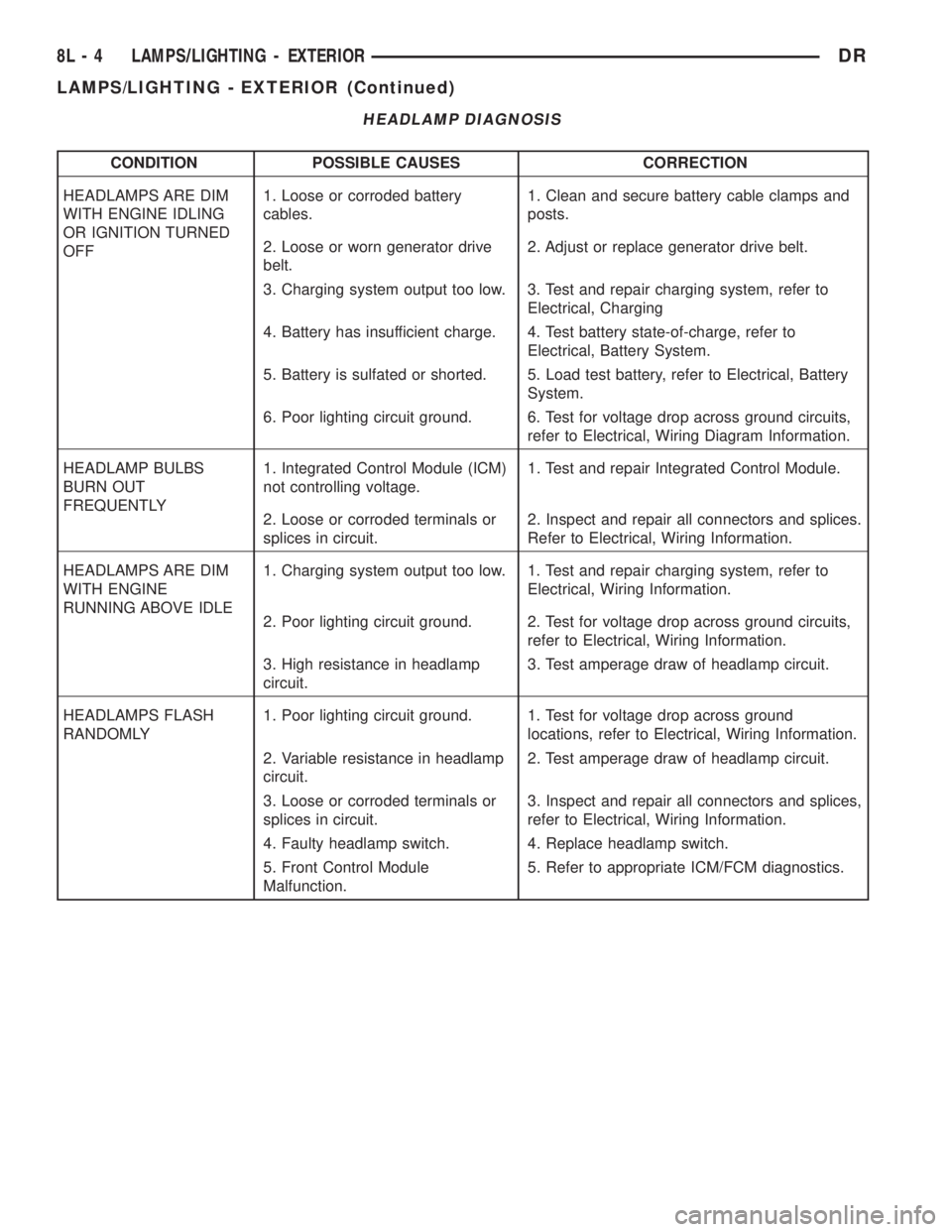
HEADLAMP DIAGNOSIS
CONDITION POSSIBLE CAUSES CORRECTION
HEADLAMPS ARE DIM
WITH ENGINE IDLING
OR IGNITION TURNED
OFF1. Loose or corroded battery
cables.1. Clean and secure battery cable clamps and
posts.
2. Loose or worn generator drive
belt.2. Adjust or replace generator drive belt.
3. Charging system output too low. 3. Test and repair charging system, refer to
Electrical, Charging
4. Battery has insufficient charge. 4. Test battery state-of-charge, refer to
Electrical, Battery System.
5. Battery is sulfated or shorted. 5. Load test battery, refer to Electrical, Battery
System.
6. Poor lighting circuit ground. 6. Test for voltage drop across ground circuits,
refer to Electrical, Wiring Diagram Information.
HEADLAMP BULBS
BURN OUT
FREQUENTLY1. Integrated Control Module (ICM)
not controlling voltage.1. Test and repair Integrated Control Module.
2. Loose or corroded terminals or
splices in circuit.2. Inspect and repair all connectors and splices.
Refer to Electrical, Wiring Information.
HEADLAMPS ARE DIM
WITH ENGINE
RUNNING ABOVE IDLE1. Charging system output too low. 1. Test and repair charging system, refer to
Electrical, Wiring Information.
2. Poor lighting circuit ground. 2. Test for voltage drop across ground circuits,
refer to Electrical, Wiring Information.
3. High resistance in headlamp
circuit.3. Test amperage draw of headlamp circuit.
HEADLAMPS FLASH
RANDOMLY1. Poor lighting circuit ground. 1. Test for voltage drop across ground
locations, refer to Electrical, Wiring Information.
2. Variable resistance in headlamp
circuit.2. Test amperage draw of headlamp circuit.
3. Loose or corroded terminals or
splices in circuit.3. Inspect and repair all connectors and splices,
refer to Electrical, Wiring Information.
4. Faulty headlamp switch. 4. Replace headlamp switch.
5. Front Control Module
Malfunction.5. Refer to appropriate ICM/FCM diagnostics.
8L - 4 LAMPS/LIGHTING - EXTERIORDR
LAMPS/LIGHTING - EXTERIOR (Continued)
Page 542 of 2895
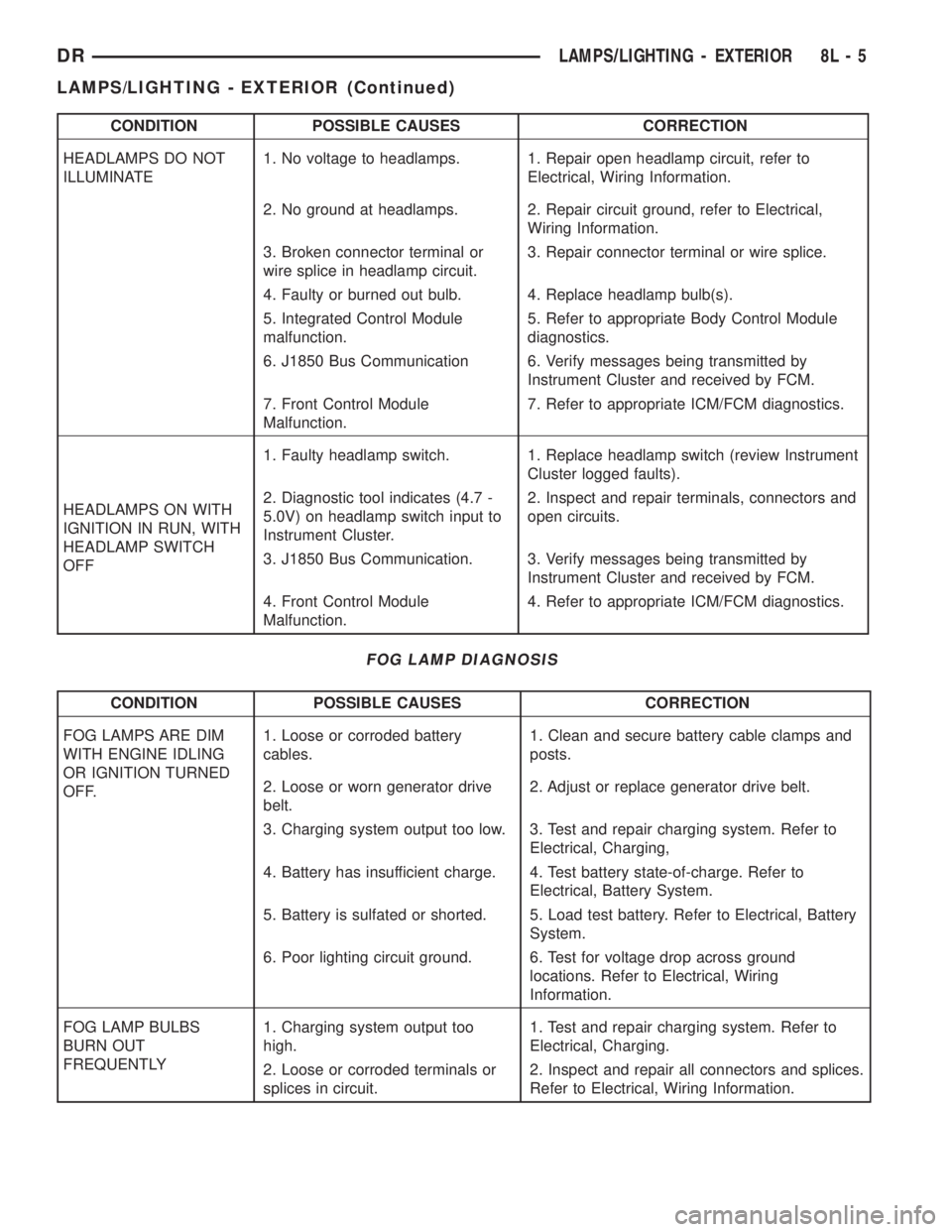
CONDITION POSSIBLE CAUSES CORRECTION
HEADLAMPS DO NOT
ILLUMINATE1. No voltage to headlamps. 1. Repair open headlamp circuit, refer to
Electrical, Wiring Information.
2. No ground at headlamps. 2. Repair circuit ground, refer to Electrical,
Wiring Information.
3. Broken connector terminal or
wire splice in headlamp circuit.3. Repair connector terminal or wire splice.
4. Faulty or burned out bulb. 4. Replace headlamp bulb(s).
5. Integrated Control Module
malfunction.5. Refer to appropriate Body Control Module
diagnostics.
6. J1850 Bus Communication 6. Verify messages being transmitted by
Instrument Cluster and received by FCM.
7. Front Control Module
Malfunction.7. Refer to appropriate ICM/FCM diagnostics.
HEADLAMPS ON WITH
IGNITION IN RUN, WITH
HEADLAMP SWITCH
OFF1. Faulty headlamp switch. 1. Replace headlamp switch (review Instrument
Cluster logged faults).
2. Diagnostic tool indicates (4.7 -
5.0V) on headlamp switch input to
Instrument Cluster.2. Inspect and repair terminals, connectors and
open circuits.
3. J1850 Bus Communication. 3. Verify messages being transmitted by
Instrument Cluster and received by FCM.
4. Front Control Module
Malfunction.4. Refer to appropriate ICM/FCM diagnostics.
FOG LAMP DIAGNOSIS
CONDITION POSSIBLE CAUSES CORRECTION
FOG LAMPS ARE DIM
WITH ENGINE IDLING
OR IGNITION TURNED
OFF.1. Loose or corroded battery
cables.1. Clean and secure battery cable clamps and
posts.
2. Loose or worn generator drive
belt.2. Adjust or replace generator drive belt.
3. Charging system output too low. 3. Test and repair charging system. Refer to
Electrical, Charging,
4. Battery has insufficient charge. 4. Test battery state-of-charge. Refer to
Electrical, Battery System.
5. Battery is sulfated or shorted. 5. Load test battery. Refer to Electrical, Battery
System.
6. Poor lighting circuit ground. 6. Test for voltage drop across ground
locations. Refer to Electrical, Wiring
Information.
FOG LAMP BULBS
BURN OUT
FREQUENTLY1. Charging system output too
high.1. Test and repair charging system. Refer to
Electrical, Charging.
2. Loose or corroded terminals or
splices in circuit.2. Inspect and repair all connectors and splices.
Refer to Electrical, Wiring Information.
DRLAMPS/LIGHTING - EXTERIOR 8L - 5
LAMPS/LIGHTING - EXTERIOR (Continued)
Page 543 of 2895
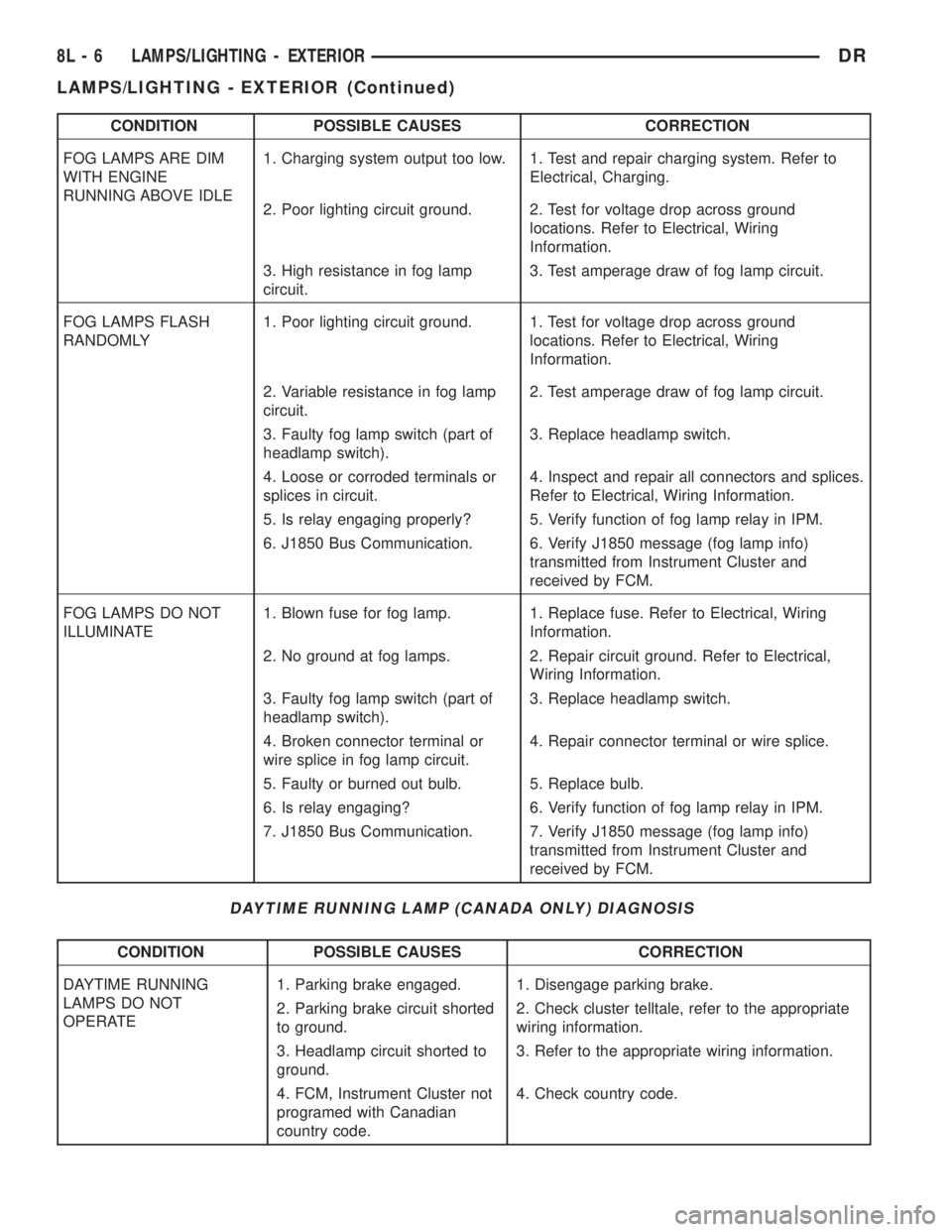
CONDITION POSSIBLE CAUSES CORRECTION
FOG LAMPS ARE DIM
WITH ENGINE
RUNNING ABOVE IDLE1. Charging system output too low. 1. Test and repair charging system. Refer to
Electrical, Charging.
2. Poor lighting circuit ground. 2. Test for voltage drop across ground
locations. Refer to Electrical, Wiring
Information.
3. High resistance in fog lamp
circuit.3. Test amperage draw of fog lamp circuit.
FOG LAMPS FLASH
RANDOMLY1. Poor lighting circuit ground. 1. Test for voltage drop across ground
locations. Refer to Electrical, Wiring
Information.
2. Variable resistance in fog lamp
circuit.2. Test amperage draw of fog lamp circuit.
3. Faulty fog lamp switch (part of
headlamp switch).3. Replace headlamp switch.
4. Loose or corroded terminals or
splices in circuit.4. Inspect and repair all connectors and splices.
Refer to Electrical, Wiring Information.
5. Is relay engaging properly? 5. Verify function of fog lamp relay in IPM.
6. J1850 Bus Communication. 6. Verify J1850 message (fog lamp info)
transmitted from Instrument Cluster and
received by FCM.
FOG LAMPS DO NOT
ILLUMINATE1. Blown fuse for fog lamp. 1. Replace fuse. Refer to Electrical, Wiring
Information.
2. No ground at fog lamps. 2. Repair circuit ground. Refer to Electrical,
Wiring Information.
3. Faulty fog lamp switch (part of
headlamp switch).3. Replace headlamp switch.
4. Broken connector terminal or
wire splice in fog lamp circuit.4. Repair connector terminal or wire splice.
5. Faulty or burned out bulb. 5. Replace bulb.
6. Is relay engaging? 6. Verify function of fog lamp relay in IPM.
7. J1850 Bus Communication. 7. Verify J1850 message (fog lamp info)
transmitted from Instrument Cluster and
received by FCM.
DAYTIME RUNNING LAMP (CANADA ONLY) DIAGNOSIS
CONDITION POSSIBLE CAUSES CORRECTION
DAYTIME RUNNING
LAMPS DO NOT
OPERATE1. Parking brake engaged. 1. Disengage parking brake.
2. Parking brake circuit shorted
to ground.2. Check cluster telltale, refer to the appropriate
wiring information.
3. Headlamp circuit shorted to
ground.3. Refer to the appropriate wiring information.
4. FCM, Instrument Cluster not
programed with Canadian
country code.4. Check country code.
8L - 6 LAMPS/LIGHTING - EXTERIORDR
LAMPS/LIGHTING - EXTERIOR (Continued)
Page 568 of 2895
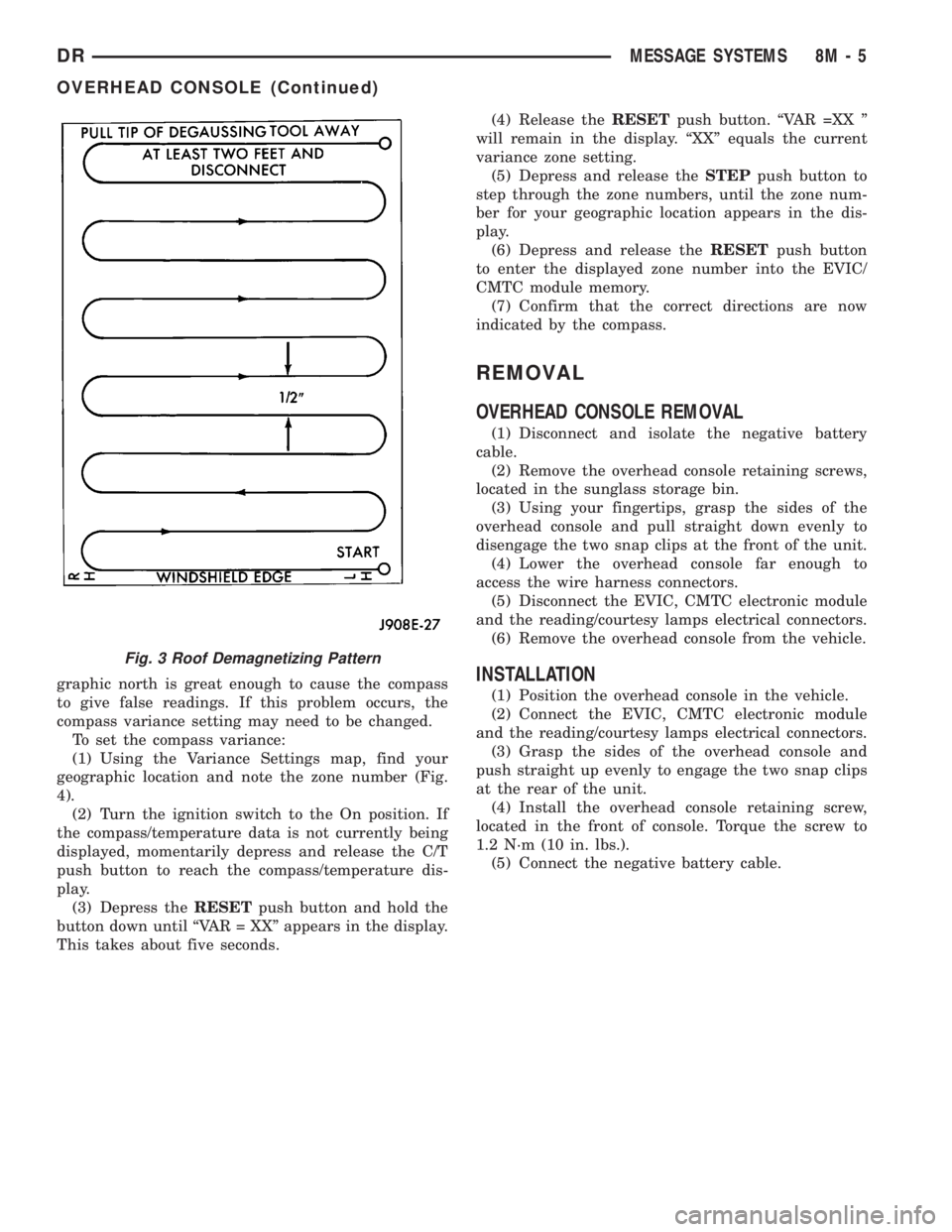
graphic north is great enough to cause the compass
to give false readings. If this problem occurs, the
compass variance setting may need to be changed.
To set the compass variance:
(1) Using the Variance Settings map, find your
geographic location and note the zone number (Fig.
4).
(2) Turn the ignition switch to the On position. If
the compass/temperature data is not currently being
displayed, momentarily depress and release the C/T
push button to reach the compass/temperature dis-
play.
(3) Depress theRESETpush button and hold the
button down until ªVAR = XXº appears in the display.
This takes about five seconds.(4) Release theRESETpush button. ªVAR =XX º
will remain in the display. ªXXº equals the current
variance zone setting.
(5) Depress and release theSTEPpush button to
step through the zone numbers, until the zone num-
ber for your geographic location appears in the dis-
play.
(6) Depress and release theRESETpush button
to enter the displayed zone number into the EVIC/
CMTC module memory.
(7) Confirm that the correct directions are now
indicated by the compass.
REMOVAL
OVERHEAD CONSOLE REMOVAL
(1) Disconnect and isolate the negative battery
cable.
(2) Remove the overhead console retaining screws,
located in the sunglass storage bin.
(3) Using your fingertips, grasp the sides of the
overhead console and pull straight down evenly to
disengage the two snap clips at the front of the unit.
(4) Lower the overhead console far enough to
access the wire harness connectors.
(5) Disconnect the EVIC, CMTC electronic module
and the reading/courtesy lamps electrical connectors.
(6) Remove the overhead console from the vehicle.
INSTALLATION
(1) Position the overhead console in the vehicle.
(2) Connect the EVIC, CMTC electronic module
and the reading/courtesy lamps electrical connectors.
(3) Grasp the sides of the overhead console and
push straight up evenly to engage the two snap clips
at the rear of the unit.
(4) Install the overhead console retaining screw,
located in the front of console. Torque the screw to
1.2 N´m (10 in. lbs.).
(5) Connect the negative battery cable.
Fig. 3 Roof Demagnetizing Pattern
DRMESSAGE SYSTEMS 8M - 5
OVERHEAD CONSOLE (Continued)
Page 580 of 2895
drivers and provides a voltage level to the door lock
motor for a specified time. All passenger doors can be
locked or unlocked using a mechanical button
mounted on the door trim panel. The front passenger
doors can be locked or unlocked by using the key cyl-
inder.
AUTOMATIC DOOR LOCKS
When the automatic door locks are ENABLED the
door locks will lock when the vehicle is moving at
about 25.7 Km/h (15 mph), all doors are closed and
the accelerator pedal is depressed. This feature can
be switched ON or OFF as desired. When the system
is DISABLED the door locks will operate normally,
but will not lock automatically when the vehicle is
rolling. Once the automatic door locks have been
actuated, they will not try to lock the doors again
until a door is opened.
DOOR LOCK INHIBIT
If the key is in the ignition, in any position, and
either front door is ajar, the doors can not be locked,
but the unlock function still operates. Pressing the
RKE lock/unlock button under these conditions will
result in a normal lock/unlock activation.
After the key is removed from the ignition switch,
or the doors are closed, the power door locks will
operate normally.
DOOR LOCK CIRCUIT PROTECTION
If the door lock switch is actuated continuously for
more than five seconds the instrument cluster will
turn the output driver OFF (the instrument cluster
would consider the switch stuck). Each lock motor is
protected with a Positive Temperature Coefficient
device that prevents motor burn out.
REMOTE KEYLESS ENTRY
²LOCK: Pressing the LOCK button locks all
doors, sounds horn (chirp) once if enabled, flashes the
park lamps once if enabled, and arms the Vehicle
Theft Security System (VTSS), if enabled. The chirp
verifies that the RKE module has sent a message to
the instrument cluster for door lock operation. If a
door has not been closed before pressing the LOCK
button, the vehicle may not be secured and the VTSS
(if equipped) will not arm until the door is closed.
²UNLOCK: Pressing the UNLOCK button once
will unlock the driver's door first if enabled, flashes
the park lamps twice if enabled, activates the illumi-
nated entry system, and disarms the Vehicle Theft
Security System (VTSS), if equipped. Pressing the
UNLOCK button twice within five seconds will
unlock all doors, if driver's door first is enabled.
²PANIC: Pressing the PANIC button sounds the
horns at half second intervals, flashes the exteriorlamps, and turns ON the interior lamps. The panic
alarm will remain on for three minutes, or until the
PANIC button is actuated again or the vehicle speed
exceeds 25.7 Km/h (15 mph) will cancel the panic
event.
The Remote Keyless Entry Module is capable of
retaining the transmitter Vehicle Access Code(s) in
its memory even after vehicle power has been inter-
rupted.
DIAGNOSIS AND TESTING - POWER LOCKS
The most reliable, efficient, and accurate
means to diagnose the power lock system
requires the use of a DRBIIItscan tool and the
proper Diagnostic Procedures manual. The
DRBIIItscan tool can provide confirmation
that the PCI data bus is functional, that all of
the electronic modules are sending and receiv-
ing the proper messages on the PCI data bus,
and that the power lock motors are being sent
the proper hard wired outputs by the relays for
them to perform their power lock system func-
tions.
Following are tests that will help to diagnose the
hard wired components and circuits of the power lock
system. However, these tests may not prove conclu-
sive in the diagnosis of this system. In order to
obtain conclusive testing of the power lock system,
the Programmable Communications Interface (PCI)
data bus network and all of the electronic modules
that provide inputs to, or receive outputs from the
power lock system components must be checked.
The instrument cluster will set Diagnostic Trouble
Codes (DTC) for the power lock system.
Refer to the appropriate wiring information. The
wiring information includes wiring diagrams, proper
wire and connector repair procedures, details of wire
harness routing and retention, connector pin-out
information and location views for the various wire
harness connectors, splices and grounds.
PRELIMINARY DIAGNOSIS
As a preliminary diagnosis for the power lock sys-
tem, note the system operation while you actuate
both the Lock and Unlock functions with the power
lock switches and with the Remote Keyless Entry
(RKE) transmitter. Then, proceed as follows:
²If the entire power lock system fails to function
with either the power lock switches or the RKE
transmitter, check the fused B(+) fuse in the Inte-
grated Power Module (IPM).
²If the power lock system functions with both
power lock switches, but not with the RKE transmit-
ter, proceed to diagnosis of the Remote Keyless Entry
(RKE) system. (Refer to 8 - ELECTRICAL/POWER
LOCKS/KEYLESS ENTRY TRANSMITTER - DIAG-
DRPOWER LOCKS 8N - 3
POWER LOCKS (Continued)
Page 581 of 2895
NOSIS AND TESTING) or (Refer to 8 - ELECTRI-
CAL/POWER LOCKS/REMOTE KEYLESS ENTRY
MODULE - DIAGNOSIS AND TESTING).
²If the power lock system functions with the RKE
transmitter, but not with one or both power lock
switches, proceed to diagnosis of the door lock
switches. (Refer to 8 - ELECTRICAL/POWER
LOCKS/POWER LOCK SWITCH - DIAGNOSIS AND
TESTING).
²If the driver side power lock switch operates
only the driver side front door power lock motor, but
all other power lock motors operate with the passen-
ger side power lock switch or the RKE transmitter,
use a DRBIIItscan tool and the appropriate diagnos-
tic information to diagnose the Programmable Com-
munications Interface (PCI) data bus.
²If only one power lock motor fails to operate
with both power lock switches and the RKE trans-
mitter, proceed to diagnosis of the power lock motor.
(Refer to 8 - ELECTRICAL/POWER LOCKS/POWER
LOCK MOTOR - DIAGNOSIS AND TESTING).
POWER LOCK SWITCH
DIAGNOSIS AND TESTING - POWER LOCK
SWITCH
The Light-Emitting Diode (LED) illumination lamp
of the power lock switch receives battery current
through a fuse in the Integrated Power Module (IPM)
on a fused ignition switch output (run) circuit. The
power lock switch on the driver side front door trim
panel is integral to the driver door module. (Refer to
8 - ELECTRICAL/POWER LOCKS/DOOR MODULE
- DIAGNOSIS AND TESTING). If the power lock
switch operates, but the LED is inoperative, check
for battery current at the switch with the ignition
switch in the On position. If OK, replace the faulty
switch. Refer to the appropriate wiring information.
The wiring information includes wiring diagrams,
proper wire and connector repair procedures, details
of wire harness routing and retention, connector pin-
out information and location views for the various
wire harness connectors, splices and grounds.
(1) Disconnect and isolate the battery negative
cable. Remove the power lock switch from the door
trim panel. Disconnect the door wire harness connec-
tor for the power lock switch from the switch connec-
tor receptacle.
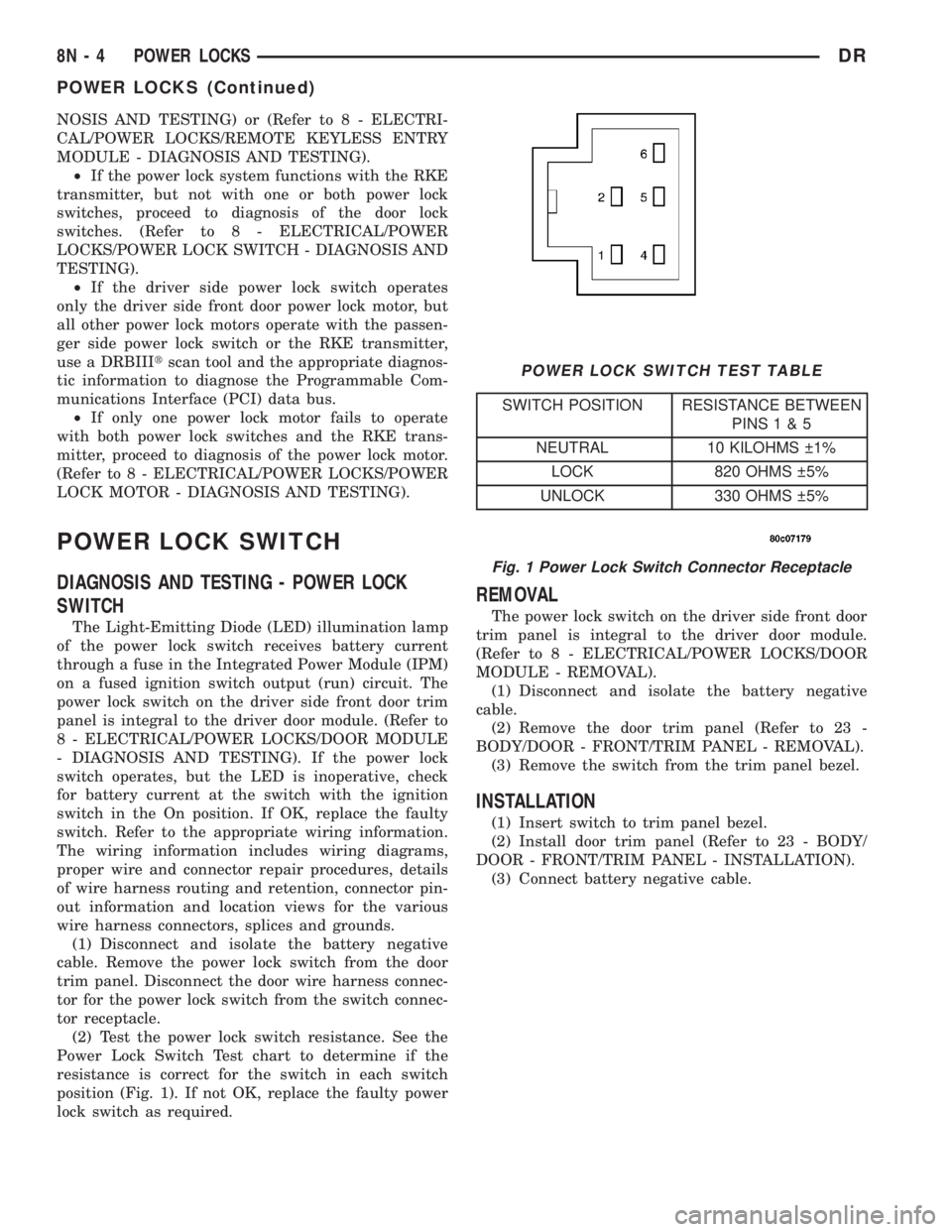
(2) Test the power lock switch resistance. See the
Power Lock Switch Test chart to determine if the
resistance is correct for the switch in each switch
position (Fig. 1). If not OK, replace the faulty power
lock switch as required.
REMOVAL
The power lock switch on the driver side front door
trim panel is integral to the driver door module.
(Refer to 8 - ELECTRICAL/POWER LOCKS/DOOR
MODULE - REMOVAL).
(1) Disconnect and isolate the battery negative
cable.
(2) Remove the door trim panel (Refer to 23 -
BODY/DOOR - FRONT/TRIM PANEL - REMOVAL).
(3) Remove the switch from the trim panel bezel.
INSTALLATION
(1) Insert switch to trim panel bezel.
(2) Install door trim panel (Refer to 23 - BODY/
DOOR - FRONT/TRIM PANEL - INSTALLATION).
(3) Connect battery negative cable.
Fig. 1 Power Lock Switch Connector Receptacle
POWER LOCK SWITCH TEST TABLE
SWITCH POSITION RESISTANCE BETWEEN
PINS1&5
NEUTRAL 10 KILOHMS 1%
LOCK 820 OHMS 5%
UNLOCK 330 OHMS 5%
8N - 4 POWER LOCKSDR
POWER LOCKS (Continued)
Page 583 of 2895
the Integrated Power Module (IPM) on a fused igni-
tion switch output (run-acc) circuit so that the power
windows will operate whenever the ignition switch is
in the On or Accessory positions. Each two-way,
momentary master passenger power window switch
in the DDM provides battery current and ground to
the individual power window switches on each pas-
senger door so that the power window switch controls
the battery current and ground feeds to its respective
power window motor. The DDM switch for the driver
side front door power window is labeled ªAutoº and
includes an auto-down feature. When this switch is
depressed to a second momentary detent position and
released, the driver door power window is automati-
cally operated through an internal circuit and relay
to its fully lowered position. The Auto-down event is
cancelled if the switch paddle is depressed a second
time in either the Up or Down direction. When the
two position window lockout switch in the DDM is
depressed and latched in the lockout position, the
battery current feed to each of the individual passen-
ger power window switches is interrupted so that the
passenger door power windows can only be operated
from the master switches in the DDM. The window
lockout switch also controls the battery current feed
for the LED in each passenger power window switch
so that the switch will not be illuminated when it is
locked out.
Power Mirror Switches
The DDM power mirror switch circuitry is con-
nected to battery current through a fuse in the IPM
on a fused B(+) circuit so that the power mirrors
remain operational regardless of the ignition switch
position. A rocker type selector switch has three posi-
tions, one to select the right mirror, one to select the
left mirror, and a neutral Off position. After the right
or left mirror is selected, one of four directional but-
tons is depressed to move the selected mirror Up,
Down, Right or Left. The DDM power mirror switch
circuitry controls the battery current and ground
feeds to each of the four (two in each mirror head)
power mirror motors. The Light-Emitting Diode
(LED) in the DDM power mirror switch is connected
to battery current through the power window circuit
breaker in the IPM on a fused ignition switch output
(run-acc) circuit so that the switch directional but-
tons will be illuminated whenever the ignition switch
is in the On or Accessory positions.DIAGNOSIS AND TESTING - DRIVER DOOR
MODULE
The Light-Emitting Diode (LED) illumination
lamps for all of the Driver Door Module (DDM)
power window, power lock, and power mirror
switches receive battery current through the power
window circuit breaker in the Integrated Power Mod-
ule (IPM). If all of the LEDs are inoperative in the
DDM, be certain to diagnose the power window sys-
tem before replacing the switch unit. (Refer to 8 -
ELECTRICAL/POWER WINDOWS - DIAGNOSIS
AND TESTING). If only one LED in the DDM is
inoperative, replace the faulty DDM. If the driver
side front door power window operates in a normal
manner, but the Auto-Down feature is inoperative,
replace the faulty DDM. Refer to the appropriate wir-
ing information. The wiring information includes wir-
ing diagrams, proper wire and connector repair
procedures, details of wire harness routing and
retention, connector pin-out information and location
views for the various wire harness connectors, splices
and grounds.
(1) Disconnect and isolate the battery negative
cable. Remove the DDM from the door trim panel.
Disconnect the door wire harness connectors for the
DDM from the DDM connector receptacles.
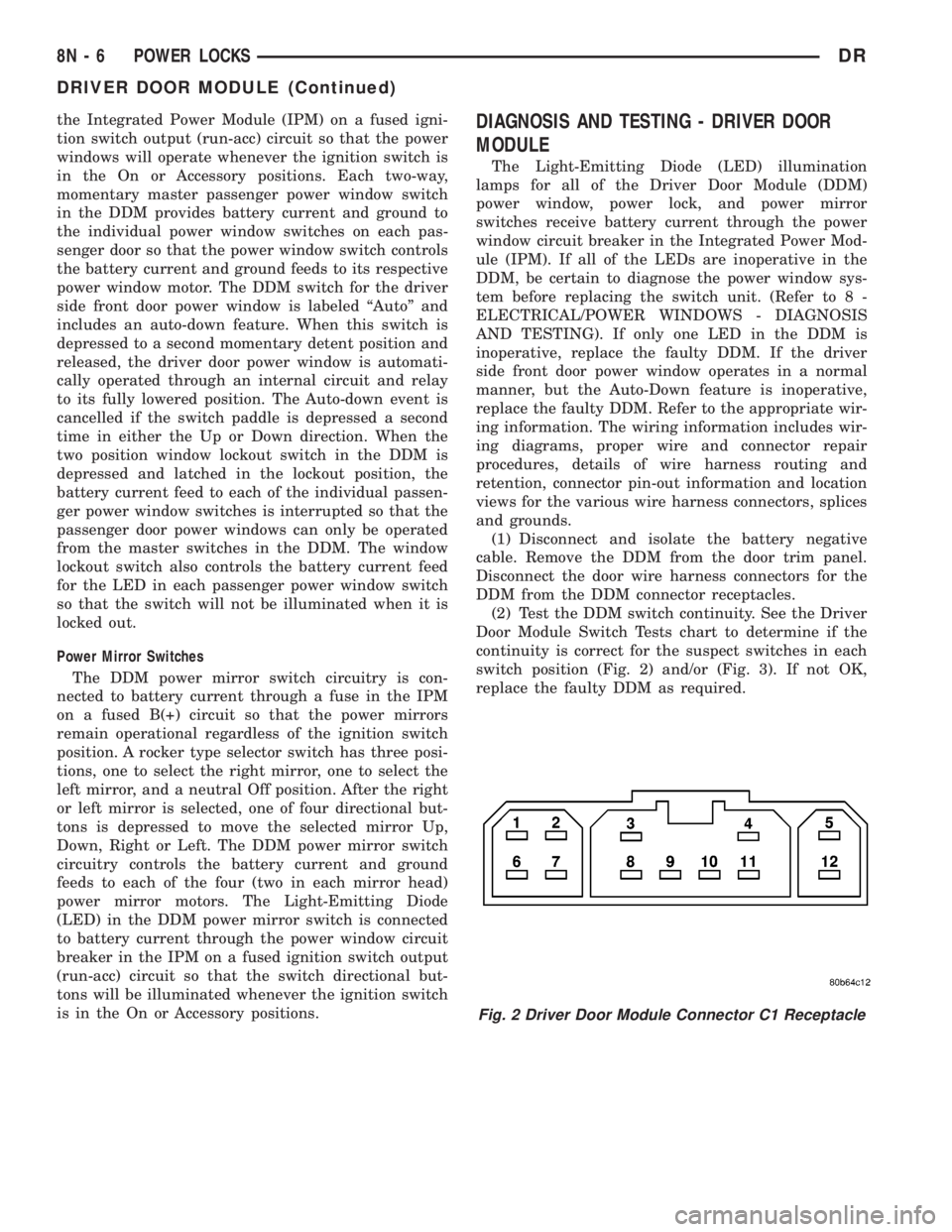
(2) Test the DDM switch continuity. See the Driver
Door Module Switch Tests chart to determine if the
continuity is correct for the suspect switches in each
switch position (Fig. 2) and/or (Fig. 3). If not OK,
replace the faulty DDM as required.
Fig. 2 Driver Door Module Connector C1 Receptacle
8N - 6 POWER LOCKSDR
DRIVER DOOR MODULE (Continued)
Page 585 of 2895
the horn to sound for about three minutes, or until a
second panic message is sent to the instrument clus-
ter. A vehicle speed of about 25.7 kilometers-per-hour
(15 miles-per-hour) will also cancel the panic event.
Refer to the owner's manual for more information
on the features, use and operation of the RKE sys-
tem.
OPERATION
Whenever the vehicle battery power is interrupted,
the Remote Keyless Module (RKE) Module will retain
all vehicle access codes in its memory. When replac-
ing or adding a key fob transmitter (maximum of 4) a
DRB IIItscan tool is required to program the RKE
Module to accept the new Vehicle Access Code if a
customer owned transmitter is not available.
If a functioning transmitter is available, (Refer to 8
- ELECTRICAL/POWER LOCKS/KEYLESS ENTRY
TRANSMITTER - STANDARD PROCEDURE)
DIAGNOSIS AND TESTING - REMOTE KEYLESS
ENTRY MODULE
Refer to the appropriate wiring information. The
wiring information includes wiring diagrams, proper
wire and connector repair procedures, further details
on wire harness routing and retention, as well as
pin-out and location views for the various wire har-
ness connectors, splices and grounds. Refer to the
proper Body Diagnostic Procedures Manual for test-
ing the Remote Keyless Entry system using a DRB
IIItscan tool.
REMOVAL
(1) Disconnect and isolate the battery negative
cable.
(2) Remove the instrument cluster (Refer to 8 -
ELECTRICAL/INSTRUMENT CLUSTER - REMOV-
AL).
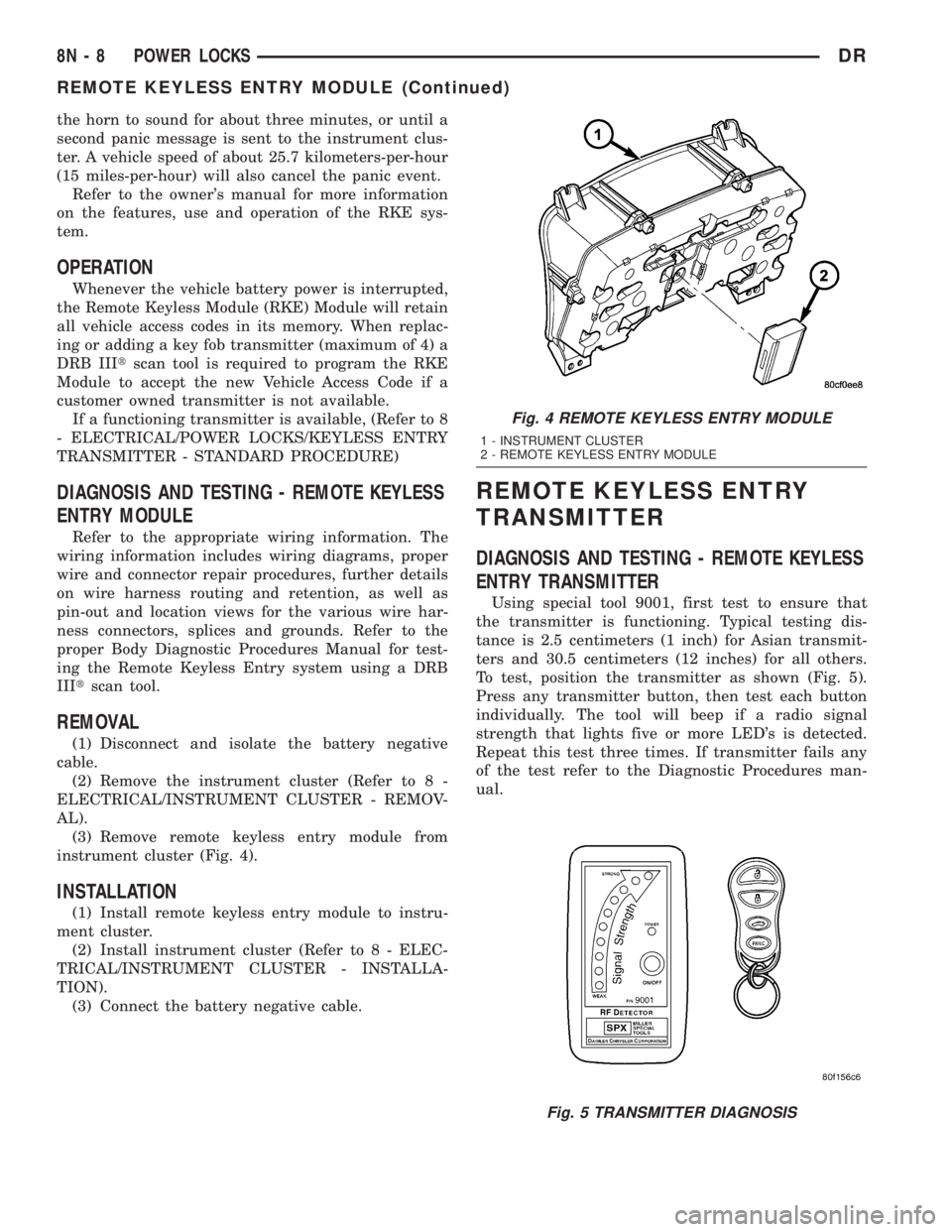
(3) Remove remote keyless entry module from
instrument cluster (Fig. 4).
INSTALLATION
(1) Install remote keyless entry module to instru-
ment cluster.
(2) Install instrument cluster (Refer to 8 - ELEC-
TRICAL/INSTRUMENT CLUSTER - INSTALLA-
TION).
(3) Connect the battery negative cable.
REMOTE KEYLESS ENTRY
TRANSMITTER
DIAGNOSIS AND TESTING - REMOTE KEYLESS
ENTRY TRANSMITTER
Using special tool 9001, first test to ensure that
the transmitter is functioning. Typical testing dis-
tance is 2.5 centimeters (1 inch) for Asian transmit-
ters and 30.5 centimeters (12 inches) for all others.
To test, position the transmitter as shown (Fig. 5).
Press any transmitter button, then test each button
individually. The tool will beep if a radio signal
strength that lights five or more LED's is detected.
Repeat this test three times. If transmitter fails any
of the test refer to the Diagnostic Procedures man-
ual.
Fig. 4 REMOTE KEYLESS ENTRY MODULE
1 - INSTRUMENT CLUSTER
2 - REMOTE KEYLESS ENTRY MODULE
Fig. 5 TRANSMITTER DIAGNOSIS
8N - 8 POWER LOCKSDR
REMOTE KEYLESS ENTRY MODULE (Continued)