Front hub assembly DODGE RAM 2003 Service Manual PDF
[x] Cancel search | Manufacturer: DODGE, Model Year: 2003, Model line: RAM, Model: DODGE RAM 2003Pages: 2895, PDF Size: 83.15 MB
Page 2334 of 2895
NOTE: The air supply which is used must be free of
moisture and dirt. Use a pressure of 30 psi to test
clutch operation.
Apply air pressure at each port. If the clutch is
functioning, a soft thump will be heard as the clutch
is applied. The clutch application can also be felt by
touching the appropriate element while applying air
pressure. As the air pressure is released, the clutch
should also release.
DIAGNOSIS AND TESTING - CONVERTER
HOUSING FLUID LEAK
When diagnosing converter housing fluid leaks,
two items must be established before repair.
(1) Verify that a leak condition actually exists.
(2) Determined the true source of the leak.
Some suspected converter housing fluid leaks may not
be leaks at all. They may only be the result of residual
fluid in the converter housing, or excess fluid spilled dur-
ing factory fill or fill after repair. Converter housing
leaks have several potential sources. Through careful
observation, a leak source can be identified before remov-
ing the transmission for repair. Torque converter seal
leaks tend to move along the drive hub and onto the rear
of the converter. Pump cover seal tend to run down the
cover and the inside surface of the bellhousing.
Some leaks, or suspected leaks, may be particu-
larly difficult to locate. If necessary, a Mopart
approved dye may be used to locate a leak.
TORQUE CONVERTER LEAK POINTS
Possible sources of converter leaks are:
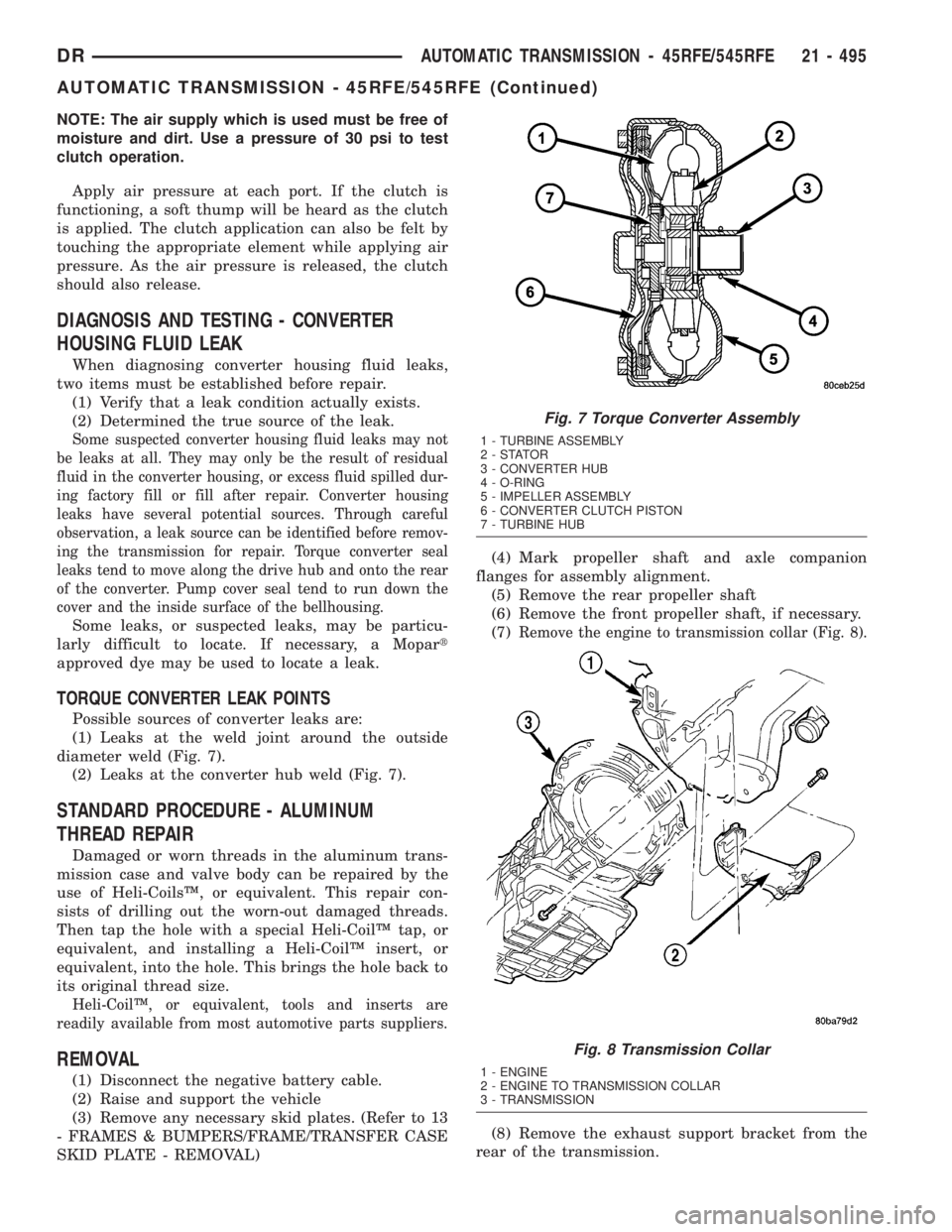
(1) Leaks at the weld joint around the outside
diameter weld (Fig. 7).
(2) Leaks at the converter hub weld (Fig. 7).
STANDARD PROCEDURE - ALUMINUM
THREAD REPAIR
Damaged or worn threads in the aluminum trans-
mission case and valve body can be repaired by the
use of Heli-CoilsŸ, or equivalent. This repair con-
sists of drilling out the worn-out damaged threads.
Then tap the hole with a special Heli-CoilŸ tap, or
equivalent, and installing a Heli-CoilŸ insert, or
equivalent, into the hole. This brings the hole back to
its original thread size.
Heli-CoilŸ, or equivalent, tools and inserts are
readily available from most automotive parts suppliers.
REMOVAL
(1) Disconnect the negative battery cable.
(2) Raise and support the vehicle
(3) Remove any necessary skid plates. (Refer to 13
- FRAMES & BUMPERS/FRAME/TRANSFER CASE
SKID PLATE - REMOVAL)(4) Mark propeller shaft and axle companion
flanges for assembly alignment.
(5) Remove the rear propeller shaft
(6) Remove the front propeller shaft, if necessary.
(7)
Remove the engine to transmission collar (Fig. 8).
(8) Remove the exhaust support bracket from the
rear of the transmission.
Fig. 7 Torque Converter Assembly
1 - TURBINE ASSEMBLY
2-STATOR
3 - CONVERTER HUB
4 - O-RING
5 - IMPELLER ASSEMBLY
6 - CONVERTER CLUTCH PISTON
7 - TURBINE HUB
Fig. 8 Transmission Collar
1 - ENGINE
2 - ENGINE TO TRANSMISSION COLLAR
3 - TRANSMISSION
DRAUTOMATIC TRANSMISSION - 45RFE/545RFE 21 - 495
AUTOMATIC TRANSMISSION - 45RFE/545RFE (Continued)
Page 2438 of 2895
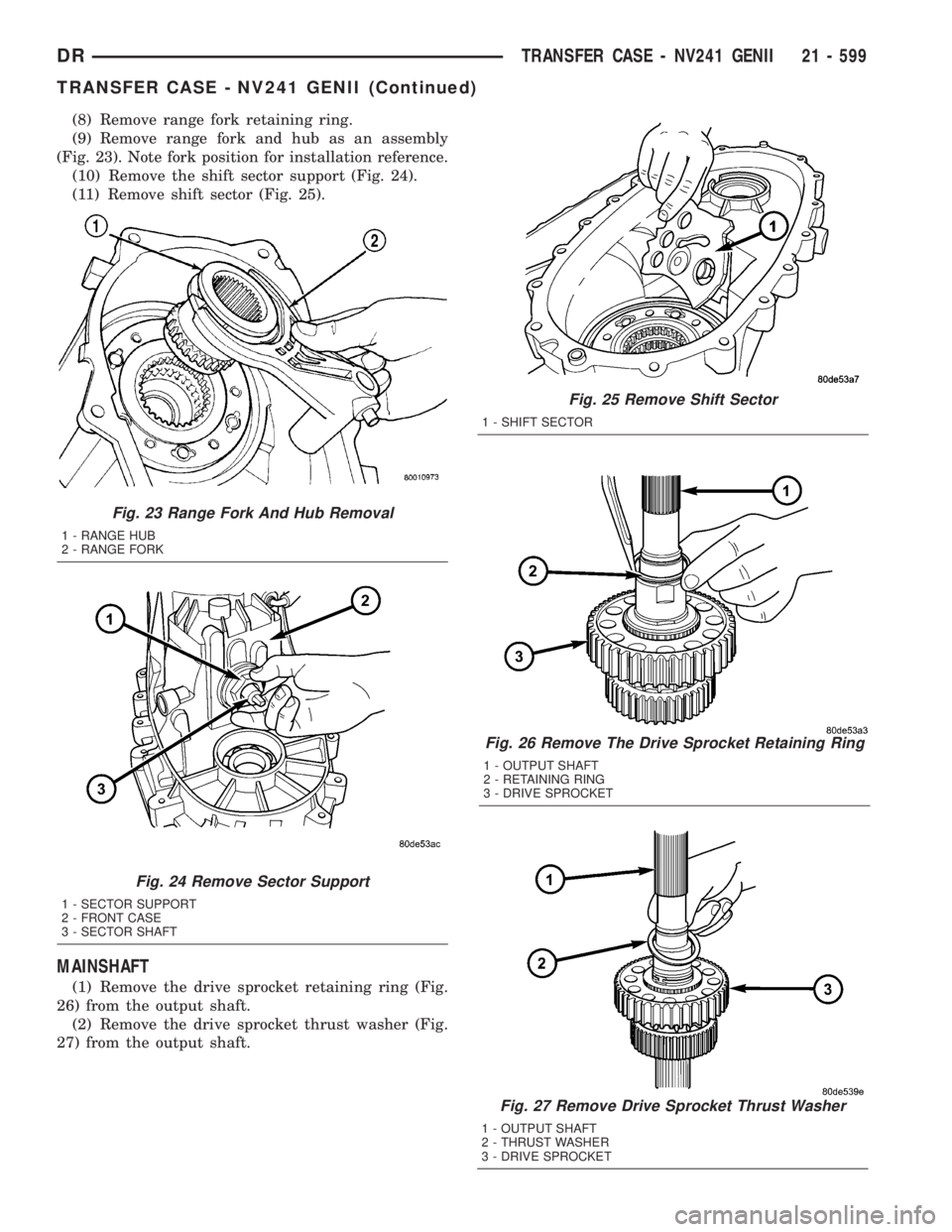
(8) Remove range fork retaining ring.
(9) Remove range fork and hub as an assembly
(Fig. 23). Note fork position for installation reference.
(10) Remove the shift sector support (Fig. 24).
(11) Remove shift sector (Fig. 25).
MAINSHAFT
(1) Remove the drive sprocket retaining ring (Fig.
26) from the output shaft.
(2) Remove the drive sprocket thrust washer (Fig.
27) from the output shaft.
Fig. 23 Range Fork And Hub Removal
1 - RANGE HUB
2 - RANGE FORK
Fig. 24 Remove Sector Support
1 - SECTOR SUPPORT
2 - FRONT CASE
3 - SECTOR SHAFT
Fig. 25 Remove Shift Sector
1 - SHIFT SECTOR
Fig. 26 Remove The Drive Sprocket Retaining Ring
1 - OUTPUT SHAFT
2 - RETAINING RING
3 - DRIVE SPROCKET
Fig. 27 Remove Drive Sprocket Thrust Washer
1 - OUTPUT SHAFT
2 - THRUST WASHER
3 - DRIVE SPROCKET
DRTRANSFER CASE - NV241 GENII 21 - 599
TRANSFER CASE - NV241 GENII (Continued)
Page 2441 of 2895
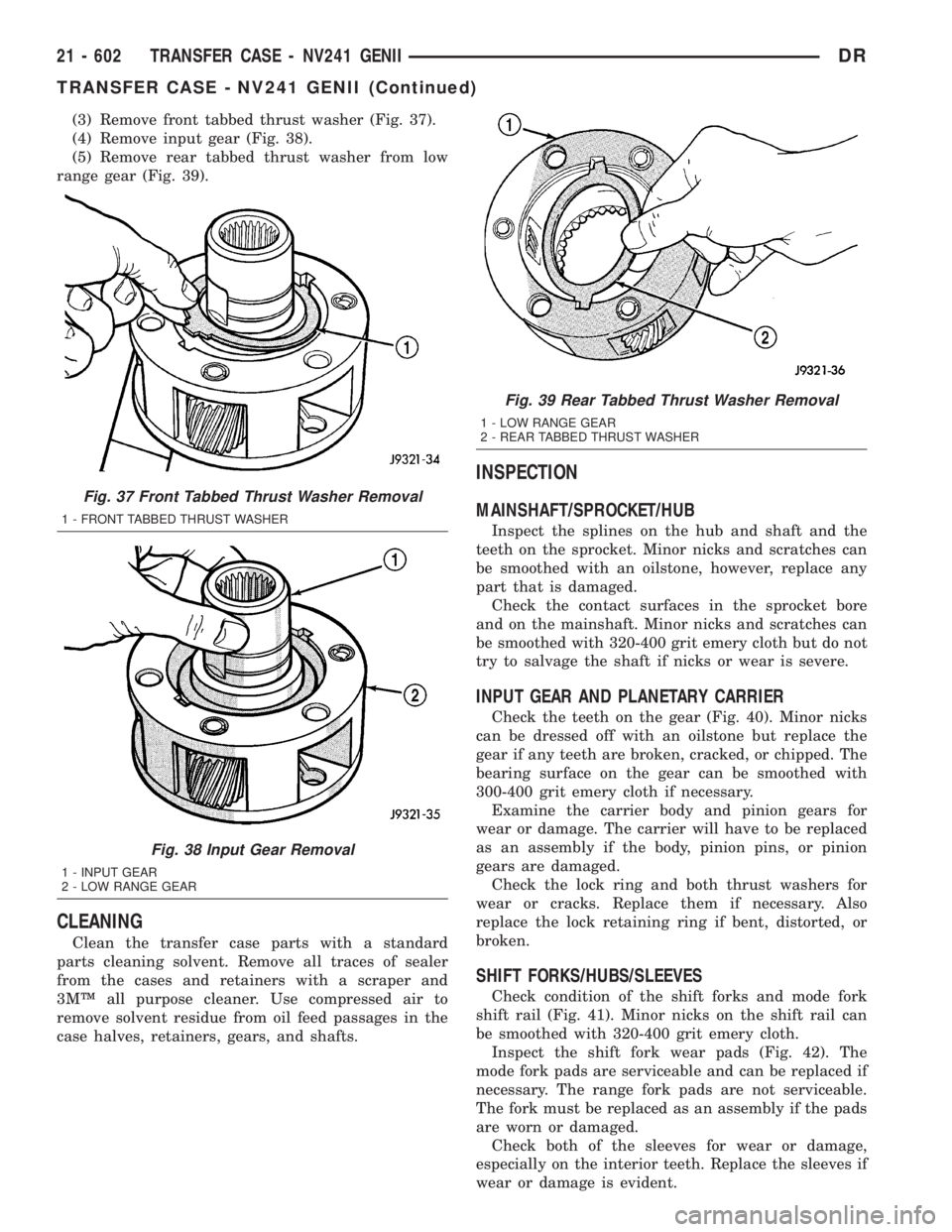
(3) Remove front tabbed thrust washer (Fig. 37).
(4) Remove input gear (Fig. 38).
(5) Remove rear tabbed thrust washer from low
range gear (Fig. 39).
CLEANING
Clean the transfer case parts with a standard
parts cleaning solvent. Remove all traces of sealer
from the cases and retainers with a scraper and
3MŸ all purpose cleaner. Use compressed air to
remove solvent residue from oil feed passages in the
case halves, retainers, gears, and shafts.
INSPECTION
MAINSHAFT/SPROCKET/HUB
Inspect the splines on the hub and shaft and the
teeth on the sprocket. Minor nicks and scratches can
be smoothed with an oilstone, however, replace any
part that is damaged.
Check the contact surfaces in the sprocket bore
and on the mainshaft. Minor nicks and scratches can
be smoothed with 320-400 grit emery cloth but do not
try to salvage the shaft if nicks or wear is severe.
INPUT GEAR AND PLANETARY CARRIER
Check the teeth on the gear (Fig. 40). Minor nicks
can be dressed off with an oilstone but replace the
gear if any teeth are broken, cracked, or chipped. The
bearing surface on the gear can be smoothed with
300-400 grit emery cloth if necessary.
Examine the carrier body and pinion gears for
wear or damage. The carrier will have to be replaced
as an assembly if the body, pinion pins, or pinion
gears are damaged.
Check the lock ring and both thrust washers for
wear or cracks. Replace them if necessary. Also
replace the lock retaining ring if bent, distorted, or
broken.
SHIFT FORKS/HUBS/SLEEVES
Check condition of the shift forks and mode fork
shift rail (Fig. 41). Minor nicks on the shift rail can
be smoothed with 320-400 grit emery cloth.
Inspect the shift fork wear pads (Fig. 42). The
mode fork pads are serviceable and can be replaced if
necessary. The range fork pads are not serviceable.
The fork must be replaced as an assembly if the pads
are worn or damaged.
Check both of the sleeves for wear or damage,
especially on the interior teeth. Replace the sleeves if
wear or damage is evident.
Fig. 37 Front Tabbed Thrust Washer Removal
1 - FRONT TABBED THRUST WASHER
Fig. 38 Input Gear Removal
1 - INPUT GEAR
2 - LOW RANGE GEAR
Fig. 39 Rear Tabbed Thrust Washer Removal
1 - LOW RANGE GEAR
2 - REAR TABBED THRUST WASHER
21 - 602 TRANSFER CASE - NV241 GENIIDR
TRANSFER CASE - NV241 GENII (Continued)
Page 2446 of 2895
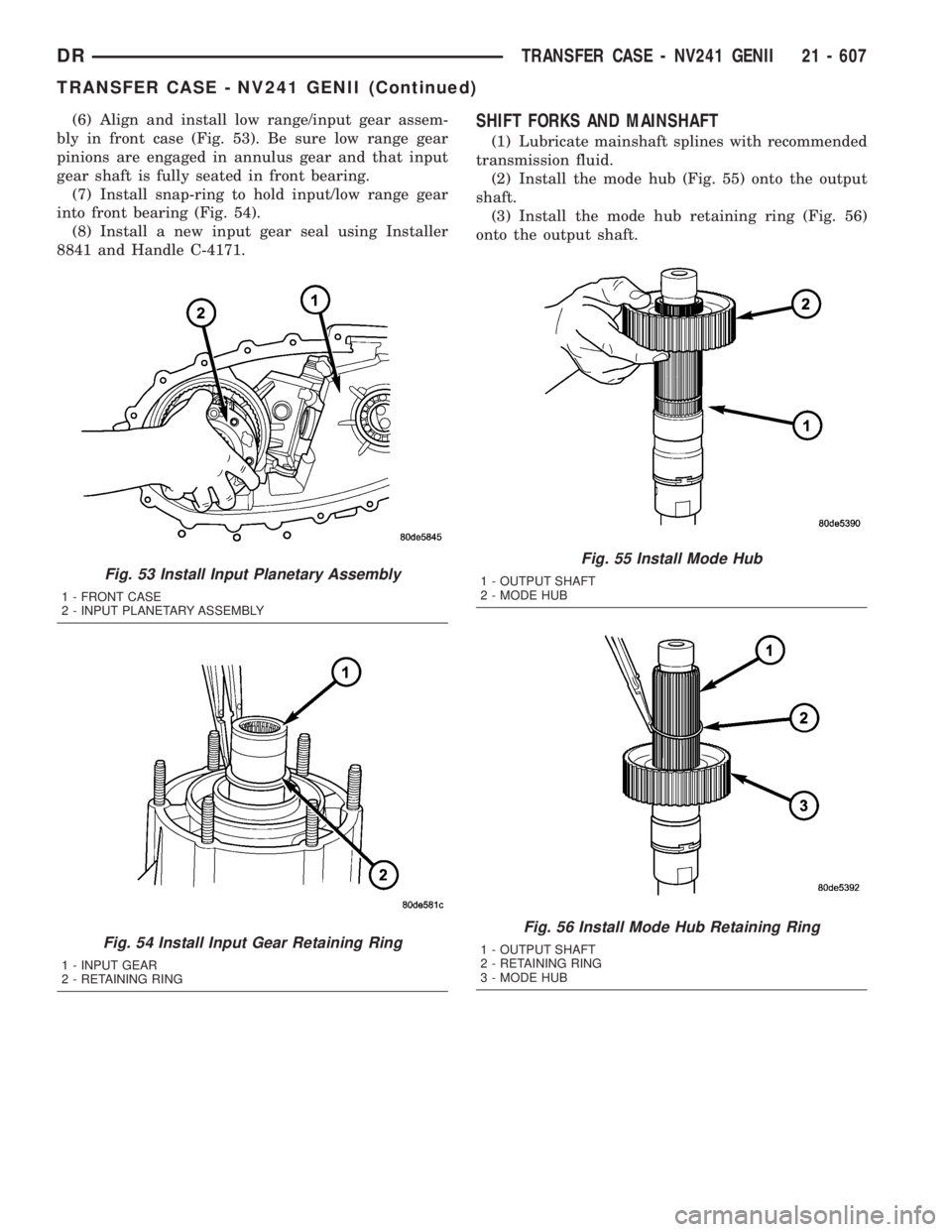
(6) Align and install low range/input gear assem-
bly in front case (Fig. 53). Be sure low range gear
pinions are engaged in annulus gear and that input
gear shaft is fully seated in front bearing.
(7) Install snap-ring to hold input/low range gear
into front bearing (Fig. 54).
(8) Install a new input gear seal using Installer
8841 and Handle C-4171.SHIFT FORKS AND MAINSHAFT
(1) Lubricate mainshaft splines with recommended
transmission fluid.
(2) Install the mode hub (Fig. 55) onto the output
shaft.
(3) Install the mode hub retaining ring (Fig. 56)
onto the output shaft.
Fig. 53 Install Input Planetary Assembly
1 - FRONT CASE
2 - INPUT PLANETARY ASSEMBLY
Fig. 54 Install Input Gear Retaining Ring
1 - INPUT GEAR
2 - RETAINING RING
Fig. 55 Install Mode Hub
1 - OUTPUT SHAFT
2 - MODE HUB
Fig. 56 Install Mode Hub Retaining Ring
1 - OUTPUT SHAFT
2 - RETAINING RING
3 - MODE HUB
DRTRANSFER CASE - NV241 GENII 21 - 607
TRANSFER CASE - NV241 GENII (Continued)
Page 2448 of 2895
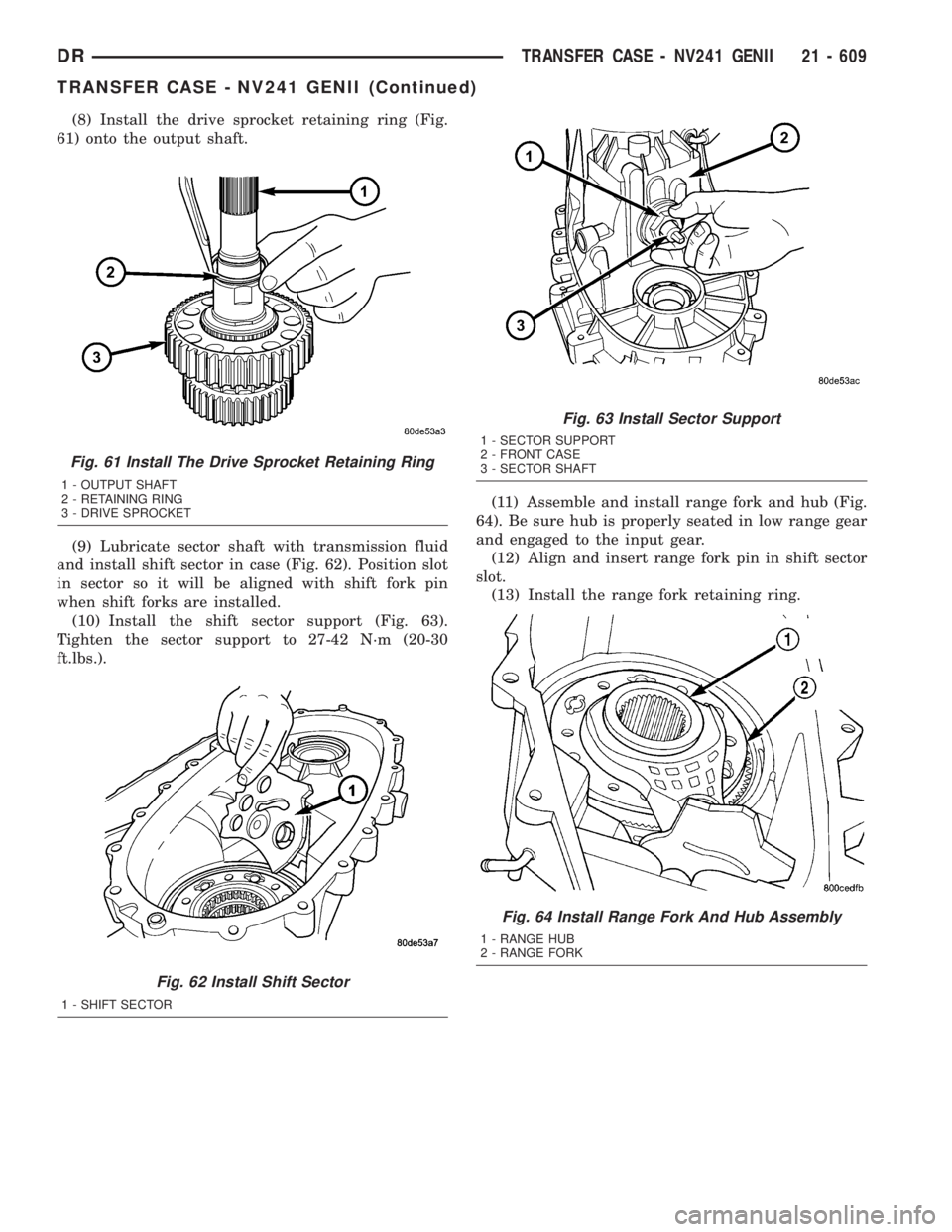
(8) Install the drive sprocket retaining ring (Fig.
61) onto the output shaft.
(9) Lubricate sector shaft with transmission fluid
and install shift sector in case (Fig. 62). Position slot
in sector so it will be aligned with shift fork pin
when shift forks are installed.
(10) Install the shift sector support (Fig. 63).
Tighten the sector support to 27-42 N´m (20-30
ft.lbs.).(11) Assemble and install range fork and hub (Fig.
64). Be sure hub is properly seated in low range gear
and engaged to the input gear.
(12) Align and insert range fork pin in shift sector
slot.
(13) Install the range fork retaining ring.
Fig. 61 Install The Drive Sprocket Retaining Ring
1 - OUTPUT SHAFT
2 - RETAINING RING
3 - DRIVE SPROCKET
Fig. 62 Install Shift Sector
1 - SHIFT SECTOR
Fig. 63 Install Sector Support
1 - SECTOR SUPPORT
2 - FRONT CASE
3 - SECTOR SHAFT
Fig. 64 Install Range Fork And Hub Assembly
1 - RANGE HUB
2 - RANGE FORK
DRTRANSFER CASE - NV241 GENII 21 - 609
TRANSFER CASE - NV241 GENII (Continued)
Page 2451 of 2895
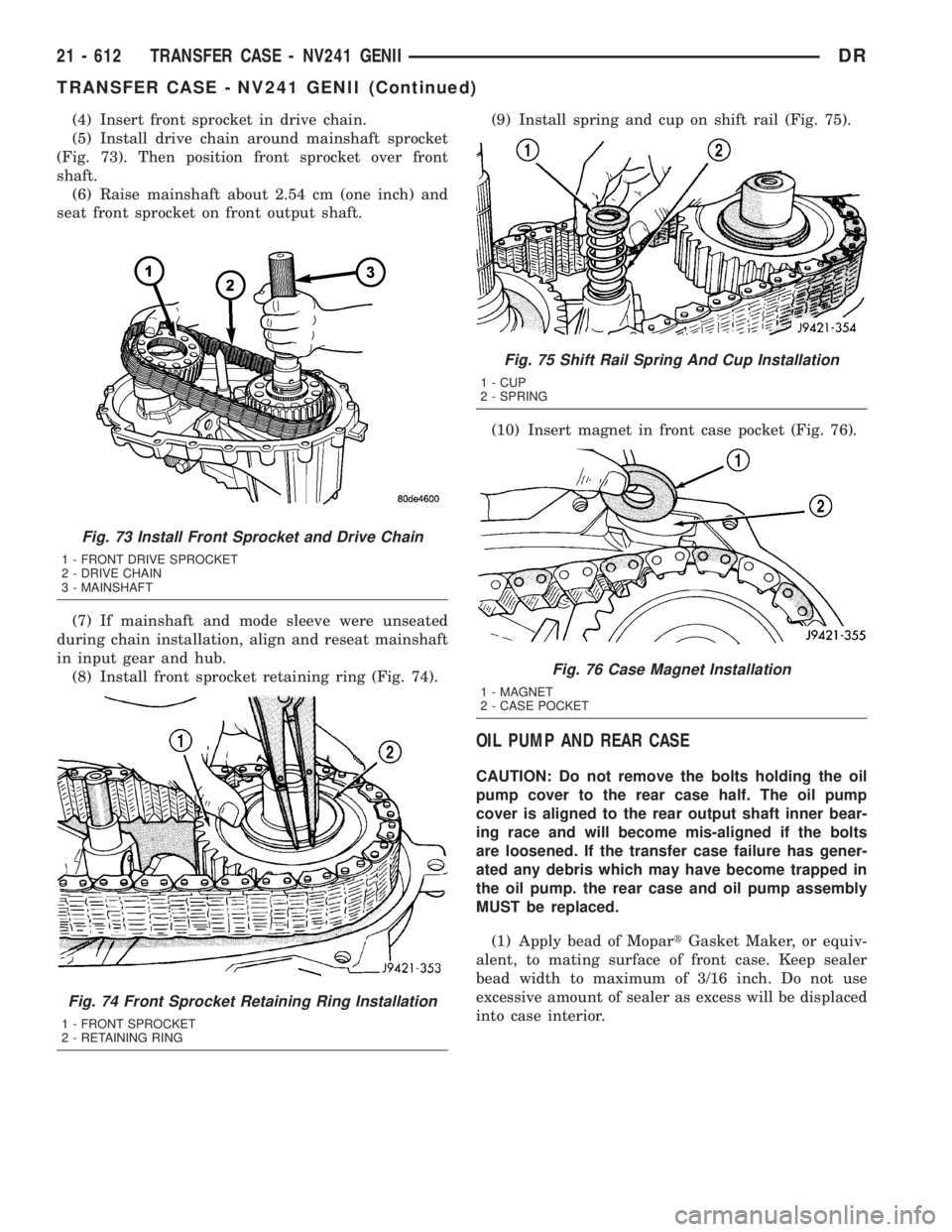
(4) Insert front sprocket in drive chain.
(5) Install drive chain around mainshaft sprocket
(Fig. 73). Then position front sprocket over front
shaft.
(6) Raise mainshaft about 2.54 cm (one inch) and
seat front sprocket on front output shaft.
(7) If mainshaft and mode sleeve were unseated
during chain installation, align and reseat mainshaft
in input gear and hub.
(8) Install front sprocket retaining ring (Fig. 74).(9) Install spring and cup on shift rail (Fig. 75).
(10) Insert magnet in front case pocket (Fig. 76).
OIL PUMP AND REAR CASE
CAUTION: Do not remove the bolts holding the oil
pump cover to the rear case half. The oil pump
cover is aligned to the rear output shaft inner bear-
ing race and will become mis-aligned if the bolts
are loosened. If the transfer case failure has gener-
ated any debris which may have become trapped in
the oil pump. the rear case and oil pump assembly
MUST be replaced.
(1) Apply bead of MopartGasket Maker, or equiv-
alent, to mating surface of front case. Keep sealer
bead width to maximum of 3/16 inch. Do not use
excessive amount of sealer as excess will be displaced
into case interior.
Fig. 73 Install Front Sprocket and Drive Chain
1 - FRONT DRIVE SPROCKET
2 - DRIVE CHAIN
3 - MAINSHAFT
Fig. 74 Front Sprocket Retaining Ring Installation
1 - FRONT SPROCKET
2 - RETAINING RING
Fig. 75 Shift Rail Spring And Cup Installation
1 - CUP
2 - SPRING
Fig. 76 Case Magnet Installation
1 - MAGNET
2 - CASE POCKET
21 - 612 TRANSFER CASE - NV241 GENIIDR
TRANSFER CASE - NV241 GENII (Continued)
Page 2452 of 2895
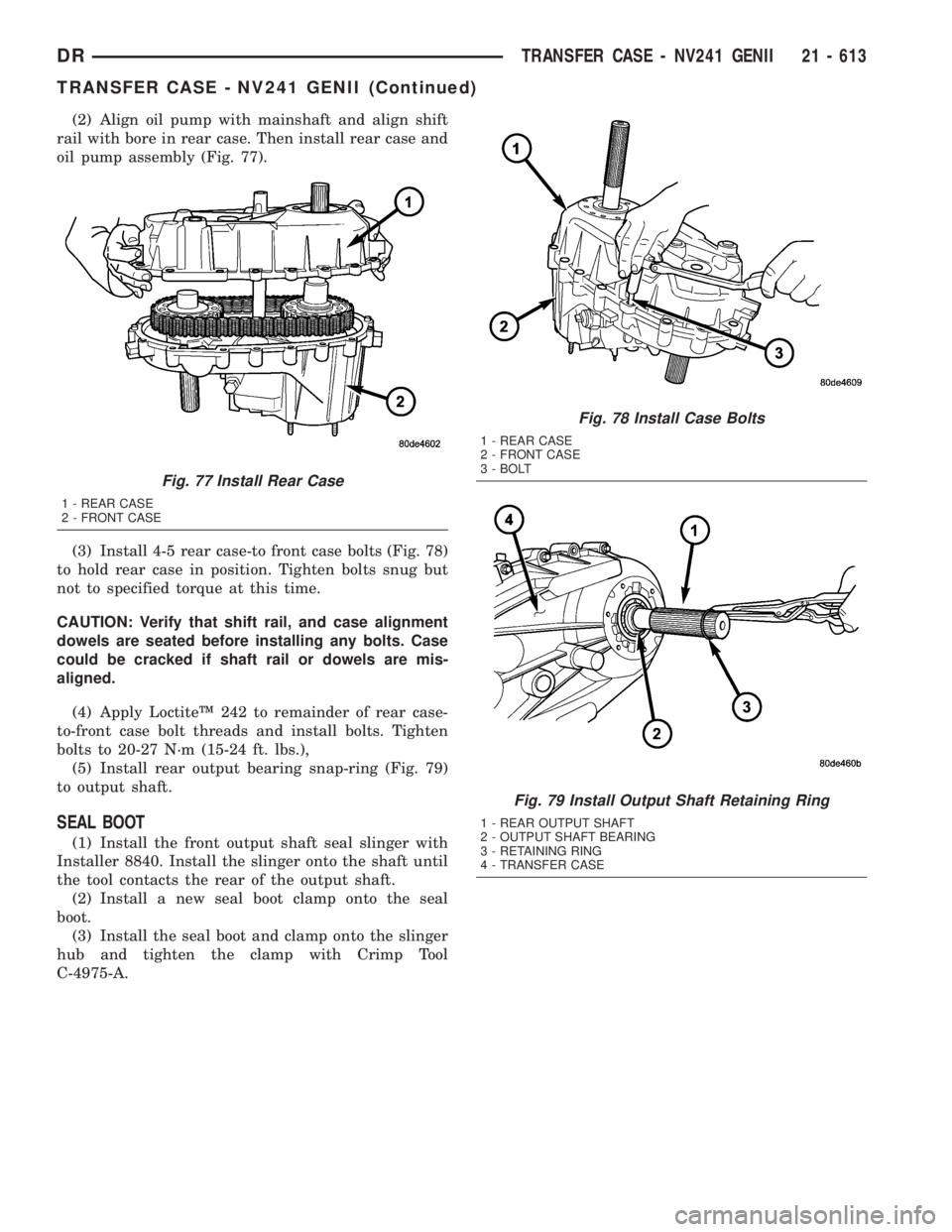
(2) Align oil pump with mainshaft and align shift
rail with bore in rear case. Then install rear case and
oil pump assembly (Fig. 77).
(3) Install 4-5 rear case-to front case bolts (Fig. 78)
to hold rear case in position. Tighten bolts snug but
not to specified torque at this time.
CAUTION: Verify that shift rail, and case alignment
dowels are seated before installing any bolts. Case
could be cracked if shaft rail or dowels are mis-
aligned.
(4) Apply LoctiteŸ 242 to remainder of rear case-
to-front case bolt threads and install bolts. Tighten
bolts to 20-27 N´m (15-24 ft. lbs.),
(5) Install rear output bearing snap-ring (Fig. 79)
to output shaft.
SEAL BOOT
(1) Install the front output shaft seal slinger with
Installer 8840. Install the slinger onto the shaft until
the tool contacts the rear of the output shaft.
(2) Install a new seal boot clamp onto the seal
boot.
(3) Install the seal boot and clamp onto the slinger
hub and tighten the clamp with Crimp Tool
C-4975-A.
Fig. 77 Install Rear Case
1 - REAR CASE
2 - FRONT CASE
Fig. 78 Install Case Bolts
1 - REAR CASE
2 - FRONT CASE
3 - BOLT
Fig. 79 Install Output Shaft Retaining Ring
1 - REAR OUTPUT SHAFT
2 - OUTPUT SHAFT BEARING
3 - RETAINING RING
4 - TRANSFER CASE
DRTRANSFER CASE - NV241 GENII 21 - 613
TRANSFER CASE - NV241 GENII (Continued)
Page 2472 of 2895
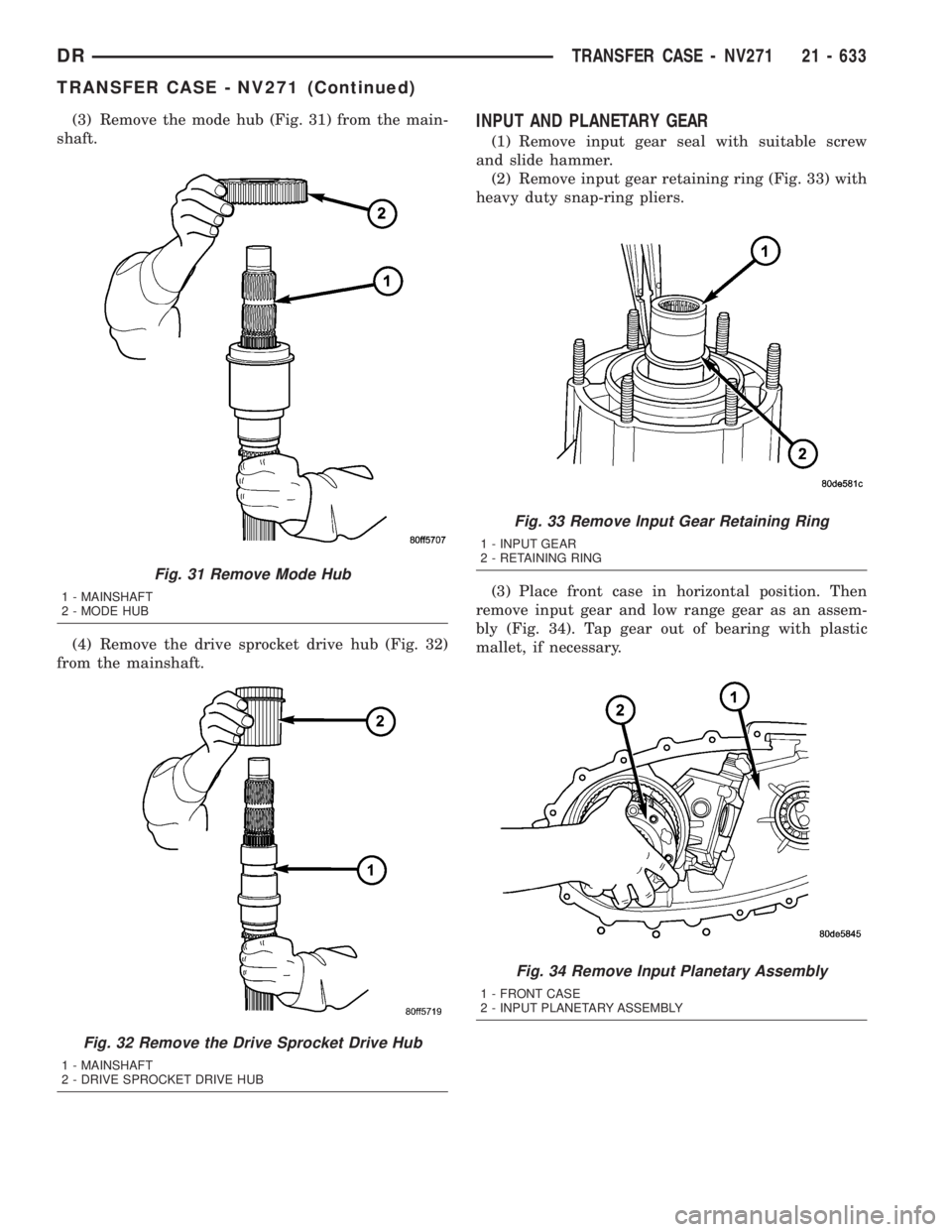
(3) Remove the mode hub (Fig. 31) from the main-
shaft.
(4) Remove the drive sprocket drive hub (Fig. 32)
from the mainshaft.INPUT AND PLANETARY GEAR
(1) Remove input gear seal with suitable screw
and slide hammer.
(2) Remove input gear retaining ring (Fig. 33) with
heavy duty snap-ring pliers.
(3) Place front case in horizontal position. Then
remove input gear and low range gear as an assem-
bly (Fig. 34). Tap gear out of bearing with plastic
mallet, if necessary.
Fig. 31 Remove Mode Hub
1 - MAINSHAFT
2 - MODE HUB
Fig. 32 Remove the Drive Sprocket Drive Hub
1 - MAINSHAFT
2 - DRIVE SPROCKET DRIVE HUB
Fig. 33 Remove Input Gear Retaining Ring
1 - INPUT GEAR
2 - RETAINING RING
Fig. 34 Remove Input Planetary Assembly
1 - FRONT CASE
2 - INPUT PLANETARY ASSEMBLY
DRTRANSFER CASE - NV271 21 - 633
TRANSFER CASE - NV271 (Continued)
Page 2475 of 2895
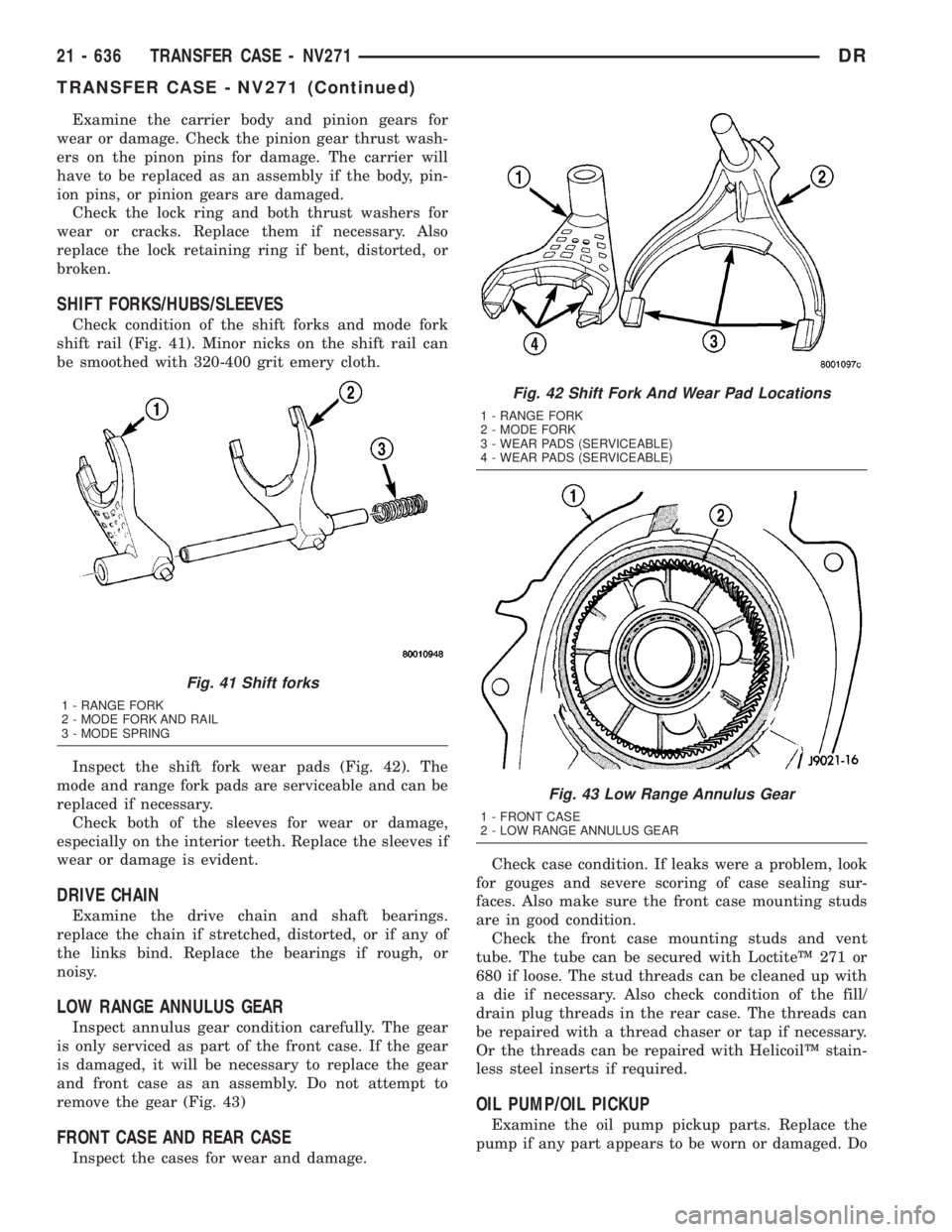
Examine the carrier body and pinion gears for
wear or damage. Check the pinion gear thrust wash-
ers on the pinon pins for damage. The carrier will
have to be replaced as an assembly if the body, pin-
ion pins, or pinion gears are damaged.
Check the lock ring and both thrust washers for
wear or cracks. Replace them if necessary. Also
replace the lock retaining ring if bent, distorted, or
broken.
SHIFT FORKS/HUBS/SLEEVES
Check condition of the shift forks and mode fork
shift rail (Fig. 41). Minor nicks on the shift rail can
be smoothed with 320-400 grit emery cloth.
Inspect the shift fork wear pads (Fig. 42). The
mode and range fork pads are serviceable and can be
replaced if necessary.
Check both of the sleeves for wear or damage,
especially on the interior teeth. Replace the sleeves if
wear or damage is evident.
DRIVE CHAIN
Examine the drive chain and shaft bearings.
replace the chain if stretched, distorted, or if any of
the links bind. Replace the bearings if rough, or
noisy.
LOW RANGE ANNULUS GEAR
Inspect annulus gear condition carefully. The gear
is only serviced as part of the front case. If the gear
is damaged, it will be necessary to replace the gear
and front case as an assembly. Do not attempt to
remove the gear (Fig. 43)
FRONT CASE AND REAR CASE
Inspect the cases for wear and damage.Check case condition. If leaks were a problem, look
for gouges and severe scoring of case sealing sur-
faces. Also make sure the front case mounting studs
are in good condition.
Check the front case mounting studs and vent
tube. The tube can be secured with LoctiteŸ 271 or
680 if loose. The stud threads can be cleaned up with
a die if necessary. Also check condition of the fill/
drain plug threads in the rear case. The threads can
be repaired with a thread chaser or tap if necessary.
Or the threads can be repaired with HelicoilŸ stain-
less steel inserts if required.
OIL PUMP/OIL PICKUP
Examine the oil pump pickup parts. Replace the
pump if any part appears to be worn or damaged. Do
Fig. 41 Shift forks
1 - RANGE FORK
2 - MODE FORK AND RAIL
3 - MODE SPRING
Fig. 42 Shift Fork And Wear Pad Locations
1 - RANGE FORK
2 - MODE FORK
3 - WEAR PADS (SERVICEABLE)
4 - WEAR PADS (SERVICEABLE)
Fig. 43 Low Range Annulus Gear
1 - FRONT CASE
2 - LOW RANGE ANNULUS GEAR
21 - 636 TRANSFER CASE - NV271DR
TRANSFER CASE - NV271 (Continued)
Page 2482 of 2895
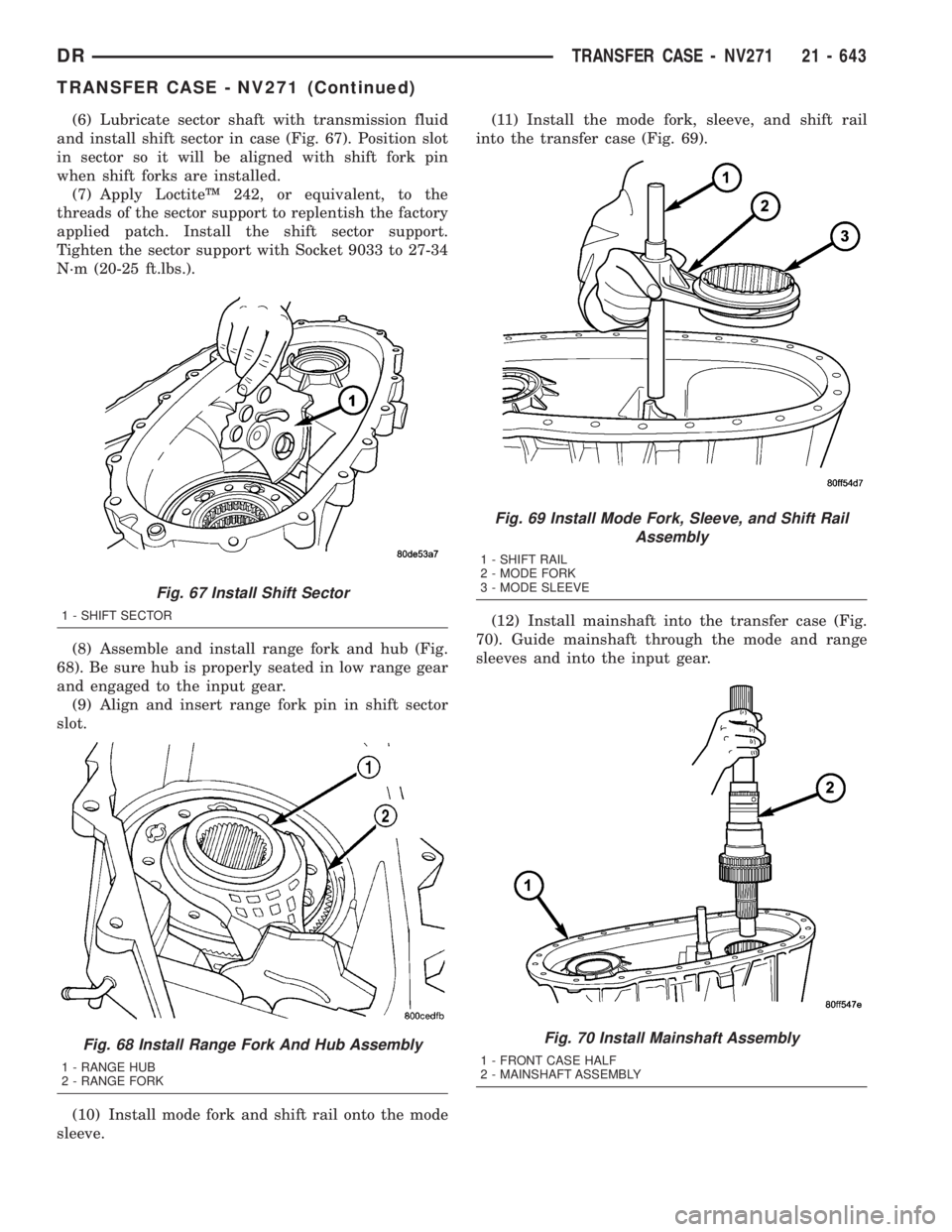
(6) Lubricate sector shaft with transmission fluid
and install shift sector in case (Fig. 67). Position slot
in sector so it will be aligned with shift fork pin
when shift forks are installed.
(7) Apply LoctiteŸ 242, or equivalent, to the
threads of the sector support to replentish the factory
applied patch. Install the shift sector support.
Tighten the sector support with Socket 9033 to 27-34
N´m (20-25 ft.lbs.).
(8) Assemble and install range fork and hub (Fig.
68). Be sure hub is properly seated in low range gear
and engaged to the input gear.
(9) Align and insert range fork pin in shift sector
slot.
(10) Install mode fork and shift rail onto the mode
sleeve.(11) Install the mode fork, sleeve, and shift rail
into the transfer case (Fig. 69).
(12) Install mainshaft into the transfer case (Fig.
70). Guide mainshaft through the mode and range
sleeves and into the input gear.
Fig. 67 Install Shift Sector
1 - SHIFT SECTOR
Fig. 68 Install Range Fork And Hub Assembly
1 - RANGE HUB
2 - RANGE FORK
Fig. 69 Install Mode Fork, Sleeve, and Shift Rail
Assembly
1 - SHIFT RAIL
2 - MODE FORK
3 - MODE SLEEVE
Fig. 70 Install Mainshaft Assembly
1 - FRONT CASE HALF
2 - MAINSHAFT ASSEMBLY
DRTRANSFER CASE - NV271 21 - 643
TRANSFER CASE - NV271 (Continued)