display DODGE RAM 2500 DIESEL 2008 3.G Owners Manual
[x] Cancel search | Manufacturer: DODGE, Model Year: 2008, Model line: RAM 2500 DIESEL, Model: DODGE RAM 2500 DIESEL 2008 3.GPages: 527, PDF Size: 8.88 MB
Page 93 of 527
The radio display will be used for visual prompts from
the UConnecttsystem such as9CELL9or caller ID on
certain radios.
Operation
Voice commands can be used to operate the UConnectt
system and to navigate through the UConnecttmenu
structure. Voice commands are required after most
UConnecttsystem prompts. You will be prompted for a
specific command and then guided through the available
options.
²Prior to giving a voice command, one must wait for
the beep, which follows the9Ready9prompt or another
prompt.
²For certain operations, compound commands can be
used. For example, instead of saying9Setup9and then
9Phone Pairing,9the following compound command
can be said:9Setup Phone Pairing.9
²For each feature explanation in this section, only the
combined form of the voice command is given. You
can also break the commands into parts and say each
part of the command when you are asked for it. For
example, you can use the combined form voice com-
mand9Phonebook New Entry,9or you can break the
combined form command into two voice commands:
9Phonebook9and9New Entry.9Please remember, the
UConnecttsystem works best when you talk in a
normal conversational tone, as if speaking to someone
sitting a few feet/meters away from you.
Voice Command Tree
Refer to ªVoice Treeº in this section.
Help Command
If you need assistance at any prompt, or if you want to
know your options at any prompt, say9Help9following
the beep. The UConnecttsystem will play all the options
at any prompt if you ask for help.
UNDERSTANDING THE FEATURES OF YOUR VEHICLE 91
3
Page 95 of 527
²You will then be asked to give your cellular phone a
priority level between 1 and 7, with 1 being the highest
priority. You can pair up to seven cellular phones to
your UConnecttsystem. However, at any given time,
only one cellular phone can be in use, connected to
your UConnecttsystem. The priority allows the
UConnecttsystem to know which cellular phone to
use if multiple cellular phones are in the vehicle at the
same time. For example, if priority 3 and priority 5
phones are present in the vehicle, the UConnectt
system will use the priority 3 cellular phone when you
make a call. You can select to use a lower priority
cellular phone at any time (refer to9Advanced Phone
Connectivity9in this section).
Dial by Saying a Number
²
Press the PHONE button to begin.
²After the9Ready9prompt and the following beep, say
9Dial.9
²The system will prompt you to say the number you
want to call.
²For example, you can say9234-567-8901.9The phone
number that you enter must be of valid length and
combination. Based on the country in which the ve-
hicle was purchased, the UConnecttsystem limits the
user from dialing an invalid combination of numbers.
For example, in the U.S., 234-567-890 is nine digits
long, which is not a valid U.S. phone number - the
closest valid phone number has 10 digits.
²The UConnecttsystem will confirm the phone num-
ber and then dial. The number will appear in the
display of certain radios.
Call by Saying a Name
²
Press the PHONE button to begin.
²After the9Ready9prompt and the following beep, say
ªCall.9
UNDERSTANDING THE FEATURES OF YOUR VEHICLE 93
3
Page 96 of 527
²The system will prompt you to say the name of the
person you want to call.
²After the9Ready9prompt and the following beep, say
the name of the person you want to call. For example,
you can say9John Doe,9where John Doe is a previ-
ously stored name entry in the UConnecttphonebook.
To learn how to store a name in the phonebook, refer
to9Add Names to Your UConnecttPhonebook,9in
this section.
²The UConnecttsystem will confirm the name and
then dial the corresponding phone number, which
may appear in the display of certain radios.
Add Names to Your UConnecttPhonebook
NOTE:Adding names to the phonebook is recom-
mended when the vehicle is not in motion.
²Press the PHONE button to begin.
²After the9Ready9prompt and the following beep, say
9Phonebook New Entry.9
²When prompted, say the name of the new entry. Use of
long names helps the voice recognition and it is
recommended. For example, say9Robert Smith9or
9Robert9instead of9Bob.9
²When prompted, enter the number designation (e.g.,
9Home,99Work,99Mobile,9or9Pager9). This will allow
you to store multiple numbers for each phonebook
entry, if desired.
²When prompted, recite the phone number for the
phonebook entry that you are adding.
After you are finished adding an entry into the phone-
book, you will be given the opportunity to add more
phone numbers to the current entry or to return to the
main menu.
94 UNDERSTANDING THE FEATURES OF YOUR VEHICLE
Page 97 of 527
The UConnecttsystem will allow you to enter up to 32
names in the phonebook with each name having up to
four associated phone numbers and designations. Each
language has a separate 32-name phonebook accessible
only in that language.
Phonebook Download
UConnecttallows the user to download entries from
their phone via Bluetootht. To use this feature, press the
PHONE button and say ªPhonebook Download.º The
system prompts, ªReady to accept ªVº card entry via
Bluetootht¼º The system is now ready to accept phone-
book entries from your phone using the Bluetootht
Object Exchange Profile (OBEX). Please see your phone
Owner's Manual for specific instructions on how to send
these entries from your phone.
NOTE:
²The phone handset must support BluetoothtOBEX
transfers of phonebook entries to use this feature.
²Some phones cannot send phonebook entries if they
are already connected to any system via Bluetootht,
and you may see a message on the phone display that
the Bluetoothtlink is busy. In this case, the user must
first disconnect or drop the Bluetoothtconnection to
the UConnecttsystem, and then send the address
book entry via Bluetootht. Please see your phone
Owner 's Manual for specific instructions on how to
drop the Bluetoothtconnection.
²If the phonebook entry is longer than 24 characters, it
will only use the first 24 characters.
Edit Entries in the UConnecttPhonebook
NOTE:Editing names in the phonebook is recom-
mended when the vehicle is not in motion.
²Press the PHONE button to begin.
²After the9Ready9prompt and the following beep, say
9Phonebook Edit.9
UNDERSTANDING THE FEATURES OF YOUR VEHICLE 95
3
Page 106 of 527
²Press the PHONE button to begin.
²After the9Ready9prompt and the following beep, say
9Setup Confirmations.9The UConnecttsystem will
play the current confirmation prompt status and you
will be given the choice to change it.
Phone and Network Status Indicators
If available on the radio and/or on a premium display
such as the instrument panel cluster, and supported by
your cell phone, the UConnecttsystem will provide
notification to inform you of your phone and network
status when you are attempting to make a phone call
using UConnectt. The status is given for roaming, net-
work signal strength, phone battery strength, etc.
Dialing Using the Cellular Phone Keypad
You can dial a phone number with your cellular phone
keypad and still use the UConnecttsystem (while dial-
ing via the cell phone keypad, the user must exercise
caution and take precautionary safety measures). Bydialing a number with your paired Bluetoothtcellular
phone, the audio will be played through your vehicle's
audio system. The UConnecttsystem will work the same
as if you dial the number using voice recognition.
NOTE:Certain brands of mobile phones do not send the
dial ring to the UConnecttsystem to play it on the
vehicle audio system, so you will not hear it. Under this
situation, after successfully dialing a number the user
may feel that the call did not go through even though the
call is in progress. Once your call is answered, you will
hear the audio.
Mute/Un-Mute (Mute Off)
When you mute the UConnecttsystem, you will still be
able to hear the conversation coming from the other
party, but the other party will not be able to hear you. In
order to mute the UConnecttsystem:
²Press the ªVoice Recognitionº button.
104 UNDERSTANDING THE FEATURES OF YOUR VEHICLE
Page 145 of 527
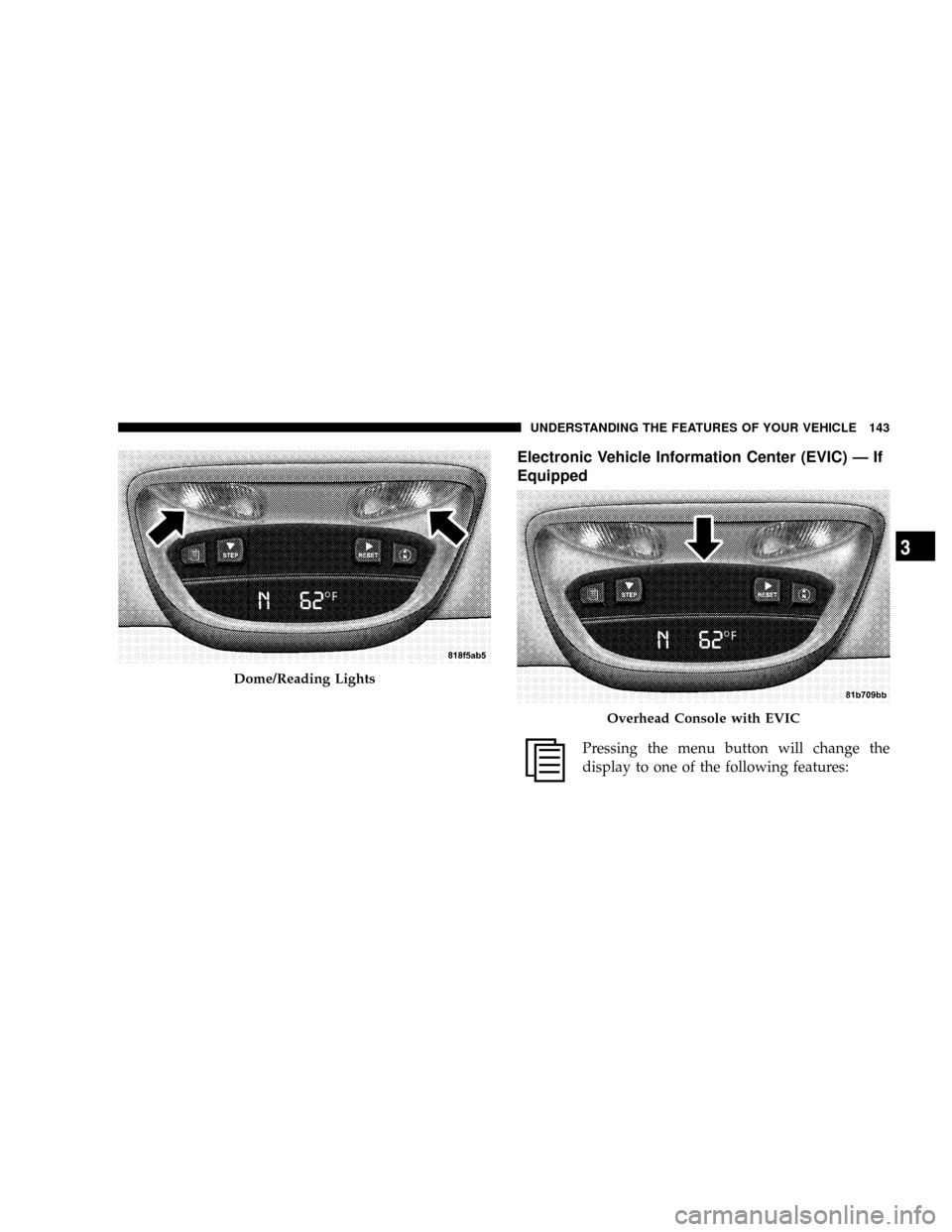
Electronic Vehicle Information Center (EVIC) Ð If
Equipped
Pressing the menu button will change the
display to one of the following features:
Dome/Reading Lights
Overhead Console with EVIC
UNDERSTANDING THE FEATURES OF YOUR VEHICLE 143
3
Page 146 of 527
Trip Functions
Pressing the STEP button allows you to scroll through
one of the following Trip Function features:
²TRIP ± Shows the total distance traveled since the last
reset. To reset the TRIP function, press and hold the
RESET button.
²ELAPSED TIME ± Shows the total elapsed time of
travel since the last reset. Elapsed time will increment
when the ignition switch is in the ON/RUN or START
positions.
²UNIT IN US/METRIC ± Press the RESET button to
toggle between US and METRIC.
²AVG. MPG ± Shows the average fuel economy since
the last reset. When the fuel economy is reset, the
display will show dashes for two seconds. Then the
history information will be erased, and the averaging
will continue from the last fuel average reading beforethe reset. (Example: If your EVIC displays 18 AVG.
MPG and the RESET button is pressed, the previous
averaging history will be erased and the display will
return to the 18 AVG. MPG, not to 0 AVG. MPG.) The
display may take several miles/kilometers for the
value to change, dependent upon driving habits.
²MI TO EMPTY (Distance to Empty) ± Shows the
estimated distance that can be traveled with the fuel
remaining in the tank. This estimated distance is
determined by a weighted average of fuel economy,
according to the current fuel tank level. MI TO EMPTY
cannot be reset through the RESET button.
NOTE:Significant changes in driving style or vehicle
loading will greatly affect the actual drivable distance of
the vehicle, regardless of the DTE displayed value.
²When the DTE value is less than 30 mi (48 km)
estimated driving distance, the DTE display will
change to a text display of9LOW FUEL.9This display
144 UNDERSTANDING THE FEATURES OF YOUR VEHICLE
Page 147 of 527
will continue until the vehicle runs out of fuel. Adding
a significant amount of fuel to the vehicle will turn off
the9LOW FUEL9text and a new DTE value will
display.
System Status (EVIC Displays)
When the appropriate conditions exist, the Electronic
Vehicle Information Center (EVIC) displays the following
messages:
²TURN SIGNALS ON (with a continuous warning
chime)
²PERSONAL SETTINGS NOT AVAILABLE ± Vehicle
Not in Park or Vehicle in Motion (manual transmis-
sions only)
²LEFT/RIGHT FRONT DOOR AJAR (one or more,
with a single chime if speed is above 1 mph (1.6 km/h)
²LEFT/RIGHT REAR DOOR AJAR (one or more, with
a single chime if speed is above 1 mph (1.6 km/h)
²DOOR(S) AJAR (with a single chime if vehicle is in
motion)
²LOW WASHER FLUID (with a single chime)
²OIL CHANGE REQUIRED (with a single chime)
²CATALYST FULL SEE OWNER MANUAL
²CATALYST STAT lllllll 90%
²CATALYST FULL SERVICE REQUIRED
²SERVICE AIR FILTER
²PERFORM SERVICE
OIL CHANGE REQUIRED Ð If Equipped
Your vehicle is equipped with an engine oil change
indicator system. The ªOil Change Requiredº message
will flash in the EVIC display for approximately 10
seconds after a single chime has sounded to indicate the
next scheduled oil change interval. The engine oil change
UNDERSTANDING THE FEATURES OF YOUR VEHICLE 145
3
Page 148 of 527
indicator system is duty cycle based, which means the
engine oil change interval may fluctuate, dependent
upon your personal driving style.
Unless reset, this message will continue to display each
time you turn the ignition switch to the ON/RUN
position. To turn off the message temporarily, press and
release the Menu button. To reset the oil change indicator
system (after performing the scheduled maintenance) use
the following procedure.
1. Turn the ignition switch to the ON position(Do not
start the engine).
2. Fully depress the accelerator pedal slowly three times
within 10 seconds.
3. Turn the ignition switch to the OFF/LOCK position.
NOTE:If the indicator message illuminates when you
start the vehicle, the oil change indicator system did not
reset. If necessary, repeat this procedure.PERFORM SERVICE
Your vehicle will require emissions maintenance at a set
interval. To help remind you when this maintenance is
due, the Electronic Vehicle Information Center (EVIC)
will display ªPerform Serviceº. When the ªPerform Ser-
viceº message is displayed on the EVIC it is necessary to
have the emissions maintenance performed. Emissions
maintenance includes replacing the Closed Crankcase
Ventilation (CCV) filter element, cleaning of the EGR
Cooler, and cleaning of the EGR Valve. The procedure for
clearing and resetting the9Perform Service9indicator
message is located in the appropriate Service Informa-
tion.
Personal Settings (Customer Programmable
Features)
Personal Settings allows the driver to set and recall
features when the transmission is in PARK. If the trans-
mission is not in PARK, the EVIC will display NOT
AVAILABLE and VEHICLE NOT IN PARK.
146 UNDERSTANDING THE FEATURES OF YOUR VEHICLE
Page 149 of 527
Press and release the Menu button until the
Personal Settings displays on the EVIC.
Use the STEP button to display one of the following:
²ªLANGUAGEº ± When in this display you may select
one of three languages for all display nomenclature,
including the trip functions. Press the RESET button
while in this display to select English, Espanol, or
Francais. Then, as you continue, the information will
display in the selected language.
²ªAUTO DOOR LOCKS > ONº ± When ON is selected,
all doors will lock automatically when the vehicle
reaches a speed of 15 mph (24 km/h). To make your
selection, press and release the RESET button until
ªONº or ªOFFº appears.
²ªAUTO UNLOCK ON EXIT > ONº ± When ON is
selected, all doors will unlock when the vehicle isstopped and the transmission is in the PARK or
NEUTRAL position and the driver's door is opened.
To make your selection, press and release the RESET
button until ªONº or ªOFFº appears.
²ªRKE UNLOCK DRV DR 1stº ± WhenDRV DR 1stis
selected, only the driver's door will unlock on the first
press of the remote keyless entry UNLOCK button.
When Driver Door 1st Press is selected, you must
press the remote keyless entry UNLOCK button twice
to unlock the passenger's doors. To make your selec-
tion, press and release the RESET button until ªDRV
DR 1st º appears.
²ªRKE UNLOCK ALL DR 1STº ± WhenALL DR 1STis
selected, all of the doors will unlock on the first press
of the remote keyless entry unlock button. To make
your selection, press and release the RESET button
until ªAll DR 1stº appears.
UNDERSTANDING THE FEATURES OF YOUR VEHICLE 147
3