instrument panel DODGE RAM SRT-10 2006 Service Owner's Manual
[x] Cancel search | Manufacturer: DODGE, Model Year: 2006, Model line: RAM SRT-10, Model: DODGE RAM SRT-10 2006Pages: 5267, PDF Size: 68.7 MB
Page 4471 of 5267
LATCH RELEASE CABLE/HANDLE ASSEMBLY
REMOVAL
REMOVAL
1.Removethehoodlatch(Referto23-BODY/
HOOD/LATCH - REMOVAL).
2. Remove the battery tray from the left side of the
engine compartment (Refer to 8 - ELECTRICAL/
BATTERY SYSTEM/TRAY - REMOVAL).
3. Remove the three hood release cable retainers
from the upper radiator crossmember and the left
fender rail.
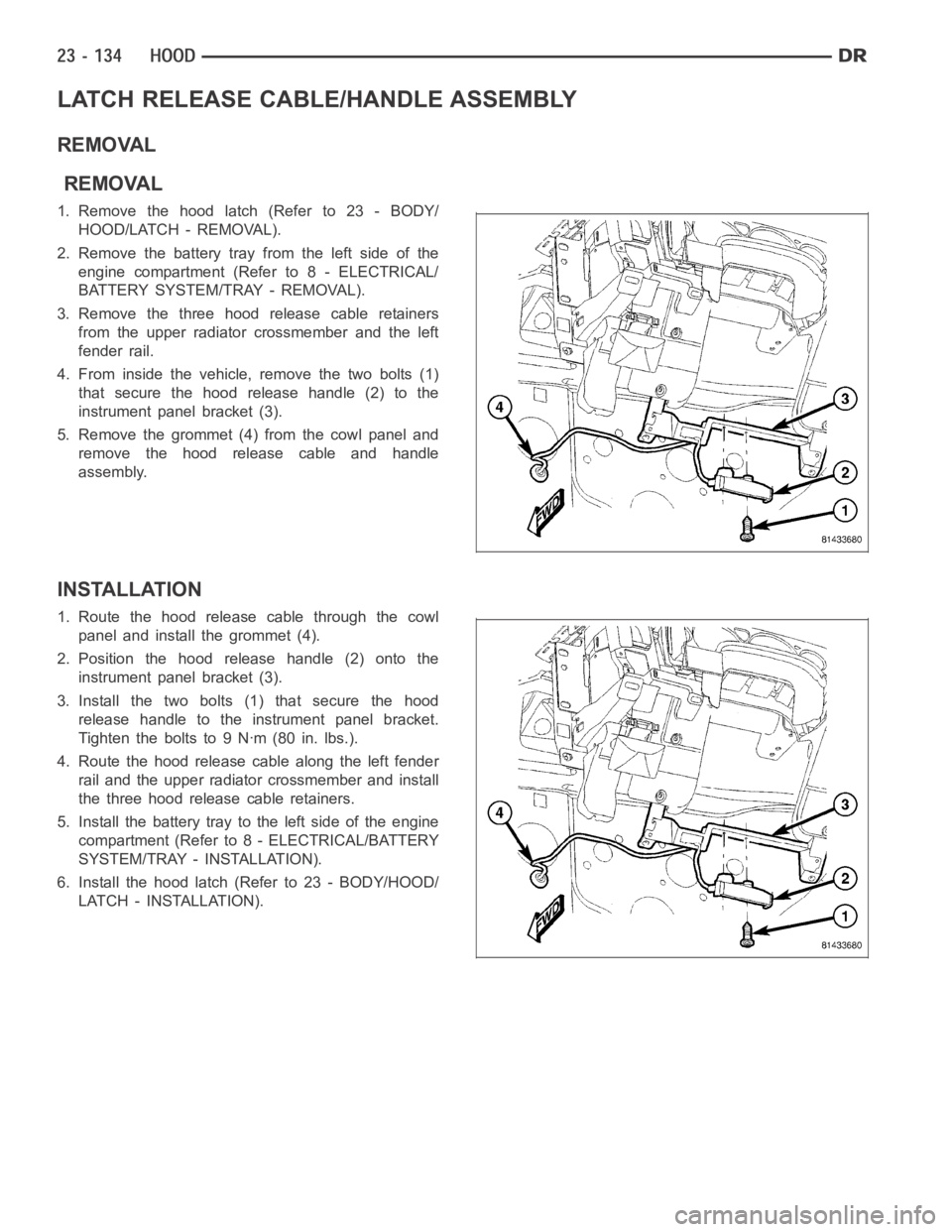
4. From inside the vehicle, remove the two bolts (1)
that secure the hood release handle (2) to the
instrument panel bracket (3).
5. Remove the grommet (4) from the cowl panel and
remove the hood release cable and handle
assembly.
INSTALLATION
1. Route the hood release cable through the cowl
panel and install the grommet (4).
2. Position the hood release handle (2) onto the
instrument panel bracket (3).
3. Install the two bolts (1) that secure the hood
release handle to the instrument panel bracket.
Tightentheboltsto9Nꞏm(80in.lbs.).
4. Route the hood release cable along the left fender
rail and the upper radiator crossmember and install
the three hood release cable retainers.
5. Install the battery tray to the left side of the engine
compartment (Refer to 8 - ELECTRICAL/BATTERY
SYSTEM/TRAY - INSTALLATION).
6. Install the hood latch (Refer to 23 - BODY/HOOD/
LATCH - INSTALLATION).
Page 4475 of 5267
page page
CLUSTER BEZEL
REMOVAL ................................... 139
INSTALLATION .............................. 140
CUP HOLDER
REMOVAL ................................... 141
INSTALLATION .............................. 142
GLOVE BOX
REMOVAL ................................... 144
INSTALLATION .............................. 144
GLOVE BOX LATCH
REMOVAL ................................... 145
INSTALLATION .............................. 146
INSTRUMENT PANEL ASSEMBLY
REMOVAL ................................... 147
INSTALLATION .............................. 155
INSTRUMENT PANEL CENTER BEZEL
REMOVAL ................................... 164
INSTALLATION .............................. 165
INSTRUMENT PANEL DRIVER SIDE BEZEL
REMOVAL ................................... 166INSTALLATION .............................. 166
INSTRUMENT PANEL LOWER SURROUND
REMOVAL ................................... 167
INSTALLATION .............................. 167
INSTRUMENT PANEL TOP COVER
REMOVAL ................................... 169
INSTALLATION .............................. 169
STEERING COLUMN OPENING COVER
REMOVAL ................................... 170
INSTALLATION .............................. 171
STEERING COLUMN OPENING SUPPORT
BRACKET
REMOVAL ................................... 173
INSTALLATION .............................. 174
STORAGE BIN
REMOVAL ................................... 175
INSTALLATION .............................. 175
Page 4476 of 5267
CLUSTER BEZEL
REMOVAL
WARNING: On vehicles equipped with airbags, disable the airbag system before attempting any steering
wheel, steering column, seat belt tensioner, or instrument panel component diagnosis or service. Discon-
nect and isolate the battery negative (ground) cable, then wait two minutes for the airbag system capacitor
to discharge before performing further diagnosis or service. This is the only sure way to disable the airbag
system. Failure to take the proper precautions could result in accidentalairbag deployment and possible
personal injury or death.
1. Disconnect and isolate the negative battery cable.
2. Remove the steering column opening cover. (Refer
to 23 - BODY/INSTRUMENT PANEL/STEERING
COLUMN OPENING COVER - REMOVAL)
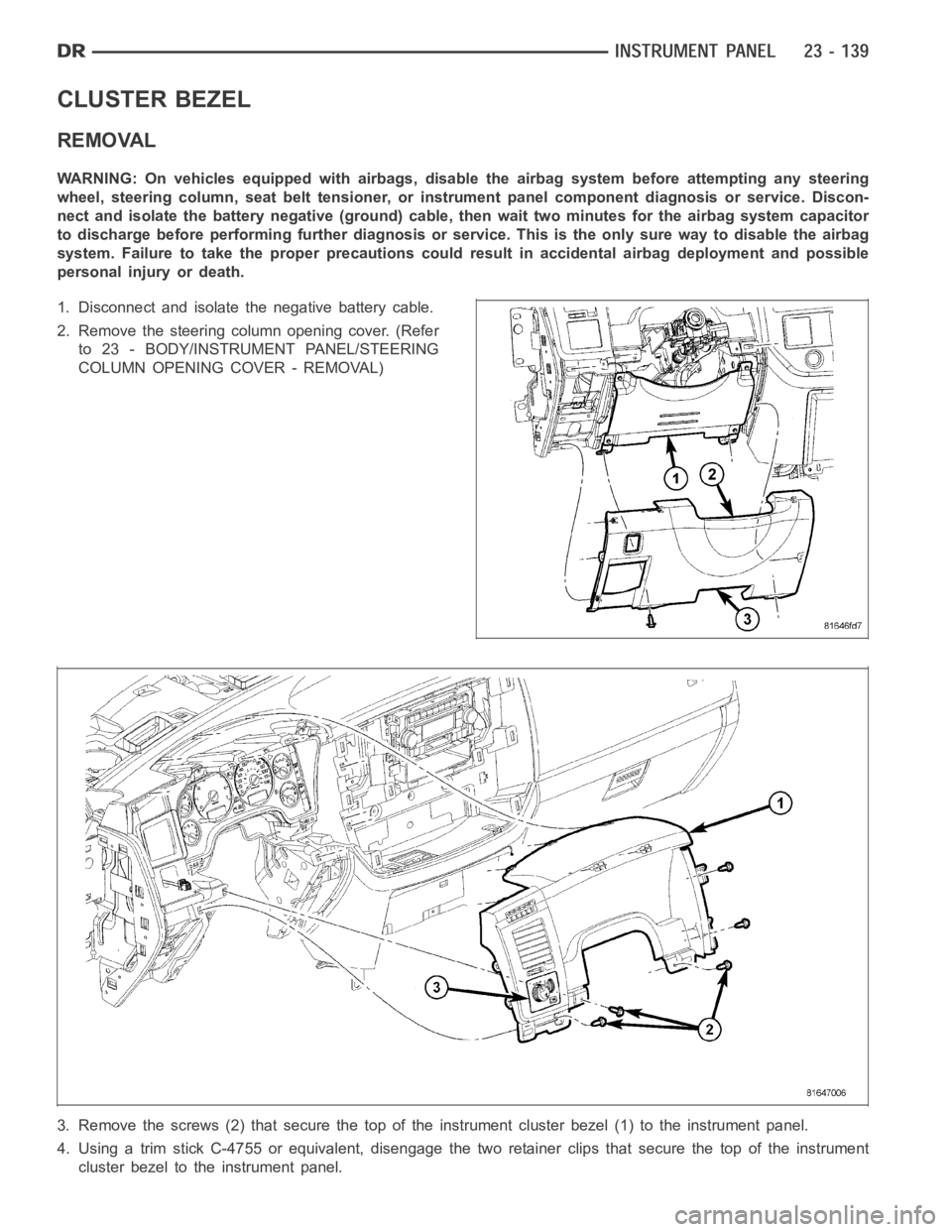
3. Remove the screws (2) that secure the top of the instrument cluster bezel(1) to the instrument panel.
4. Using a trim stick C-4755 or equivalent, disengage the two retainer clips that secure the top of the instrument
cluster bezel to the instrument panel.
Page 4477 of 5267
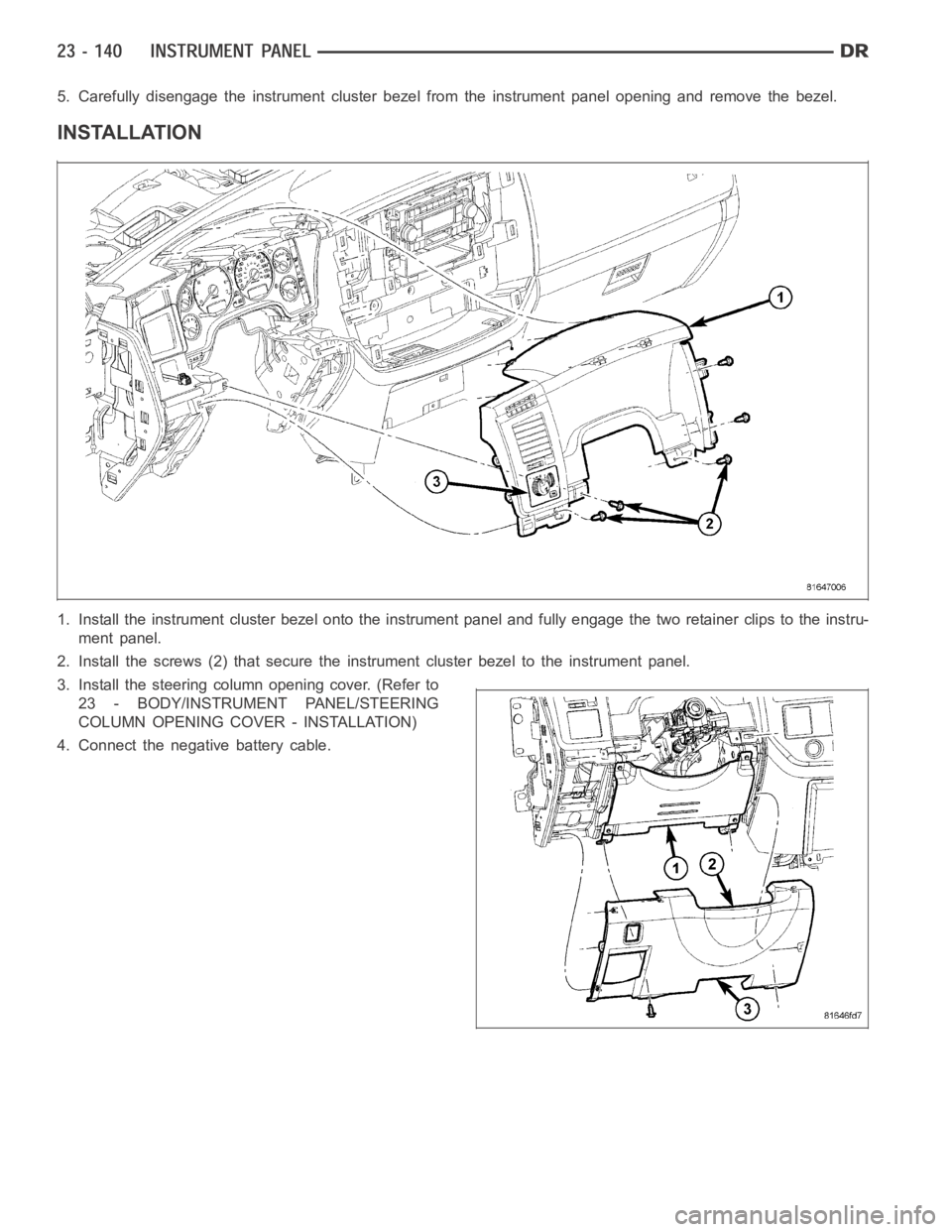
5. Carefully disengage the instrument cluster bezel from the instrument panel opening and remove the bezel.
INSTALLATION
1. Install the instrument cluster bezel onto the instrument panel and fully engage the two retainer clips to the instru-
ment panel.
2. Install the screws (2) that secure the instrument cluster bezel to the instrument panel.
3. Install the steering column opening cover. (Refer to
23 - BODY/INSTRUMENT PANEL/STEERING
COLUMN OPENING COVER - INSTALLATION)
4. Connect the negative battery cable.
Page 4481 of 5267
GLOVE BOX
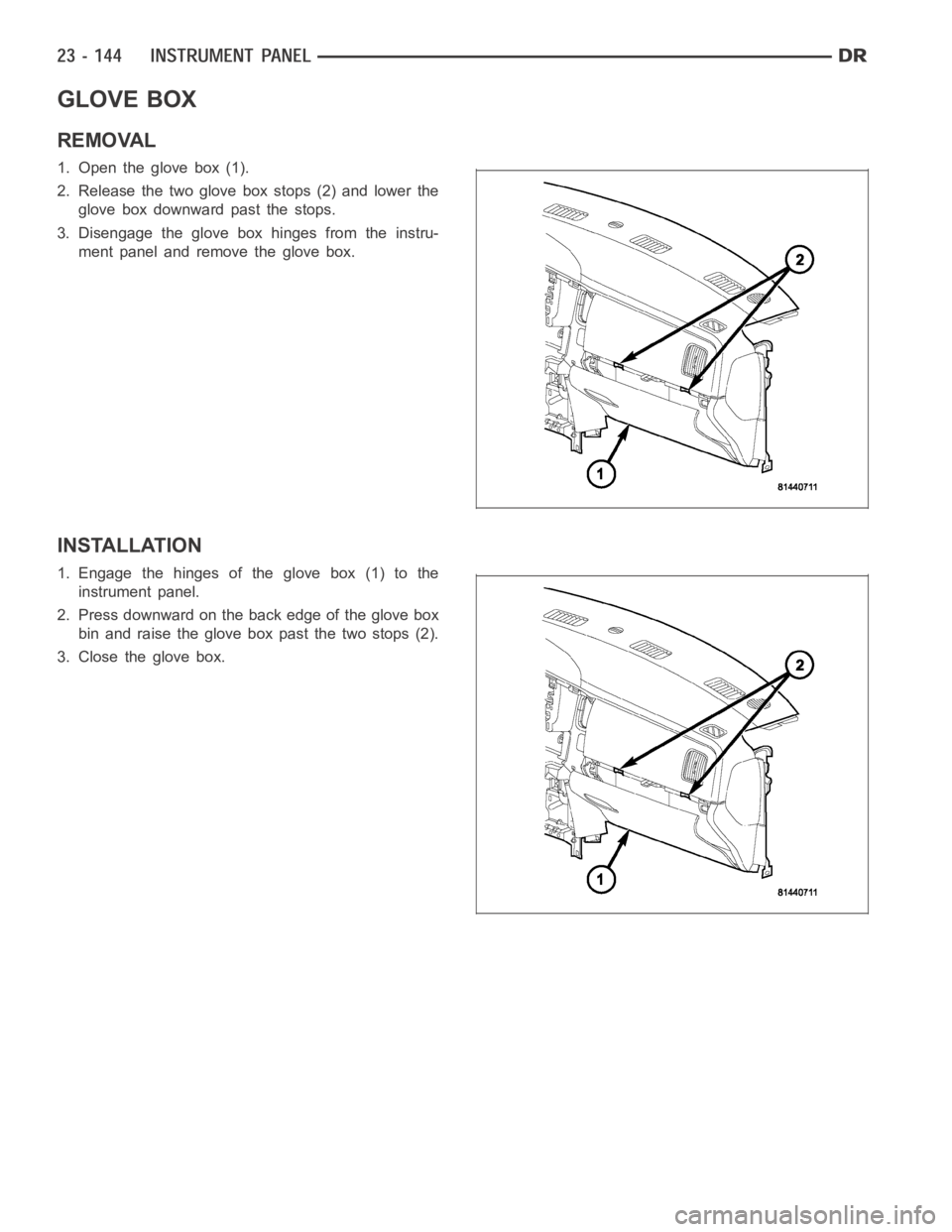
REMOVAL
1. Open the glove box (1).
2. Release the two glove box stops (2) and lower the
glove box downward past the stops.
3. Disengage the glove box hinges from the instru-
ment panel and remove the glove box.
INSTALLATION
1. Engage the hinges of the glove box (1) to the
instrument panel.
2. Press downward on the back edge of the glove box
bin and raise the glove box past the two stops (2).
3. Close the glove box.
Page 4482 of 5267
GLOVE BOX LATCH
REMOVAL
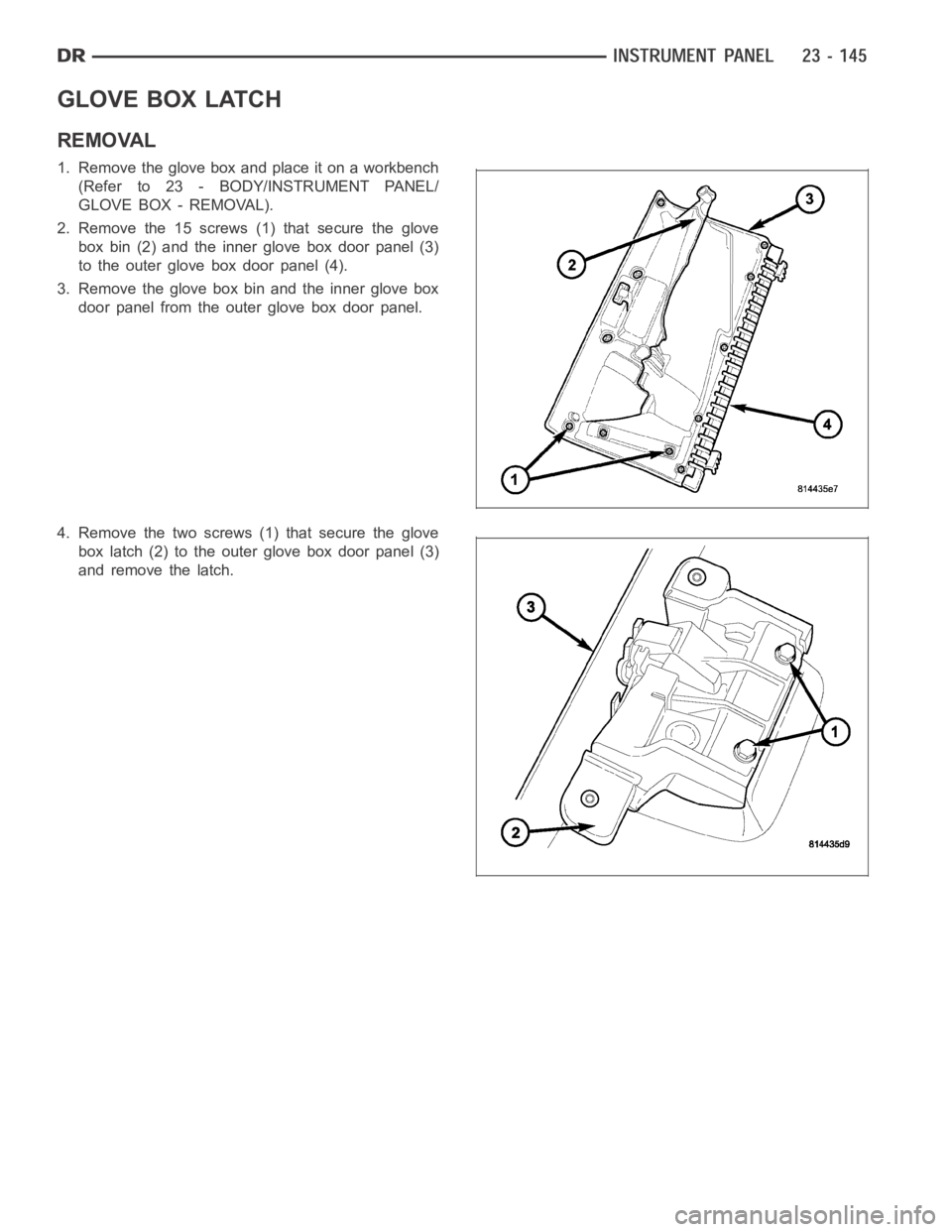
1. Remove the glove box and place it on a workbench
(Refer to 23 - BODY/INSTRUMENT PANEL/
GLOVE BOX - REMOVAL).
2. Remove the 15 screws (1) that secure the glove
box bin (2) and the inner glove box door panel (3)
to the outer glove box door panel (4).
3. Remove the glove box bin and the inner glove box
door panel from the outer glove box door panel.
4. Remove the two screws (1) that secure the glove
box latch (2) to the outer glove box door panel (3)
and remove the latch.
Page 4484 of 5267
INSTRUMENT PANEL ASSEMBLY
REMOVAL
WARNING: On vehicles equipped with airbags, disable the airbag system before attempting any steering
wheel, steering column, seat belt tensioner, or instrument panel component diagnosis or service. Discon-
nect and isolate the battery negative (ground) cable, then wait two minutes for the airbag system capacitor
to discharge before performing further diagnosis or service. This is the only sure way to disable the airbag
system. Failure to take the proper precautions could result in accidentalairbag deployment and possible
personal injury or death.
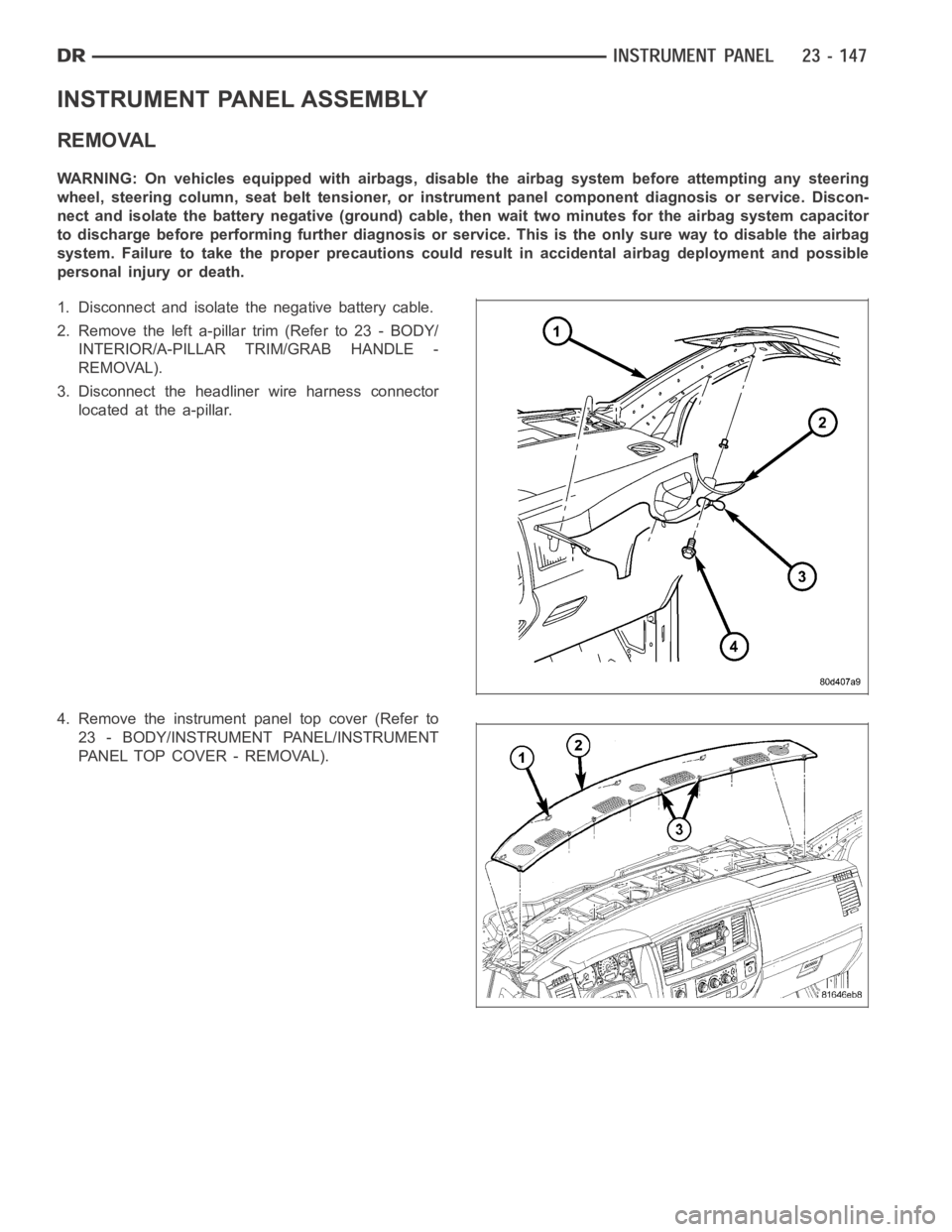
1. Disconnect and isolate the negative battery cable.
2. Remove the left a-pillar trim (Refer to 23 - BODY/
INTERIOR/A-PILLAR TRIM/GRAB HANDLE -
REMOVAL).
3. Disconnect the headliner wire harness connector
located at the a-pillar.
4. Remove the instrument panel top cover (Refer to
23 - BODY/INSTRUMENT PANEL/INSTRUMENT
PANEL TOP COVER - REMOVAL).
Page 4486 of 5267
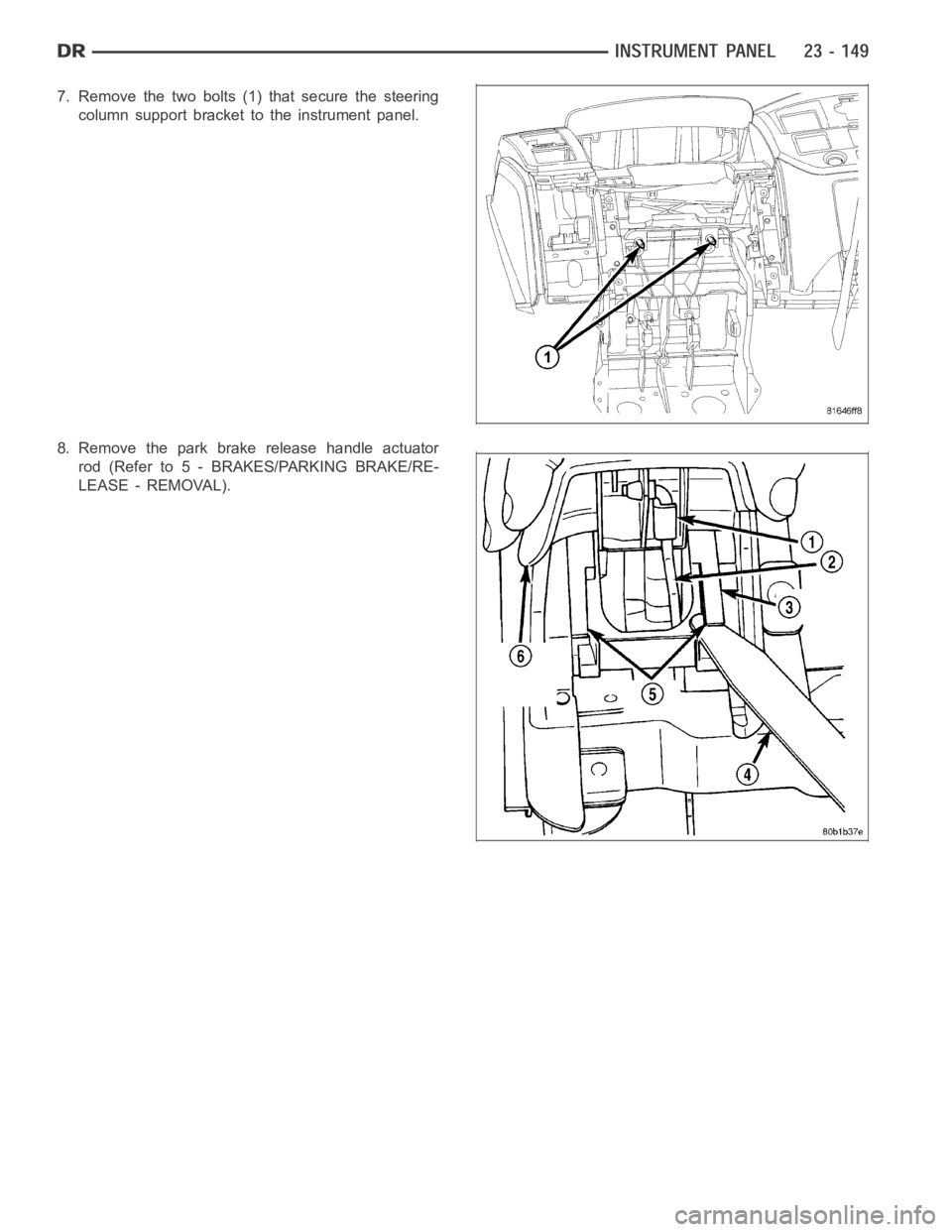
7. Remove the two bolts (1) that secure the steering
column support bracket to the instrument panel.
8. Remove the park brake release handle actuator
rod (Refer to 5 - BRAKES/PARKING BRAKE/RE-
LEASE - REMOVAL).
Page 4487 of 5267
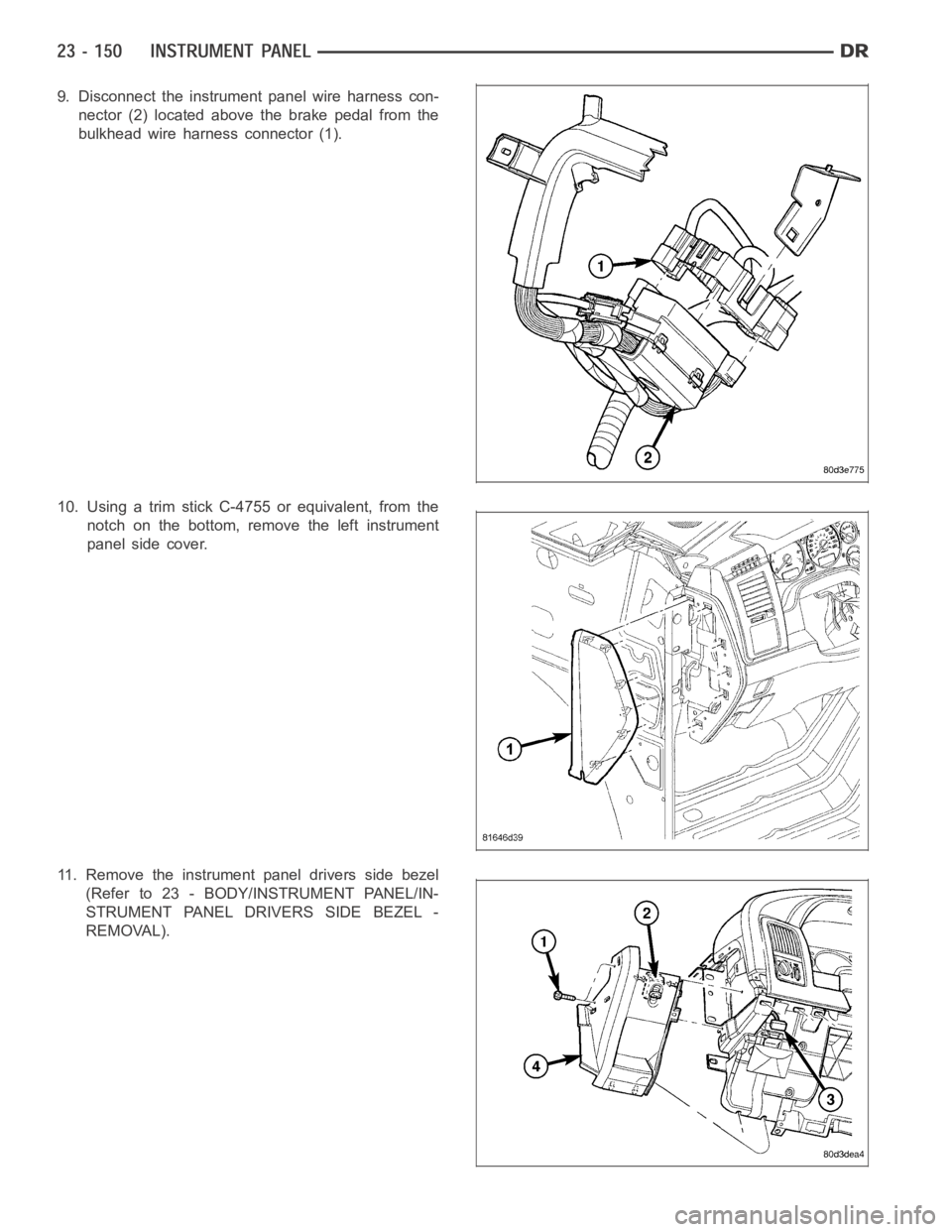
9. Disconnect the instrument panel wire harness con-
nector (2) located above the brake pedal from the
bulkhead wire harness connector (1).
10. Using a trim stick C-4755 or equivalent, from the
notch on the bottom, remove the left instrument
panel side cover.
11. Remove the instrument panel drivers side bezel
(Refer to 23 - BODY/INSTRUMENT PANEL/IN-
STRUMENT PANEL DRIVERS SIDE BEZEL -
REMOVAL).
Page 4488 of 5267
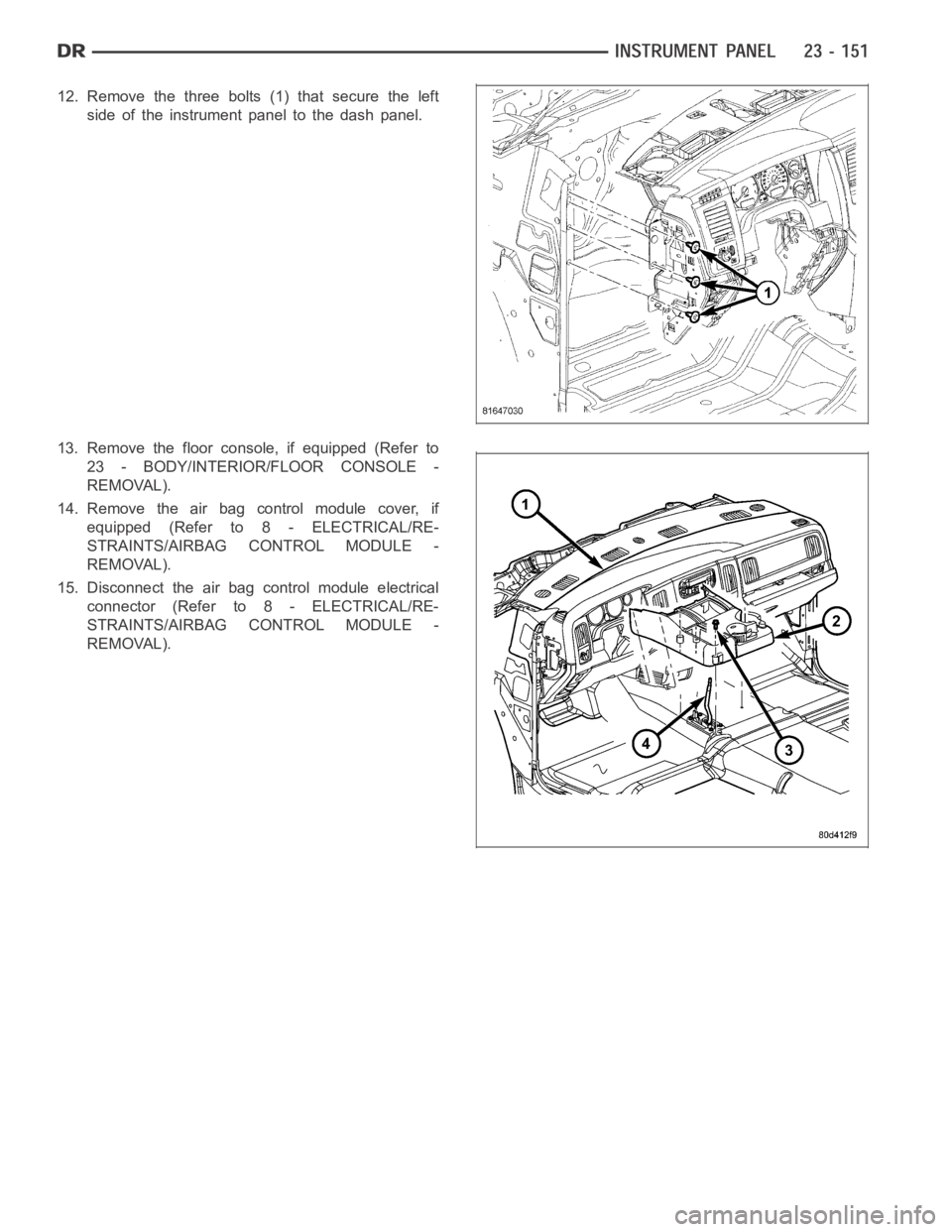
12. Remove the three bolts (1) that secure the left
side of the instrument panel to the dash panel.
13. Remove the floor console, if equipped (Refer to
23 - BODY/INTERIOR/FLOOR CONSOLE -
REMOVAL).
14. Remove the air bag control module cover, if
equipped (Refer to 8 - ELECTRICAL/RE-
STRAINTS/AIRBAG CONTROL MODULE -
REMOVAL).
15. Disconnect the air bag control module electrical
connector (Refer to 8 - ELECTRICAL/RE-
STRAINTS/AIRBAG CONTROL MODULE -
REMOVAL).