instrument cluster DODGE SPRINTER 2007 2.G User Guide
[x] Cancel search | Manufacturer: DODGE, Model Year: 2007, Model line: SPRINTER, Model: DODGE SPRINTER 2007 2.GPages: 393, PDF Size: 7.61 MB
Page 88 of 393
87 Controls in detail
Operating system without steering wheel buttons
3
\3 Operating system without steering wheel buttonsThe operating system is activated as soon
as you switch on the ignition. You may per-
form the following using the operating sys-
tem:
\4Call up vehicle information
\4Make settingsThe operating system shows the informa-
tion in the display.
You can control the display and the set-
tings in the operating system using the
adjustment buttons on the instrument
cluster.Changing the standard display
\1Switch on the ignition (\2page 67).
\1Press and hold the menu button for
more than 1 second.
The information shown in the display
changes from the outside temperature
to the digital speedometer.
Outside temperature display*Warning
G
Only use adjustment buttons , ,
or
when traffic conditions permit. You will oth-
erwise be unable to observe road and traffic
conditions and could cause an accident.
Do not reach through the steering wheel to
press the adjustment buttons. This will
make the steering wheel much more difficult
to control. Your attention will also be divert-
ed from the road and traffic conditions. This
could cause you to lose control of the vehi-
cle and could lead to an accident.
Do not rest your head or chest on the steer-
ing wheel or dashboard when operating the
adjustment buttons.
See the safety precautions for airbags
(\2page 31).
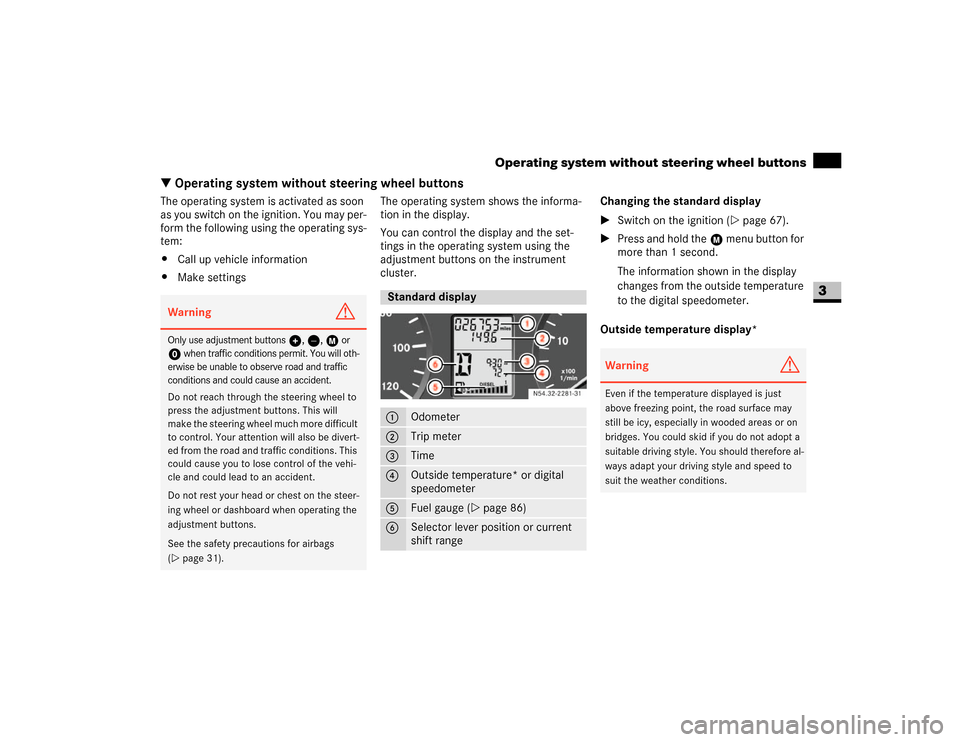
Standard display1
Odometer
2
Trip meter
3
Time
4
Outside temperature* or digital
speedometer
5
Fuel gauge (\2page 86)
6
Selector lever position or current
shift rangeN54.32-2281-31
Warning
G
Even if the temperature displayed is just
above freezing point, the road surface may
still be icy, especially in wooded areas or on
bridges. You could skid if you do not adopt a
suitable driving style. You should therefore al-
ways adapt your driving style and speed to
suit the weather conditions.
Page 90 of 393
89 Controls in detail
Operating system with steering wheel buttons*
3
\3 Operating system with steering wheel buttons*The operating system is activated as soon
as you switch on the ignition. You may per-
form the following using the operating sys-
tem:
\4Call up vehicle information
\4Make settings
You can use this not only to find out when
the next service is due, but also to set the
language for messages in the instrument
cluster, for example, and much more.
The operating system shows the informa-
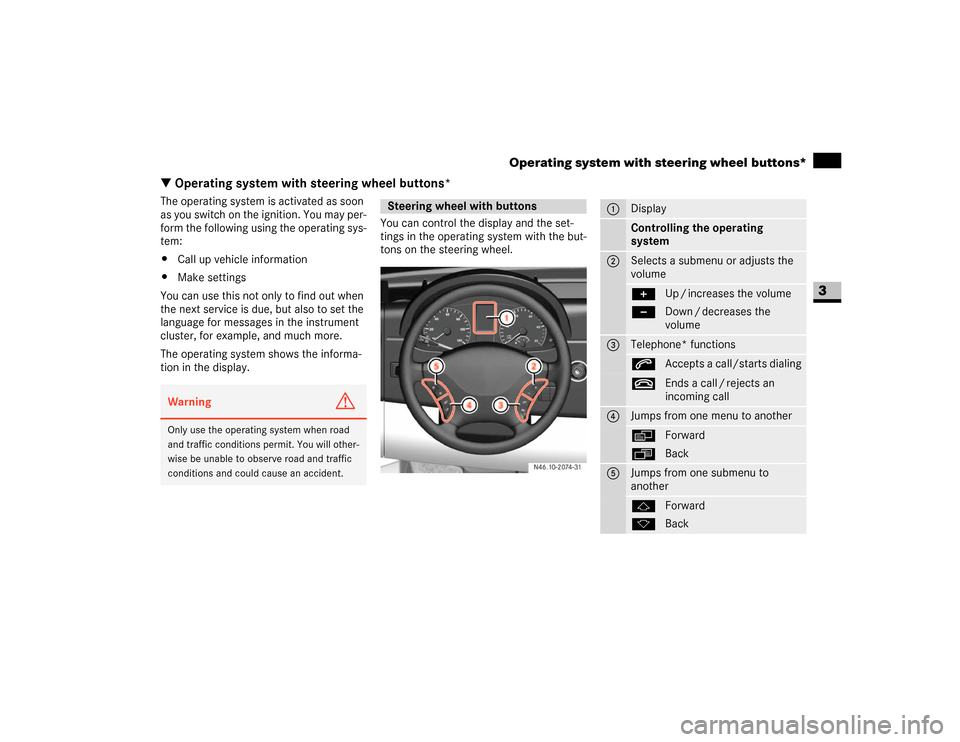
tion in the display.You can control the display and the set-
tings in the operating system with the but-
tons on the steering wheel.Warning
G
Only use the operating system when road
and traffic conditions permit. You will other-
wise be unable to observe road and traffic
conditions and could cause an accident.
Steering wheel with buttons
N46.10-2074-31
1
DisplayControlling the operating
system
2
Selects a submenu or adjusts the
volume+
-
Up / increases the volume
Down / decreases the
volume
3
Telephone* functionss
Accepts a call/starts dialing
t
Ends a call / rejects an
incoming call
4
Jumps from one menu to anotherè
·
Forward
Back
5
Jumps from one submenu to
anotherj
k
Forward
Back
Page 93 of 393
92 Controls in detailOperating system with steering wheel buttons*
3
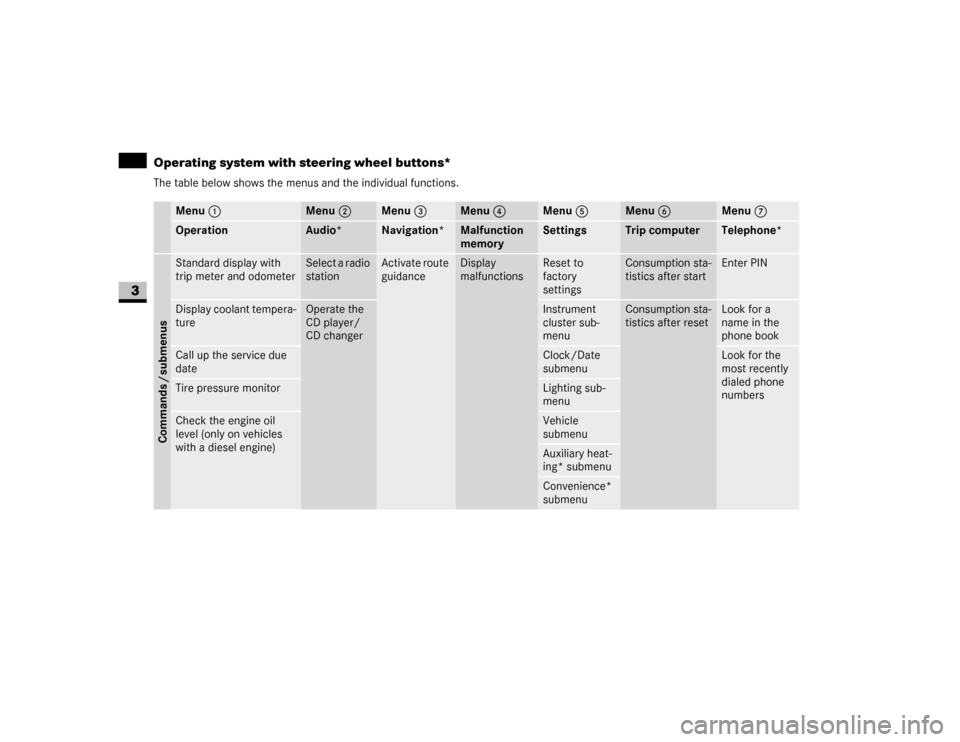
The table below shows the menus and the individual functions.
Menu 1
Menu 2
Menu 3
Menu 4
Menu 5
Menu 6
Menu 7
Operation
Audio*
Navigation*
Malfunction
memory
Settings
Trip computer
Telephone*
Commands / submenusStandard display with
trip meter and odometer
Select a radio
station
Activate route
guidance
Display
malfunctions
Reset to
factory
settings
Consumption sta-
tistics after start
Enter PIN
Display coolant tempera-
ture
Operate the
CD player/
CD changer
Instrument
cluster sub-
menu
Consumption sta-
tistics after reset
Look for a
name in the
phone book
Call up the service due
date
Clock/Date
submenu
Look for the
most recently
dialed phone
numbers
Tire pressure monitor
Lighting sub-
menu
Check the engine oil
level (only on vehicles
with a diesel engine)
Vehicle
submenuAuxiliary heat-
ing* submenuConvenience*
submenu
Page 97 of 393
96 Controls in detailOperating system with steering wheel buttons*
3
The
Settings
menu has two functions:
\4the
To reset: Press reset button for
3 sec.
function, with which you can re-
set all settings to the factory defaults
\4a collection of submenus which you
can use to make individual settings for
your vehicle
\1Press theè or ÿ button repeat-
edly until you see the
Settings
menu in
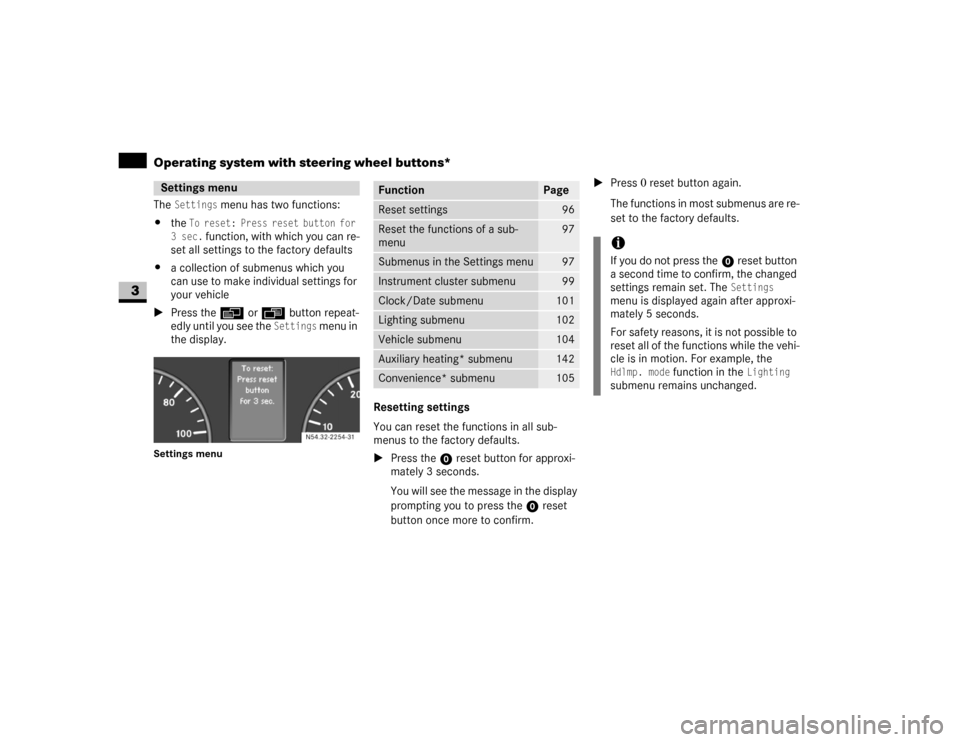
the display.
Settings menu
Resetting settings
You can reset the functions in all sub-
menus to the factory defaults.
\1Press the reset button for approxi-
mately 3 seconds.
You will see the message in the display
prompting you to press the reset
button once more to confirm.\1Press 0 reset button again.
The functions in most submenus are re-
set to the factory defaults.
Settings menu
N54.32-2254-31
Function
Page
Reset settings
96
Reset the functions of a sub-
menu
97
Submenus in the Settings menu
97
Instrument cluster submenu
99
Clock/Date submenu
101
Lighting submenu
102
Vehicle submenu
104
Auxiliary heating* submenu
142
Convenience* submenu
105
iIf you do not press the reset button
a second time to confirm, the changed
settings remain set. The
Settings
menu is displayed again after approxi-
mately 5 seconds.
For safety reasons, it is not possible to
reset all of the functions while the vehi-
cle is in motion. For example, the
Hdlmp. mode
function in the
Lighting
submenu remains unchanged.
Page 99 of 393
98 Controls in detailOperating system with steering wheel buttons*
3
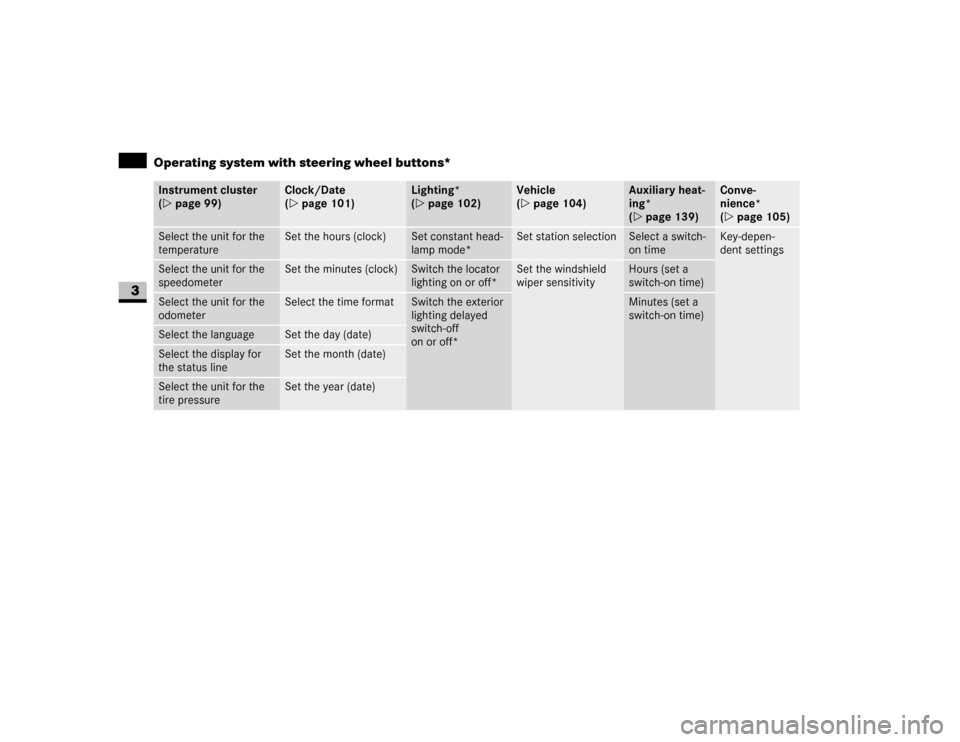
Instrument cluster
(\2page 99)
Clock/Date
(\2page 101)
Lighting*
(\2page 102)
Vehicle
(\2page 104)
Auxiliary heat-
ing*
(\2page 139)
Conve-
nience*
(\2page 105)
Select the unit for the
temperature
Set the hours (clock)
Set constant head-
lamp mode*
Set station selection
Select a switch-
on time
Key-depen-
dent settings
Select the unit for the
speedometer
Set the minutes (clock)
Switch the locator
lighting on or off*
Set the windshield
wiper sensitivity
Hours (set a
switch-on time)
Select the unit for the
odometer
Select the time format
Switch the exterior
lighting delayed
switch-off
on or off*
Minutes (set a
switch-on time)
Select the language
Set the day (date)
Select the display for
the status line
Set the month (date)
Select the unit for the
tire pressure
Set the year (date)
Page 100 of 393
99 Controls in detail
Operating system with steering wheel buttons*
3
Instrument cluster submenu
You can reach the
Inst. cluster
submenu
via the
Settings
menu (\2page 96).
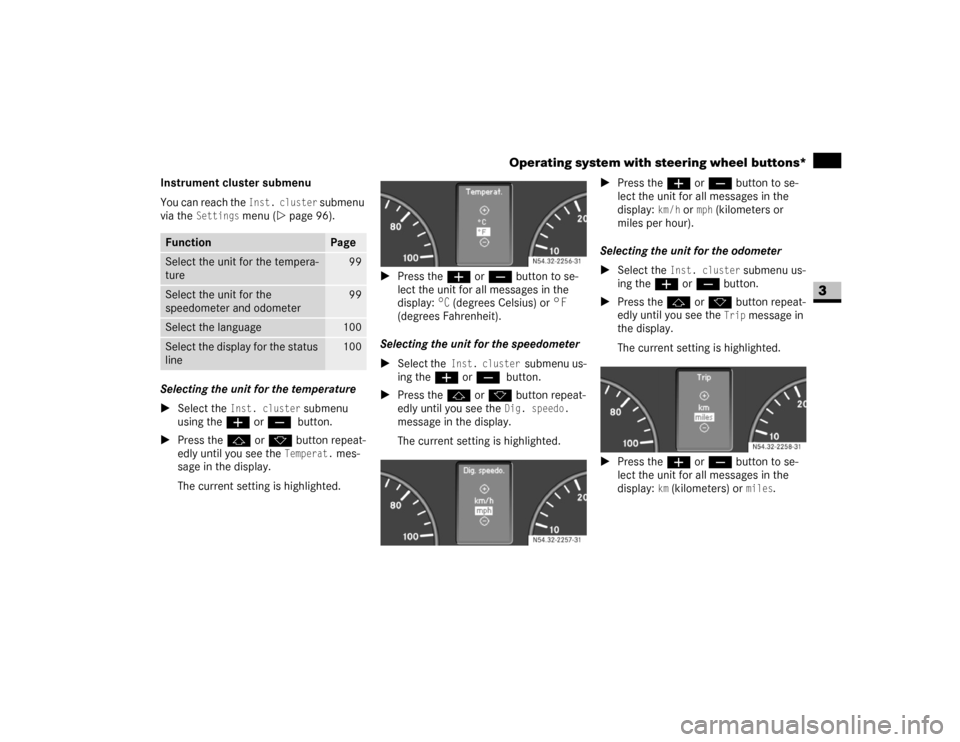
Selecting the unit for the temperature
\1Select the Inst. cluster
submenu
using theæ or ç button.
\1Press thej or k button repeat-
edly until you see the
Temperat.
mes-
sage in the display.
The current setting is highlighted.\1Press theæ or ç button to se-
lect the unit for all messages in the
display:
°C
(degrees Celsius) or °F
(degrees Fahrenheit).
Selecting the unit for the speedometer
\1Select the Inst. cluster
submenu us-
ing theæ or ç
button.
\1Press thej or k button repeat-
edly until you see the Dig. speedo.
message in the display.
The current setting is highlighted.\1Press theæ or ç button to se-
lect the unit for all messages in the
display:
km/h
or
mph
(kilometers or
miles per hour).
Selecting the unit for the odometer
\1Select the
Inst. cluster
submenu us-
ing theæ or ç button.
\1Press thej or k button repeat-
edly until you see the
Trip
message in
the display.
The current setting is highlighted.
\1Press theæ or ç button to se-
lect the unit for all messages in the
display:
km (kilometers) or
miles
.
Function
Page
Select the unit for the tempera-
ture
99
Select the unit for the
speedometer and odometer
99
Select the language
100
Select the display for the status
line
100
N54.32-2256-31
N54.32-2257-31
N54.32-2258-31
Page 106 of 393
105 Controls in detail
Operating system with steering wheel buttons*
3
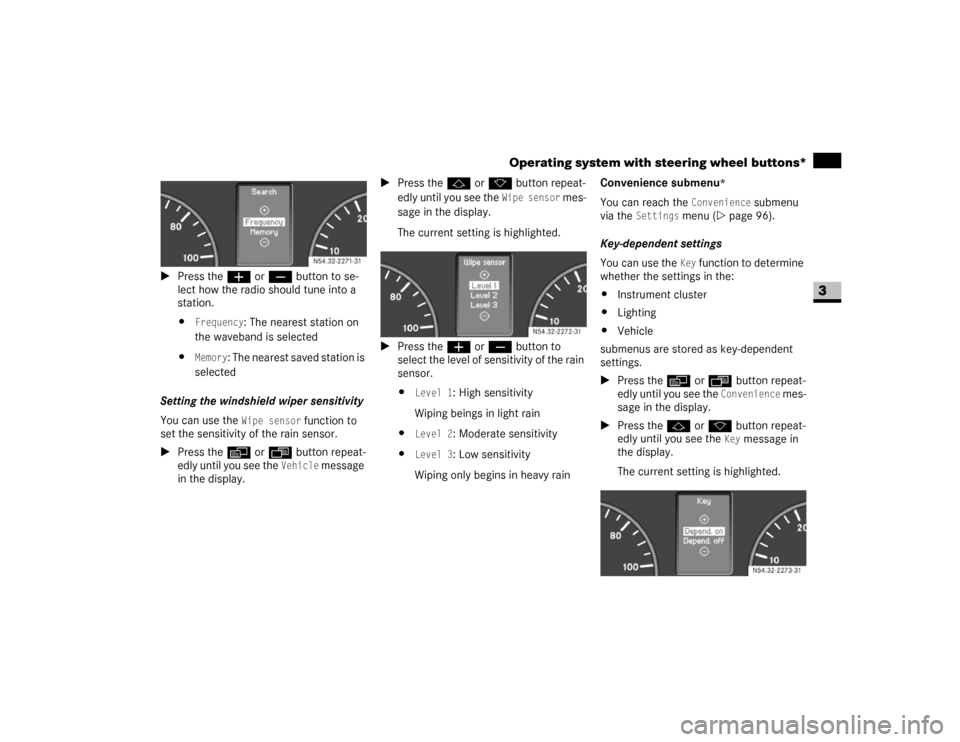
\1Press the æ or ç button to se-
lect how the radio should tune into a
station.
\4
Frequency
: The nearest station on
the waveband is selected
\4
Memory
: The nearest saved station is
selected
Setting the windshield wiper sensitivity
You can use the
Wipe sensor
function to
set the sensitivity of the rain sensor.
\1Press the è or ÿ button repeat-
edly until you see the
Vehicle
message
in the display.\1Press thej or k button repeat-
edly until you see the
Wipe sensor
mes-
sage in the display.
The current setting is highlighted.
\1Press the æ or ç button to
select the level of sensitivity of the rain
sensor.
\4
Level 1
: High sensitivity
Wiping beings in light rain
\4
Level 2
: Moderate sensitivity
\4
Level 3
: Low sensitivity
Wiping only begins in heavy rainConvenience submenu
*
You can reach the
Convenience
submenu
via the
Settings
menu (\2page 96).
Key-dependent settings
You can use the Key
function to determine
whether the settings in the:
\4Instrument cluster
\4Lighting
\4Vehicle
submenus are stored as key-dependent
settings.
\1Press the è or ÿ button repeat-
edly until you see the
Convenience
mes-
sage in the display.
\1Press thej or k button repeat-
edly until you see the
Key
message in
the display.
The current setting is highlighted. N54.32-2271-31
N54.32-2272-31
N54.32-2273-31
Page 112 of 393
111 Controls in detail
Driving and parking
3
\1Before starting the engine, make sure
that all vehicle occupants are wearing
their seat belt correctly (\2page 27)
and the handbrake (\2page 115) is ap-
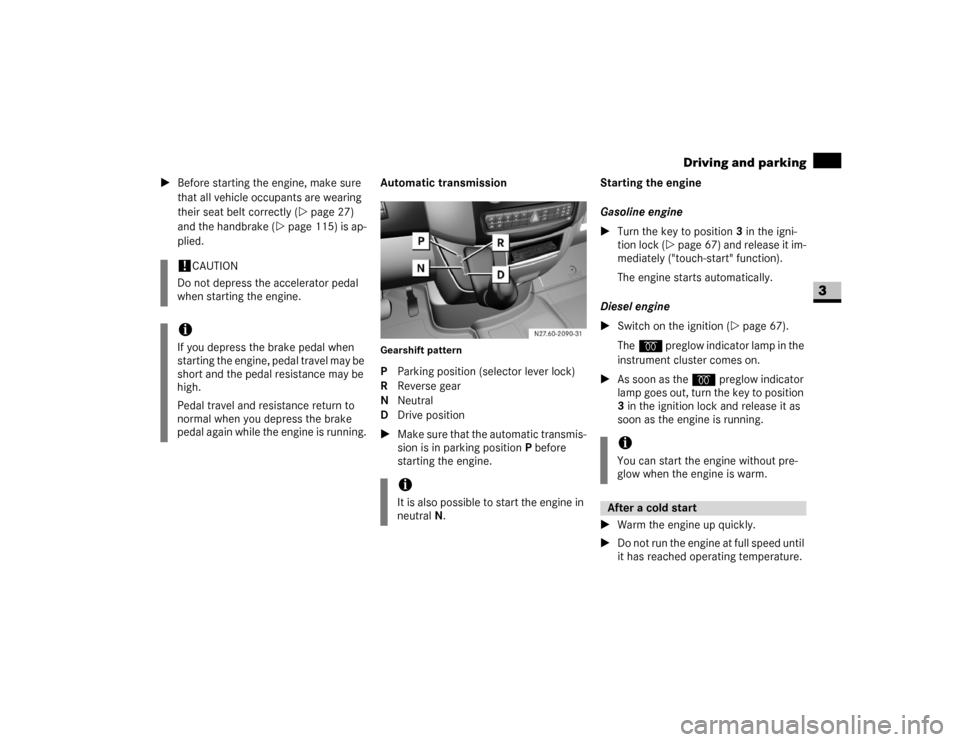
plied.Automatic transmission
Gearshift patternP Parking position (selector lever lock)
R Reverse gear
N Neutral
D Drive position
\1Make sure that the automatic transmis-
sion is in parking position P before
starting the engine.Starting the engine
Gasoline engine
\1Turn the key to position3 in the igni-
tion lock (\2page 67) and release it im-
mediately ("touch-start" function).
The engine starts automatically.
Diesel engine
\1Switch on the ignition (\2page 67).
Theq preglow indicator lamp in the
instrument cluster comes on.
\1As soon as the q preglow indicator
lamp goes out, turn the key to position
3 in the ignition lock and release it as
soon as the engine is running.
\1Warm the engine up quickly.
\1Do not run the engine at full speed until
it has reached operating temperature.
!
CAUTION
Do not depress the accelerator pedal
when starting the engine.
iIf you depress the brake pedal when
starting the engine, pedal travel may be
short and the pedal resistance may be
high.
Pedal travel and resistance return to
normal when you depress the brake
pedal again while the engine is running.
iIt is also possible to start the engine in
neutral N.
iYou can start the engine without pre-
glow when the engine is warm.After a cold start
Page 144 of 393
143 Controls in detail
Auxiliary heating/ventilation*
3
\1Press the è button.
The switch-on time is selected.
The yellow indicator lamp in theö
switch comes on.
Setting the switch-on time
Operating system without steering
wheel buttons
\1Select a switch-on time as described
under “Selecting a switch-on time”
(\2page 142).\1Press the reset button on the instru-
ment cluster to set the selected switch-
on time.
The hours figure flashes and the”
symbol appears in the display.
\1Set the hours using the or am
button on the instrument cluster.
\1Press the reset button.
The minute display flashes.
\1Set the minutes using the or
button.Operating system with steering wheel
buttons
\1Select a switch-on time as described
under “Selecting a switch-on time”
(\2page 142).
\1Press thej button.
The
Hours
menu appears in the display.
\1Set the hours using theæ orç
button.
\1Press thej button.
The
Minutes
menu appears in the dis-
play.
\1Set the minutes using theæ
orç button.
\1Press the è button.
The switch-on time is set and selected.
iIf you turn the key to position0 in the
ignition lock, the yellow indicator lamp
in theö switch goes out after
30 minutes.
The red indicator lamp in theö
switch comes on when the auxiliary
heating switches on.
iIf you keep the button pressed, the val-
ues will change continuously.
To return to the standard display:
\4press and hold the button on
the instrument cluster for more
than 1 second
\4do not press a button for
10 seconds
iTo return to the standard display, press
theè or ÿ button repeatedly
until the standard display appears.
Page 149 of 393
148 Controls in detailDriving systems
3
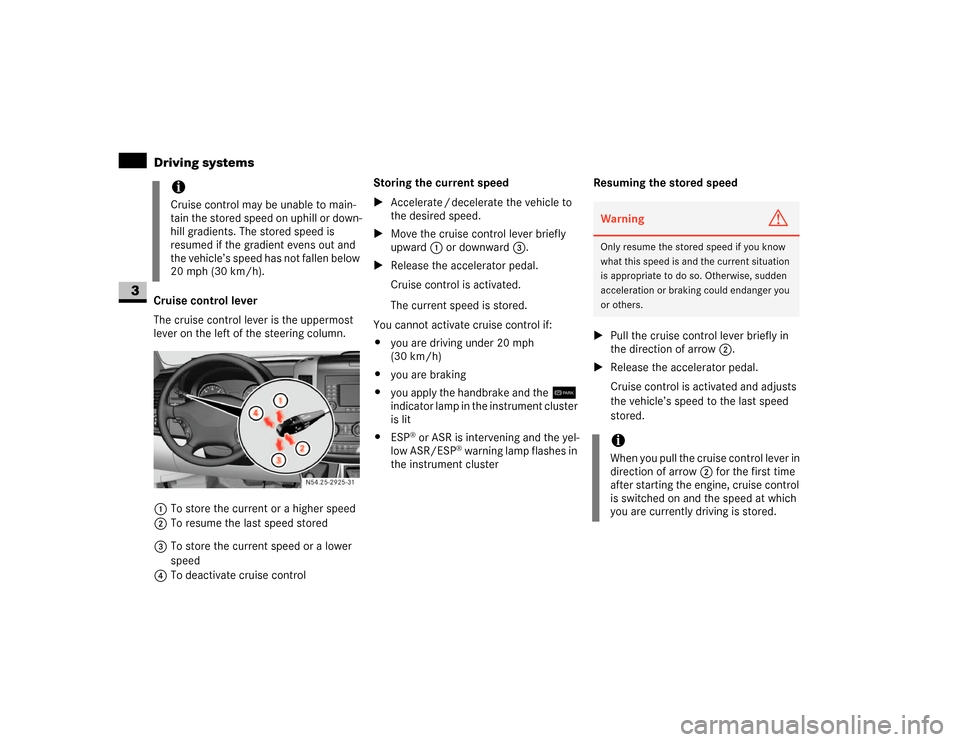
Cruise control lever
The cruise control lever is the uppermost
lever on the left of the steering column.
1To store the current or a higher speed
2To resume the last speed stored
3To store the current speed or a lower
speed
4To deactivate cruise controlStoring the current speed
\1Accelerate / decelerate the vehicle to
the desired speed.
\1Move the cruise control lever briefly
upward 1 or downward 3.
\1Release the accelerator pedal.
Cruise control is activated.
The current speed is stored.
You cannot activate cruise control if:
\4you are driving under 20 mph
(30 km/h)
\4you are braking
\4you apply the handbrake and the7
indicator lamp in the instrument cluster
is lit
\4ESP
® or ASR is intervening and the yel-
low ASR/ESP
® warning lamp flashes in
the instrument clusterResuming the stored speed
\1Pull the cruise control lever briefly in
the direction of arrow2.
\1Release the accelerator pedal.
Cruise control is activated and adjusts
the vehicle’s speed to the last speed
stored.
iCruise control may be unable to main-
tain the stored speed on uphill or down-
hill gradients. The stored speed is
resumed if the gradient evens out and
the vehicle’s speed has not fallen below
20 mph (30 km/h).
N54.25-2925-31
Warning
G
Only resume the stored speed if you know
what this speed is and the current situation
is appropriate to do so. Otherwise, sudden
acceleration or braking could endanger you
or others.iWhen you pull the cruise control lever in
direction of arrow 2 for the first time
after starting the engine, cruise control
is switched on and the speed at which
you are currently driving is stored.