phone DODGE SPRINTER 2007 2.G User Guide
[x] Cancel search | Manufacturer: DODGE, Model Year: 2007, Model line: SPRINTER, Model: DODGE SPRINTER 2007 2.GPages: 393, PDF Size: 7.61 MB
Page 172 of 393
171 Controls in detail
Features
3
Telephones may only be used inside the
vehicle if they are connected to a separate
exterior antenna of a type tested and ap-
proved by the manufacturer.The installation of the antenna must be ap-
proved by a qualified specialist workshop.
Always have maintenance work carried out
at a qualified specialist workshop, e.g. an
authorized Sprinter Dealer.Telephone*Warning
G
You must observe the legal requirements for
the country in which you are driving when
operating a cell phone in the vehicle.
If it is permitted to operate a cell phone
while the vehicle is in motion, you must only
operate it when road and traffic conditions
permit. You may otherwise be distracted
from the traffic conditions, cause an acci-
dent and injure yourself and others.
Cell phones without exterior antennas may
interfere with the vehicle electronics and
thereby jeopardize the operational safety of
the vehicle. You must therefore only use
these devices when they are connected to a
separate exterior antenna.
Warning
G
Only use the telephone when road, weather
and traffic conditions permit you to do so.
You will otherwise be too distracted. If you
are not using the hands-free system, pull
over to make a phone call.
Bear in mind that at a speed of just 30 mph
(approx. 50 km/h), your vehicle is covering
a distance of 44 feet (approx. 14 m) every
second.
Telephones without exterior antennas may
interfere with the vehicle electronics and
thereby jeopardize the operational safety of
the vehicle.
iObserve all legal requirements.iThe cell phone battery will be charged
depending on the charge status and
the position of the key in the ignition
lock. The cell phone display indicates
the charging process.
Page 184 of 393
183 Operation
Electronic equipment
4
\3 Electronic equipment
The vehicle’s general operating permit may
be invalidated if you do not observe the
manufacturer’s installation specifications .
You will find information about retrofitting
electrical / electronic equipment in the
“Technical data” section (\2page 354).
Radio, telephone, two-way radio,
fax machine and navigation systemWarning
G
Please do not forget that your primary respon-
sibility is to drive the vehicle safely.
Only operate the electronic equipment when
road and traffic conditions permit. Keep in
mind that at a speed of just 30 mph (about
50 km/h), your vehicle travels 44 feet (about
14 m) per second.
A navigation system does not provide infor-
mation about bridge load-bearing capacities
or headroom clearances.
You are responsible for safety at all times.
Observe legal requirements.
Telephones, two-way radios and fax machines
without an exterior antenna may interfere
with the vehicle’s electronics, thereby jeopar-
dizing the vehicle’s operating safety. The risk
of an accident increases.
Do not use this equipment while the vehicle is
in motion.
Page 189 of 393
188 OperationEngine
4
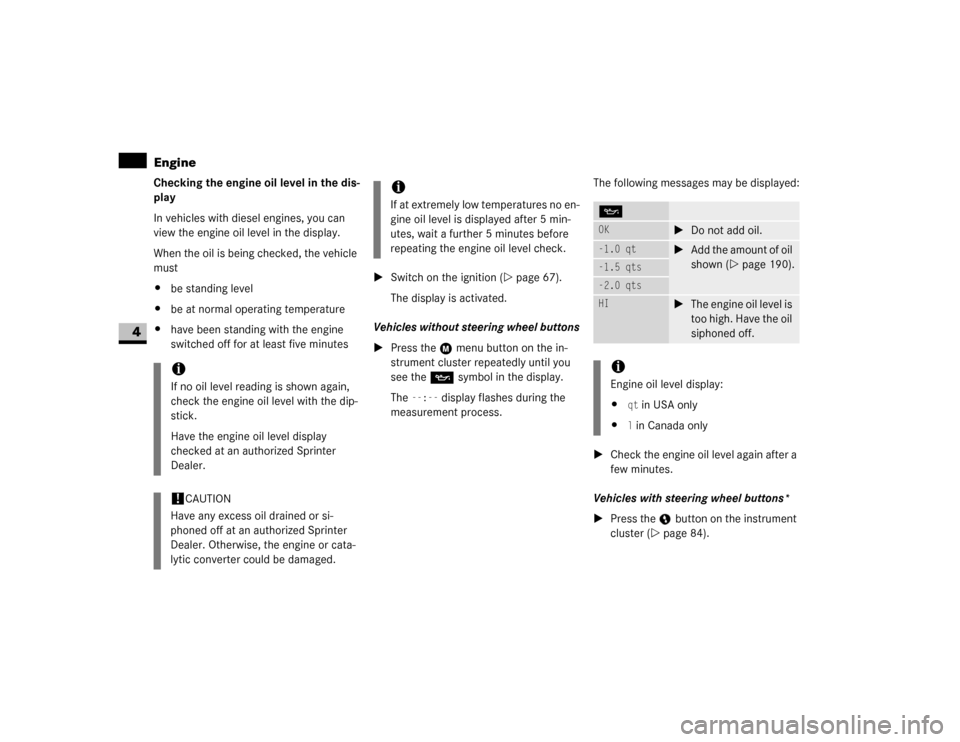
Checking the engine oil level in the dis-
play
In vehicles with diesel engines, you can
view the engine oil level in the display.
When the oil is being checked, the vehicle
must
\4be standing level
\4be at normal operating temperature
\4have been standing with the engine
switched off for at least five minutes\1Switch on the ignition (\2page 67).
The display is activated.
Vehicles without steering wheel buttons
\1Press the menu button on the in-
strument cluster repeatedly until you
see the P symbol in the display.
The
--:--
display flashes during the
measurement process.The following messages may be displayed:
\1Check the engine oil level again after a
few minutes.
Vehicles with steering wheel buttons*
\1Press the button on the instrument
cluster (\2page 84).
iIf no oil level reading is shown again,
check the engine oil level with the dip-
stick.
Have the engine oil level display
checked at an authorized Sprinter
Dealer.!
CAUTION
Have any excess oil drained or si-
phoned off at an authorized Sprinter
Dealer. Otherwise, the engine or cata-
lytic converter could be damaged.
iIf at extremely low temperatures no en-
gine oil level is displayed after 5 min-
utes, wait a further 5 minutes before
repeating the engine oil level check.
POK
\1Do not add oil.
-1.0 qt
\1Add the amount of oil
shown (\2page 190).
-1.5 qts-2.0 qtsHI
\1The engine oil level is
too high. Have the oil
siphoned off.
iEngine oil level display:
\4
qt in USA only
\4l in Canada only
Page 190 of 393
189 Operation
Engine
4
\1The following message is displayed for
the duration of the measurement pro-
cess:
N
Engine oil level Measuring in
progress
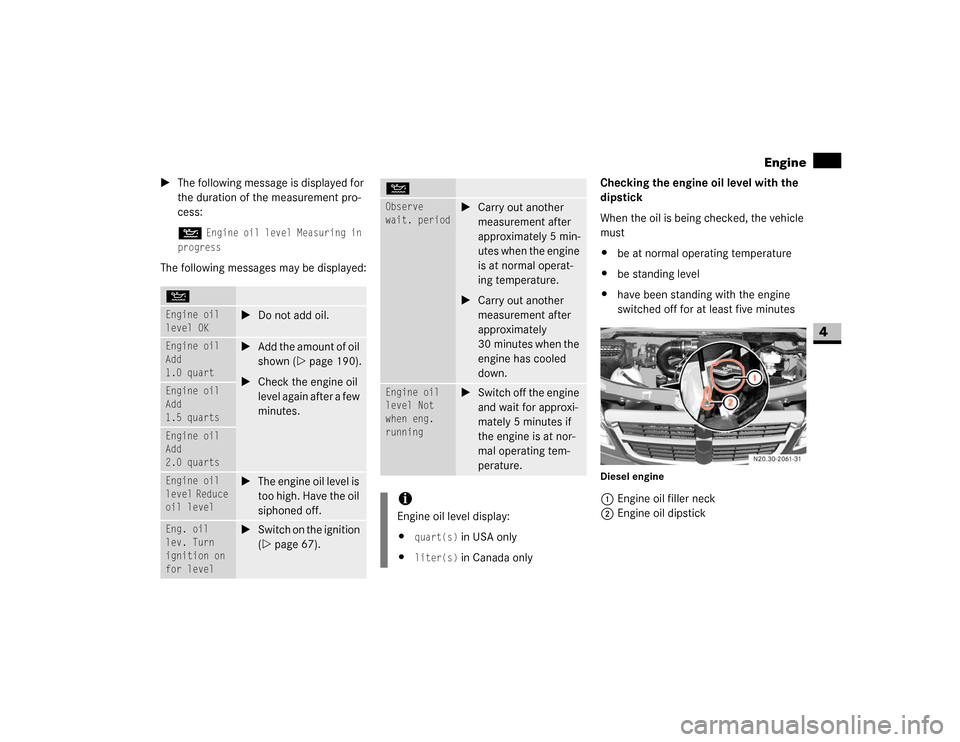
The following messages may be displayed:Checking the engine oil level with the
dipstick
When the oil is being checked, the vehicle
must
\4be at normal operating temperature
\4be standing level
\4have been standing with the engine
switched off for at least five minutes
Diesel engine1Engine oil filler neck
2Engine oil dipstick
NEngine oil
level OK
\1Do not add oil.
Engine oil
Add
1.0 quart
\1Add the amount of oil
shown (\2page 190).
\1Check the engine oil
level again after a few
minutes.
Engine oil
Add
1.5 quartsEngine oil
Add
2.0 quartsEngine oil
level Reduce
oil level
\1The engine oil level is
too high. Have the oil
siphoned off.
Eng. oil
lev. Turn
ignition on
for level
\1Switch on the ignition
(\2page 67).
Observe
wait. period
\1Carry out another
measurement after
approximately 5 min-
utes when the engine
is at normal operat-
ing temperature.
\1Carry out another
measurement after
approximately
30 minutes when the
engine has cooled
down.
Engine oil
level Not
when eng.
running
\1Switch off the engine
and wait for approxi-
mately 5 minutes if
the engine is at nor-
mal operating tem-
perature.
iEngine oil level display:
\4
quart(s)
in USA only
\4
liter(s)
in Canada only
N
Page 191 of 393
190 OperationEngine
4
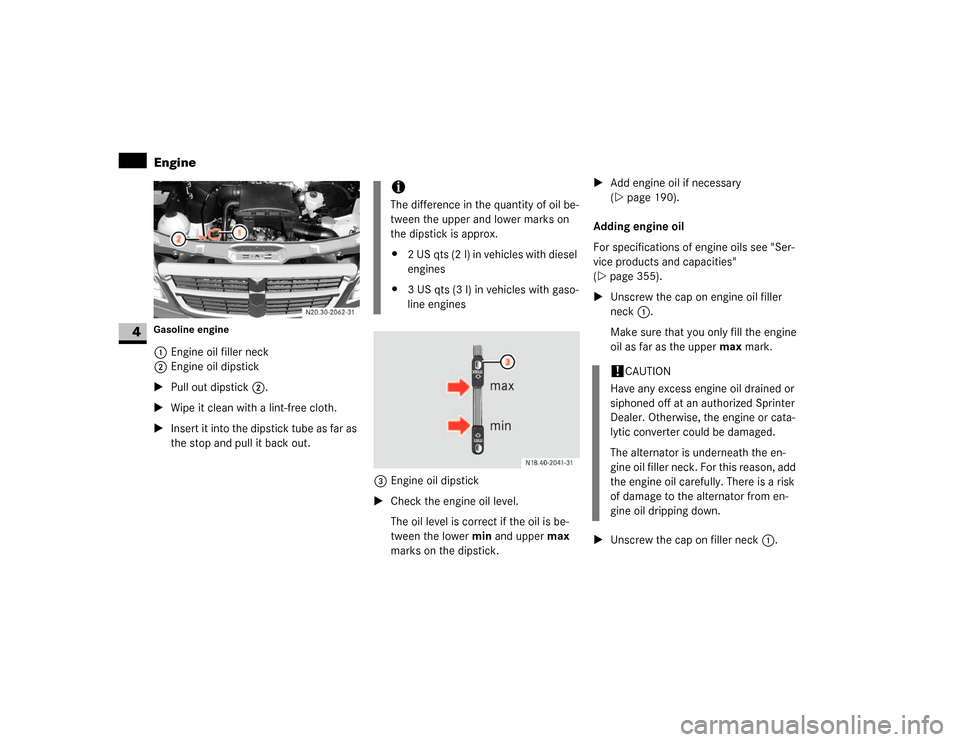
Gasoline engine1Engine oil filler neck
2Engine oil dipstick
\1Pull out dipstick2.
\1Wipe it clean with a lint-free cloth.
\1Insert it into the dipstick tube as far as
the stop and pull it back out.
3Engine oil dipstick
\1Check the engine oil level.
The oil level is correct if the oil is be-
tween the lower min and upper max
marks on the dipstick.\1Add engine oil if necessary
(\2page 190).
Adding engine oil
For specifications of engine oils see "Ser-
vice products and capacities"
(\2page 355).
\1Unscrew the cap on engine oil filler
neck1.
Make sure that you only fill the engine
oil as far as the upper max mark.
\1Unscrew the cap on filler neck1.
iThe difference in the quantity of oil be-
tween the upper and lower marks on
the dipstick is approx.
\42 US qts (2 l) in vehicles with diesel
engines
\43 US qts (3 l) in vehicles with gaso-
line engines
N18.00-2041-31
!
CAUTION
Have any excess engine oil drained or
siphoned off at an authorized Sprinter
Dealer. Otherwise, the engine or cata-
lytic converter could be damaged.
The alternator is underneath the en-
gine oil filler neck. For this reason, add
the engine oil carefully. There is a risk
of damage to the alternator from en-
gine oil dripping down.
Page 243 of 393
242 OperationCleaning and care of the vehicle
4
Automatic car wash
You can clean the vehicle in an automatic
car wash from the very start. It is prefera-
ble to use a car wash that does not have
brushes.
If the vehicle is very dirty, prewash it be-
fore you drive into the car wash.
\1Remove the radio / telephone antenna
and fold the exterior mirrors in before
driving into the automatic car wash.After using an automatic car wash, wipe off
wax from the windshield and the wiper
blades. This prevents smears and reduces
wiping noises which can be caused by res-
idue on the windshield.High-pressure cleaners
\1The minimum distance that must be
maintained between the vehicle and
the nozzle of the high-pressure cleaner
is:
\4approximately 2.2 ft (70 cm) for
round-spray jets
\4approximately 1 ft (30 cm) for 25°
flat-spray jets and concentrated-
power jets
\1Move the high-pressure cleaner nozzle
around when cleaning your vehicle.Care of the vehicle!
CAUTION
After cleaning your vehicle, especially
the wheel rims with rim cleaner, do not
simply park the vehicle and leave it.
Rim cleaners can promote corrosion of
the brake discs and the brake pads /
linings. Before parking and leaving the
vehicle after cleaning, always warm the
vehicle up to normal operating temper-
ature first.
!
CAUTION
Make sure that the automatic car wash
is suitable for the size of the vehicle.
If you do not remove the radio / tele-
phone antenna and fold in the exterior
mirrors, there is a possibility that the
antenna, the exterior mirrors or the ve-
hicle could be damaged by the auto-
matic car wash.
!
CAUTION
Make sure that the windshield wiper
switch is set to 0 (\2page 126), other-
wise the rain sensor could be activated,
for example, and the windshield wipers
could be triggered unintentionally. This
could cause damage to the vehicle.
!
CAUTION
Do not use high-pressure cleaners with
round-spray jets for cleaning the tires.
You could otherwise damage the tires.
Have damaged tires replaced.
!
CAUTION
To avoid damage, do not aim directly at
the door joints, brake hoses, electrical
components, connectors or seals.
Page 245 of 393
244 OperationCleaning and care of the vehicle
4
Windows
Headlamps
\1Wipe the headlamp lenses with a damp
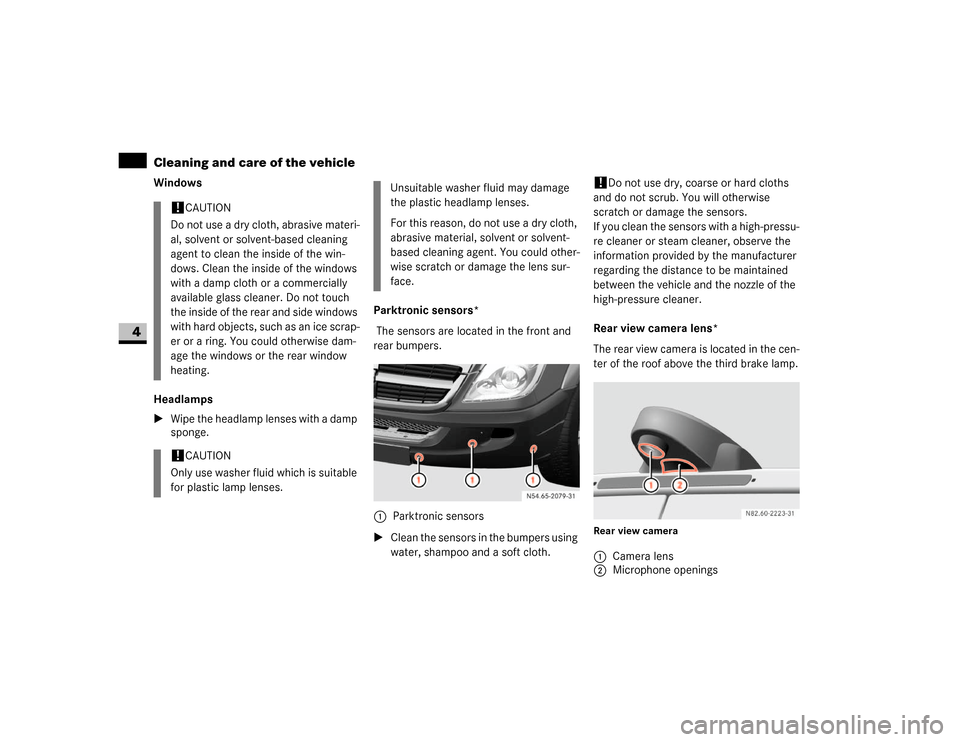
sponge.Parktronic sensors*
The sensors are located in the front and
rear bumpers.
\1Clean the sensors in the bumpers using
water, shampoo and a soft cloth.
!
Do not use dry, coarse or hard cloths
and do not scrub. You will otherwise
scratch or damage the sensors.
If you clean the sensors with a high-pressu-
re cleaner or steam cleaner, observe the
information provided by the manufacturer
regarding the distance to be maintained
between the vehicle and the nozzle of the
high-pressure cleaner.
Rear view camera lens*
The rear view camera is located in the cen-
ter of the roof above the third brake lamp.
Rear view camera
!
CAUTION
Do not use a dry cloth, abrasive materi-
al, solvent or solvent-based cleaning
agent to clean the inside of the win-
dows. Clean the inside of the windows
with a damp cloth or a commercially
available glass cleaner. Do not touch
the inside of the rear and side windows
with hard objects, such as an ice scrap-
er or a ring. You could otherwise dam-
age the windows or the rear window
heating.
!
CAUTION
Only use washer fluid which is suitable
for plastic lamp lenses.
Unsuitable washer fluid may damage
the plastic headlamp lenses.
For this reason, do not use a dry cloth,
abrasive material, solvent or solvent-
based cleaning agent. You could other-
wise scratch or damage the lens sur-
face.
1Parktronic sensors
1Camera lens
2Microphone openings
Page 246 of 393
245 Operation
Cleaning and care of the vehicle
4
\1Clean the camera lens 1 using water
and a soft cloth only.
Be careful not to apply wax to the camera
lens 1 when waxing the vehicle. If neces-
sary, remove the wax using shampoo with
plenty of water.!
Do not use dry, coarse or hard cloths
and aggressive cleaning agents. Do not
scrub or use high pressure. You will other-
wise scratch or damage the lens or the ca-
mera.
If you clean the vehicle with a high-pressu-
re cleaner or steam cleaner, maintain a mi-
nimum distance of 1.6 ft (50 cm) to the
rear view camera. To prevent damage, do
not aim directly at the rear view camera or
at the microphone openings on the under-
side of the rear view camera.
Plastic trimsLight soiling
\1Wipe plastic parts with a damp, lint-
free cloth (e.g. a micro-fiber cloth).
Heavy soiling
\1Wipe plastic parts with a damp, lint-
free cloth (e.g. a micro-fiber cloth). Dashboard and padded boss of the
steering wheel
\1Moisten a clean and lint-free cloth with
water and clean the plastic parts and
the dashboard.
\1Use a mild soap solution for particularly
stubborn dirt.!
CAUTION
Do not use dry, coarse or hard cloths
and do not scrub. You will otherwise
scratch or damage the surfaces.
!
CAUTION
Use a low-foaming grease solvent (e.g.
washing-up liquid) diluted in water as a
cleaning agent.
The surface color may temporarily
change shade during cleaning. Simply
wait for the surface to dry.
!
CAUTION
Use a solvent-free and non-caustic
cleaning agent. The manufacturer
recommends that you use a
Mercedes-Benz product.
The surface color may temporarily
change shade during cleaning. Simply
wait for the surface to dry.
Warning
G
Do not use cleaners or cockpit care sprays
containing solvents to clean the dashboard
or the padded boss of the steering wheel.
Cleaners containing solvents can make the
surface porous, which could lead to serious
injuries if plastic parts were to come loose
when an airbag is triggered.
Page 276 of 393
275 Practical hints
What to do if ...
5
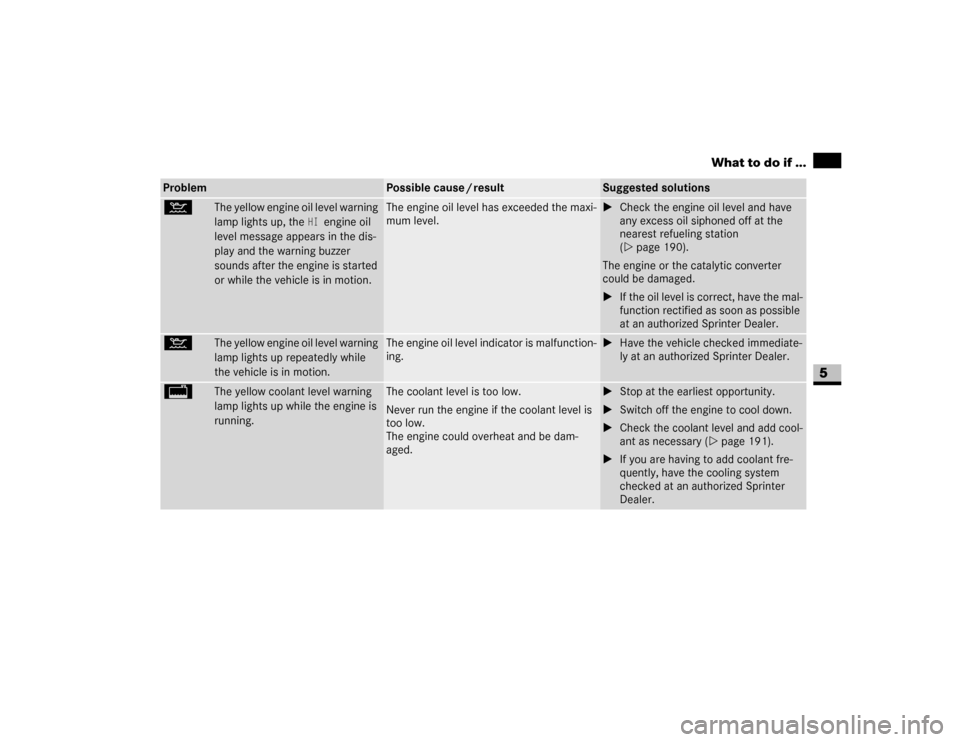
:
The yellow engine oil level warning
lamp lights up, the
HI
engine oil
level message appears in the dis-
play and the warning buzzer
sounds after the engine is started
or while the vehicle is in motion.
The engine oil level has exceeded the maxi-
mum level.
\1Check the engine oil level and have
any excess oil siphoned off at the
nearest refueling station
(\2page 190).
The engine or the catalytic converter
could be damaged.
\1If the oil level is correct, have the mal-
function rectified as soon as possible
at an authorized Sprinter Dealer.
:
The yellow engine oil level warning
lamp lights up repeatedly while
the vehicle is in motion.
The engine oil level indicator is malfunction-
ing.
\1Have the vehicle checked immediate-
ly at an authorized Sprinter Dealer.
/
The yellow coolant level warning
lamp lights up while the engine is
running.
The coolant level is too low.
Never run the engine if the coolant level is
too low.
The engine could overheat and be dam-
aged.
\1Stop at the earliest opportunity.
\1Switch off the engine to cool down.
\1Check the coolant level and add cool-
ant as necessary (\2page 191).
\1If you are having to add coolant fre-
quently, have the cooling system
checked at an authorized Sprinter
Dealer.
Problem
Possible cause / result
Suggested solutions
Page 292 of 393
291 Practical hints
Display messages
5
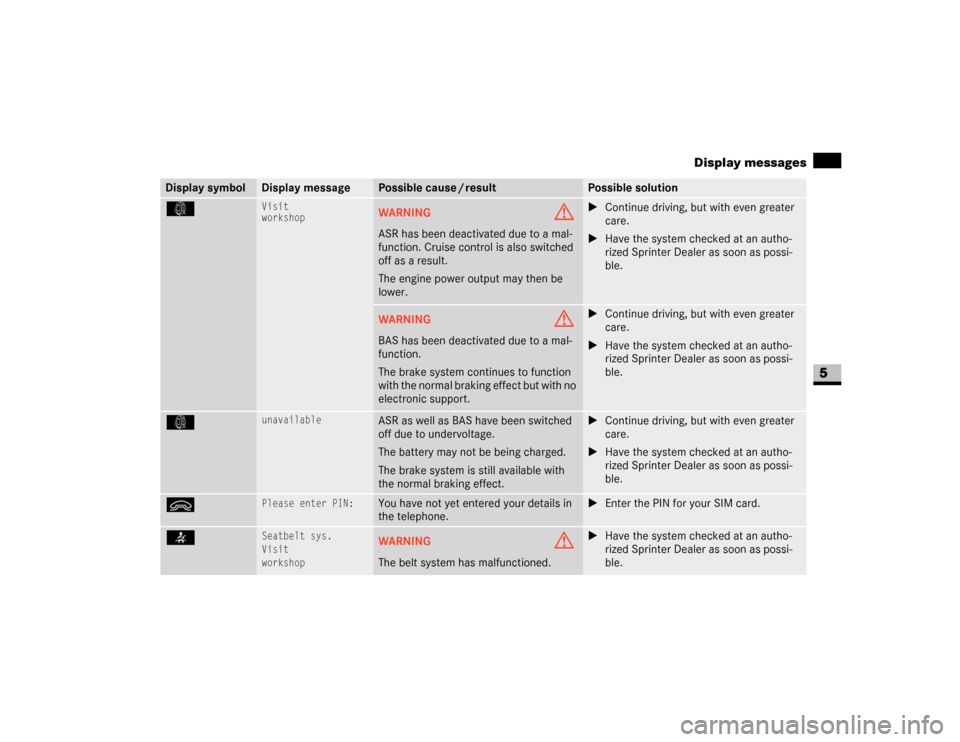
k
Visit
workshop
WARNING
G
ASR has been deactivated due to a mal-
function. Cruise control is also switched
off as a result.
The engine power output may then be
lower.
\1Continue driving, but with even greater
care.
\1Have the system checked at an autho-
rized Sprinter Dealer as soon as possi-
ble.
WARNING
G
BAS has been deactivated due to a mal-
function.
The brake system continues to function
with the normal braking effect but with no
electronic support.
\1Continue driving, but with even greater
care.
\1Have the system checked at an autho-
rized Sprinter Dealer as soon as possi-
ble.
k
unavailable
ASR as well as BAS have been switched
off due to undervoltage.
The battery may not be being charged.
The brake system is still available with
the normal braking effect.
\1Continue driving, but with even greater
care.
\1Have the system checked at an autho-
rized Sprinter Dealer as soon as possi-
ble.
ì
Please enter PIN:
You have not yet entered your details in
the telephone.
\1Enter the PIN for your SIM card.
<
Seatbelt sys.
Visit
workshop
WARNING
G
The belt system has malfunctioned.
\1Have the system checked at an autho-
rized Sprinter Dealer as soon as possi-
ble.
Display symbol
Display message
Possible cause / result
Possible solution