reset DODGE SPRINTER 2007 2.G User Guide
[x] Cancel search | Manufacturer: DODGE, Model Year: 2007, Model line: SPRINTER, Model: DODGE SPRINTER 2007 2.GPages: 393, PDF Size: 7.61 MB
Page 144 of 393
143 Controls in detail
Auxiliary heating/ventilation*
3
\1Press the è button.
The switch-on time is selected.
The yellow indicator lamp in theö
switch comes on.
Setting the switch-on time
Operating system without steering
wheel buttons
\1Select a switch-on time as described
under “Selecting a switch-on time”
(\2page 142).\1Press the reset button on the instru-
ment cluster to set the selected switch-
on time.
The hours figure flashes and the”
symbol appears in the display.
\1Set the hours using the or am
button on the instrument cluster.
\1Press the reset button.
The minute display flashes.
\1Set the minutes using the or
button.Operating system with steering wheel
buttons
\1Select a switch-on time as described
under “Selecting a switch-on time”
(\2page 142).
\1Press thej button.
The
Hours
menu appears in the display.
\1Set the hours using theæ orç
button.
\1Press thej button.
The
Minutes
menu appears in the dis-
play.
\1Set the minutes using theæ
orç button.
\1Press the è button.
The switch-on time is set and selected.
iIf you turn the key to position0 in the
ignition lock, the yellow indicator lamp
in theö switch goes out after
30 minutes.
The red indicator lamp in theö
switch comes on when the auxiliary
heating switches on.
iIf you keep the button pressed, the val-
ues will change continuously.
To return to the standard display:
\4press and hold the button on
the instrument cluster for more
than 1 second
\4do not press a button for
10 seconds
iTo return to the standard display, press
theè or ÿ button repeatedly
until the standard display appears.
Page 145 of 393
144 Controls in detailOpen air
3
\3 Open airYou can open and close the side windows
electrically.
The switches for all side windows are locat-
ed on the door control panel.
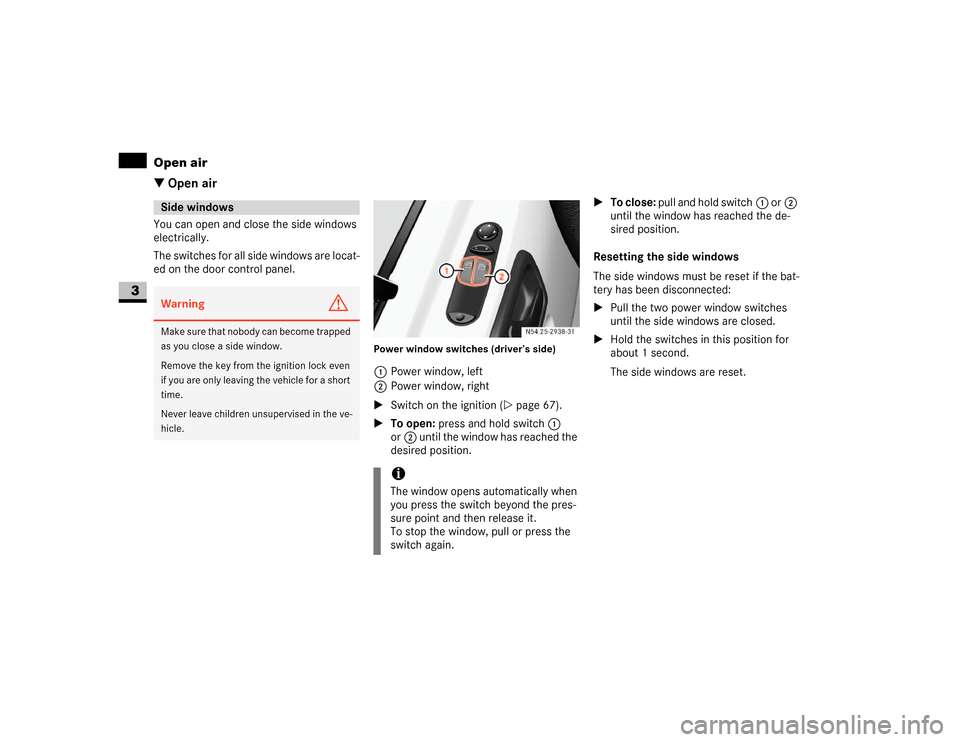
Power window switches (driver’s side)1Power window, left
2Power window, right
\1Switch on the ignition (\2page 67).
\1To open: press and hold switch1
or2 until the window has reached the
desired position.\1To close: pull and hold switch1 or2
until the window has reached the de-
sired position.
Resetting the side windows
The side windows must be reset if the bat-
tery has been disconnected:
\1Pull the two power window switches
until the side windows are closed.
\1Hold the switches in this position for
about 1 second.
The side windows are reset.
Side windowsWarning
G
Make sure that nobody can become trapped
as you close a side window.
Remove the key from the ignition lock even
if you are only leaving the vehicle for a short
time.
Never leave children unsupervised in the ve-
hicle.
iThe window opens automatically when
you press the switch beyond the pres-
sure point and then release it.
To stop the window, pull or press the
switch again.
Page 147 of 393
146 Controls in detailOpen air
3
Resetting the sliding sunroof
The sliding sunroof must be reset after:
\4the sunroof has been closed manually
using the emergency operation key
(\2page 304)
\4the sunroof has opened with a jerk
\4a malfunction
\1Switch on the ignition (\2page 67).
\1Press the sliding sunroof switch in the
direction of arrow2 (\2page 145).
\1Wait until the sliding sunroof is closed
and then keep the sliding sunroof
switch pressed for approximately
3seconds.
The sliding sunroof is reset.The roof ventilator can be used to ventilate
or remove air from the load compartment.
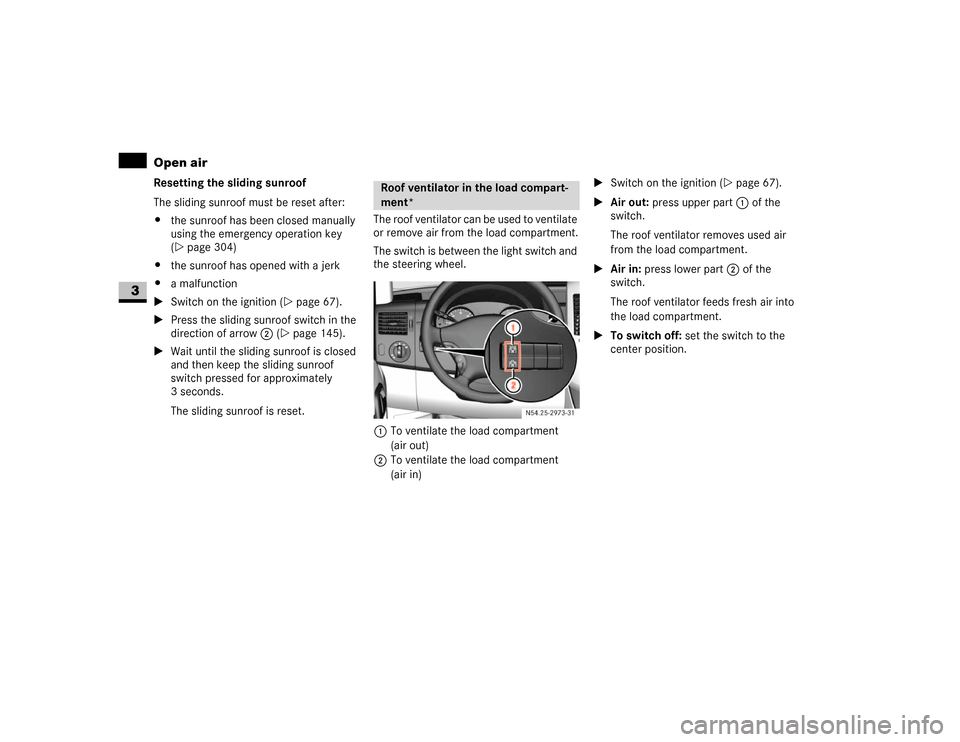
The switch is between the light switch and
the steering wheel.
1To ventilate the load compartment
(air out)
2To ventilate the load compartment
(air in)\1Switch on the ignition (\2page 67).
\1Air out: press upper part 1 of the
switch.
The roof ventilator removes used air
from the load compartment.
\1Air in: press lower part 2 of the
switch.
The roof ventilator feeds fresh air into
the load compartment.
\1To switch off: set the switch to the
center position.
Roof ventilator in the load compart-
ment*
N54.25-2929-31
Page 155 of 393
154 Controls in detailOperating the vehicle
3
\3 Operating the vehicleWhen activated, the operating speed gov-
ernor (ADR) automatically increases the
engine speed to a preset or adjustable
operating speed (\2page 155).Activating / deactivating ADR
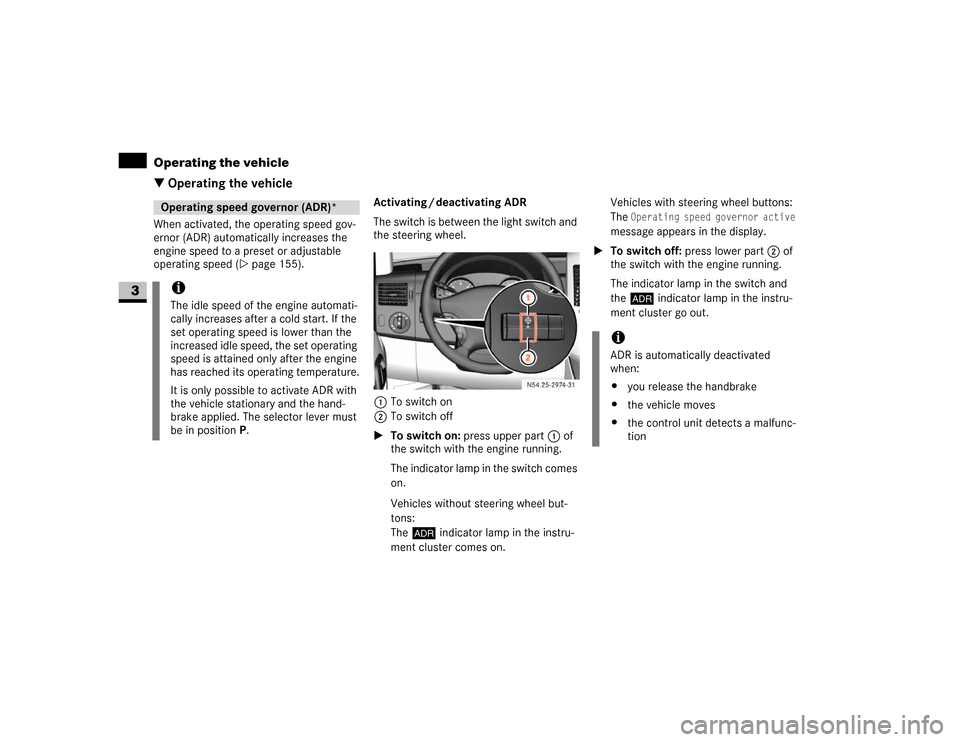
The switch is between the light switch and
the steering wheel.
1To switch on
2To switch off
\1To switch on: press upper part 1 of
the switch with the engine running.
The indicator lamp in the switch comes
on.
Vehicles without steering wheel but-
tons:
The™ indicator lamp in the instru-
ment cluster comes on.Vehicles with steering wheel buttons:
The
Operating speed governor active
message appears in the display.
\1To switch off: press lower part 2 of
the switch with the engine running.
The indicator lamp in the switch and
the™ indicator lamp in the instru-
ment cluster go out.
Operating speed governor (ADR)*iThe idle speed of the engine automati-
cally increases after a cold start. If the
set operating speed is lower than the
increased idle speed, the set operating
speed is attained only after the engine
has reached its operating temperature.
It is only possible to activate ADR with
the vehicle stationary and the hand-
brake applied. The selector lever must
be in position P.
N54.25-2932-31
iADR is automatically deactivated
when:
\4you release the handbrake
\4the vehicle moves
\4the control unit detects a malfunc-
tion
Page 198 of 393
197 Operation
Battery isolating switch*
4
You can disconnect the current to all your
vehicle’s consumers using the battery
isolating switch. This will prevent uncon-
trolled battery discharge caused by quies-
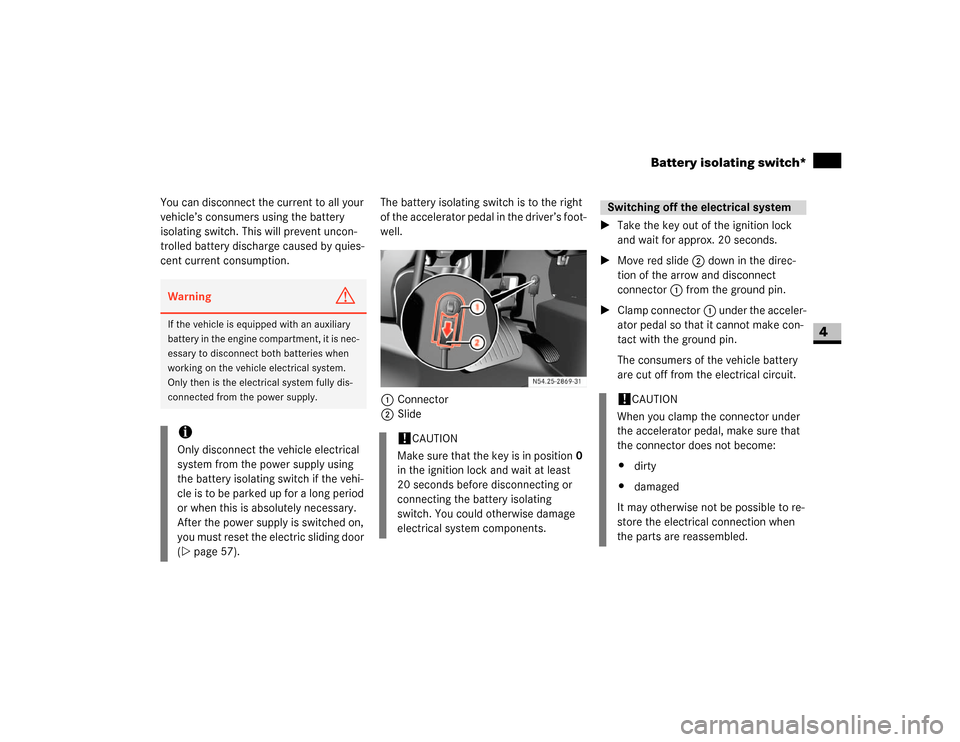
cent current consumption.The battery isolating switch is to the right
of the accelerator pedal in the driver’s foot-
well.
1Connector
2Slide\1Take the key out of the ignition lock
and wait for approx. 20 seconds.
\1Move red slide2 down in the direc-
tion of the arrow and disconnect
connector1 from the ground pin.
\1Clamp connector1 under the acceler-
ator pedal so that it cannot make con-
tact with the ground pin.
The consumers of the vehicle battery
are cut off from the electrical circuit.Warning
G
If the vehicle is equipped with an auxiliary
battery in the engine compartment, it is nec-
essary to disconnect both batteries when
working on the vehicle electrical system.
Only then is the electrical system fully dis-
connected from the power supply.iOnly disconnect the vehicle electrical
system from the power supply using
the battery isolating switch if the vehi-
cle is to be parked up for a long period
or when this is absolutely necessary.
After the power supply is switched on,
you must reset the electric sliding door
(\2page 57).
!
CAUTION
Make sure that the key is in position0
in the ignition lock and wait at least
20 seconds before disconnecting or
connecting the battery isolating
switch. You could otherwise damage
electrical system components.
Switching off the electrical system!
CAUTION
When you clamp the connector under
the accelerator pedal, make sure that
the connector does not become:
\4dirty
\4damaged
It may otherwise not be possible to re-
store the electrical connection when
the parts are reassembled.
Page 222 of 393
221 Operation
Tires and wheels
4
\1Press thej or kbutton repeat-
edly until you see the current inflation
pressures for each tire appear in the
display or the following message ap-
pears in the display
Tire pres. displayed
after driving
for several minutes
\1Press reset button0 on the instrument
cluster (\2page 14).
The following message will appear in
the multifunction display:
Tire pres.
Adjust pres.
\1Press æbutton.
The following message will appear in
the multifunction display:
Tire pres. monitor
reactivatedAfter a few minutes' driving, the cur-
rent tire inflation pressure values are
accepted as reference values and then
monitored.If you wish to cancel activation:
\1Press çbutton.
Potential problems associated with un-
derinflated and overinflated tires
Proper tire inflation pressure is essential to
the safe and satisfactory operation of your
vehicle. Three primary areas are affected
by improper tire inflation pressure:
1. Safety
2. Economy
Improper inflation pressures can cause un-
even wear patterns to develop across the
tire tread. These abnormal wear patterns
will reduce tread life resulting in a need for
earlier tire replacement. Underinflation
also increases tire rolling resistance and
results in higher fuel consumption.
Warning
G
Follow recommended tire inflation pres-
sures.
Do not underinflate tires. Underinflated tires
wear excessively and/or unevenly, adverse-
ly affect handling and fuel economy, and are
more likely to fail from being overheated.
Do not overinflate tires. Overinflated tires
can adversely affect handling and ride com-
fort, wear unevenly, increase stopping dis-
tance, and result in sudden deflation
(blowout) because they are more likely to
become punctured or damaged by road de-
bris, potholes etc.Warning
G
Improperly inflated tires are dangerous and
can cause accidents.
Unequal tire inflation pressures can cause
steering problems. You could lose control of
your vehicle.
Unequal tire inflation pressures from one
side of the vehicle to the other can cause
the vehicle to drift to the right or left. Always
drive with each tire inflated to the recom-
mended cold tire inflation pressure.
\2\2
Page 240 of 393
239 Operation
Maintenance and servicing
4
Vehicles without steering wheel buttons
The following messages may be displayed:
\49 for service A
\4´ for service B
The following are also shown, depending
on the style of driving:
\4the remaining distance in kilometers,
e.g.
1900 miles
(3000 km
)
\4the remaining time in days, e.g.
30 days
.
Missing the service due date
An authorized Sprinter Dealer, can reset
the service indicator when the service has
been carried out.Vehicles with steering wheel buttons*
If you have missed the service due date,
one of the following messages appears in
the display:
\49
Service A overdue by .. days
\49
Service A overdue by .. miles
(km)
A signal also sounds.
Vehicles without steering wheel buttons
If you have missed the service due date,
the following symbol flashes in the display
for 10 seconds after the ignition is
switched on:
\49 for service A
\4´ for service B
You will also see a minus sign before the
service due date.Calling up the service due date
\1Switch on the ignition (\2page 67).
The display is activated.
Vehicles with steering wheel buttons*
\1Press the è or ÿ button on the
steering wheel repeatedly until you see
the standard display (\2page 89) .
\1Press the j or k button on the
steering wheel repeatedly until you see
the following in the display, for exam-
ple:
\49
Service A in .. days
\49
Service A in .. miles
(km)
The letters
A or
B indicate the type of
service that is due.
!
CAUTION
If you fail to have the specified service
carried out, you could be in breach of
relevant regulations and warranty and
goodwill settlements could be invali-
dated.
\2\2
Page 285 of 393
284 Practical hintsDisplay messages
5
The operating system shows warnings,
malfunctions or additional information in
the display.
Certain messages are accompanied by a
warning signal or a permanent tone.
High-priority messages are highlighted in
red in the display.
Please respond in accordance with the
messages and follow the additional notes
in these Operating instructions.
\4Low-priority messages can be acknowl-
edged using theè, ·, j
ork buttons on the steering wheel
or using the reset button on the in-
strument cluster (\2page 84). They are
then stored in the malfunction memo-
ry.
\4Highest-priority messages cannot be
acknowledged and are automatically
stored in the malfunction memory.If you select the Malfunction memory
menu in the operating system
(\2page 95), the acknowledged and
unacknowledged messages will appear.
The following table shows messages which
could appear in the display. The messages
are divided into two types to make it easier
for you to find the relevant message:
\4Text messages are shown in alphabeti-
cal order from (\2page 285) onwards
\4Symbol messages (\2page 289)Display messages on vehicles with
steering wheel buttons
Warning
G
No messages can be displayed if there is a
failure of the instrument cluster and / or the
display. You will not then be able to see in-
formation about the vehicle status, such as
speed and outside temperature, warning
and indicator lamps, malfunction and warn-
ing messages or the failure of systems. Han-
dling characteristics may be affected.
Contact an authorized Sprinter Dealer im-
mediately which has the necessary special-
ist knowledge and tools to carry out the
work required.
The manufacturer recommends that you use
an authorized Sprinter Dealer for this pur-
pose. In particular, work relevant to safety
or on safety-related systems must be car-
ried out at an authorized Sprinter Dealer.
Warning
G
Always have maintenance work carried out
at an authorized Sprinter Dealer which has
the necessary specialist knowledge and
tools to carry out the work required.
The manufacturer recommends that you use
an authorized Sprinter Dealer for this pur-
pose. In particular, work relevant to safety
or on safety-related systems must be car-
ried out at an authorized Sprinter Dealer.
There is a risk of an accident and injury if
this work is carried out incorrectly.
Page 306 of 393
305 Practical hints
Where will I find...?
5
\1With the ignition switched on
(\2page 67), press and hold the sliding
sunroof switch (\2page 145) forward
or backward for 45 seconds to reset
the electronics.
\1Reset the sliding sunroof
(\2page 146).
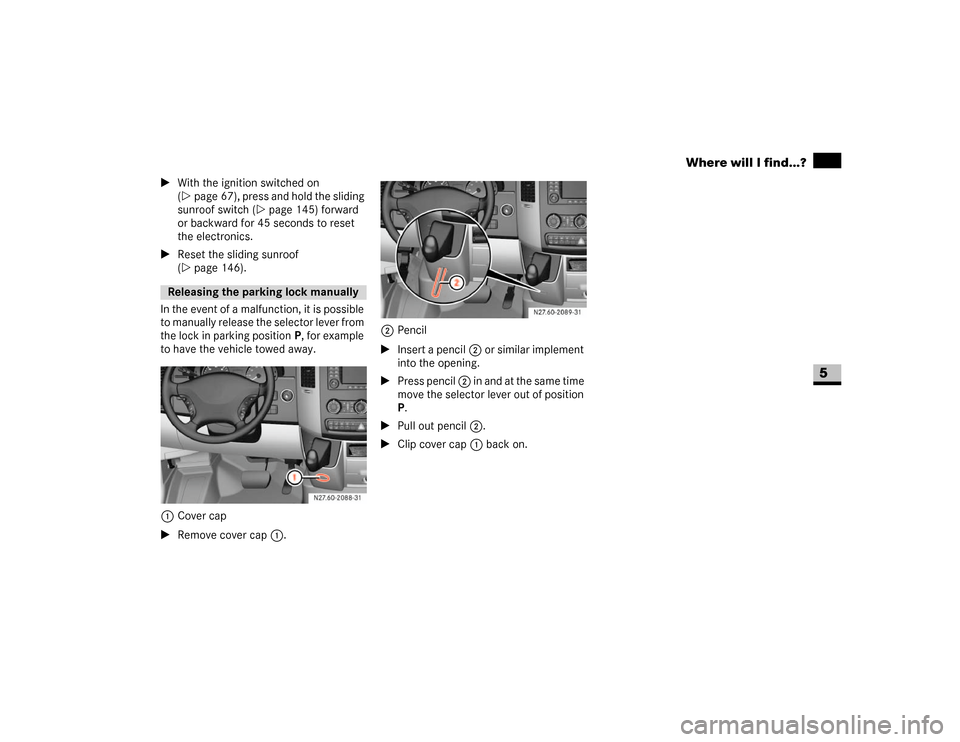
In the event of a malfunction, it is possible
to manually release the selector lever from
the lock in parking positionP, for example
to have the vehicle towed away.
1Cover cap
\1Remove cover cap1.2Pencil
\1Insert a pencil2 or similar implement
into the opening.
\1Press pencil 2 in and at the same time
move the selector lever out of position
P.
\1Pull out pencil 2.
\1Clip cover cap1 back on.Releasing the parking lock manually
N27.60-2088-31
N27.60-2089-31
Page 340 of 393
339 Practical hints
Battery
5
\1Recharge the removed battery. Ob-
serve the notes in the operating in-
structions for your battery charger.
\1Reinstall the battery in the reverse or-
der.\1Switch off all electrical consumers.
\1Connect the positive terminal and se-
cure the cover.
\1Connect the negative terminal.Recharging the battery!
CAUTION
Only charge the installed battery using
a battery charger tested and approved
by the manufacturer. These devices al-
low you to charge the battery while it is
installed. The vehicle’s electronics sys-
tem may otherwise be damaged.
Warning
G
Only charge the battery in well-ventilated ar-
eas. As the battery is being charged, gases
can escape and generate minor explosions,
which can injure you and others and may
cause damage to the paintwork or permit
acid corrosion on the vehicle.
During the charge procedure, there is a risk
of acid burns due to gases escaping from
the battery. Do not, therefore, lean over the
battery while it is being recharged.iIt is also possible to charge the starter
battery using the jump-starting connec-
tion point in the engine compartment
(\2page 340).
Reconnecting the battery!
CAUTION
Never swap the terminal clamps. Other-
wise, the vehicle’s electronics system
may be damaged. After reconnecting
the battery, you must reset the electric
sliding door* (\2page 57).