steering wheel DODGE SPRINTER 2007 2.G User Guide
[x] Cancel search | Manufacturer: DODGE, Model Year: 2007, Model line: SPRINTER, Model: DODGE SPRINTER 2007 2.GPages: 393, PDF Size: 7.61 MB
Page 43 of 393
42 SafetyDriving safety systems
2
\3 Driving safety systemsIn this section, you will find information
about the following driving safety systems:
\4ABS (A
ntilock B
rake S
ystem)
\4BAS (B
rake As
sist)
\4ESP
® (E
lectronic S
tability P
rogram)
\4ASR (acceleration skid control)
\4EBV (electronic brake force distribu-
tion)ABS regulates the brake pressure in such a
way that the wheels do not lock when you
brake. This allows you to continue steering
when braking.
ABS works from a speed of about 3 mph
(5 km/h) upwards, regardless of road sur-
face conditions.
ABS works on slippery surfaces, even
when you only brake gently.
There is a malfunction if the - indicator
lamp is permanently lit while the engine is
running (\2page 271).
Despite this, the normal driving and brak-
ing functions remain available.
iThe maximum effect of ABS, BAS,
ESP
®, ASR and EBV can only be
achieved if you:
\4always drive with the correct tire
pressures adjusted according to
the load (\2page 210)
\4use winter tires (M+S tires) in win-
try conditions, with snow chains if
necessary
Warning
G
There is an increased risk of an accident if
you:
\4drive too fast, in particular when corner-
ing and on a wet or slippery road surface
\4drive too close to the vehicle in front
The driving safety systems described in this
section cannot reduce this risk and are un-
able to override the laws of physics.
Always adapt your driving style to the pre-
vailing road and weather conditions, and
maintain an adequately safe distance from
other road users as well as any obstacles on
the road.iOnly use wheels with the recommend-
ed tire sizes (\2page 367), otherwise
the driving safety systems will not work
correctly.
Antilock Brake System (ABS)Warning
G
Do not depress the brake pedal several
times in quick succession (pumping). De-
press the brake firmly and evenly. Pumping
the brake pedal may reduce the braking ef-
fect.
Page 44 of 393
43 Safety
Driving safety systems
2
Braking
If ABS intervenes during braking, you will
feel the steering wheel vibrate gently and
the brake pedal pulsate.
If ABS intervenes:
\1Continue to depress the brake pedal
firmly until the braking situation is over.
For full brake application:
\1Depress the brake pedal with maxi-
mum force.Brake Assist operates in emergency brak-
ing situations. If you depress the brake
pedal quickly, BAS automatically increases
the brake pressure, thereby reducing the
stopping distance.
\1Keep the brake pedal firmly depressed
until the emergency braking situation is
over.
ABS prevents the wheels from locking.
When you release the brake pedal, the
brakes will work as normal again. BAS is
deactivated.
Vehicles without steering wheel buttons:
There is a malfunction if thek indicator
lamp is permanently lit while the engine is
running (\2page 270).ESP
® monitors driving stability and detects
a tendency of the vehicle to understeer or
oversteer (skidding). ESP
® stabilizes the
vehicle by braking individual wheels, limit-
ing the engine power output, and greatly
assists you when driving on wet or slippery
road surfaces. ESP
® also stabilizes the ve-
hicle when braking.
When ESP
® intervenes, thev warning
lamp in the speedometer flashes.
Warning
G
Always adapt your driving style to the pre-
vailing road and weather conditions, and
maintain an adequately safe distance from
other road users as well as any obstacles on
the road.
If ABS malfunctions, the wheels could lock
when you brake. This means that the steer-
ability of the vehicle is restricted during
braking and the stopping distance may in-
crease. If ABS is deactivated due to a mal-
function, BAS is also deactivated.Brake Assist (BAS)
Warning
G
If BAS malfunctions, the brake system is still
available with the full brake boosting effect.
In an emergency braking situation, however,
the braking force will not be additionally
boosted automatically and the stopping dis-
tance may increase.Electronic Stability Program (ESP
®)
Page 45 of 393
44 SafetyDriving safety systems
2
There is a malfunction if the # indicator
lamp is permanently lit while the engine is
running (\2page 272).
If ESP
® malfunctions, engine power output
may be reduced.ASR improves traction for a sustained peri-
od, i.e. the transfer of power from the tires
to the road surface, and thus also improves
the driving stability of the vehicle. ASR as-
sists you when pulling away and accelerat-
ing, especially on smooth and slippery
surfaces.
ASR brakes individual drive wheels and
limits the engine torque to prevent the
drive wheels from spinning. When ASR in-
tervenes, thev indicator lamp in the
speedometer flashes.
If the road surface is not capable of provid-
ing sufficient traction, bearing in mind the
tires, load and gradient, it is not be possi-
ble to pull away smoothly even with ASR.
Vehicles without steering wheel buttons:
There is a malfunction if thek indicator
lamp is permanently lit while the engine is
running (\2page 270).
If ASR malfunctions, engine power output
may be reduced.
Warning
G
Proceed as follows if the v warning lamp
in the speedometer flashes:
\4Do not deactivate ASR under any cir-
cumstances.
\4Only depress the accelerator pedal as
far as necessary when pulling away.
\4Adapt your driving style to suit the pre-
vailing road and weather conditions.
Otherwise, the vehicle could begin to skid.
ESP
® cannot reduce the risk of an accident
if you drive too fast. ESP
® is unable to over-
ride the laws of physics.
!
CAUTION
Only operate the vehicle briefly (maxi-
mum of 10 seconds) on a brake dyna-
mometer. The key must be turned to
position1 in the ignition lock during
this time. You could damage the drive
train or the brake system.
!
CAUTION
Do not operate the vehicle on a roller
dynamometer (for example for perfor-
mance testing). If you wish to operate
the vehicle on a roller dynamometer,
please consult an authorized Sprinter
Dealer beforehand. You could other-
wise damage the drive train or the
brake system.
Acceleration skid control (ASR)
Page 52 of 393
51 Controls in detail
3
Controls in detail
Opening and closing ............52
Key positions ............67
Seats ............68
Steering wheel adjustment ............76
Lighting ............77
Instrument cluster ............84
Operating system without steering wheel buttons ............87
Operating system with steering wheel buttons* ............89
Driving and parking ......... 110
Automatic transmission ......... 121
Good visibility ......... 125
Tempmatic ......... 129
Auxiliary heating/ventilation* ......... 139
Open air ......... 144
Driving systems ......... 147
Operating the vehicle ......... 154
Transporting ......... 156
Features ......... 164
Page 68 of 393
67 Controls in detail
Key positions
3
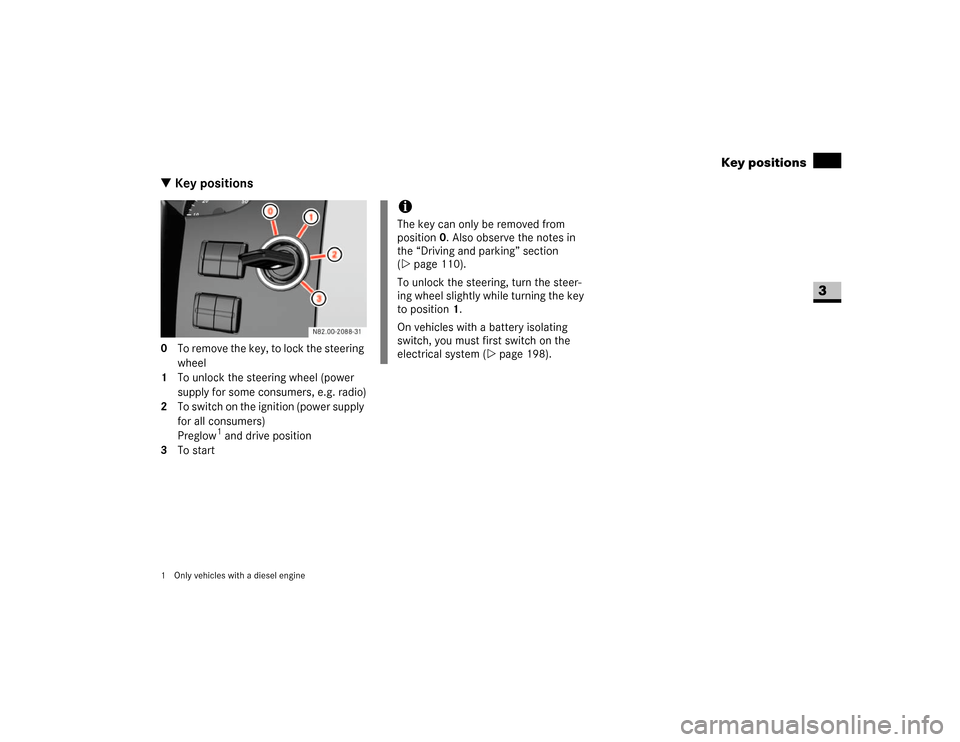
\3 Key positions0 To remove the key, to lock the steering
wheel
1 To unlock the steering wheel (power
supply for some consumers, e.g. radio)
2 To switch on the ignition (power supply
for all consumers)
Preglow
1 and drive position
3 To start
1 Only vehicles with a diesel engine
iThe key can only be removed from
position0. Also observe the notes in
the “Driving and parking” section
(\2page 110).
To unlock the steering, turn the steer-
ing wheel slightly while turning the key
to position 1.
On vehicles with a battery isolating
switch, you must first switch on the
electrical system (\2page 198).
Page 69 of 393
68 Controls in detailSeats
3
Driver’s and co-driver’s seatsWarning
G
Only adjust the seats when the vehicle is
stationary and the handbrake is applied. You
could otherwise lose control of the vehicle
as a result of the seat moving and cause an
accident.Warning
G
Make sure that nobody can become trapped
as the seat is adjusted. Never place your
hands under the seat or near to moving
parts.
Your seat must be adjusted in such a way
that you can wear the seat belt correctly
(\2page 27).
Observe the following points:
\4Position the backrest as vertically as
possible and sit upright.
\4Avoid seat positions that do not allow
the seat belt to be routed correctly. The
shoulder section of the seat belt must
be routed across the middle of your
shoulder and must fit closely across
your chest. The lap section of the belt
must be routed as low as possible
across your pelvic area, i.e. across your
hip joints. Never drive with the backrest
tilted too far back.
\4Your arms should be slightly bent when
you are holding the steering wheel.
\4The distance from the pedals should be
such that you can depress them fully.
\4Adjust the head restraint in such a way
that the upper edge of the head restraint
is level with your head.
\4Make sure that you hear the seat en-
gage. Otherwise, the seat is not correct-
ly locked in place.
Injuries may be caused if these notes are
not observed.Warning
G
Avoid seat positions in which you cannot
wear your seat belt correctly. They are a
safety hazard and must therefore be
avoided.
Page 71 of 393
70 Controls in detailSeats
3
Seat suspension adjustment*
The seat suspension must be adjusted to
your body weight.
\1Relieve the load on the seat.
\1Select your body weight 88 to 165 lbs
(40 to 120 kg) using thumbwheel6
for optimal seat suspension.
The seat suspension becomes harder
as the load on the seat increases.
Vertical lock*
If the seat bounces up and down frequent-
ly, you can engage the seat in its lowest po-
sition.
\1Turn lever7 downward.
The next time the seat bounces, it will
engage in its lowest position.
\1Turn lever7 upward to release the
seat from the vertical lock.
The seat can now move up and down
again.Swivelling front seats*
The driver’s and co-driver’s seat can be ro-
tated by 180° to be opposite of the direc-
tion of travel.The seats engage in the direction of travel
or opposite the direction of travel as well
as at 50° pointing towards the exit.
!
When rotating the seats, make sure the-
re is sufficient space. If necessary, move
the seat fore or aft to avoid colliding with
adjacent add-on parts.
Fold the handbrake lever down as far as it
will go. You could otherwise damage the
handbrake or the handbrake lever.
i
Move the co-driver’s seat forward as far
as it will go before rotating it (\2page 69).
\1Make sure the handbrake is applied
and the handbrake lever is folded down
as far as it will go (\2page 115).
\1Set the steering wheel so that there is
sufficient clearance for turning and ad-
justing the driver’s seat (\2page 76).
Warning
G
Only adjust the seats when the vehicle is
stationary and the handbrake is applied. You
could otherwise lose control of the vehicle
as a result of the seat moving and cause an
accident.Warning
G
The driver’s and co-driver’s seat must be ad-
justed and properly engaged in the direction
of travel for driving. Otherwise you will not
be able to operate the vehicle safely.The restraint systems in your vehicle will
only function as intended when the driver’s
and co-driver’s seat are engaged in the di-
rection of travel.
Warning
G
Make sure nobody can become trapped
when unlocking and turning the seats. Never
hold your hands under the seat or near mo-
veable parts when turning the seats.
Page 77 of 393
76 Controls in detailSteering wheel adjustment
3
\3 Steering wheel adjustment
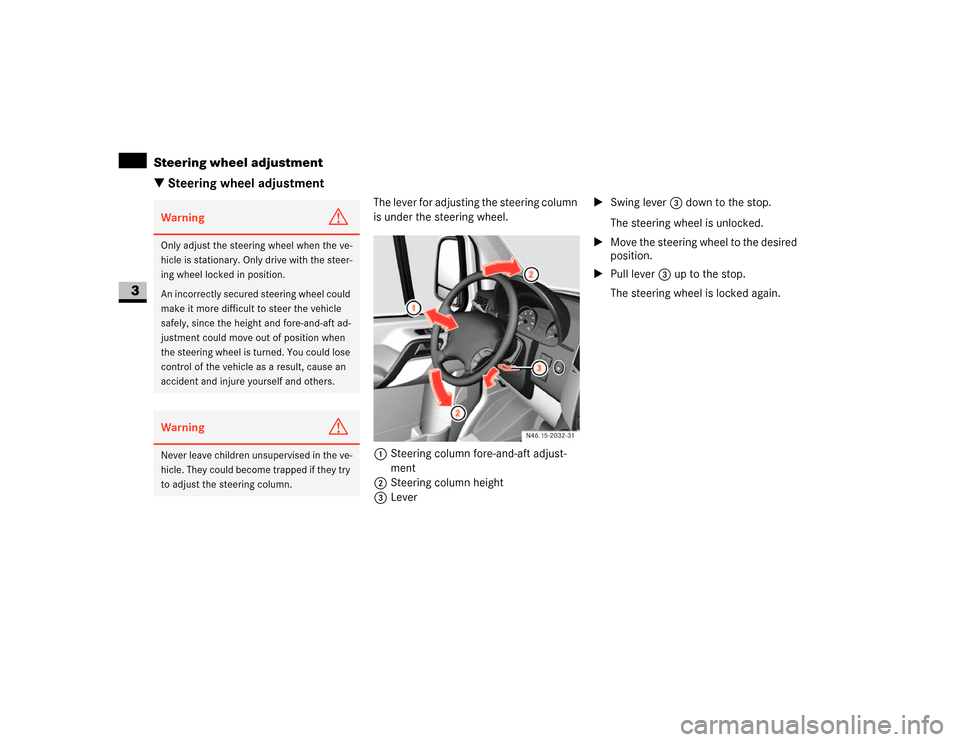
The lever for adjusting the steering column
is under the steering wheel.
1Steering column fore-and-aft adjust-
ment
2Steering column height
3Lever\1Swing lever 3 down to the stop.
The steering wheel is unlocked.
\1Move the steering wheel to the desired
position.
\1Pull lever3 up to the stop.
The steering wheel is locked again.
Warning
G
Only adjust the steering wheel when the ve-
hicle is stationary. Only drive with the steer-
ing wheel locked in position.
An incorrectly secured steering wheel could
make it more difficult to steer the vehicle
safely, since the height and fore-and-aft ad-
justment could move out of position when
the steering wheel is turned. You could lose
control of the vehicle as a result, cause an
accident and injure yourself and others.Warning
G
Never leave children unsupervised in the ve-
hicle. They could become trapped if they try
to adjust the steering column.
N46.15-2032-31
Page 78 of 393
77 Controls in detail
Lighting
3
Legal requirements may impose variations
in certain countries.
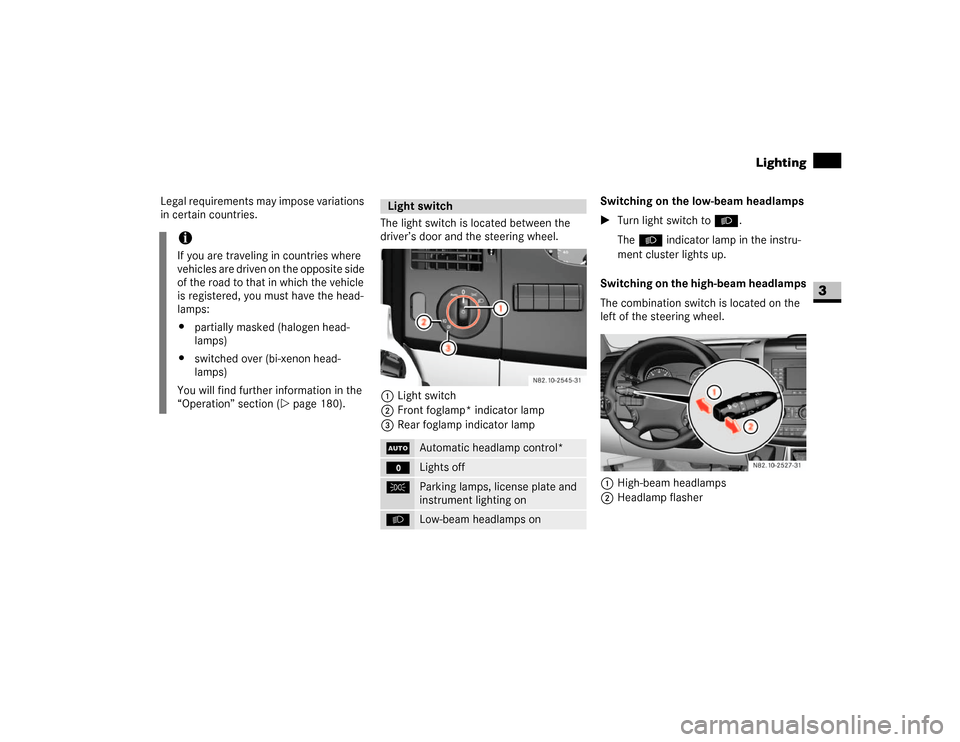
The light switch is located between the
driver’s door and the steering wheel.
1Light switch
2Front foglamp* indicator lamp
3Rear foglamp indicator lampSwitching on the low-beam headlamps
\1Turn light switch to B.
TheB indicator lamp in the instru-
ment cluster lights up.
Switching on the high-beam headlamps
The combination switch is located on the
left of the steering wheel.
1High-beam headlamps
2Headlamp flasher
iIf you are traveling in countries where
vehicles are driven on the opposite side
of the road to that in which the vehicle
is registered, you must have the head-
lamps:
\4partially masked (halogen head-
lamps)
\4switched over (bi-xenon head-
lamps)
You will find further information in the
“Operation” section (\2page 180).
Light switchU
Automatic headlamp control*
M
Lights off
C
Parking lamps, license plate and
instrument lighting on
B
Low-beam headlamps on
N82.10-2527-31
Page 79 of 393
78 Controls in detailLighting
3
\1Turn key to position1 in ignition lock
(\2page 67).
\1Turn light switch to B.
\1Press combination switch forward 1.
The indicator lampA in the instru-
ment cluster lights up.
Headlamp flasher
\1Turn key to position1 in ignition lock
(\2page 67).
\1Pull combination switch briefly in
direction2.
Constant headlamp mode*
On vehicles with steering wheel buttons,
you can set constant headlamp mode
(\2page 102). This does not apply to coun-
tries in which there is a legal requirement
to use constant headlamp mode.\1Turn light switch to M.
The low-beam headlamps, parking
lamps and license plate lamp are
switched on when the engine is
running.
TheB indicator lamp in the instru-
ment cluster lights up.
Automatic headlamp control*
The parking lamps, low-beam headlamps
and license plate lamp are switched on au-
tomatically when the brightness of ambi-
ent light falls below a predetermined level.\1Turn light switch toU.
The parking lamps are switched on / off
automatically when the key is in posi-
tion 1 (\2page 67) in the ignition lock.
The parking lamps, low-beam head-
lamps and license plate lamp are
switched on / off automatically when
the engine is running, depending on the
ambient light conditions.
Only use manual headlamp mode when
you are driving in countries where driving
with the low-beam headlamps switched on
is required by law.
\1In this case, turn the light switch to
B.
Warning
G
If the light switch is atU:
\4the headlamps could switch off tempo-
rarily due to extreme glare, e.g. from on-
coming traffic
\4the lights do not switch on automatically
in foggy conditions
Set the light switch to B. Otherwise you
are endangering yourself and others.
If it is dark, only turn the light switch from
U toB when the vehicle is stationary.
You could otherwise cause an accident if the
headlamps were to switch off briefly.
Automatic headlamp mode is only a driving
aid. You are responsible for the vehicle’s
lighting at all times.