handbrake DODGE SPRINTER 2008 2.G User Guide
[x] Cancel search | Manufacturer: DODGE, Model Year: 2008, Model line: SPRINTER, Model: DODGE SPRINTER 2008 2.GPages: 666, PDF Size: 14.11 MB
Page 192 of 666
190 Controls in detailDriving and parking
3
Warning
G
Always switch off the engine and apply
the handbrake before leaving the vehicle.
The vehicle could roll away if it is not
secured.
On uphill or downhill gradients steeper
than 15%:
\4apply the handbrake
\4secure an unloaded vehicle by chock-
ing the front axle (\2page 521)
\4secure a loaded vehicle by, for exam-
ple, chocking the rear axle
(\2page 521)
!
CAUTION
Whenever you park the vehicle, al-
ways remove the key to prevent the
battery from excessively discharg-
ing.
For vehicles which are out of use for
extended periods and have a battery
isolating switch*, switch off the elec-
trical system (
\2
page 338).
Warning
G
Make sure that the exhaust system does
not come into contact with highly flamma-
ble materials, e.g. dry grass or gasoline.
The flammable material could otherwise
ignite and set vehicle components on fire.
nf_BA.book Page 190 Friday, January 25, 2008 3:53 PM
Page 193 of 666
191 Controls in detail
Driving and parking
3
Handbrake
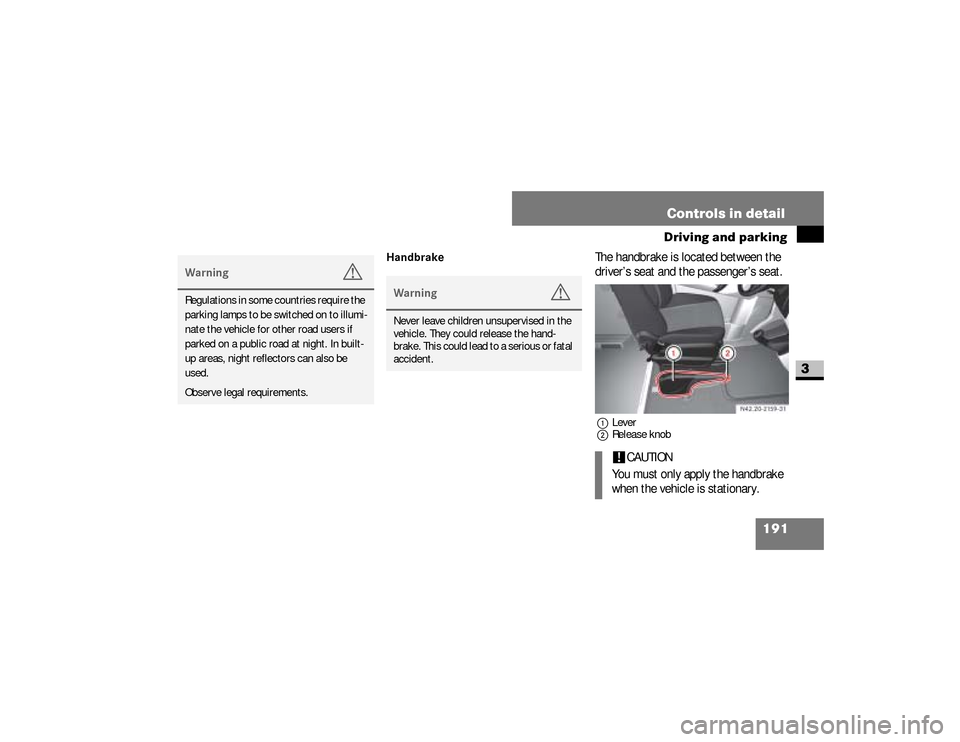
The handbrake is located between the
driver’s seat and the passenger’s seat.1Lever
2Release knob
Warning
G
Regulations in some countries require the
parking lamps to be switched on to illumi-
nate the vehicle for other road users if
parked on a public road at night. In built-
up areas, night reflectors can also be
used.
Observe legal requirements.
Warning
G
Never leave children unsupervised in the
vehicle. They could release the hand-
brake. This could lead to a serious or fatal
accident.
!
CAUTION
You must only apply the handbrake
when the vehicle is stationary.
nf_BA.book Page 191 Friday, January 25, 2008 3:53 PM
Page 194 of 666
192 Controls in detailDriving and parking
3
Applying the handbrake
\1
Pull lever
1
up as far as the last de-
tent.
The
7
indicator lamp in the in-
strument cluster lights up while the
engine is running.
Releasing the handbrake
\1
Raise lever
1
slightly and press re-
lease knob
2
.
\1
Guide lever
1
down to the stop.
The
7
indicator lamp in the in-
strument cluster goes out.
Emergency brakingNormally, you are only permitted to ap-
ply the handbrake when the vehicle is
stationary.
In exceptional cases, the handbrake can
be used for emergency braking if the
service brake fails.\1
Keep release knob
2
pressed and
carefully apply lever1
.
iOn vehicles with a folding handbrake
lever, you can then press lever
1
down to the stop.
iOn vehicles with a folding handbrake
lever, you must first pull lever
1
up
to the stop.
nf_BA.book Page 192 Friday, January 25, 2008 3:53 PM
Page 195 of 666
193 Controls in detail
Driving and parking
3
Stopping the engine\1
Apply handbrake (
\2
page 191).
\1
Move selector lever to
P.
\1
Turn key to position
0 (\2
page 111)
in the ignition lock and remove it.
The immobilizer is activated.
\1
Secure the vehicle at the front axle if
unloaded and at the rear axle if load-
ed, e.g. using a chock (
\2
page 521).
Warning
G
The wheels on the rear axle could lock if
the handbrake lever is applied too abrupt-
ly. The vehicle could then start to skid.
Make sure that you apply the handbrake
lever carefully to ensure that braking ap-
plication is moderated.
!
CAUTION
If the coolant temperature is raised,
e.g. following driving in mountainous
terrain, run the engine at idling speed
for a further 1 or 2 minutes before
you switch off the engine. This allows
the coolant temperature to return to
normal again.
iWhen parking on steep uphill or
downhill gradients, turn the front
wheels towards the curb.
iYou can only remove the key from
the ignition lock when the selector le-
ver is in position
P.
nf_BA.book Page 193 Friday, January 25, 2008 3:53 PM
Page 209 of 666
207 Controls in detail
Automatic transmission
3
Trailer towing
\1
Run the engine in the moderate en-
gine speed range on steep uphill gra-
dients.
\1
Depending on the uphill or downhill
gradient, shift down to shift range
3
or
2 (\2
page 204), even if cruise
control* is switched on.
Working on the vehicleWarning
G
Apply the handbrake before working on
the vehicle and shift the automatic trans-
mission into parking positionP.
The vehicle could otherwise roll away.
nf_BA.book Page 207 Friday, January 25, 2008 3:53 PM
Page 252 of 666
250 Controls in detailDriving systems
3
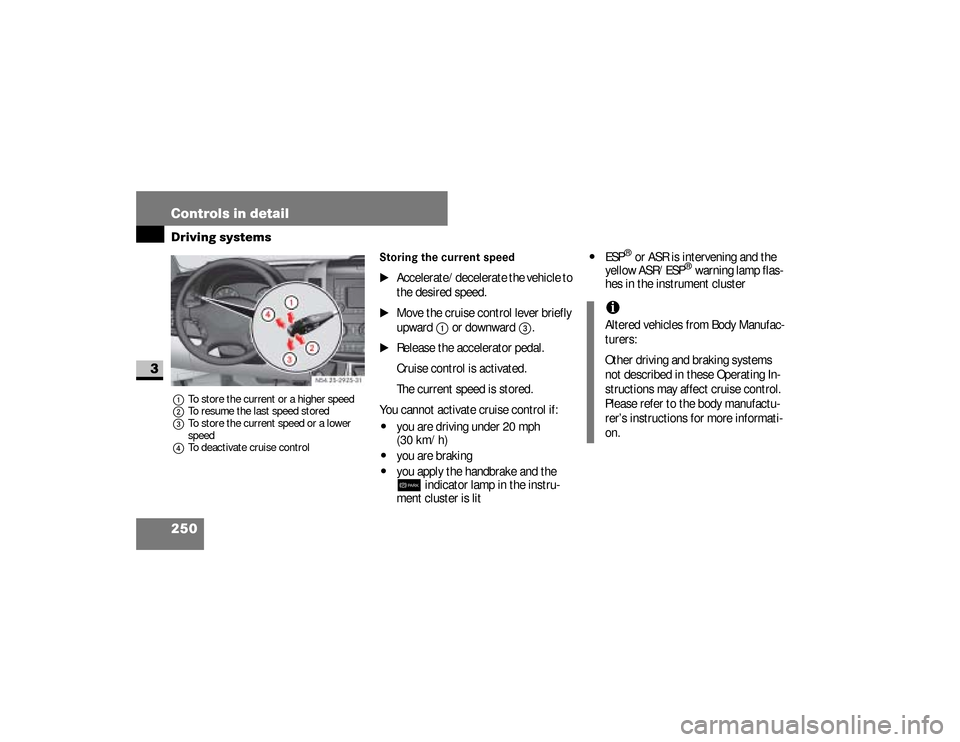
1To store the current or a higher speed
2To resume the last speed stored
3To store the current speed or a lower
speed
4To deactivate cruise control
Storing the current speed
\1
Accelerate/decelerate the vehicle to
the desired speed.
\1
Move the cruise control lever briefly
upward
1
or downward
3
.
\1
Release the accelerator pedal.
Cruise control is activated.
The current speed is stored.
You cannot activate cruise control if:
\4
you are driving under 20 mph
(30 km/h)
\4
you are braking
\4
you apply the handbrake and the 7
indicator lamp in the instru-
ment cluster is lit
\4
ESP
® or ASR is intervening and the
yellow ASR/ESP
® warning lamp flas-
hes in the instrument cluster
N54.25-2925-31
iAltered vehicles from Body Manufac-
turers:
Other driving and braking systems
not described in these Operating In-
structions may affect cruise control.
Please refer to the body manufactu-
rer’s instructions for more informati-
on.
nf_BA.book Page 250 Friday, January 25, 2008 3:53 PM
Page 255 of 666
253 Controls in detail
Driving systems
3 i
Cruise control is automatically deac-
tivated if:\4
you are braking
\4
you apply the handbrake and
the
7
indicator lamp in the in-
strument cluster is lit
\4
you are driving under 20 mph
(30 km/h)
\4
ESP
® or ASR is intervening and
the yellow ASR/ESP
® warning
lamp flashes in the instrument
cluster
\4
you move the selector lever to po-
sition
N while driving
\4
ESP
®, ASR or ABS has malfunc-
tioned
Parktronic system (PTS)
*
Warning
G
Parktronic is only an aid and may not de-
tect all obstacles. This system does not
relieve you of the need to pay attention.
You are always responsible for safety and
must continue to pay attention to your im-
mediate surroundings when parking and
maneuvering. Otherwise, you could en-
danger yourself and others.
Warning
G
Make sure that no persons or animals are
in the maneuvering range of the vehicle.
They could otherwise be injured.
nf_BA.book Page 253 Friday, January 25, 2008 3:53 PM
Page 256 of 666
254 Controls in detailDriving systems
3
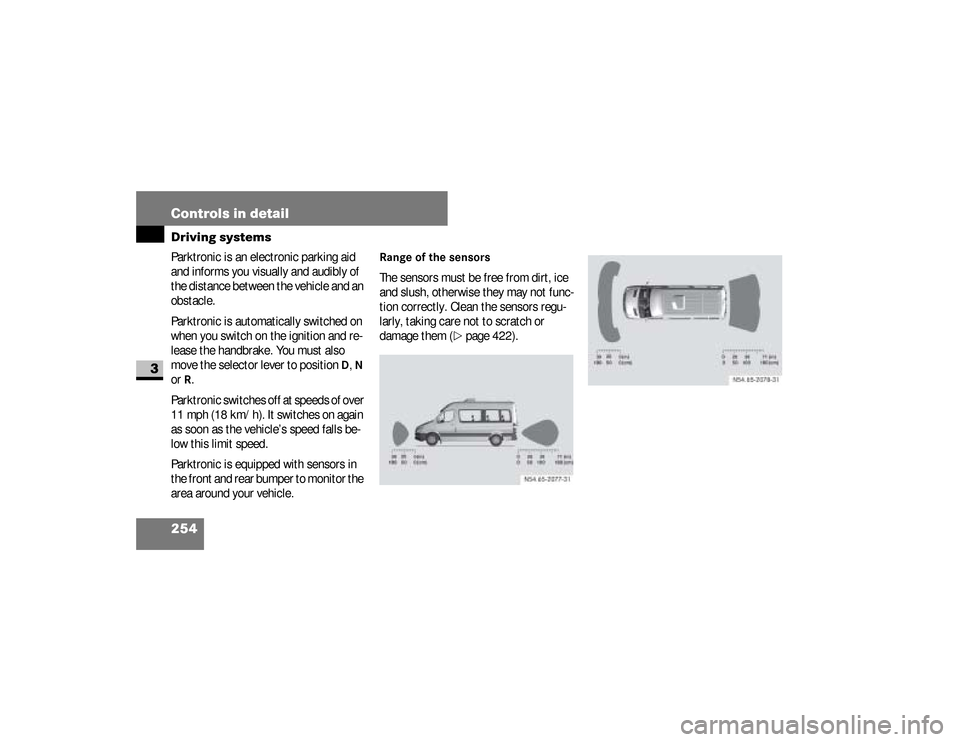
Parktronic is an electronic parking aid
and informs you visually and audibly of
the distance between the vehicle and an
obstacle.
Parktronic is automatically switched on
when you switch on the ignition and re-
lease the handbrake. You must also
move the selector lever to position
D, N
or R.
Parktronic switches off at speeds of over
11 mph (18 km/h). It switches on again
as soon as the vehicle’s speed falls be-
low this limit speed.
Parktronic is equipped with sensors in
the front and rear bumper to monitor the
area around your vehicle.
Range of the sensorsThe sensors must be free from dirt, ice
and slush, otherwise they may not func-
tion correctly. Clean the sensors regu-
larly, taking care not to scratch or
damage them (
\2
page 422).
nf_BA.book Page 254 Friday, January 25, 2008 3:53 PM
Page 275 of 666
273 Controls in detail
Operating the vehicle
3
\3 Operating the vehicleWhen activated, the operating speed
governor (ADR) automatically increases
the engine speed to a preset or adjust-
able operating speed (
\2
page 275).
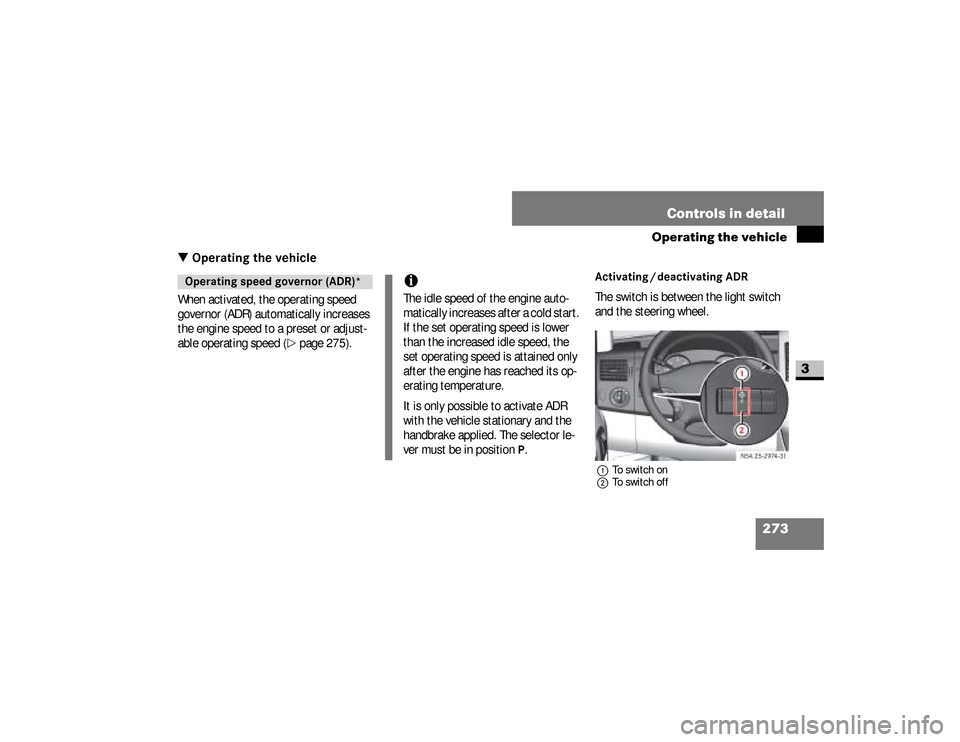
Activating / deactivating ADRThe switch is between the light switch
and the steering wheel.1To switch on
2To switch off
Operating speed governor (ADR)*
iThe idle speed of the engine auto-
matically increases after a cold start.
If the set operating speed is lower
than the increased idle speed, the
set operating speed is attained only
after the engine has reached its op-
erating temperature.
It is only possible to activate ADR
with the vehicle stationary and the
handbrake applied. The selector le-
ver must be in position
P.
N54.25-2932-31
nf_BA.book Page 273 Friday, January 25, 2008 3:53 PM
Page 276 of 666
274 Controls in detailOperating the vehicle
3
\1To switch on:
press upper part
1
of
the switch with the engine running.
The indicator lamp in the switch
comes on.
Vehicles without steering wheel but-
tons:
The
™
indicator lamp in the in-
strument cluster comes on.Vehicles with steering wheel but-
tons:
The
Operating speed governor ac-
tive message appears in the dis-
play.
\1To switch off:
press lower part
2
of
the switch with the engine running.
The indicator lamp in the switch and
the
™
indicator lamp in the in-
strument cluster go out.
iADR is automatically deactivated
when:\4
you release the handbrake
\4
the vehicle moves
\4
the control unit detects a mal-
function
nf_BA.book Page 274 Friday, January 25, 2008 3:53 PM