key DODGE SPRINTER 2008 2.G User Guide
[x] Cancel search | Manufacturer: DODGE, Model Year: 2008, Model line: SPRINTER, Model: DODGE SPRINTER 2008 2.GPages: 666, PDF Size: 14.11 MB
Page 88 of 666
86 Controls in detailOpening and closing
3
As a precaution, both remote controls
should always be carried.Checking the batteries
\1
Press the
Œ
or
‹
button for
longer than 2 seconds.The battery check lamp
5
comes on
briefly to indicate that the remote
control batteries are in order.
Change the batteries immediately if
the lamp
does not
light up briefly
during check (
\2
page 540).
Locking and unlocking the vehicle
with the remote control
Unlocking the driver's door
\1
Press the
Œ
button.
The turn signals flash once.
The anti-theft alarm system (ATA)* is
deactivated.
iTo prevent theft, only use the remote
control in the immediate vicinity of
the vehicle.
In an emergency, the driver’s door
and rear door can also be unlocked
manually using the key.
iIf the batteries are checked within
signal range of the vehicle, pressing
the
Œ
or
‹
but ton wil l lock or
unlock the vehicle accordingly.
iIf you unlock the vehicle using the
key and do not open a door within 40
seconds, the vehicle locks again au-
tomatically.
nf_BA.book Page 86 Friday, January 25, 2008 3:53 PM
Page 90 of 666
88 Controls in detailOpening and closing
3
Locking and unlocking the vehicle
with the keyIf the doors can no longer be locked or
unlocked with the remote control, you
can lock and unlock the driver's door
and the rear doors with the key.
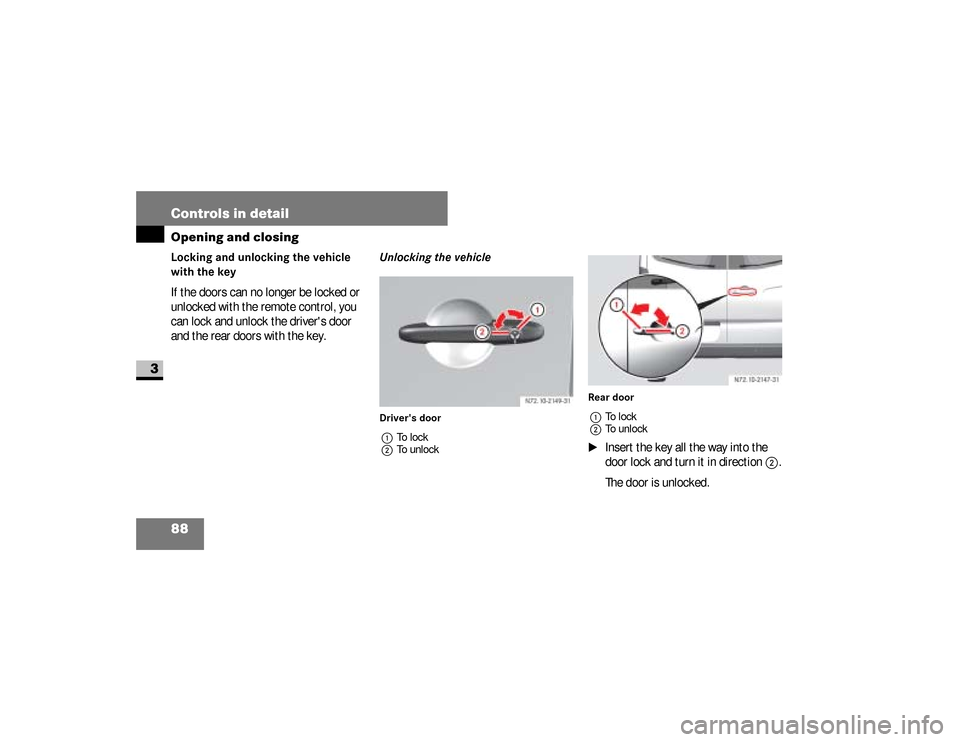
Unlocking the vehicleDriver's door
1To lock
2To unlockRear door
1To lock
2To unlock
\1
Insert the key all the way into the
door lock and turn it in direction
2
.
The door is unlocked. N72.10-2149-31
NCV 2
N72.10-2147-31
nf_BA.book Page 88 Friday, January 25, 2008 3:53 PM
Page 91 of 666
89 Controls in detail
Opening and closing
3
The alarm can be disabled in the follow-
ing ways:\1
Press the
Œ
button on the remote
control.
or
\1
Insert the key into the ignition lock.
Locking the vehicleOnly the driver's door and the rear doors
can be locked with the key.\1
For all other doors, press the locking
knob down.
\1
Close the doors.
The doors are locked.
\1
Insert the key all the way into the
rear door lock and turn it to the left.
The rear doors are locked.
\1
Insert the key all the way into the
driver’s door lock and turn it to the
right.
The driver’s door is locked.
iThe anti-theft alarm system (ATA) is
triggered when you open the vehicle
using the key.
Opening the driver’s or passen-
ger’s door from the insideWarning
G
Make sure nobody can become trapped
when you close or open the doors. Take
particular care, especially when children
are near the vehicle.Make sure there is sufficient clearance
and that the traffic area is clear when ope-
ning the doors.You could otherwise injure yourself and
others.
nf_BA.book Page 89 Friday, January 25, 2008 3:53 PM
Page 95 of 666
93 Controls in detail
Opening and closing
3
If the electric drive of the sliding door is
at risk of overheating, e.g. as a result of
frequent opening and closing within a
short amount of time, the sliding door
opens completely and is locked (func-
tion override). After approx. 30 seconds,
the sliding door is again operational.
Opening / closing using the switchObserve the notes on anti-trap protec-
tion (
\2
page 98).
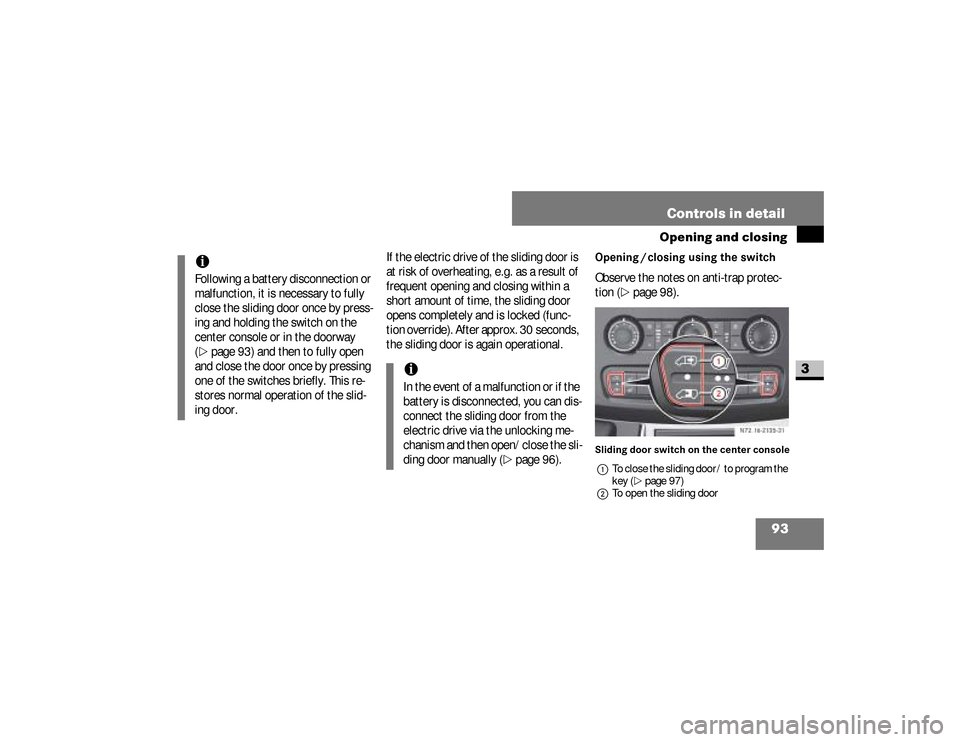
Sliding door switch on the center console
1To close the sliding door / to program the
key (\2page 97)
2To open the sliding door
iFollowing a battery disconnection or
malfunction, it is necessary to fully
close the sliding door once by press-
ing and holding the switch on the
center console or in the doorway
(\2
page 93) and then to fully open
and close the door once by pressing
one of the switches briefly. This re-
stores normal operation of the slid-
ing door.
iIn the event of a malfunction or if the
battery is disconnected, you can dis-
connect the sliding door from the
electric drive via the unlocking me-
chanism and then open/close the sli-
ding door manually (
\2
page 96).
N72.16-2135-31
nf_BA.book Page 93 Friday, January 25, 2008 3:53 PM
Page 107 of 666
105 Controls in detail
Opening and closing
3
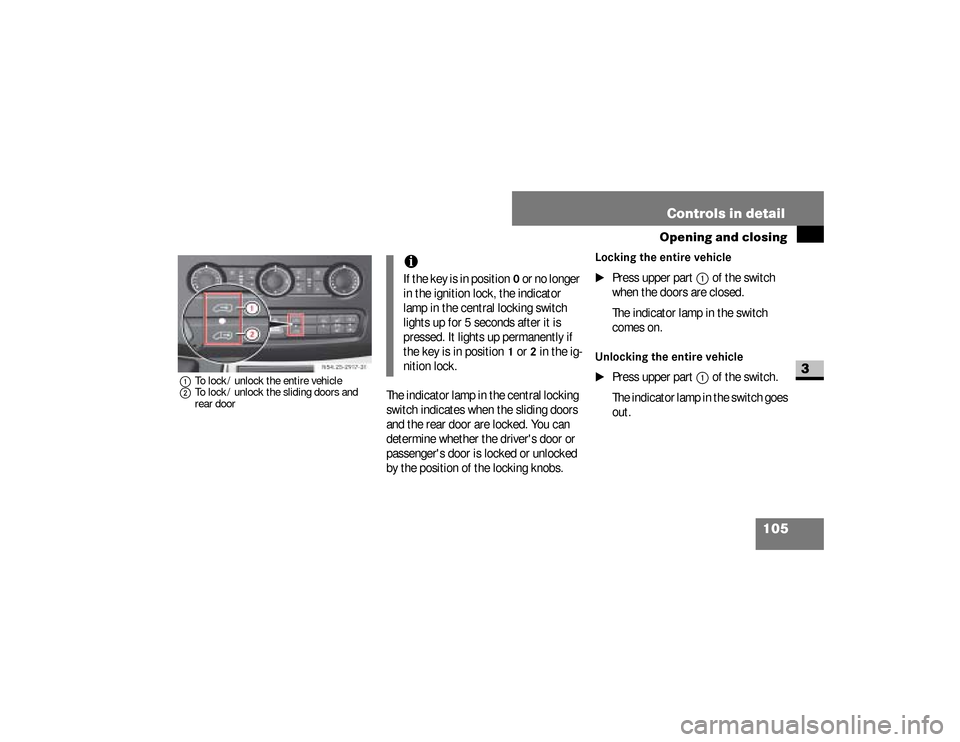
1To lock / unlock the entire vehicle
2To lock / unlock the sliding doors and
rear door
The indicator lamp in the central locking
switch indicates when the sliding doors
and the rear door are locked. You can
determine whether the driver's door or
passenger's door is locked or unlocked
by the position of the locking knobs.
Locking the entire vehicle
\1
Press upper part
1
of the switch
when the doors are closed.
The indicator lamp in the switch
comes on.
Unlocking the entire vehicle
\1
Press upper part
1
of the switch.
The indicator lamp in the switch goes
out. N54.25-2917-31
iIf the key is in position
0 or no longer
in the ignition lock, the indicator
lamp in the central locking switch
lights up for 5 seconds after it is
pressed. It lights up permanently if
the key is in position
1 or
2 in the ig-
nition lock.
nf_BA.book Page 105 Friday, January 25, 2008 3:53 PM
Page 109 of 666
107 Controls in detail
Opening and closing
3
Activating the automatic locking
function for the entire vehicle
\1
Close all the doors.
\1
Turn the key to position
1 or
2 in the
ignition lock (
\2
page 111).
\1
Press upper part
1
of the switch.
Keep it pressed for approximately
5seconds.
The indicator lamp in the switch
flashes four times.
!
CAUTION
If your vehicle is centrally locked, this
could hinder rescue operations from the
outside in the event of an accident.When the automatic locking when
driving function is activated, there is
a risk of being locked out if the vehi-
cle is pushed or towed.
For this reason, always deactivate
the automatic locking when driving
function:\4
before pushing the vehicle
\4
before having the vehicle towed
\4
if you are only leaving the vehicle
for a brief period
iFor information about different set-
tings, please contact your authorized
Sprinter Dealer.iIf activated, automatic locking is de-
activated if the vehicle is unlocked or
locked using the central locking
switch.
Automatic locking is reactivated af-
ter the ignition is switched off or a
door is opened with the vehicle sta-
tionary.
nf_BA.book Page 107 Friday, January 25, 2008 3:53 PM
Page 110 of 666
108 Controls in detailOpening and closing
3
Deactivating the automatic locking
function for the entire vehicle
\1
Close all the doors.
\1
Turn the key to position
1 or
2 in the
ignition lock (
\2
page 111).
\1
Press upper part
1
of the switch.
Keep it pressed for approximately
5seconds.
The indicator lamp in the switch
flashes twice.
Activating the automatic locking
function for the sliding doors and the
rear door
\1
Close all the doors.
\1
Turn the key to position
1 or
2 in the
ignition lock (
\2
page 111).
\1
Press lower part
2
of the switch.
Keep it pressed for approximately
5seconds.
The indicator lamp in the switch
flashes four times.
Deactivating the automatic locking
when driving function for the sliding
doors and the rear door
\1
Close all the doors.
\1
Turn the key to position
1 or
2 in the
ignition lock (
\2
page 111).
\1
Press lower part
2
of the switch.
Keep it pressed for approximately
5seconds.
The indicator lamp in the switch
flashes twice.
nf_BA.book Page 108 Friday, January 25, 2008 3:53 PM
Page 111 of 666
109 Controls in detail
Opening and closing
3
The partition sliding door is in the parti-
tion between the cab and the load com-
partment.
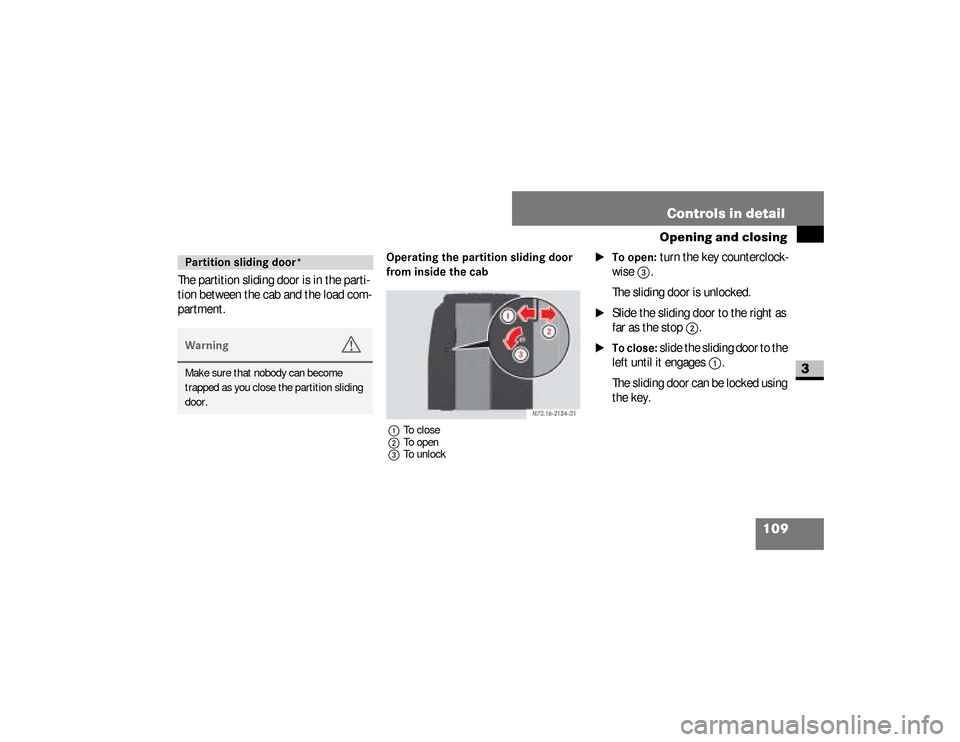
Operating the partition sliding door
from inside the cab1To close
2To open
3To unlock
\1To open:
turn the key counterclock-
wise
3
.
The sliding door is unlocked.
\1
Slide the sliding door to the right as
far as the stop
2
.
\1To close:
slide the sliding door to the
left until it engages
1
.
The sliding door can be locked using
the key.
Partition sliding door*Warning
G
Make sure that nobody can become
trapped as you close the partition sliding
door.
nf_BA.book Page 109 Friday, January 25, 2008 3:53 PM
Page 113 of 666
111 Controls in detail
Key positions
3
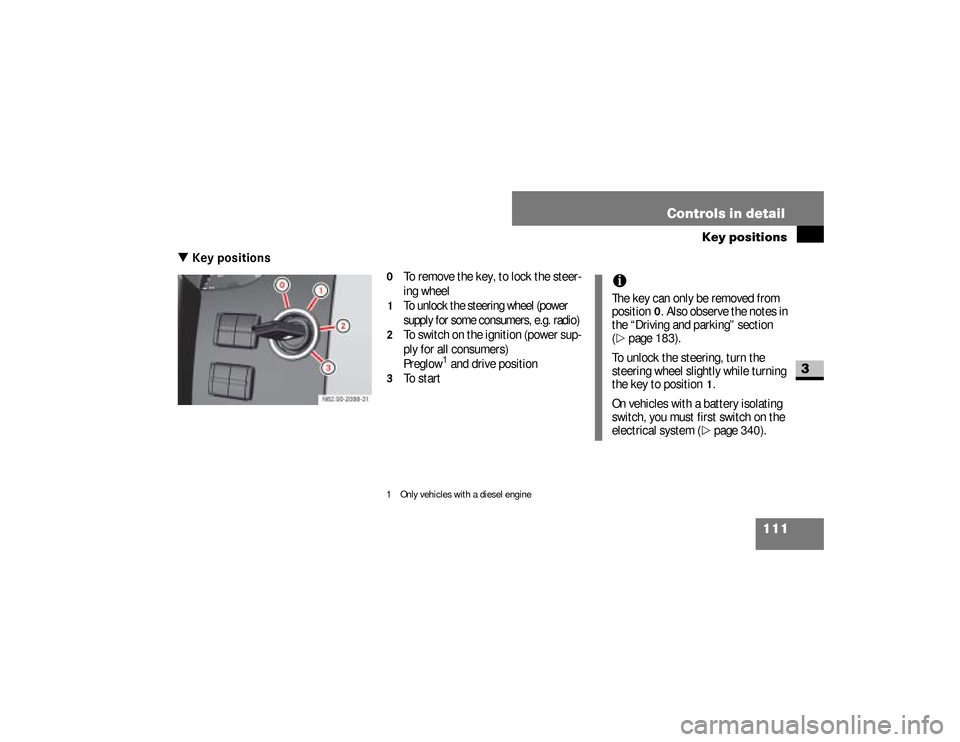
\3 Key positions
0
To remove the key, to lock the steer-
ing wheel
1
To unlock the steering wheel (power
supply for some consumers, e.g. radio)
2
To switch on the ignition (power sup-
ply for all consumers)
Preglow
1 and drive position
3
To start
1 Only vehicles with a diesel engine
iThe key can only be removed from
position
0. Also observe the notes in
the “Driving and parking” section
(
\2
page 183).
To unlock the steering, turn the
steering wheel slightly while turning
the key to position
1.
On vehicles with a battery isolating
switch, you must first switch on the
electrical system (\2
page 340).
nf_BA.book Page 111 Friday, January 25, 2008 3:53 PM
Page 125 of 666
123 Controls in detailSeats
3
Normal heating
\1To switch on:
press upper part of
the
& switch.
An indicator lamp in the switch comes
on.
\1To switch off:
press upper part of
the
& switch again.
The indicator lamp in the switch goes
out.
Rapid heating
\1To switch on:
press lower part of
the switch.
Both indicator lamps in the switch
come on.
\1To switch off:
press lower part of
the switch again.
The indicator lamps in the switch go
out.
\1To switch down to normal heat-
ing:
press upper part of the
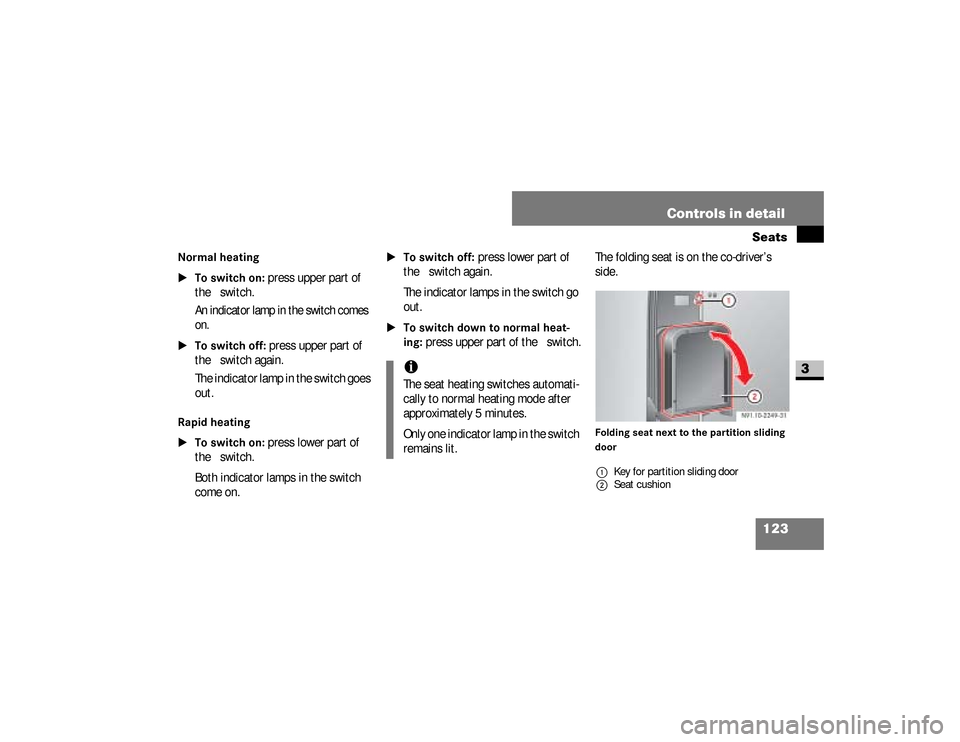
& switch.The folding seat is on the co-driver’s
side.
Folding seat next to the partition sliding
door
iThe seat heating switches automati-
cally to normal heating mode after
approximately 5 minutes.
Only one indicator lamp in the switch
remains lit.
1Key for partition sliding door
2Seat cushion
nf_BA.book Page 123 Friday, January 25, 2008 3:53 PM