key DODGE SPRINTER 2008 2.G Service Manual
[x] Cancel search | Manufacturer: DODGE, Model Year: 2008, Model line: SPRINTER, Model: DODGE SPRINTER 2008 2.GPages: 666, PDF Size: 14.11 MB
Page 224 of 666
222 Controls in detailAir conditioning
3
The switch for air-recirculation mode is
in the control panel (
\2
page 218).
\1To switch on:
press the
Ä
switch.
The indicator lamp in the switch
comes on.
\1To switch off:
press the
Ä
switch again.
The indicator lamp in the switch goes
out.The engine stores residual heat after
long periods of driving. You can use the
residual heat of the engine to heat the
stationary vehicle for a further 30 min-
utes.
\1To switch on:
turn key to position
0
in the ignition lock (
\2
page 111) or
remove it.
\1
Set as required:\4
temperature
(\2
page 220)
\4
air distribution (
\2
page 221)
\4
the air vents (
\2
page 215)
\1
Press the
°
switch
(
\2
page 218).
The indicator lamp in the switch
comes on.
\1To switch off:
press
°
switch
again (
\2
page 218).
The indicator lamp in the switch goes
out.
iAir-recirculation mode is automati-
cally switched off after about 10 to
30 minutes, depending on the out-
side temperature.
Residual heat mode iThe heating period depends on:\4
the coolant temperature
\4
the interior temperature selected
\4
the on-board voltage
The blower runs at speed
1 regard-
less of the position of the airflow
control.
nf_BA.book Page 222 Friday, January 25, 2008 3:53 PM
Page 241 of 666
239 Controls in detail
Auxiliary heating/ventilation*
3
\1To switch the auxiliary heating
off:
press the
ö
switch.
or
\1
Turn the key to position
0 in the igni-
tion lock (
\2
page 111).
The red indicator lamp in the switch
goes out.The auxiliary heating operates for
around a further 2 minutes and then
switches off automatically.
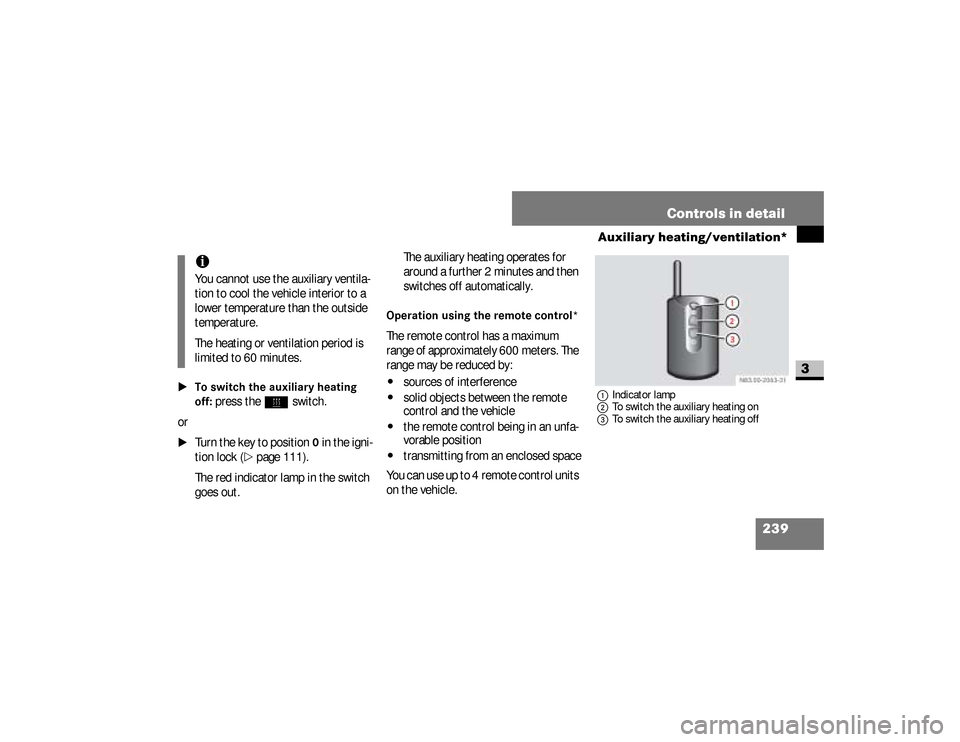
Operation using the remote control*The remote control has a maximum
range of approximately 600 meters. The
range may be reduced by:\4
sources of interference
\4
solid objects between the remote
control and the vehicle
\4
the remote control being in an unfa-
vorable position
\4
transmitting from an enclosed space
You can use up to 4 remote control units
on the vehicle.
1Indicator lamp
2To switch the auxiliary heating on
3To switch the auxiliary heating off
iYou cannot use the auxiliary ventila-
tion to cool the vehicle interior to a
lower temperature than the outside
temperature.
The heating or ventilation period is
limited to 60 minutes.
nf_BA.book Page 239 Friday, January 25, 2008 3:53 PM
Page 243 of 666
241 Controls in detail
Auxiliary heating/ventilation*
3
Operating system without steering
wheel buttons
\1
Switch on the ignition (
\2
page 111).
\1
Press the
ö
switch.
The
ö
symbol in the display flashes.
or \1
Press the
menu button on the
in-
strument cluster repeatedly until the
ö
symbol in the display flashes.
\1
Use the or button on the
in-
strument cluster to select desired
switch-on time
1 to
3.
The switch-on time selected is dis-
played.
\1
Wait 10 seconds for the standard
display to appear.The switch-on time is selected.
The yellow indicator lamp in
the
ö
switch comes on.
If you have not selected a switch-on time
and
--:--
appears in the display, the au-
tomatic switch-on is deactivated. The
yellow indicator lamp in the
ö
switch
goes out.
Operating system with steering wheel
buttons*
\1
Switch on the ignition (
\2
page 111).
\1
Briefly press the
ö
switch.
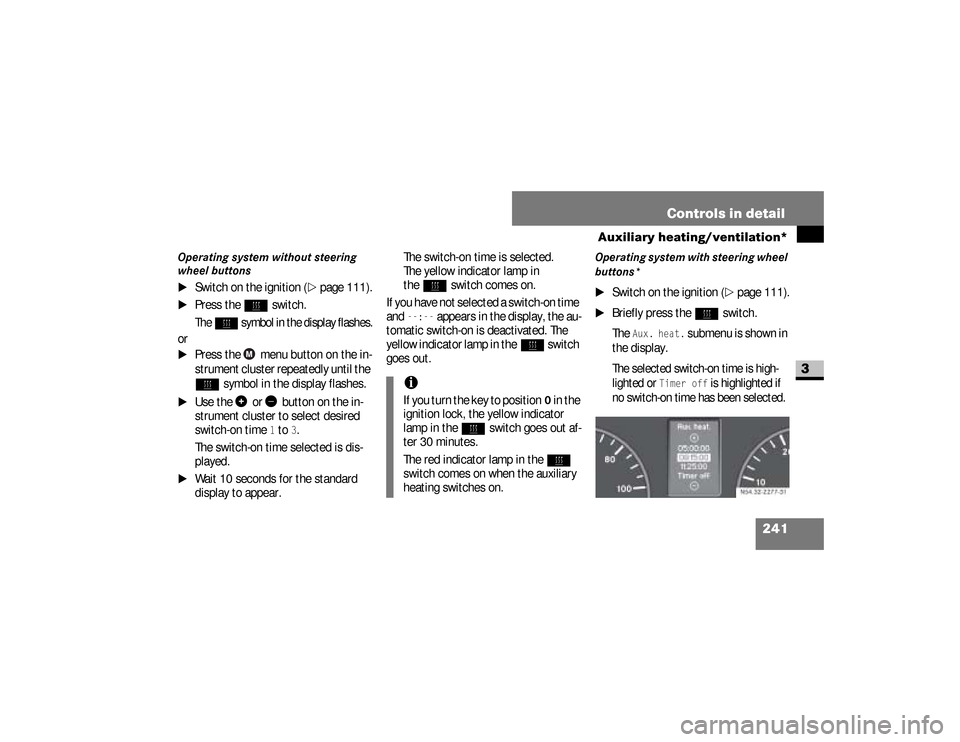
The
Aux. heat.
submenu is shown in
the display.
The selected switch-on time is high-
lighted or
Timer off
is highlighted if
no switch-on time has been selected.
iIf you turn the key to position
0 in the
ignition lock, the yellow indicator
lamp in the
ö
switch goes out af-
ter 30 minutes.
The red indicator lamp in the
ö
switch comes on when the auxiliary
heating switches on.
N54.32-2277-31
nf_BA.book Page 241 Friday, January 25, 2008 3:53 PM
Page 244 of 666
242 Controls in detailAuxiliary heating/ventilation*
3
\1
Press the
æ
or
ç
button to se-
lect the desired switch-on time. The
automatic switch-on is deactivated if
the
Timer off
setting is selected.
\1
Press the
è
button.
The switch-on time is selected.
The yellow indicator lamp in
the
ö
switch comes on.
Setting the switch-on time
Operating system without steering
wheel buttons
\1
Select a switch-on time as described
under “Selecting a switch-on time”
(\2
page 240).
\1
Press the reset button on the
in-
strument cluster to set the selected
switch-on time.
The hours figure flashes and
the
”
symbol appears in the dis-
play.
\1
Set the hours using the or
am
button on the
instrument cluster.
\1
Press the reset button.
The minute display flashes.
\1
Set the minutes using the
or button.
iYou can reach the
Aux. heat.
sub-
menu via the
Settings
menu
(
\2
page 161).
iIf you turn the key to position
0 in the
ignition lock, the yellow indicator
lamp in the
ö
switch goes out af-
ter 30 minutes.
The red indicator lamp in the
ö
switch comes on when the auxiliary
heating switches on.
nf_BA.book Page 242 Friday, January 25, 2008 3:53 PM
Page 246 of 666
244 Controls in detailOpen air
3
\3 Open airYou can open and close the side win-
dows electrically.
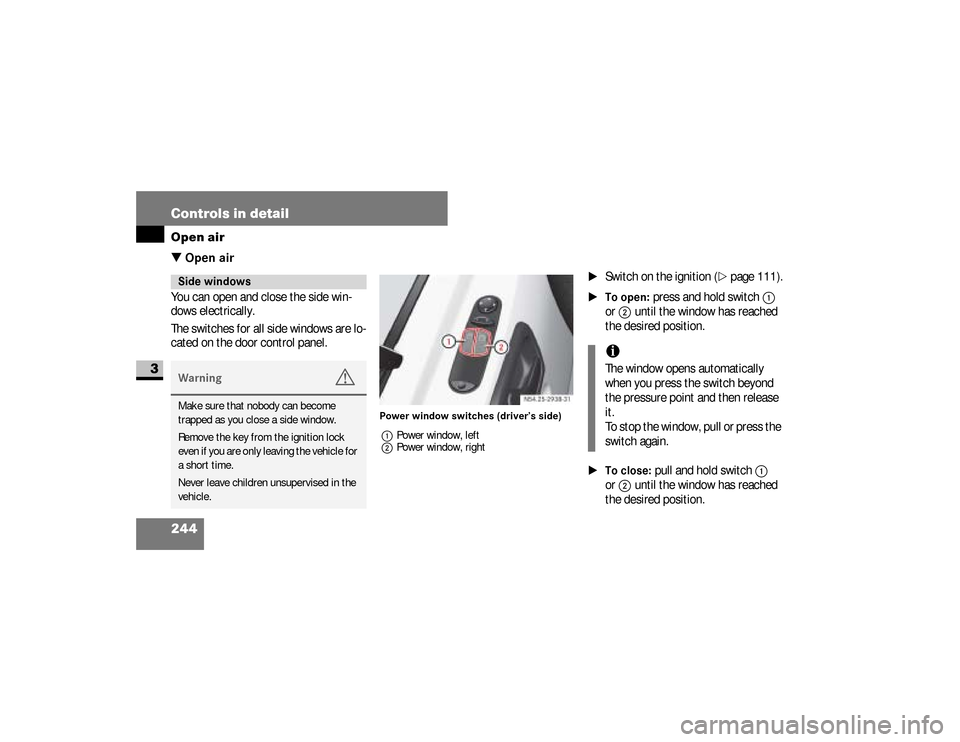
The switches for all side windows are lo-
cated on the door control panel.
Power window switches (driver’s side)
1Power window, left
2Power window, right
\1
Switch on the ignition (
\2
page 111).
\1To open:
press and hold switch
1
or
2
until the window has reached
the desired position.
\1To close:
pull and hold switch
1
or
2
until the window has reached
the desired position.
Side windowsWarning
G
Make sure that nobody can become
trapped as you close a side window.
Remove the key from the ignition lock
even if you are only leaving the vehicle for
a short time.
Never leave children unsupervised in the
vehicle.
iThe window opens automatically
when you press the switch beyond
the pressure point and then release
it.
To stop the window, pull or press the
switch again.
nf_BA.book Page 244 Friday, January 25, 2008 3:53 PM
Page 247 of 666
245 Controls in detail
Open air
3
Resetting the side windowsThe side windows must be reset if the
battery has been disconnected:\1
Pull the two power window switches
until the side windows are closed.
\1
Hold the switches in this position for
about 1 second.
The side windows are reset.
Sliding sunroof*Warning
G
Make sure that nobody can become
trapped as you close the sliding sunroof.The glass may shatter in the event of an
accident.If you or other occupants are not wearing
your seat belt, there is a risk of being
thrown out of the opening in the event of
the vehicle overturning. Therefore, always
wear a seat belt to reduce the risk of inju-
ries.
Continued
Warning (Continued)
G
In accidents in which the vehicle over-
turns, there is an increased risk of injury
even for occupants who have fastened
their seat belts correctly, as their head or
limbs could be thrust through the open-
ing.Remove the key from the ignition lock
even if you are only leaving the vehicle for
a short time.
nf_BA.book Page 245 Friday, January 25, 2008 3:53 PM
Page 249 of 666
247 Controls in detail
Open air
3
Resetting the sliding sunroofThe sliding sunroof must be reset after:\4
the sunroof has been closed manual-
ly using the emergency operation
key (
\2
page 522)
\4
the sunroof has opened with a jerk
\4
a malfunction
\1
Switch on the ignition (
\2
page 111).
\1
Press the sliding sunroof switch in
the direction of arrow
2
(\2
page 246).
\1
Wait until the sliding sunroof is
closed and then keep the sliding sun-
roof switch pressed for approximate-
ly 3 seconds.
The sliding sunroof is reset.The roof ventilator can be used to venti-
late or remove air from the load com-
partment.
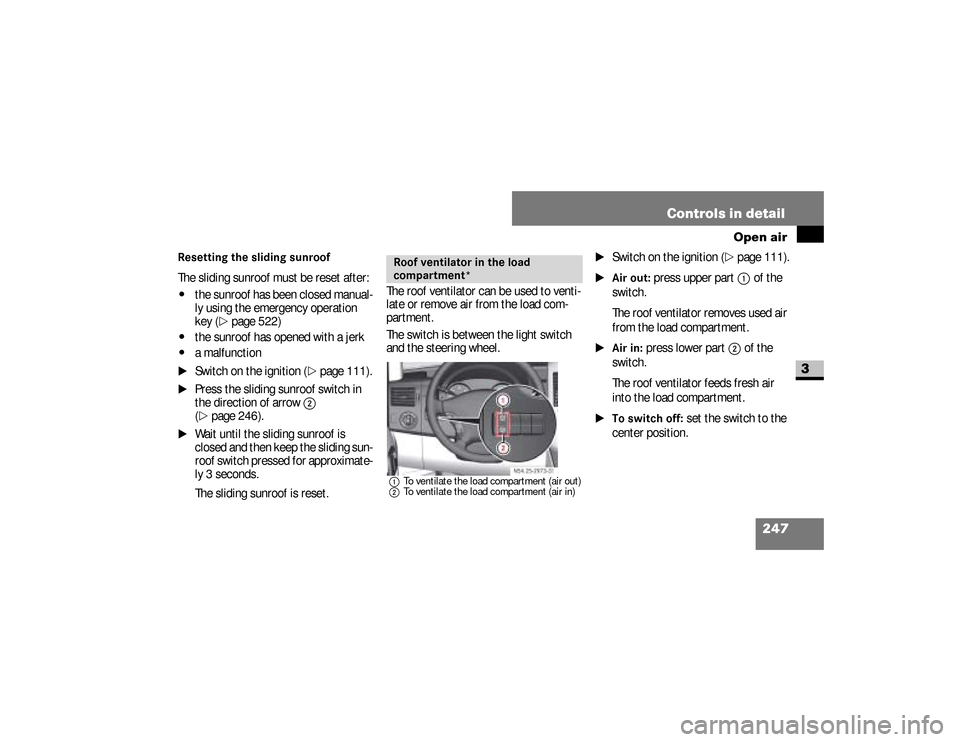
The switch is between the light switch
and the steering wheel.
1To ventilate the load compartment (air out)
2To ventilate the load compartment (air in)
\1
Switch on the ignition (
\2
page 111).
\1Air out:
press upper part
1
of the
switch.
The roof ventilator removes used air
from the load compartment.
\1Air in:
press lower part
2
of the
switch.
The roof ventilator feeds fresh air
into the load compartment.
\1To switch off:
set the switch to the
center position.
Roof ventilator in the load
compartment*
N54.25-2929-31
nf_BA.book Page 247 Friday, January 25, 2008 3:53 PM
Page 290 of 666
288 Controls in detailFeatures
3
Storage compartments in the doorsYou can use these storage compart-
ments for the safe storage of small and
light items.Storage compartment under the twin
passenger's seat*On vehicles with a twin passenger’s
seat, the storage compartment is under
the seat cushion (
\2
page 119).
You can use the storage compartment
for the safekeeping of tools and other
small items.
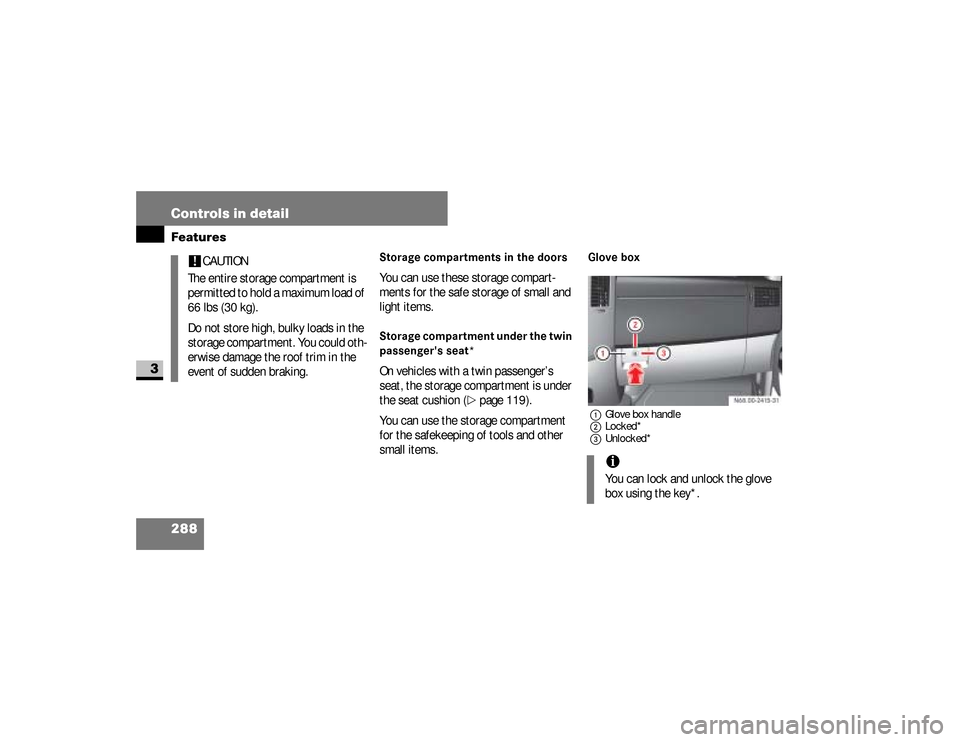
Glove box1Glove box handle
2Locked*
3Unlocked*
!
CAUTION
The entire storage compartment is
permitted to hold a maximum load of
66 lbs (30 kg).
Do not store high, bulky loads in the
storage compartment. You could oth-
erwise damage the roof trim in the
event of sudden braking.
iYou can lock and unlock the glove
box using the key*.
nf_BA.book Page 288 Friday, January 25, 2008 3:53 PM
Page 300 of 666
298 Controls in detailFeatures
3
Telephones may only be used inside the
vehicle if they are connected to a sepa-
rate exterior antenna of a type tested
and approved by the manufacturer.
iThe sockets are supplied with power
even if the key is removed from the
ignition lock. Please note that the
battery may be discharged if you
have connected an accessory, e.g. a
coolbox, and the engine is switched
off.Telephone*
Warning
G
You must observe the legal requirements
for the country in which you are driving
when operating a cell phone in the vehi-
cle.If it is permitted to operate a cell phone
while the vehicle is in motion, you must
only operate it when road and traffic con-
ditions permit. You may otherwise be dis-
tracted from the traffic conditions, cause
an accident and injure yourself and oth-
ers.
Continued
Warning (Continued)
G
Cell phones without exterior antennas
may interfere with the vehicle electronics
and thereby jeopardize the operational
safety of the vehicle. You must therefore
only use these devices when they are con-
nected to a separate exterior antenna.
nf_BA.book Page 298 Friday, January 25, 2008 3:53 PM
Page 301 of 666
299 Controls in detail
Features
3
The installation of the antenna must be
approved by a qualified specialist work-
shop.
Always have maintenance work carried
out at a qualified specialist workshop,
e.g. an authorized Sprinter Dealer.
Warning
G
Only use the telephone when road, weath-
er and traffic conditions permit you to do
so. You will otherwise be too distracted. If
you are not using the hands-free system,
pull over to make a phone call.
Bear in mind that at a speed of just
30 mph (approx. 50 km/h), your vehicle
is covering a distance of 44 feet (approx.
14 m) every second.
Telephones without exterior antennas
may interfere with the vehicle electronics
and thereby jeopardize the operational
safety of the vehicle.
iObserve all legal requirements.iThe cell phone battery will be
charged depending on the charge
status and the position of the key in
the ignition lock. The cell phone dis-
play indicates the charging process.
nf_BA.book Page 299 Friday, January 25, 2008 3:53 PM