light DODGE SPRINTER 2008 2.G Owner's Manual
[x] Cancel search | Manufacturer: DODGE, Model Year: 2008, Model line: SPRINTER, Model: DODGE SPRINTER 2008 2.GPages: 666, PDF Size: 14.11 MB
Page 107 of 666
105 Controls in detail
Opening and closing
3
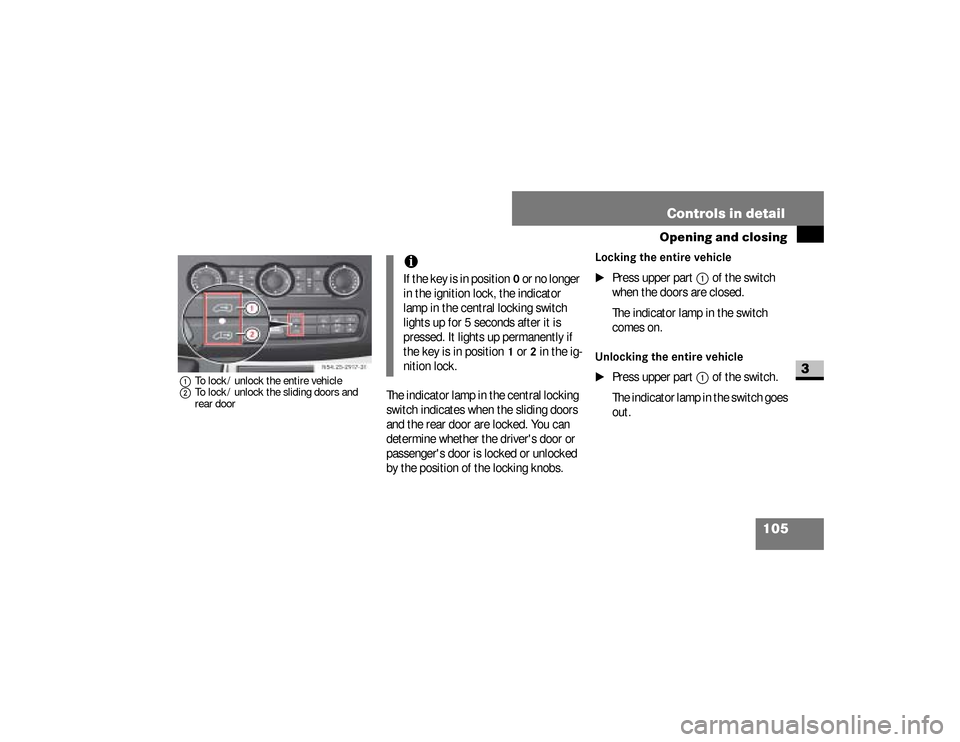
1To lock / unlock the entire vehicle
2To lock / unlock the sliding doors and
rear door
The indicator lamp in the central locking
switch indicates when the sliding doors
and the rear door are locked. You can
determine whether the driver's door or
passenger's door is locked or unlocked
by the position of the locking knobs.
Locking the entire vehicle
\1
Press upper part
1
of the switch
when the doors are closed.
The indicator lamp in the switch
comes on.
Unlocking the entire vehicle
\1
Press upper part
1
of the switch.
The indicator lamp in the switch goes
out. N54.25-2917-31
iIf the key is in position
0 or no longer
in the ignition lock, the indicator
lamp in the central locking switch
lights up for 5 seconds after it is
pressed. It lights up permanently if
the key is in position
1 or
2 in the ig-
nition lock.
nf_BA.book Page 105 Friday, January 25, 2008 3:53 PM
Page 113 of 666
111 Controls in detail
Key positions
3
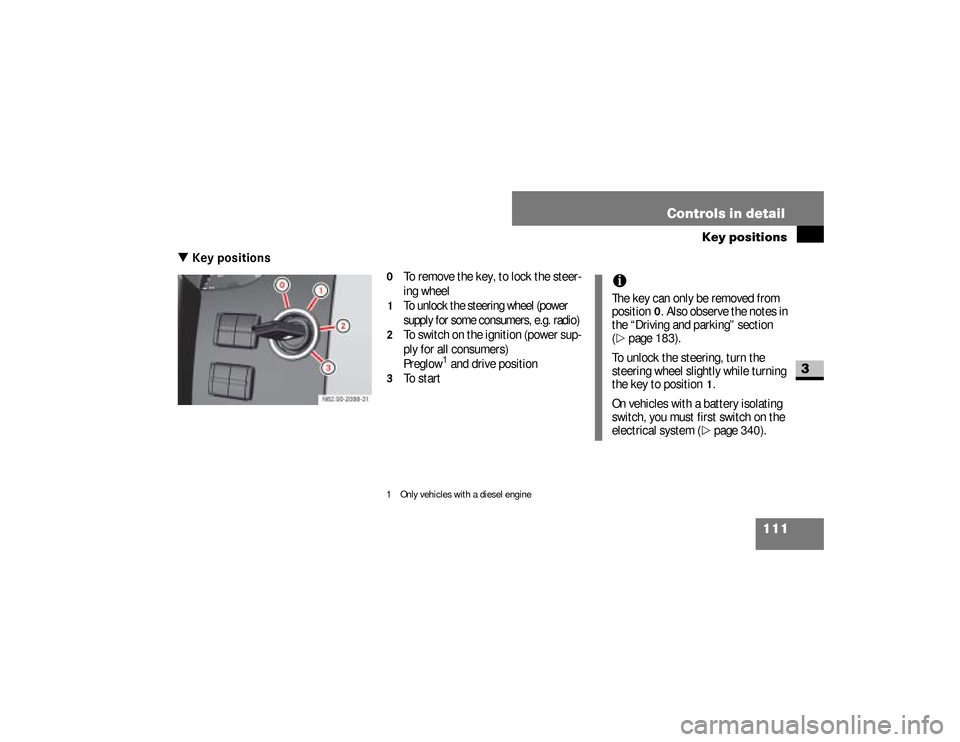
\3 Key positions
0
To remove the key, to lock the steer-
ing wheel
1
To unlock the steering wheel (power
supply for some consumers, e.g. radio)
2
To switch on the ignition (power sup-
ply for all consumers)
Preglow
1 and drive position
3
To start
1 Only vehicles with a diesel engine
iThe key can only be removed from
position
0. Also observe the notes in
the “Driving and parking” section
(
\2
page 183).
To unlock the steering, turn the
steering wheel slightly while turning
the key to position
1.
On vehicles with a battery isolating
switch, you must first switch on the
electrical system (\2
page 340).
nf_BA.book Page 111 Friday, January 25, 2008 3:53 PM
Page 114 of 666
112 Controls in detailSeats
3
\3 SeatsDriver’s and passenger’s seatsWarning
G
Only adjust the seats when the vehicle is
stationary and the handbrake is applied.
You could otherwise lose control of the
vehicle as a result of the seat moving and
cause an accident.
Warning
G
Make sure that nobody can become
trapped as the seat is adjusted. Never
place your hands under the seat or near to
moving parts.Your seat must be adjusted in such a way
that you can wear the seat belt correctly
(\2page 39). Observe the following points:\4Position the backrest as vertically as
possible and sit upright.
Continued
Warning (Continued)
G
\4Avoid seat positions that do not allow
the seat belt to be routed correctly.
The shoulder section of the seat belt
must be routed across the middle of
your shoulder and must fit closely
across your chest. The lap section of
the belt must be routed as low as pos-
sible across your pelvic area, i.e.
across your hip joints. Never drive
with the backrest tilted too far back.\4
Your arms should be slightly bent when
you are holding the steering wheel.
Continued
nf_BA.book Page 112 Friday, January 25, 2008 3:53 PM
Page 116 of 666
114 Controls in detailSeats
3
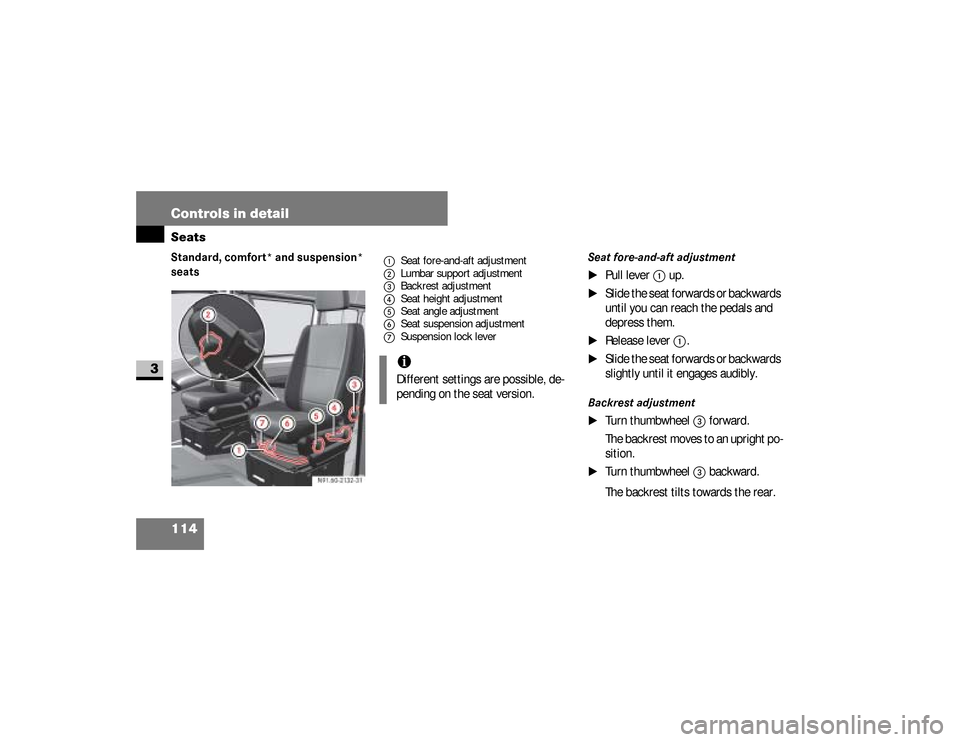
Standard, comfort* and suspension*
seats Seat fore-and-aft adjustment
\1
Pull lever
1
up.
\1
Slide the seat forwards or backwards
until you can reach the pedals and
depress them.
\1
Release lever
1
.
\1
Slide the seat forwards or backwards
slightly until it engages audibly.
Backrest adjustment
\1
Turn thumbwheel
3
forward.
The backrest moves to an upright po-
sition.
\1
Turn thumbwheel
3
backward.
The backrest tilts towards the rear.
1Seat fore-and-aft adjustment
2Lumbar support adjustment
3Backrest adjustment
4Seat height adjustment
5Seat angle adjustment
6Seat suspension adjustment
7Suspension lock lever
iDifferent settings are possible, de-
pending on the seat version.
nf_BA.book Page 114 Friday, January 25, 2008 3:53 PM
Page 120 of 666
118 Controls in detailSeats
3
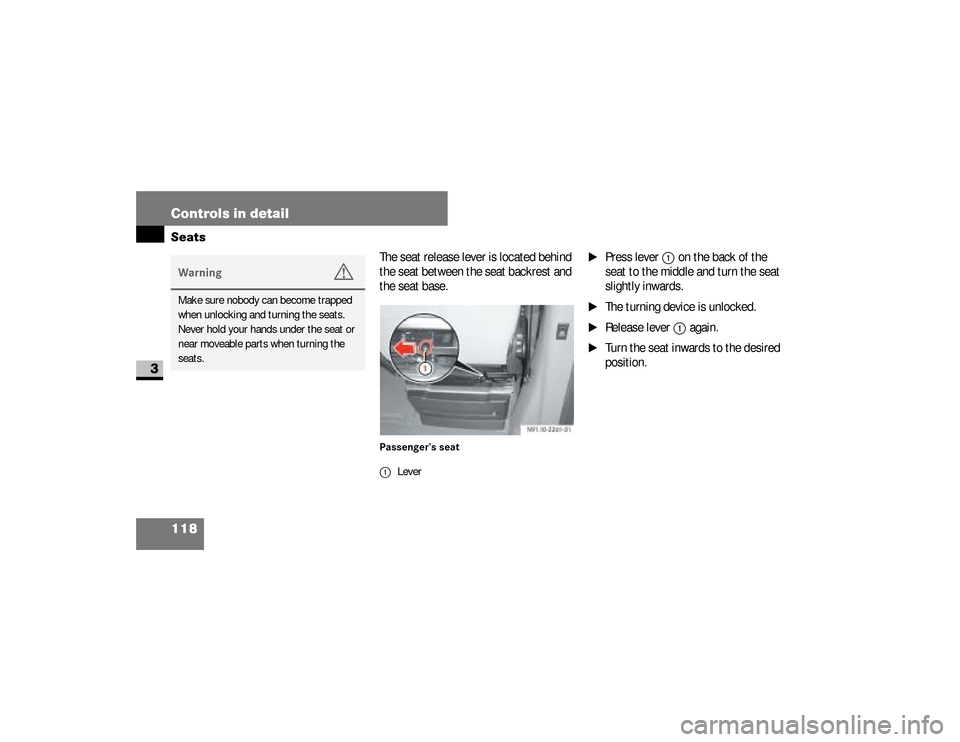
The seat release lever is located behind
the seat between the seat backrest and
the seat base.Passenger’s seat
\1
Press lever
1
on the back of the
seat to the middle and turn the seat
slightly inwards.
\1
The turning device is unlocked.
\1
Release lever
1
again.
\1
Turn the seat inwards to the desired
position.
Warning
G
Make sure nobody can become trapped
when unlocking and turning the seats.
Never hold your hands under the seat or
near moveable parts when turning the
seats.
1Lever
nf_BA.book Page 118 Friday, January 25, 2008 3:53 PM
Page 122 of 666
120 Controls in detailSeats
3
\1
Pull the seat cushion towards the
front slightly and out of rear
anchorage
2
.
\1
Fold the seat cushion up by the rear
edge.
Positioning the seat cushion
\1
Fold the seat cushion back.
\1
Slide the seat cushion under the
backrest and into rear
anchorage
2
.
\1
Fold the seat cushion down.
\1
Press the front of the seat cushion
down until it engages in front
anchorage
1
.
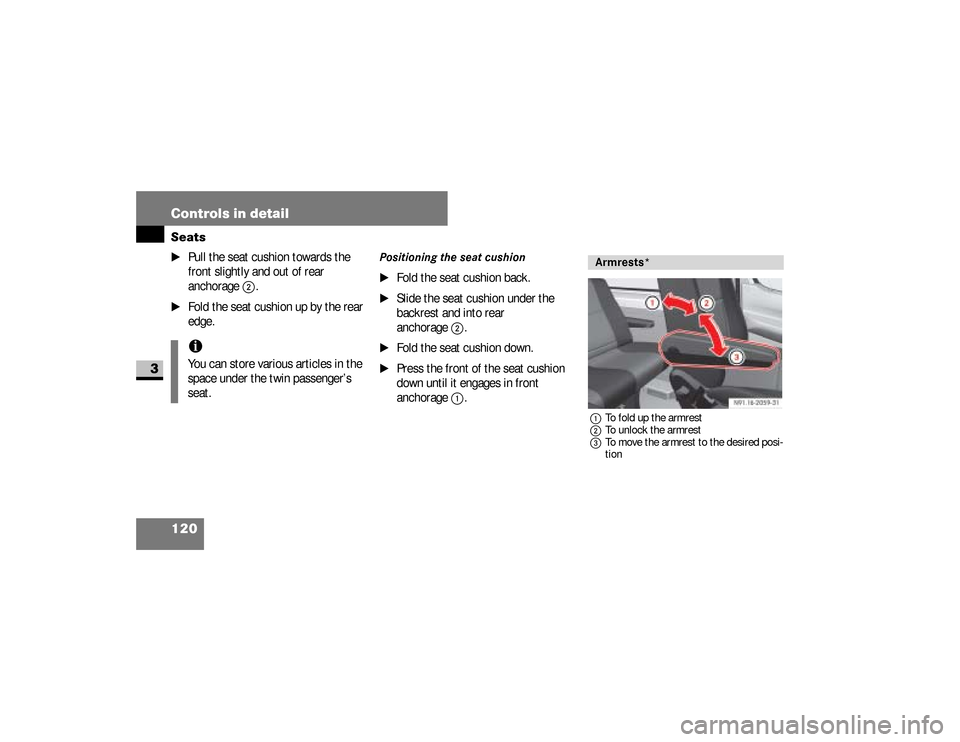
1To fold up the armrest
2To unlock the armrest
3To move the armrest to the desired posi-
tion
iYou can store various articles in the
space under the twin passenger’s
seat.
Armrests*
nf_BA.book Page 120 Friday, January 25, 2008 3:53 PM
Page 131 of 666
129 Controls in detail
Lighting
3
\3 LightingLegal requirements may impose variati-
ons in certain countries.
Your vehicle is equipped as standard
with a lamp failure monitor.
The lamp failure monitor monitors all
lamps of the exterior lighting with the ex-
ception of the identification lamps and
the trailer lighting. In the event of a lamp
failure, either the indicator lamp
.
lights up or a corresponding message
appears in the display.
iIf you are traveling in countries
where vehicles are driven on the op-
posite side of the road to that in
which the vehicle is registered, you
must have the headlamps:\4
partially masked (halogen head-
lamps)
\4
switched over (bi-xenon head-
lamps)
You will find further information in
the “Operation” section
(
\2
page 311).
Lamp failure monitor
nf_BA.book Page 129 Friday, January 25, 2008 3:53 PM
Page 132 of 666
130 Controls in detailLighting
3
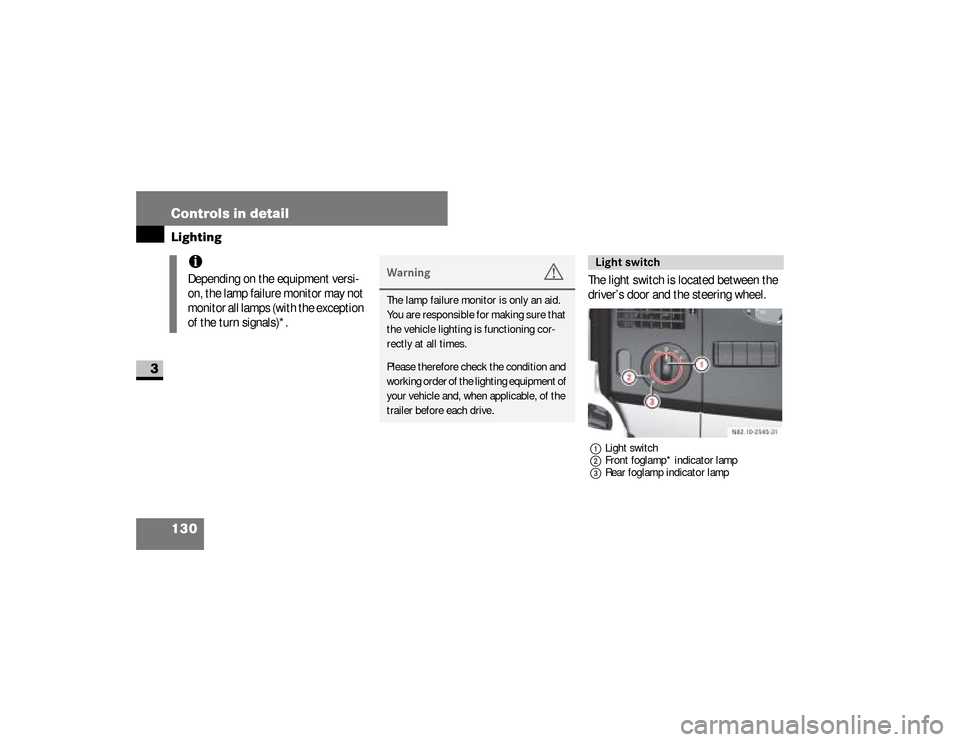
The light switch is located between the
driver’s door and the steering wheel.1Light switch
2Front foglamp* indicator lamp
3Rear foglamp indicator lamp
iDepending on the equipment versi-
on, the lamp failure monitor may not
monitor all lamps (with the exception
of the turn signals)*.
Warning
G
The lamp failure monitor is only an aid.
You are responsible for making sure that
the vehicle lighting is functioning cor-
rectly at all times.Please therefore check the condition and
working order of the lighting equipment of
your vehicle and, when applicable, of the
trailer before each drive.
Light switch
nf_BA.book Page 130 Friday, January 25, 2008 3:53 PM
Page 133 of 666
131 Controls in detail
Lighting
3
Switching on the low-beam head-
lamps
\1
Turn light switch to
B
.
The
B
indicator lamp in the in-
strument cluster lights up.
Switching on the high-beam head-
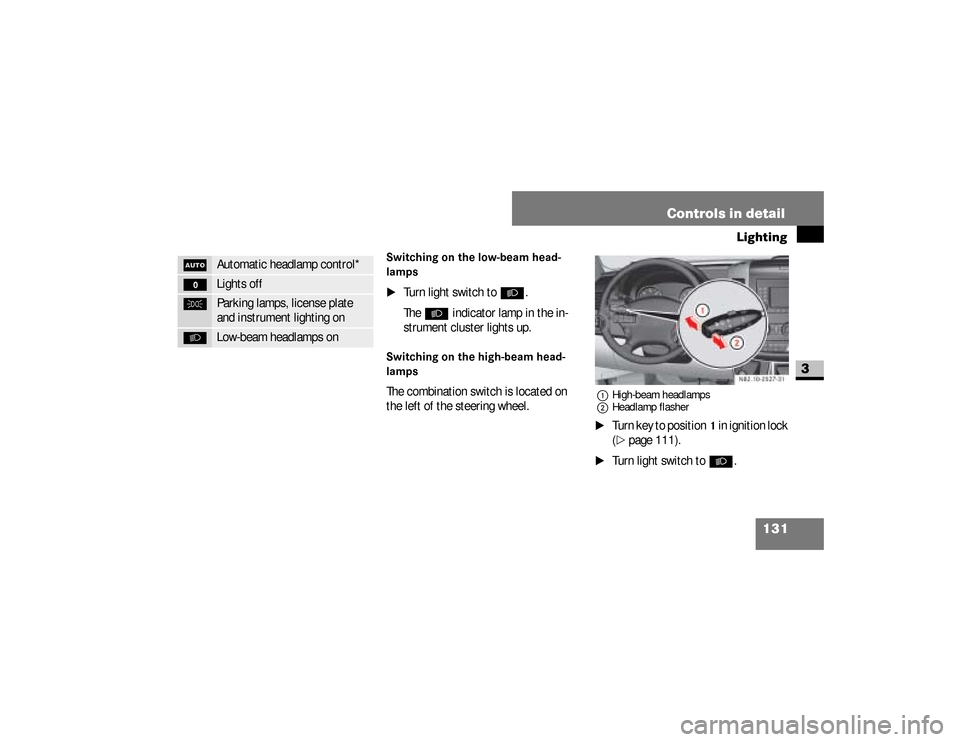
lampsThe combination switch is located on
the left of the steering wheel.
1High-beam headlamps
2Headlamp flasher\1
Turn key to position
1 in ignition lock
(
\2
page 111).
\1
Turn light switch to
B
.
U
Automatic headlamp control*
M
Lights off
C
Parking lamps, license plate
and instrument lighting on
B
Low-beam headlamps on
N82.10-2527-31
nf_BA.book Page 131 Friday, January 25, 2008 3:53 PM
Page 134 of 666
132 Controls in detailLighting
3
\1
Press combination switch forward 1
.
The indicator lamp
A
in the in-
strument cluster lights up.
Headlamp flasher
\1
Turn key to position
1 in ignition lock
(
\2
page 111).
\1
Pull combination switch briefly in
direction
2
.
Constant headlamp mode*On vehicles with steering wheel buttons,
you can set constant headlamp mode
(\2
page 171). This does not apply to
countries in which there is a legal re-
quirement to use constant headlamp
mode.
\1
Turn light switch to
M
.
The low-beam headlamps, parking
lamps and license plate lamp are
switched on when the engine is
running.
The
B
indicator lamp in the in-
strument cluster lights up.
Automatic headlamp control*The parking lamps, low-beam head-
lamps and license plate lamp are
switched on automatically when the
brightness of ambient light falls below a
predetermined level.
nf_BA.book Page 132 Friday, January 25, 2008 3:53 PM