lock DODGE VIPER 2008 ZB II / 2.G User Guide
[x] Cancel search | Manufacturer: DODGE, Model Year: 2008, Model line: VIPER, Model: DODGE VIPER 2008 ZB II / 2.GPages: 303, PDF Size: 2.65 MB
Page 24 of 303
DOOR LOCKS
WARNING!
Do not touch the exhaust pipe sill covers when
entering or exiting your Viper. They can be hot
enough to burn you. Observe the warning labels on
each door closure panel.
WARNING!
²For personal security and safety in the event of an
accident, lock the vehicle doors as you drive as
well as when you park and leave the vehicle.
²When leaving the vehicle always remove the key
from the ignition lock, and lock your vehicle.
Unsupervised use of vehicle equipment may cause
severe personal injuries and death.
²Never leave children alone in a vehicle. Leaving
children in a vehicle unattended is dangerous for a
number of reasons. A child or others could be
injured seriously or fatally. Don't leave the keys in
the ignition. A child could operate power win-
dows, other controls, or move the vehicle.
THINGS TO KNOW BEFORE STARTING YOUR VEHICLE 23
2
Page 25 of 303
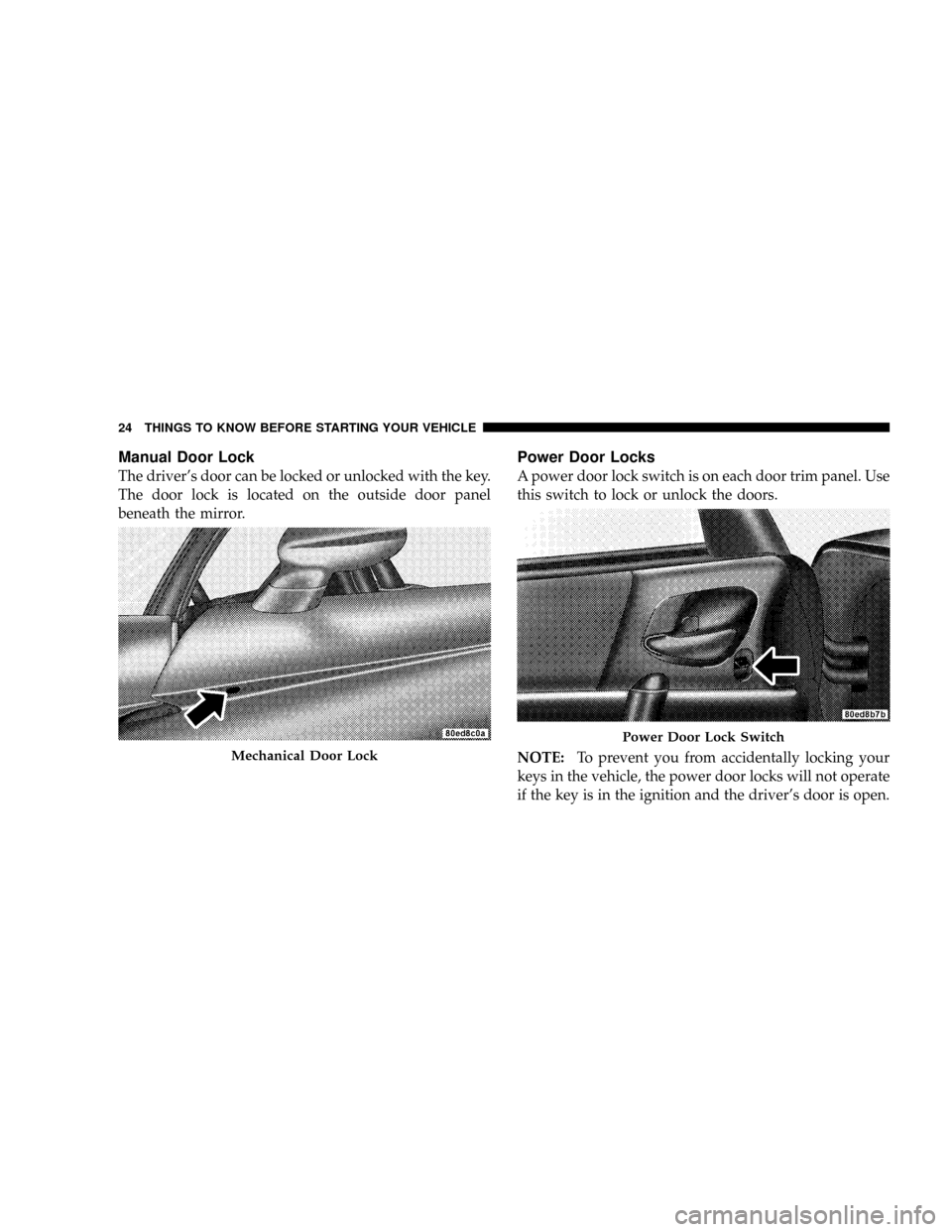
Manual Door Lock
The driver's door can be locked or unlocked with the key.
The door lock is located on the outside door panel
beneath the mirror.
Power Door Locks
A power door lock switch is on each door trim panel. Use
this switch to lock or unlock the doors.
NOTE:To prevent you from accidentally locking your
keys in the vehicle, the power door locks will not operate
if the key is in the ignition and the driver's door is open.
Mechanical Door Lock
Power Door Lock Switch
24 THINGS TO KNOW BEFORE STARTING YOUR VEHICLE
Page 26 of 303
Electronic Door Lock
This vehicle is equipped with a virtual lock system. Input
from the outside door handle is ignored if the vehicle is
virtually locked.
Door Lock Messaging
The words ªDOOR UNLOCKEDº will flash in the odom-
eter if one door is unlocked or will remain on steadily if
both doors are unlocked. A door is considered unlocked
if the inside door handle is pulled. With the key in the
ignition switch, this display will turn off approximately
40 seconds after switching off the ignition, or if the Power
Accessory Delay feature is active, it will turn off approxi-
mately 40 seconds after the delay feature times out.
Automatic Door Locks
This feature locks the doors automatically once vehicle
speed reaches 18 mph (29 km/h).
NOTE:Input from the door handles is ignored once the
vehicle is moving faster than 5 mph.
Automatic Door Locks Programming
The Automatic Door Locks feature can be enabled or
disabled as follows:
1. Close all doors and place the key in the ignition.
2. Cycle the ignition switch between ON/RUN and
OFF/LOCK 4 times ending up in the OFF/LOCK posi-
tion.
3. Depress the power door lock switch to lock the doors.
4. A single chime will indicate the completion of the
programming.
5. Repeat these steps if you want to return this feature to
its previous setting.
This feature can also be disabled at the dealership if
desired.
NOTE:Use the Automatic Door Locks feature in accor-
dance with local laws.
THINGS TO KNOW BEFORE STARTING YOUR VEHICLE 25
2
Page 29 of 303
LIFTGATE Ð COUPE MODELS ONLY
The liftgate can be unlocked or locked by the Remote
Keyless Entry (RKE) transmitter or by activating either of
the power door lock switches located on the door trim
panels.
To unlock the liftgate with the RKE transmitter, press the
LIFTGATE button on the transmitter for at least one
second. The park lights and turn signal lights will flash
three times to acknowledge the signal.
NOTE:Pressing the UNLOCK button on the transmitter
will also allow liftgate access.
Once unlocked, the liftgate can be opened or closed. To
open the liftgate, depress the liftgate release switch
located in the exterior liftgate handle and pull the liftgate
open with one fluid motion.
NOTE:The liftgate release switch will be ignored under
the following conditions:
²When the ignition is in RUN and the parking brake is
not set.
²When vehicle speed is not a 0 mph (0 km/h).
²When all doors are locked (except for RKE liftgate
access). Refer to ªEntering the liftgate with the System
Armed Ð Coupeº under ªSecurity Alarm Systemº in
this section for additional information.
The word ªDECKº will flash in the odometer when the
liftgate is open. With the key in the ignition switch, this
display will turn off approximately 40 seconds after
switching off the ignition, or if the Power Accessory
Delay feature is active, it will turn off approximately 40
seconds after the delay feature times out.
28 THINGS TO KNOW BEFORE STARTING YOUR VEHICLE
Page 30 of 303
WARNING!
²Driving with the liftgate open can allow poison-
ous exhaust gases into your vehicle. You and your
passengers could be injured by these fumes. Keep
the liftgate closed when you are operating the
vehicle.
²If you are required to drive with the liftgate open,
make sure that all windows are closed, and the
climate control blower switch is set at high speed.
DO NOT use the recirculation mode.
Gas props support the liftgate in the open position.
However, because the gas pressure drops with tempera-
ture, it may be necessary to assist the props when
opening the liftgate in cold weather.
TRUNK LOCK AND RELEASE Ð CONVERTIBLE
MODELS ONLY
You can unlatch the trunk lid by pressing the TRUNK
button on the Remote Keyless Entry (RKE) transmitter
for at least one second. The park lights and turn signal
lights will flash three times to acknowledge the signal
and the trunk lid will pop open.
You can also unlatch the trunk lid with the key. The key
cylinder is located on the trunk lid.
The word ªDECKº will flash in the odometer when the
trunk lid is open. With the key in the ignition switch, this
display will turn off approximately 40 seconds after
switching off the ignition, or if the Power Accessory
Delay feature is active, it will turn off approximately 40
seconds after the delay feature times out.
THINGS TO KNOW BEFORE STARTING YOUR VEHICLE 29
2
Page 32 of 303
OCCUPANT RESTRAINTS
Some of the most important safety features in your
vehicle are the restraint systems. These include the seat
belts and the airbags for the driver and passenger.
Please pay close attention to the information in this
section. It explains how to use your restraint system
properly to keep you and your passenger as safe as
possible. Note that all of the warnings in this section
apply no matter which system you have.
WARNING!
In a collision, you and your passenger can suffer
much greater injuries if you are not buckled up
properly. You can strike the interior of your vehicle or
your passenger, or you can be thrown out of the
vehicle. Always be sure you and your passenger are
buckled up properly.Buckle up even though you are an excellent driver, even
on short trips. Someone on the road may be a poor driver
and cause a collision that includes you. This can happen
far away from home or on your street.
Research has shown that seat belts save lives. They also
can reduce the seriousness of injuries in a collision. Some
of the worst injuries happen when people are thrown
from the vehicle. Seat belts reduce the possibility of
ejection and the risk of injury caused by striking the
inside of the vehicle.Everyonein a motor vehicle should
be belted at all times.Lap/Shoulder Belts
Each seat belt is a combined lap/shoulder belt system.
The belt webbing retractor will lock only during very
sudden stops or impacts. This feature allows the shoulder
portion of the belt to move freely with you under normal
conditions. However, in a collision, the belt will lock and
reduce your risk of striking the inside of the vehicle or
being thrown out.
THINGS TO KNOW BEFORE STARTING YOUR VEHICLE 31
2
Page 37 of 303
Enhanced Seat Belt Reminder System (BeltAlertT)
If the driver does not buckle their seat belt and vehicle
speed exceeds 5 mph (8 km/h), or if the passenger does
not buckle their seat belt within 10 seconds of vehicle
speed exceeding 5 mph (8 km/h), the Enhanced Warning
System (Belt Alert) will alert the occupant(s) to buckle
their seat belt(s). Once triggered, the Enhanced Warning
System (Belt Alert) will flash the Seat Belt Reminder light
and chime for up to 96 seconds to alert the occupant(s) to
buckle their seat belt(s). If the driver unbuckles their seat
belt while vehicle speed is greater than 5 mph (8 km/h),
or if the passenger unbuckles their seat belt for more than
10 seconds while vehicle speed is greater than 5 mph (8
km/h), the Enhanced Warning System (Belt Alert) will
reactivate.
BeltAlerttProgramming
The Enhanced Warning System (BeltAlertt) can be en-
abled or disabled by your authorized dealer or by
performing the following steps:NOTE:DaimlerChrysler does not recommend deacti-
vating the Enhanced Warning System (BeltAlertt).
1. Close all doors.
2. Turn the ignition switch to the OFF/LOCK position.
3. Buckle the driver's seat belt.
4. Turn the ignition switch to the ON/RUN position, but
do not start the engine. Wait for the Seat Belt Reminder
light to turn off and then proceed to the next step.
NOTE:You must perform the following steps within 60
seconds of turning the ignition switch to the ON/RUN
position.
5. Within 60 seconds of turning the ignition switch to the
ON/RUN position, unbuckle and then re-buckle the
driver's seat belt at least three times within 10 seconds,
ending with the seat belt buckled.
36 THINGS TO KNOW BEFORE STARTING YOUR VEHICLE
Page 38 of 303
NOTE:Watch for the Seat Belt Reminder light to turn on
while unbuckling the seat belt and turn off while re-
buckling the seat belt. It may be necessary to retract the
seat belt.
6. Turn the ignition switch to the OFF/LOCK position. A
single chime will sound to signify that you have com-
pleted the programming successfully.
The Enhanced Warning System (BeltAlertt) can be reac-
tivated by repeating this procedure.
NOTE:When the Enhanced Warning System
(BeltAlertt) is deactivated, the Seat Belt Reminder light
will continue to illuminate as long as the driver's seat belt
or the passenger's seat belt is unbuckled.Automatic Locking Mode
The seat belts for both occupants are equipped with
emergency locking retractors for normal use. Emergency
locking retractors activate during very sudden stops or
impacts. The passenger seat belt in your vehicle can also
be converted to an automatic locking retractor to secure
child restraint systems. Seat belts equipped with auto-
matic locking retractors have a distinctive label on the
webbing.
How To Engage The Automatic Locking Mode
To convert the passenger seat belt from emergency lock-
ing mode to automatic locking mode, grasp the shoulder
portion of the belt and pull all of the webbing out of the
retractor. Then, allow some of the webbing to retract back
into the retractor. As the belt retracts, you will hear a
clicking sound indicating that the belt is now in auto-
matic locking mode.
THINGS TO KNOW BEFORE STARTING YOUR VEHICLE 37
2
Page 39 of 303
NOTE:Once the belt is in automatic locking mode, you
will not be able to pull any more of the webbing out of
the retractor. In this mode, you will only be able to retract
excess webbing into the retractor to secure the child
restraint.
How To Disengage The Automatic Locking Mode
Simply allow all of the webbing to retract back into the
retractor to disengage the automatic locking mode. This
will return the retractor to the emergency locking mode
for normal use.
Six-Point Belt System - If equipped
This six-point belt system meets SCCA standards and it
should only be used when engaging in performance
related driving events. In turn, the standard lap/
shoulder belt should be used whenever the vehicle is
operated on the street.
Six-Point Belt Operating Instructions
1. Place the anti-submarining belt on the seat so that it
points upward.
2. Buckle the left and right lap belts and strap both legs.
3. Buckle the left and right shoulder belts.
4. Adjust the belts by pulling on the web ends and/or
repositioning the web clips and straps as required.
5. To release the belts, turn the belt latch mechanism
1¤4
turn in either the clockwise or the counter-clockwise
direction.
NOTE:The anti-submarining belt and the shoulder belt
are attached to eye bolts at designated locations and they
should be removed from the vehicle when not in use. The
lap belts and straps can be stored behind or to the side of
the seat after removal.
38 THINGS TO KNOW BEFORE STARTING YOUR VEHICLE
Page 44 of 303
²Steering Wheel and Column
²Instrument Panel
²Seat Track Position Sensors
²Interconnecting Wiring
²Seat Belt Reminder Light
²Knee Impact Bolsters
²Front Acceleration Sensors
²Passenger Seat Occupant Classification System (OCS)
þOccupant Classification Module (OCM)
þPassenger Airbag Disabled (PAD) Indicator Light
þFlex Mat
þInterconnecting Wiring
þSeat Track Position Sensors
How The Airbag System Works
²
TheOccupant Restraint Controller (ORC)determines
if a frontal collision is severe enough to require the
airbags to inflate. The airbag inflators are designed to
provide different rates of inflation. Based on the level
of collision severity, the ORC determines the proper
rate of inflation. The ORC may modify the rate of
passenger airbag inflation or prevent passenger airbag
deployment based on input from the Occupant Clas-
sification System (OCS). The ORC will not detect roll
over or rear impacts. Furthermore, the airbags are not
on and will not inflate if the key is in the OFF/LOCK
position, in the ACC position, or not in the ignition.
The ORC also monitors the readiness of the electronic
parts of the system whenever the ignition switch is in
the ON/RUN position. These include all of the items
listed under ªAirbag System Componentsº except the
steering wheel and column and the knee bolsters.
THINGS TO KNOW BEFORE STARTING YOUR VEHICLE 43
2